
Har du nogensinde scannet en QR-kode på en forsendelseskasse og undret dig over, hvad den egentlig gør? Afhængigt af hvem der placerede den der og hvorfor, varierer svaret betydeligt. Denne guide forklarer alle større anvendelsestilfælde – fra transportør-routing til lagerstyring til kundeorienterede returneringer – så du ved præcis, hvad du ser på, og hvordan du implementerer din egen.
Hvorfor forsendelseskasser bærer QR-koder
En forsendelseskasse kan passere gennem snesevis af hænder, før den når sin destination. På hvert trin – distributionscenter, transportørknudepunkt, leveringskøretøj, kundens dørtrin – skal nogen eller noget læse information om den pakke hurtigt og præcist.
QR-koder løser dette ved at pakke flere datapunkter ind i et enkelt scannbart billede. I modsætning til en standard 1D-stregkode, som typisk indeholder 20-85 tegn, kan en QR-kode kode over 7.000 tegn. Det betyder, at en enkelt kode på en kasse kan indeholde et ordrenummer, leveringsadresse, produktidentifikatorer, batchnumre og en URL – alt sammen læsbart i én scanning. For et dybere kig på, hvordan 1D- og 2D-etiketformater sammenlignes, se denne oversigt over stregkoder til forsendelsesetiketter.
Årsagen til, at en QR-kode vises på din forsendelseskasse, afhænger af, hvilket lag af forsyningskæden der placerede den der.
Transportør- og forsendelsesetiket QR-koder
De mest almindelige QR-koder på forsendelseskasser kommer fra transportøren og vises direkte på forsendelsesetiketten eller som et ledsagende element ved siden af den.
Sporing og routing
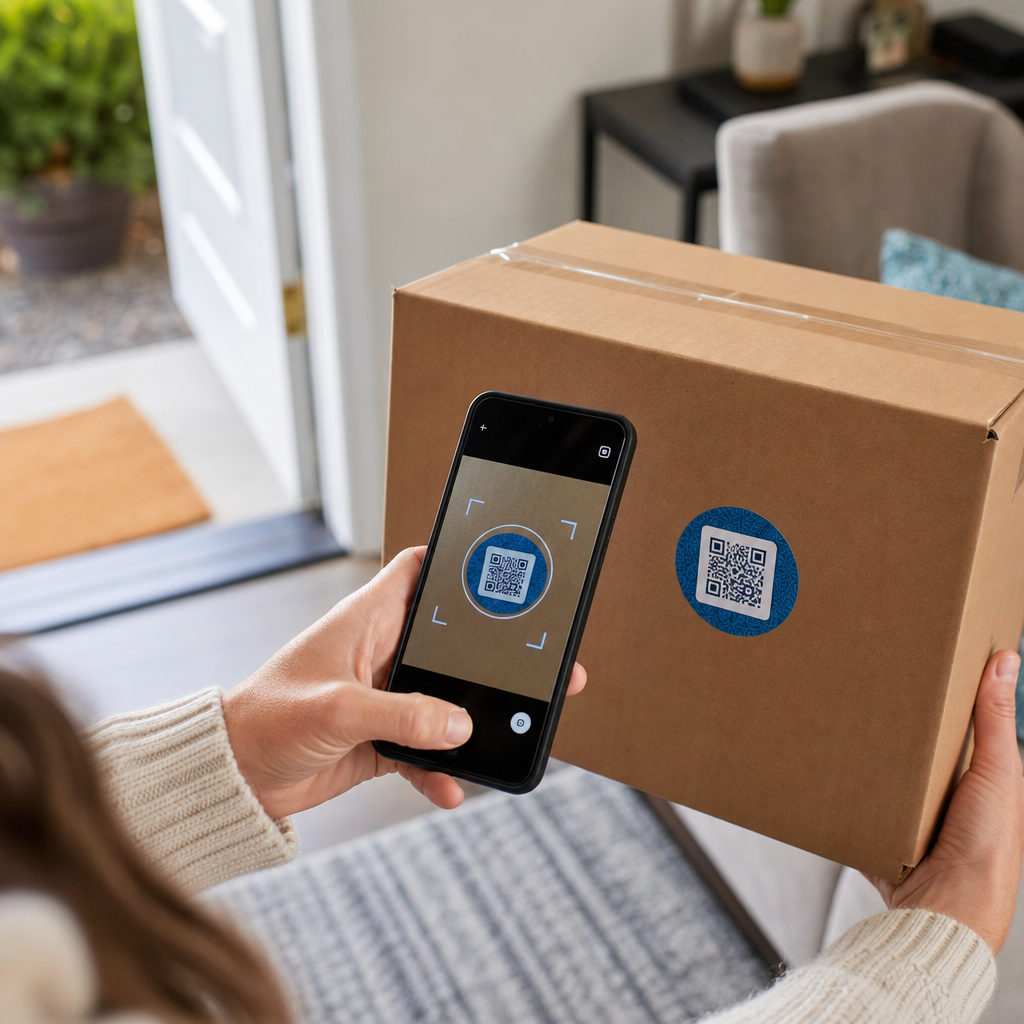
Transportører bruger QR-koder til at rute pakker gennem deres netværk. Når en scanner på et sorteringsanlæg læser koden, opdateres pakkens placering i realtid. Dette er den samme scanningsbegivenhed, der udløser den sporingsmeddelelse, du ser, når du tjekker en forsendelsesstatus online. For kunder trækker scanning af QR-koden på en indgående pakke øjeblikkeligt live sporingsdata frem – ingen grund til at jage efter et sporingsnummer eller navigere manuelt til en transportørhjemmeside.
Printerløs etiketlevering
En stadig mere almindelig anvendelse er Etiketmægler model. I stedet for at kræve, at kunder printer en retur- eller udgående etiket derhjemme, sender forhandleren en QR-kode via e-mail eller sms. Kunden bringer pakken til et deltagende transportørsted – et USPS-postkontor, UPS Store eller FedEx-sted – og ekspedienten scanner QR-koden for at printe etiketten ved skranken.
USPS Label Broker lader for eksempel forhandlere gemme etiketter i et digitalt arkiv og distribuere dem til kunder som unikke QR-kodede ID'er. Forhandlere kan også opdatere, slette eller tjekke sporingsstatus for disse etiketter til enhver tid. Transportører, herunder USPS og FedEx, understøtter QR-koder for indenlandske returforsendelser, og UPS udvider denne funktionalitet på tværs af sit detailbutiksnetværk.
Denne arbejdsgang er praktisk for e-handelsvirksomheder, fordi den fjerner friktionen ved at kræve en printer – en betydelig barriere for mange kunder, der igangsætter en returnering.
Tilføj QR-koder til din forsendelsesworkflow Skal du generere scannbare QR-koder, der er knyttet til sporingssider, returportaler eller ordreoplysninger? Brug Pageloot QR-kodegenerator til at oprette og administrere koder til dine forsendelseskasser på få minutter.
Returneringer og omvendt logistik
Returneringer er en stor operationel udfordring. Amerikanske detailhandlere forventede, at 15.8% af alt salg ville blive returneret i 2025, hvilket udgør cirka $849.9 milliarder, og e-handelsreturraten ligger på cirka 19.3% – hvilket betyder, at næsten hver femte onlineordre kommer tilbage. Behandling af en enkelt returnering koster i gennemsnit mellem $20 og $30, hvor nogle kategorier løber op til $65.
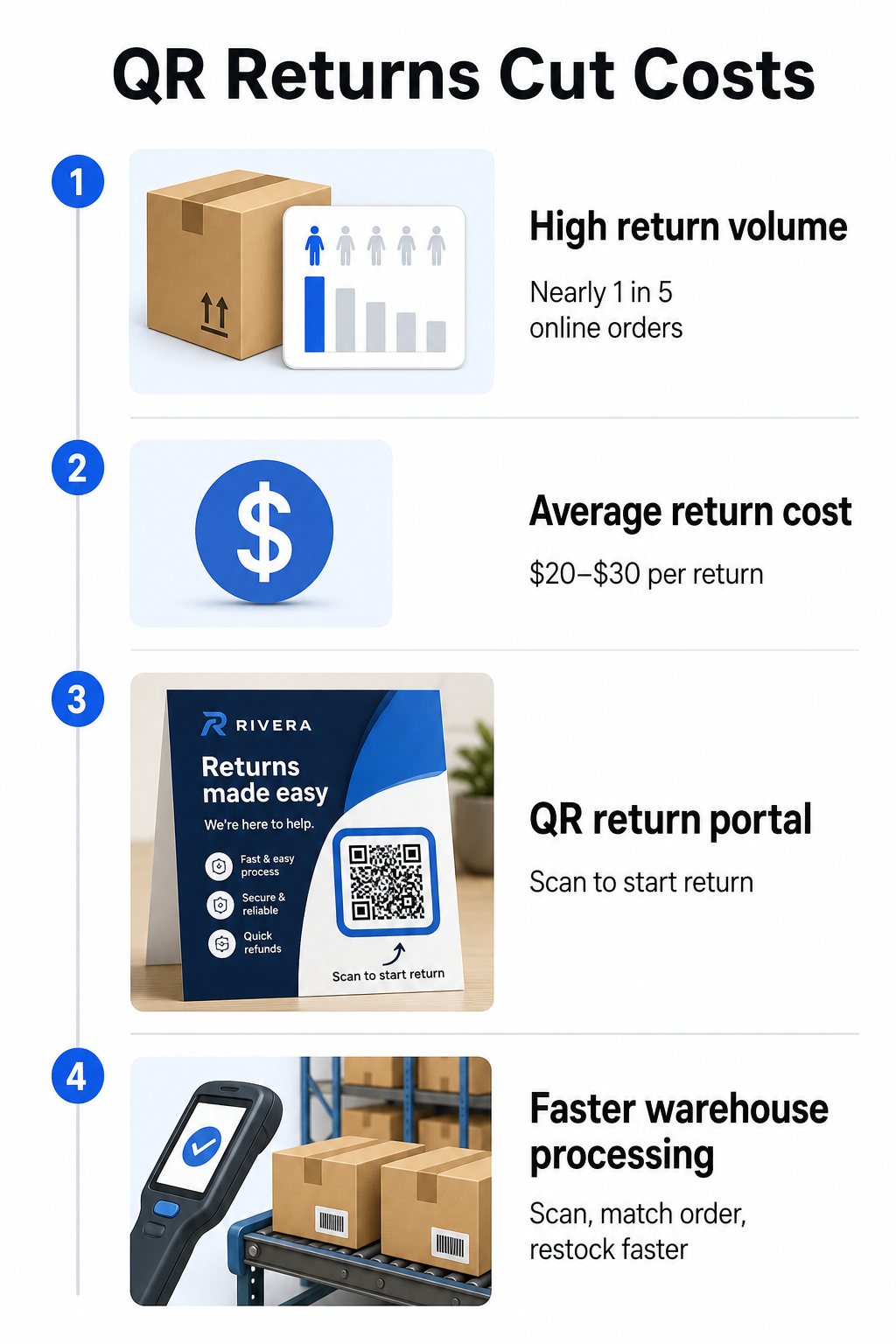
QR-koder reducerer den omkostning ved at gøre returprocessen hurtigere og mindre fejlbehæftet. I stedet for at kræve, at kunder udfylder papirformularer eller slår returadresser op, kan en QR-kode printet på kassen eller inkluderet på en pakkeseddel linke direkte til en returportal, hvor de igangsætter processen digitalt.
Fordele ved QR-kodebaserede returneringer inkluderer:
- Færre supportkontakter – kunder selvbetjener i stedet for at e-maile eller ringe
- Reduceret retursvindel – QR-koder knyttet til specifikke ordrer forhindrer manipulation med etiketdetaljer
- Hurtigere behandling – lagerpersonale scanner retur-QR-koden for øjeblikkeligt at hente den originale ordre i stedet for at indtaste data manuelt
- Printerløse muligheder – understøttet af USPS og FedEx indenlandsk, hvor forhandlere kan tilbyde kunder en QR-kode, en printbar etiket eller begge dele
For et praktisk kig på at forbinde retur-QR-koder til automatiserede arbejdsgange, guiden om QR-koder til e-handelsleverancer gennemgår den fulde opsætning.
Lager- og intern logistikbrug
QR-koder på forsendelseskasser er ikke kun for fragtfirmaer og kunder. Inde i distributionscentre og lagre er de et primært værktøj til sporing af lagerbevægelser uden manuel dataindtastning.
Modtagelse og placering
Når en kasse ankommer til et lager, trækker scanning af dens QR-kode øjeblikkeligt forsendelsesregistreringen – leverandøroplysninger, antal varer, SKU-identifikatorer og forventet lagerplacering. Personalet behøver ikke at indtaste noget eller krydsreferere papirarbejde. Scanningen opdaterer lagerstyringssystemet (WMS) i realtid, hvilket reducerer de uoverensstemmelser, som manuel indtastning typisk medfører.
Plukning, pakning og forsendelsesverifikation
Under ordreopfyldelse guider QR-koder på kasser og beholdere personalet til de rigtige varer og mængder. På pakningsstadiet fungerer scanning af kassens kode som et sidste kontrolpunkt – der bekræfter, at de korrekte varer er inkluderet, før kassen forsegles. I opfyldelsesarbejdsgange som Amazon FBA lader aktivering af 2D-stregkoder på systemniveau WMS'et generere en kode, der repræsenterer kassens indhold under pakning, så den samme kode håndterer forsendelsessporing uden at nogen behøver at åbne kassen senere.
Placering og lagerbeholdningssporing
QR-koder kan tildeles ikke kun produkter, men også lagerplaceringer – hylder, zoner, rum eller beholdere. Scanning af en placeringskode sammen med en produktkode logger præcis, hvor lagerbeholdningen befinder sig på et givet tidspunkt, hvilket giver dit team live synlighed på tværs af hele lageret. Guiden om oprettelse af QR-koder til produktlager dækker, hvordan man opsætter dette i praksis.
Spor hver scanning, overalt Ønsker du realtidsdata om, hvornår og hvor dine forsendelseskasses QR-koder scannes? Pageloots QR-kode statistik dashboard registrerer scanningstid, placering og enhedsdetaljer automatisk.
Kundeorienterede QR-koder på forsendelseskasser
Ud over logistik bruger nogle virksomheder selve forsendelseskassen som et marketing-berøringspunkt. En QR-kode på ydersiden eller indersiden af en kasse kan linke til:
- En sporingsside for den aktuelle forsendelse
- En landingsside efter køb med produktvejledninger eller opsætningsvideoer
- En tilmelding til et loyalitetsprogram eller et rabattilbud
- En anmodning om anmeldelse eller feedbackformular
- Digital produktdokumentation eller manualer
Dette forvandler udpakningsøjeblikket til en brandinteraktion. For e-handelsvirksomheder er det et af de få fysiske berøringspunkter, du fuldt ud kontrollerer efter kassen. Den Pageloot e-handels QR-kode side skitserer foreslåede placeringer – forsendelseskassens yderside, pakkeindlæg og produktmanualer – hver designet til at udløse en forskellig type engagement.
En praktisk bemærkning om placering: baseret på feedback fra USPS-medarbejdere tillader USPS sandsynligvis ikke brugerdefinerede QR-koder på selve forsendelsesetiketten. Dog er det tilladt at placere en QR-kode-sticker direkte på kassen – ikke på etiketten – og bør ikke forårsage problemer med posthåndtering eller levering.
Dynamiske QR-koder: Den praktiske fordel for forsendelse
Hvis du tilføjer QR-koder til dine forsendelseskasser, dynamiske QR-koder er det rigtige valg frem for statiske. En statisk QR-kode koder en fast datastreng permanent. En dynamisk QR-kode peger på en omdirigerings-URL, som du kan opdatere når som helst uden at ændre den trykte kode.
For forsendelsesapplikationer betyder dette noget på flere måder:
- En sporings-URL kan ændre format eller flytte til et nyt domæne uden at kræve en ny trykning
- Sæsonbestemte kampagner linket fra kassen kan udskiftes uden ny emballage
- Hvis en returportal ændrer sin adresse, fortsætter QR-koden på allerede trykte kasser med at fungere
Dynamiske koder muliggør også scanningssporing. Du kan se, hvor mange kunder der scannede koden på deres kasse, fra hvilken by, og på hvilken type enhed. Disse data, tilgængelige via Pageloots analyse, fortæller dig, om kunder engagerer sig i efterkøbsoplevelsen, og hvilke produkter eller regioner der genererer mest aktivitet. For et bredere kig på, hvad sporing af QR-koder kan afsløre om kundeadfærd, vejledning til sporing af QR-koder dækker de vigtigste målinger, der er værd at overvåge.
GS1 Digital Link: Industristandarden der opstår inden for logistik
Hvis du arbejder inden for detail- eller engrosopfyldelse, kan du støde på GS1 Digital Link – en standardiseret metode til at indlejre produktidentifikatorer som GTIN'er (Global Trade Item Numbers), batchnumre og udløbsdatoer i en enkelt 2D-stregkode eller QR-kode.
GS1 Digital Link giver én kode mulighed for at tjene flere funktioner samtidigt. Den kan scannes ved salgsstedet til kassen, på et lager til lagerstyring, eller af en forbruger for produktinformation – alt fra den samme trykte kode. Leverandører kan også opdatere indholdet leveret ved scanning (salgsfremmende beskeder, tilbagekaldelsesinstruktioner, allergenopdateringer) uden at genoptrykke emballage, fordi koden peger på en webbaseret resolver i stedet for at kode alle data direkte.
For virksomheder der forbereder sig på GS1 Sunrise 2027-overholdelseskrav, er forståelsen af denne standard i stigende grad relevant. Vejledningen om QR-koder i forsyningskædesporing dækker hvordan 2D-stregkoder som disse passer ind i bredere sporbarheds-arbejdsgange.
Sådan tilføjer du QR-koder til dine forsendelseskasser
Hvis du ønsker at implementere QR-koder på dine egne forsendelseskasser, vil de følgende trin bringe dig fra koncept til implementering pålideligt.
Definer destinationen først. Beslut hvad QR-koden skal linke til – en sporingsside, returportal, produktside eller et efterkøbstilbud. Brug en kort URL i stedet for en lang sporingsstreng; kortere kodede data producerer et mindre tæt kodemønster der scanner hurtigere og mere pålideligt, især ved mindre printstørrelser.
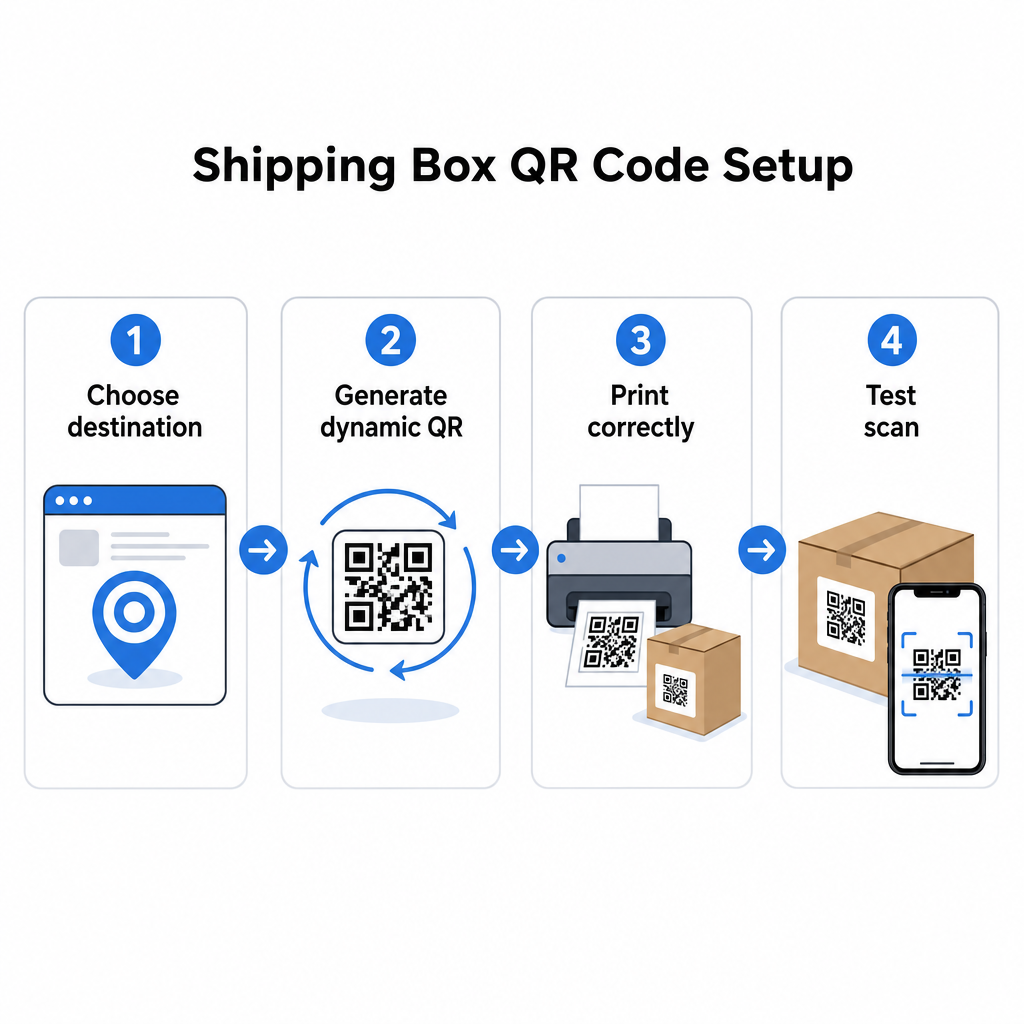
Generer en dynamisk QR-kode. Brug en link QR-kodegenerator for at oprette en dynamisk kode knyttet til din destinations-URL. Dette giver dig mulighed for at opdatere destinationen senere uden at røre ved den trykte emballage.
Følg printspecifikationerne. Print koden med et minimum af 2 × 2 cm (0,8 × 0,8 tommer), med 3 × 3 cm foretrukket for pålidelighed i den virkelige verden. Brug mørke moduler på en hvid eller lys baggrund – sort på hvid er ideel. Eksporter som en vektorfil (SVG eller PDF) eller med 300–600 DPI for at sikre skarphed i den endelige størrelse. Oprethold en stillezone på mindst fire tomme moduler på alle fire sider af koden, uden tekst, logoer eller kanter der trænger ind i den margen.
Placer den korrekt. Placer koden på et fladt, udfoldet panel væk fra sømme, hjørner, tapebaner og områder der er udsat for slid under forsendelse. Undgå blanke overflader omkring kodeområdet, da genskin forstyrrer kameraets genkendelse. Front- eller toppanelet fungerer bedst for kundevendte koder. For detaljeret placeringsvejledning specifikt for kasser og etiketter, dækker QR-koder på produktemballage siden de vigtigste overvejelser.
Test før print i stor skala. Scan koden på faktiske kasseprøver ved hjælp af flere smartphones, under varierende lysforhold, og fra de afstande dine kunder eller lagerpersonale realistisk vil scanne fra. At fange et kontrast- eller størrelsesproblem før en fuld produktionskørsel er langt mindre omkostningsfuldt end at opdage det efterfølgende.
Klar til at bygge dit forsendelses-QR-kodesystem? Uanset om du har brug for koder til sporingssider, returportaler eller efterkøbsengagement, giver Pageloot QR-kodegenerator dig dynamiske, sporbare koder med et komplet analyse-dashboard. Start gratis – intet kreditkort påkrævet.
Ofte stillede spørgsmål
USPS tillader sandsynligvis ikke brugerdefinerede QR-koder på selve forsendelsesetiketten. Dog er det tilladt at placere et QR-kodeklistermærke direkte på kassen – ikke på etiketten – og bør ikke forårsage problemer med posthåndtering eller levering.
Transportør-QR-koder genereres af fragttransportøren (USPS, UPS, FedEx) og er knyttet til deres sporings- og rutesystemer. Brugerdefinerede QR-koder tilføjes af forhandleren og kan linke til hvad som helst – sporingssider, returportaler, produktindhold eller kampagner. Begge kan vises på den samme kasse, men de tjener forskellige målgrupper og formål.
Ikke hvis du bruger en dynamisk QR-kode. Dynamiske koder peger på en omdirigering, som du kan opdatere når som helst i din QR-kodeplatform, så den printede kode fortsætter med at virke, selv efter destinations-URL'en ændres. Dette er en af de primære årsager til, at virksomheder vælger dynamiske koder til emballageapplikationer.