
Hledají vaši hosté heslo k Wi-Fi nebo mávají na obsluhu jen proto, aby si prohlédli menu? Tyto malé třecí body se rychle sčítají, frustrují zákazníky a zpomalují váš personál. Tento průvodce vám přesně ukáže, jak navrhnout, vygenerovat a nasadit QR kódy na podtácky tak, aby jediný sken vyřešil problém – a poskytl vám data pro neustálé zlepšování.
Proč jsou podtácky praktickým povrchem pro QR kódy
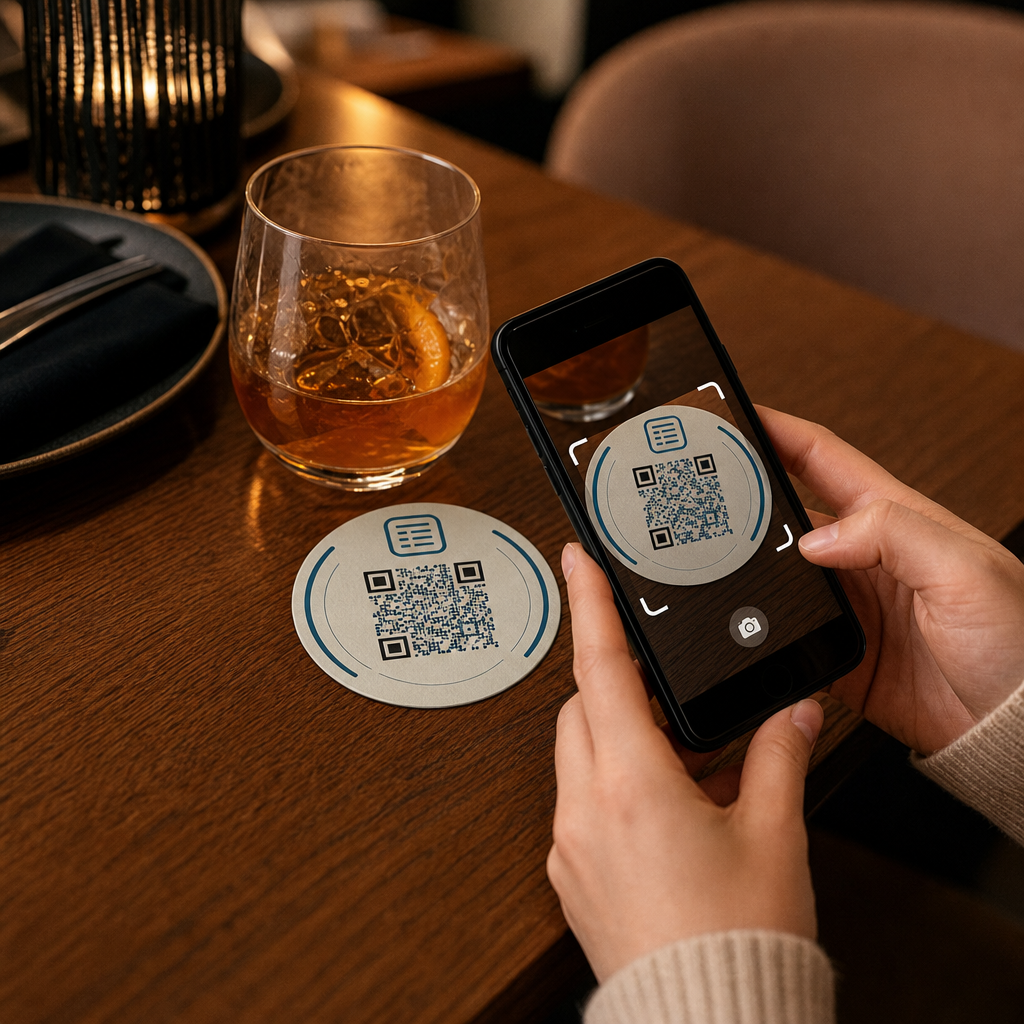
Každý nápoj, který přistane na stole, je dodáván s podtáckem. Díky tomu jsou podtácky jedním z nejčastěji prohlížených povrchů v jakémkoli pohostinském prostředí. Na rozdíl od stolních stojánků, které hosté často odsunou stranou, nebo nástěnných plakátů, které vyžadují, aby se někdo postavil a přešel k nim, podtácek sedí přímo před vaším zákazníkem po celou dobu návštěvy.
Tato trvalá přítomnost činí podtácky užitečnými pro tři konkrétní úkoly:
- Přístup k menu – umožnit hostům procházet jídla a nápoje v okamžiku, kdy si sednou
- Sdílení Wi-Fi – eliminovat potřebu personálu opakovat heslo desítkykrát za směnu
- Sledování zapojení zákazníků – měřit, kolik lidí interaguje s vaším digitálním obsahem, kdy a z jakých oblastí vašeho podniku
Pro širší pohled na to, jak se QR kódy hodí napříč pohostinskými prostředími, je vzor konzistentní: čím blíže je kód hostovi v okamžiku, kdy ho potřebuje, tím vyšší je míra skenování. Podtácky jsou tak blízko, jak jen to jde.
Výběr správného typu QR kódu pro podtácky
Než cokoli vytisknete, musíte se rozhodnout, zda použít statický nebo dynamický QR kód. Rozdíl má praktické důsledky konkrétně pro podtácky, protože přetisk je drahý a časově náročný.
Statické QR kódy kódují informace přímo do vzoru. Nelze je upravovat po vytvoření a nesledují skeny. QR kódy pro Wi-Fi se přirozeně hodí pro statický formát – vaše síťové přihlašovací údaje se zřídka mění a není potřeba analytika pro tento konkrétní případ použití.
Dynamické QR kódy odkazují na krátkou přesměrovací URL adresu, kterou můžete kdykoli aktualizovat bez přetiskování podtácku. Také zaznamenávají každý sken, zaznamenávají čas, typ zařízení a geografickou polohu. Pro přístup k menu a sledování zapojení jsou dynamické kódy praktickou volbou. Pokud se vaše menu mění sezónně, nebo pokud chcete vyměnit propagaci bez objednávání nových podtácků, dynamický kód vám to umožní z vašeho ovládacího panelu.
Kompromis je jednoduchý: statické kódy jsou zdarma a trvalé, zatímco dynamické kódy vyžadují předplatné, ale poskytují vám flexibilitu a data. Pro většinu pohostinských podniků s probíhajícím provozem činí schopnost aktualizovat obsah bez přetiskování dynamické kódy lepší dlouhodobou investicí. Úplný rozpis obou možností je popsán na statických vs. dynamických QR kódů strana.
Vytvořte QR kódy připravené pro podtácky během několika minut Použijte Dynamický QR kód k vytvoření kódů pro menu, Wi-Fi a zapojení, které můžete kdykoli aktualizovat – bez nutnosti přetiskování.
Nastavení QR kódu menu pro podtácky
QR kód menu na podtácku by měl vašeho hosta okamžitě po naskenování zavést přímo na čisté, mobilně responzivní digitální menu. Nastavení zahrnuje dvě rozhodnutí: v jakém formátu se vaše menu nachází a jak kolem něj vytvoříte QR kód.
Pagelootův Menu QR kód generátor podporuje dva přístupy. Zaprvé můžete nahrát existující PDF – pokud již máte navržené menu, můžete jej propojit prostřednictvím nahrání souboru nebo hostované URL adresy, jako je odkaz na Google Drive nebo Dropbox, což je nejrychlejší cesta k online zobrazení. Zadruhé můžete vytvořit strukturovanou vstupní stránku menu s kategoriemi, fotografiemi položek, popisy a cenami a přidat sezónní speciality, denní nabídky a obrázky, které PDF nemusí vždy dobře zobrazit na mobilu.
Konkrétně pro podtácky má přístup s vstupní stránkou tendenci fungovat lépe. Hosté jsou na svých telefonech a mobilně optimalizovaná stránka se snadněji naviguje než PDF, které vyžaduje přibližování a oddalování. Pro hlubší pohled na to, jak se objednávání pomocí QR kódů hodí do plnohodnotného pracovního postupu, průvodce na téma systémy objednávání pomocí QR kódů podrobně pokrývá technickou a provozní stránku.
Jakmile je vaše menu nakonfigurováno, přizpůsobte QR kód barvám vaší značky, logu a rámečku s krátkou výzvou k akci, jako je “Naskenujte pro zobrazení menu”. Tento kontext pomáhá hostům pochopit, co skenují, než to udělají, což přímo zlepšuje míru skenování.
Nastavení QR kódu Wi-Fi pro podtácky
Sdílení přihlašovacích údajů k Wi-Fi prostřednictvím podtácku je jednou z nejjednodušších a nejpříměji užitečných aplikací QR kódů v pohostinství. Host naskenuje kód a jeho zařízení se automaticky připojí – žádné viditelné heslo, žádné zapojení personálu, žádné překlepy.
Nastavení je jednoduché pomocí Pageloot generátor QR kódů pro Wi-Fi. Zadejte název své sítě (SSID), vyberte typ zabezpečení (WPA/WPA2 je nejběžnější), zadejte heslo sítě, přizpůsobte design a stáhněte. Protože se přihlašovací údaje k Wi-Fi mění zřídka, statický QR kód je zde dostatečný a jeho generování nic nestojí. Pro kompletní průvodce procesem a radami ohledně umístění, co průvodce připojením hostů k Wi-Fi pomocí QR kódu pokrývá každý krok podrobně.
Jedna praktická poznámka: pokud vaše zařízení používá samostatnou hostovskou síť – což je dobrá bezpečnostní praxe – ujistěte se, že QR kód kóduje přihlašovací údaje hostovské sítě, ne vaší provozní sítě.
Sledování zapojení zákazníků prostřednictvím skenování podtácků
QR kódy Wi-Fi jsou statické a negenerují data o skenování. Ale pro přístup k menu a jakýkoli jiný obsah kampaně, který umístíte na podtácky, dynamické QR kódy vám poskytnou živý pohled na to, jak hosté interagují s vaším fyzickým prostorem.
Pagelootův analytický panel QR kódů sleduje následující pro každý dynamický kód:
- Celkový počet skenování a unikátních skenování v průběhu času
- Datum a čas každého skenu
- Typ zařízení (iOS, Android, nebo stolní počítač)
- Geografická poloha až na úroveň města
- Srovnání na úrovni umístění, pokud používáte samostatné kódy pro různé zóny stolů nebo oblasti podniku
Pro provoz s více podniky nebo velký eventový prostor tato data odpovídají na praktické otázky: Které oblasti zaznamenávají největší zapojení? Skenují hosté více během oběda nebo večeře? Zvyšuje se počet skenování menu v dny, které korelují s akcemi, které jste spustili?
Můžete také propojit an QR kód formuláře Google z podtácku pro sběr přímé zpětné vazby od hostů. Krátký průzkum po jídle zachycuje skóre spokojenosti a komentáře, aniž by personál musel rozdávat papírové karty nebo žádat o recenze ústně. Pro širší přehled o tom, jak data ze skenování mohou zdokonalit váš marketing a provoz, co průvodci sledováním QR kódů provádí metrikami, které jsou nejdůležitější.
Sledujte každé skenování v reálném čase Sledujte zapojení do menu, identifikujte svá nejrušnější období a měřte výkon kampaně v reálném čase s Analytika QR kódů Pageloot.
Navrhování QR kódu, který spolehlivě skenuje na podtácku
Podtácek je fyzicky náročné prostředí pro QR kód. Zmokne, je s ním manipulováno, je stohován a nerovnoměrně osvětlen. Designová rozhodnutí, která by byla v pořádku na plakátu, se mohou stát selháním skenování na podtácku.
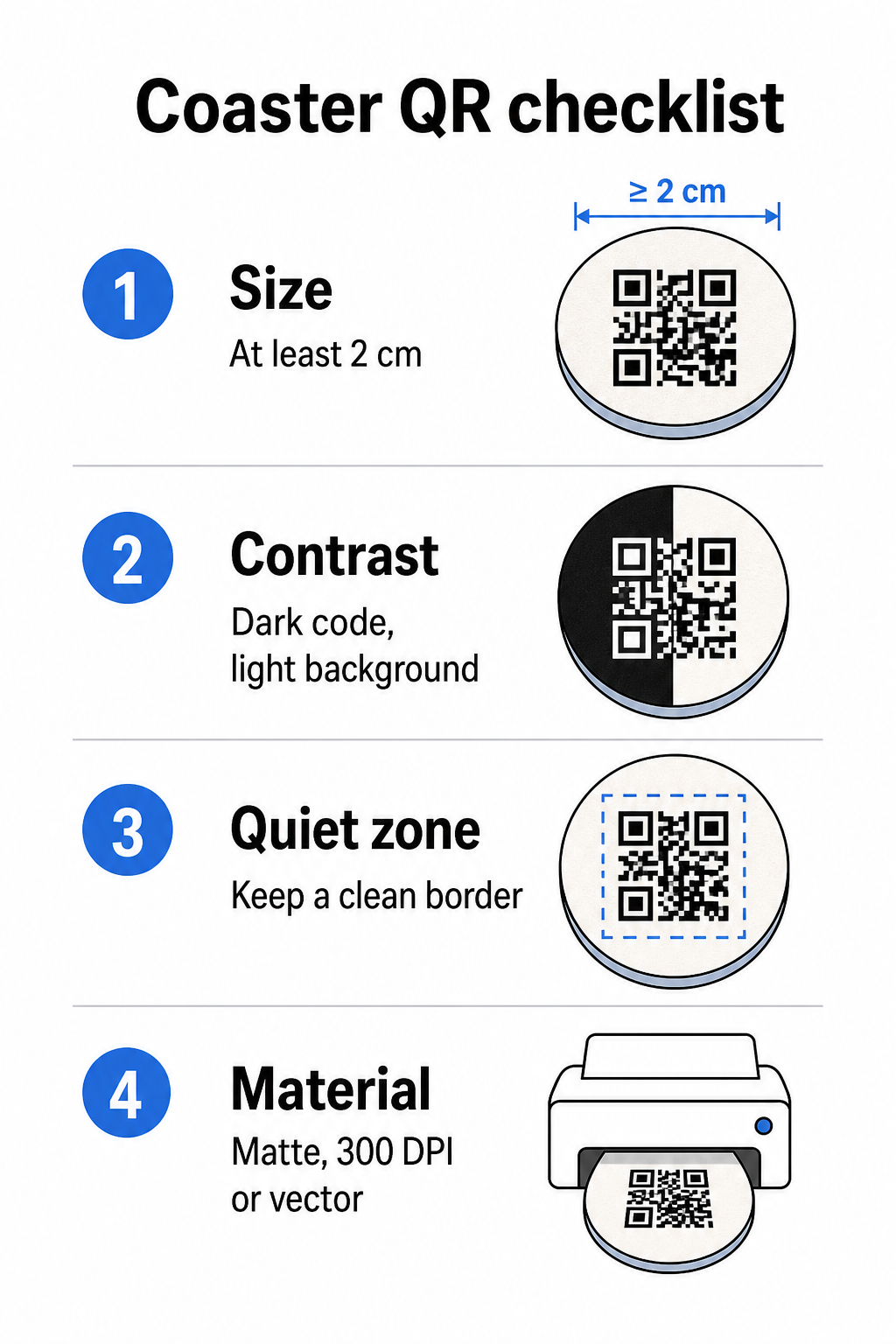
Velikost je vaše první úvaha. Minimální spolehlivá velikost pro QR kód je 2 cm × 2 cm (přibližně 0,8 palce × 0,8 palce) pro skenování zblízka. Na standardním kulatém podtácku – typicky 3,5 až 4 palce v průměru – máte prostor pro větší velikost, což zlepšuje spolehlivost. Zde platí pravidlo 10:1: šířka kódu by měla být zhruba jedna desetina maximální skenovací vzdálenosti. Kód o velikosti 1 palce funguje zhruba na 10 palců; kód o velikosti 1,5 palce poskytuje pohodlnější rezervu pro typického sedícího hosta.
Kontrast je nejdůležitějším faktorem pro spolehlivost skenování. Tmavé moduly na světlém pozadí – černá na bílé je zlatý standard – by měly být vaším výchozím bodem. Mnoho fotoaparátů chytrých telefonů a skenovacích aplikací má potíže s invertovanými designy (světlé moduly na tmavém pozadí), takže se této kombinaci vyhněte, i když vypadá esteticky lépe. Minimální kontrastní poměr 4:1 je doporučený základ; vyšší je lepší. Vyhněte se červeným nebo oranžovým popředím, protože mnoho senzorů fotoaparátů má potíže s jejich spolehlivou detekcí. Co osvědčené postupy pro barevný kontrast QR kódů stránka má podrobnou srovnávací tabulku, pokud pracujete s barvami značky, které spadají mimo standardní černobílou kombinaci.
Klidová zóna odkazuje na jasný okraj, který musí obklopovat každý QR kód – minimálně 4 moduly široký na všech stranách – bez rušivého textu, grafiky nebo designových prvků. Na podtácku to znamená ponechat kolem kódu pevný světlý okraj. Pokud má váš design podtácku tmavé nebo vizuálně rušné pozadí, přidejte za QR kód pevný bílý výplňový rámeček, který zahrnuje celou tichou zónu. Bez něj mohou skenery selhat při spolehlivém určení hranice kódu.
Povrchová úprava a materiál záleží více na podtáccích než na většině ostatních povrchů. Papírové podtácky z lepenky jsou nejběžnější v pohostinství – absorbují kondenzaci a chrání povrchy stolů, ale nejsou vodotěsné. Pro QR kódy na papírových podtáccích jsou matné povrchové úpravy preferovány před lesklými, protože odlesky z horního osvětlení ruší skenování. Pro aplikace s vyšší odolností, jako jsou trvalé instalace na stoly nebo opakovaně použitelné podtácky, materiály jako potažené dřevo s epoxidovou nebo polyuretanovou úpravou chrání tisk a zároveň umožňují spolehlivé skenování, za předpokladu, že povrchová úprava je čirá, nikoli tónovaná. Bez ohledu na materiál se vyhněte gradientům, stínům nebo průhledným prvkům uvnitř samotného QR kódu – ty snižují kontrast a narušují skenovatelnost v reálných podmínkách.
Rozlišení je pro tisk nezbytná. Vždy stahujte svůj QR kód ve vektorovém formátu (SVG nebo EPS) nebo s minimálním rozlišením 300 DPI. Rastrové soubory zvětšené z exportů s nízkým rozlišením se v tisku budou jevit rozmazaně, což snižuje spolehlivost skenování, i když kód vypadá na obrazovce přijatelně. Kompletní sada pokynů pro tisk a design je k dispozici v osvědčené postupy pro čitelnost QR kódů průvodci.
Praktické umístění a kontext na podtácku
Samotný QR kód neřekne vašemu hostu, co dělá. Přidání jednořádkové výzvy k akci přímo na podtácek – “Naskenujte pro menu,” “Připojte se k Wi-Fi,” “Sdílejte svou zpětnou vazbu” – odstraňuje nejednoznačnost a zvyšuje pravděpodobnost skenování. To je obzvláště důležité pro hosty, kteří jsou méně obeznámeni s QR kódy nebo kteří jsou rozptýleni konverzací.
Umístěte QR kód a text výzvy k akci tak, aby zůstaly čitelné z jakékékoli orientace. Kulatý podtácek, který lze umístit v libovolném směru, by měl mít kód vycentrovaný, s textem uspořádaným kolem něj spíše než nad nebo pod ním, kde by ho rotace převrátila vzhůru nohama. Pokud mají vaše podtácky definovanou orientaci, umístěte kód na prominentní, ničím nerušenou plochu dál od okraje podtácku, aby tichá zóna nebyla nikdy odříznuta během vysekávání nebo ořezávání.
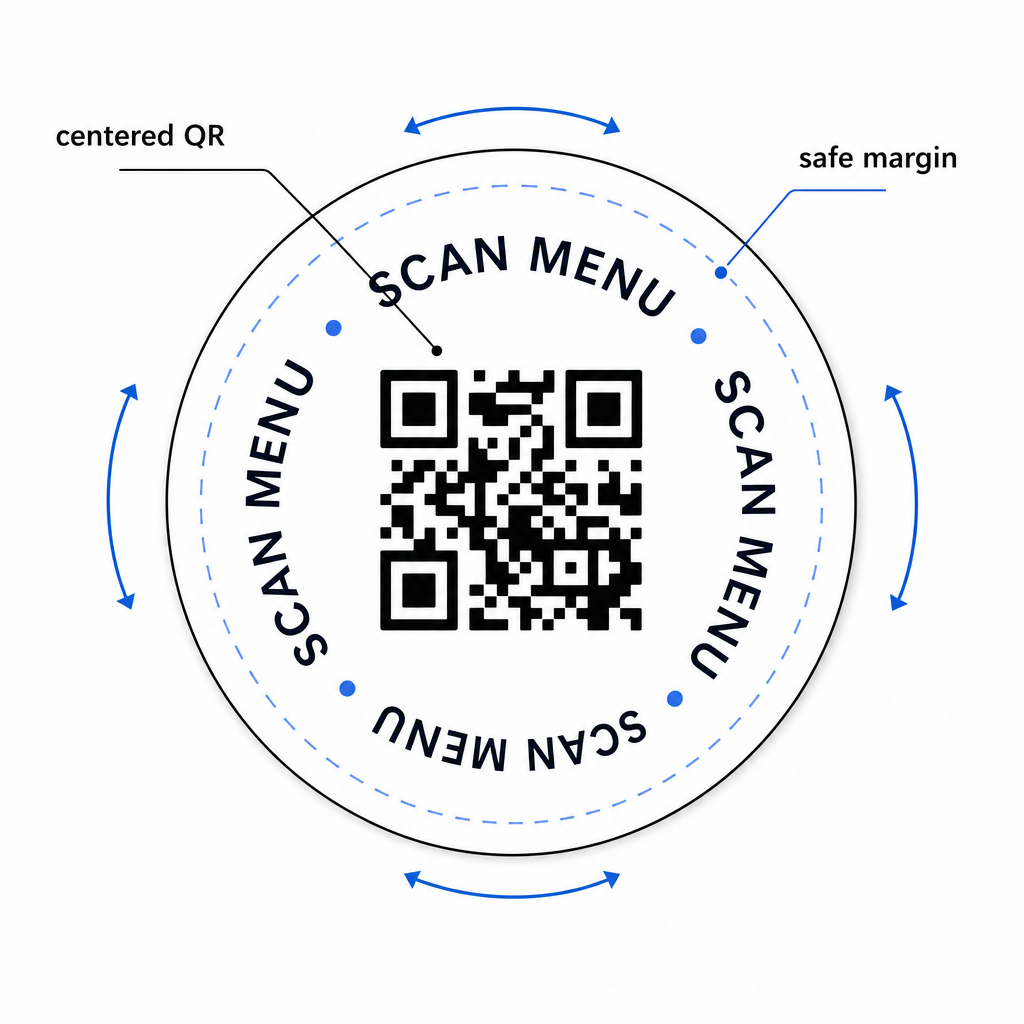
Pro události zvažte použití samostatných podtácků pro různé účely – jeden pro menu, jeden pro program události, jeden pro formulář zpětné vazby. Zaměření každého podtácku na jednu akci zjednodušuje zážitek hosta a usnadňuje samostatné sledování výkonu každého kódu. Pro jiné kompaktní povrchy s QR kódy s podobnými omezeními designu platí pokyny pro QR kódy na stolních stojáncích platí přímo.
Testování před hromadným tiskem
Vytiskněte jeden testovací podtácek, než se zavážete k plné produkční sérii. Naskenujte jej na minimálně třech různých zařízeních v reálných světelných podmínkách vašeho podniku – stropní osvětlení, svíčky nebo venkovní sluneční světlo, pokud má váš prostor terasu. Testujte z realistické vzdálenosti, ve které by sedící host držel svůj telefon.
Potvrďte, že:
- Kód se naskenuje za méně než tři sekundy na všech testovacích zařízeních
- Cíl se správně načítá na mobilu, nejen na počítači
- Tichá zóna je neporušená a není oříznuta okrajem podtácku
- Kontrast se udržuje i za špatných světelných podmínek
Pokud používáte dynamické QR kódy, ověřte, že cílová URL je správně nakonfigurována ve vašem Pageloot panelu před zkušebním tiskem, a potvrďte, že jakékoli aktualizace menu nebo přesměrování, které provedete po tisku, se okamžitě projeví po naskenování.
Podtácky jsou jedním z mála kontaktních bodů v pohostinství, které zůstávají s vaším hostem od okamžiku, kdy si sedne, dokud neodejde. Dobře navržený QR kód odstraňuje tření při procházení menu, eliminuje požadavky na heslo Wi-Fi a poskytuje vám měřitelná data o tom, jak hosté interagují s vaším prostorem. Požadavky na design jsou specifické, ale dosažitelné: dostatečná velikost, silný kontrast, čistá tichá zóna a jasná výzva k akci vytištěná vedle kódu.
Začněte se správnými nástroji. Použijte Pagelootův Menu QR kód generátor k vytvoření dynamického kódu menu, Generátor Wi-Fi QR kódů pro bezproblémový přístup hostů k síti, a analytický panel ke sledování zapojení, jakmile jsou vaše podtácky v oběhu.
Často kladené otázky
Technicky ano, ale nedoporučuje se to. Jeden QR kód odkazuje na jednu destinaci, takže kombinování obou funkcí znamená odkazování na vstupní stránku se dvěma samostatnými možnostmi – přidání dalšího klepnutí pro hosta. Čistší přístup je použít dva odlišné QR kódy na podtácku, každý s jasným popiskem, nebo věnovat samostatné designy podtácků každému účelu. Wi-Fi kódy jsou statické a zdarma k vygenerování; kódy menu fungují nejlépe jako dynamické kódy s povoleným sledováním.
Pokud jste vytvořili svůj QR kód podtácku jako dynamický kód pomocí Pageloot, můžete se přihlásit do svého panelu a kdykoli aktualizovat cílovou URL adresu nebo obsah menu. Vytištěný QR kód na podtácku zůstává stejný; mění se pouze propojený obsah. To je jeden z hlavních důvodů, proč jsou dynamické kódy doporučovány pro menu – sezónní aktualizace, změny cen a dostupnost položek mohou být okamžitě promítnuty bez objednání nové várky podtácků.
S dynamickým QR kódem a analytikou Pageloot můžete sledovat celkový počet skenování, unikátní skenování, datum a čas každého skenování, typ použitého zařízení (iOS nebo Android) a geografickou polohu až na úroveň města. Můžete také porovnávat výkon napříč různými umístěními, pokud přiřadíte samostatné QR kódy různým stolním zónám nebo oblastem vašeho podniku. Statické QR kódy, včetně Wi-Fi kódů, negenerují žádná data o skenování.