
Traže li vaši gosti lozinku za Wi-Fi ili dozivaju konobara samo da vide jelovnik? Ove male točke trenja brzo se zbrajaju, frustrirajući kupce i usporavajući vaše osoblje. Ovaj vodič vam pokazuje kako točno dizajnirati, generirati i postaviti QR kodove na podmetače tako da jedno skeniranje riješi problem – i pruži vam podatke za stalno poboljšanje.
Zašto su podmetači praktična površina za QR kodove
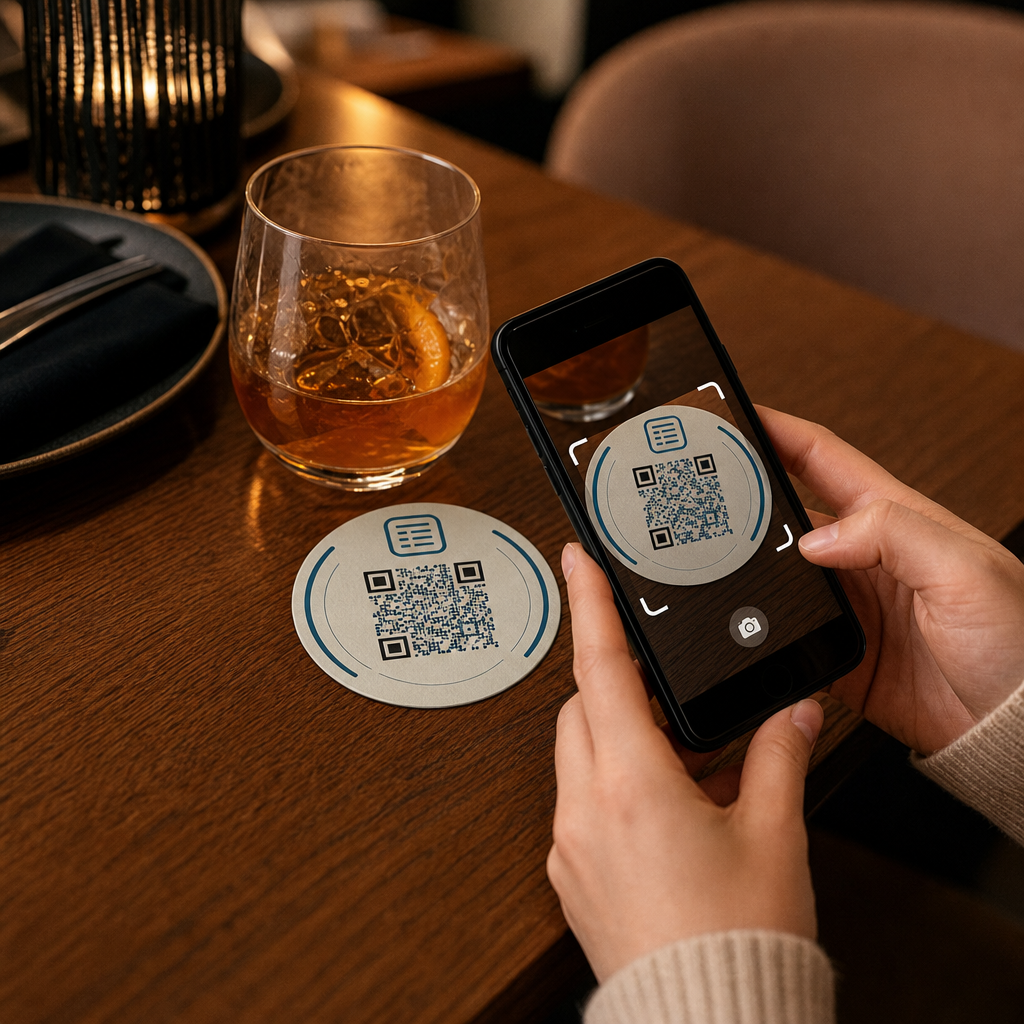
Svako piće koje sleti na stol dolazi s podmetačem. To čini podmetače jednom od najdosljednije pregledavanih površina u bilo kojem ugostiteljskom okruženju. Za razliku od stolnih stalaka, koje gosti često guraju u stranu, ili zidnih plakata koji zahtijevaju da netko ustane i priđe, podmetač sjedi izravno ispred vašeg kupca tijekom cijelog posjeta.
Ta postojanost čini podmetače korisnima za tri specifična zadatka:
- Pristup jelovniku – omogućiti gostima pregledavanje hrane i pića čim sjednu
- Dijeljenje Wi-Fi-ja – eliminirati potrebu da osoblje ponavlja lozinku desetak puta po smjeni
- Praćenje angažmana kupaca – mjeriti koliko ljudi komunicira s vašim digitalnim sadržajem, kada i iz kojih područja vašeg objekta
Za širi pogled na to kako se QR kodovi uklapaju u ugostiteljska okruženja, obrazac je dosljedan: što je kod bliže gostu u trenutku kada mu je potreban, to je veća stopa skeniranja. Podmetači su najbliže što se može.
Odabir pravog tipa QR koda za podmetače
Prije nego što išta ispišete, morate odlučiti hoćete li koristiti statički ili dinamički QR kod. Razlika ima praktične posljedice posebno za podmetače, jer je ponovno tiskanje skupo i dugotrajno.
Statički QR kodovi kodiraju informacije izravno u uzorak. Ne mogu se uređivati nakon izrade i ne prate skeniranja. Wi-Fi QR kodovi prirodno se uklapaju u statički format – vaši mrežni podaci rijetko se mijenjaju, i nema potrebe za analitikom za taj specifični slučaj upotrebe.
Dinamički QR kodovi upućuju na kratki URL za preusmjeravanje koji možete ažurirati u bilo kojem trenutku bez ponovnog ispisa podmetača. Također bilježe svako skeniranje, bilježeći vrijeme, vrstu uređaja i geografsku lokaciju. Za pristup jelovniku i praćenje angažmana, dinamički kodovi su praktičan izbor. Ako se vaš jelovnik mijenja sezonski ili ako želite zamijeniti promociju bez naručivanja novih podmetača, dinamički kod vam to omogućuje s vaše nadzorne ploče.
Kompromis je jasan: statički kodovi su besplatni i trajni, dok dinamički kodovi zahtijevaju pretplatu, ali vam daju fleksibilnost i podatke. Za većinu ugostiteljskih objekata koji obavljaju tekuće poslovanje, mogućnost ažuriranja sadržaja bez ponovnog ispisa čini dinamičke kodove boljom dugoročnom investicijom. Potpuni pregled obje opcije pokriven je na statičkih i dinamičkih QR kodova stranica.
Izradite QR kodove spremne za podmetače u nekoliko minuta Koristiti Dinamični QR kod generator za izradu kodova za jelovnik, Wi-Fi i angažman koje možete ažurirati bilo kada – bez potrebe za ponovnim ispisom.
Postavljanje QR koda jelovnika za podmetače
QR kod jelovnika na podmetaču trebao bi vašeg gosta odvesti izravno na čist, mobilno prilagođen digitalni jelovnik u trenutku skeniranja. Postavljanje uključuje dvije odluke: u kojem formatu se nalazi vaš jelovnik i kako oko njega izgraditi QR kod.
Pagelootov Generator menija za restoran s QR kodom podržava dva pristupa. Prvo, možete učitati postojeći PDF – ako već imate dizajniran jelovnik, možete ga povezati putem prijenosa datoteke ili hostiranog URL-a kao što je veza Google Drivea ili Dropboxa, što je najbrži put do online objave. Drugo, možete izgraditi strukturiranu odredišnu stranicu jelovnika s kategorijama, fotografijama stavki, opisima i cijenama te dodati sezonske ponude, dnevne prijedloge i slike koje PDF ne može uvijek dobro prikazati na mobilnom uređaju.
Konkretno za podmetače, pristup odredišne stranice obično daje bolje rezultate. Gosti su na svojim telefonima, a mobilno optimizirana stranica lakša je za navigaciju od PDF-a koji zahtijeva zumiranje i pomicanje prstima. Za dublji uvid u to kako se naručivanje putem QR koda uklapa u cjelokupni radni proces, vodič na Sustavi za naručivanje putem QR koda pokriva tehničku i operativnu stranu detaljno.
Nakon što je vaš jelovnik konfiguriran, prilagodite QR kod bojama vašeg brenda, logotipom i okvirom s kratkim pozivom na akciju poput “Skenirajte za pregled jelovnika.” Ovaj kontekst pomaže gostima da razumiju što skeniraju prije nego što to učine, što izravno poboljšava stope skeniranja.
Postavljanje Wi-Fi QR koda za podmetače
Dijeljenje Wi-Fi vjerodajnica putem podmetača jedna je od najjednostavnijih i najkorisnijih primjena QR kodova u ugostiteljstvu. Gost skenira kod i njegov se uređaj automatski povezuje – bez vidljive lozinke, bez uključenosti osoblja, bez pogrešaka u tipkanju.
Postavljanje je jednostavno koristeći Pagelootov generator Wi-Fi QR kodova. Unesite naziv svoje mreže (SSID), odaberite vrstu sigurnosti (WPA/WPA2 je najčešća), unesite mrežnu lozinku, prilagodite dizajn i preuzmite. Budući da se Wi-Fi vjerodajnice rijetko mijenjaju, statični QR kod je ovdje dovoljan i ne košta ništa za generiranje. Za potpuni pregled procesa i savjete o postavljanju, vodič za povezivanje gostiju na Wi-Fi putem QR koda pokriva svaki korak detaljno.
Jedna praktična napomena: ako vaše mjesto koristi zasebnu mrežu za goste – što je dobra sigurnosna praksa – pobrinite se da QR kod kodira vjerodajnice mreže za goste, a ne vaše operativne mreže.
Praćenje angažmana kupaca putem skeniranja podmetača
Wi-Fi QR kodovi su statični i ne generiraju podatke o skeniranju. Ali za pristup jelovniku i bilo koji drugi sadržaj kampanje koji stavite na podmetače, dinamički QR kodovi daju vam uvid u stvarnom vremenu kako gosti komuniciraju s vašim fizičkim prostorom.
Pagelootov nadzorna ploča za analitiku QR kodova prati sljedeće za svaki dinamički kod:
- Ukupna skeniranja i jedinstvena skeniranja tijekom vremena
- Datum i vrijeme svakog skeniranja
- Vrsta uređaja (iOS, Android ili stolno računalo)
- Geografska lokacija do razine grada
- Usporedbe na razini postavljanja ako koristite zasebne kodove za različite zone stolova ili područja objekta
Za operaciju s više lokacija ili veliki prostor za događanja, ovi podaci odgovaraju na praktična pitanja: Koja područja bilježe najveći angažman? Skeniraju li gosti više tijekom ručka ili večere? Raste li broj skeniranja jelovnika u danima koji se podudaraju s promocijama koje ste provodili?
Također možete povezati QR kod Google obrasca s podmetača za prikupljanje izravnih povratnih informacija gostiju. Kratka anketa nakon obroka bilježi ocjene zadovoljstva i komentare bez potrebe da osoblje dijeli papirnate kartice ili usmeno traži recenzije. Za širi pregled kako podaci o skeniranju mogu poboljšati vaš marketing i poslovanje, vodiču za praćenje QR kodova prolazi kroz najvažnije metrike.
Vidite svako skeniranje kako se događa Pratite angažman s jelovnikom, identificirajte svoja najprometnija razdoblja i mjerite učinkovitost kampanje u stvarnom vremenu uz Pagelootovu analitiku QR kodova.
Dizajniranje QR koda koji se pouzdano skenira na podmetaču
Podmetač je fizički zahtjevno okruženje za QR kod. Mokri se, rukuje se njime, slaže se i neravnomjerno osvjetljava. Dizajnerske odluke koje bi bile u redu na plakatu mogu postati neuspjesi skeniranja na podmetaču.
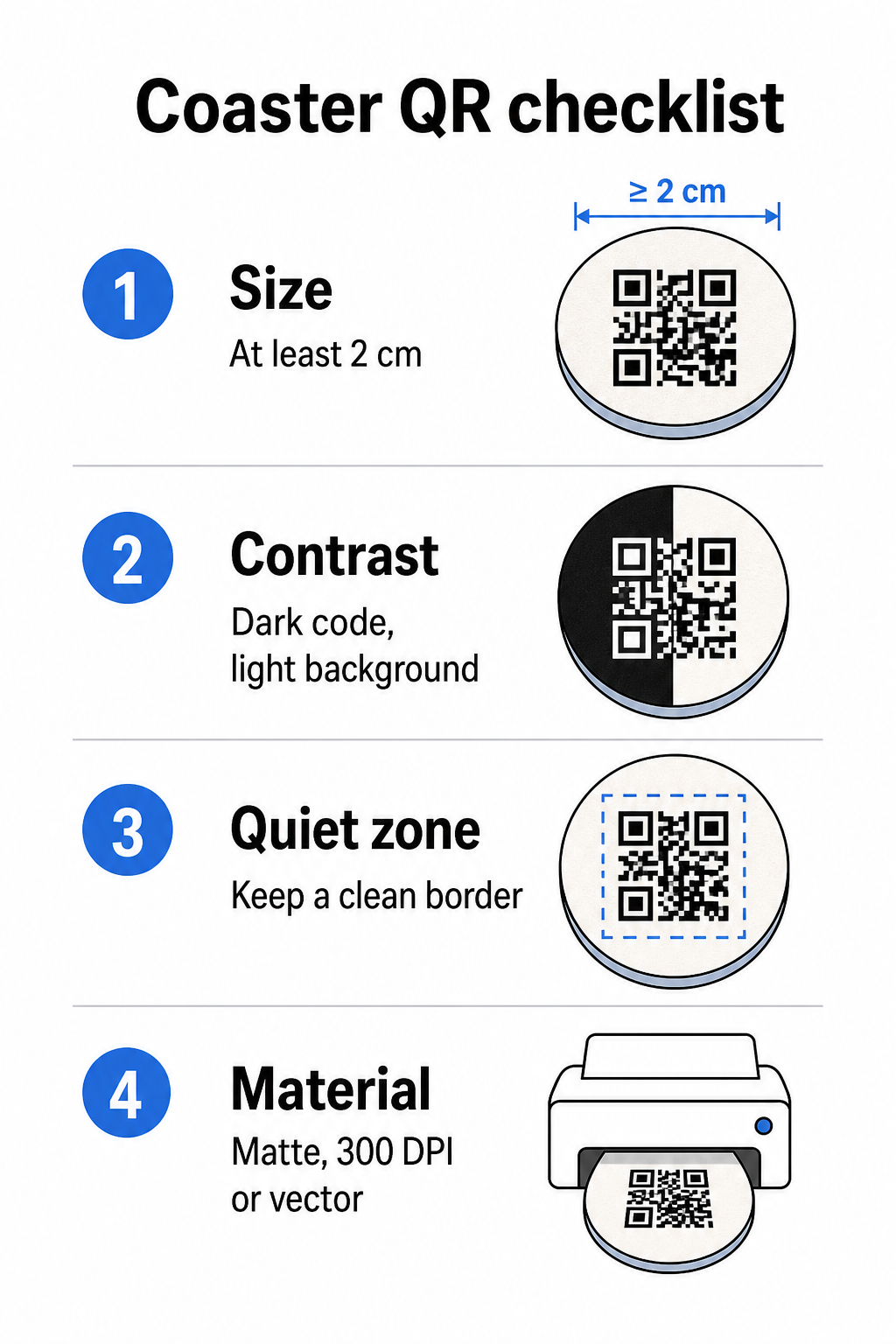
Veličina je vaše prvo razmatranje. Minimalna pouzdana veličina za QR kod je 2 cm × 2 cm (približno 0,8 in × 0,8 in) za skeniranje iz blizine. Na standardnom okruglom podmetaču – obično promjera 3,5 do 4 inča – imate mjesta za veći kod, što poboljšava pouzdanost. Ovdje se primjenjuje pravilo 10:1: širina koda trebala bi biti otprilike jedna desetina maksimalne udaljenosti skeniranja. Kod od 1 inča radi na otprilike 10 inča; kod od 1,5 inča daje udobniju marginu za tipičnog gosta koji sjedi.
Kontrast je najkritičniji faktor za pouzdanost skeniranja. Tamni moduli na svijetloj pozadini – crna na bijeloj je zlatni standard – trebali bi biti vaša početna točka. Mnoge kamere pametnih telefona i aplikacije za skeniranje imaju poteškoća s invertiranim dizajnom (svijetli moduli na tamnoj pozadini), stoga izbjegavajte tu kombinaciju čak i ako estetski izgleda bolje. Minimalni omjer kontrasta od 4:1 je preporučena osnovna vrijednost; veći je bolji. Izbjegavajte crvene ili narančaste prednje planove, budući da mnogi senzori kamere imaju poteškoća s pouzdanim otkrivanjem tih nijansi. najbolje prakse za kontrast boja QR koda stranica ima detaljnu usporednu tablicu ako radite s bojama marke koje odstupaju od standardne crno-bijele kombinacije.
Tiha zona odnosi se na jasan rub koji mora okruživati svaki QR kod – najmanje 4 modula širine sa svih strana – bez teksta, grafike ili dizajnerskih elemenata koji prodiru. Na podmetaču to znači ostavljanje čvrste svijetle margine oko koda. Ako vaš dizajn podmetača ima tamnu ili vizualno zauzetu pozadinu, dodajte čvrstu bijelu kutiju za popunjavanje iza QR koda koja uključuje cijelu tihu zonu. Bez toga, skeneri mogu propustiti pouzdano locirati granicu koda.
Završna obrada i materijal važniji su na podmetačima nego na većini drugih površina. Podmetači od kartona su najčešći u ugostiteljstvu – upijaju kondenzaciju i štite površine stola, ali nisu vodootporni. Za QR kodove na papirnatim podmetačima, mat završne obrade su poželjnije od sjajnih jer odsjaj od gornje rasvjete ometa skeniranje. Za primjene veće trajnosti, kao što su trajne instalacije na stolu ili višekratni podmetači, materijali poput premazanog drva s epoksidnom ili poliuretanskom završnom obradom štite ispis dok omogućuju pouzdano skeniranje, pod uvjetom da je završna obrada prozirna, a ne tonirana. Bez obzira na materijal, izbjegavajte gradijente, sjene ili prozirne elemente unutar samog QR koda – oni smanjuju kontrast i narušavaju mogućnost skeniranja u stvarnim uvjetima.
Rezolucija je neupitna za ispis. Uvijek preuzmite svoj QR kod u vektorskom formatu (SVG ili EPS) ili s minimalno 300 DPI. Bitmap datoteke povećane iz izvoza niske rezolucije izgledat će mutno u ispisu, što smanjuje pouzdanost skeniranja čak i kada kod izgleda prihvatljivo na zaslonu. Cjelovit skup smjernica za ispis i dizajn dostupan je u najbolje prakse za čitljivost QR koda vodiču.
Praktično postavljanje i kontekst na podmetaču
Sam QR kod ne govori vašem gostu što radi. Dodavanje poziva na akciju u jednom retku izravno na podmetač – “Skenirajte za jelovnik”, “Povežite se na Wi-Fi”, “Podijelite svoje povratne informacije” – uklanja dvosmislenost i povećava vjerojatnost skeniranja. Ovo je posebno važno za goste koji su manje upoznati s QR kodovima ili koji su ometeni razgovorom.
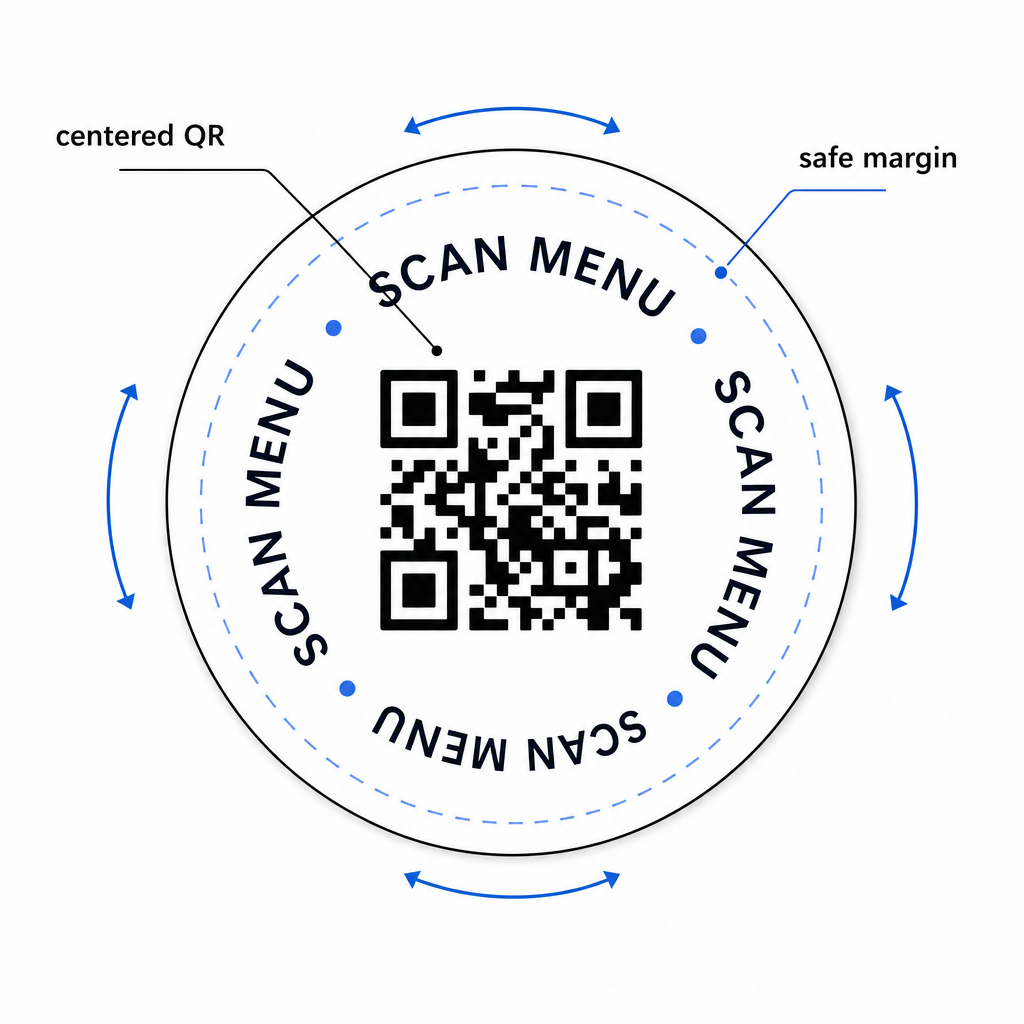
Postavite QR kod i tekst poziva na akciju tako da ostanu čitljivi iz bilo koje orijentacije. Okrugli podmetač koji se može postaviti u bilo kojem smjeru trebao bi imati kod centriran, s tekstom raspoređenim oko njega, a ne iznad ili ispod gdje bi ga rotacija okrenula naopako. Ako vaši podmetači imaju definiranu orijentaciju, postavite kod na istaknuto, neometano područje dalje od ruba podmetača tako da tiha zona nikada ne bude odrezana tijekom štancanja ili obrezivanja.
Za događaje razmislite o korištenju zasebnih podmetača za različite svrhe – jedan za jelovnik, jedan za raspored događaja, jedan za obrazac za povratne informacije. Fokusiranje svakog podmetača na jednu radnju pojednostavljuje iskustvo gosta i olakšava zasebno praćenje performansi svakog koda. Za druge kompaktne površine QR kodova sa sličnim ograničenjima dizajna, smjernice o QR kodovi na stolnim šatorima primjenjuju se izravno.
Testiranje prije masovnog ispisa
Ispišite jedan testni podmetač prije nego što se obvežete na punu proizvodnu seriju. Skenirajte ga na najmanje tri različita uređaja u stvarnim uvjetima osvjetljenja vašeg prostora – gornje osvjetljenje, svjetlost svijeća ili vanjsko sunčevo svjetlo ako vaš prostor ima terasu. Testirajte s realne udaljenosti na kojoj bi sjedeći gost držao svoj telefon.
Potvrdite da:
- Kod se skenira za manje od tri sekunde na svim testnim uređajima
- Odredište se ispravno učitava na mobilnom uređaju, a ne samo na stolnom računalu
- Tiha zona je netaknuta i nije odrezana rubom podmetača
- Kontrast se održava u uvjetima slabog osvjetljenja
Ako koristite dinamičke QR kodove, provjerite je li odredišni URL ispravno konfiguriran na vašoj Pageloot nadzornoj ploči prije probnog ispisa i potvrdite da se sva ažuriranja jelovnika ili preusmjeravanja koja napravite nakon ispisa odmah odražavaju prilikom skeniranja.
Podmetači su jedna od rijetkih dodirnih točaka u ugostiteljstvu koje ostaju s vašim gostom od trenutka kada sjedne dok ne ode. Dobro dizajniran QR kod uklanja trenje pri pregledavanju jelovnika, eliminira zahtjeve za Wi-Fi lozinkom i daje vam mjerljive podatke o tome kako se gosti angažiraju s vašim prostorom. Zahtjevi dizajna su specifični, ali ostvarivi: dovoljna veličina, snažan kontrast, čista tiha zona i jasan poziv na akciju ispisan uz kod.
Započnite s pravim alatima. Koristite Pagelootov Generator menija za restoran s QR kodom za izradu dinamičkog koda jelovnika, Generator Wi-Fi QR kodova za besprijekoran pristup gostujućoj mreži, i analitičku nadzornu ploču za praćenje angažmana nakon što vaši podmetači budu u opticaju.
Često postavljana pitanja
Tehnički da, ali se ne preporučuje. Jedan QR kod pokazuje na jedno odredište, pa kombiniranje obje funkcije znači povezivanje na odredišnu stranicu s dvije zasebne opcije – dodajući dodatni dodir za gosta. Čišći pristup je koristiti dva različita QR koda na podmetaču, svaki s jasnom oznakom, ili posvetiti zasebne dizajne podmetača svakoj svrsi. Wi-Fi kodovi su statični i besplatni za generiranje; kodovi jelovnika najbolje funkcioniraju kao dinamički kodovi s omogućenim praćenjem.
Ako ste izradili svoj QR kod podmetača kao dinamički kod koristeći Pageloot, možete se prijaviti na svoju nadzornu ploču i ažurirati odredišni URL ili sadržaj jelovnika u bilo kojem trenutku. Ispisani QR kod na podmetaču ostaje isti; mijenja se samo povezani sadržaj. Ovo je jedan od primarnih razloga zašto se dinamički kodovi preporučuju za jelovnike – sezonska ažuriranja, promjene cijena i dostupnost artikala sve se to može odmah odraziti bez naručivanja nove serije podmetača.
S dinamičkim QR kodom i Pagelootovom analitikom možete pratiti ukupan broj skeniranja, jedinstvena skeniranja, datum i vrijeme svakog skeniranja, vrstu korištenog uređaja (iOS ili Android) i geografsku lokaciju do razine grada. Također možete usporediti performanse na različitim mjestima ako dodijelite zasebne QR kodove različitim stolnim zonama ili područjima vašeg prostora. Statički QR kodovi, uključujući Wi-Fi kodove, ne generiraju nikakve podatke o skeniranju.