
Zijn uw gasten op zoek naar het Wi-Fi-wachtwoord of houden ze een ober tegen om de menukaart te zien? Deze kleine frictiepunten stapelen zich snel op, frustreren klanten en vertragen uw personeel. Deze gids laat u precies zien hoe u QR-codes op onderzetters ontwerpt, genereert en implementeert, zodat één enkele scan het probleem oplost – en u de gegevens geeft om te blijven verbeteren.
Waarom onderzetters een praktisch QR-codeoppervlak zijn
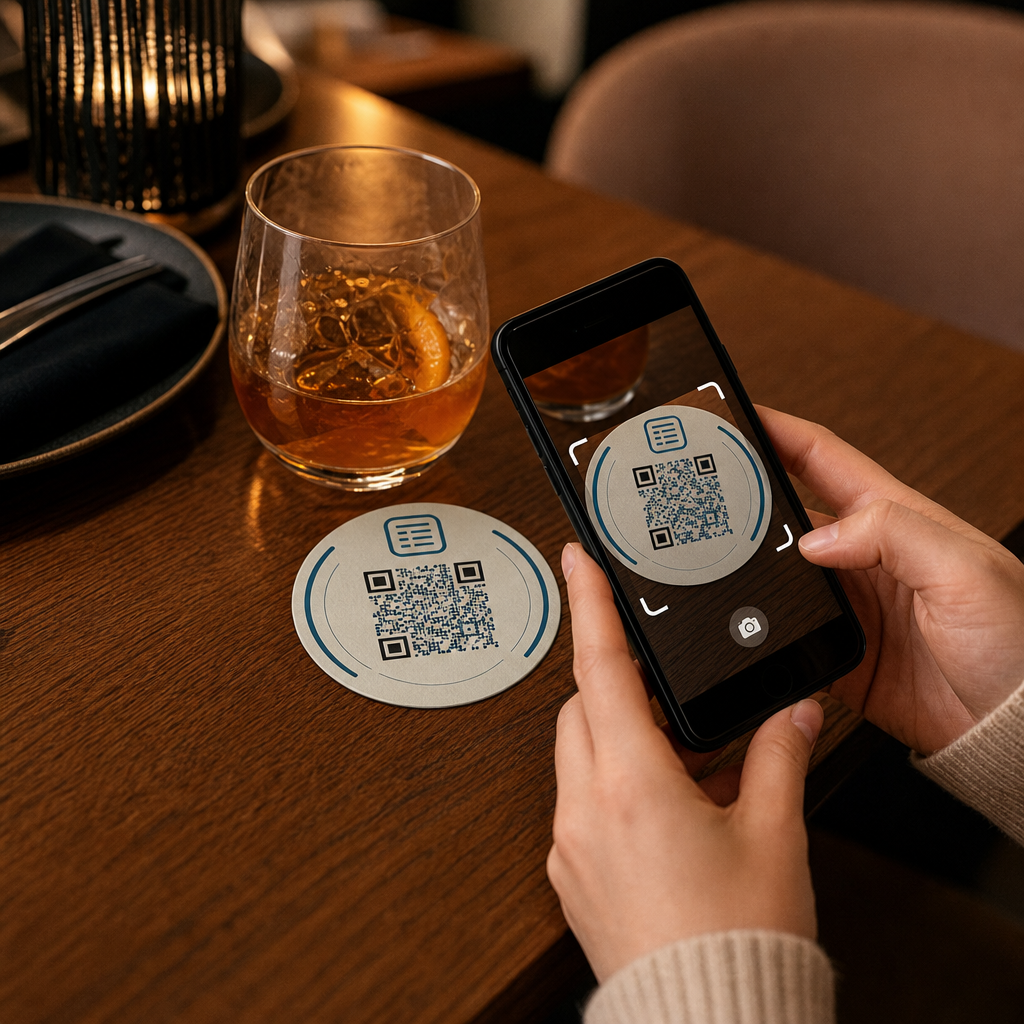
Elk drankje dat op een tafel landt, wordt geleverd met een onderzetter. Dat maakt onderzetters een van de meest consistent bekeken oppervlakken in elke horecaomgeving. In tegenstelling tot tafelstandaards, die gasten vaak opzij schuiven, of aan de muur gemonteerde posters die vereisen dat iemand opstaat en ernaartoe loopt, ligt een onderzetter gedurende het hele bezoek direct voor uw klant.
Die blijvende kracht maakt onderzetters nuttig voor drie specifieke taken:
- Menutoegang – laat gasten eten en drinken bekijken zodra ze gaan zitten
- Wi-Fi delen – elimineer de noodzaak voor personeel om het wachtwoord tientallen keren per dienst te herhalen
- Klantbetrokkenheid volgen – meet hoeveel mensen interactie hebben met uw digitale inhoud, wanneer en vanuit welke delen van uw locatie
Voor een bredere kijk op hoe QR-codes passen binnen horecaomgevingen, is het patroon consistent: hoe dichter de code bij de gast is op het moment dat ze deze nodig hebben, hoe hoger de scanfrequentie. Onderzetters zijn zo dichtbij als het maar kan.
De juiste QR-codetype kiezen voor onderzetters
Voordat u iets afdrukt, moet u beslissen of u een statische of dynamische QR-code wilt gebruiken. Het verschil heeft praktische gevolgen specifiek voor onderzetters, omdat opnieuw afdrukken duur en tijdrovend is.
Statische QR codes coderen informatie direct in het patroon. Ze kunnen na creatie niet worden bewerkt en ze volgen geen scans. Wi-Fi QR-codes passen van nature bij het statische formaat – uw netwerkreferenties veranderen zelden, en er is geen behoefte aan analyses voor die specifieke gebruikssituatie.
Dynamische QR codes wijzen naar een korte omleidings-URL die u op elk moment kunt bijwerken zonder de onderzetter opnieuw af te drukken. Ze loggen ook elke scan, waarbij de tijd, het apparaattype en de geografische locatie worden vastgelegd. Voor menutoegang en het volgen van betrokkenheid zijn dynamische codes de praktische keuze. Als uw menu seizoensgebonden verandert, of als u een promotie wilt invoegen zonder nieuwe onderzetters te bestellen, kunt u dat met een dynamische code doen vanuit uw dashboard.
De afweging is eenvoudig: statische codes zijn gratis en permanent, terwijl dynamische codes een abonnement vereisen, maar u flexibiliteit en gegevens bieden. Voor de meeste horecabedrijven met lopende activiteiten maakt de mogelijkheid om inhoud bij te werken zonder opnieuw af te drukken dynamische codes de betere langetermijninvestering. De volledige uitleg van beide opties wordt behandeld op de statische versus dynamische QR-codes pagina.
Maak binnen enkele minuten onderzetter-klare QR-codes Gebruik de Dynamische QR code generator om menu-, Wi-Fi- en betrokkenheidscodes te bouwen die u op elk moment kunt bijwerken – opnieuw afdrukken is niet nodig.
Een menu-QR-code instellen voor onderzetters
Een menu-QR-code op een onderzetter moet uw gast direct naar een overzichtelijk, mobielvriendelijk digitaal menu leiden zodra ze scannen. De installatie omvat twee beslissingen: in welk formaat uw menu bestaat, en hoe u de QR-code eromheen bouwt.
Pageloot's QR-code menukaart maken ondersteunt twee benaderingen. Ten eerste kunt u een bestaande PDF uploaden – als u al een ontworpen menu heeft, kunt u deze koppelen via een bestandsupload of een gehoste URL zoals een Google Drive- of Dropbox-link, wat de snelste manier is om online te komen. Ten tweede kunt u een gestructureerde menu-landingspagina bouwen met categorieën, itemfoto's, beschrijvingen en prijzen, en seizoensspecials, dagelijkse aanbiedingen en afbeeldingen toevoegen die een PDF niet altijd goed kan weergeven op mobiel.
Specifiek voor onderzetters presteert de landingspagina-aanpak doorgaans beter. Gasten zijn op hun telefoon, en een voor mobiel geoptimaliseerde pagina is gemakkelijker te navigeren dan een PDF die knijpen en zoomen vereist. Voor een diepere kijk op hoe QR-gebaseerd bestellen past in een full-service workflow, behandelt de gids over QR-code bestelsystemen de technische en operationele kant in detail.
Zodra uw menu is geconfigureerd, past u de QR-code aan met uw merkkleuren, logo en een kader met een korte call-to-action zoals “Scan om het menu te zien.” Deze context helpt gasten te begrijpen wat ze scannen voordat ze het doen, wat de scanfrequenties direct verbetert.
Een Wi-Fi QR-code instellen voor onderzetters
Het delen van Wi-Fi-referenties via een onderzetter is een van de eenvoudigste en meest direct nuttige toepassingen van QR-codes in de horeca. Een gast scant de code en hun apparaat maakt automatisch verbinding – geen wachtwoord zichtbaar, geen personeelsbetrokkenheid, geen typefouten.
De installatie is eenvoudig met Pageloot's Wi-Fi QR-codegenerator. Voer uw netwerknaam (SSID) in, selecteer uw beveiligingstype (WPA/WPA2 is het meest voorkomend), voer het netwerkwachtwoord in, pas het ontwerp aan en download. Omdat Wi-Fi-gegevens zelden veranderen, is een statische QR-code hier voldoende en kost het niets om deze te genereren. Voor een volledige uitleg van het proces en plaatsingsadvies, de gids voor het verbinden van gasten met Wi-Fi via QR-code behandelt elke stap in detail.
Een praktische opmerking: als uw locatie een apart gastennetwerk gebruikt – wat een goede beveiligingspraktijk is – zorg er dan voor dat de QR-code de gegevens van het gastennetwerk codeert, niet die van uw operationele netwerk.
Klantbetrokkenheid volgen via onderzetterscans
Wi-Fi QR-codes zijn statisch en genereren geen scangegevens. Maar voor menutoegang en andere campagne-inhoud die u op onderzetters plaatst, geven dynamische QR-codes u een live beeld van hoe gasten omgaan met uw fysieke ruimte.
Pageloot's QR-code analyse dashboard volgt het volgende voor elke dynamische code:
- Totaal aantal scans en unieke scans over tijd
- Datum en tijd van elke scan
- Apparaattype (iOS, Android of desktop)
- Geografische locatie tot op stadsniveau
- Vergelijkingen op plaatsingsniveau als u afzonderlijke codes gebruikt voor verschillende tafelzones of locatiegebieden
Voor een multi-locatie operatie of een grote evenementenruimte beantwoordt deze data praktische vragen: Welke gebieden zien de meeste betrokkenheid? Scannen gasten meer tijdens de lunch- of diner service? Stijgen de menu-scans op dagen die correleren met promoties die u heeft uitgevoerd?
U kunt ook een Google formulier QR code vanaf een onderzetter koppelen om directe feedback van gasten te verzamelen. Een korte enquête na de maaltijd legt tevredenheidsscores en opmerkingen vast zonder dat personeel papieren kaarten hoeft uit te delen of mondeling om recensies hoeft te vragen. Voor een breder overzicht van hoe scangegevens uw marketing en operationele activiteiten kunnen verbeteren, de QR-code trackinggids loopt door de belangrijkste statistieken.
Zie elke scan terwijl deze plaatsvindt Volg menu-betrokkenheid, identificeer uw drukste periodes en meet campagneprestaties in realtime met Pageloot's QR Code Analytics.
Een QR-code ontwerpen die betrouwbaar scant op een onderzetter
Een onderzetter is een fysiek veeleisende omgeving voor een QR-code. Hij wordt nat, aangeraakt, gestapeld en ongelijkmatig belicht. Ontwerpbeslissingen die prima zouden zijn op een poster, kunnen leiden tot scanfouten op een onderzetter.
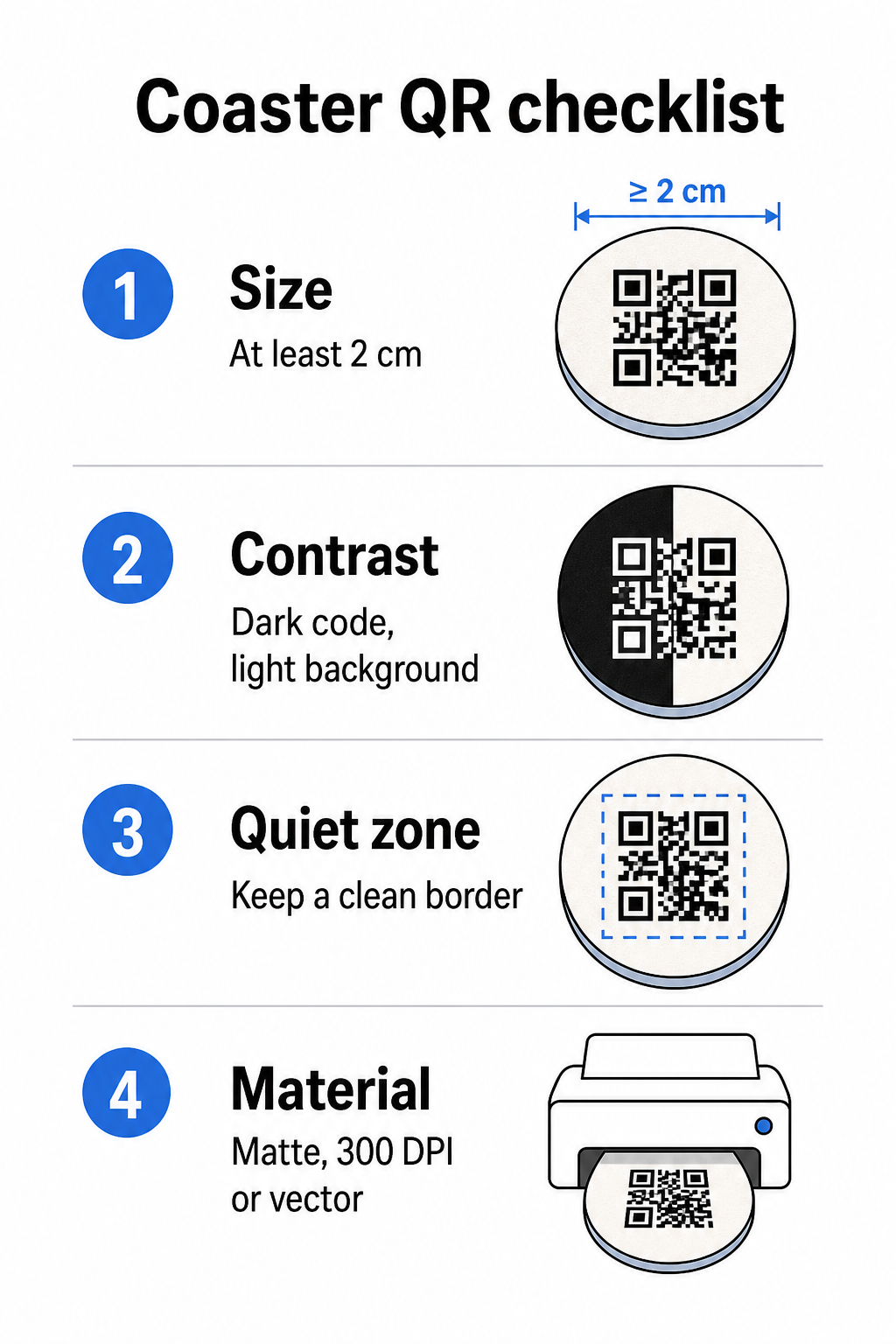
Grootte is uw eerste overweging. De minimaal betrouwbare grootte voor een QR-code is 2 cm × 2 cm (ongeveer 0,8 inch × 0,8 inch) voor scannen op korte afstand. Op een standaard ronde onderzetter – typisch 3,5 tot 4 inch in diameter – heeft u ruimte om groter te gaan, wat de betrouwbaarheid verbetert. De 10:1 regel is hier van toepassing: de breedte van de code moet ongeveer een tiende zijn van de maximale scanafstand. Een code van 1 inch werkt op ongeveer 10 inch; een code van 1,5 inch geeft een comfortabelere marge voor de typische zittende gast.
Contrast is de meest kritieke factor voor scanbetrouwbaarheid. Donkere modules op een lichte achtergrond – zwart op wit is de gouden standaard – moeten uw uitgangspunt zijn. Veel smartphonecamera's en scanner-apps hebben moeite met omgekeerde ontwerpen (lichte modules op een donkere achtergrond), dus vermijd die combinatie, zelfs als het esthetisch beter lijkt. Een minimale contrastverhouding van 4:1 is de aanbevolen basislijn; hoger is beter. Vermijd rode of oranje voorgronden, aangezien veel camerasensoren moeite hebben om deze tinten betrouwbaar te detecteren. De best practices voor kleurcontrast van QR-codes pagina heeft een gedetailleerde vergelijkingstabel als u werkt met merkkleuren die buiten de standaard zwart-wit combinatie vallen.
Stille zone verwijst naar de duidelijke rand die elke QR-code moet omringen – minimaal 4 modules breed aan alle zijden – zonder tekst, afbeeldingen of ontwerpelementen die binnendringen. Op een onderzetter betekent dit dat u een effen lichtgekleurde marge rond de code moet laten. Als uw onderzetterontwerp een donkere of visueel drukke achtergrond heeft, voeg dan een effen wit opvulvak toe achter de QR-code dat de volledige stille zone omvat. Zonder dit kunnen scanners de codebegrenzing niet betrouwbaar lokaliseren.
Afwerking en materiaal doen er meer toe op onderzetters dan op de meeste andere oppervlakken. Onderzetters van pulpboardpapier zijn het meest voorkomend in de horeca – ze absorberen condensatie en beschermen tafeloppervlakken, maar ze zijn niet waterdicht. Voor QR-codes op papieren onderzetters hebben matte afwerkingen de voorkeur boven glanzende, omdat schittering van bovenaf komende verlichting het scannen verstoort. Voor toepassingen met een hogere duurzaamheid, zoals permanente tafelinstallaties of herbruikbare onderzetters, beschermen materialen zoals gecoat hout met een epoxy- of polyurethaanafwerking de print en maken ze betrouwbaar scannen mogelijk, mits de afwerking helder is in plaats van getint. Ongeacht het materiaal, vermijd verlopen, schaduwen of transparante elementen binnen de QR-code zelf – deze verminderen het contrast en belemmeren de scanbaarheid onder reële omstandigheden.
Resolutie is niet onderhandelbaar voor drukwerk. Download uw QR-code altijd in een vectorformaat (SVG of EPS) of met minimaal 300 DPI. Bitmapbestanden die zijn opgeschaald vanuit exportbestanden met lage resolutie, zullen wazig lijken in drukwerk, wat de scanbetrouwbaarheid vermindert, zelfs wanneer de code er op het scherm acceptabel uitziet. Een volledige set afdruk- en ontwerprichtlijnen is beschikbaar in de best practices voor de leesbaarheid van QR-codes gids.
Praktische Plaatsing en Context op de Onderzetter
Een QR-code alleen vertelt uw gast niet wat deze doet. Het toevoegen van een éénregelige call-to-action direct op de onderzetter – “Scan voor het menu”, “Verbind met Wi-Fi”, “Deel uw feedback” – verwijdert dubbelzinnigheid en verhoogt de kans op een scan. Dit is vooral belangrijk voor gasten die minder bekend zijn met QR-codes of die afgeleid zijn door een gesprek.
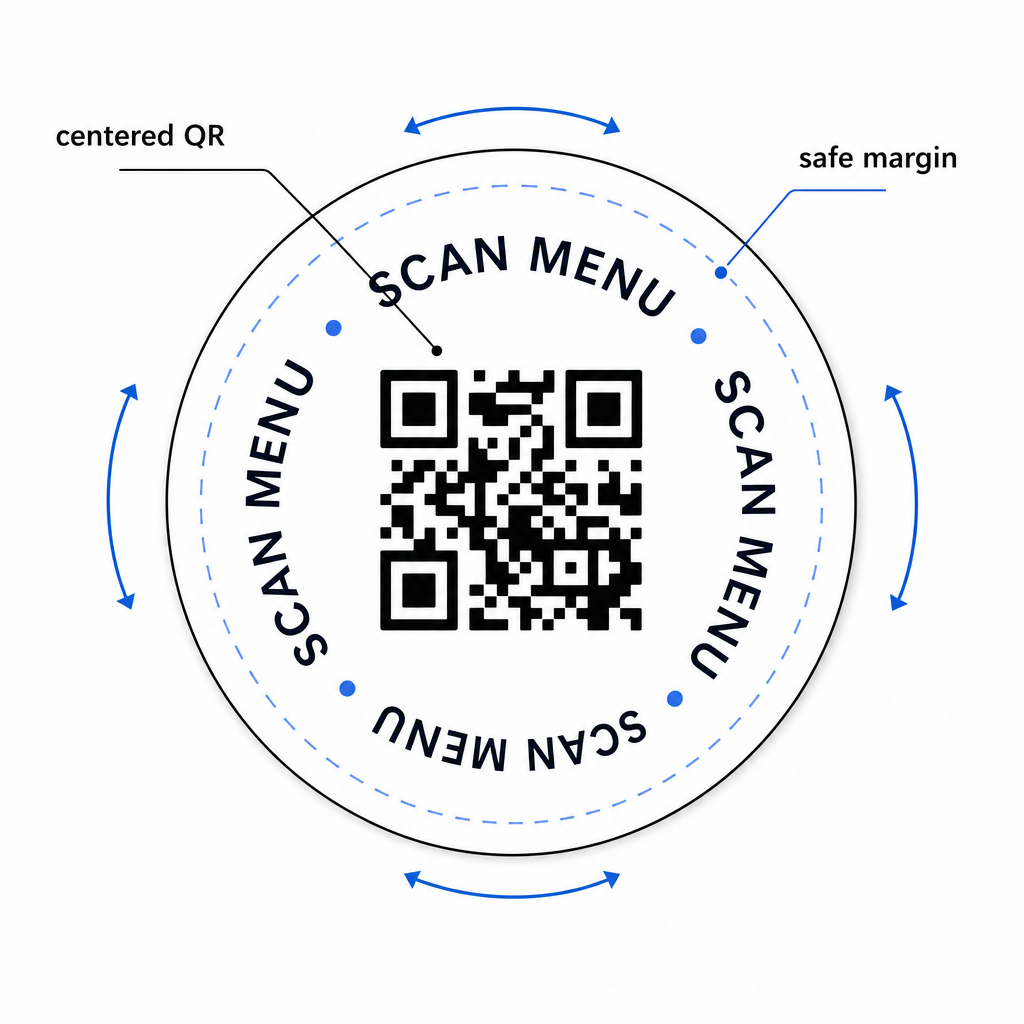
Plaats de QR-code en de call-to-action-tekst zo dat ze vanuit elke oriëntatie leesbaar blijven. Een ronde onderzetter die in elke richting kan worden geplaatst, moet de code gecentreerd hebben, met tekst eromheen gerangschikt in plaats van erboven of eronder, waar rotatie deze ondersteboven zou draaien. Als uw onderzetters een gedefinieerde oriëntatie hebben, plaats de code dan op een prominente, onbelemmerde plek weg van de rand van de onderzetter, zodat de stille zone nooit wordt afgesneden tijdens het stansen of trimmen.
Overweeg voor evenementen het gebruik van afzonderlijke onderzetters voor verschillende doeleinden – één voor het menu, één voor het evenementenprogramma, één voor een feedbackformulier. Door elke onderzetter te richten op één enkele actie, wordt de gastervaring vereenvoudigd en wordt het gemakkelijker om de prestaties van elke code afzonderlijk te volgen. Voor andere compacte QR-code-oppervlakken met vergelijkbare ontwerpbeperkingen, is de leidraad over QR-codes op tafelstandaards direct van toepassing.
Testen Voordat U in Bulk Print
Print een enkele testonderzetter voordat u zich verbindt aan een volledige productierun. Scan deze met ten minste drie verschillende apparaten onder de werkelijke lichtomstandigheden van uw locatie – bovenverlichting, kaarslicht of zonlicht buiten als uw ruimte een terras heeft. Test vanaf de realistische afstand waarop een zittende gast zijn telefoon zou vasthouden.
Bevestig dat:
- De code binnen drie seconden scant op alle testapparaten
- De bestemming correct laadt op mobiel, niet alleen op desktop
- De stille zone intact is en niet wordt afgesneden door de rand van de onderzetter
- Contrast behouden blijft onder schemerige lichtomstandigheden
Als u dynamische QR-codes gebruikt, controleer dan of de bestemmings-URL correct is geconfigureerd in uw Pageloot-dashboard vóór de testafdruk, en bevestig dat eventuele menu-updates of omleidingen die u na het afdrukken maakt, onmiddellijk worden weergegeven wanneer deze worden gescand.
Onderzetters zijn een van de weinige horeca-contactpunten die bij uw gast blijven vanaf het moment dat ze gaan zitten totdat ze vertrekken. Een goed ontworpen QR-code vermindert wrijving bij het bladeren door menu's, elimineert Wi-Fi-wachtwoordverzoeken en geeft u meetbare gegevens over hoe gasten omgaan met uw ruimte. De ontwerpvereisten zijn specifiek maar haalbaar: voldoende grootte, sterk contrast, een schone stille zone en een duidelijke call-to-action afgedrukt naast de code.
Begin met de juiste tools. Gebruik Pageloot's QR-code menukaart maken om een dynamische menucode te bouwen, de Wi-Fi QR-codegenerator voor naadloze toegang tot het gastnetwerk, en de analyse-dashboard om de betrokkenheid te volgen zodra uw onderzetters in omloop zijn.
Veelgestelde vragen
Technisch gezien wel, maar het wordt niet aanbevolen. Eén enkele QR-code wijst naar één bestemming, dus het combineren van beide functies betekent linken naar een landingspagina met twee afzonderlijke opties – wat een extra tik toevoegt voor de gast. Een schonere aanpak is om twee afzonderlijke QR-codes op de onderzetter te gebruiken, elk met een duidelijk label, of om afzonderlijke onderzetterontwerpen aan elk doel te wijden. Wi-Fi-codes zijn statisch en gratis te genereren; menucodes werken het beste als dynamische codes met tracking ingeschakeld.
Als u uw onderzetter QR-code als een dynamische code heeft gemaakt met Pageloot, kunt u inloggen op uw dashboard en de bestemmings-URL of menu-inhoud op elk gewenst moment bijwerken. De geprinte QR-code op de onderzetter blijft hetzelfde; alleen de gekoppelde inhoud verandert. Dit is een van de belangrijkste redenen waarom dynamische codes worden aanbevolen voor menu's – seizoensupdates, prijswijzigingen en beschikbaarheid van items kunnen allemaal onmiddellijk worden weergegeven zonder een nieuwe partij onderzetters te bestellen.
Met een dynamische QR-code en de analyses van Pageloot kunt u het totale aantal scans, unieke scans, de datum en tijd van elke scan, het gebruikte apparaattype (iOS of Android) en de geografische locatie tot op stadsniveau volgen. U kunt ook de prestaties vergelijken tussen verschillende plaatsingen als u afzonderlijke QR-codes toewijst aan verschillende tafelzones of gebieden van uw locatie. Statische QR-codes, inclusief Wi-Fi-codes, genereren geen scangegevens.