
Os seus convidados estão à procura da palavra-passe do Wi-Fi ou a chamar um servidor apenas para ver o menu? Estes pequenos pontos de atrito acumulam-se rapidamente, frustrando os clientes e atrasando a sua equipa. Este guia mostra-lhe exatamente como conceber, gerar e implementar códigos QR em bolachas para que uma única leitura resolva o problema – e lhe dê os dados para continuar a melhorar.
Por que as Bolachas São uma Superfície Prática para Códigos QR
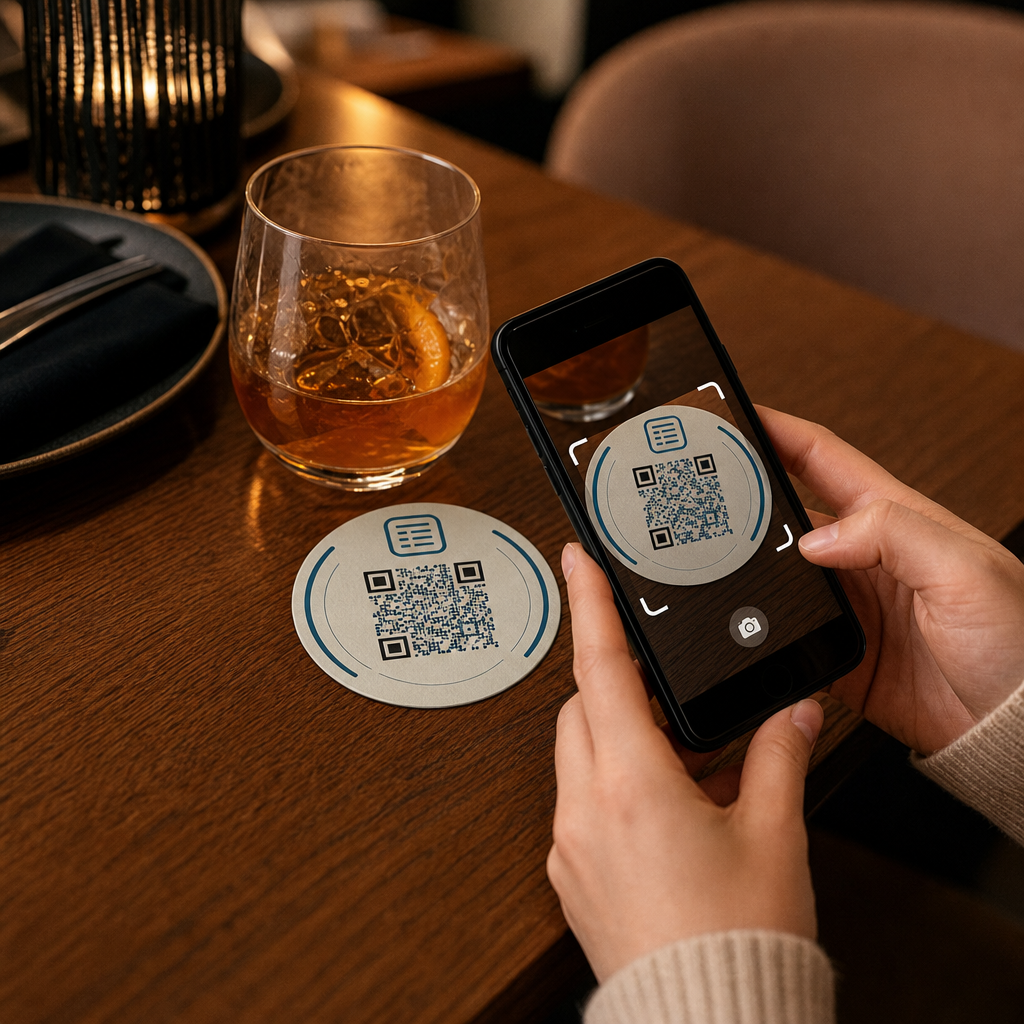
Cada bebida que chega a uma mesa vem com uma bolacha. Isso torna as bolachas uma das superfícies mais consistentemente vistas em qualquer ambiente de hospitalidade. Ao contrário dos expositores de mesa, que os convidados muitas vezes empurram para o lado, ou dos cartazes de parede que exigem que alguém se levante e se aproxime, uma bolacha fica diretamente à frente do seu cliente durante toda a visita.
Essa permanência torna as bolachas úteis para três tarefas específicas:
- Acesso ao menu – permitir que os convidados consultem alimentos e bebidas no momento em que se sentam
- Partilha de Wi-Fi – eliminar a necessidade de a equipa repetir a palavra-passe dezenas de vezes por turno
- Rastreamento de envolvimento do cliente – medir quantas pessoas estão a interagir com o seu conteúdo digital, quando e de que áreas do seu estabelecimento
Para uma visão mais ampla de como os códigos QR se encaixam em ambientes de hospitalidade, o padrão é consistente: quanto mais próximo o código estiver do convidado no momento em que ele precisa, maior a taxa de leitura. As bolachas são o mais próximo que se pode chegar.
Escolher o Tipo Certo de Código QR para Bolachas
Antes de imprimir qualquer coisa, precisa de decidir se vai usar um código QR estático ou dinâmico. A diferença tem consequências práticas especificamente para as bolachas, porque reimprimir é caro e demorado.
Códigos QR estáticos codificam informações diretamente no padrão. Não podem ser editados após a criação e não rastreiam leituras. Os códigos QR de Wi-Fi são um ajuste natural para o formato estático – as suas credenciais de rede raramente mudam, e não há necessidade de análises para esse caso de uso específico.
Códigos QR dinâmicos apontam para um URL de redirecionamento curto que pode atualizar a qualquer momento sem reimprimir a bolacha. Também registam cada leitura, gravando a hora, o tipo de dispositivo e a localização geográfica. Para acesso ao menu e rastreamento de envolvimento, os códigos dinâmicos são a escolha prática. Se o seu menu muda sazonalmente, ou se deseja trocar uma promoção sem encomendar novas bolachas, um código dinâmico permite-lhe fazer isso a partir do seu painel de controlo.
A troca é simples: os códigos estáticos são gratuitos e permanentes, enquanto os códigos dinâmicos exigem uma subscrição, mas oferecem flexibilidade e dados. Para a maioria dos negócios de hospitalidade com operações contínuas, a capacidade de atualizar o conteúdo sem reimprimir torna os códigos dinâmicos o melhor investimento a longo prazo. A análise completa de ambas as opções é abordada em códigos QR estáticos vs. dinâmicos página.
Crie Códigos QR Prontos para Bolachas em Minutos Use o Gerador de QR Code Dinâmico para criar códigos de menu, Wi-Fi e envolvimento que pode atualizar a qualquer momento – sem necessidade de reimpressão.
Configurar um Código QR de Menu para Bolachas
Um código QR de menu numa bolacha deve levar o seu convidado diretamente a um menu digital limpo e responsivo para dispositivos móveis no momento em que ele o lê. A configuração envolve duas decisões: em que formato o seu menu reside e como constrói o código QR em torno dele.
Da Pageloot Gerador de QR code para cardápio suporta duas abordagens. Primeiro, pode carregar um PDF existente – se já tiver um menu desenhado, pode ligá-lo através de um carregamento de ficheiro ou de um URL alojado, como um link do Google Drive ou Dropbox, que é o caminho mais rápido para ficar online. Segundo, pode construir uma página de destino de menu estruturada com categorias, fotos de itens, descrições e preços, e adicionar especiais sazonais, propostas diárias e imagens que um PDF nem sempre consegue exibir bem em dispositivos móveis.
Especificamente para bolachas, a abordagem da página de destino tende a ter um melhor desempenho. Os convidados estão nos seus telefones, e uma página otimizada para dispositivos móveis é mais fácil de navegar do que um PDF que exige "pinçar" e "zoom". Para uma análise mais aprofundada de como o pedido baseado em QR se encaixa num fluxo de trabalho de serviço completo, o guia sobre sistemas de pedido por código QR abrange o lado técnico e operacional em detalhe.
Uma vez configurado o seu menu, personalize o código QR com as cores da sua marca, logótipo e uma moldura com uma breve chamada para ação, como “Digitalize para ver o menu.” Este contexto ajuda os convidados a entender o que estão a digitalizar antes de o fazerem, o que melhora diretamente as taxas de leitura.
Configurar um Código QR de Wi-Fi para Bolachas
Partilhar credenciais de Wi-Fi através de uma bolacha é uma das aplicações mais simples e imediatamente úteis de códigos QR na hospitalidade. Um convidado lê o código e o seu dispositivo conecta-se automaticamente – sem palavra-passe visível, sem envolvimento da equipa, sem erros de digitação.
A configuração é simples usando o Pageloot's gerador de código QR de Wi-Fi. Insira o nome da sua rede (SSID), selecione o tipo de segurança (WPA/WPA2 é o mais comum), insira a senha da rede, personalize o design e faça o download. Como as credenciais de Wi-Fi raramente mudam, um código QR estático é suficiente aqui e não custa nada para gerar. Para um passo a passo completo do processo e conselhos de posicionamento, o guia para conectar convidados ao Wi-Fi via código QR cobre cada passo em detalhe.
Uma nota prática: se o seu local usa uma rede de convidados separada – o que é uma prática de segurança sólida – certifique-se de que o código QR codifica as credenciais da rede de convidados, não a sua rede operacional.
Rastreando o Engajamento do Cliente Através de Scans de Porta-copos
Os códigos QR de Wi-Fi são estáticos e não geram dados de scan. Mas para acesso ao menu e qualquer outro conteúdo de campanha que você coloca em porta-copos, os códigos QR dinâmicos oferecem uma visão em tempo real de como os convidados interagem com o seu espaço físico.
Da Pageloot painel de análise de códigos QR rastreia o seguinte para cada código dinâmico:
- Scans totais e scans únicos ao longo do tempo
- Data e hora de cada leitura
- Tipo de dispositivo (iOS, Android ou desktop)
- Localização geográfica até o nível da cidade
- Comparações de nível de posicionamento se você usa códigos separados para diferentes zonas de mesa ou áreas do local
Para uma operação multi-local ou um grande espaço para eventos, esses dados respondem a perguntas práticas: Quais áreas veem o maior engajamento? Os convidados escaneiam mais durante o serviço de almoço ou jantar? Os scans de menu estão aumentando nos dias que se correlacionam com as promoções que você realizou?
Você também pode vincular um Código QR do formulário do Google de um porta-copos para coletar feedback direto dos convidados. Uma breve pesquisa pós-refeição captura pontuações de satisfação e comentários sem exigir que a equipe distribua cartões de papel ou peça avaliações verbalmente. Para uma visão geral mais ampla de como os dados de scan podem aprimorar seu marketing e operações, o guia de rastreamento de código QR detalha as métricas que mais importam.
Veja Cada Scan à Medida que Acontece Rastreie o engajamento do menu, identifique seus períodos de maior movimento e meça o desempenho da campanha em tempo real com Analytics de Código QR da Pageloot.
Projetando um Código QR Que Escaneia Confiabilidade em um Porta-copos
Um porta-copos é um ambiente fisicamente exigente para um código QR. Ele fica molhado, é manuseado, empilhado e iluminado de forma desigual. Decisões de design que seriam adequadas em um pôster podem se tornar falhas de scan em um porta-copos.
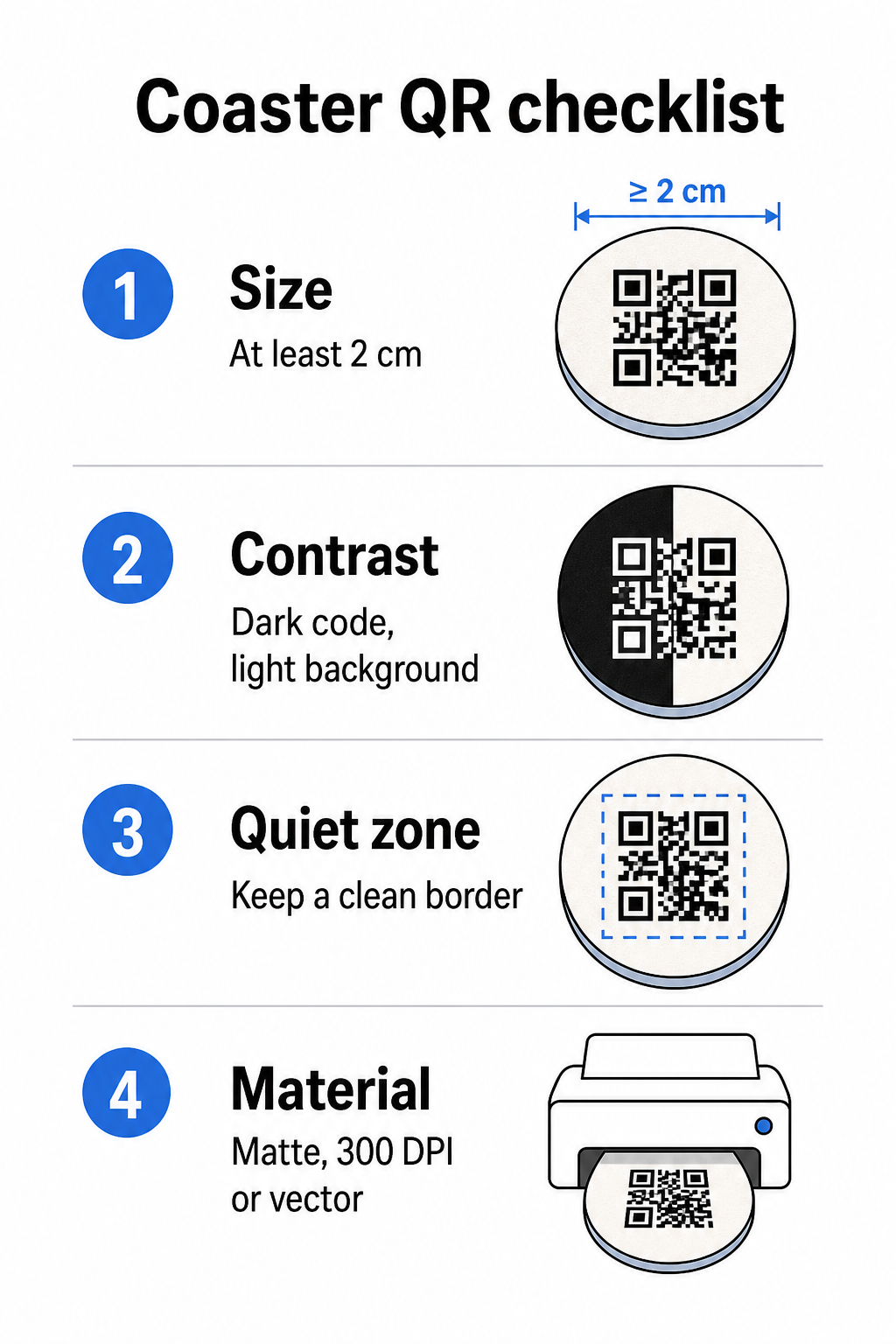
Tamanho é a sua primeira consideração. O tamanho mínimo confiável para um código QR é de 2 cm × 2 cm (aproximadamente 0,8 pol × 0,8 pol) para scan de curto alcance. Em um porta-copos redondo padrão – tipicamente de 3,5 a 4 polegadas de diâmetro – você tem espaço para aumentar, o que melhora a confiabilidade. A regra 10:1 se aplica aqui: a largura do código deve ser aproximadamente um décimo da distância máxima de scan. Um código de 1 polegada funciona a aproximadamente 10 polegadas; um código de 1,5 polegadas oferece uma margem mais confortável para o convidado sentado típico.
Contraste é o fator mais crítico para a confiabilidade do scan. Módulos escuros em um fundo claro – preto no branco sendo o padrão ouro – deve ser o seu ponto de partida. Muitas câmeras de smartphone e aplicativos de scanner têm dificuldade com designs invertidos (módulos claros em um fundo escuro), então evite essa combinação mesmo que pareça esteticamente melhor. Uma taxa de contraste mínima de 4:1 é a linha de base recomendada; maior é melhor. Evite fundos vermelhos ou laranjas, já que muitos sensores de câmera têm dificuldade em detectar essas tonalidades de forma confiável. A melhores práticas de contraste de cores para códigos QR página tem uma tabela de comparação detalhada se você está trabalhando com cores de marca que fogem da combinação padrão preto e branco.
Zona de silêncio refere-se à borda clara que deve cercar cada código QR – pelo menos 4 módulos de largura em todos os lados – sem texto, gráficos ou elementos de design intrusivos. Em um porta-copos, isso significa deixar uma margem sólida de cor clara ao redor do código. Se o design do seu porta-copos tem um fundo escuro ou visualmente carregado, adicione uma caixa de preenchimento branca sólida atrás do código QR que inclua a zona de silêncio completa. Sem ela, os scanners podem falhar em localizar o limite do código de forma confiável.
Acabamento e material importam mais em porta-copos do que na maioria das outras superfícies. Porta-copos de papelão são os mais comuns na hospitalidade – eles absorvem a condensação e protegem as superfícies da mesa, mas não são à prova d'água. Para códigos QR em porta-copos de papel, acabamentos foscos são preferíveis ao brilho porque o brilho da iluminação superior interfere no scan. Para aplicações de maior durabilidade, como instalações de mesa permanentes ou porta-copos reutilizáveis, materiais como madeira revestida com acabamento de epóxi ou poliuretano protegem a impressão enquanto permitem um scan confiável, desde que o acabamento seja transparente em vez de tingido. Independentemente do material, evite gradientes, sombras ou elementos transparentes dentro do próprio código QR – estes reduzem o contraste e comprometem a escaneabilidade em condições do mundo real.
Resolução é inegociável para impressão. Sempre baixe o seu código QR em formato vetorial (SVG ou EPS) ou com um mínimo de 300 DPI. Arquivos bitmap ampliados a partir de exportações de baixa resolução aparecerão borrados na impressão, o que reduz a confiabilidade da leitura mesmo quando o código parece aceitável na tela. Um conjunto completo de diretrizes de impressão e design está disponível em melhores práticas para legibilidade de códigos QR guia.
Posicionamento Prático e Contexto no Coaster
Um código QR sozinho não diz ao seu convidado o que ele faz. Adicionar uma chamada para ação de uma linha diretamente no coaster – “Digitalize para o menu,” “Conecte-se ao Wi-Fi,” “Compartilhe seu feedback” – remove a ambiguidade e aumenta a probabilidade de uma leitura. Isso é especialmente importante para convidados que estão menos familiarizados com códigos QR ou que estão distraídos por conversas.
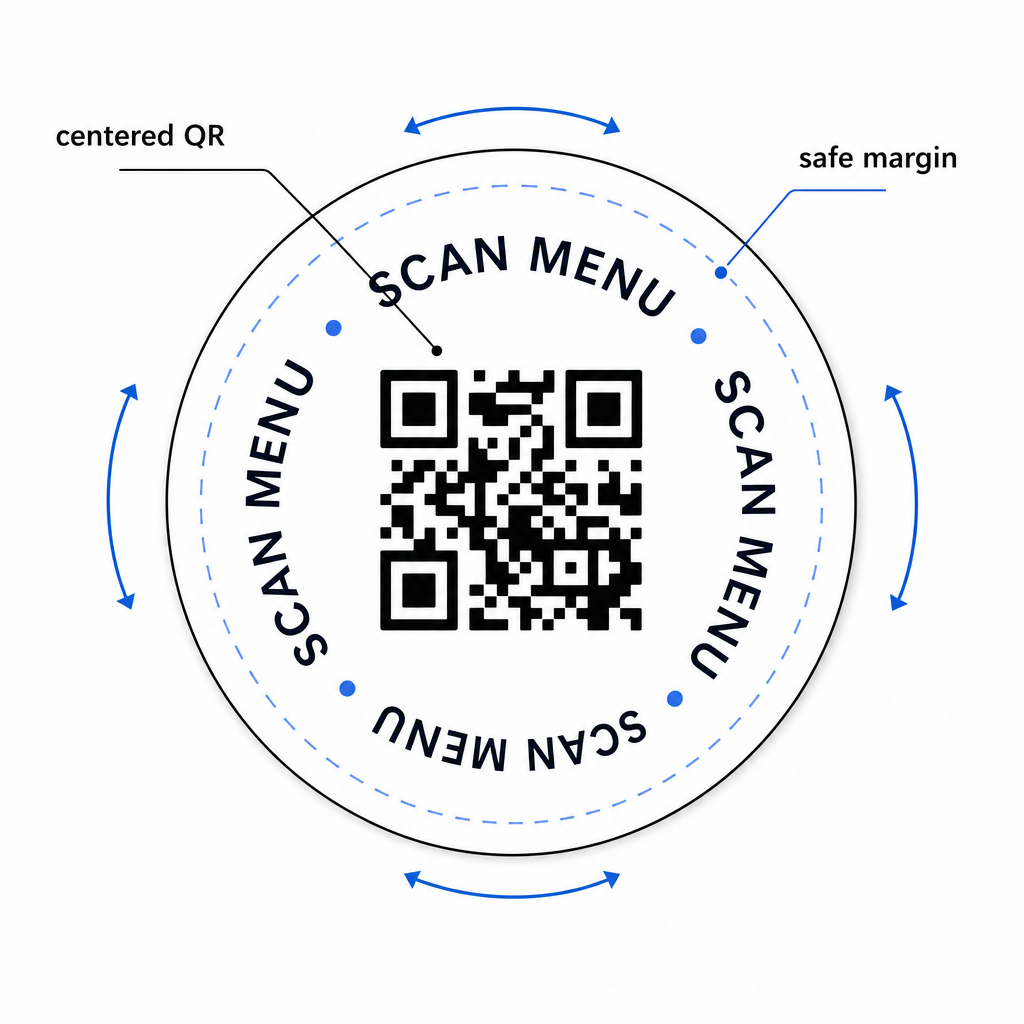
Posicione o código QR e o texto da chamada para ação para que permaneçam legíveis de qualquer orientação. Um coaster redondo que pode ser colocado em qualquer direção deve ter o código centralizado, com o texto disposto ao redor dele, em vez de acima ou abaixo, onde a rotação o viraria de cabeça para baixo. Se os seus coasters tiverem uma orientação definida, coloque o código em uma área proeminente e desobstruída, longe da borda do coaster, para que a zona de silêncio nunca seja cortada durante o corte ou aparagem.
Para eventos, considere usar coasters separados para propósitos distintos – um para o menu, um para a programação do evento, um para um formulário de feedback. Manter cada coaster focado em uma única ação simplifica a experiência do convidado e facilita o rastreamento do desempenho de cada código separadamente. Para outras superfícies compactas de código QR com restrições de design semelhantes, a orientação sobre Códigos QR em displays de mesa aplica-se diretamente.
Teste Antes de Imprimir em Massa
Imprima um único coaster de teste antes de se comprometer com uma produção em larga escala. Digitalize-o em pelo menos três dispositivos diferentes nas condições de iluminação reais do seu local – iluminação suspensa, luz de velas ou luz solar externa se o seu espaço tiver um pátio. Teste a uma distância realista em que um convidado sentado seguraria o seu telefone.
Confirme que:
- O código é lido em menos de três segundos em todos os dispositivos de teste
- O destino carrega corretamente no celular, não apenas no desktop
- A zona de silêncio está intacta e não cortada pela borda do coaster
- O contraste se mantém em condições de pouca luz
Se você estiver usando códigos QR dinâmicos, verifique se o URL de destino está configurado corretamente no seu painel Pageloot antes da impressão de teste, e confirme que quaisquer atualizações de menu ou redirecionamentos que você faça após a impressão são refletidos imediatamente quando digitalizados.
Coasters são um dos poucos pontos de contato de hospitalidade que permanecem com o seu convidado desde o momento em que se sentam até a partida. Um código QR bem projetado remove o atrito da navegação no menu, elimina solicitações de senha de Wi-Fi e fornece dados mensuráveis sobre como os convidados interagem com o seu espaço. Os requisitos de design são específicos, mas alcançáveis: tamanho suficiente, contraste forte, uma zona de silêncio limpa e uma chamada para ação clara impressa ao lado do código.
Comece com as ferramentas certas. Use o da Pageloot Gerador de QR code para cardápio para construir um código de menu dinâmico, o Gerador de Código QR de Wi-Fi para acesso contínuo à rede de convidados, e o análise integrado para rastrear o engajamento assim que os seus coasters estiverem em circulação.
Perguntas frequentes
Tecnicamente sim, mas não é recomendado. Um único código QR aponta para um destino, então combinar ambas as funções significa vincular a uma página de destino com duas opções separadas – adicionando um toque extra para o convidado. Uma abordagem mais limpa é usar dois códigos QR distintos no porta-copos, cada um com um rótulo claro, ou dedicar designs de porta-copos separados para cada finalidade. Códigos Wi-Fi são estáticos e gratuitos para gerar; códigos de menu funcionam melhor como códigos dinâmicos com rastreamento ativado.
Se você criou seu código QR do porta-copos como um código dinâmico usando Pageloot, você pode fazer login no seu painel e atualizar o URL de destino ou o conteúdo do menu a qualquer momento. O código QR impresso no porta-copos permanece o mesmo; apenas o conteúdo vinculado muda. Esta é uma das principais razões pelas quais códigos dinâmicos são recomendados para menus – atualizações sazonais, mudanças de preço e disponibilidade de itens podem ser todas refletidas imediatamente sem pedir um novo lote de porta-copos.
Com um código QR dinâmico e as análises da Pageloot, você pode rastrear o total de leituras, leituras únicas, a data e hora de cada leitura, o tipo de dispositivo usado (iOS ou Android) e a localização geográfica até o nível da cidade. Você também pode comparar o desempenho em diferentes posicionamentos se atribuir códigos QR separados a diferentes zonas de mesa ou áreas do seu local. Códigos QR estáticos, incluindo códigos Wi-Fi, não geram dados de leitura.