
Hľadajú vaši hostia heslo k Wi-Fi alebo signalizujú čašníkovi, aby si pozreli menu? Tieto malé trenia sa rýchlo sčítavajú, frustrujú zákazníkov a spomaľujú váš personál. Táto príručka vám presne ukáže, ako navrhnúť, vygenerovať a nasadiť QR kódy na podložky pod poháre, aby jediné skenovanie vyriešilo problém – a poskytlo vám údaje na neustále zlepšovanie.
Prečo sú podložky pod poháre praktickým povrchom pre QR kódy
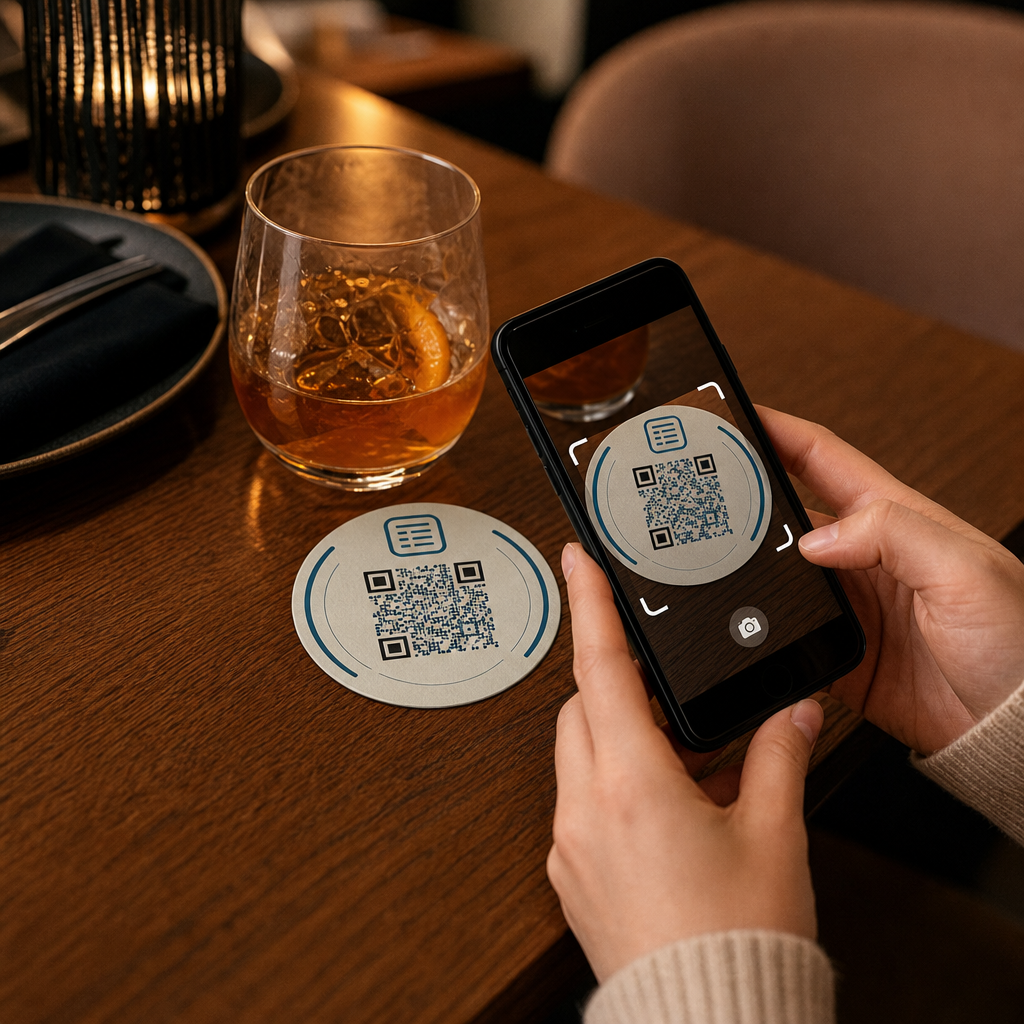
Každý nápoj, ktorý pristane na stole, prichádza s podložkou pod pohár. To robí z podložiek pod poháre jeden z najčastejšie prezeraných povrchov v akomkoľvek pohostinskom prostredí. Na rozdiel od stolových stojanov, ktoré hostia často odsunú, alebo nástenných plagátov, ktoré vyžadujú, aby sa niekto postavil a prešiel k nim, podložka pod pohár sedí priamo pred vaším zákazníkom počas celej návštevy.
Táto trvalá prítomnosť robí podložky pod poháre užitočnými pre tri konkrétne úlohy:
- Prístup k menu – umožniť hosťom prehliadať si jedlá a nápoje hneď, ako si sadnú
- Zdieľanie Wi-Fi – eliminovať potrebu, aby personál opakoval heslo desiatkykrát za smenu
- Sledovanie angažovanosti zákazníkov – merať, koľko ľudí interaguje s vaším digitálnym obsahom, kedy a z ktorých oblastí vášho podniku
Pre širší pohľad na to, ako sa QR kódy hodia do pohostinských prostredí, vzor je konzistentný: čím bližšie je kód k hosťovi v momente, keď ho potrebuje, tým vyššia je miera skenovania. Podložky pod poháre sú tak blízko, ako sa len dá.
Výber správneho typu QR kódu pre podložky pod poháre
Predtým, ako čokoľvek vytlačíte, musíte sa rozhodnúť, či použijete statický alebo dynamický QR kód. Rozdiel má praktické dôsledky špecificky pre podložky pod poháre, pretože opätovná tlač je drahá a časovo náročná.
Statické kódy QR kódujú informácie priamo do vzoru. Po vytvorení ich nemožno upravovať a nesledujú skeny. QR kódy pre Wi-Fi sú prirodzene vhodné pre statický formát – vaše sieťové poverenia sa menia zriedka a pre tento konkrétny prípad použitia nie sú potrebné žiadne analýzy.
Dynamické kódy QR odkazujú na krátku presmerovaciu URL, ktorú môžete kedykoľvek aktualizovať bez opätovnej tlače podložky. Zaznamenávajú tiež každé skenovanie, čas, typ zariadenia a geografickú polohu. Pre prístup k menu a sledovanie interakcií sú dynamické kódy praktickou voľbou. Ak sa vaše menu mení sezónne, alebo ak chcete vymeniť akciu bez objednávania nových podložiek, dynamický kód vám to umožní z vášho ovládacieho panela.
Kompromis je jednoduchý: statické kódy sú bezplatné a trvalé, zatiaľ čo dynamické kódy vyžadujú predplatné, ale poskytujú vám flexibilitu a dáta. Pre väčšinu pohostinských podnikov s nepretržitou prevádzkou je možnosť aktualizovať obsah bez opätovnej tlače dynamických kódov lepšou dlhodobou investíciou. Úplný rozpis oboch možností je uvedený na statických vs. dynamických QR kódov strana.
Vytvorte QR kódy pripravené na podložky za pár minút Použi Dynamický QR kód generátor na vytvorenie kódov pre menu, Wi-Fi a interakcie, ktoré môžete kedykoľvek aktualizovať – bez nutnosti opätovnej tlače.
Nastavenie QR kódu menu pre podložky
QR kód menu na podložke by mal vášho hosťa okamžite po naskenovaní presmerovať priamo na čisté, mobilne responzívne digitálne menu. Nastavenie zahŕňa dve rozhodnutia: v akom formáte je vaše menu a ako okolo neho vytvoríte QR kód.
Pageloot Generátor QR menu podporuje dva prístupy. Po prvé, môžete nahrať existujúci PDF súbor – ak už máte navrhnuté menu, môžete ho prepojiť prostredníctvom nahrania súboru alebo hostovanej URL adresy, ako je odkaz na Google Drive alebo Dropbox, čo je najrýchlejšia cesta k online prítomnosti. Po druhé, môžete vytvoriť štruktúrovanú vstupnú stránku menu s kategóriami, fotografiami položiek, popismi a cenami a pridať sezónne špeciality, denné ponuky a obrázky, ktoré PDF súbor nemusí vždy dobre zobraziť na mobile.
Konkrétne pre podložky má prístup s vstupnou stránkou tendenciu fungovať lepšie. Hostia používajú svoje telefóny a mobilne optimalizovaná stránka sa ľahšie naviguje ako PDF, ktoré vyžaduje približovanie a posúvanie. Pre hlbší pohľad na to, ako sa objednávanie pomocou QR kódov hodí do plnohodnotného pracovného postupu, si pozrite sprievodcu na Systémy objednávania pomocou QR kódov pokrýva technickú a prevádzkovú stránku podrobne.
Keď je vaše menu nakonfigurované, prispôsobte QR kód farbami vašej značky, logom a rámom s krátkou výzvou k akcii, ako napríklad “Naskenujte pre zobrazenie menu.” Tento kontext pomáha hosťom pochopiť, čo skenujú predtým, ako to urobia, čo priamo zlepšuje mieru skenovania.
Nastavenie QR kódu Wi-Fi pre tácky
Zdieľanie prihlasovacích údajov Wi-Fi prostredníctvom tácky je jednou z najjednoduchších a najbezprostrednejšie užitočných aplikácií QR kódov v pohostinstve. Hosť naskenuje kód a jeho zariadenie sa pripojí automaticky – žiadne viditeľné heslo, žiadna účasť personálu, žiadne preklepy.
Nastavenie je jednoduché pomocou Pagelootu generátor QR kódov Wi-Fi. Zadajte názov siete (SSID), vyberte typ zabezpečenia (WPA/WPA2 je najbežnejší), zadajte heslo siete, prispôsobte dizajn a stiahnite. Pretože prihlasovacie údaje Wi-Fi sa menia zriedka, statický QR kód je tu dostatočný a jeho generovanie nič nestojí. Pre kompletný návod na proces a rady ohľadom umiestnenia, sprievodca pripojením hostí k Wi-Fi pomocou QR kódu pokrýva každý krok podrobne.
Jedna praktická poznámka: ak vaše zariadenie používa samostatnú hosťovskú sieť – čo je dobrá bezpečnostná prax – uistite sa, že QR kód kóduje prihlasovacie údaje hosťovskej siete, nie vašej prevádzkovej siete.
Sledovanie angažovanosti zákazníkov prostredníctvom skenov podložiek
QR kódy Wi-Fi sú statické a negenerujú údaje o skenovaní. Ale pre prístup k menu a akýkoľvek iný obsah kampane, ktorý umiestnite na podložky, dynamické QR kódy vám poskytujú živý pohľad na to, ako hostia interagujú s vaším fyzickým priestorom.
Pageloot analytický panel QR kódov sleduje nasledujúce pre každý dynamický kód:
- Celkový počet skenov a jedinečných skenov v čase
- Dátum a čas každého skenovania
- Typ zariadenia (iOS, Android alebo desktop)
- Geografická poloha až na úroveň mesta
- Porovnania na úrovni umiestnenia, ak používate samostatné kódy pre rôzne stolové zóny alebo oblasti podniku
Pre prevádzku s viacerými podnikmi alebo veľký eventový priestor tieto údaje odpovedajú na praktické otázky: Ktoré oblasti vykazujú najväčšiu angažovanosť? Skenujú hostia viac počas obeda alebo večere? Stúpa počet skenov menu v dňoch, ktoré korelujú s vami spustenými akciami?
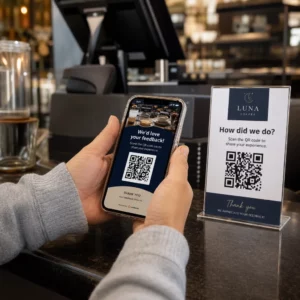
Môžete tiež prepojiť Kód QR formulára Google z podložky na zber priamej spätnej väzby od hostí. Krátky prieskum po jedle zachytáva skóre spokojnosti a komentáre bez toho, aby personál musel rozdávať papierové karty alebo ústne žiadať o recenzie. Pre širší prehľad o tom, ako môžu údaje zo skenov zlepšiť váš marketing a prevádzku, sprievodcovi sledovaním QR kódov prechádza metrikami, ktoré sú najdôležitejšie.
Pozrite si každý sken, ako sa deje Sledujte angažovanosť menu, identifikujte svoje najrušnejšie obdobia a merajte výkonnosť kampaní v reálnom čase pomocou Analytika QR kódov Pagelootu.
Navrhovanie QR kódu, ktorý spoľahlivo skenuje na podložke
Podložka je fyzicky náročné prostredie pre QR kód. Zmokne, manipuluje sa s ňou, stohuje sa a je nerovnomerne osvetlená. Dizajnové rozhodnutia, ktoré by boli v poriadku na plagáte, sa môžu stať zlyhaniami skenovania na podložke.
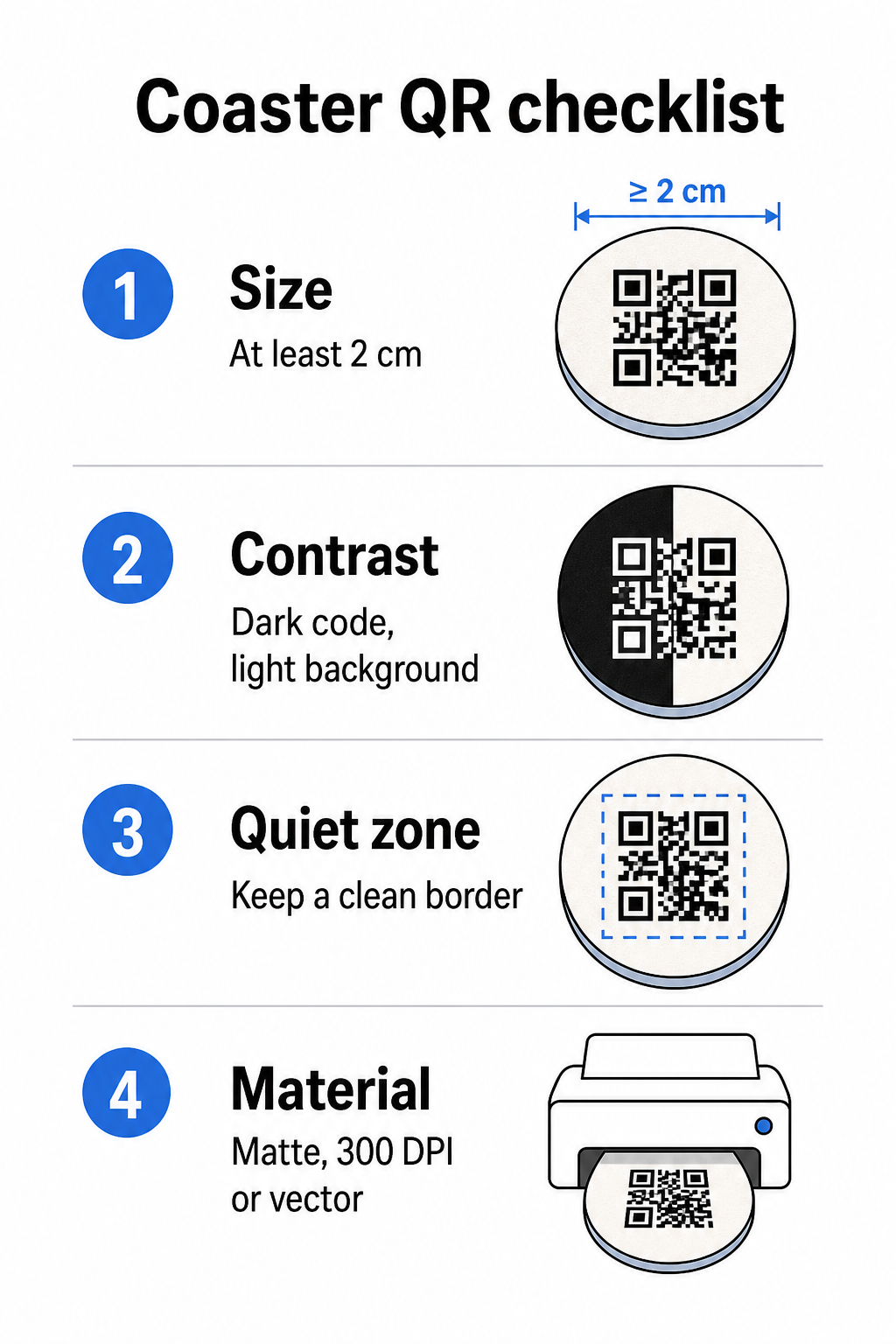
Veľkosť je vaša prvá úvaha. Minimálna spoľahlivá veľkosť pre QR kód je 2 cm × 2 cm (približne 0,8 palca × 0,8 palca) pre skenovanie zblízka. Na štandardnej okrúhlej podložke – typicky s priemerom 3,5 až 4 palce – máte priestor na zväčšenie, čo zlepšuje spoľahlivosť. Pravidlo 10:1 platí tu: šírka kódu by mala byť približne jedna desatina maximálnej vzdialenosti skenovania. 1-palcový kód funguje približne na 10 palcov; 1,5-palcový kód poskytuje pohodlnejšiu rezervu pre typického sediaceho hosťa.
Kontrast je najkritickejším faktorom pre spoľahlivosť skenovania. Tmavé moduly na svetlom pozadí – čierna na bielej je zlatý štandard – by mali byť vaším východiskovým bodom. Mnohé fotoaparáty smartfónov a skenovacie aplikácie majú problémy s invertovanými dizajnmi (svetlé moduly na tmavom pozadí), takže sa tejto kombinácii vyhnite, aj keď vyzerá esteticky lepšie. Minimálny kontrastný pomer 4:1 je odporúčaný základ; vyšší je lepší. Vyhnite sa červeným alebo oranžovým poprediam, pretože mnohé snímače fotoaparátov majú problémy so spoľahlivou detekciou týchto odtieňov. osvedčené postupy pre farebný kontrast QR kódov stránka obsahuje podrobnú porovnávaciu tabuľku, ak pracujete s farbami značky, ktoré spadajú mimo štandardnej čierno-bielej kombinácie.
Tichá zóna sa vzťahuje na jasný okraj, ktorý musí obklopovať každý QR kód – minimálne 4 moduly široký zo všetkých strán – bez zasahujúceho textu, grafiky alebo dizajnových prvkov. Na podložke to znamená ponechať okolo kódu pevný svetlý okraj. Ak má váš dizajn podložky tmavé alebo vizuálne rušné pozadie, pridajte za QR kód pevný biely výplňový box, ktorý zahŕňa celú tichú zónu. Bez neho môžu skenery zlyhať pri spoľahlivom nájdení hranice kódu.
Povrchová úprava a materiál záleží viac na podložkách ako na väčšine iných povrchov. Podložky z kartónového papiera sú najbežnejšie v pohostinstve – absorbujú kondenzáciu a chránia povrchy stolov, ale nie sú vodotesné. Pre QR kódy na papierových podložkách sú matné povrchové úpravy preferované pred lesklými, pretože odlesky z horného osvetlenia rušia skenovanie. Pre aplikácie s vyššou odolnosťou, ako sú trvalé inštalácie na stoly alebo opakovane použiteľné podložky, materiály ako potiahnuté drevo s epoxidovou alebo polyuretánovou úpravou chránia tlač a zároveň umožňujú spoľahlivé skenovanie, za predpokladu, že povrchová úprava je číra a nie tónovaná. Bez ohľadu na materiál sa vyhnite prechodom, tieňom alebo priehľadným prvkom v samotnom QR kóde – tie znižujú kontrast a narúšajú skenovateľnosť v reálnych podmienkach.
Rozlíšenie je nevyhnutné pre tlač. Vždy si stiahnite svoj QR kód vo vektorovom formáte (SVG alebo EPS) alebo s minimálnym rozlíšením 300 DPI. Bitmapové súbory zväčšené z exportov s nízkym rozlíšením sa budú v tlači javiť rozmazané, čo znižuje spoľahlivosť skenovania, aj keď kód vyzerá na obrazovke prijateľne. Kompletný súbor pokynov pre tlač a dizajn je k dispozícii v osvedčených postupov pre čitateľnosť QR kódov sprievodcovi.
Praktické umiestnenie a kontext na podložke
Samotný QR kód nehovorí vášmu hosťovi, čo robí. Pridanie jedno-riadkového výzvy na akciu priamo na podložku – “Naskenujte pre menu”, “Pripojte sa k Wi-Fi”, “Zdieľajte svoju spätnú väzbu” – odstraňuje nejednoznačnosť a zvyšuje pravdepodobnosť skenovania. To je obzvlášť dôležité pre hostí, ktorí sú menej oboznámení s QR kódmi alebo sú rozptýlení konverzáciou.
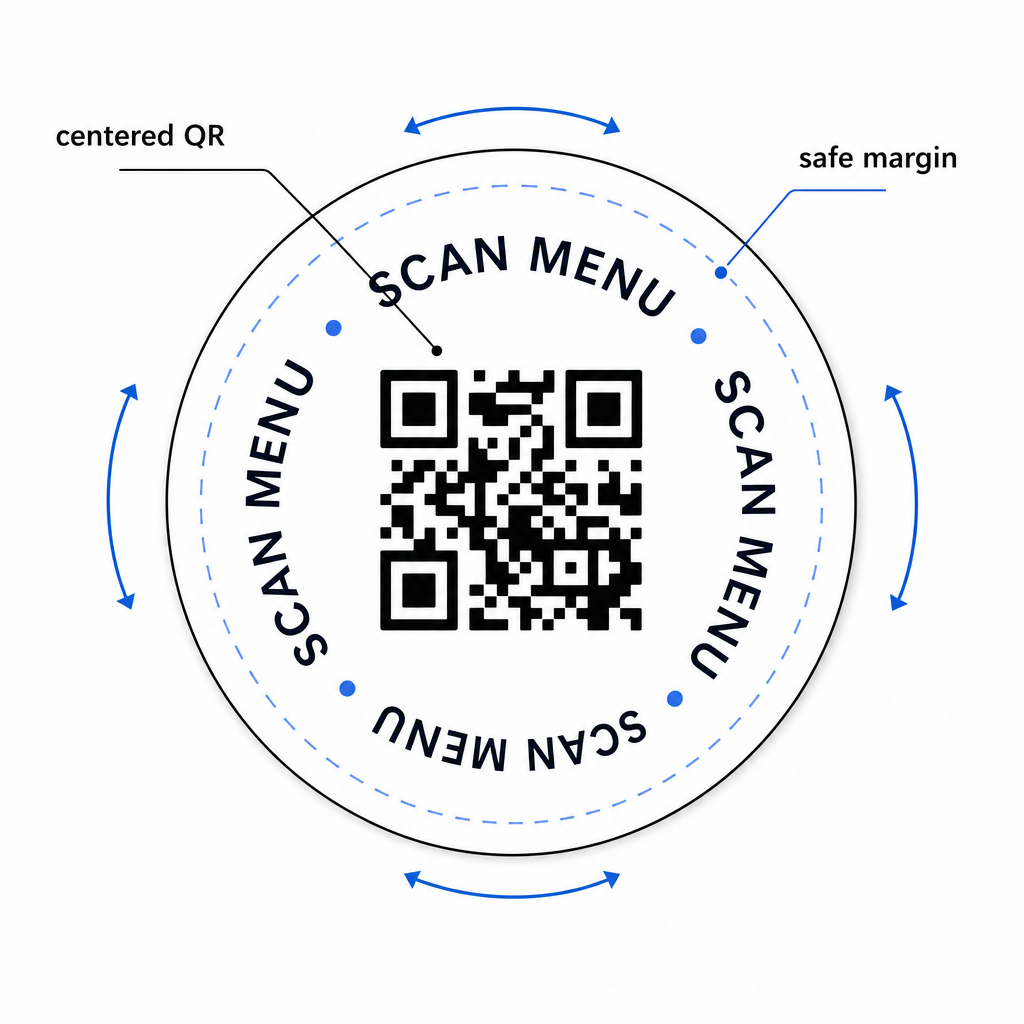
Umiestnite QR kód a text výzvy na akciu tak, aby zostali čitateľné z akejkoľvek orientácie. Okrúhla podložka, ktorú možno umiestniť v akomkoľvek smere, by mala mať kód vycentrovaný, s textom usporiadaným okolo neho, a nie nad alebo pod ním, kde by ho rotácia prevrátila hore nohami. Ak majú vaše podložky definovanú orientáciu, umiestnite kód na prominentné, neobmedzené miesto ďalej od okraja podložky, aby tichá zóna nebola nikdy odrezaná počas vysekávania alebo orezávania.
Pre podujatia zvážte použitie samostatných podložiek na rôzne účely – jedna pre menu, jedna pre program podujatia, jedna pre formulár spätnej väzby. Udržiavanie každej podložky zameranej na jednu akciu zjednodušuje zážitok hosťa a uľahčuje samostatné sledovanie výkonu každého kódu. Pre iné kompaktné povrchy s QR kódmi s podobnými dizajnovými obmedzeniami platí usmernenie pre QR kódy na stolových stojanoch platí priamo.
Testovanie pred hromadnou tlačou
Vytlačte jednu testovaciu podložku pred spustením plnej produkcie. Naskenujte ju aspoň tromi rôznymi zariadeniami v skutočných svetelných podmienkach vášho podniku – horné osvetlenie, svetlo sviečok alebo vonkajšie slnečné svetlo, ak má váš priestor terasu. Testujte z realistickej vzdialenosti, v ktorej by sediaci hosť držal svoj telefón.
Potvrďte, že:
- Kód sa naskenuje za menej ako tri sekundy na všetkých testovacích zariadeniach
- Cieľ sa načíta správne na mobilnom zariadení, nielen na počítači
- Tichá zóna je neporušená a nie je orezaná okrajom podložky
- Kontrast sa udržiava aj pri slabom osvetlení
Ak používate dynamické QR kódy, overte, či je cieľová URL adresa správne nakonfigurovaná vo vašom Pageloot paneli pred testovacou tlačou, a potvrďte, že akékoľvek aktualizácie menu alebo presmerovania, ktoré vykonáte po tlači, sa okamžite prejavia pri skenovaní.
Podložky sú jedným z mála kontaktných bodov v pohostinstve, ktoré zostávajú s vaším hosťom od chvíle, keď si sadne, až kým neodíde. Dobre navrhnutý QR kód odstraňuje trenie pri prehliadaní menu, eliminuje požiadavky na heslo Wi-Fi a poskytuje vám merateľné údaje o tom, ako hostia interagujú s vaším priestorom. Požiadavky na dizajn sú špecifické, ale dosiahnuteľné: dostatočná veľkosť, silný kontrast, čistá tichá zóna a jasná výzva na akciu vytlačená vedľa kódu.
Začnite so správnymi nástrojmi. Použite Pageloot’s Generátor QR menu na vytvorenie dynamického kódu menu, ten Generátor Wi-Fi QR kódov pre bezproblémový prístup k hosťovskej sieti, a ten analytický panel na sledovanie angažovanosti, keď sú vaše podložky v obehu.
Často kladené otázky
Technicky áno, ale neodporúča sa. Jeden QR kód smeruje na jednu destináciu, takže kombinovanie oboch funkcií znamená prepojenie na vstupnú stránku s dvoma samostatnými možnosťami – pridanie dodatočného ťuknutia pre hosťa. Čistejší prístup je použiť dva odlišné QR kódy na podložke, každý s jasným označením, alebo venovať samostatné dizajny podložiek každému účelu. Wi-Fi kódy sú statické a zadarmo na generovanie; kódy menu fungujú najlepšie ako dynamické kódy s povoleným sledovaním.
Ak ste vytvorili váš QR kód na podložke ako dynamický kód pomocou Pageloot, môžete sa prihlásiť do vášho ovládacieho panela a kedykoľvek aktualizovať cieľovú URL adresu alebo obsah menu. Vytlačený QR kód na podložke zostáva rovnaký; mení sa iba prepojený obsah. Toto je jeden z hlavných dôvodov, prečo sa dynamické kódy odporúčajú pre menu – sezónne aktualizácie, zmeny cien a dostupnosť položiek sa môžu okamžite prejaviť bez objednania novej várky podložiek.
S dynamickým QR kódom a analytikou Pageloot môžete sledovať celkový počet skenov, unikátne skeny, dátum a čas každého skenu, typ použitého zariadenia (iOS alebo Android) a geografickú polohu na úrovni mesta. Môžete tiež porovnať výkonnosť naprieč rôznymi umiestneniami, ak priradíte samostatné QR kódy rôznym stolovým zónam alebo oblastiam vášho podniku. Statické QR kódy, vrátane Wi-Fi kódov, negenerujú žiadne údaje o skenovaní.