
首页 > 使用案例 > QR Codes on Coasters: A Guide for Hospitality and Events
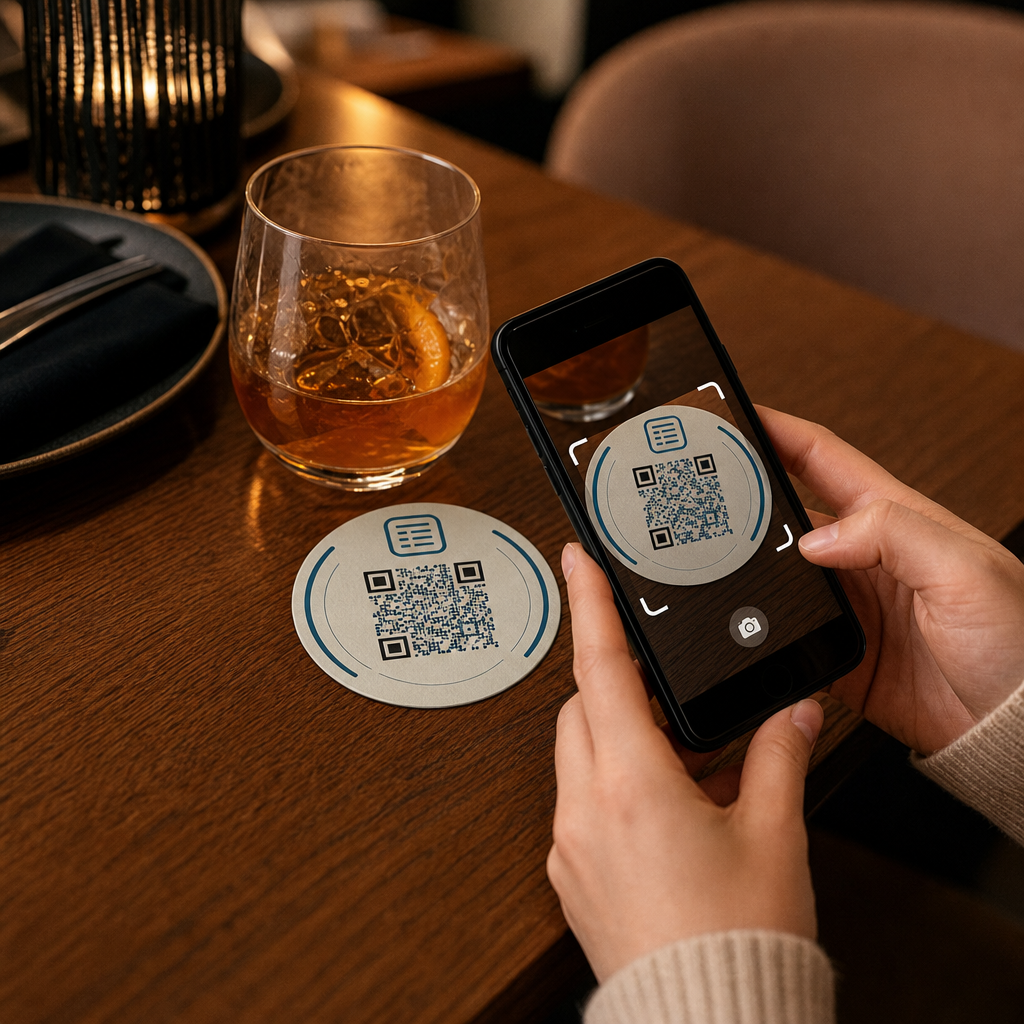
QR coaster scan

QR Codes on Coasters: A Guide for Hospitality and Events

Learn how to design and use QR codes on coasters for menus and Wi-Fi. This guide covers setup, scan tracking, and design tips to improve guest service.
Updated on 7 月 2, 2026
目录

Are your guests hunting for the Wi-Fi password or flagging down a server just to see the menu? These small friction points add up fast, frustrating customers and slowing your staff. This guide shows you exactly how to design, generate, and deploy QR codes on coasters so that a single scan solves the problem – and gives you the data to keep improving.

Why Coasters Are a Practical QR Code Surface

Every drink that lands on a table comes with a coaster. That makes coasters one of the most consistently viewed surfaces in any hospitality environment. Unlike table tents, which guests often push aside, or wall-mounted posters that require someone to stand up and walk over, a coaster sits directly in front of your customer for the entire visit.

That staying power makes coasters useful for three specific jobs:

  • Menu access – let guests browse food and drinks the moment they sit down
  • Wi-Fi sharing – eliminate the need for staff to repeat the password dozens of times per shift
  • Customer engagement tracking – measure how many people are interacting with your digital content, when, and from which areas of your venue

For a broader look at how QR codes fit across hospitality environments, the pattern is consistent: the closer the code is to the guest at the moment they need it, the higher the scan rate. Coasters are as close as it gets.

Choosing the Right QR Code Type for Coasters

Before you print anything, you need to decide whether to use a static or dynamic QR code. The difference has practical consequences for coasters specifically, because reprinting is expensive and time-consuming.

静态二维码 encode information directly into the pattern. They cannot be edited after creation, and they do not track scans. Wi-Fi QR codes are a natural fit for the static format – your network credentials rarely change, and there is no need for analytics on that specific use case.

动态 QR 码 point to a short redirect URL that you can update at any time without reprinting the coaster. They also log every scan, recording the time, device type, and geographic location. For menu access and engagement tracking, dynamic codes are the practical choice. If your menu changes seasonally, or if you want to swap in a promotion without ordering new coasters, a dynamic code lets you do that from your dashboard.

The trade-off is straightforward: static codes are free and permanent, while dynamic codes require a subscription but give you flexibility and data. For most hospitality businesses running ongoing operations, the ability to update content without reprinting makes dynamic codes the better long-term investment. The full breakdown of both options is covered on the 静态与动态二维码 page.

Create Coaster-Ready QR Codes in Minutes 使用 动态二维码生成器 to build menu, Wi-Fi, and engagement codes that you can update anytime – no reprinting required.

Setting Up a Menu QR Code for Coasters

A menu QR code on a coaster should take your guest directly to a clean, mobile-responsive digital menu the moment they scan. The setup involves two decisions: what format your menu lives in, and how you build the QR code around it.

Pageloot 的 Menu QR code generator supports two approaches. First, you can upload an existing PDF – if you already have a designed menu, you can link it via a file upload or a hosted URL such as a Google Drive or Dropbox link, which is the fastest path to getting online. Second, you can build a structured menu landing page with categories, item photos, descriptions, and pricing, and add seasonal specials, daily propositions, and images that a PDF cannot always display well on mobile.

For coasters specifically, the landing page approach tends to perform better. Guests are on their phones, and a mobile-optimized page is easier to navigate than a PDF that requires pinching and zooming. For a deeper look at how QR-based ordering fits into a full-service workflow, the guide on QR code ordering systems covers the technical and operational side in detail.

Once your menu is configured, customize the QR code with your brand colors, logo, and a frame with a short call-to-action such as “Scan to see the menu.” This context helps guests understand what they are scanning before they do it, which directly improves scan rates.

Setting Up a Wi-Fi QR Code for Coasters

Sharing Wi-Fi credentials via a coaster is one of the simplest and most immediately useful applications of QR codes in hospitality. A guest scans the code and their device connects automatically – no password visible, no staff involvement, no typos.

The setup is straightforward using Pageloot’s Wi-Fi二维码生成器. Enter your network name (SSID), select your security type (WPA/WPA2 is most common), enter the network password, customize the design, and download. Because Wi-Fi credentials rarely change, a static QR code is sufficient here and costs nothing to generate. For a full walkthrough of the process and placement advice, the guide to connecting guests to Wi-Fi via QR code covers every step in detail.

One practical note: if your venue uses a separate guest network – which is a sound security practice – make sure the QR code encodes the guest network credentials, not your operational network.

Tracking Customer Engagement Through Coaster Scans

Wi-Fi QR codes are static and do not generate scan data. But for menu access and any other campaign content you put on coasters, dynamic QR codes give you a live view of how guests interact with your physical space.

Pageloot 的 二维码分析仪表板 tracks the following for each dynamic code:

  • Total scans and unique scans over time
  • Date and time of each scan
  • Device type (iOS, Android, or desktop)
  • Geographic location down to city level
  • Placement-level comparisons if you use separate codes for different table zones or venue areas

For a multi-venue operation or a large event space, this data answers practical questions: Which areas see the most engagement? Do guests scan more during lunch or dinner service? Are menu scans spiking on days that correlate with promotions you ran?

You can also link a 谷歌表格二维码 from a coaster to collect direct guest feedback. A brief post-meal survey captures satisfaction scores and comments without requiring staff to hand out paper cards or ask for reviews verbally. For a broader overview of how scan data can sharpen your marketing and operations, the QR code tracking guide walks through the metrics that matter most.

See Every Scan as It Happens Track menu engagement, identify your busiest periods, and measure campaign performance in real time with Pageloot’s QR Code Analytics.

Designing a QR Code That Scans Reliably on a Coaster

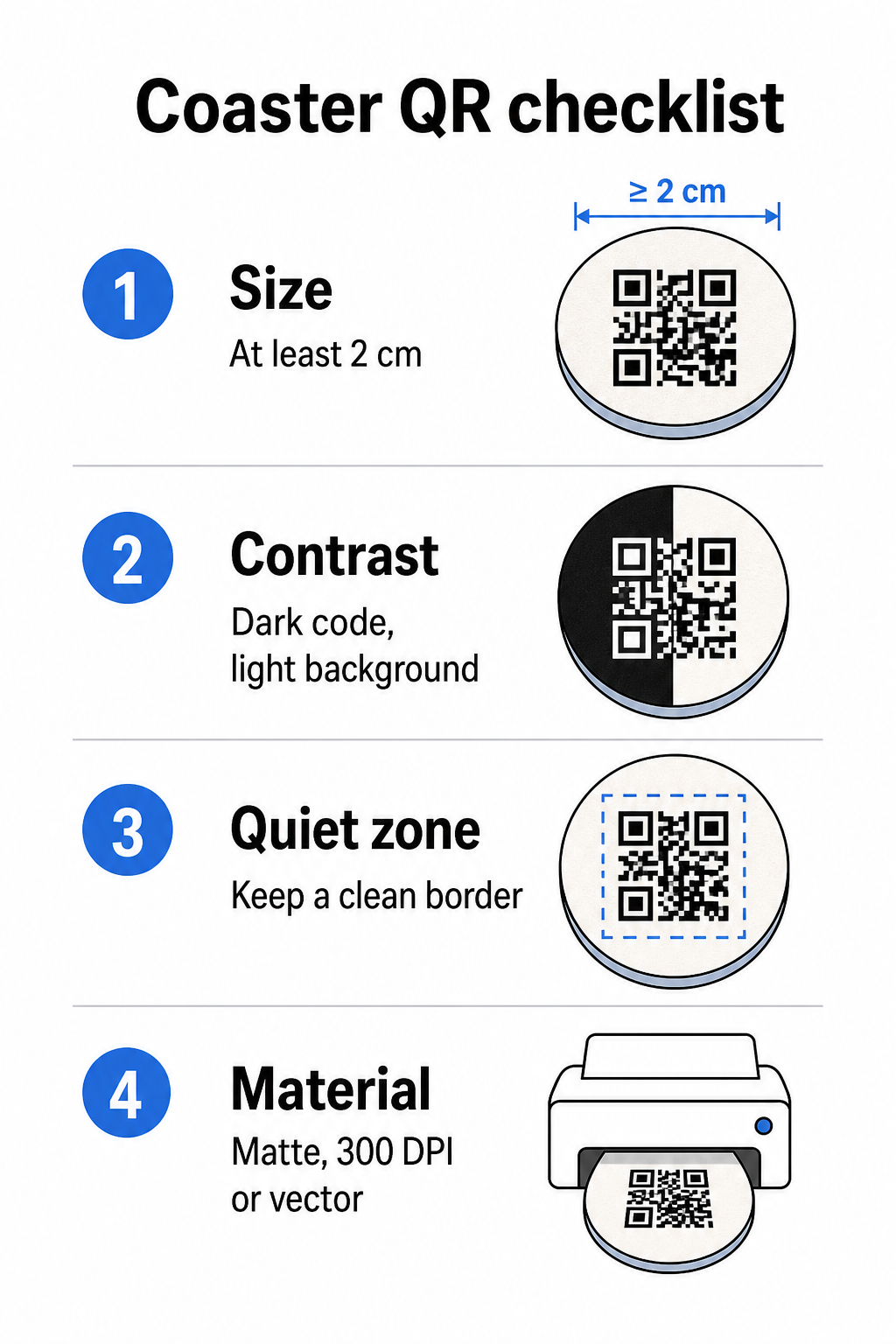
A coaster is a physically demanding environment for a QR code. It gets wet, handled, stacked, and lit unevenly. Design decisions that would be fine on a poster can become scan failures on a coaster.

Coaster QR tips

尺寸 is your first consideration. The minimum reliable size for a QR code is 2 cm × 2 cm (approximately 0.8 in × 0.8 in) for close-range scanning. On a standard round coaster – typically 3.5 to 4 inches in diameter – you have room to go larger, which improves reliability. The 10:1 rule applies here: the code width should be roughly one-tenth of the maximum scanning distance. A 1-inch code works at roughly 10 inches; a 1.5-inch code gives more comfortable margin for the typical seated guest.

对比 is the most critical factor for scan reliability. Dark modules on a light background – black on white being the gold standard – should be your starting point. Many smartphone cameras and scanner apps struggle with inverted designs (light modules on a dark background), so avoid that combination even if it looks better aesthetically. A minimum contrast ratio of 4:1 is the recommended baseline; higher is better. Avoid red or orange foregrounds, since many camera sensors have difficulty detecting these hues reliably. The 二维码颜色对比度最佳实践 page has a detailed comparison table if you are working with brand colors that fall outside the standard black-and-white combination.

Quiet zone refers to the clear border that must surround every QR code – at least 4 modules wide on all sides – with no text, graphics, or design elements intruding. On a coaster, this means leaving a solid light-colored margin around the code. If your coaster design has a dark or visually busy background, add a solid white padding box behind the QR code that includes the full quiet zone. Without it, scanners can fail to locate the code boundary reliably.

Finish and material matter more on coasters than on most other surfaces. Pulpboard paper coasters are the most common in hospitality – they absorb condensation and protect table surfaces, but they are not waterproof. For QR codes on paper coasters, matte finishes are preferable to gloss because glare from overhead lighting interferes with scanning. For higher-durability applications such as permanent table installations or reusable coasters, materials like coated wood with an epoxy or polyurethane finish protect the print while allowing reliable scanning, provided the finish is clear rather than tinted. Regardless of material, avoid gradients, shadows, or transparent elements within the QR code itself – these reduce contrast and break scannability under real-world conditions.

分辨率 is non-negotiable for print. Always download your QR code in a vector format (SVG or EPS) or at a minimum of 300 DPI. Bitmap files scaled up from low-resolution exports will appear blurry in print, which reduces scan reliability even when the code looks acceptable on screen. A full set of print and design guidelines is available in the 二维码可读性的最佳实践 指南中了解更多关于选择正确颜色的信息。.

Practical Placement and Context on the Coaster

A QR code alone does not tell your guest what it does. Adding a one-line call-to-action directly on the coaster – “Scan for the menu,” “Connect to Wi-Fi,” “Share your feedback” – removes ambiguity and increases the likelihood of a scan. This is especially important for guests who are less familiar with QR codes or who are distracted by conversation.

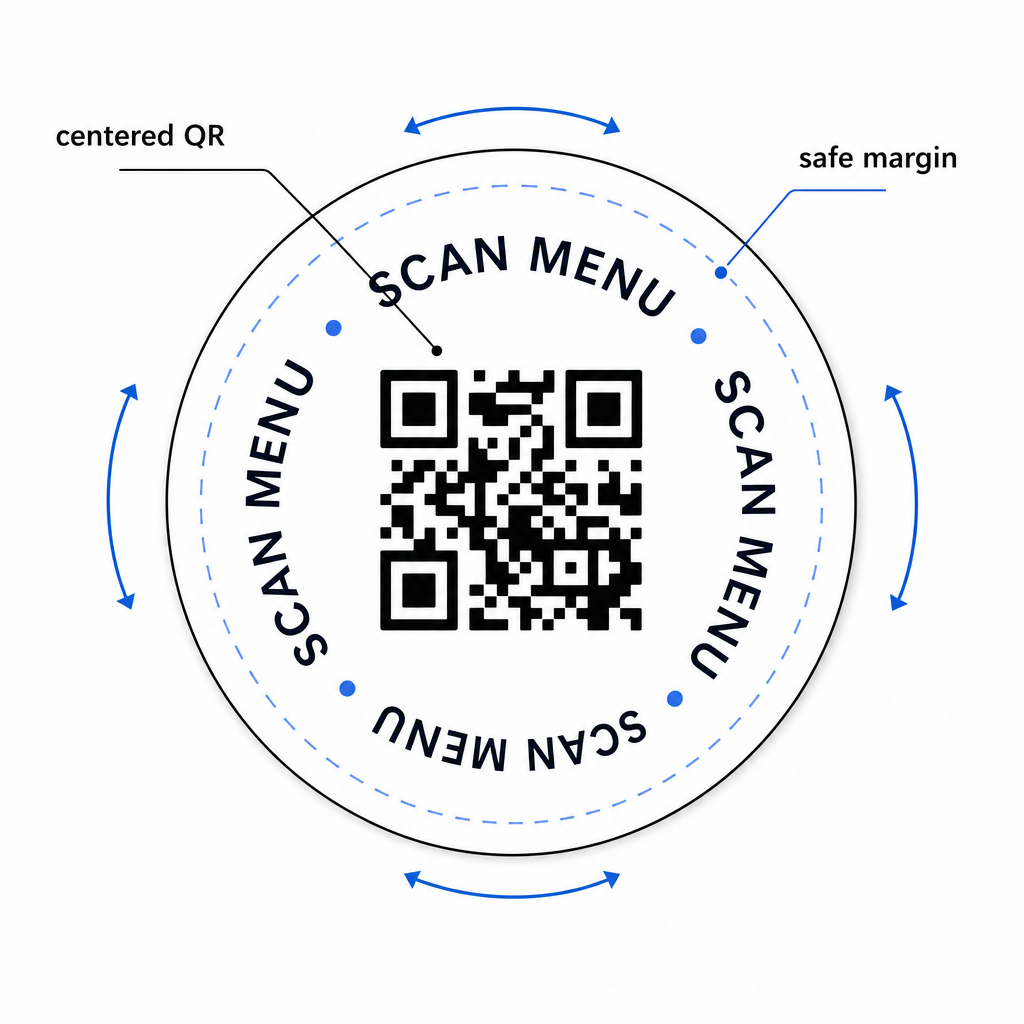
Position the QR code and call-to-action text so they remain readable from any orientation. A round coaster that can be placed in any direction should have the code centered, with text arranged around it rather than above or below where rotation would flip it upside-down. If your coasters have a defined orientation, place the code in a prominent, unobstructed area away from the coaster edge so the quiet zone is never cut off during die-cutting or trimming.

Centered coaster layout

For events, consider using separate coasters for distinct purposes – one for the menu, one for the event schedule, one for a feedback form. Keeping each coaster focused on a single action simplifies the guest experience and makes it easier to track each code’s performance separately. For other compact QR code surfaces with similar design constraints, the guidance on QR codes on table tents applies directly.

Testing Before You Print in Bulk

Print a single test coaster before committing to a full production run. Scan it across at least three different devices in the actual lighting conditions of your venue – overhead lighting, candlelight, or outdoor sunlight if your space has a patio. Test from the realistic distance at which a seated guest would hold their phone.

Confirm that:

  • The code scans in under three seconds on all test devices
  • The destination loads correctly on mobile, not just desktop
  • The quiet zone is intact and not cropped by the coaster edge
  • Contrast holds under dim lighting conditions

If you are using dynamic QR codes, verify that the destination URL is correctly configured in your Pageloot dashboard before the test print, and confirm that any menu updates or redirects you make after printing are reflected immediately when scanned.

Coasters are one of the few hospitality touchpoints that stay with your guest from the moment they sit down until they leave. A well-designed QR code removes friction from menu browsing, eliminates Wi-Fi password requests, and gives you measurable data on how guests engage with your space. The design requirements are specific but achievable: sufficient size, strong contrast, a clean quiet zone, and a clear call-to-action printed alongside the code.

Start with the right tools. Use Pageloot’s 菜单二维码生成器 to build a dynamic menu code, the Wi-Fi二维码生成器 for seamless guest network access, and the 分析仪表板 to track engagement once your coasters are in circulation.

常见问题

Can I use one QR code on a coaster for both the menu and the Wi-Fi?

Technically yes, but it is not recommended. A single QR code points to one destination, so combining both functions means linking to a landing page with two separate options – adding an extra tap for the guest. A cleaner approach is to use two distinct QR codes on the coaster, each with a clear label, or to dedicate separate coaster designs to each purpose. Wi-Fi codes are static and free to generate; menu codes work best as dynamic codes with tracking enabled.

How do I update the menu linked to my coaster QR code without reprinting?

If you created your coaster QR code as a dynamic code using Pageloot, you can log into your dashboard and update the destination URL or menu content at any time. The printed QR code on the coaster stays the same; only the linked content changes. This is one of the primary reasons dynamic codes are recommended for menus – seasonal updates, price changes, and item availability can all be reflected immediately without ordering a new batch of coasters.

What scan data can I collect from QR codes on coasters?

With a dynamic QR code and Pageloot’s analytics, you can track total scans, unique scans, the date and time of each scan, the device type used (iOS or Android), and geographic location to city level. You can also compare performance across different placements if you assign separate QR codes to different table zones or areas of your venue. Static QR codes, including Wi-Fi codes, do not generate any scan data.

关于作者

Siim Kostabi 是 Pageloot 的内容主管,负责撰写关于我们创新型二维码生成器服务的文章。凭借五年多来在二维码领域积累的深厚专业知识,Siim 是该领域的专家。他致力于利用二维码技术简化和增强数字交互,并取得了显著的成果。.

类别
了解更多关于
扫描文件二维码
制作二维码 PDF文件
QR QR码的#1解决方案

如果您需要在线创建QR码,则可以 制作二维码 就在这里免费!
Pageloot是 #1转到解决方案 创建和扫描QR码。

BL-0285

博客生成器

受到超过 20,000 个品牌的信赖,可获得更多销售、评论和关注者。

客户徽标
受到顶级品牌的信赖
评分为 4.8(共 5)

4.86 / 5 星评级

雨果·劳伦特
雨果·劳伦特
餐馆老板
有史以来最容易和最可靠的QR码生成器。PDF文件可以立即上传。我们的餐厅菜单现在是数字化的。
卢卡斯-詹森
卢卡斯-詹森
房地产开发商
这是一个很好的工具,二维码带你到你想要的地方。我们只使用位置二维码,但有许多有用的功能。
艾玛-莫雷蒂
艾玛-莫雷蒂
零售产品
易于使用和快速。它工作得很好,创造了一个完美的图像,所以员工可以下载我的vCard。
雨果·劳伦特
雨果·劳伦特
餐馆老板
有史以来最容易和最可靠的QR码生成器。PDF文件可以立即上传。我们的餐厅菜单现在是数字化的。
卢卡斯-詹森
卢卡斯-詹森
房地产开发商
这是一个很好的工具,二维码带你到你想要的地方。我们只使用位置二维码,但有许多有用的功能。
艾玛-莫雷蒂
艾玛-莫雷蒂
零售产品
易于使用和快速。它工作得很好,创造了一个完美的图像,所以员工可以下载我的vCard。
查看更多QR码
扫描二维码营销传单
二维码 维克斯
营销人员与二维码宣传册
如何 编辑QR码
将一切转化为数字体验 不到3分钟。

免费试用 14 天。

无需信用卡。

首次购买可享受 30% 折扣

使用代码:

分享您的 MP3 文件

注册以创建 PDF QR 码

上传和显示你需要的一切。

  • 音频文件
  • 播客
  • 音乐

注册即可享 14 天免费试用。.
试用期结束后,二维码将失效。.

注册以创建音频 mp3 二维码

使用边框获得更多扫描

注册以向您的二维码添加更多框架

呼叫行动框架帮助您的客户与QR码轻松互动。试试吧!

注册即可享 14 天免费试用。.
试用期结束后,二维码将失效。.

注册以向您的二维码添加更多框架

使用形状添加更多样式

注册以创建更多形状

二维码不一定是方形的。试着改变它以适应你的品牌形象。

注册即可享 14 天免费试用。.
试用期结束后,二维码将失效。.

注册以创建更多形状

为您的二维码添加徽标

注册以将您的徽标添加到二维码中

通过在二维码上添加你的标志和品牌,使你的二维码脱颖而出。

注册即可享 14 天免费试用。.
试用期结束后,二维码将失效。.

注册以将您的徽标添加到二维码中

智能应用商店重定向

注册以创建应用商店二维码

将您的应用程序链接添加到我们的智能应用程序商店QR码。用户会根据他们的设备被重新定向。

注册即可享 14 天免费试用。.
试用期结束后,二维码将失效。.

注册以创建应用商店二维码

将图片上传到二维码

注册以创建图像二维码

轻松分享你的图像。在几秒钟内动态地改变任何图像。

注册即可享 14 天免费试用。.
试用期结束后,二维码将失效。.

注册以创建图像二维码

分享您的 PDF 文件

注册以创建 PDF QR 码

上传和显示你需要的一切。

  • 菜单和价格表
  • 使用说明
  • 任何文件

注册即可享 14 天免费试用。.
试用期结束后,二维码将失效。.

注册以创建 PDF QR 码

稍后编辑,无需打印

注册即可编辑您的二维码,无需再次打印

动态QR码让你改变你的QR码的内容,而不需要打印新的QR码。

注册即可享 14 天免费试用。.
试用期结束后,二维码将失效。.

注册即可编辑您的二维码,无需再次打印

何时?何地?追踪您的二维码扫描

注册以追踪您的二维码

发现你的哪些二维码收到了最多的扫描,以及什么最能让你的客户兴奋。

注册即可享 14 天免费试用。.
试用期结束后,二维码将失效。.

注册以追踪您的二维码

提供可打印文件

注册以创建 PDF 和 SVG 等矢量二维码

.EPS, .PDF, .SVG

想下载高清分辨率的QR码吗?获得矢量或像素格式,可随时打印。

注册即可享 14 天免费试用。.
试用期结束后,二维码将失效。.

注册以创建 PDF 和 SVG 等矢量二维码

请等待。您的二维码是 正在加载... 正在加载...

打造专属

注册以保存您的二维码以供日后使用

通过创建具有不同颜色、标识和行动呼吁框架的出色的QR码,获得更多的扫描。

注册即可享 14 天免费试用。.
试用期结束后,二维码将失效。.

注册以保存您的二维码以供日后使用