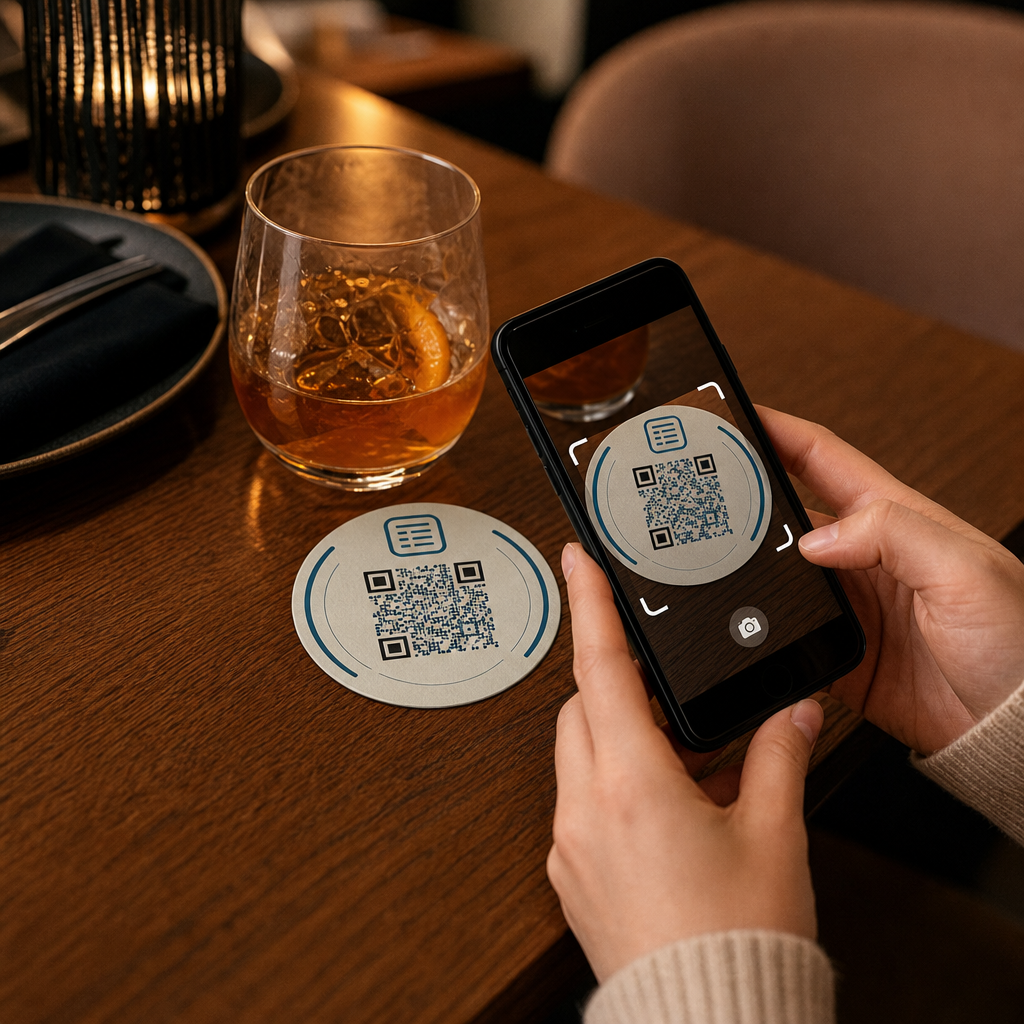

Ваши гости ищут пароль от Wi-Fi или зовут официанта, чтобы посмотреть меню? Эти мелкие неудобства быстро накапливаются, расстраивая клиентов и замедляя работу вашего персонала. Это руководство покажет вам, как именно разрабатывать, генерировать и размещать QR-коды на подставках, чтобы одно сканирование решало проблему – и предоставляло вам данные для постоянного улучшения.
Почему подставки – практичная поверхность для QR-кодов
Каждый напиток, который оказывается на столе, подается с подставкой. Это делает подставки одной из наиболее постоянно просматриваемых поверхностей в любой среде гостеприимства. В отличие от настольных табличек, которые гости часто отодвигают, или настенных плакатов, требующих, чтобы кто-то встал и подошел, подставка находится прямо перед вашим клиентом на протяжении всего визита.
Эта устойчивость делает подставки полезными для трех конкретных задач:
- Доступ к меню – позволяют гостям просматривать еду и напитки в тот момент, когда они садятся
- Совместное использование Wi-Fi – устраняют необходимость персоналу повторять пароль десятки раз за смену
- Отслеживание вовлеченности клиентов – измеряют, сколько людей взаимодействуют с вашим цифровым контентом, когда и из каких зон вашего заведения
Для более широкого взгляда на то, как QR-коды вписываются в среды гостеприимства, картина последовательна: чем ближе код к гостю в тот момент, когда он ему нужен, тем выше скорость сканирования. Подставки максимально близки к этому.
Выбор правильного типа QR-кода для подставок
Прежде чем что-либо печатать, вам нужно решить, использовать ли статический или динамический QR-код. Разница имеет практические последствия именно для подставок, потому что перепечатка является дорогостоящей и трудоемкой.
Статические QR-коды кодируют информацию непосредственно в шаблон. Их нельзя редактировать после создания, и они не отслеживают сканирования. QR-коды Wi-Fi идеально подходят для статического формата – ваши сетевые учетные данные редко меняются, и нет необходимости в аналитике для этого конкретного случая использования.
Динамические QR-коды указывают на короткий URL-адрес перенаправления, который вы можете обновить в любое время без перепечатки подставки. Они также регистрируют каждое сканирование, записывая время, тип устройства и географическое местоположение. Для доступа к меню и отслеживания вовлеченности динамические коды являются практичным выбором. Если ваше меню меняется сезонно, или если вы хотите заменить акцию без заказа новых подставок, динамический код позволяет вам сделать это из вашей панели управления.
Компромисс прост: статические коды бесплатны и постоянны, в то время как динамические коды требуют подписки, но дают вам гибкость и данные. Для большинства предприятий гостеприимства, ведущих текущие операции, возможность обновлять контент без перепечатки делает динамические коды лучшей долгосрочной инвестицией. Полный обзор обоих вариантов представлен на статических и динамических QR-кодов страница.
Создавайте QR-коды, готовые для подставок, за минуты Использовать Динамический QR код: генератор для создания кодов меню, Wi-Fi и вовлеченности, которые вы можете обновлять в любое время – перепечатка не требуется.
Настройка QR-кода меню для подставок
QR-код меню на подставке должен направлять вашего гостя непосредственно к чистому, адаптивному для мобильных устройств цифровому меню в тот момент, когда он сканирует. Настройка включает два решения: в каком формате существует ваше меню и как вы строите QR-код вокруг него.
Pageloot’s Создать QR код меню поддерживает два подхода. Во-первых, вы можете загрузить существующий PDF – если у вас уже есть разработанное меню, вы можете связать его через загрузку файла или размещенный URL-адрес, такой как ссылка Google Drive или Dropbox, что является самым быстрым путем для выхода в онлайн. Во-вторых, вы можете создать структурированную целевую страницу меню с категориями, фотографиями товаров, описаниями и ценами, а также добавить сезонные специальные предложения, ежедневные предложения и изображения, которые PDF не всегда может хорошо отображать на мобильных устройствах.
Именно для подставок подход с целевой страницей, как правило, работает лучше. Гости пользуются своими телефонами, и оптимизированная для мобильных устройств страница легче для навигации, чем PDF, который требует масштабирования щипком. Для более глубокого взгляда на то, как QR-заказ вписывается в полный рабочий процесс, руководство по системы заказа по QR-коду подробно освещает техническую и операционную сторону.
После того как ваше меню настроено, настройте QR-код с использованием цветов вашего бренда, логотипа и рамки с коротким призывом к действию, например, “Сканируйте, чтобы увидеть меню”. Этот контекст помогает гостям понять, что они сканируют, прежде чем они это сделают, что напрямую улучшает показатели сканирования.
Настройка QR-кода Wi-Fi для подставок
Обмен учетными данными Wi-Fi через подставку является одним из самых простых и наиболее непосредственно полезных применений QR-кодов в сфере гостеприимства. Гость сканирует код, и его устройство подключается автоматически – пароль не виден, персонал не задействован, опечаток нет.
Настройка проста с использованием Pageloot’s генератор QR-кодов Wi-Fi. Введите название вашей сети (SSID), выберите тип безопасности (WPA/WPA2 является наиболее распространенным), введите пароль сети, настройте дизайн и скачайте. Поскольку учетные данные Wi-Fi редко меняются, статический QR-код здесь достаточен и его генерация ничего не стоит. Для полного обзора процесса и советов по размещению, руководство по подключению гостей к Wi-Fi через QR-код подробно описывает каждый шаг.
Одно практическое замечание: если ваше заведение использует отдельную гостевую сеть – что является хорошей практикой безопасности – убедитесь, что QR-код кодирует учетные данные гостевой сети, а не вашей операционной сети.
Отслеживание вовлеченности клиентов через сканирование подставок
QR-коды Wi-Fi статичны и не генерируют данные сканирования. Но для доступа к меню и любого другого контента кампании, который вы размещаете на подставках, динамические QR-коды дают вам живое представление о том, как гости взаимодействуют с вашим физическим пространством.
Pageloot’s панель аналитики QR-кодов отслеживает следующее для каждого динамического кода:
- Общее количество сканирований и уникальных сканирований с течением времени
- Дата и время каждого сканирования
- Тип устройства (iOS, Android или настольный компьютер)
- Географическое местоположение вплоть до уровня города
- Сравнения на уровне размещения, если вы используете отдельные коды для разных зон столов или зон заведения
Для многозального заведения или большого пространства для мероприятий эти данные отвечают на практические вопросы: Какие зоны видят наибольшую вовлеченность? Сканируют ли гости чаще во время обеда или ужина? Увеличивается ли количество сканирований меню в дни, которые коррелируют с проведенными вами акциями?
Вы также можете привязать QR-код формы Google с подставки для сбора прямой обратной связи от гостей. Краткий опрос после еды фиксирует оценки удовлетворенности и комментарии, не требуя от персонала раздавать бумажные карточки или устно просить отзывы. Для более широкого обзора того, как данные сканирования могут улучшить ваш маркетинг и операции, руководстве по отслеживанию QR-кодов подробно рассматривает наиболее важные метрики.
Видите каждое сканирование в реальном времени Отслеживайте вовлеченность в меню, определяйте самые загруженные периоды и измеряйте эффективность кампаний в реальном времени с помощью Аналитики QR-кодов Pageloot.
Разработка QR-кода, который надежно сканируется на подставке
Подставка — это физически требовательная среда для QR-кода. Она намокает, ее трогают, складывают и освещают неравномерно. Дизайнерские решения, которые были бы приемлемы на плакате, могут привести к сбоям сканирования на подставке.
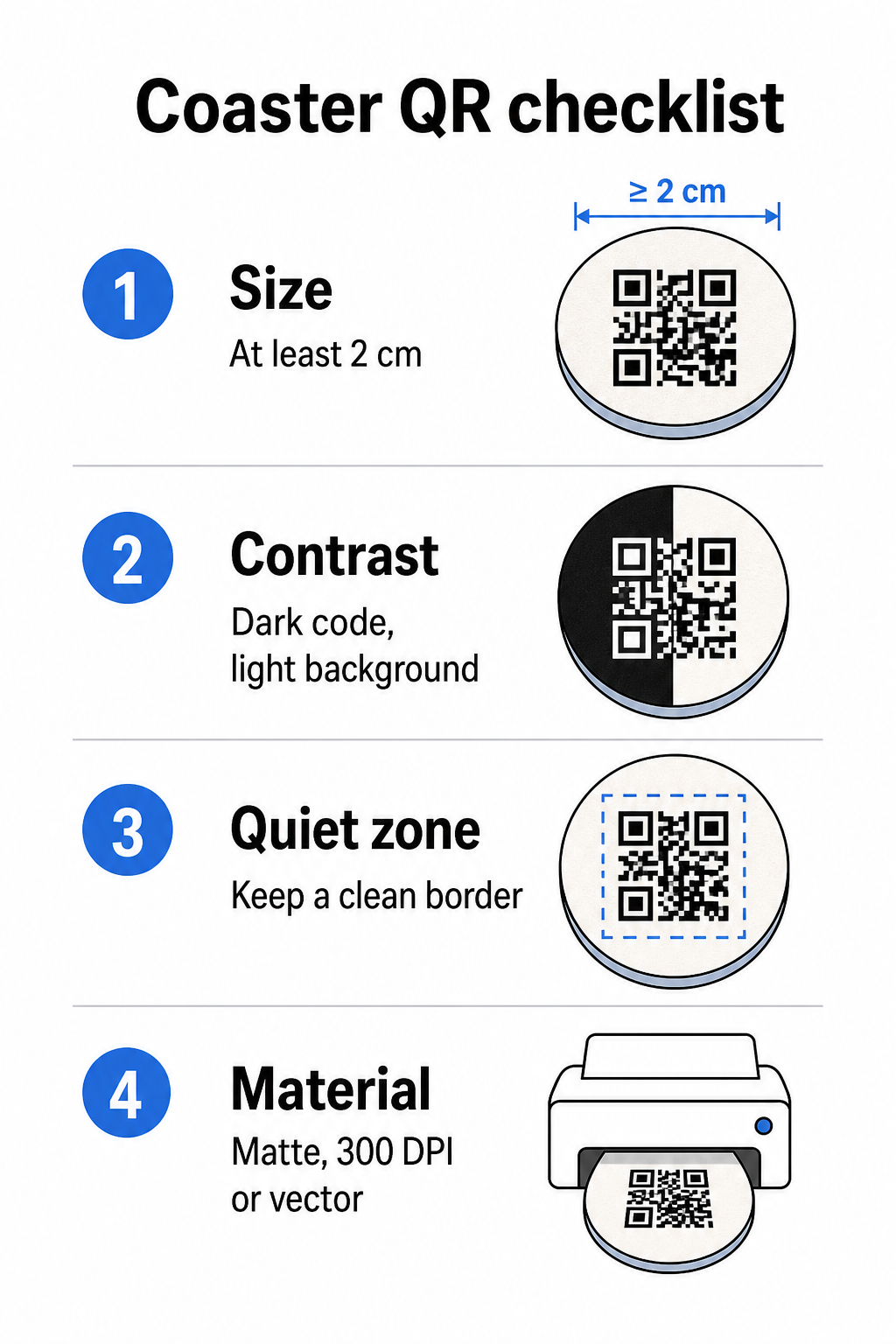
Размер является вашим первым соображением. Минимальный надежный размер для QR-кода составляет 2 см × 2 см (приблизительно 0,8 дюйма × 0,8 дюйма) для сканирования с близкого расстояния. На стандартной круглой подставке – обычно диаметром от 3,5 до 4 дюймов – у вас есть место, чтобы сделать его больше, что повышает надежность. Здесь применяется правило 10:1: ширина кода должна составлять примерно одну десятую от максимального расстояния сканирования. Код размером 1 дюйм работает примерно на расстоянии 10 дюймов; код размером 1,5 дюйма дает более комфортный запас для обычного сидящего гостя.
Контраст является наиболее критическим фактором для надежности сканирования. Темные модули на светлом фоне – черный на белом является золотым стандартом – должны быть вашей отправной точкой. Многие камеры смартфонов и приложения-сканеры испытывают трудности с инвертированными дизайнами (светлые модули на темном фоне), поэтому избегайте этой комбинации, даже если она выглядит эстетичнее. Минимальный коэффициент контрастности 4:1 является рекомендуемой базой; чем выше, тем лучше. Избегайте красных или оранжевых передних планов, поскольку многие датчики камер испытывают трудности с надежным обнаружением этих оттенков. лучшим практикам контрастности цветов QR-кода страница содержит подробную сравнительную таблицу, если вы работаете с фирменными цветами, которые выходят за рамки стандартной черно-белой комбинации.
Тихая зона относится к четкой границе, которая должна окружать каждый QR-код – не менее 4 модулей шириной со всех сторон – без вторжения текста, графики или элементов дизайна. На подставке это означает оставление сплошного светлого поля вокруг кода. Если дизайн вашей подставки имеет темный или визуально насыщенный фон, добавьте сплошную белую рамку-подложку за QR-кодом, которая включает полную тихую зону. Без нее сканеры могут не обнаружить границу кода надежно.
Отделка и материал имеют большее значение для подставок, чем для большинства других поверхностей. Подставки из целлюлозного картона являются наиболее распространенными в гостиничном бизнесе – они впитывают конденсат и защищают поверхности столов, но они не водонепроницаемы. Для QR-кодов на бумажных подставках матовые покрытия предпочтительнее глянцевых, потому что блики от верхнего освещения мешают сканированию. Для более долговечных применений, таких как постоянные настольные установки или многоразовые подставки, материалы, такие как покрытое дерево с эпоксидным или полиуретановым покрытием, защищают печать, при этом обеспечивая надежное сканирование, при условии, что покрытие прозрачное, а не тонированное. Независимо от материала, избегайте градиентов, теней или прозрачных элементов внутри самого QR-кода – они снижают контрастность и нарушают сканируемость в реальных условиях.
Разрешение является обязательным для печати. Всегда загружайте свой QR-код в векторном формате (SVG или EPS) или с разрешением не менее 300 DPI. Растровые файлы, увеличенные из экспортов с низким разрешением, будут выглядеть размытыми при печати, что снижает надежность сканирования, даже если код выглядит приемлемо на экране. Полный набор рекомендаций по печати и дизайну доступен в лучшим практикам читаемости QR-кодов руководстве.
Практическое размещение и контекст на подставке
Один QR-код сам по себе не сообщает вашему гостю, что он делает. Добавление однострочного призыва к действию непосредственно на подставку – “Сканируйте для меню”, “Подключитесь к Wi-Fi”, “Поделитесь своим отзывом” – устраняет двусмысленность и увеличивает вероятность сканирования. Это особенно важно для гостей, которые менее знакомы с QR-кодами или отвлечены разговором.
Расположите QR-код и текст призыва к действию так, чтобы они оставались читаемыми при любой ориентации. Круглая подставка, которую можно разместить в любом направлении, должна иметь код по центру, с текстом, расположенным вокруг него, а не сверху или снизу, где поворот перевернул бы его вверх ногами. Если ваши подставки имеют определенную ориентацию, разместите код в заметной, беспрепятственной области вдали от края подставки, чтобы тихая зона никогда не была обрезана во время высечки или обрезки.
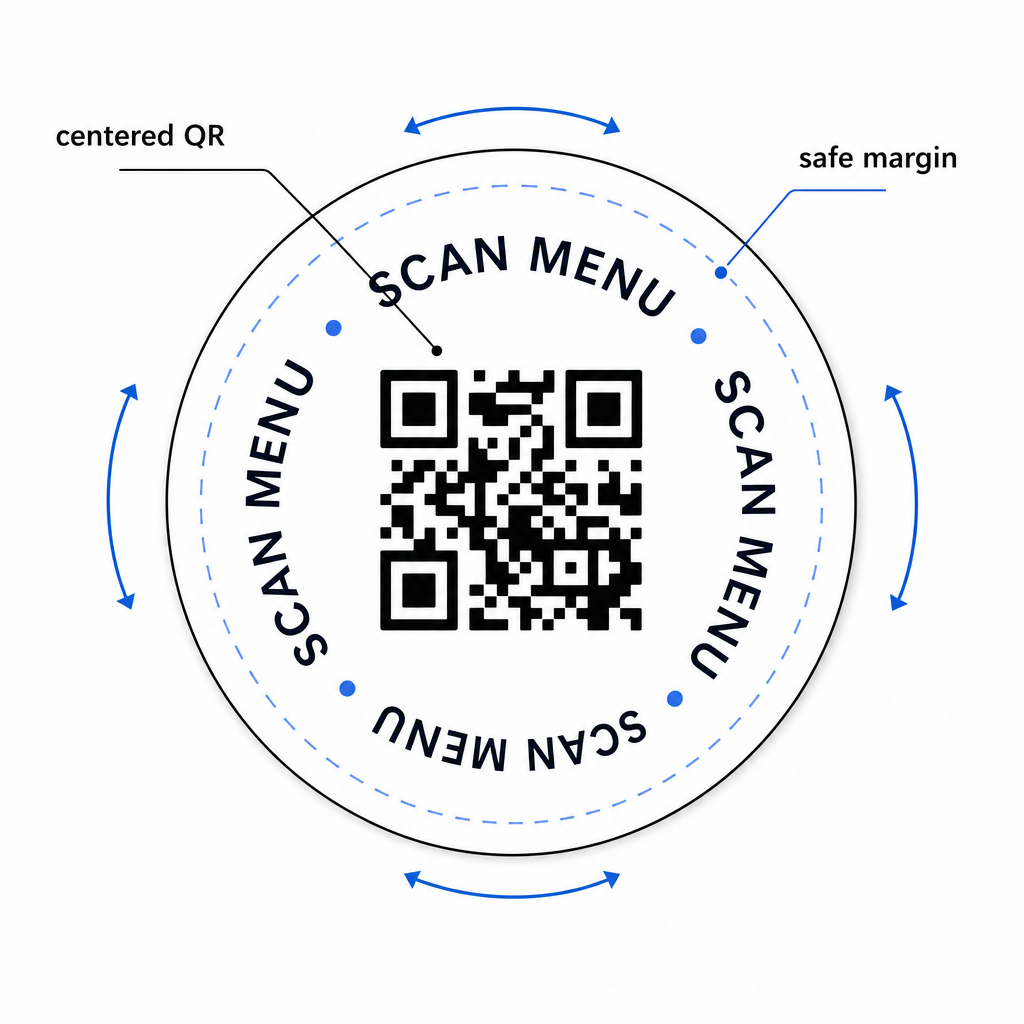
Для мероприятий рассмотрите возможность использования отдельных подставок для разных целей – одна для меню, одна для расписания мероприятия, одна для формы обратной связи. Сосредоточение каждой подставки на одном действии упрощает опыт гостя и облегчает отдельное отслеживание производительности каждого кода. Для других компактных поверхностей с QR-кодами с аналогичными ограничениями дизайна, руководство по QR-коды на настольных тентах применяется напрямую.
Тестирование перед массовой печатью
Распечатайте одну тестовую подставку, прежде чем запускать полномасштабное производство. Отсканируйте ее как минимум на трех разных устройствах в реальных условиях освещения вашего заведения – верхнее освещение, свет свечей или солнечный свет на улице, если у вас есть патио. Проверьте с реалистичного расстояния, на котором сидящий гость держал бы свой телефон.
Подтвердите, что:
- Код сканируется менее чем за три секунды на всех тестовых устройствах
- Место назначения загружается корректно на мобильных устройствах, а не только на настольных
- Тихая зона не повреждена и не обрезана краем подставки
- Контраст сохраняется в условиях тусклого освещения
Если вы используете динамические QR-коды, убедитесь, что URL-адрес назначения правильно настроен в вашей панели управления Pageloot перед тестовой печатью, и подтвердите, что любые обновления меню или перенаправления, которые вы делаете после печати, немедленно отражаются при сканировании.
Подставки — это одна из немногих точек контакта в сфере гостеприимства, которая остается с вашим гостем с момента, как он садится, до момента, как он уходит. Хорошо разработанный QR-код устраняет трудности при просмотре меню, исключает запросы пароля Wi-Fi и предоставляет вам измеримые данные о том, как гости взаимодействуют с вашим пространством. Требования к дизайну специфичны, но достижимы: достаточный размер, сильный контраст, чистая тихая зона и четкий призыв к действию, напечатанный рядом с кодом.
Начните с правильных инструментов. Используйте Pageloot’s Создать QR код меню для создания динамического кода меню, Генератор QR-кодов Wi-Fi для беспрепятственного доступа к гостевой сети, и панель аналитики для отслеживания вовлеченности, как только ваши подставки поступят в обращение.
Часто задаваемые вопросы
Технически да, но это не рекомендуется. Один QR-код указывает на одно назначение, поэтому объединение обеих функций означает ссылку на целевую страницу с двумя отдельными опциями – добавление дополнительного касания для гостя. Более чистый подход – использовать два отдельных QR-кода на подставке, каждый с четкой меткой, или посвятить отдельные дизайны подставок каждой цели. Коды Wi-Fi являются статичными и бесплатными для генерации; коды меню лучше всего работают как динамические коды с включенным отслеживанием.
Если вы создали свой QR-код для подставки как динамический код с помощью Pageloot, вы можете войти в свою панель управления и в любое время обновить целевой URL или содержимое меню. Напечатанный QR-код на подставке остается прежним; меняется только связанное содержимое. Это одна из основных причин, по которой динамические коды рекомендуются для меню – сезонные обновления, изменения цен и наличие товаров могут быть немедленно отражены без заказа новой партии подставок.
С помощью динамического QR-кода и аналитики Pageloot вы можете отслеживать общее количество сканирований, уникальные сканирования, дату и время каждого сканирования, тип используемого устройства (iOS или Android) и географическое местоположение до уровня города. Вы также можете сравнивать производительность по различным местам размещения, если вы назначаете отдельные QR-коды для разных зон столов или областей вашего заведения. Статические QR-коды, включая коды Wi-Fi, не генерируют никаких данных о сканировании.