
¿Están tus invitados buscando la contraseña del Wi-Fi o haciendo señas a un camarero solo para ver el menú? Estos pequeños puntos de fricción se acumulan rápidamente, frustrando a los clientes y ralentizando a tu personal. Esta guía te muestra exactamente cómo diseñar, generar e implementar códigos QR en posavasos para que un solo escaneo resuelva el problema, y te dé los datos para seguir mejorando.
Por qué los posavasos son una superficie práctica para códigos QR
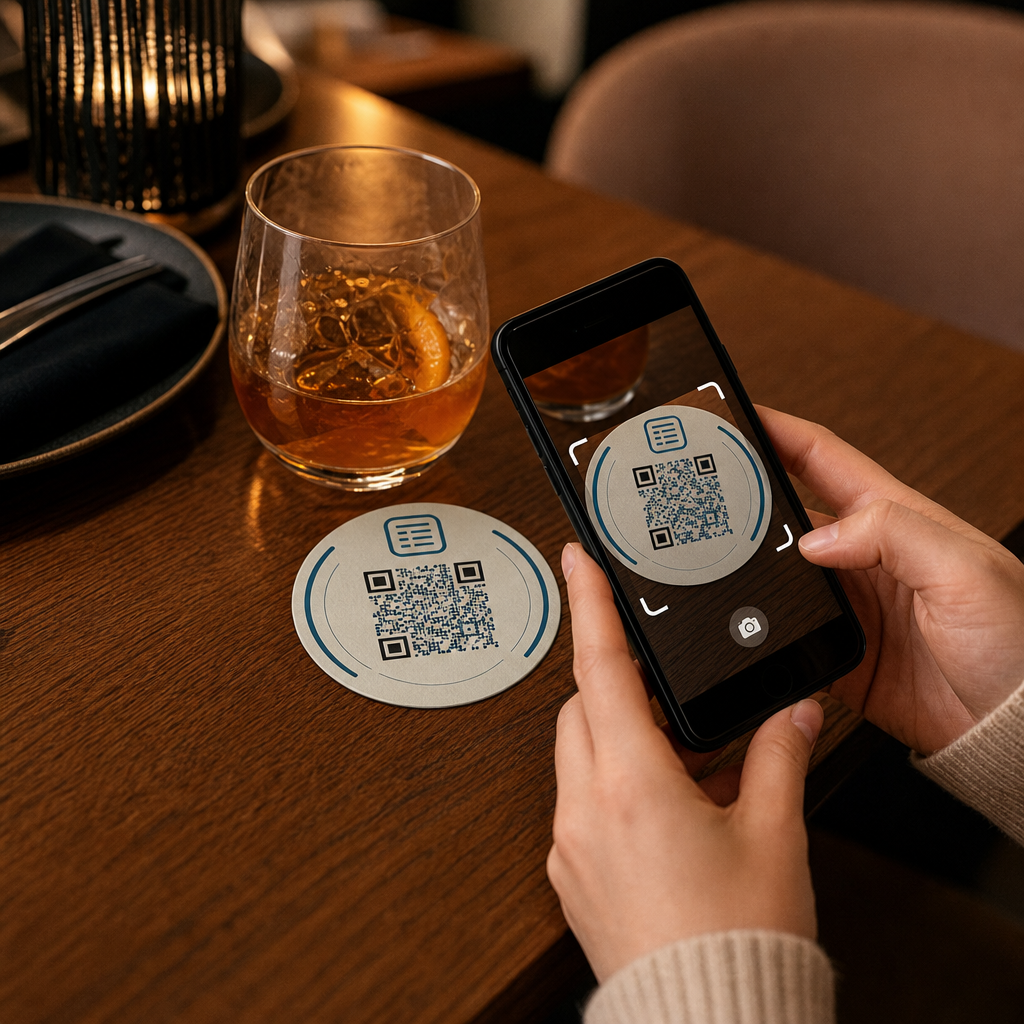
Cada bebida que llega a una mesa viene con un posavasos. Eso convierte a los posavasos en una de las superficies más vistas de forma consistente en cualquier entorno de hostelería. A diferencia de los carteles de mesa, que los invitados a menudo apartan, o los pósteres montados en la pared que requieren que alguien se levante y se acerque, un posavasos se encuentra directamente frente a tu cliente durante toda la visita.
Esa permanencia hace que los posavasos sean útiles para tres tareas específicas:
- Acceso al menú – permitir a los invitados explorar alimentos y bebidas en el momento en que se sientan
- Compartir Wi-Fi – eliminar la necesidad de que el personal repita la contraseña docenas de veces por turno
- Seguimiento de la interacción con el cliente – medir cuántas personas interactúan con tu contenido digital, cuándo y desde qué áreas de tu local
Para una visión más amplia de cómo los códigos QR encajan en entornos de hostelería, el patrón es consistente: cuanto más cerca esté el código del invitado en el momento en que lo necesita, mayor será la tasa de escaneo. Los posavasos están tan cerca como es posible.
Elegir el tipo de código QR adecuado para posavasos
Antes de imprimir cualquier cosa, debes decidir si usar un código QR estático o dinámico. La diferencia tiene consecuencias prácticas específicamente para los posavasos, porque reimprimir es costoso y lleva mucho tiempo.
Códigos QR estáticos codifican la información directamente en el patrón. No se pueden editar después de su creación y no rastrean los escaneos. Los códigos QR de Wi-Fi son una opción natural para el formato estático: tus credenciales de red rara vez cambian y no hay necesidad de análisis en ese caso de uso específico.
Códigos QR dinámicos apuntan a una URL de redirección corta que puedes actualizar en cualquier momento sin reimprimir el posavasos. También registran cada escaneo, grabando la hora, el tipo de dispositivo y la ubicación geográfica. Para el acceso al menú y el seguimiento de la interacción, los códigos dinámicos son la opción práctica. Si tu menú cambia estacionalmente, o si quieres intercambiar una promoción sin pedir nuevos posavasos, un código dinámico te permite hacerlo desde tu panel de control.
La compensación es sencilla: los códigos estáticos son gratuitos y permanentes, mientras que los códigos dinámicos requieren una suscripción pero te dan flexibilidad y datos. Para la mayoría de los negocios de hostelería que realizan operaciones continuas, la capacidad de actualizar el contenido sin reimprimir hace que los códigos dinámicos sean la mejor inversión a largo plazo. El desglose completo de ambas opciones se cubre en la códigos QR estáticos vs. dinámicos página.
Crea códigos QR listos para posavasos en minutos Use el Generador de códigos QR dinámicos para crear códigos de menú, Wi-Fi y de interacción que puedes actualizar en cualquier momento, sin necesidad de reimprimir.
Configuración de un código QR de menú para posavasos
Un código QR de menú en un posavasos debe llevar a tu invitado directamente a un menú digital limpio y adaptable a dispositivos móviles en el momento en que escanee. La configuración implica dos decisiones: en qué formato reside tu menú y cómo construyes el código QR a su alrededor.
De Pageloot Generador de códigos QR para menús admite dos enfoques. Primero, puedes subir un PDF existente; si ya tienes un menú diseñado, puedes vincularlo a través de una carga de archivo o una URL alojada como un enlace de Google Drive o Dropbox, que es el camino más rápido para estar en línea. Segundo, puedes construir una página de destino de menú estructurada con categorías, fotos de artículos, descripciones y precios, y añadir especiales de temporada, propuestas diarias e imágenes que un PDF no siempre puede mostrar bien en dispositivos móviles.
Específicamente para posavasos, el enfoque de página de destino tiende a funcionar mejor. Los invitados están en sus teléfonos, y una página optimizada para móviles es más fácil de navegar que un PDF que requiere pellizcar y hacer zoom. Para una mirada más profunda sobre cómo el pedido basado en QR encaja en un flujo de trabajo de servicio completo, la guía sobre sistemas de pedido con código QR cubre el lado técnico y operativo en detalle.
Una vez configurado tu menú, personaliza el código QR con los colores de tu marca, el logotipo y un marco con una breve llamada a la acción como “Escanea para ver el menú”. Este contexto ayuda a los invitados a entender lo que están escaneando antes de hacerlo, lo que mejora directamente las tasas de escaneo.
Configuración de un código QR de Wi-Fi para posavasos
Compartir credenciales de Wi-Fi a través de un posavasos es una de las aplicaciones más simples e inmediatamente útiles de los códigos QR en hostelería. Un invitado escanea el código y su dispositivo se conecta automáticamente, sin contraseña visible, sin intervención del personal, sin errores tipográficos.
La configuración es sencilla usando Pageloot's generador de códigos QR de Wi-Fi. Introduzca el nombre de su red (SSID), seleccione su tipo de seguridad (WPA/WPA2 es el más común), introduzca la contraseña de la red, personalice el diseño y descargue. Dado que las credenciales de Wi-Fi rara vez cambian, un código QR estático es suficiente aquí y no cuesta nada generarlo. Para una explicación completa del proceso y consejos de ubicación, la guía para conectar a los huéspedes al Wi-Fi mediante código QR cubre cada paso en detalle.
Una nota práctica: si su local utiliza una red de invitados separada –lo cual es una buena práctica de seguridad– asegúrese de que el código QR codifique las credenciales de la red de invitados, no las de su red operativa.
Seguimiento de la interacción del cliente mediante escaneos de posavasos
Los códigos QR de Wi-Fi son estáticos y no generan datos de escaneo. Pero para el acceso al menú y cualquier otro contenido de campaña que coloque en los posavasos, los códigos QR dinámicos le ofrecen una vista en vivo de cómo los huéspedes interactúan con su espacio físico.
De Pageloot panel de análisis de códigos QR rastrea lo siguiente para cada código dinámico:
- Escaneos totales y escaneos únicos a lo largo del tiempo
- Fecha y hora de cada escaneo
- Tipo de dispositivo (iOS, Android o escritorio)
- Ubicación geográfica hasta el nivel de ciudad
- Comparaciones a nivel de ubicación si utiliza códigos separados para diferentes zonas de mesas o áreas del local
Para una operación con múltiples locales o un gran espacio para eventos, estos datos responden a preguntas prácticas: ¿Qué áreas ven la mayor interacción? ¿Los huéspedes escanean más durante el servicio de almuerzo o cena? ¿Los escaneos de menú aumentan en días que se correlacionan con las promociones que realizó?
También puede vincular una Formulario de Google Código QR de un posavasos para recopilar comentarios directos de los huéspedes. Una breve encuesta posterior a la comida captura puntuaciones de satisfacción y comentarios sin requerir que el personal entregue tarjetas de papel o pida reseñas verbalmente. Para una visión más amplia de cómo los datos de escaneo pueden mejorar su marketing y operaciones, la guía de seguimiento de códigos QR recorre las métricas que más importan.
Vea cada escaneo en tiempo real Rastree la interacción con el menú, identifique sus períodos de mayor actividad y mida el rendimiento de la campaña en real time con Análisis de códigos QR de Pageloot.
Diseño de un código QR que se escanee de forma fiable en un posavasos
Un posavasos es un entorno físicamente exigente para un código QR. Se moja, se manipula, se apila y se ilumina de forma desigual. Las decisiones de diseño que serían adecuadas en un póster pueden convertirse en fallos de escaneo en un posavasos.
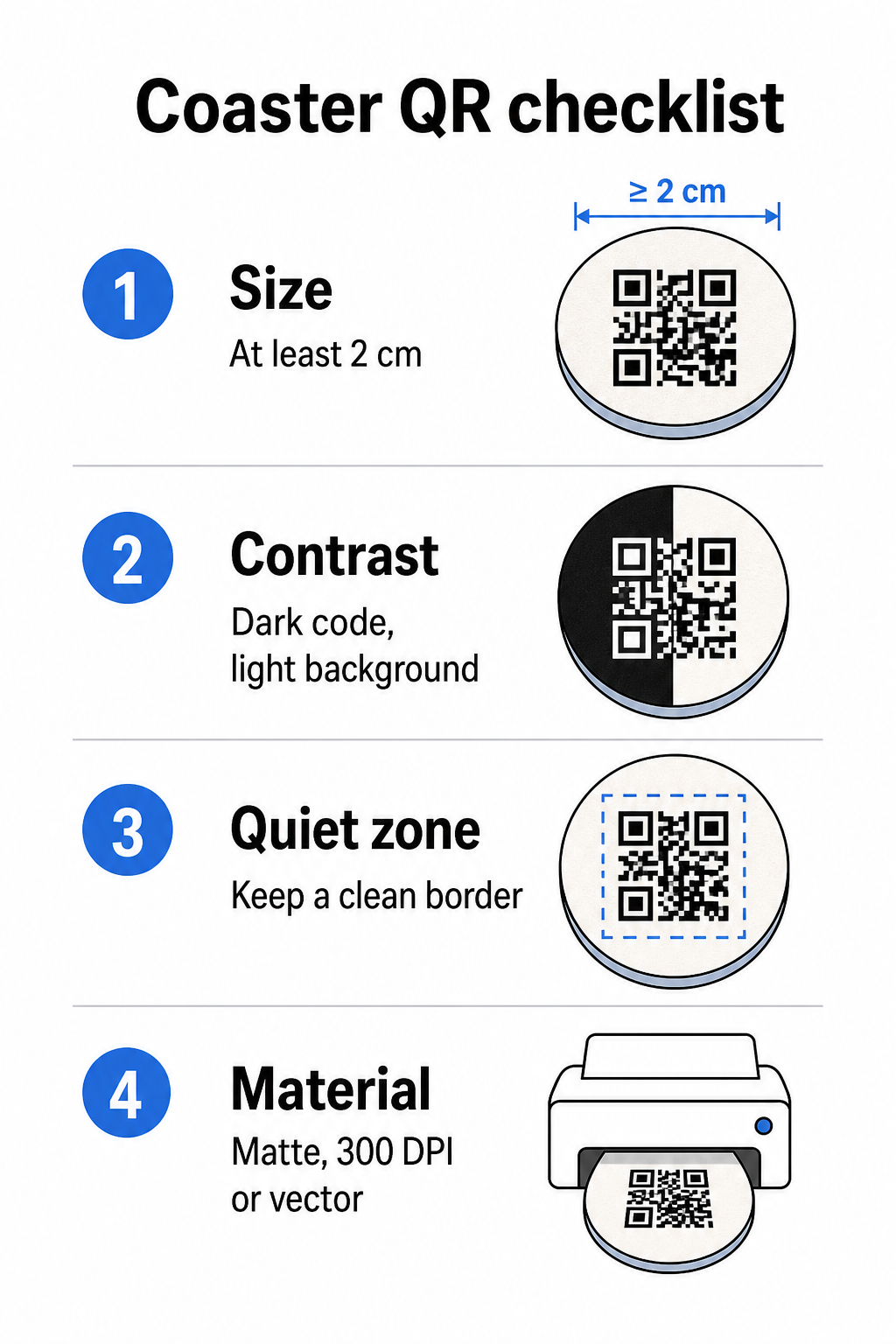
Tamaño es tu primera consideración. El tamaño mínimo fiable para un código QR es de 2 cm × 2 cm (aproximadamente 0,8 pulg. × 0,8 pulg.) para escaneo a corta distancia. En un posavasos redondo estándar –típicamente de 3,5 a 4 pulgadas de diámetro– tienes espacio para hacerlo más grande, lo que mejora la fiabilidad. Aquí se aplica la regla 10:1: el ancho del código debe ser aproximadamente una décima parte de la distancia máxima de escaneo. Un código de 1 pulgada funciona a unas 10 pulgadas; un código de 1,5 pulgadas ofrece un margen más cómodo para el huésped sentado típico.
Contraste es el factor más crítico para la fiabilidad del escaneo. Los módulos oscuros sobre un fondo claro –siendo el negro sobre blanco el estándar de oro– deben ser tu punto de partida. Muchas cámaras de smartphone y aplicaciones de escáner tienen dificultades con los diseños invertidos (módulos claros sobre un fondo oscuro), así que evita esa combinación incluso si estéticamente se ve mejor. Una relación de contraste mínima de 4:1 es la base recomendada; cuanto mayor, mejor. Evita los primeros planos rojos o naranjas, ya que muchos sensores de cámara tienen dificultades para detectar estos tonos de forma fiable. La mejores prácticas de contraste de color de códigos QR página tiene una tabla de comparación detallada si estás trabajando con colores de marca que se salen de la combinación estándar de blanco y negro.
Zona tranquila se refiere al borde claro que debe rodear cada código QR –de al menos 4 módulos de ancho por todos los lados– sin que invadan texto, gráficos o elementos de diseño. En un posavasos, esto significa dejar un margen sólido de color claro alrededor del código. Si el diseño de tu posavasos tiene un fondo oscuro o visualmente recargado, añade un recuadro de relleno blanco sólido detrás del código QR que incluya toda la zona de silencio. Sin él, los escáneres pueden no localizar el límite del código de forma fiable.
Acabado y material importan más en posavasos que en la mayoría de otras superficies.
Resolución es innegociable para la impresión. Descargue siempre su código QR en formato vectorial (SVG o EPS) o con un mínimo de 300 DPI. Los archivos de mapa de bits escalados a partir de exportaciones de baja resolución aparecerán borrosos en la impresión, lo que reduce la fiabilidad del escaneo incluso cuando el código se ve aceptable en pantalla. Un conjunto completo de pautas de impresión y diseño está disponible en el las mejores prácticas para la legibilidad de los códigos QR guía.
Colocación Práctica y Contexto en el Posavasos
Un código QR por sí solo no le dice a su invitado qué hace. Agregar una llamada a la acción de una línea directamente en el posavasos – “Escanear para el menú,” “Conectarse a Wi-Fi,” “Compartir sus comentarios” – elimina la ambigüedad y aumenta la probabilidad de un escaneo. Esto es especialmente importante para los invitados que están menos familiarizados con los códigos QR o que están distraídos por la conversación.
Posicione el código QR y el texto de llamada a la acción para que permanezcan legibles desde cualquier orientación. Un posavasos redondo que se pueda colocar en cualquier dirección debe tener el código centrado, con el texto dispuesto a su alrededor en lugar de arriba o abajo, donde la rotación lo voltearía. Si sus posavasos tienen una orientación definida, coloque el código en un área prominente y sin obstrucciones, lejos del borde del posavasos, para que la zona tranquila nunca se corte durante el troquelado o el recorte.
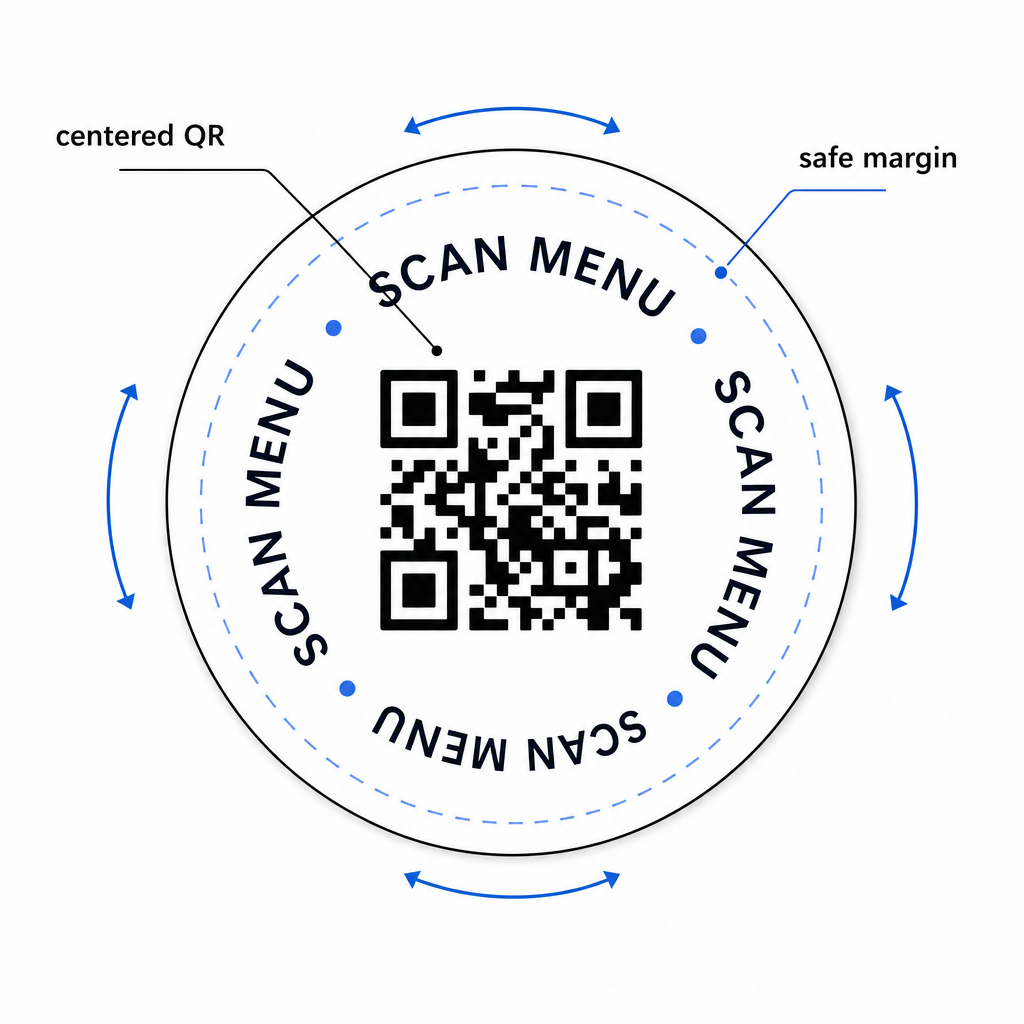
Para eventos, considere usar posavasos separados para propósitos distintos – uno para el menú, uno para el horario del evento, uno para un formulario de comentarios. Mantener cada posavasos enfocado en una sola acción simplifica la experiencia del invitado y facilita el seguimiento del rendimiento de cada código por separado. Para otras superficies compactas de códigos QR con restricciones de diseño similares, la guía sobre Códigos QR en los exhibidores de mesa se aplica directamente.
Pruebas Antes de Imprimir en Masa
Imprima un solo posavasos de prueba antes de comprometerse con una tirada de producción completa. Escanéelo en al menos tres dispositivos diferentes en las condiciones de iluminación reales de su local – iluminación cenital, luz de velas o luz solar exterior si su espacio tiene un patio. Pruebe desde la distancia realista a la que un invitado sentado sostendría su teléfono.
Confirme que:
- El código escanea en menos de tres segundos en todos los dispositivos de prueba
- El destino carga correctamente en dispositivos móviles, no solo en computadoras de escritorio
- La zona tranquila está intacta y no recortada por el borde del posavasos
- El contraste se mantiene bajo condiciones de poca luz
Si está utilizando códigos QR dinámicos, verifique que la URL de destino esté configurada correctamente en su panel de control de Pageloot antes de la impresión de prueba, y confirme que cualquier actualización de menú o redireccionamiento que realice después de la impresión se refleje inmediatamente al escanear.
Los posavasos son uno de los pocos puntos de contacto de hospitalidad que permanecen con su invitado desde el momento en que se sientan hasta que se van. Un código QR bien diseñado elimina la fricción de la navegación del menú, elimina las solicitudes de contraseña de Wi-Fi y le proporciona datos medibles sobre cómo los invitados interactúan con su espacio. Los requisitos de diseño son específicos pero alcanzables: tamaño suficiente, contraste fuerte, una zona tranquila limpia y una llamada a la acción clara impresa junto al código.
Comience con las herramientas adecuadas. Utilice el de Pageloot Generador de códigos QR para menús para construir un código de menú dinámico, el Generador de códigos QR de Wi-Fi para un acceso fluido a la red de invitados, y el panel de análisis integrado para rastrear la interacción una vez que sus posavasos estén en circulación.
Preguntas frecuentes
Técnicamente sí, pero no es recomendable. Un solo código QR apunta a un destino, por lo que combinar ambas funciones significa enlazar a una página de destino con dos opciones separadas – añadiendo un toque extra para el huésped. Un enfoque más limpio es usar dos códigos QR distintos en el posavasos, cada uno con una etiqueta clara, o dedicar diseños de posavasos separados para cada propósito. Los códigos Wi-Fi son estáticos y gratuitos de generar; los códigos de menú funcionan mejor como códigos dinámicos con seguimiento habilitado.
Si creó su código QR de posavasos como un código dinámico usando Pageloot, puede iniciar sesión en su panel de control y actualizar la URL de destino o el contenido del menú en cualquier momento. El código QR impreso en el posavasos permanece igual; solo cambia el contenido vinculado. Esta es una de las razones principales por las que se recomiendan los códigos dinámicos para los menús – las actualizaciones estacionales, los cambios de precio y la disponibilidad de artículos pueden reflejarse todos inmediatamente sin necesidad de pedir una nueva tanda de posavasos.
Con un código QR dinámico y los análisis de Pageloot, puede rastrear el total de escaneos, escaneos únicos, la fecha y hora de cada escaneo, el tipo de dispositivo utilizado (iOS o Android) y la ubicación geográfica a nivel de ciudad. También puede comparar el rendimiento en diferentes ubicaciones si asigna códigos QR separados a diferentes zonas de mesa o áreas de su local. Los códigos QR estáticos, incluidos los códigos Wi-Fi, no generan ningún dato de escaneo.