
Da li vaši gosti traže lozinku za Wi-Fi ili dozivaju servera samo da bi videli jelovnik? Ovi mali problemi se brzo nagomilavaju, frustrirajući kupce i usporavajući vaše osoblje. Ovaj vodič vam tačno pokazuje kako da dizajnirate, generišete i primenite QR kodove na podmetačima tako da jedno skeniranje reši problem – i pruži vam podatke za stalno poboljšavanje.
Zašto su podmetači praktična površina za QR kodove
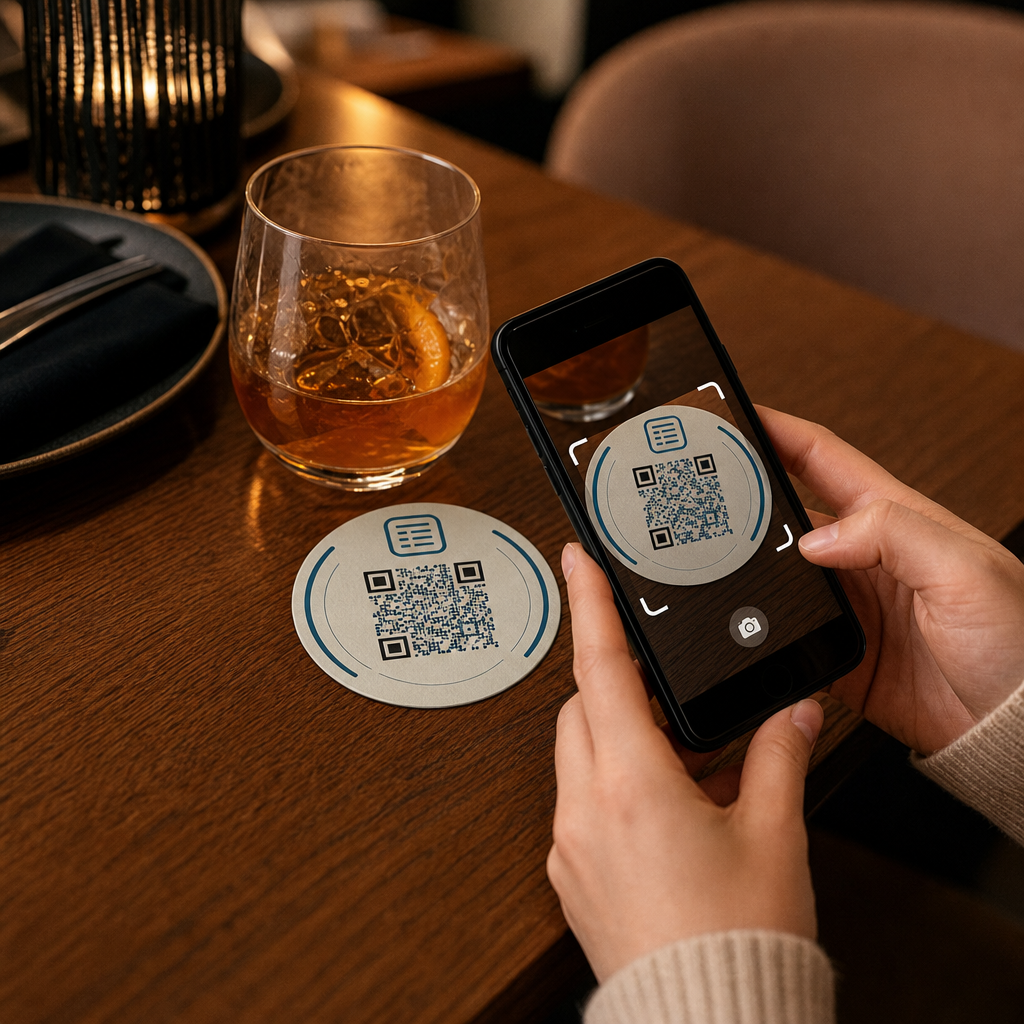
Svako piće koje sleti na sto dolazi sa podmetačem. To čini podmetače jednom od najčešće viđenih površina u bilo kom ugostiteljskom okruženju. Za razliku od stoni šatora, koje gosti često guraju u stranu, ili zidnih postera koji zahtevaju da neko ustane i priđe, podmetač stoji direktno ispred vašeg gosta tokom cele posete.
Ta postojanost čini podmetače korisnim za tri specifična zadatka:
- Pristup meniju – omogućite gostima da pregledaju hranu i piće u trenutku kada sednu
- Wi-Fi deljenje – eliminišite potrebu da osoblje ponavlja lozinku desetine puta po smeni
- Praćenje angažovanja kupaca – merite koliko ljudi interreaguje sa vašim digitalnim sadržajem, kada i iz kojih delova vašeg objekta
Za širi pogled na to kako se QR kodovi uklapaju širom ugostiteljskih okruženja, obrazac je dosledan: što je kod bliže gostu u trenutku kada mu je potreban, veća je stopa skeniranja. Podmetači su najbliže što može biti.
Odabir pravog tipa QR koda za podmetače
Pre nego što išta odštampate, morate odlučiti da li ćete koristiti statički ili dinamički QR kod. Razlika ima praktične posledice posebno za podmetače, jer je ponovno štampanje skupo i dugotrajno.
Статички КР кодови kodiraju informacije direktno u obrazac. Ne mogu se uređivati nakon kreiranja i ne prate skeniranja. Wi-Fi QR kodovi su prirodno pogodni za statički format – vaši mrežni podaci se retko menjaju, i nema potrebe za analitikom za taj specifičan slučaj upotrebe.
Динамички КР кодови ukazuju na kratak URL za preusmeravanje koji možete ažurirati u bilo kom trenutku bez ponovnog štampanja podmetača. Oni takođe beleže svako skeniranje, beležeći vreme, tip uređaja i geografsku lokaciju. Za pristup meniju i praćenje angažovanja, dinamički kodovi su praktičan izbor. Ako se vaš jelovnik menja sezonski, ili ako želite da ubacite promociju bez naručivanja novih podmetača, dinamički kod vam omogućava da to uradite sa vaše kontrolne table.
Kompromis je jednostavan: statički kodovi su besplatni i trajni, dok dinamički kodovi zahtevaju pretplatu, ali vam daju fleksibilnost i podatke. Za većinu ugostiteljskih preduzeća koja obavljaju tekuće operacije, mogućnost ažuriranja sadržaja bez ponovnog štampanja čini dinamičke kodove boljom dugoročnom investicijom. Potpuni pregled obe opcije je pokriven na statičkih naspram dinamičkih QR kodova страница.
Kreirajte QR kodove spremne za podmetače za nekoliko minuta Користити Dinamički QR kod generator za kreiranje kodova za jelovnik, Wi-Fi i angažovanje koje možete ažurirati bilo kada – nije potrebno ponovno štampanje.
Postavljanje QR koda za jelovnik za podmetače
QR kod za jelovnik na podmetaču treba da odvede vašeg gosta direktno na čist, digitalni jelovnik prilagođen mobilnim uređajima u trenutku kada skeniraju. Postavljanje uključuje dve odluke: u kom formatu se nalazi vaš jelovnik i kako gradite QR kod oko njega.
Pageloot-ov QR kod za jelovnik: generator podržava dva pristupa. Prvo, možete otpremiti postojeći PDF – ako već imate dizajniran jelovnik, možete ga povezati putem otpremanja datoteke ili hostovanog URL-a kao što je link sa Google Drive-a ili Dropbox-a, što je najbrži put do postavljanja na mrežu. Drugo, možete izgraditi strukturiranu odredišnu stranicu menija sa kategorijama, fotografijama artikala, opisima i cenama, i dodati sezonske specijalitete, dnevne ponude i slike koje PDF ne može uvek dobro prikazati na mobilnom uređaju.
Posebno za podmetače, pristup odredišne stranice obično daje bolje rezultate. Gosti su na svojim telefonima, i stranica optimizovana za mobilne uređaje je lakša za navigaciju od PDF-a koji zahteva štipanje i zumiranje. Za dublji uvid u to kako se naručivanje putem QR koda uklapa u radni tok pune usluge, vodič na Sistemi za naručivanje putem QR koda detaljno pokriva tehničku i operativnu stranu.
Kada je vaš jelovnik konfigurisan, prilagodite QR kod bojama vašeg brenda, logotipom i okvirom sa kratkim pozivom na akciju kao što je “Skenirajte da vidite jelovnik.” Ovaj kontekst pomaže gostima da razumeju šta skeniraju pre nego što to urade, što direktno poboljšava stope skeniranja.
Postavljanje Wi-Fi QR koda za podmetače
Deljenje Wi-Fi akreditiva putem podmetača je jedna od najjednostavnijih i najkorisnijih primena QR kodova u ugostiteljstvu. Gost skenira kod i njihov uređaj se automatski povezuje – bez vidljive lozinke, bez angažovanja osoblja, bez grešaka u kucanju.
Postavljanje je jednostavno koristeći Pageloot-ov generator Wi-Fi QR kodova. Unesite naziv vaše mreže (SSID), izaberite tip bezbednosti (WPA/WPA2 je najčešći), unesite lozinku mreže, prilagodite dizajn i preuzmite. Pošto se Wi-Fi akreditivi retko menjaju, statički QR kod je ovde dovoljan i ne košta ništa za generisanje. Za potpuni pregled procesa i savete o postavljanju, vodič za povezivanje gostiju na Wi-Fi putem QR koda pokriva svaki korak detaljno.
Jedna praktična napomena: ako vaše mesto koristi zasebnu mrežu za goste – što je dobra bezbednosna praksa – pobrinite se da QR kod kodira akreditive mreže za goste, a ne vašu operativnu mrežu.
Praćenje angažovanja kupaca putem skeniranja podmetača
Wi-Fi QR kodovi su statični i ne generišu podatke o skeniranju. Ali za pristup meniju i bilo koji drugi sadržaj kampanje koji stavite na podmetače, dinamički QR kodovi vam daju prikaz uživo kako gosti interaguju sa vašim fizičkim prostorom.
Pageloot-ov kontrolna tabla za analitiku QR kodova prati sledeće za svaki dinamički kod:
- Ukupna skeniranja i jedinstvena skeniranja tokom vremena
- Datum i vreme svakog skeniranja
- Tip uređaja (iOS, Android ili desktop)
- Geografska lokacija do nivoa grada
- Poređenja na nivou postavljanja ako koristite zasebne kodove za različite zone stolova ili delove objekta
Za operaciju sa više objekata ili veliki prostor za događaje, ovi podaci odgovaraju na praktična pitanja: Koje oblasti beleže najveće angažovanje? Da li gosti više skeniraju tokom ručka ili večere? Da li skeniranja menija rastu u danima koji se podudaraju sa promocijama koje ste pokrenuli?
Takođe možete povezati КР код за Гоогле образац sa podmetača za prikupljanje direktnih povratnih informacija gostiju. Kratka anketa nakon obroka beleži ocene zadovoljstva i komentare bez potrebe da osoblje deli papirne kartice ili usmeno traži recenzije. Za širi pregled kako podaci o skeniranju mogu poboljšati vaš marketing i operacije, vodiču za praćenje QR kodova detaljno objašnjava najvažnije metrike.
Vidite svako skeniranje čim se dogodi Pratite angažovanje menija, identifikujte vaše najprometnije periode i merite performanse kampanje u realnom vremenu sa Pageloot-ova analitika QR kodova.
Dizajniranje QR koda koji se pouzdano skenira na podmetaču
Podmetač je fizički zahtevno okruženje za QR kod. On se kvasi, rukuje se njime, slaže se i neravnomerno je osvetljen. Odluke o dizajnu koje bi bile u redu na posteru mogu postati neuspešna skeniranja na podmetaču.
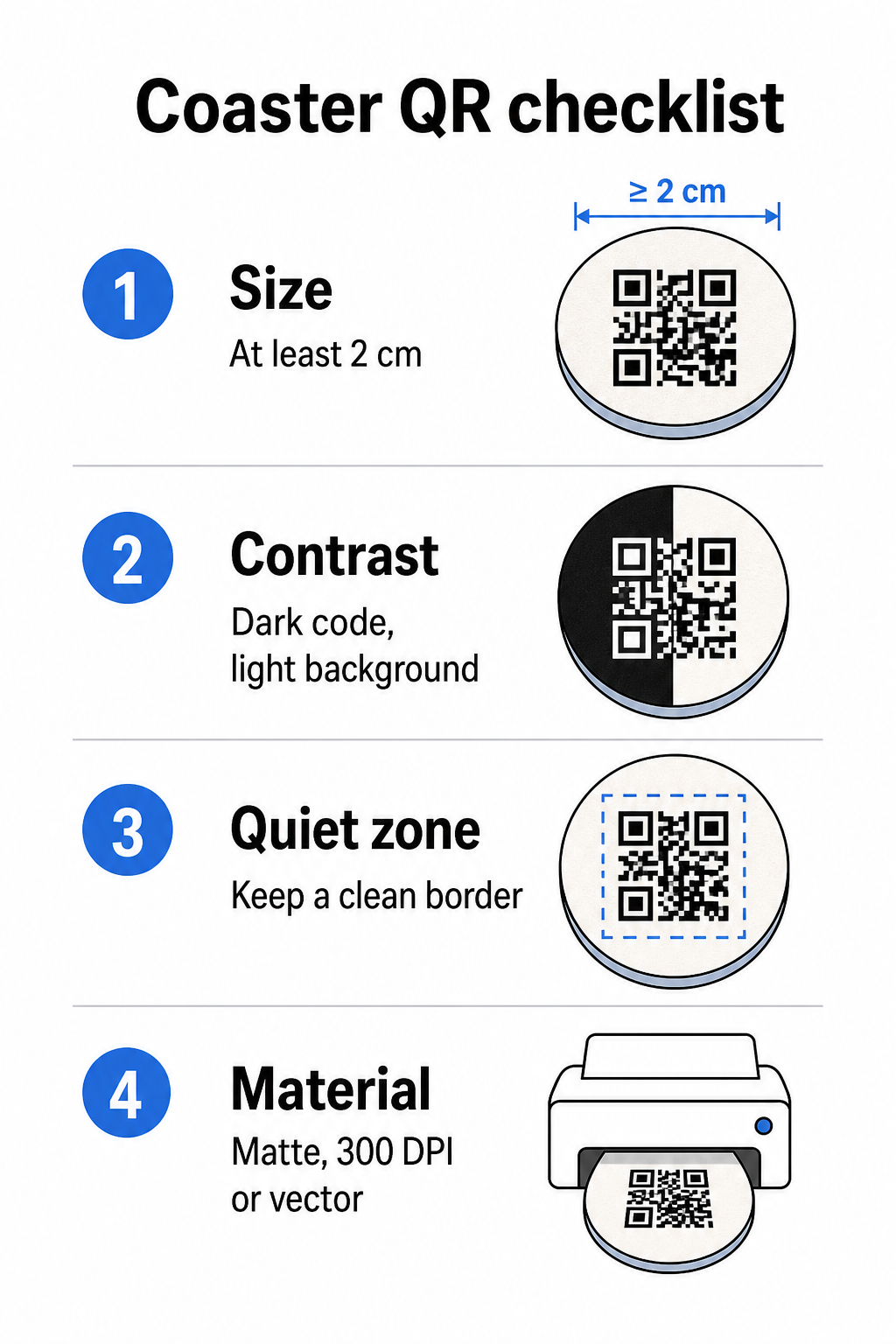
Величина Veličina je vaša prva stvar koju treba uzeti u obzir. Minimalna pouzdana veličina za QR kod je 2 cm × 2 cm (približno 0,8 in × 0,8 in) za skeniranje iz blizine. Na standardnom okruglom podmetaču – obično prečnika 3,5 do 4 inča – imate prostora da idete na veću veličinu, što poboljšava pouzdanost. Pravilo 10:1 se ovde primenjuje: širina koda bi trebalo da bude otprilike jedna desetina maksimalne udaljenosti skeniranja. Kod od 1 inča radi na otprilike 10 inča; kod od 1,5 inča daje udobniju marginu za tipičnog gosta koji sedi.
Контраст Kontrast je najkritičniji faktor za pouzdanost skeniranja. Tamni moduli na svetloj pozadini – crna na beloj je zlatni standard – trebalo bi da budu vaša polazna tačka. Mnoge kamere pametnih telefona i aplikacije za skeniranje imaju poteškoća sa invertovanim dizajnima (svetli moduli na tamnoj pozadini), zato izbegavajte tu kombinaciju čak i ako estetski izgleda bolje. Minimalni kontrastni odnos od 4:1 je preporučena osnova; veći je bolji. Izbegavajte crvene ili narandžaste prednje planove, jer mnogi senzori kamera imaju poteškoća sa pouzdanim detektovanjem ovih nijansi. najbolje prakse za kontrast boja QR koda stranica ima detaljnu tabelu poređenja ako radite sa bojama brenda koje izlaze izvan standardne crno-bele kombinacije.
Tiha zona Tiha zona se odnosi na jasnu ivicu koja mora okruživati svaki QR kod – najmanje 4 modula širine sa svih strana – bez teksta, grafike ili dizajnerskih elemenata koji prodiru. Na podmetaču, to znači ostavljanje čvrste svetle margine oko koda. Ako vaš dizajn podmetača ima tamnu ili vizuelno zauzetu pozadinu, dodajte čvrstu belu kutiju za popunjavanje iza QR koda koja uključuje celu tihu zonu. Bez toga, skeneri mogu propustiti da pouzdano lociraju granicu koda.
Završna obrada i materijal su važniji na podmetačima nego na većini drugih površina. Podmetači od kartona su najčešći u ugostiteljstvu – oni upijaju kondenzaciju i štite površine stola, ali nisu vodootporni. Za QR kodove na papirnim podmetačima, mat završne obrade su poželjnije od sjajnih jer odsjaj od gornjeg osvetljenja ometa skeniranje. Za primene veće izdržljivosti, kao što su trajne instalacije na stolovima ili višekratni podmetači, materijali poput obloženog drveta sa epoksidnom ili poliuretanskom završnom obradom štite štampu dok omogućavaju pouzdano skeniranje, pod uslovom da je završna obrada prozirna, a ne tonirana. Bez obzira na materijal, izbegavajte gradijente, senke ili prozirne elemente unutar samog QR koda – oni smanjuju kontrast i narušavaju mogućnost skeniranja u stvarnim uslovima.
Rezolucija je neophodno za štampu. Uvek preuzmite svoj QR kod u vektorskom formatu (SVG ili EPS) ili sa minimalno 300 DPI. Bitmapske datoteke uvećane iz izvoza niske rezolucije će izgledati mutno u štampi, što smanjuje pouzdanost skeniranja čak i kada kod izgleda prihvatljivo na ekranu. Kompletan set smernica za štampu i dizajn dostupan je u najbolje prakse za čitljivost QR kodova vodiču.
Praktično postavljanje i kontekst na podmetaču
Sam QR kod ne govori vašem gostu šta radi. Dodavanje poziva na akciju u jednom redu direktno na podmetač – “Skenirajte za meni”, “Povežite se na Wi-Fi”, “Podelite svoje povratne informacije” – uklanja dvosmislenost i povećava verovatnoću skeniranja. Ovo je posebno važno za goste koji su manje upoznati sa QR kodovima ili koji su ometeni razgovorom.
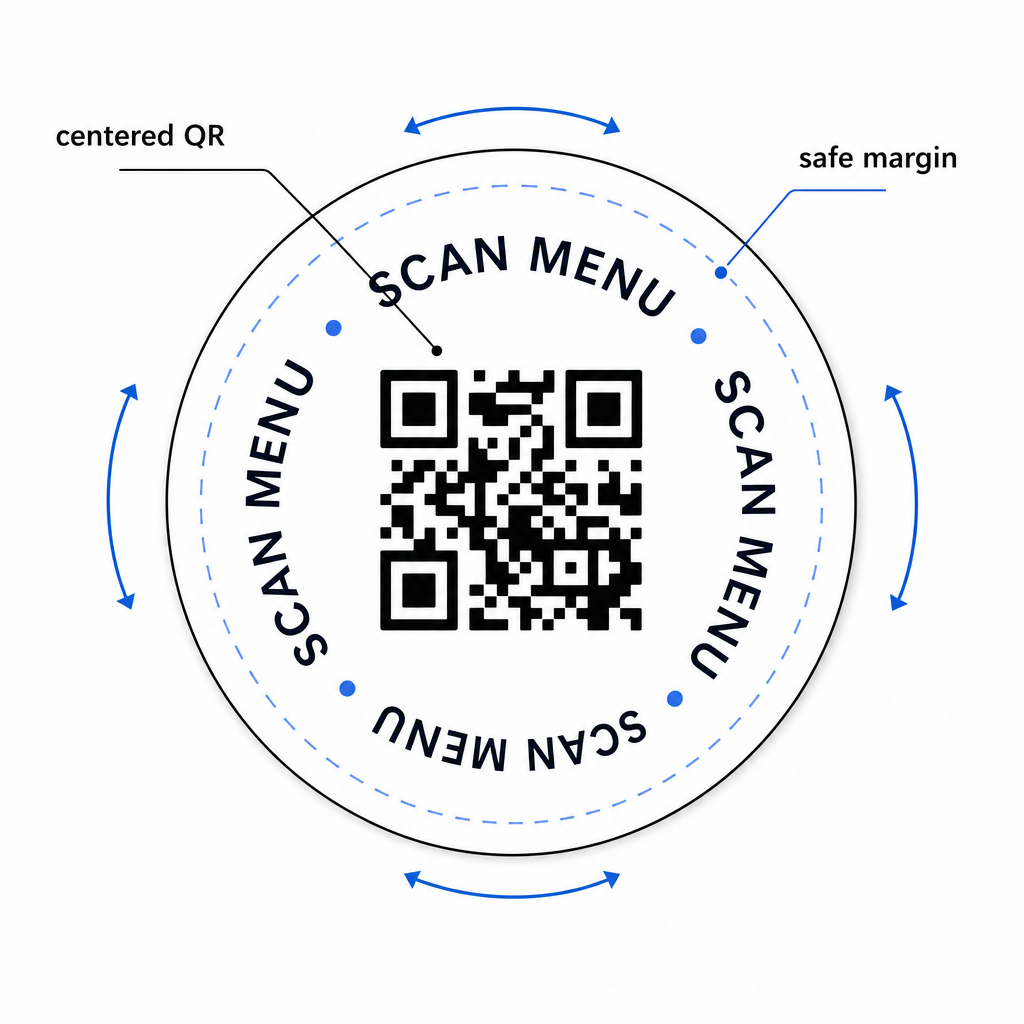
Postavite QR kod i tekst poziva na akciju tako da ostanu čitljivi iz bilo koje orijentacije. Okrugli podmetač koji se može postaviti u bilo kom smeru treba da ima kod centriran, sa tekstom raspoređenim oko njega, a ne iznad ili ispod, gde bi ga rotacija okrenula naopako. Ako vaši podmetači imaju definisanu orijentaciju, postavite kod na istaknuto, neometano područje dalje od ivice podmetača, tako da tiha zona nikada ne bude odsečena tokom sečenja ili obrezivanja.
Za događaje, razmislite o korišćenju zasebnih podmetača za različite svrhe – jedan za meni, jedan za raspored događaja, jedan za obrazac za povratne informacije. Držanje svakog podmetača fokusiranim na jednu akciju pojednostavljuje iskustvo gosta i olakšava odvojeno praćenje performansi svakog koda. Za druge kompaktne površine QR kodova sa sličnim ograničenjima dizajna, smernice za QR kodovi na stonom šatoru primenjuju se direktno.
Testiranje pre masovne štampe
Odštampajte jedan probni podmetač pre nego što se obavežete na punu proizvodnu seriju. Skenirajte ga na najmanje tri različita uređaja u stvarnim svetlosnim uslovima vašeg objekta – gornje osvetljenje, svetlost sveća ili spoljašnje sunčevo svetlo ako vaš prostor ima terasu. Testirajte sa realne udaljenosti na kojoj bi sedeći gost držao svoj telefon.
Potvrdite da:
- Kod se skenira za manje od tri sekunde na svim testnim uređajima
- Odredište se ispravno učitava na mobilnom uređaju, ne samo na desktopu
- Tiha zona je netaknuta i nije isečena ivicom podmetača
- Kontrast se održava u uslovima slabog osvetljenja
Ako koristite dinamičke QR kodove, proverite da li je odredišni URL ispravno konfigurisan na vašoj Pageloot kontrolnoj tabli pre probne štampe i potvrdite da se sva ažuriranja menija ili preusmeravanja koja napravite nakon štampe odmah odražavaju prilikom skeniranja.
Podmetači su jedna od retkih dodirnih tačaka u ugostiteljstvu koje ostaju sa vašim gostom od trenutka kada sedne dok ne ode. Dobro dizajniran QR kod uklanja trenje pri pretraživanju menija, eliminiše zahteve za Wi-Fi lozinkom i pruža vam merljive podatke o tome kako se gosti angažuju sa vašim prostorom. Zahtevi za dizajn su specifični, ali ostvarivi: dovoljna veličina, jak kontrast, čista tiha zona i jasan poziv na akciju odštampan pored koda.
Počnite sa pravim alatima. Koristite Pageloot-ov QR kod za jelovnik: generator za kreiranje dinamičkog koda menija, Generator Wi-Fi QR kodova za besprekoran pristup gostinskoj mreži, i analitičku kontrolnu tablu za praćenje angažovanja kada vaši podmetači budu u opticaju.
Često postavljana pitanja
Tehnički da, ali se ne preporučuje. Jedan QR kod pokazuje na jednu destinaciju, tako da kombinovanje obe funkcije znači povezivanje sa odredišnom stranicom sa dve odvojene opcije – dodavanje dodatnog dodira za gosta. Čistiji pristup je korišćenje dva različita QR koda na podmetaču, svaki sa jasnom oznakom, ili posvetiti zasebne dizajne podmetača svakoj svrsi. Wi-Fi kodovi su statični i besplatni za generisanje; kodovi menija najbolje funkcionišu kao dinamički kodovi sa omogućenim praćenjem.
Ako ste kreirali vaš QR kod za podmetač kao dinamički kod koristeći Pageloot, možete se prijaviti na svoju kontrolnu tablu i ažurirati odredišni URL ili sadržaj menija u bilo kom trenutku. Odštampani QR kod na podmetaču ostaje isti; menja se samo povezani sadržaj. Ovo je jedan od primarnih razloga zašto se dinamički kodovi preporučuju za menije – sezonska ažuriranja, promene cena i dostupnost artikala mogu se svi odmah odraziti bez naručivanja nove serije podmetača.
Sa dinamičkim QR kodom i Pageloot-ovom analitikom, možete pratiti ukupan broj skeniranja, jedinstvena skeniranja, datum i vreme svakog skeniranja, tip korišćenog uređaja (iOS ili Android) i geografsku lokaciju do nivoa grada. Takođe možete uporediti performanse na različitim mestima ako dodelite zasebne QR kodove različitim zonama stolova ili delovima vašeg objekta. Statički QR kodovi, uključujući Wi-Fi kodove, ne generišu nikakve podatke o skeniranju.