
Oaspeții tăi caută parola Wi-Fi sau fac semn unui chelner doar pentru a vedea meniul? Aceste mici puncte de fricțiune se acumulează rapid, frustrând clienții și încetinind personalul tău. Acest ghid îți arată exact cum să proiectezi, să generezi și să implementezi coduri QR pe suporturi de pahare, astfel încât o singură scanare să rezolve problema – și să îți ofere datele necesare pentru a continua să te îmbunătățești.
De ce suporturile de pahare sunt o suprafață practică pentru codurile QR
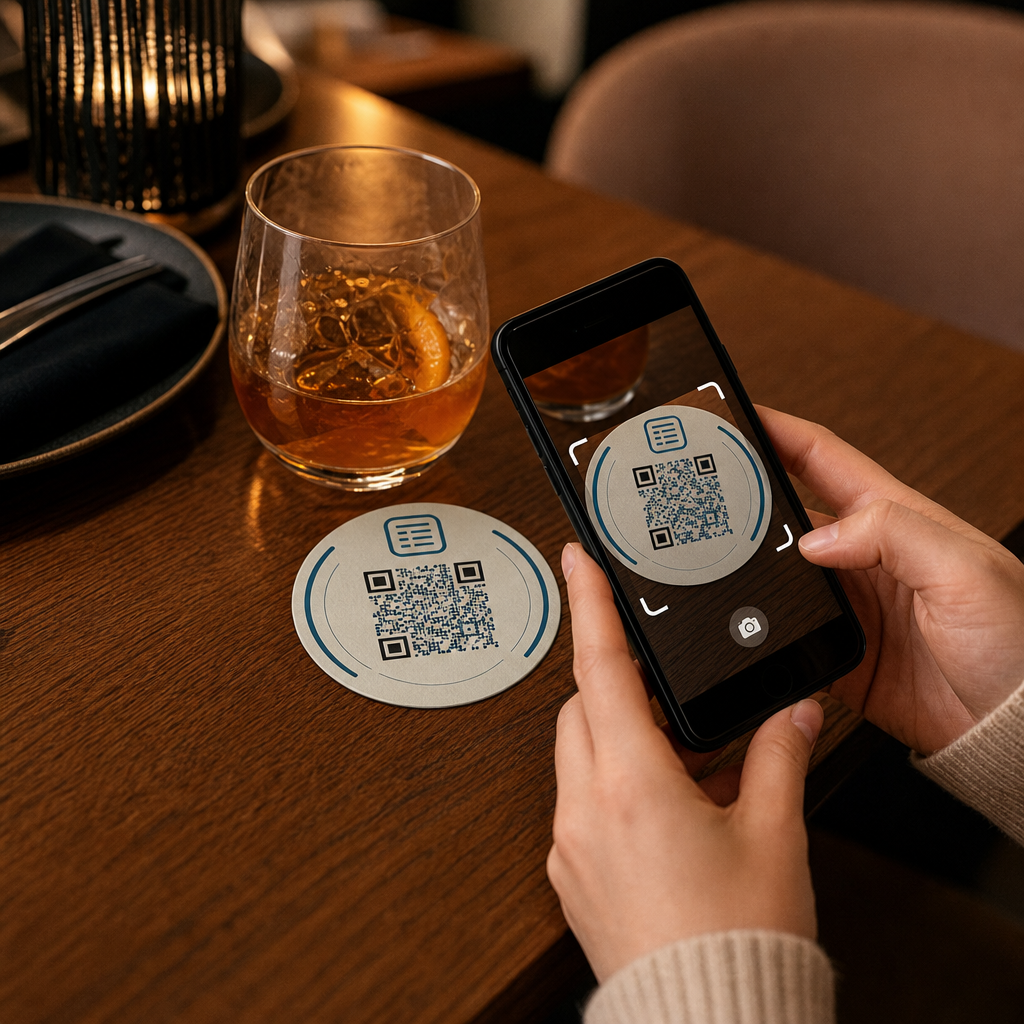
Fiecare băutură care ajunge pe o masă vine cu un suport de pahar. Acest lucru face ca suporturile de pahare să fie una dintre cele mai vizualizate suprafețe în orice mediu de ospitalitate. Spre deosebire de display-urile de masă, pe care oaspeții le împing adesea deoparte, sau de posterele montate pe perete care necesită ca cineva să se ridice și să se deplaseze, un suport de pahar stă direct în fața clientului tău pe toată durata vizitei.
Această putere de menținere face suporturile de pahare utile pentru trei sarcini specifice:
- Acces la meniu – permite oaspeților să răsfoiască mâncărurile și băuturile în momentul în care se așează
- Partajare Wi-Fi – elimină necesitatea ca personalul să repete parola de zeci de ori pe tură
- Urmărirea implicării clienților – măsoară câți oameni interacționează cu conținutul tău digital, când și din ce zone ale locației tale
Pentru o privire mai amplă asupra modului în care codurile QR se integrează în mediile de ospitalitate, modelul este consecvent: cu cât codul este mai aproape de oaspete în momentul în care are nevoie de el, cu atât rata de scanare este mai mare. Suporturile de pahare sunt cât se poate de aproape.
Alegerea tipului potrivit de cod QR pentru suporturile de pahare
Înainte de a imprima orice, trebuie să decizi dacă vei folosi un cod QR static sau dinamic. Diferența are consecințe practice în special pentru suporturile de pahare, deoarece reimprimarea este costisitoare și consumatoare de timp.
Coduri QR statice codifică informațiile direct în model. Nu pot fi editate după creare și nu urmăresc scanările. Codurile QR Wi-Fi se potrivesc natural formatului static – credențialele rețelei tale se schimbă rar și nu este nevoie de analize pentru acest caz de utilizare specific.
Coduri QR dinamice indică o adresă URL scurtă de redirecționare pe care o poți actualiza oricând fără a reimprima suportul de pahar. De asemenea, înregistrează fiecare scanare, consemnând ora, tipul dispozitivului și locația geografică. Pentru accesul la meniu și urmărirea implicării, codurile dinamice sunt alegerea practică. Dacă meniul tău se schimbă sezonier sau dacă vrei să introduci o promoție fără a comanda noi suporturi de pahare, un cod dinamic îți permite să faci acest lucru din tabloul de bord.
Compromisul este simplu: codurile statice sunt gratuite și permanente, în timp ce codurile dinamice necesită un abonament, dar îți oferă flexibilitate și date. Pentru majoritatea afacerilor din ospitalitate care desfășoară operațiuni continue, capacitatea de a actualiza conținutul fără a reimprima face ca codurile dinamice să fie o investiție pe termen lung mai bună. Prezentarea completă a ambelor opțiuni este acoperită pe coduri QR statice vs. dinamice pagină.
Creează coduri QR gata de utilizare pe suporturi de pahare în câteva minute Folosește Generator cod QR dinamic pentru a crea coduri pentru meniu, Wi-Fi și implicare pe care le poți actualiza oricând – fără a fi necesară reimprimarea.
Configurarea unui cod QR pentru meniu pe suporturi de pahare
Un cod QR pentru meniu pe un suport de pahar ar trebui să ducă oaspetele tău direct la un meniu digital curat, adaptat pentru mobil, în momentul în care scanează. Configurarea implică două decizii: în ce format există meniul tău și cum construiești codul QR în jurul acestuia.
Pageloot Meniu QR pentru restaurant suportă două abordări. În primul rând, poți încărca un PDF existent – dacă ai deja un meniu proiectat, îl poți lega printr-o încărcare de fișier sau o adresă URL găzduită, cum ar fi un link Google Drive sau Dropbox, ceea ce reprezintă cea mai rapidă cale de a ajunge online. În al doilea rând, poți construi o pagină de destinație structurată pentru meniu cu categorii, fotografii de articole, descrieri și prețuri, și poți adăuga oferte speciale sezoniere, propuneri zilnice și imagini pe care un PDF nu le poate afișa întotdeauna bine pe mobil.
În special pentru suporturile de pahare, abordarea cu pagina de destinație tinde să funcționeze mai bine. Oaspeții sunt pe telefoanele lor, iar o pagină optimizată pentru mobil este mai ușor de navigat decât un PDF care necesită ciupire și zoom. Pentru o privire mai aprofundată asupra modului în care comanda bazată pe QR se integrează într-un flux de lucru cu servicii complete, ghidul despre sisteme de comandă cu cod QR acoperă în detaliu partea tehnică și operațională.
Odată ce meniul tău este configurat, personalizează codul QR cu culorile brandului tău, logo-ul și un cadru cu un scurt apel la acțiune, cum ar fi “Scanează pentru a vedea meniul”. Acest context îi ajută pe oaspeți să înțeleagă ce scanează înainte de a o face, ceea ce îmbunătățește direct ratele de scanare.
Configurarea unui cod QR Wi-Fi pentru suporturi de pahare
Partajarea credențialelor Wi-Fi printr-un suport de pahar este una dintre cele mai simple și mai imediat utile aplicații ale codurilor QR în ospitalitate. Un oaspete scanează codul și dispozitivul său se conectează automat – fără parolă vizibilă, fără implicarea personalului, fără greșeli de tastare.
Configurarea este simplă folosind Pageloot’s generator de coduri QR Wi-Fi. Introduceți numele rețelei (SSID), selectați tipul de securitate (WPA/WPA2 este cel mai comun), introduceți parola rețelei, personalizați designul și descărcați. Deoarece datele de conectare Wi-Fi se schimbă rar, un cod QR static este suficient aici și nu costă nimic să-l generați. Pentru o prezentare completă a procesului și sfaturi de plasare, ghidul de conectare a oaspeților la Wi-Fi prin cod QR acoperă fiecare pas în detaliu.
O notă practică: dacă locația dvs. utilizează o rețea separată pentru oaspeți – ceea ce este o practică de securitate solidă – asigurați-vă că codul QR codifică datele de conectare ale rețelei pentru oaspeți, nu ale rețelei dvs. operaționale.
Urmărirea implicării clienților prin scanări de pe suporturi de pahare
Codurile QR Wi-Fi sunt statice și nu generează date de scanare. Dar pentru accesul la meniu și orice alt conținut de campanie pe care îl plasați pe suporturi de pahare, codurile QR dinamice vă oferă o vizualizare în timp real a modului în care oaspeții interacționează cu spațiul dvs. fizic.
Pageloot tabloul de bord de analiză a codurilor QR urmărește următoarele pentru fiecare cod dinamic:
- Scanări totale și scanări unice în timp
- Data și ora fiecărei scanări
- Tipul dispozitivului (iOS, Android sau desktop)
- Locația geografică până la nivel de oraș
- Comparații la nivel de plasare dacă utilizați coduri separate pentru diferite zone de masă sau zone ale locației
Pentru o operațiune cu mai multe locații sau un spațiu mare de evenimente, aceste date răspund la întrebări practice: Ce zone înregistrează cea mai mare implicare? Oaspeții scanează mai mult în timpul serviciului de prânz sau cină? Scanările meniului cresc brusc în zilele care se corelează cu promoțiile pe care le-ați derulat?
Puteți, de asemenea, să legați un Codul QR al formularului Google de pe un suport de pahare pentru a colecta feedback direct de la oaspeți. Un scurt sondaj post-masă captează scorurile de satisfacție și comentariile fără a necesita personalului să distribuie carduri de hârtie sau să ceară recenzii verbal. Pentru o imagine de ansamblu mai largă a modului în care datele de scanare vă pot îmbunătăți marketingul și operațiunile, ghidul de urmărire a codurilor QR prezintă în detaliu metricile cele mai importante.
Vezi Fiecare Scanare Pe Măsură Ce Se Întâmplă Urmăriți implicarea în meniu, identificați perioadele cele mai aglomerate și măsurați performanța campaniei în timp real cu Analiza Codurilor QR de la Pageloot.
Proiectarea unui cod QR care scanează fiabil pe un suport de pahare
Un suport de pahar este un mediu solicitant fizic pentru un cod QR. Se udă, este manevrat, stivuit și iluminat neuniform. Deciziile de design care ar fi bune pe un poster pot deveni eșecuri de scanare pe un suport de pahar.
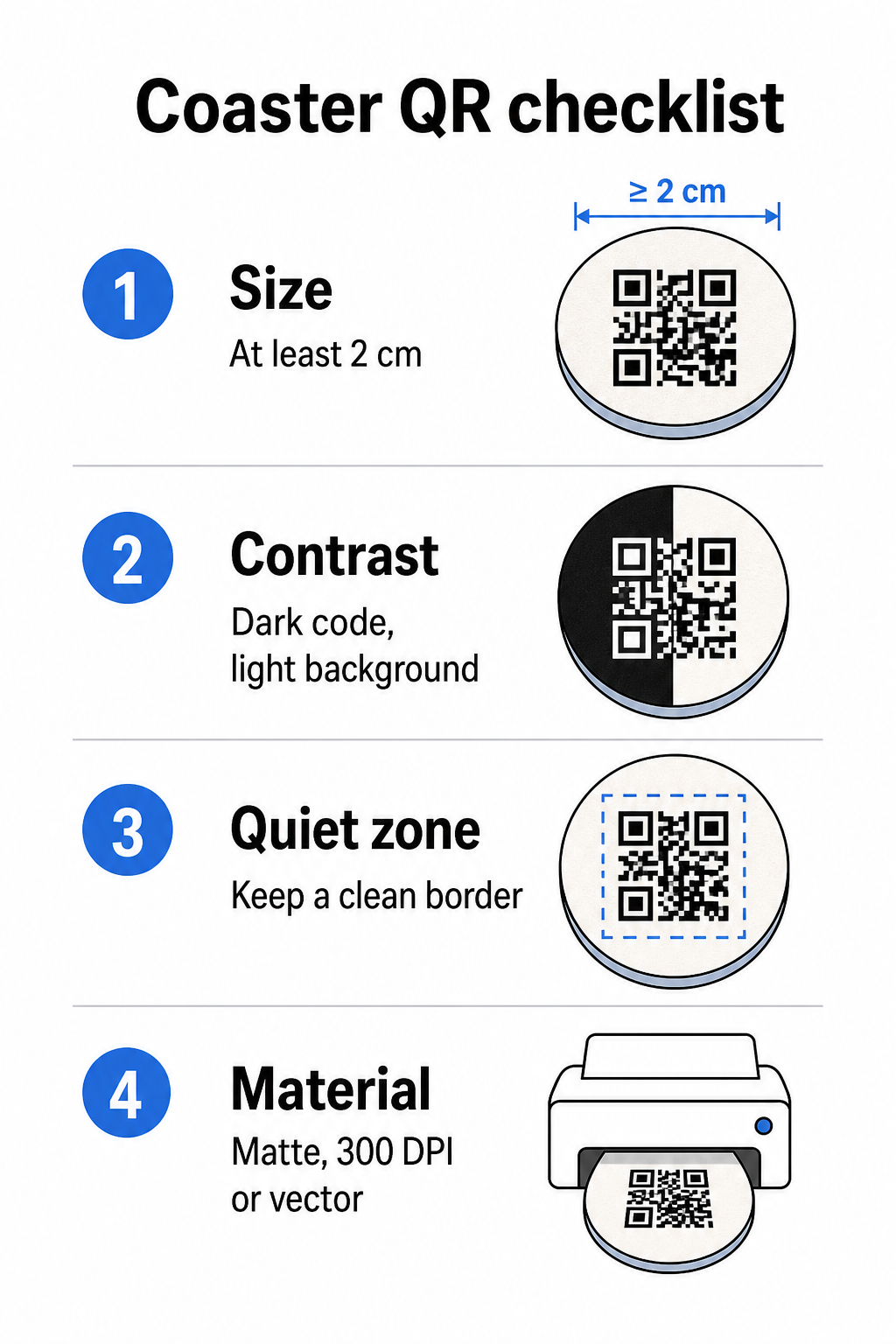
mărimea este prima dumneavoastră considerație. Dimensiunea minimă fiabilă pentru un cod QR este de 2 cm × 2 cm (aproximativ 0,8 in × 0,8 in) pentru scanare de aproape. Pe un suport de pahar rotund standard – de obicei cu diametrul de 3,5 până la 4 inci – aveți loc să îl faceți mai mare, ceea ce îmbunătățește fiabilitatea. Regula 10:1 se aplică aici: lățimea codului ar trebui să fie aproximativ o zecime din distanța maximă de scanare. Un cod de 1 inch funcționează la aproximativ 10 inci; un cod de 1,5 inci oferă o marjă mai confortabilă pentru oaspetele tipic așezat.
Contrast este cel mai critic factor pentru fiabilitatea scanării. Modulele întunecate pe un fundal deschis – negru pe alb fiind standardul de aur – ar trebui să fie punctul dumneavoastră de plecare. Multe camere de smartphone și aplicații de scanare se confruntă cu dificultăți la designurile inversate (module deschise pe un fundal întunecat), așa că evitați această combinație chiar dacă arată mai bine estetic. Un raport de contrast minim de 4:1 este linia de bază recomandată; mai mare este mai bine. Evitați prim-planurile roșii sau portocalii, deoarece mulți senzori de cameră au dificultăți în detectarea fiabilă a acestor nuanțe. cele mai bune practici de contrast de culoare pentru codurile QR pagină are un tabel detaliat de comparație dacă lucrați cu culori de brand care se încadrează în afara combinației standard alb-negru.
Zonă liniștită se referă la marginea clară care trebuie să înconjoare fiecare cod QR – de cel puțin 4 module lățime pe toate părțile – fără text, grafică sau elemente de design care să interfereze. Pe un suport de pahar, aceasta înseamnă să lăsați o margine solidă de culoare deschisă în jurul codului. Dacă designul suportului dumneavoastră de pahar are un fundal întunecat sau vizual încărcat, adăugați o casetă de umplutură albă solidă în spatele codului QR care include întreaga zonă de liniște. Fără aceasta, scanerele pot eșua în localizarea fiabilă a limitei codului.
Finisaj și material contează mai mult pe suporturile de pahare decât pe majoritatea altor suprafețe.
Rezoluție este nenegociabil pentru imprimare. Descărcați întotdeauna codul QR într-un format vectorial (SVG sau EPS) sau la un minim de 300 DPI. Fișierele bitmap scalate de la exporturi de rezoluție joasă vor apărea neclare la imprimare, ceea ce reduce fiabilitatea scanării chiar și atunci când codul arată acceptabil pe ecran. Un set complet de ghiduri de imprimare și design este disponibil în cele mai bune practici pentru lizibilitatea codurilor QR ghidul nostru.
Amplasare practică și Context pe Suportul de pahar
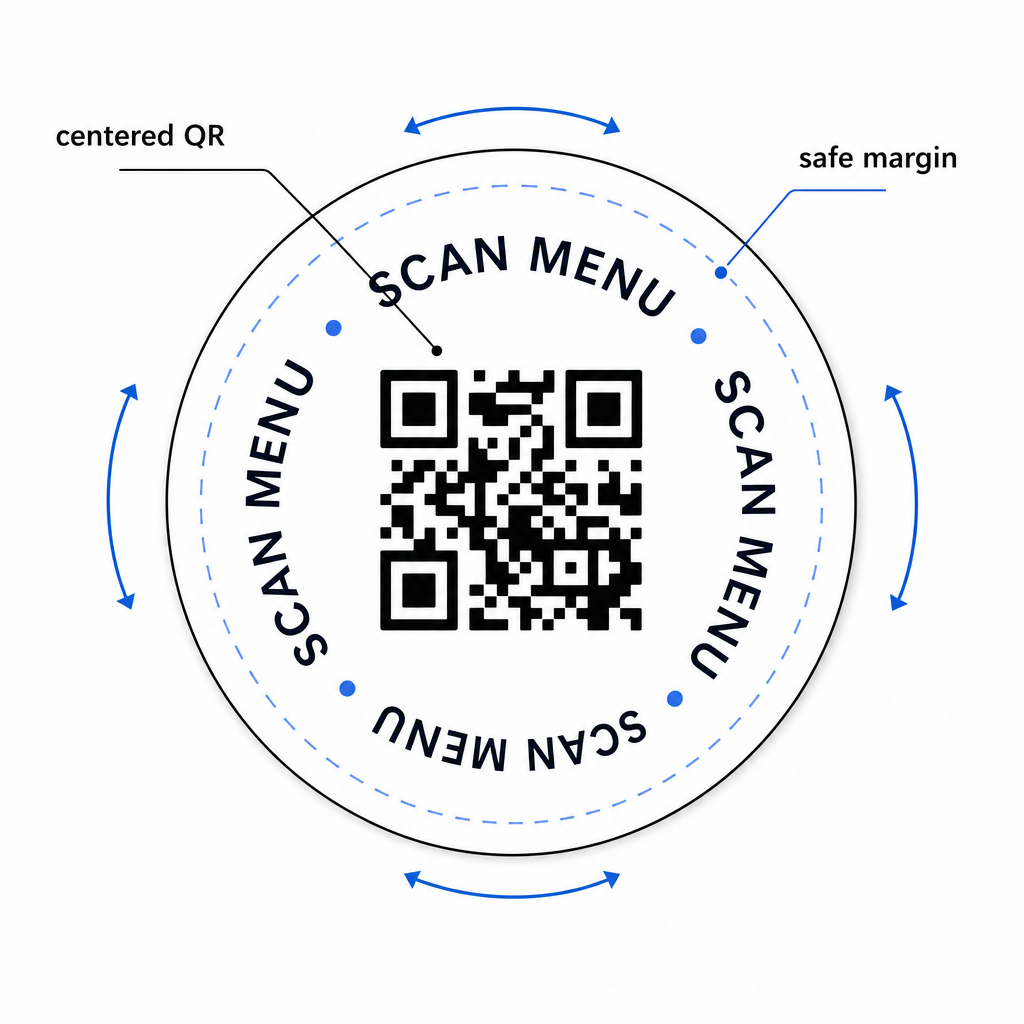
Un cod QR singur nu îi spune oaspetelui dumneavoastră ce face. Adăugarea unui apel la acțiune pe o singură linie direct pe suportul de pahar – “Scanați pentru meniu,” “Conectați-vă la Wi-Fi,” “Trimiteți feedback-ul dumneavoastră” – elimină ambiguitatea și crește probabilitatea unei scanări. Acest lucru este deosebit de important pentru oaspeții care sunt mai puțin familiarizați cu codurile QR sau care sunt distrași de conversație.
Poziționați codul QR și textul apelului la acțiune astfel încât să rămână lizibile din orice orientare. Un suport de pahar rotund care poate fi așezat în orice direcție ar trebui să aibă codul centrat, cu textul aranjat în jurul său mai degrabă decât deasupra sau dedesubt, unde rotația l-ar întoarce cu susul în jos. Dacă suporturile dumneavoastră de pahare au o orientare definită, plasați codul într-o zonă proeminentă, neobstrucționată, departe de marginea suportului de pahar, astfel încât zona de liniște să nu fie niciodată tăiată în timpul tăierii cu matrița sau al tăierii.
Pentru evenimente, luați în considerare utilizarea unor suporturi de pahare separate pentru scopuri distincte – unul pentru meniu, unul pentru programul evenimentului, unul pentru un formular de feedback. Menținerea fiecărui suport de pahar concentrat pe o singură acțiune simplifică experiența oaspetelui și facilitează urmărirea performanței fiecărui cod separat. Pentru alte suprafețe compacte de coduri QR cu constrângeri de design similare, ghidul privind Coduri QR pe corturi de masă se aplică direct.
Testare Înainte de a imprima în vrac
Imprimați un singur suport de pahar de test înainte de a vă angaja la o producție completă. Scanați-l pe cel puțin trei dispozitive diferite în condițiile reale de iluminare ale locației dumneavoastră – iluminat deasupra capului, lumina lumânărilor sau lumina soarelui în aer liber dacă spațiul dumneavoastră are o terasă. Testați de la distanța realistă la care un oaspete așezat și-ar ține telefonul.
Confirmați că:
- Codul scanează în mai puțin de trei secunde pe toate dispozitivele de test
- Destinația se încarcă corect pe mobil, nu doar pe desktop
- Zona de liniște este intactă și nu este tăiată de marginea suportului de pahar
- Contrastul se menține în condiții de iluminare slabă
Dacă utilizați coduri QR dinamice, verificați dacă URL-ul de destinație este configurat corect în tabloul de bord Pageloot înainte de imprimarea de test și confirmați că orice actualizări de meniu sau redirecționări pe care le faceți după imprimare sunt reflectate imediat la scanare.
Suporturile de pahare sunt unul dintre puținele puncte de contact din ospitalitate care rămân cu oaspetele dumneavoastră din momentul în care se așează până pleacă. Un cod QR bine conceput elimină fricțiunea din navigarea meniului, elimină cererile de parolă Wi-Fi și vă oferă date măsurabile despre modul în care oaspeții interacționează cu spațiul dumneavoastră. Cerințele de design sunt specifice, dar realizabile: dimensiune suficientă, contrast puternic, o zonă de liniște curată și un apel la acțiune clar imprimat alături de cod.
Începeți cu instrumentele potrivite. Utilizați Pageloot’s Meniu QR pentru restaurant pentru a construi un cod de meniu dinamic, cel Coduri QR Wi-Fi pentru acces fără întreruperi la rețeaua de oaspeți, și cel tablou de bord de analiză pentru a urmări implicarea odată ce suporturile dumneavoastră de pahare sunt în circulație.
Întrebări frecvente
Tehnic da, dar nu este recomandat. Un singur cod QR indică o singură destinație, așa că combinarea ambelor funcții înseamnă legarea la o pagină de destinație cu două opțiuni separate – adăugând o atingere suplimentară pentru oaspete. O abordare mai curată este să folosiți două coduri QR distincte pe coaster, fiecare cu o etichetă clară, sau să dedicați designuri separate de coastere fiecărui scop. Codurile Wi-Fi sunt statice și gratuite de generat; codurile de meniu funcționează cel mai bine ca coduri dinamice cu urmărire activată.
Dacă ați creat codul QR al coasterului dumneavoastră ca un cod dinamic folosind Pageloot, vă puteți conecta la tabloul de bord și actualiza URL-ul de destinație sau conținutul meniului în orice moment. Codul QR imprimat pe coaster rămâne același; doar conținutul legat se modifică. Acesta este unul dintre motivele principale pentru care codurile dinamice sunt recomandate pentru meniuri – actualizările sezoniere, modificările de preț și disponibilitatea articolelor pot fi toate reflectate imediat fără a comanda o nouă serie de coastere.
Cu un cod QR dinamic și analizele Pageloot, puteți urmări scanările totale, scanările unice, data și ora fiecărei scanări, tipul de dispozitiv utilizat (iOS sau Android) și locația geografică până la nivel de oraș. Puteți compara, de asemenea, performanța în diferite amplasamente dacă atribuiți coduri QR separate diferitelor zone de masă sau zone ale locației dumneavoastră. Codurile QR statice, inclusiv codurile Wi-Fi, nu generează date de scanare.