ホーム > ユースケース > QR Codes on Shopping Bags: Design, Placement, and Tracking
QR shopping bag

QR Codes on Shopping Bags: Design, Placement, and Tracking

Learn to design and track QR codes on shopping bags. Boost post-purchase engagement with tips on placement, dynamic links, and effective calls to action.
Updated on 7月 2, 2026
目次

Are your shopping bags doing any work after a customer walks out the door? Most aren’t – and that’s a missed opportunity to keep the conversation going. This page shows you how to design effective QR codes for shopping bags, what to link them to, and how to measure the results.

Why Shopping Bags Are a Valuable QR Code Surface

A shopping bag travels well beyond the point of sale. It rides the subway, sits on an office desk, gets reused at a farmer’s market. Every trip is a potential impression – and a potential scan.

A World Sync 2024 consumer survey found that 64% of shoppers have already scanned a QR code on a product while shopping in-store, and 42% say QR codes have significantly improved their in-person shopping experience. Shoppers are ready to scan. The question is whether your bag gives them a reason to.

Unlike product packaging, which a customer often discards after opening, a shopping bag frequently gets reused. That extended lifespan means your QR code has repeated exposure – to the original buyer and to everyone around them. For retailers looking to squeeze more value from physical touchpoints, the bag is one of the simplest places to start. You can explore the full range of QR code use cases for retail businesses to see how other touchpoints compare.

What to Link Your Shopping Bag QR Code To

The destination matters as much as the code itself. A QR code that leads nowhere useful gets scanned once and forgotten. Here are the most effective destinations for retail bags:

  • Exclusive discounts or coupons – Reward customers who scan post-purchase with a discount on their next order. A coupon QR code lets you display multiple offers on a single branded landing page.
  • Loyalty program sign-up – Turn a one-time buyer into a repeat customer by making it effortless to join your rewards program.
  • New arrivals or seasonal collections – Link to a curated product page that keeps the shopping momentum going after they leave the store.
  • ソーシャルメディア・プロフィール – Grow your following by giving bag recipients a direct path to your Instagram, TikTok, or Pinterest page.
  • How-to content or brand story – A short video or article about how your products are made builds brand affinity and trust.
  • Product registration or warranty pages – Especially useful for tech, appliances, or premium goods.
  • Reviews page – Prompt customers to leave a Google or social review while the purchase is still fresh.

リンクQRコード handles most of these use cases cleanly – you enter a URL, customize the code to match your brand, and you’re ready to print.

Turn Your Shopping Bag Into a Marketing Channel を使用しています。 QRコードジェネレーター to create a branded, trackable code for your next bag print run. No technical knowledge needed.

Why You Should Use Dynamic QR Codes on Bags

Static QR codes encode a fixed URL. Once you print them, that destination is permanent. If the promotion ends, the landing page changes, or the link breaks, every bag in circulation becomes a dead end.

ダイナミックQRコード solve this by routing scans through a redirect, so you can update the destination at any time without reprinting the bags. This makes them the practical choice for retail packaging, where bag inventory often lasts months.

Beyond flexibility, dynamic QR codes provide detailed scan analytics: total and unique scan counts, scan times, device types, and geographic data down to city or region level. That data turns a passive bag into an active campaign asset you can measure and improve. You can read more about 動的QRコードが収集するデータ and how to use it.

For retailers running seasonal campaigns or testing different offers across store locations, the ability to update destinations and compare scan performance by location is especially valuable. Pageloot’s QR code solutions for retailers are built for exactly this kind of campaign management.

Update Your Bag Campaign Without a Reprint Create a dynamic QR code at PagelootのQRコードジェネレータ and change your destination URL anytime – your printed bags stay current automatically.

How to Design a QR Code That Scans Reliably on a Bag

A QR code that doesn’t scan is worse than no QR code at all – it frustrates customers and wastes print budget. Bags introduce specific design challenges: textured surfaces, folded panels, handles that interrupt the printing area, and varying lighting conditions at the point of scan. Here’s what to get right.

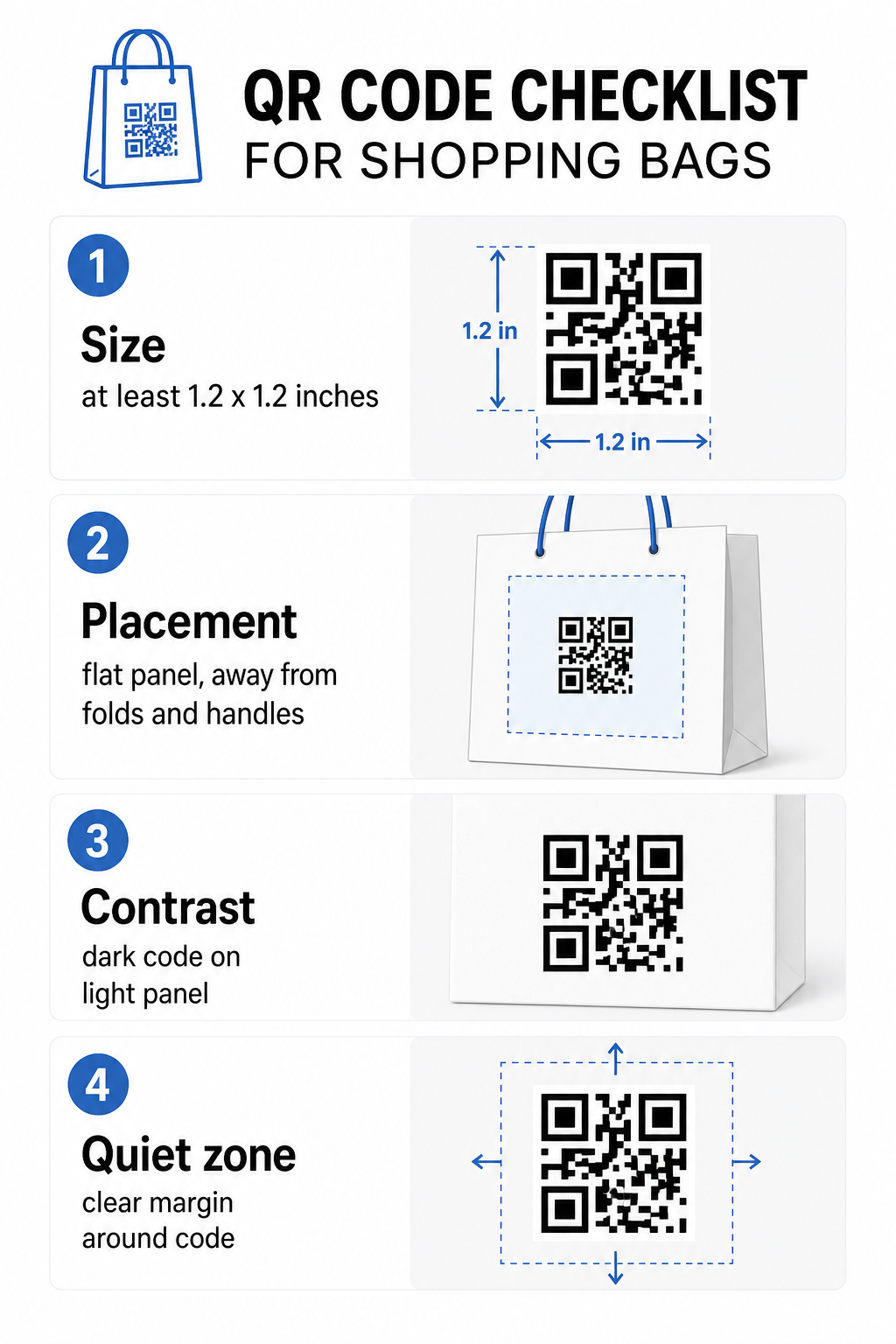
Bag QR checklist

サイズ

The minimum recommended print size for reliable scanning at arm’s length is 0.8 × 0.8インチ (2 × 2 cm). For a shopping bag, where the scanning distance is typically greater and the bag may be moving, aim for at least 1.2 × 1.2 inches (3 × 3 cm).

役立つ経験則は 10:1の距離対サイズ比: the code should be 1 cm wide for every 10 cm of expected scanning distance. If someone is likely to scan your bag from about 30 cm (12 inches) away, the code should be at least 3 cm wide. Denser QR codes – those encoding longer URLs or more data – require additional size to remain readable, so using shortened or dynamic URLs keeps the code pattern less dense and easier to scan.

プレースメント

Avoid placing the code near folds, seams, handles, or reinforced edges. These areas distort the code’s geometry, which confuses scanners. The flat center panel – front or back – is the safest location. If your bag design includes a side gusset, that panel works too, provided the surface is flat when the bag is held open. For more strategic placement thinking, the guide to 小売店向けの最適なQRコード配置 covers how to think about surface, visibility, and context together.

コントラスト

QR code scanners detect the difference between dark modules and a light background. Dark pattern on a light background is the most reliable combination. Aim for a contrast ratio of at least 4:1 between the code and its background – higher is better. Avoid gradients, which create uneven contrast, and steer clear of reversed color schemes (light code on dark background), which some scanners fail to read.

If your bag has a dark base color, place the QR code inside a white or light-colored panel rather than printing directly onto the dark surface. For a full breakdown of which color pairings work and which to avoid, see the QR code color contrast best practices guide.

クワイエットゾーン

クワイエットゾーン is the empty margin surrounding a QR code. It signals to the scanner where the code begins and ends. The standard requires at least four modules of clear space on all sides – where a module is the smallest square unit in the code grid. On a printed bag at typical sizes, this translates to roughly 3–4 mm of empty space on each side.

Do not let text, logos, brand patterns, or decorative elements intrude into this margin. Even partial encroachment can cause scan failures. If your bag design is dense with graphics, place the QR code inside a bordered white box to protect the quiet zone.

Branding the Code

A branded QR code – one that incorporates your logo and brand colors – is more likely to be scanned than a plain black-and-white version. Customers are more likely to engage when they recognize the source and understand there’s something worth scanning. You can use the ロゴ付きQRコードジェネレーター to embed your logo in the center of the code while maintaining scannability.

When adding a logo, use a higher error correction level (Q or H) so the code remains readable even with part of the pattern covered. Keep the logo to no more than 30% of the total code area. The QR code readability best practices guide covers logo placement alongside contrast and size guidelines in full detail.

印刷前のテスト

Always test the final code on multiple devices and in conditions that match real use – varying light levels, different scanning angles, and at the expected scanning distance. Test on both iOS and Android. Print a physical sample before committing to a full bag run, because a code that looks fine on screen can fail on a textured or laminated bag surface.

Adding a Call-to-Action Near the Code

Research from Scantrust found that consumers who don’t typically scan QR codes said they’d be more likely to do so if the code clearly communicated what they would get. A short, direct call-to-action placed near the code does exactly that.

Keep it brief and specific. Examples that work well on bags:

  • Scan for 15% off your next order
  • Scan to join our rewards program
  • Scan for new arrivals
  • Exclusive offer inside – scan to unlock

Vague prompts like “Scan me” or “Learn more” give customers no reason to act. Tell them what they’ll get before they scan. This principle applies across all physical QR code placements – you can see how it works in broader retail QR code contexts as well.

Tracking Campaign Performance

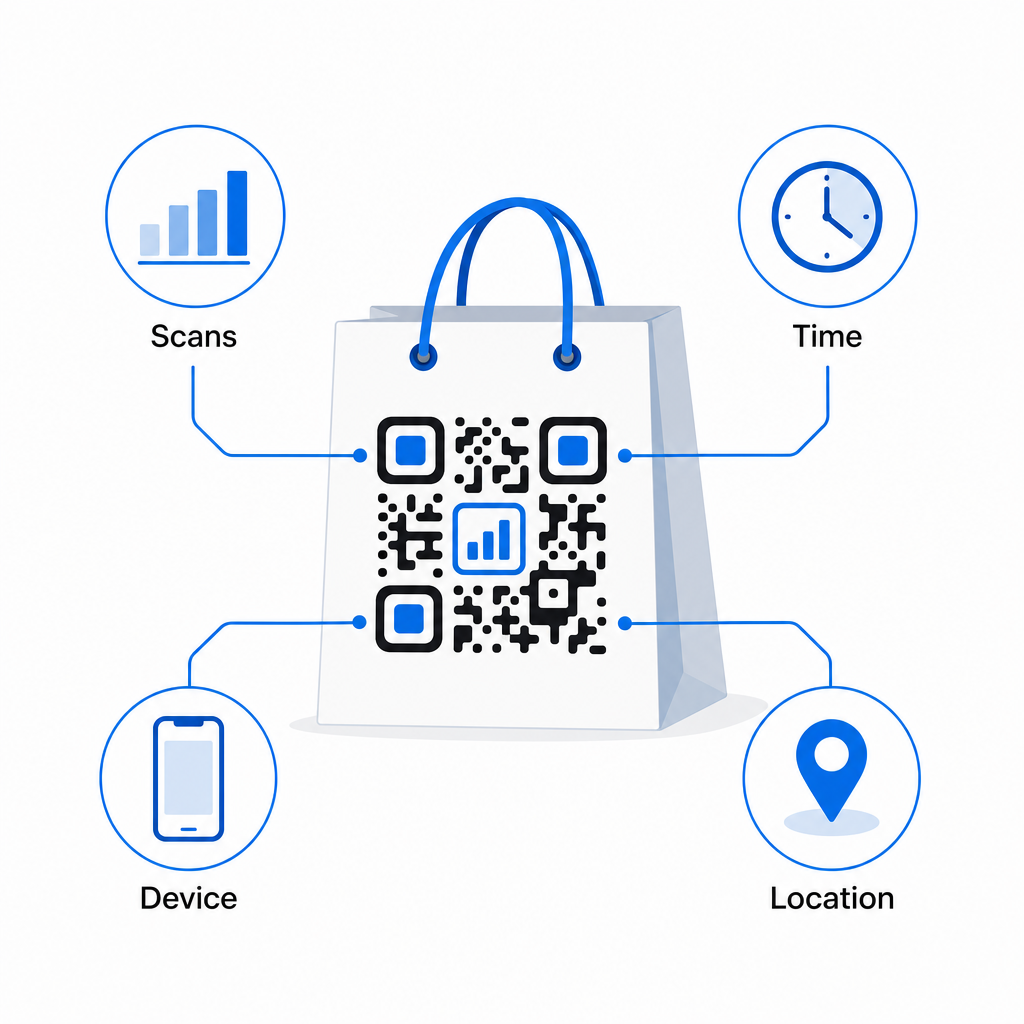
One of the strongest arguments for QR codes on shopping bags is measurability. Unlike a printed phone number or website URL, a QR code scan is a trackable event. With dynamic QR codes, each scan logs key data points that turn your bag into a measurable campaign asset:

QRスキャン分析
  • Total scans and unique scans – distinguishes overall reach from repeat engagement
  • Scan time and date – reveals when customers are most likely to engage post-purchase
  • Device type – helps you optimize the landing page for the most common device your customers use
  • Location data – useful for retailers with multiple locations or regional campaigns

This data lets you compare performance across bag versions, store locations, or campaign periods. If a particular promotion drives significantly more scans, you can extend it. If scans drop off after two weeks, you know the offer has run its course and can update the destination without touching the bag. The QR code analytics and tracking feature explains what the dashboard shows and how to interpret scan data in real time.

For retailers running campaigns across multiple physical formats beyond bags, the industry solutions hub gives a broader view of how QR codes fit into a coordinated strategy.

Design and Technical Checklist

Before sending your bag design to print, confirm each of the following:

エレメント 要件
Code size Minimum 1.2 × 1.2 inches (3 × 3 cm) for bags
Contrast ratio At least 4:1 between code and background
Quiet zone Minimum 4 modules of clear space on all sides
プレースメント Flat panel, away from folds, seams, and handles
Code type Dynamic QR code for updatable destinations
Call-to-action Specific and benefit-led, placed near the code
Logo (if used) Error correction level Q or H, ≤30% of code area
Testing Confirmed scannable on iOS and Android in real lighting

A shopping bag is one of the few retail materials that keeps working after the transaction ends. With a well-designed, dynamically linked QR code, it becomes a trackable connection between the physical purchase and your ongoing digital relationship with that customer. Design it carefully, give customers a clear reason to scan, and use the analytics to keep improving the campaign over time.

Start Building Your Bag Campaign を使用しています。 Pageloot QRコードジェネレータ to create a branded, dynamic QR code ready for retail bag printing – with full analytics included.

よくある質問

Can I use the same QR code on bags across multiple store locations?

Yes. With a dynamic QR code, you can use a single code across all locations and track scan data by geography, which lets you see which stores drive the most engagement. Alternatively, you can create separate codes per location to compare performance directly.

What happens if my bag promotion ends but the bags are still in circulation?

With a dynamic QR code, you simply update the destination URL in your Pageloot dashboard. Customers scanning old bags will land on your new page automatically. You never need to reprint to keep the experience current.

How do I prevent the QR code from being distorted by the bag’s texture or finish?

Print the code on a flat, matte surface and avoid placing it near folds, seams, or glossy laminated areas that cause glare. If your bag has a textured finish throughout, consider applying a small flat label or printed panel specifically for the QR code, ensuring a clean, scannable surface.

著者について

Siim KostabiはPagelootのコンテンツリードです。Pagelootの革新的なQRコード生成サービスについて執筆しています。5年以上にわたるQRコードに関する深い専門知識を持つSiimは、この分野の専門家です。QRテクノロジーを活用してデジタルインタラクションを簡素化・拡張する上で、大きな進歩を遂げています。.

カテゴリー
について詳しくはこちら
Agency QR campaign
QRコード マーケティング代理店
Gym QR code scan
フィットネス QRコード
✅ QRコードの#1ソリューション

オンラインでQRコードを作成する必要がある場合は QRコードを作る ここで無料で
ページルートは #1のGo-Toソリューション でQRコードを作成してスキャンすることができます。

BL-0293

ブログジェネ

売上、レビュー、フォロワーを増やすために 20,000 を超えるブランドから信頼されています。

クライアントのロゴ
トップブランドから信頼される
5 のうち 4.8 と評価しました

4.86 / 5つ星評価

ユーゴ・ローラン
ユーゴ・ローラン
レストランオーナー
最も簡単で信頼性の高いQRコードジェネレータです。PDFファイルを即座にアップロードできます。レストランのメニューがデジタル化されました。
ルーカス・ジャンセン
ルーカス・ジャンセン
不動産開発業者
これは優れたツールで、QRコードでちょうど欲しいところに連れて行ってくれます。私たちは位置情報のQRコードしか使っていませんが、とても便利な機能がたくさんあります。
エマ・モレッティ
エマ・モレッティ
小売製品
使いやすいし、早い。素晴らしい機能で、完璧な画像を作成してくれるので、社員は私のvCardをダウンロードすることができます。
ユーゴ・ローラン
ユーゴ・ローラン
レストランオーナー
最も簡単で信頼性の高いQRコードジェネレータです。PDFファイルを即座にアップロードできます。レストランのメニューがデジタル化されました。
ルーカス・ジャンセン
ルーカス・ジャンセン
不動産開発業者
これは優れたツールで、QRコードでちょうど欲しいところに連れて行ってくれます。私たちは位置情報のQRコードしか使っていませんが、とても便利な機能がたくさんあります。
エマ・モレッティ
エマ・モレッティ
小売製品
使いやすいし、早い。素晴らしい機能で、完璧な画像を作成してくれるので、社員は私のvCardをダウンロードすることができます。
QRコードをもっと見る
LinkedIn QRネットワーキング
どのように LinkedIn QRコードを探す
ノートパソコンのQRコードスキャン
QRコードをスキャンして PCとMac
あらゆるものをデジタル体験に変えよう 3分以内に。

14日間の無料トライアル。

クレジットカードは必要ありません。

初回購入で30%オフ

次のコードを使用してください:

MP3ファイルを共有

PDF QRコードを作成するにはサインアップしてください

必要なものをすべてアップロードして表示する。

  • オーディオファイル
  • ポッドキャスト
  • 音楽

サインアップで14日間無料トライアル。.
トライアル終了後、QRコードは期限切れになります。.

オーディオmp3 QRコードを作成するにはサインアップしてください

フレームでより多くのスキャンを獲得

QRコードにフレームを追加するにはサインアップしてください

コールトゥアクションフレームは、お客様が簡単にQRコードと対話できるようにします。ぜひお試しください。

サインアップで14日間無料トライアル。.
トライアル終了後、QRコードは期限切れになります。.

QRコードにフレームを追加するにはサインアップしてください

シェイプでスタイルを追加

より多くの図形を作成するにはサインアップしてください

QRコードは四角いものである必要はありません。あなたのブランドのイメージに合わせて変えてみてください。

サインアップで14日間無料トライアル。.
トライアル終了後、QRコードは期限切れになります。.

より多くの図形を作成するにはサインアップしてください

QRコードにロゴを追加

QRコードにロゴを追加するにはサインアップしてください

QRコードにロゴやブランドを入れることで、目立たせることができます。

サインアップで14日間無料トライアル。.
トライアル終了後、QRコードは期限切れになります。.

QRコードにロゴを追加するにはサインアップしてください

スマートなApp Storeリダイレクト

アプリストアのQRコードを作成するにはサインアップしてください

スマートなApp StoreのQRコードに、あなたのアプリのリンクを追加します。ユーザーは、デバイスに応じてリダイレクトされます。

サインアップで14日間無料トライアル。.
トライアル終了後、QRコードは期限切れになります。.

アプリストアのQRコードを作成するにはサインアップしてください

QRコードに画像をアップロード

画像QRコードを作成するにはサインアップしてください

画像を簡単に共有できます。どんな画像も、数秒でダイナミックに変化します。

サインアップで14日間無料トライアル。.
トライアル終了後、QRコードは期限切れになります。.

画像QRコードを作成するにはサインアップしてください

PDFファイルを共有

PDF QRコードを作成するにはサインアップしてください

必要なものをすべてアップロードして表示する。

  • メニュー&プライスリスト
  • 指示
  • 任意の書類

サインアップで14日間無料トライアル。.
トライアル終了後、QRコードは期限切れになります。.

PDF QRコードを作成するにはサインアップしてください

印刷せずに後で編集

再度印刷せずにQRコードを編集するにはサインアップしてください

ダイナミックQRコードは、新たにQRコードを印刷することなく、QRコードの内容を変更することができます。

サインアップで14日間無料トライアル。.
トライアル終了後、QRコードは期限切れになります。.

再度印刷せずにQRコードを編集するにはサインアップしてください

いつ?どこで?QRコードのスキャンを追跡

QRコードを追跡するにはサインアップしてください

どのQRコードが最も多くスキャンされ、何が最も顧客を喜ばせているのかを知ることができます。

サインアップで14日間無料トライアル。.
トライアル終了後、QRコードは期限切れになります。.

QRコードを追跡するにはサインアップしてください

印刷可能なファイルが利用可能

PDFやSVGのようなベクターQRコードを作成するにはサインアップしてください

.eps、.pdf、.svg

QRコードをHD解像度でダウンロードしたいですか?すぐに印刷できるベクターまたはピクセル形式を入手しましょう。

サインアップで14日間無料トライアル。.
トライアル終了後、QRコードは期限切れになります。.

PDFやSVGのようなベクターQRコードを作成するにはサインアップしてください

しばらくお待ちください。あなたのQRコードは ロード... ロード...

あなただけのものに

サインアップしてQRコードを後で保存してください

異なる色、ロゴ、コールトゥアクションフレームで素晴らしいQRコードを作成することで、より多くのスキャンを得ることができます。

サインアップで14日間無料トライアル。.
トライアル終了後、QRコードは期限切れになります。.

サインアップしてQRコードを後で保存してください