Gjør handleposene dine noe arbeid etter at en kunde går ut døren? De fleste gjør ikke det – og det er en tapt mulighet til å holde samtalen i gang. Denne siden viser deg hvordan du designer effektive QR-koder for handleposer, hva du skal lenke dem til, og hvordan du måler resultatene.
Hvorfor handleposer er en verdifull QR-kodeoverflate
En handlepose reiser langt utover salgsstedet. Den kjører med T-banen, ligger på et kontorbord, blir gjenbrukt på et bondemarked. Hver tur er et potensielt inntrykk – og en potensiell skanning.
En World Sync 2024 forbrukerundersøkelse fant at 64% av handlende allerede har skannet en QR-kode på et produkt mens de handlet i butikk, og 42% sier at QR-koder har forbedret deres personlige handleopplevelse betydelig. Handlende er klare til å skanne. Spørsmålet er om posen din gir dem en grunn til det.
I motsetning til produktemballasje, som en kunde ofte kaster etter åpning, blir en handlepose ofte gjenbrukt. Den utvidede levetiden betyr at QR-koden din får gjentatt eksponering – for den opprinnelige kjøperen og for alle rundt dem. For forhandlere som ønsker å hente mer verdi fra fysiske berøringspunkter, er posen et av de enkleste stedene å starte. Du kan utforske hele spekteret av Brukstilfeller for QR-koder for detaljhandelsbedrifter for å se hvordan andre berøringspunkter sammenlignes.
Hva du skal lenke QR-koden på handleposen din til
Destinasjonen betyr like mye som koden selv. En QR-kode som ikke fører noe nyttig sted, blir skannet én gang og glemt. Her er de mest effektive destinasjonene for handleposer i detaljhandelen:
- Eksklusive rabatter eller kuponger – Belønn kunder som skanner etter kjøpet med en rabatt på deres neste bestilling. En kupong-QR-kode lar deg vise flere tilbud på en enkelt merkevarelandingpage.
- Påmelding til lojalitetsprogram – Gjør en engangskjøper til en gjentakende kunde ved å gjøre det enkelt å bli med i belønningsprogrammet ditt.
- Nye ankomster eller sesongkolleksjoner – Lenk til en kuratert produktside som holder shoppingmomentumet i gang etter at de forlater butikken.
- Sosiale medier profiler – Øk følgerskaren din ved å gi posemottakere en direkte vei til din Instagram-, TikTok- eller Pinterest-side.
- Hvordan-innhold eller merkevarehistorie – En kort video eller artikkel om hvordan produktene dine lages, bygger merkevaretilhørighet og tillit.
- Produktregistrering eller garantisider – Spesielt nyttig for teknologi, hvitevarer eller premiumvarer.
- Anmeldelsesside – Be kundene om å legge igjen en Google- eller sosial anmeldelse mens kjøpet fortsatt er ferskt.
EN lenke-QR-kode håndterer de fleste av disse brukstilfellene rent – du skriver inn en URL, tilpasser koden for å matche merkevaren din, og du er klar til å skrive ut.
Gjør handleposen din om til en markedsføringskanal Bruke QR-kodegenerator for å lage en merkevaretilpasset, sporbar kode for ditt neste poseopplag. Ingen teknisk kunnskap nødvendig.
Hvorfor du bør bruke dynamiske QR-koder på poser
Statiske QR-koder koder en fast URL. Når du har skrevet dem ut, er den destinasjonen permanent. Hvis kampanjen avsluttes, landingssiden endres, eller lenken brytes, blir hver pose i omløp en blindvei.
Dynamiske QR-koder løser dette ved å rute skanninger gjennom en omdirigering, slik at du kan oppdatere destinasjonen når som helst uten å trykke posene på nytt. Dette gjør dem til det praktiske valget for detaljhandelemballasje, der posebeholdningen ofte varer i måneder.
Utover fleksibilitet gir dynamiske QR-koder detaljert skanneanalyse: totalt og unikt antall skanninger, skannetider, enhetstyper og geografiske data ned til by- eller regionnivå. Disse dataene gjør en passiv pose om til en aktiv kampanjeaktiva du kan måle og forbedre. Du kan lese mer om hvilke data dynamiske QR-koder samler inn og hvordan du bruker det.
For forhandlere som kjører sesongkampanjer eller tester forskjellige tilbud på tvers av butikksteder, er muligheten til å oppdatere destinasjoner og sammenligne skanneytelse etter sted spesielt verdifull. Pageloot’s QR-kodeløsninger for forhandlere er bygget for akkurat denne typen kampanjehåndtering.
Oppdater posekampanjen din uten et nytt opplag Lag en dynamisk QR-kode på Pageloots QR-kodegenerator og endre destinasjons-URL-en din når som helst – dine trykte poser holder seg automatisk oppdatert.
Hvordan designe en QR-kode som skanner pålitelig på en pose
En QR-kode som ikke skanner, er verre enn ingen QR-kode i det hele tatt – det frustrerer kunder og kaster bort utskriftsbudsjettet. Poser introduserer spesifikke designutfordringer: teksturerte overflater, foldede paneler, håndtak som avbryter utskriftsområdet, og varierende lysforhold ved skannepunktet. Her er hva du må få riktig.
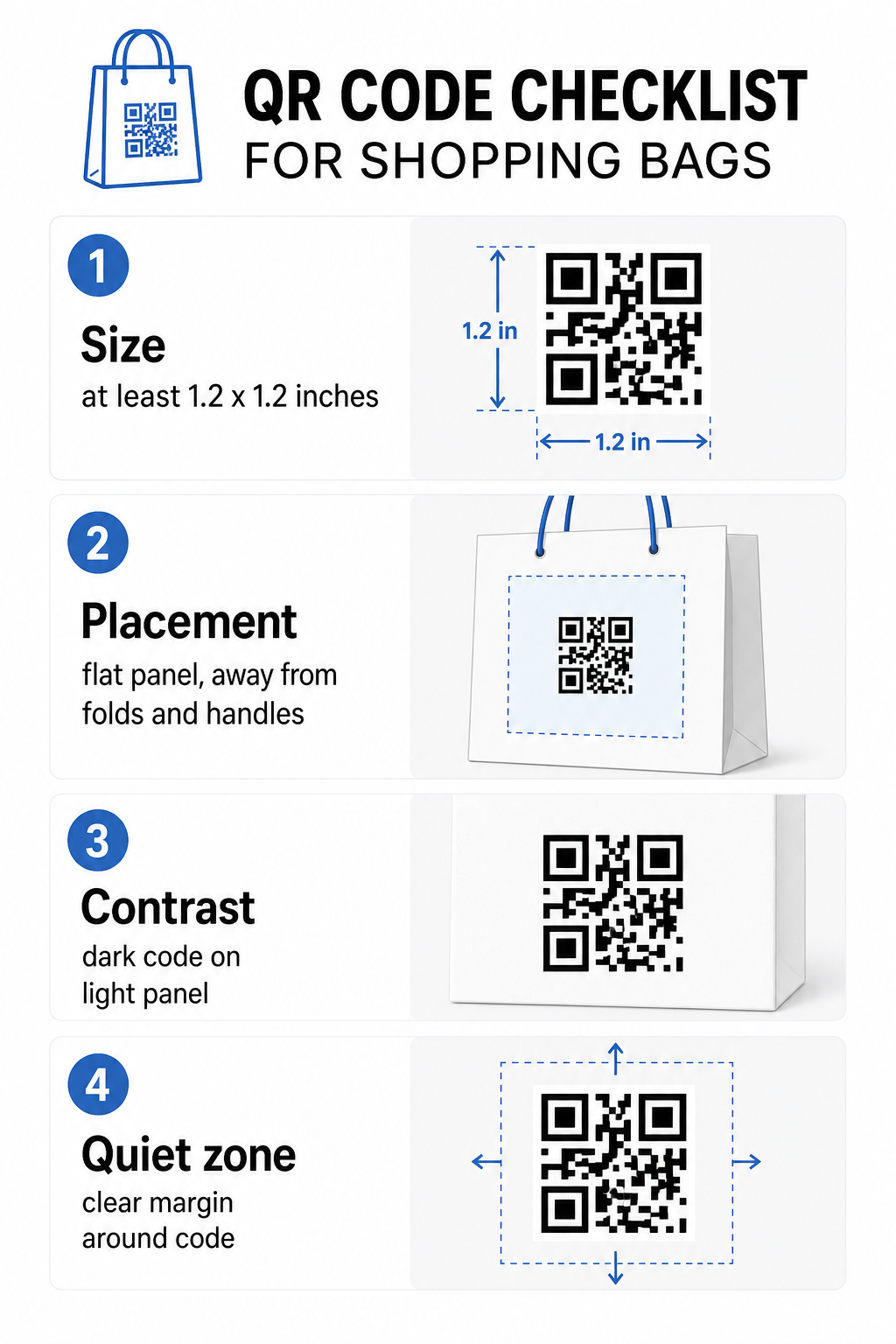
Størrelse
Den anbefalte minimumsstørrelsen for pålitelig skanning på armlengdes avstand er 0,8 × 0,8 tommer (2 × 2 cm). For en handlepose, der skanneavstanden vanligvis er større og posen kan være i bevegelse, sikt på minst 1,2 × 1,2 tommer (3 × 3 cm).
En nyttig tommelfingerregel er 10:1 avstand-til-størrelse-forholdet: koden bør være 1 cm bred for hver 10 cm av forventet skanneavstand. Hvis noen sannsynligvis vil skanne vesken din fra omtrent 30 cm (12 tommer) unna, bør koden være minst 3 cm bred. Tettere QR-koder – de som koder lengre URL-er eller mer data – krever ekstra størrelse for å forbli lesbar, så å bruke forkortede eller dynamiske URL-er holder kodemønsteret mindre tett og lettere å skanne.
PLASSERING
Unngå å plassere koden nær folder, sømmer, håndtak eller forsterkede kanter. Disse områdene forvrenger kodens geometri, noe som forvirrer skannere. Det flate midtpanelet – foran eller bak – er den tryggeste plasseringen. Hvis veskedesignet ditt inkluderer en sidekile, fungerer det panelet også, forutsatt at overflaten er flat når vesken holdes åpen. For mer strategisk plasseringsvurdering, dekker guiden til beste plasseringer for QR-koder i butikker hvordan man tenker på overflate, synlighet og kontekst sammen.
Kontrast
QR-kodeskannere oppdager forskjellen mellom mørke moduler og en lys bakgrunn. Mørkt mønster på en lys bakgrunn er den mest pålitelige kombinasjonen. Sikt på et kontrastforhold på minst 4:1 mellom koden og bakgrunnen – høyere er bedre. Unngå gradienter, som skaper ujevn kontrast, og unngå omvendte fargevalg (lys kode på mørk bakgrunn), som noen skannere ikke klarer å lese.
Hvis vesken din har en mørk grunnfarge, plasser QR-koden inne i et hvitt eller lyst panel i stedet for å skrive ut direkte på den mørke overflaten. For en fullstendig oversikt over hvilke fargeparinger som fungerer og hvilke som bør unngås, se veiledningen for beste praksis for fargekontrast i QR-koder.
Rolig sone
De stille sone er den tomme margen som omgir en QR-kode. Den signaliserer til skanneren hvor koden begynner og slutter. Standarden krever minst fire moduler med klar plass på alle sider – der en modul er den minste kvadratiske enheten i koderutenettet. På en trykt veske i typiske størrelser tilsvarer dette omtrent 3–4 mm med tom plass på hver side.
Ikke la tekst, logoer, merkevaremønstre eller dekorative elementer trenge inn i denne margen. Selv delvis inntrenging kan føre til skannefeil. Hvis veskedesignet ditt er tett med grafikk, plasser QR-koden inne i en innrammet hvit boks for å beskytte den stille sonen.
Merkevarebygging av koden
En merkevare-QR-kode – en som inkluderer logoen og merkevarefargene dine – er mer sannsynlig å bli skannet enn en vanlig svart-hvitt-versjon. Kunder er mer sannsynlig å engasjere seg når de gjenkjenner kilden og forstår at det er noe verdt å skanne. Du kan bruke QR-kode generator med logo for å bygge inn logoen din i midten av koden samtidig som skannbarheten opprettholdes.
Når du legger til en logo, bruk et høyere feilrettingsnivå (Q eller H) slik at koden forblir lesbar selv med deler av mønsteret dekket. Hold logoen til ikke mer enn 30 % av det totale kodeområdet. veiledningen for beste praksis for lesbarhet av QR-koder dekker logoplassering sammen med kontrast- og størrelsesretningslinjer i full detalj.
Testing før du trykker
Test alltid den endelige koden på flere enheter og under forhold som samsvarer med reell bruk – varierende lysnivåer, forskjellige skannevinkler og på den forventede skanneavstanden. Test på både iOS og Android. Skriv ut en fysisk prøve før du forplikter deg til en full veskeproduksjon, fordi en kode som ser fin ut på skjermen kan feile på en teksturert eller laminert veskeoverflate.
Legge til en oppfordring til handling nær koden
Forskning fra Scantrust fant at forbrukere som vanligvis ikke skanner QR-koder, sa de ville være mer sannsynlig å gjøre det hvis koden tydelig kommuniserte hva de ville få. En kort, direkte oppfordring til handling plassert nær koden gjør nettopp det.
Hold det kort og spesifikt. Eksempler som fungerer bra på vesker:
- Skann for 15 % rabatt på din neste bestilling
- Skann for å bli med i vårt belønningsprogram
- Skann for nye ankomster
- Eksklusivt tilbud inni – skann for å låse opp
Vage oppfordringer som “Skann meg” eller “Lær mer” gir kundene ingen grunn til å handle. Fortell dem hva de får før de skanner. Dette prinsippet gjelder for alle fysiske QR-kodeplasseringer – du kan se hvordan det fungerer i bredere QR-kodekontekster i detaljhandelen også.
Sporing av kampanjeytelse
Et av de sterkeste argumentene for QR-koder på handleposer er målbarhet. I motsetning til et trykt telefonnummer eller en nettsteds-URL, er en QR-kodeskanning en sporbar hendelse. Med dynamiske QR-koder logger hver skanning viktige datapunkter som gjør vesken din til en målbar kampanjeaktiva:
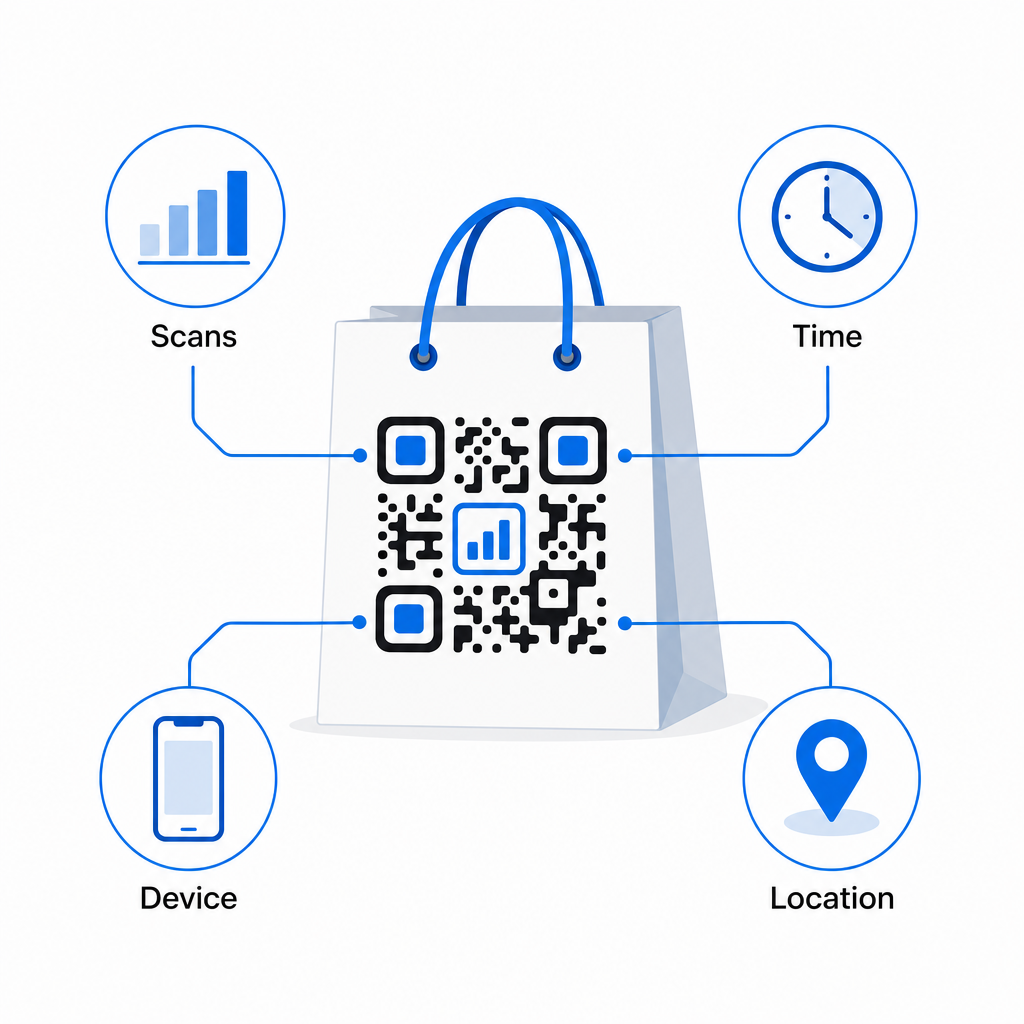
- Totalt antall skanninger og unike skanninger – skiller total rekkevidde fra gjentatt engasjement
- Skannetid og dato – avslører når kunder er mest sannsynlig å engasjere seg etter kjøpet
- Enhetstype – hjelper deg med å optimalisere landingssiden for den vanligste enheten kundene dine bruker
- Stedsdata – nyttig for forhandlere med flere lokasjoner eller regionale kampanjer
Disse dataene lar deg sammenligne ytelse på tvers av veskeversjoner, butikksteder eller kampanjeperioder. Hvis en bestemt kampanje driver betydelig flere skanninger, kan du forlenge den. Hvis skanninger faller av etter to uker, vet du at tilbudet har gått sin gang og kan oppdatere destinasjonen uten å røre vesken. Den QR-kode analyse- og sporingsfunksjon forklarer hva dashbordet viser og hvordan man tolker skannedata i sanntid.
For forhandlere som kjører kampanjer på tvers av flere fysiske formater utover vesker, gir den bransjeløsningshuben et bredere syn på hvordan QR-koder passer inn i en koordinert strategi.
Design- og teknisk sjekkliste
Før du sender veskedesignet ditt til trykk, bekreft hver av følgende:
| Element | Krav |
|---|---|
| Kodestørrelse | Minimum 1,2 × 1,2 tommer (3 × 3 cm) for vesker |
| Kontrastforhold | Minst 4:1 mellom kode og bakgrunn |
| Stille sone | Minimum 4 moduler med klar plass på alle sider |
| PLASSERING | Flatt panel, borte fra folder, sømmer og håndtak |
| Kodetype | Dynamisk QR-kode for oppdaterbare destinasjoner |
| Oppfordring til handling | Spesifikk og fordelsdrevet, plassert nær koden |
| Logo (hvis brukt) | Feilrettingsnivå Q eller H, ≤30 % av kodeområdet |
| Testing | Bekreftet skannbar på iOS og Android i ekte belysning |
En handlepose er et av de få detaljhandelsmaterialene som fortsetter å fungere etter at transaksjonen er avsluttet. Med en veldesignet, dynamisk koblet QR-kode, blir den en sporbar forbindelse mellom det fysiske kjøpet og ditt pågående digitale forhold med den kunden. Design den nøye, gi kundene en klar grunn til å skanne, og bruk analysene til å fortsette å forbedre kampanjen over tid.
Begynn å bygge din veskekampanje Bruke Pageloot QR-kodegenerator for å lage en merkevarebasert, dynamisk QR-kode klar for trykk på handleposer – med full analyse inkludert.
Ofte stilte spørsmål
Ja. Med en dynamisk QR-kode kan du bruke én kode på tvers av alle steder og spore skannedata etter geografi, som lar deg se hvilke butikker som driver mest engasjement. Alternativt kan du opprette separate koder per sted for å sammenligne ytelse direkte.
Med en dynamisk QR-kode oppdaterer du enkelt destinasjons-URL-en i ditt Pageloot-dashbord. Kunder som skanner gamle poser vil automatisk lande på din nye side. Du trenger aldri å trykke på nytt for å holde opplevelsen oppdatert.
Skriv ut koden på en flat, matt overflate og unngå å plassere den nær folder, sømmer, eller blanke laminerte områder som forårsaker gjenskinn. Hvis vesken din har en teksturert overflate overalt, vurder å feste en liten flat etikett eller et trykt panel spesifikt for QR-koden, som sikrer en ren, skannbar overflate.