Alışveriş çantalarınız bir müşteri kapıdan çıktıktan sonra herhangi bir iş yapıyor mu? Çoğu yapmıyor – ve bu, sohbeti devam ettirmek için kaçırılmış bir fırsat. Bu sayfa size alışveriş çantaları için etkili QR kodları nasıl tasarlayacağınızı, onları neye bağlayacağınızı ve sonuçları nasıl ölçeceğinizi gösteriyor.
Alışveriş Çantaları Neden Değerli Bir QR Kod Yüzeyidir?
Bir alışveriş çantası, satış noktasının çok ötesine gider. Metroya biner, bir ofis masasında durur, bir çiftçi pazarında yeniden kullanılır. Her yolculuk potansiyel bir izlenim – ve potansiyel bir taramadır.
Bir World Sync 2024 tüketici anketi, alışveriş yapanların 'ünün mağaza içinde alışveriş yaparken bir ürün üzerindeki QR kodu zaten taradığını ve 'sinin QR kodlarının yüz yüze alışveriş deneyimlerini önemli ölçüde iyileştirdiğini buldu. Alışveriş yapanlar taramaya hazır. Soru, çantanızın onlara bir neden verip vermediği.
Bir müşterinin açtıktan sonra genellikle attığı ürün ambalajının aksine, bir alışveriş çantası sık sık yeniden kullanılır. Bu uzatılmış ömür, QR kodunuzun tekrar tekrar maruz kalması anlamına gelir – orijinal alıcıya ve etrafındaki herkese. Fiziksel temas noktalarından daha fazla değer elde etmek isteyen perakendeciler için çanta, başlamak için en basit yerlerden biridir. Tam yelpazesini keşfedebilirsiniz Perakende işletmeleri için QR kod kullanım durumları diğer temas noktalarının nasıl karşılaştırıldığını görmek için.
Alışveriş Çantası QR Kodunuzu Neye Bağlamalısınız?
Hedef, kodun kendisi kadar önemlidir. Hiçbir işe yaramayan bir yere giden bir QR kodu bir kez taranır ve unutulur. Perakende çantaları için en etkili hedefler şunlardır:
- Özel indirimler veya kuponlar – Satın alma sonrası tarama yapan müşterileri bir sonraki siparişlerinde indirimle ödüllendirin. Bir kupon QR kodu tek bir markalı açılış sayfasında birden fazla teklif görüntülemenizi sağlar.
- Sadakat programı kaydı – Tek seferlik bir alıcıyı, ödül programınıza katılmayı zahmetsiz hale getirerek tekrar eden bir müşteriye dönüştürün.
- Yeni gelenler veya sezonluk koleksiyonlar – Mağazadan ayrıldıktan sonra alışveriş ivmesini devam ettiren özel bir ürün sayfasına bağlantı verin.
- Sosyal medya profilleri – Çanta alıcılarına Instagram, TikTok veya Pinterest sayfanıza doğrudan bir yol sunarak takipçi sayınızı artırın.
- Nasıl yapılır içeriği veya marka hikayesi – Ürünlerinizin nasıl yapıldığına dair kısa bir video veya makale, marka bağlılığı ve güven oluşturur.
- Ürün kaydı veya garanti sayfaları – Özellikle teknoloji, ev aletleri veya premium ürünler için kullanışlıdır.
- İncelemeler sayfası – Satın alma hala tazeyken müşterileri bir Google veya sosyal inceleme bırakmaya teşvik edin.
Bir için taramaları takip edin ve artırın bu kullanım durumlarının çoğunu temiz bir şekilde halleder – bir URL girersiniz, kodu markanıza uyacak şekilde özelleştirirsiniz ve yazdırmaya hazırsınızdır.
Alışveriş Çantanızı Bir Pazarlama Kanalına Dönüştürün Kullan QR Kod Oluşturucu bir sonraki çanta baskı seriniz için markalı, izlenebilir bir kod oluşturmak üzere. Teknik bilgi gerekmez.
Çantalarda Neden Dinamik QR Kodları Kullanmalısınız?
Statik QR kodları sabit bir URL'yi kodlar. Onları yazdırdığınızda, o hedef kalıcıdır. Promosyon biterse, açılış sayfası değişirse veya bağlantı koparsa, dolaşımdaki her çanta bir çıkmaz sokak haline gelir.
Dinamik QR kodları taramaları bir yönlendirme aracılığıyla yönlendirerek bunu çözer, böylece çantaları yeniden yazdırmadan hedefi istediğiniz zaman güncelleyebilirsiniz. Bu, onları çanta envanterinin genellikle aylarca dayandığı perakende ambalajları için pratik bir seçim haline getirir.
Esnekliğin ötesinde, dinamik QR kodları ayrıntılı tarama analizi sağlar: toplam ve benzersiz tarama sayıları, tarama süreleri, cihaz türleri ve şehir veya bölge düzeyine kadar coğrafi veriler. Bu veriler, pasif bir çantayı ölçebileceğiniz ve geliştirebileceğiniz aktif bir kampanya varlığına dönüştürür. Hakkında daha fazla okuyabilirsiniz dinamik QR kodlarının hangi verileri topladığını ve nasıl kullanılacağını.
Mevsimlik kampanyalar yürüten veya mağaza konumlarında farklı teklifleri test eden perakendeciler için, hedefleri güncelleme ve konuma göre tarama performansını karşılaştırma yeteneği özellikle değerlidir. Pageloot'un perakendeciler için QR kod çözümleri tam da bu tür kampanya yönetimi için tasarlanmıştır.
Çanta Kampanyanızı Yeniden Baskı Yapmadan Güncelleyin adresinde dinamik bir QR kod oluşturun Pageloot'un QR Kodu Oluşturucusu ve hedef URL'nizi istediğiniz zaman değiştirin – basılı çantalarınız otomatik olarak güncel kalır.
Bir Çantada Güvenilir Şekilde Taranan Bir QR Kodu Nasıl Tasarlanır?
Taranmayan bir QR kodu, hiç QR kodu olmamasından daha kötüdür – müşterileri hayal kırıklığına uğratır ve baskı bütçesini boşa harcar. Çantalar belirli tasarım zorlukları sunar: dokulu yüzeyler, katlanmış paneller, baskı alanını kesintiye uğratan kulplar ve tarama noktasında değişen aydınlatma koşulları. İşte doğru yapılması gerekenler.
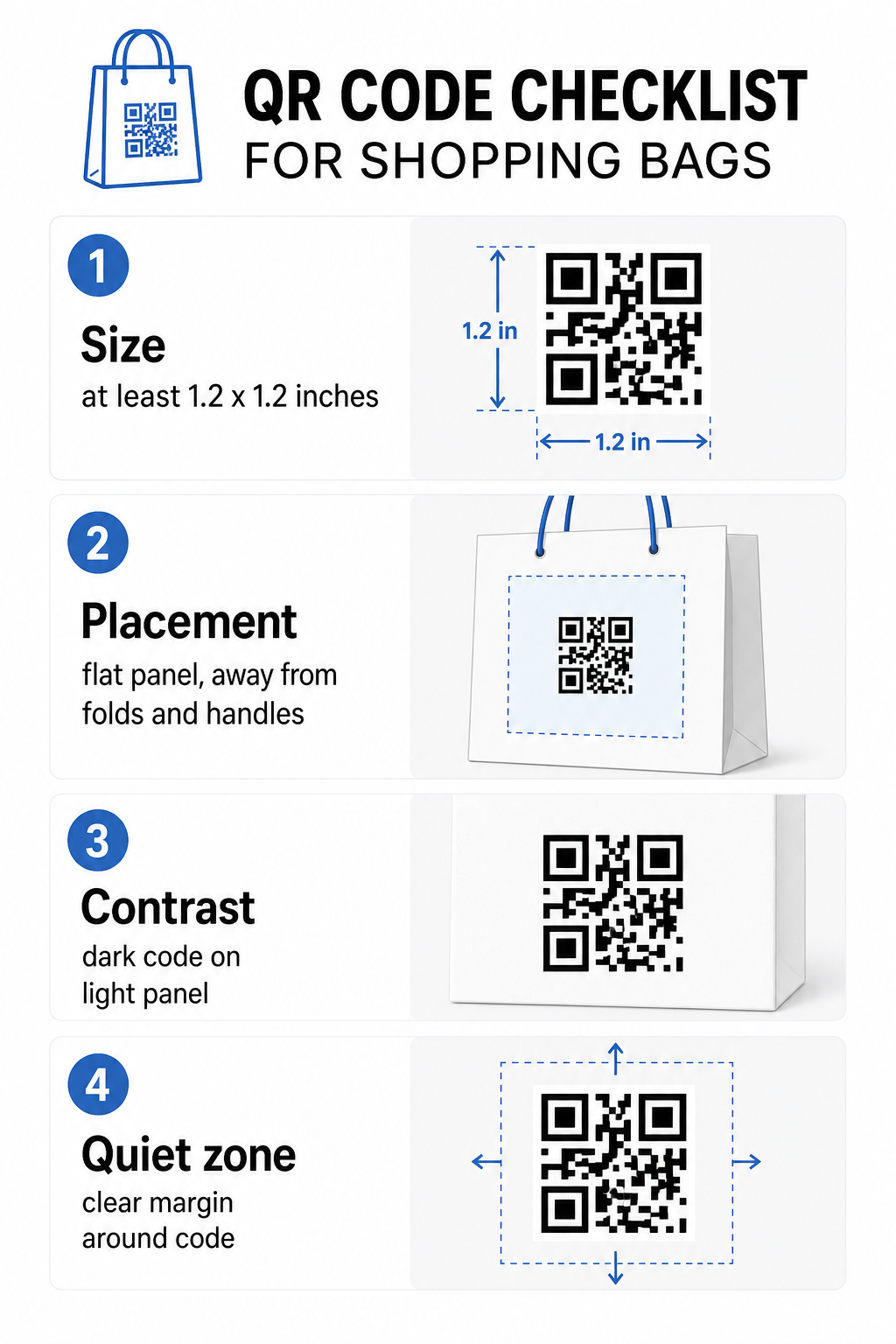
Boyut
Kol mesafesinden güvenilir tarama için önerilen minimum baskı boyutu 0.8 × 0.8 inç (2 × 2 cm). Bir alışveriş çantası için, tarama mesafesinin genellikle daha fazla olduğu ve çantanın hareket edebileceği durumlarda, en azından şunu hedefleyin: 1.2 × 1.2 inç (3 × 3 cm).
Faydalı bir pratik kural şudur: 10:1 mesafe-boyut oranı: kod, beklenen her 10 cm tarama mesafesi için 1 cm genişliğinde olmalı. Eğer biri çantanızı yaklaşık 30 cm (12 inç) uzaktan tarayacaksa, kod en az 3 cm genişliğinde olmalı. Daha yoğun QR kodları – daha uzun URL'leri veya daha fazla veriyi kodlayanlar – okunabilir kalmak için ek boyut gerektirir, bu yüzden kısaltılmış veya dinamik URL'ler kullanmak kod desenini daha az yoğun ve taranması daha kolay tutar.
yerleşimi
Kodu kıvrımların, dikişlerin, kulpların veya güçlendirilmiş kenarların yakınına yerleştirmekten kaçının. Bu alanlar kodun geometrisini bozar, bu da tarayıcıları şaşırtır. Düz orta panel – ön veya arka – en güvenli konumdur. Eğer çanta tasarımınızda bir yan körük varsa, çanta açık tutulduğunda yüzeyin düz olması koşuluyla o panel de işe yarar. Daha stratejik yerleştirme düşüncesi için, rehber perakende mağazaları için en iyi QR kodu yerleşimleri yüzey, görünürlük ve bağlamı birlikte nasıl düşüneceğinizi kapsar.
Kontrast
QR kod tarayıcıları, koyu modüller ile açık bir arka plan arasındaki farkı algılar. Açık bir arka plan üzerinde koyu desen en güvenilir kombinasyondur. Kod ile arka planı arasında en az 4:1 bir kontrast oranı hedefleyin – daha yüksek daha iyidir. Düzensiz kontrast oluşturan gradyanlardan kaçının ve bazı tarayıcıların okuyamadığı ters renk şemalarından (koyu arka plan üzerinde açık kod) uzak durun.
Eğer çantanızın koyu bir ana rengi varsa, QR kodunu doğrudan koyu yüzeye basmak yerine beyaz veya açık renkli bir panelin içine yerleştirin. Hangi renk eşleştirmelerinin işe yaradığını ve hangilerinden kaçınılması gerektiğini tam olarak görmek için QR kodu renk kontrastı en iyi uygulamalar kılavuzu.
Sessiz bölge
Bu sessiz alan bir QR kodunu çevreleyen boş kenar boşluğudur. Tarayıcıya kodun nerede başlayıp bittiğini sinyal verir. Standart en az dört modül boş alan gerektirir – burada bir modül, kod ızgarasındaki en küçük kare birimdir. Tipik boyutlarda basılı bir çantada, bu, her tarafta yaklaşık 3–4 mm boş alana denk gelir.
Metin, logolar, marka desenleri veya dekoratif öğelerin bu kenar boşluğuna girmesine izin vermeyin. Kısmi ihlal bile tarama hatalarına neden olabilir. Eğer çanta tasarımınız grafiklerle yoğunsa, sessiz bölgeyi korumak için QR kodunu kenarlıklı beyaz bir kutunun içine yerleştirin.
Kodu Markalama
Markalı bir QR kodu – logonuzu ve marka renklerinizi içeren – düz siyah-beyaz bir versiyondan daha fazla taranma olasılığına sahiptir. Müşteriler, kaynağı tanıdıklarında ve taranmaya değer bir şey olduğunu anladıklarında etkileşim kurma olasılıkları daha yüksektir. Logolu QR Kod Oluşturucu taranabilirliği korurken logonuzu kodun merkezine yerleştirmek için kullanabilirsiniz.
Logo eklerken, desenin bir kısmı kapalı olsa bile kodun okunabilir kalması için daha yüksek bir hata düzeltme seviyesi (Q veya H) kullanın. Logoyu toplam kod alanının 'undan fazla tutmayın. QR kodu okunabilirlik en iyi uygulamalar kılavuzu logo yerleşimini kontrast ve boyut yönergeleriyle birlikte tüm ayrıntılarıyla kapsar.
Baskıdan Önce Test Etme
Son kodu her zaman birden fazla cihazda ve gerçek kullanıma uygun koşullarda test edin – değişen ışık seviyeleri, farklı tarama açıları ve beklenen tarama mesafesinde. Hem iOS hem de Android'de test edin. Tam bir çanta üretimine başlamadan önce fiziksel bir örnek yazdırın, çünkü ekranda iyi görünen bir kod, dokulu veya lamine edilmiş bir çanta yüzeyinde başarısız olabilir.
Kodun Yakınına Bir Harekete Geçirici Mesaj Ekleme
Scantrust araştırması, genellikle QR kodlarını taramayan tüketicilerin, kodun ne alacaklarını açıkça iletmesi durumunda bunu yapma olasılıklarının daha yüksek olduğunu buldu. Kodun yakınına yerleştirilen kısa, doğrudan bir harekete geçirici mesaj tam olarak bunu yapar.
Kısa ve öz tutun. Çantalarda iyi çalışan örnekler:
- Bir sonraki siparişinizde indirim için tarayın
- Ödül programımıza katılmak için tarayın
- Yeni gelenler için tarayın
- İçeride özel teklif – kilidini açmak için tarayın
“Beni tara” veya “Daha fazla bilgi edin” gibi belirsiz istemler müşterilere harekete geçmek için hiçbir neden vermez. Taramadan önce ne alacaklarını söyleyin. Bu ilke tüm fiziksel QR kod yerleşimlerinde geçerlidir – nasıl çalıştığını daha geniş perakende QR kod bağlamlarında de görebilirsiniz.
Kampanya Performansını İzleme
Alışveriş çantalarındaki QR kodları için en güçlü argümanlardan biri ölçülebilirliktir. Basılı bir telefon numarası veya web sitesi URL'sinin aksine, bir QR kod taraması izlenebilir bir olaydır. Dinamik QR kodları ile, her tarama, çantanızı ölçülebilir bir kampanya varlığına dönüştüren önemli veri noktalarını kaydeder:
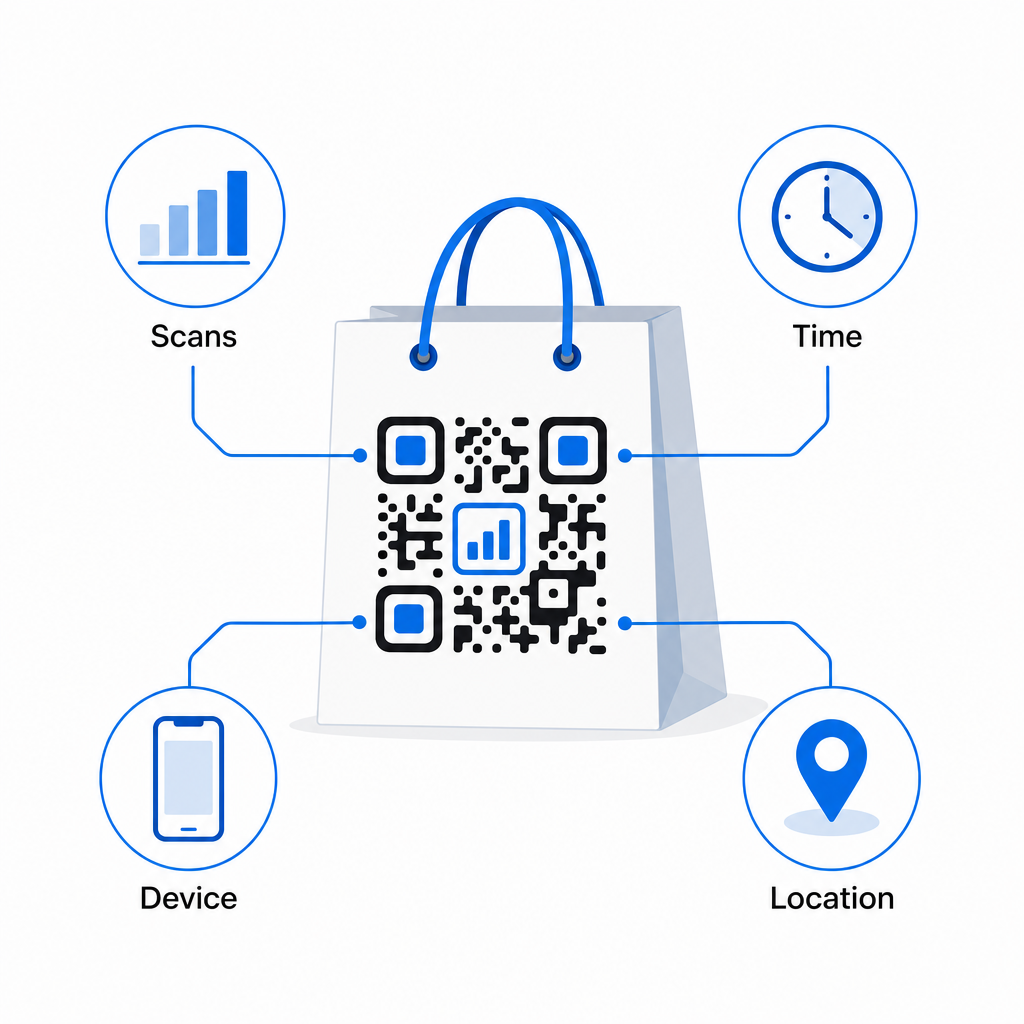
- Toplam tarama ve benzersiz tarama – genel erişimi tekrarlayan etkileşimden ayırır
- Tarama saati ve tarihi – müşterilerin satın alma sonrası ne zaman etkileşim kurma olasılığının en yüksek olduğunu ortaya koyar
- Cihaz türü – müşterilerinizin kullandığı en yaygın cihaz için açılış sayfasını optimize etmenize yardımcı olur
- Konum verileri – birden fazla konumu veya bölgesel kampanyaları olan perakendeciler için kullanışlıdır
Bu veriler, çanta versiyonları, mağaza konumları veya kampanya dönemleri arasında performansı karşılaştırmanıza olanak tanır. Belirli bir promosyon önemli ölçüde daha fazla tarama sağlarsa, onu uzatabilirsiniz. Taramalar iki hafta sonra düşerse, teklifin süresinin dolduğunu bilirsiniz ve çantaya dokunmadan hedefi güncelleyebilirsiniz. Bu QR kod analiz ve takip özelliği kontrol panelinin ne gösterdiğini ve tarama verilerini gerçek zamanlı olarak nasıl yorumlayacağınızı açıklar.
Çantaların ötesinde birden fazla fiziksel formatta kampanya yürüten perakendeciler için, bu sektör çözümleri merkezi QR kodlarının koordineli bir stratejiye nasıl uyduğuna dair daha geniş bir bakış açısı sunar.
Tasarım ve Teknik Kontrol Listesi
Çanta tasarımınızı baskıya göndermeden önce, aşağıdakilerin her birini onaylayın:
| Öğe | Gereksinim |
|---|---|
| Kod boyutu | Çantalar için minimum 1.2 × 1.2 inç (3 × 3 cm) |
| Kontrast oranı | Kod ve arka plan arasında en az 4:1 |
| Sessiz bölge | Tüm kenarlarda minimum 4 modül boş alan |
| yerleşimi | Düz panel, kıvrımlardan, dikişlerden ve kulplardan uzakta |
| Kod türü | Güncellenebilir hedefler için dinamik QR kod |
| Harekete geçirici mesaj | Belirli ve fayda odaklı, kodun yakınına yerleştirilmiş |
| Logo (kullanılıyorsa) | Hata düzeltme seviyesi Q veya H, kod alanının ≤'u |
| Test Etme | Gerçek ışıkta iOS ve Android'de taranabilir olduğu onaylandı |
Bir alışveriş çantası, işlem bittikten sonra çalışmaya devam eden birkaç perakende materyalinden biridir. İyi tasarlanmış, dinamik olarak bağlantılı bir QR kod ile, fiziksel satın alma ile o müşteriyle devam eden dijital ilişkiniz arasında izlenebilir bir bağlantı haline gelir. Dikkatlice tasarlayın, müşterilere tarama için net bir neden verin ve kampanyayı zamanla geliştirmeye devam etmek için analitiği kullanın.
Çanta Kampanyanızı Oluşturmaya Başlayın Kullan Pageloot QR Kodu Oluşturucu tam analitik dahil olmak üzere, perakende çanta baskısı için hazır, markalı, dinamik bir QR kod oluşturmak için.
Sıkça sorulan sorular
Evet. Dinamik bir QR kodu ile, tüm konumlarda tek bir kod kullanabilir ve tarama verilerini coğrafyaya göre takip edebilirsiniz, bu da hangi mağazaların en çok etkileşim sağladığını görmenizi sağlar. Alternatif olarak, performansı doğrudan karşılaştırmak için konum başına ayrı kodlar oluşturabilirsiniz.
Dinamik bir QR kodu ile, Pageloot kontrol panelinizde hedef URL'yi sadece güncellersiniz. Eski çantaları tarayan müşteriler otomatik olarak yeni sayfanıza inecektir. Deneyimi güncel tutmak için yeniden yazdırmanıza asla gerek kalmaz.
Kodu düz, mat bir yüzeye yazdırın ve katlanma yerlerine, dikişlere veya parlamaya neden olan parlak lamine alanlara yakın yerleştirmekten kaçının. Çantanızın tamamı dokulu bir yüzeye sahipse, QR kodu için özel olarak küçük düz bir etiket veya basılı bir panel uygulamayı düşünün, böylece temiz, taranabilir bir yüzey sağlamış olursunuz.