> 사용 사례 > How to Use QR Codes on Candle Packaging and Labels
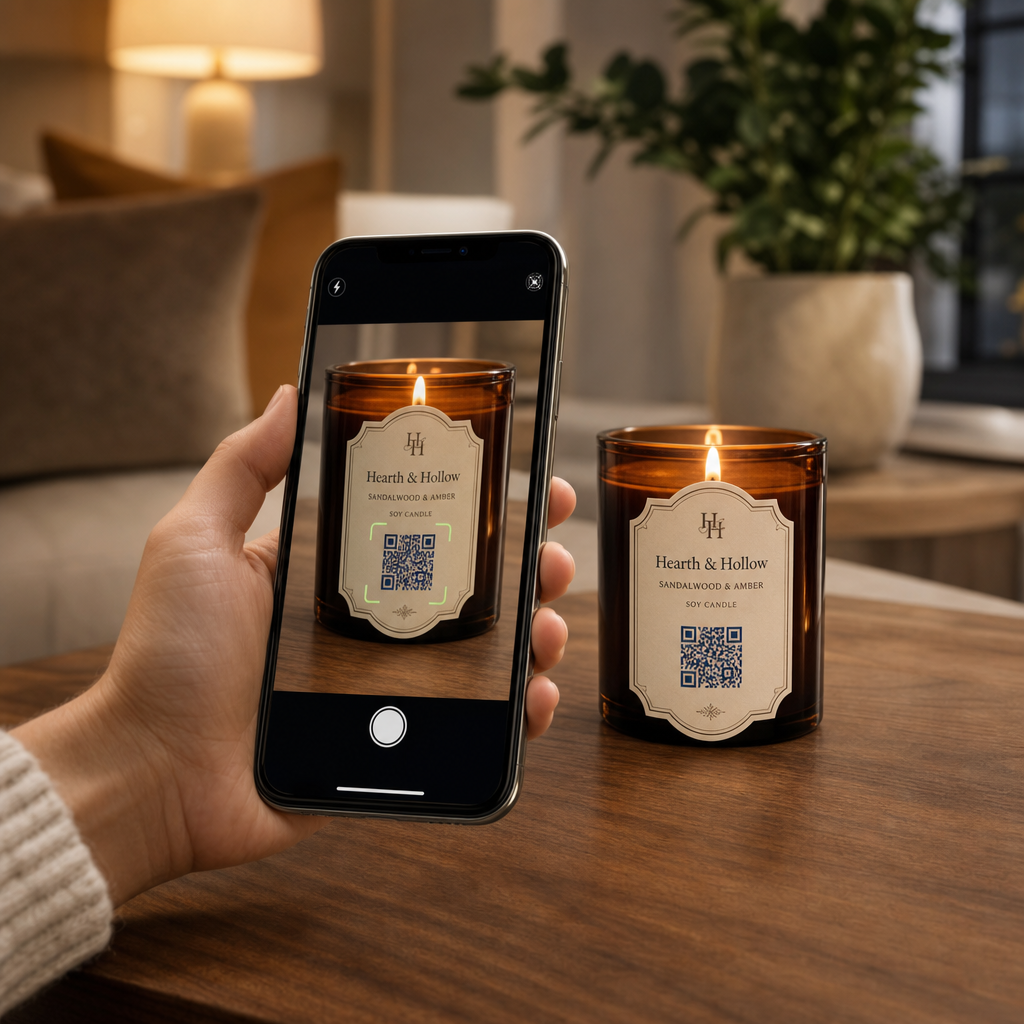
Scanning a candle label

How to Use QR Codes on Candle Packaging and Labels

Discover how QR codes on candle packaging can share care guides, custom playlists, and discounts while keeping your labels clean and legally compliant.
Updated on 7월 27, 2026
목차

Are you struggling to share your brand story and promotions on small candle labels? Physical label real estate is extremely limited, forcing makers to sacrifice product narratives, usage guides, or gift messages. Adding QR codes to your packaging bridges physical products with interactive digital content while keeping your visual layout clean.

Creative Ways to Use QR Codes on Candle Labels

Candles are versatile products commonly purchased as personal home decor, wellness items, or thoughtful gifts. Integrating a scannable digital point onto your container or packaging elevates an ordinary product into an engaging brand experience.

  • Delivering personalized gift messages: Enabling buyers to attach video, audio, or written notes using a text QR code generator 또는 MP3 QR 코드 생성기 turns candles into memorable gifts for holidays, weddings, or memorials.
  • Pairing fragrance with curated playlists: Matching scent profiles with audio vibes using a Spotify QR 코드 생성기 lets buyers scan the jar to play music matched to the scent, with additional setup details available in our guide on sharing Spotify playlists.
  • Driving repeat sales through promotional discounts: Encouraging customer loyalty by offering targeted deals using a `쿠폰 QR 코드 생성기` directly on the box drives repeat online orders.
  • Providing comprehensive candle care instructions: Sharing details about hand-poured wax, essential oil profiles, wick trimming guidelines, and jar repurposing tips keeps physical labels clutter-free.

Balancing Regulatory Compliance with Label Space

When planning strategic placements for placing QR codes on product packaging, you must balance digital engagement with mandatory legal packaging requirements.

In the United States, consumer candle labels must follow the Fair Packaging and Labeling Act (FPLA). This federal law mandates that primary display panels include specific informational elements:

  • A statement of identity clearly describing the item (such as “Scented Soy Candle”).
  • The net quantity of contents displayed in both U.S. customary units (ounces) and metric units (grams).
  • The business name and physical location (city, state, and ZIP code) of the manufacturer, packer, or distributor.

Furthermore, safety standards established under ASTM F2058 require explicit fire safety warnings. Standard warning labels outline three core precautions: “Burn within sight,” “Keep away from flammables,” and “Keep away from children and pets.” If you place full fire safety instructions on the bottom panel of a jar, packaging standards specify that the side or top label must instruct users to “See bottom panel for safety information.”

Moving background stories, fragrance pyramids, and marketing links behind a scannable code helps satisfy mandatory regulatory text requirements while protecting your overall packaging aesthetic.

Boost Repeat Orders with Dynamic Discounts Want to reward customer loyalty without reprinting your candle packaging for every campaign? Create editable discount links using the `쿠폰 QR 코드 생성기` 에서 지금 바로 시작하세요.

Design and Printing Guidelines for Scannable Candle Labels

A scannable code must function reliably under everyday lighting and handling conditions. When applying designs to glass jars, aluminum tins, or cardboard boxes, apply critical QR 코드 가독성을 위한 모범 사례:

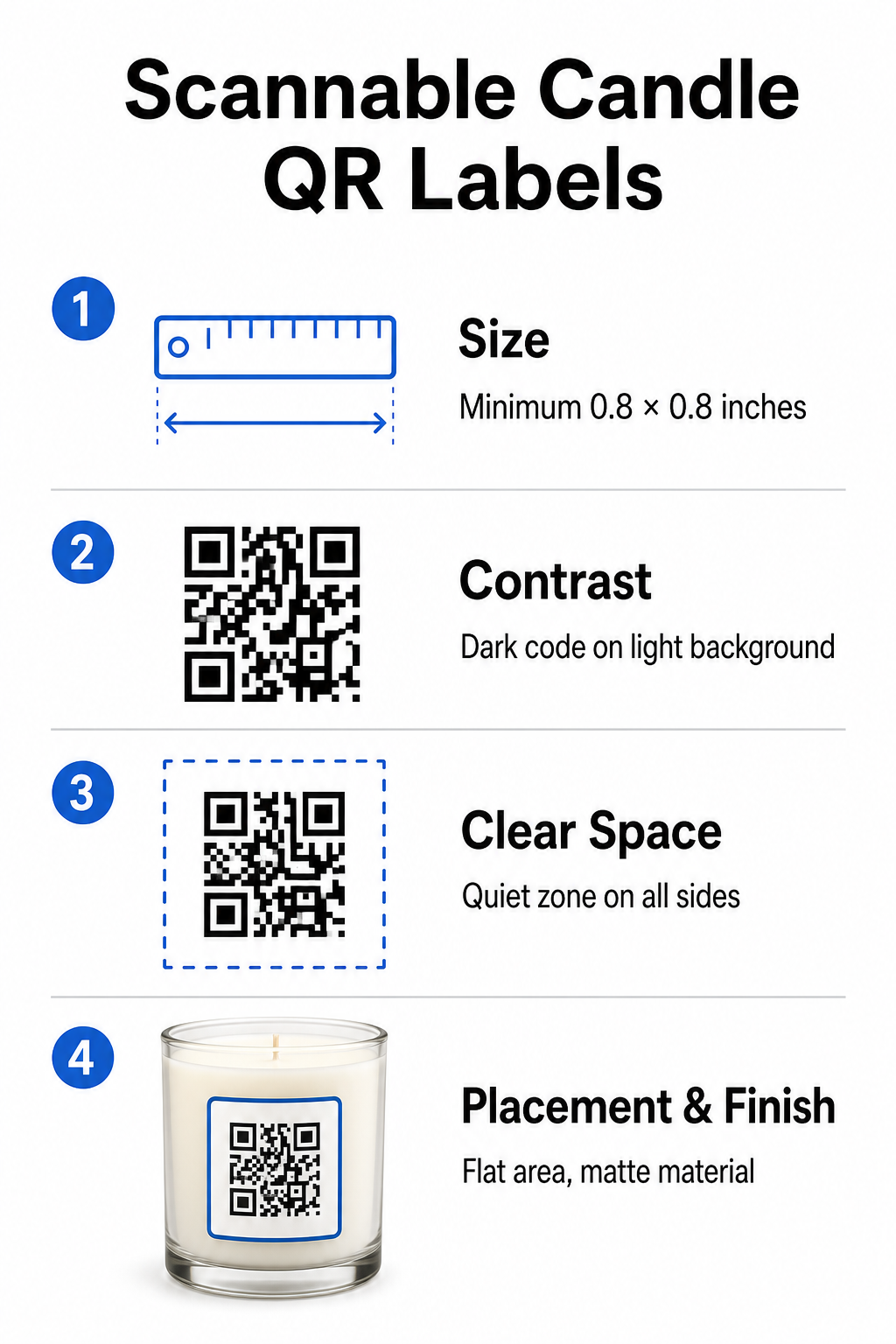
Candle QR design guidelines
  • Maintaining proper print dimensions: Keep physical dimensions to at least 0.8 x 0.8인치 (2 x 2 cm) for labels, expanding to 3 x 3cm for outer boxes as noted in our guide to QR code sizes.
  • Ensuring strong visual contrast: Use dark patterns on light backgrounds so standard phone camera sensors can easily read the matrix.
  • Preserving an adequate quiet zone: Maintain an unprinted border around all four sides that measures at least four times the module width.
  • Mitigating container glare and surface curvature: Place codes on flat secondary packaging or keep label codes narrow to prevent curved distortion, choosing matte or semi-gloss label materials over high-gloss finishes.
  • Exporting high-resolution vector assets: Save artwork in SVG or EPS format at 300 DPI or higher to keep edges sharp, following our guide to printing a QR code on a label.

Enhance Your Candle Experience with Sound Pair your signature scents with custom audio tracks or playlists to captivate your customers. Use the Spotify QR 코드 생성기 to create scannable music codes for your products.

Comparing Static and Dynamic QR Codes for Candle Brands

Selecting the correct code architecture dictates whether your post-sale marketing remains adaptable over time.

기능 정적 QR 코드 동적 QR 코드
Editable Link Permanent (Cannot be changed after printing) Fully editable anytime without reprinting packaging
스캔 분석 추적 불가 Tracks total scans, location, device OS, and time
패턴 밀도 Denser pattern with long destination URLs Clean, lower-density pattern using short redirect links
가장 좋은 사용 사례 Permanent instructions or simple text notes Seasonal sales, changing playlists, dynamic gift messages

를 사용하여 동적 QR 코드 생성기 allows you to change promotional destinations, refresh seasonal music playlists, or update digital gift messages long after your products leave the shelves. For complete implementation details, review our comprehensive guide to QR codes for product labels.

How to Create Branded QR Codes for Candle Packaging

Designing customized, print-ready codes for your candle packaging requires only a few structured steps:

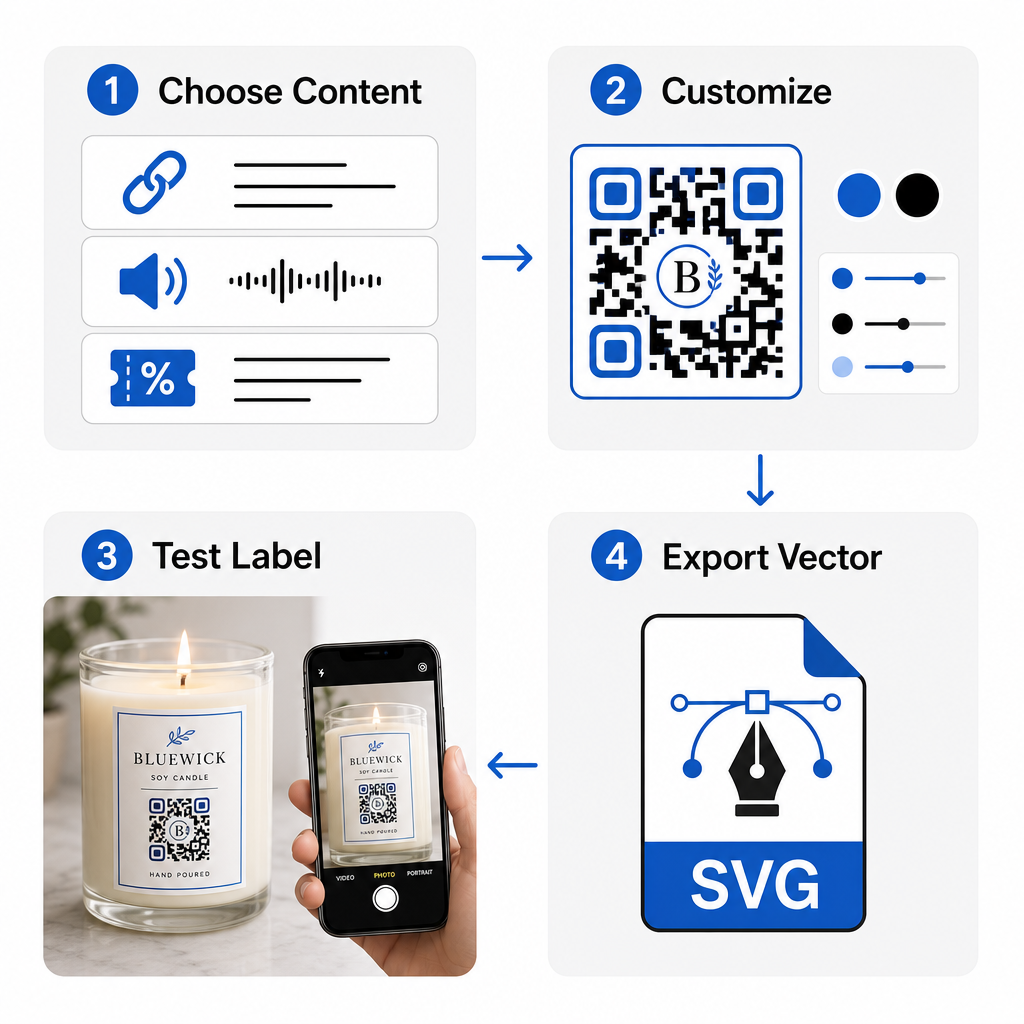
Branded QR creation workflow
  • Selecting your QR code type: Decide whether to direct buyers to a website, audio file, PDF guide, or coupon using our 무료 QR 코드 생성기.
  • Entering your destination data: Input the destination web address or upload your digital media file.
  • Customizing the visual design: Apply custom brand colors, frames, and logos with a 로고가 있는 QR 코드 생성기 to build visual trust.
  • Testing across multiple devices: Verify scan performance on test prints using different smartphones and lighting environments.
  • Downloading print-ready files: Export vector files in SVG or EPS format for high-resolution printing.

Integrating scannable codes into your candle packaging transforms standard physical products into interactive brand touchpoints without overcrowding required label space. Whether you are embedding seasonal audio playlists, offering promotional discounts, or delivering personalized customer messages, digital links give your brand long-term flexibility. Start creating trackable, customizable codes today with Pageloot’s 무료 QR 코드 생성기 to elevate your candle packaging strategy.

자주 묻는 질문

Can I place a QR code on the bottom safety label of a candle container?

Yes. You can print a QR code on the bottom safety panel alongside fire warnings, provided you maintain sufficient color contrast, an adequate quiet zone, and a clear call-to-action on the primary label pointing customers to scan the bottom.

What is the minimum recommended size for a QR code printed on candle packaging?

The minimum recommended size for a printed QR code on a primary candle label is 0.8 x 0.8 inches (2 x 2 cm). For secondary outer packaging or shipping boxes, a size of 3 x 3 cm ensures faster and more consistent scanning.

What happens if I need to update my QR code destination after printing packaging?

If you use dynamic QR codes, you can change the target URL or digital content in your management dashboard at any time without reprinting your physical candle labels or packaging boxes.

작성자 정보

시임 코스타비는 페이지루트의 콘텐츠 책임자입니다. 그는 페이지루트의 혁신적인 QR 코드 생성 서비스에 대한 글을 쓰고 있습니다. 5년 이상 QR 코드 분야에서 쌓아온 깊이 있는 전문 지식을 바탕으로, 시임은 이 분야의 전문가로 인정받고 있습니다. 그는 QR 기술을 활용하여 디지털 상호작용을 간소화하고 향상시키는 데 크게 기여하고 있습니다.

범주
에 대해 자세히 알아보기
아이폰 QR 스캔
QR 코드 스캔 아이폰
QR 코드 포스터 스캔
QR 코드 데이터 제한

온라인으로 QR 코드를 생성해야하는 경우 QR 코드 만들기 무료로 여기!
Pageloot는 #1 Go-To 솔루션 QR 코드를 만들고 스캔합니다.

BL-0325

블로그 세대

20,000개 이상의 브랜드로부터 신뢰를 받아 더 많은 매출, 리뷰, 팔로워를 확보했습니다.

클라이언트 로고
최고 브랜드의 신뢰
5 중 4.8 평가

4.86 / 5 별점

휴고 로랑
휴고 로랑
레스토랑 주인
가장 쉽고 안정적인 QR 코드 생성기. PDF 파일을 즉시 업로드할 수 있습니다. 이제 레스토랑 메뉴가 디지털화되었습니다.
루카스 얀센
루카스 얀센
부동산 개발사
이것은 훌륭한 도구이며 QR 코드를 사용하면 원하는 곳으로 이동할 수 있습니다. 우리는 위치 QR 코드만 사용하지만 유용한 기능이 너무 많습니다.
엠마 모레티
엠마 모레티
소매 제품
사용하기 쉽고 빠릅니다. 그것은 훌륭하게 작동하고 완벽한 이미지를 생성하므로 직원들이 내 vCard를 다운로드할 수 있습니다.
휴고 로랑
휴고 로랑
레스토랑 주인
가장 쉽고 안정적인 QR 코드 생성기. PDF 파일을 즉시 업로드할 수 있습니다. 이제 레스토랑 메뉴가 디지털화되었습니다.
루카스 얀센
루카스 얀센
부동산 개발사
이것은 훌륭한 도구이며 QR 코드를 사용하면 원하는 곳으로 이동할 수 있습니다. 우리는 위치 QR 코드만 사용하지만 유용한 기능이 너무 많습니다.
엠마 모레티
엠마 모레티
소매 제품
사용하기 쉽고 빠릅니다. 그것은 훌륭하게 작동하고 완벽한 이미지를 생성하므로 직원들이 내 vCard를 다운로드할 수 있습니다.
더 많은 QR 코드보기
무엇이든 디지털 경험으로 전환하세요 3분 이내에.

14일 무료 체험.

신용카드는 필요 없습니다.

첫 구매 시 30% 할인

코드를 사용하세요:

MP3 파일 공유

PDF QR 코드를 생성하려면 가입하세요

필요한 모든 것을 업로드하고 표시합니다.

  • 오디오 파일
  • 팟캐스트
  • 음악

가입 시 14일 무료 체험.
체험 기간 후 QR 코드 만료.

오디오 mp3 QR 코드를 생성하려면 가입하세요

프레임으로 더 많은 스캔 확보

QR 코드에 더 많은 프레임을 추가하려면 가입하세요

클릭 유도 문안 프레임은 고객이 QR 코드와 쉽게 상호 작용할 수 있도록 도와줍니다. 사용해 보세요!

가입 시 14일 무료 체험.
체험 기간 후 QR 코드 만료.

QR 코드에 더 많은 프레임을 추가하려면 가입하세요

도형으로 더 많은 스타일 추가

더 많은 도형을 만들려면 가입하세요

QR 코드는 정사각형일 필요가 없습니다. 브랜드 이미지에 맞게 전환해 보세요.

가입 시 14일 무료 체험.
체험 기간 후 QR 코드 만료.

더 많은 도형을 만들려면 가입하세요

QR 코드에 로고 추가

QR 코드에 로고를 추가하려면 가입하세요

로고와 브랜드를 추가하여 QR 코드를 돋보이게 만드세요.

가입 시 14일 무료 체험.
체험 기간 후 QR 코드 만료.

QR 코드에 로고를 추가하려면 가입하세요

스마트 앱 스토어 리디렉션

앱 스토어 QR 코드를 생성하려면 가입하세요

스마트 앱 스토어 QR 코드에 앱 링크를 추가하세요. 사용자는 장치에 따라 리디렉션됩니다.

가입 시 14일 무료 체험.
체험 기간 후 QR 코드 만료.

앱 스토어 QR 코드를 생성하려면 가입하세요

QR 코드에 이미지 업로드

이미지 QR 코드를 생성하려면 가입하세요

이미지를 쉽게 공유하세요. 몇 초 안에 동적으로 이미지를 변경하십시오.

가입 시 14일 무료 체험.
체험 기간 후 QR 코드 만료.

이미지 QR 코드를 생성하려면 가입하세요

PDF 파일 공유

PDF QR 코드를 생성하려면 가입하세요

필요한 모든 것을 업로드하고 표시합니다.

  • 메뉴 및 가격표
  • 명령
  • 모든 문서

가입 시 14일 무료 체험.
체험 기간 후 QR 코드 만료.

PDF QR 코드를 생성하려면 가입하세요

인쇄 없이 나중에 편집

다시 인쇄하지 않고 QR 코드를 편집하려면 가입하세요

동적 QR 코드를 사용하면 새 QR 코드를 인쇄하지 않고도 QR 코드의 내용을 변경할 수 있습니다.

가입 시 14일 무료 체험.
체험 기간 후 QR 코드 만료.

다시 인쇄하지 않고 QR 코드를 편집하려면 가입하세요

언제? 어디서? QR 코드 스캔 추적

QR 코드를 추적하려면 가입하세요

어떤 QR 코드가 가장 많이 스캔되고 무엇이 고객을 가장 흥분시키는지 알아보십시오.

가입 시 14일 무료 체험.
체험 기간 후 QR 코드 만료.

QR 코드를 추적하려면 가입하세요

인쇄 준비 파일 제공

PDF 및 SVG와 같은 벡터 QR 코드를 생성하려면 가입하세요.

.EPS, .PDF, .SVG

HD 해상도로 QR 코드를 다운로드하고 싶으신가요? 인쇄할 준비가 된 벡터 또는 픽셀 형식을 가져옵니다.

가입 시 14일 무료 체험.
체험 기간 후 QR 코드 만료.

PDF 및 SVG와 같은 벡터 QR 코드를 생성하려면 가입하세요.

기다리세요. 귀하의 QR 코드는 로드 중... 로드 중...

나만의 것으로 만들기

나중을 위해 QR 코드를 저장하려면 가입하세요.

다양한 색상, 로고 및 클릭 유도문안 프레임으로 멋진 QR 코드를 만들어 더 많은 스캔을 받으세요.

가입 시 14일 무료 체험.
체험 기간 후 QR 코드 만료.

나중을 위해 QR 코드를 저장하려면 가입하세요.