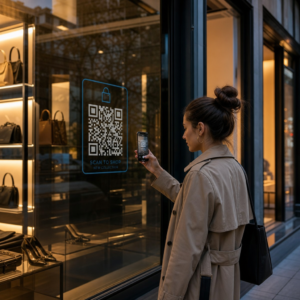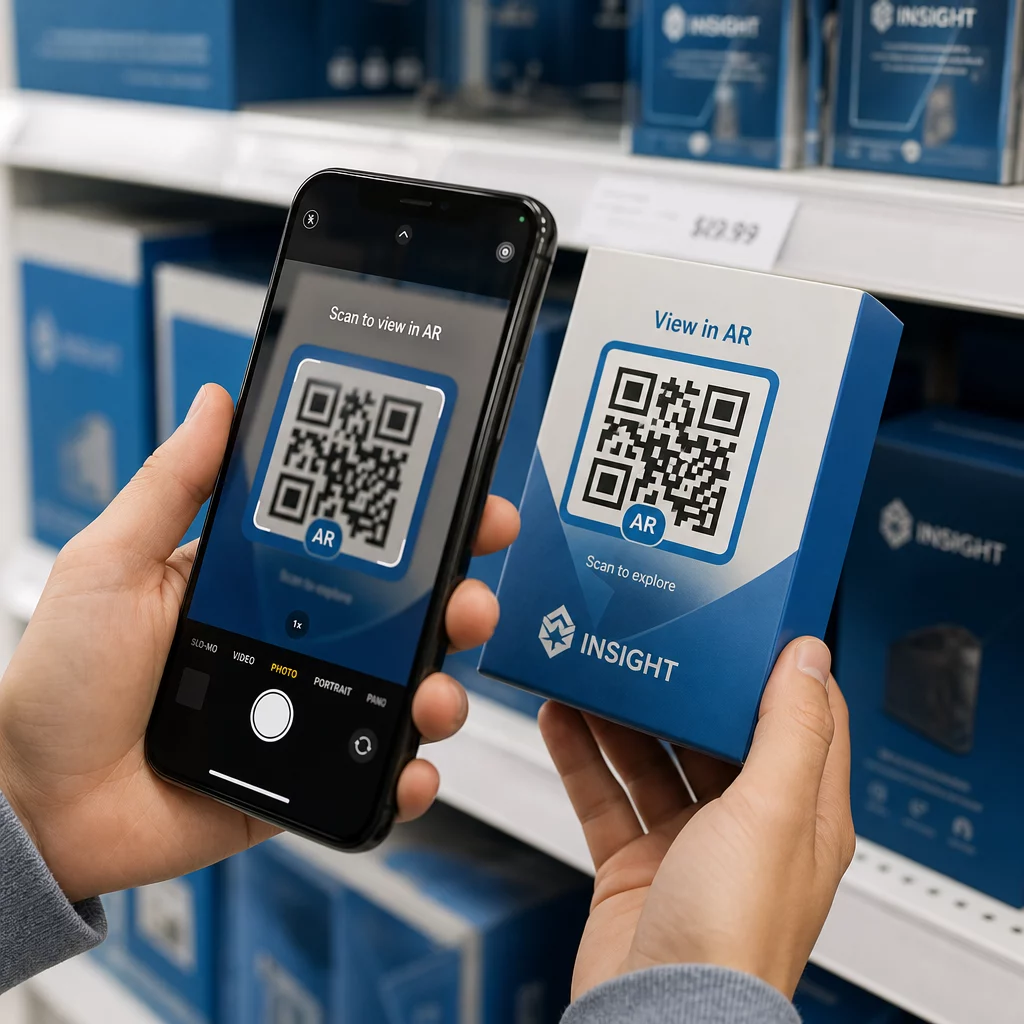
Ваши AR QR-коды не сканируются – или, что еще хуже, запускают опыт, который пользователи покидают до его загрузки? Плохой дизайн и медленно загружаемый AR-контент расстраивают пользователей и тратят ваш бюджет кампании. Это руководство охватывает каждое решение, которое влияет на надежность сканирования и вовлеченность после сканирования, от минимального размера кода до оптимизации AR-файлов.
Основы дизайна, влияющие на надежность сканирования
Физический вид AR QR-кода определяет, будет ли он вообще отсканирован. Прежде чем беспокоиться о самом AR-опыте, эти фундаментальные решения должны быть правильными.
Требования к размеру и формату
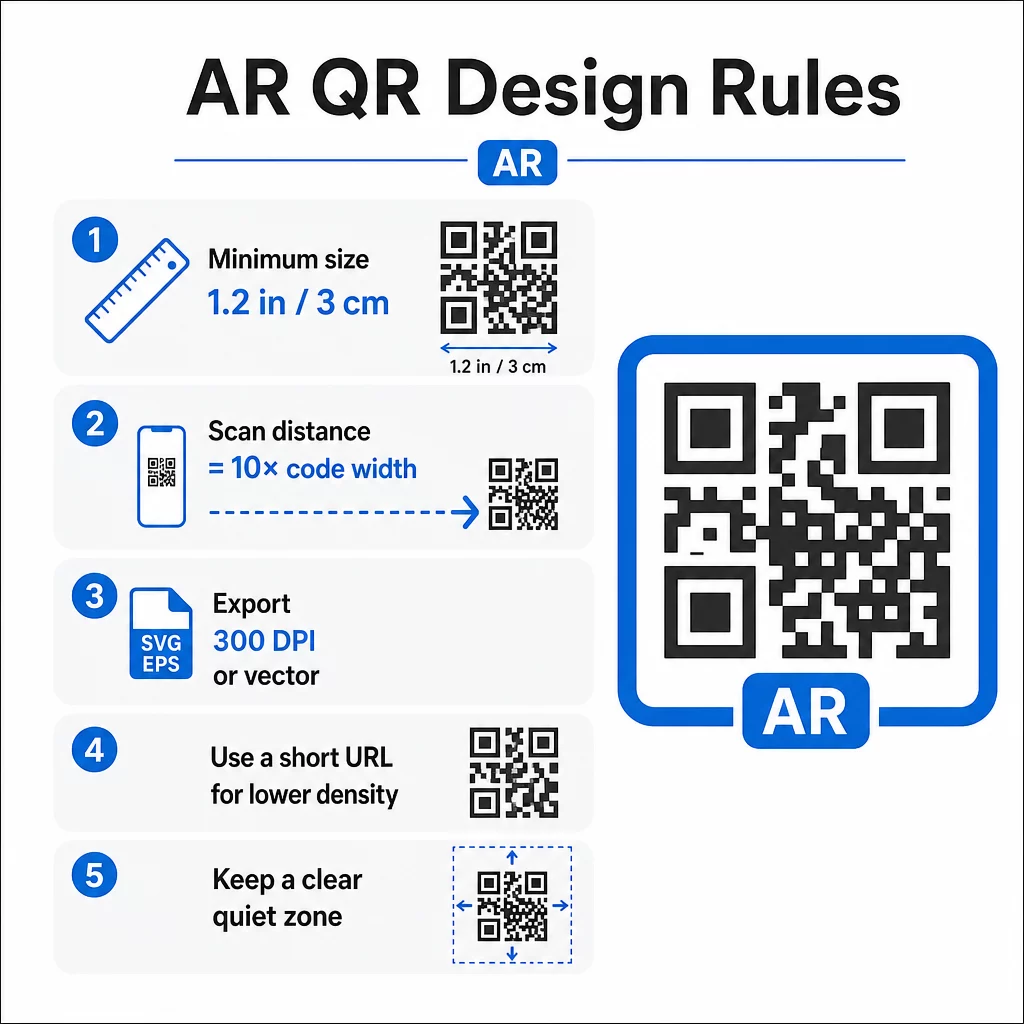
Для надежного сканирования печатайте ваш AR QR-код размером не менее 1.2″×1.2″ (приблизительно 3 см×3 см). Это дает большинству камер смартфонов достаточно данных для декодирования шаблона без необходимости для пользователей держать телефон неудобно близко. Практическое правило: расстояние сканирования должно быть примерно в десять раз больше ширины кода. Код размером 2″ может быть отсканирован с расстояния около 20 дюймов.
Для конкретных размещений:
- Упаковка продукта: не менее 0.8″×0.8″
- Плакаты или дисплеи, просматриваемые с расстояния 3–6 футов: не менее 2″×2″
- Крупноформатные поверхности, такие как рекламные щиты: масштабируйте пропорционально ожидаемому расстоянию просмотра
Всегда сохраняйте квадратное соотношение сторон. Даже небольшое растяжение искажает шаблон модуля и делает код несканируемым. Если ваше программное обеспечение для дизайна применяет ограничения соотношения сторон при экспорте или изменении размера, перепроверьте окончательные размеры файла перед печатью.
Качество печати имеет такое же значение, как и размер. Используйте минимум 300 DPI для любого растрового формата и экспортируйте в векторных форматах, таких как SVG или EPS, когда это возможно. Они масштабируются без потери качества и являются стандартом для профессиональной полиграфии. Если вектор не является вариантом, PNG высокого разрешения — следующий лучший выбор.
Также рассмотрите URL-адрес, который вы кодируете. Более короткие URL-адреса создают менее плотные QR-шаблоны, которые легче сканировать – особенно при меньших размерах или с больших расстояний. Если ваша AR-платформа генерирует длинный целевой URL-адрес, пропустите его через генератор QR-кодов ссылок который кодирует короткий редирект вместо полного URL-адреса.
Цветовой контраст и надежность сканирования
Контраст — это то, что позволяет камере отличать модули кода от его фона. Классическое черно-белое сочетание обеспечивает максимальный контраст и остается самым надежным выбором. Если вы используете фирменные цвета, стремитесь к коэффициенту контрастности не менее 4:1 между модулями переднего плана и фоном. Снижение этого показателя ниже 3:1 значительно увеличивает количество сбоев сканирования при переменном освещении.
Темные элементы переднего плана на светлом фоне работают хорошо. Темно-синий, темно-зеленый или бордовый на белом или кремовом фоне являются надежными фирменными альтернативами чисто черному цвету. Обратное — светлые модули на темном фоне — проблематично. Многие сканеры QR-кодов не откалиброваны для инвертированных дизайнов, а глянцевые темные поверхности создают блики, что еще больше ухудшает производительность.
Полностью избегайте следующих цветовых комбинаций:
- Желтый на белом
- Светло-серый на белом
- Любое сочетание пастельных тонов
- Красный на зеленом или синий на оранжевом (они также создают барьеры для пользователей с нарушениями цветового зрения)
Для AR QR-кодов, напечатанных на глянцевой упаковке, проводите тщательное тестирование в различных условиях освещения. Блики могут сделать идеально разработанный код несканируемым. Матовые покрытия или УФ-покрытия снижают отражательную способность без ущерба для долговечности. Фон за кодом должен быть абсолютно однородным — узоры, градиенты или текстуры мешают сканеру считывать границы модулей.
Для более подробного ознакомления с рекомендациями по контрастности см. лучшим практикам контрастности цветов QR-кода.
Требования к тихой зоне
Тихая зона — это пустое поле, окружающее QR-код. Сканеры используют ее для определения начала и конца кода — без нее окружающие элементы дизайна сливаются с кодом и вызывают сбои.
Минимальная тихая зона составляет четырех модулей в ширину со всех сторон. Модуль — это наименьшая квадратная единица в шаблоне кода. Если каждый модуль имеет размер 0,05 дюйма, тихая зона должна быть не менее 0,2 дюйма. Для AR-кодов, размещенных в визуально насыщенных средах, таких как витрины магазинов или стены музеев, расширение тихой зоны до шести или восьми модулей значительно повышает надежность.
Помните об этих правилах:
- Внутри тихой зоны не должно быть текста, логотипов или элементов дизайна
- Границы и рамки должны быть размещены вне тихой зоны, не касаясь кода
- Если вы сталкиваетесь с проблемами сканирования во время тестирования, расширение тихой зоны часто является первым решением, которое стоит попробовать
Распечатайте тестовую версию в натуральную величину и отсканируйте ее на нескольких устройствах. Если какое-либо из них не сработает, проверьте тихую зону, прежде чем настраивать другие элементы дизайна.
Для получения дальнейших рекомендаций по упрощению сканирования QR-кодов, включая особенности тихой зоны и размеров, руководство по читаемости Pageloot подробно освещает эти вопросы.
Добавление брендинга без ущерба для функциональности
Брендированные QR-коды могут получать значительно больше сканирований, чем обычные черно-белые коды – доверие и узнаваемость играют реальную роль в том, решит ли кто-то сканировать. Задача дизайна состоит в добавлении визуальной идентичности без нарушения базового шаблона.
Рекомендации по размещению логотипа
Размещение по центру является стандартным, поскольку QR-коды созданы с коррекцией ошибок, которая обрабатывает препятствия в середине более изящно, чем по краям. Держите свой логотип в пределах 15–20% от общей площади кода. Если логотип сложный или детализированный, упростите его – чистый, высококонтрастный знак работает лучше, чем замысловатый, который вносит двусмысленность рядом с модулями кода.
Практические шаги при добавлении логотипа:
- Используйте инструменты дизайна для точного масштабирования логотипа перед его встраиванием
- Убедитесь, что логотип не закрывает три угловых поисковых шаблона, которые необходимы для ориентации сканера
- Протестируйте брендированный код на нескольких устройствах, включая старые модели с камерами низкого разрешения
- Используйте Pageloot’s QR код с логотипом для предварительного просмотра и подтверждения сканируемости перед окончательной доработкой
Понимание Уровней коррекции ошибок
QR-коды включают встроенную коррекцию ошибок, которая позволяет им оставаться читаемыми, даже если часть шаблона скрыта или повреждена. Доступны четыре уровня:
| Уровень ECC | Восстановление данных | Безопасный размер логотипа | Примечания |
|---|---|---|---|
| L | ~7% | ≤10% от площади кода | Лучше всего подходит для простых дизайнов без логотипов |
| M | ~15% | 10–15% от площади кода | Сбалансировано для брендинга и надежности |
| Q | ~25% | 12–18% от площади кода | Хорошо работает с простыми формами логотипов |
| H | ~30% | 15–20% от площади кода | Идеально подходит для центрированных логотипов; всегда тщательно тестируйте |
Для брендированных AR QR-кодов, Уровень H является правильным выбором – особенно в условиях, где код может быть поцарапан, частично закрыт или отсканирован при сложном освещении. Если вы разрабатываете код без логотипа для простой, контролируемой среды, уровня M может быть достаточно.
Для полного руководства по как добавлять логотипы в QR-коды без ущерба для сканируемости, включая распространенные ошибки и их исправления, руководство по логотипам Pageloot охватывает процесс шаг за шагом.
Выбор фирменных цветов для QR-кодов
Высокий контраст между модулями и фоном не подлежит обсуждению. Если ваша фирменная палитра естественным образом обеспечивает сильный контраст, ее применение не составит труда. Для более светлых палитр используйте более темные оттенки для модулей вместо основного цвета бренда.
Придерживайтесь двух или трех цветов, чтобы сохранить чистоту дизайна. Избегайте комбинаций, которые снижают контраст, таких как светло-серый на белом, желтый на светло-голубом или пастельные сочетания. При разработке AR QR-кодов для кампаний тестируйте выбранные цвета при различных методах печати и условиях освещения – то, что хорошо выглядит на экране, может вести себя иначе на бумаге.
Инструменты настройки Pageloot позволяют предварительно просматривать цветовые комбинации и проверять контраст перед генерацией окончательного кода. Дополнительные примеры брендированных кодов, которые хорошо работают в реальных кампаниях, см. 7 примеров брендированных QR-кодов.
Техническая настройка для AR QR-кодов
Дизайн побуждает пользователей сканировать. Техническая настройка определяет, что произойдет дальше и будет ли это работать стабильно.
Выбор правильного генератора QR-кодов
Генератор QR-кодов, который вы используете, напрямую влияет на гибкость и производительность вашей AR-кампании. Наиболее важная возможность, которую следует приоритизировать: динамические QR-коды.
Динамический QR-код кодирует короткий URL-адрес перенаправления, а не конечный пункт назначения. Это перенаправление может быть обновлено в любое время – даже после того, как код был напечатан и распространен. Для AR-кампаний это важно, потому что AR-опыт часто требует корректировок: обновленные 3D-модели, пересмотренные целевые страницы или новая информация о продукте. Со статическим кодом любое изменение требует перепечатки всего. С динамическим кодом вы обновляете пункт назначения в своей панели управления, и каждый существующий код автоматически указывает на новый контент.
Динамические коды также поддерживают аналитику сканирований, которая необходима для понимания эффективности кампании. Вы можете отслеживать, сколько раз код был отсканирован, когда, из какого местоположения и на каком типе устройства.
Сохраняйте гибкость AR-кампаний Нужно обновить ваш AR-опыт без перепечатки физических материалов? Используйте Динамический QR код: генератор для создания кодов, которые вы можете редактировать в любое время, со встроенной аналитикой сканирований для измерения производительности.
Для AR QR-кодов на продуктах или упаковке выбирайте генератор с высокими возможностями исправления ошибок и полной поддержкой настройки. Функции аналитики помогут вам определить, какие размещения работают лучше всего и куда направить усилия по оптимизации.
Как на самом деле работают AR QR-коды
Стоит понять механизм, чтобы вы могли принимать обоснованные решения относительно вашей AR-платформы. QR-код содержит URL-адрес. При сканировании этот URL-адрес открывается в браузере устройства или в совместимом приложении. Затем AR-контент доставляется через это место назначения – либо как веб-опыт AR (WebAR), либо через специальное приложение.
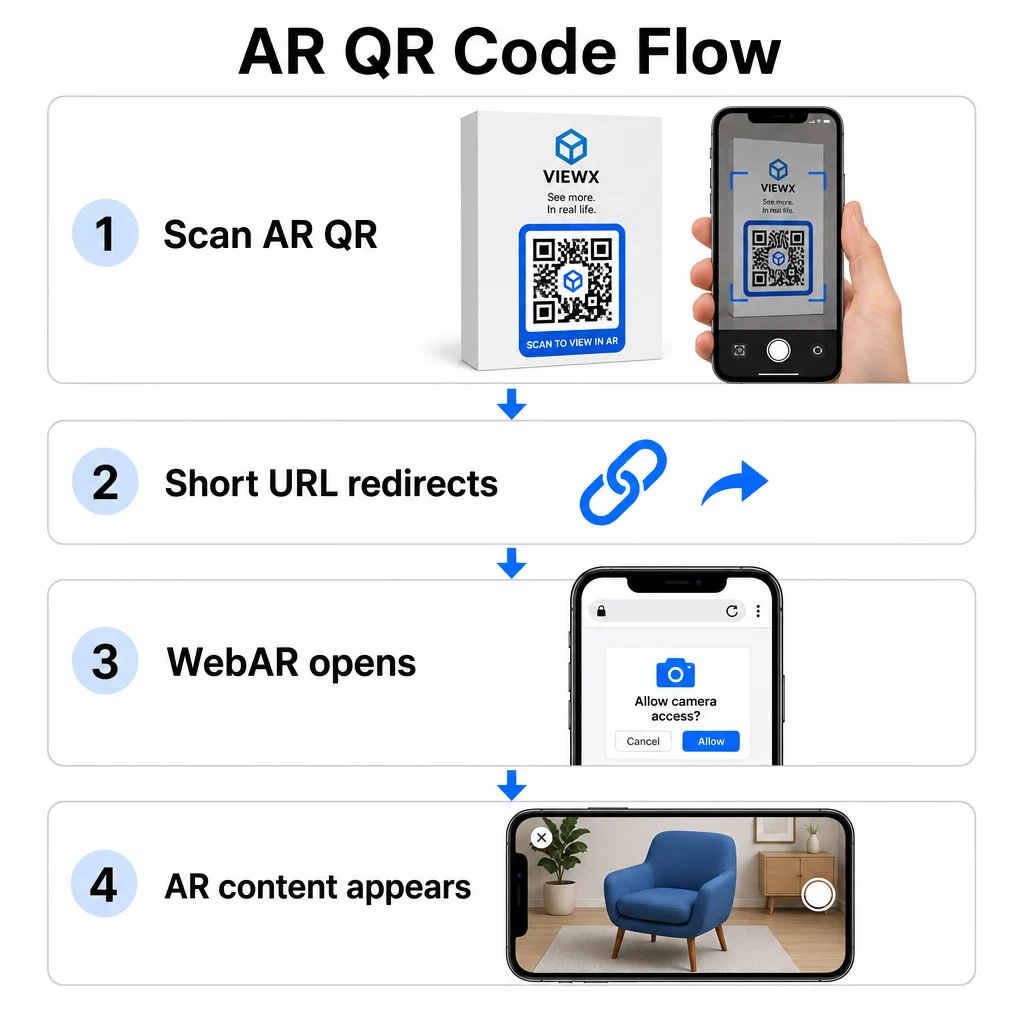
WebAR особенно хорошо подходит для кампаний, поскольку не требует загрузки приложения. Пользователи сканируют код, открывается их браузер, и AR-опыт запускается с использованием камеры и датчиков устройства. Это уменьшает трение, которое приводит к оттоку пользователей, и работает на iOS и Android без отдельного шага установки. WebAR может быть создан с использованием таких технологий, как A-Frame с AR.js для отслеживания на основе маркеров или Google’s “ для беcмаркерного AR.
Если ваш AR-опыт требует возможностей, выходящих за рамки того, что поддерживает WebAR – сложные взаимодействия, постоянный AR или специфические аппаратные функции – может потребоваться подход на основе приложения. В этом случае ваш QR-код должен ссылаться на умный редирект, который направляет пользователей iOS в App Store, а пользователей Android – в Google Play.
Для большинства случаев использования в маркетинге, упаковке и на мероприятиях WebAR, запущенный с помощью динамический QR-код является подходом с наименьшим трением и наиболее простым в обслуживании. AR QR-коды эффективно используются в музейном повествовании, художественных инсталляцияхи кампаниях маркетинговых агентств – и в каждом случае возможность обновлять контент без перепечатки является значительным операционным преимуществом.
Оптимизация AR-контента для скорости
Как только кто-то сканирует ваш код, он ожидает, что AR-опыт появится в течение 2–3 секунд. Все, что дольше, значительно увеличивает вероятность того, что они уйдут до загрузки.
Ключевые цели оптимизации:
- Держите файлы 3D-моделей размером менее 5 МБ; используйте сжатые форматы, такие как GLTF или GLB, для веб-AR
- Держите видеофайлы размером менее 10 МБ и используйте кодирование H.264
- Уменьшите разрешение текстур изображений до 1024×1024 пикселей или меньше; используйте сплошные цвета или процедурные текстуры, где это возможно, для минимизации размеров файлов
- Используйте прогрессивную загрузку – сначала отображайте упрощенную версию AR-контента, затем загружайте детали более высокого качества в фоновом режиме
- Проверяйте производительность загрузки на соединениях 3G и 4G, а не только по Wi-Fi; если производительность низкая на более слабых соединениях, упростите контент или предложите облегченную версию
Размещайте AR-активы на быстрой, надежной инфраструктуре. Медленный или ненадежный хостинг подорвет даже самые хорошо оптимизированные файлы.
Тестирование и запуск AR QR-кодов
Никакое тщательное проектирование не заменит реального тестирования. AR QR-коды сталкиваются с условиями, которые невозможно полностью смоделировать на экране.
Тестирование в различных средах
Тестируйте в реальных условиях, где будет использоваться ваш код: прямой солнечный свет, флуоресцентное освещение в помещении, условия низкой освещенности. Яркий солнечный свет на глянцевых поверхностях особенно сложен – матовые материалы значительно улучшают видимость в этих условиях.
Для кодов на экранах или цифровых дисплеях проверяйте сканируемость с разных углов, высот и расстояний. Для печатных кодов тестируйте на тех же материалах, которые вы будете использовать – производительность различается между матовой бумагой, глянцевой упаковкой и текстурированными подложками.
Связь влияет на AR больше, чем на стандартные назначения QR-кодов. Даже идеально сканируемый код может привести к неработоспособному опыту, если AR-активы не загружаются при слабом сигнале. Тестируйте в областях с различной силой сигнала.
Тестирование на нескольких платформах
Устройства iOS имеют встроенные QR-сканеры, но поведение различается между моделями iPhone и версиями iOS. Тестируйте на нескольких поколениях. Различия Android более значительны – качество камеры и вычислительная мощность значительно отличаются между бюджетными и премиальными моделями. Тестируйте на широком спектре и тех, и других.
Для веб-AR убедитесь, что опыт корректно загружается в Safari, Chrome и Firefox. Проверьте на разных размерах экрана и ориентациях. Если ваш AR-опыт требует разрешений камеры, убедитесь, что запрос браузера появляется и функционирует корректно на каждой платформе.
Для комплексного подхода к кросс-платформенному тестированию см. руководство Pageloot по лучших практик использования QR-кодов.
Отслеживание производительности с помощью аналитики
После запуска аналитика покажет вам, что на самом деле происходит с вашими кодами. С помощью динамических QR-кодов и отслеживания сканирований, вы можете отслеживать производительность в реальном времени и вносить коррективы без перепечатки.
Ключевые метрики для отслеживания:
| Метрика | Что это показывает | Действие, которое нужно предпринять |
|---|---|---|
| Общее количество сканирований / Уникальные пользователи | Охват и объем кампании | Протестируйте новые места размещения или призывы к действию, если количество падает |
| Активность по времени суток | Когда пользователи наиболее активны | Настройте время отображения для часов пик |
| Разделение по устройствам / ОС | Производительность платформы | Оптимизация для платформ с более низким уровнем вовлеченности |
| Географические горячие точки | Где происходят сканирования | Сосредоточьте ресурсы на высокоэффективных областях |
| Конверсия после сканирования | Действия пользователя после сканирования | Упростите целевые страницы или уточните предложение |
Еженедельно просматривайте аналитику во время активных кампаний. Закономерности в типе устройства или данных о местоположении часто выявляют проблемы с размещением или дизайном, которые не были видны во время тестирования.
Улучшение опыта после сканирования
Плавное сканирование — это всего лишь точка входа. Опыт после сканирования определяет, будут ли пользователи взаимодействовать с вашим AR-контентом или откажутся от него.
Дизайн, оптимизированный для мобильных устройств
Каждый аспект опыта после сканирования должен быть разработан для экрана телефона. Адаптивные макеты необходимы – ваша целевая страница и AR-контент должны адаптироваться к различным размерам и ориентациям экрана без сбоев.
Интерактивные элементы, такие как кнопки и призывы к действию, должны быть размером не менее 44×44 пикселей и располагаться в удобных для большого пальца областях – в центре и нижней части экрана. Оставляйте достаточно места между областями касания, чтобы предотвратить случайные нажатия.
Упростите путь к AR-контенту. Для WebAR опыт должен запускаться непосредственно в браузере без дополнительных плагинов, кроме доступа к камере. Каждый дополнительный шаг увеличивает отток пользователей. Для мобильных целевых страниц с QR-кодом, руководство Pageloot охватывает конкретные требования к дизайну и времени загрузки, которые удерживают пользователей после сканирования.
Если вы предоставляете несколько вариантов контента из одного сканирования, фирменная целевая страница что ссылки на ваш опыт AR наряду с другим соответствующим контентом могут улучшить общий опыт.
Четкие инструкции для AR-контента
Пользователям, незнакомым с AR, необходимо знать, что произойдет и что делать. Добавьте четкий призыв к действию рядом с самим физическим QR-кодом – что-то вроде “Сканируйте, чтобы просмотреть в 3D” или “Сканируйте, чтобы увидеть этот продукт в вашем пространстве”. Стимул к сканированию должен быть очевиден до того, как кто-либо направит свою камеру.
Оказавшись в среде AR, направляйте пользователей с помощью простых экранных подсказок:
- “Наведите камеру на упаковку продукта, чтобы активировать AR”
- “Медленно перемещайте телефон, чтобы сканировать поверхность”
Располагайте интерактивные элементы – “Добавить в корзину”, “Узнать больше”, “Поделиться опытом” – так, чтобы их было легко найти, не блокируя AR-контент. Используйте прогрессивное раскрытие: начинайте с простейших элементов управления и вводите расширенные функции по мере того, как пользователи осваиваются.
Персонализация и доступность
Динамические QR-коды позволяют удобно адаптировать контент в зависимости от местоположения, времени или предыдущих взаимодействий. В розничной торговле это может означать показ продуктов, актуальных для региона пользователя, или изменение языка контента в зависимости от места сканирования.
Соображения доступности, применимые к AR-опыту:
- Добавляйте текстовые описания для всех визуальных элементов и обеспечивайте совместимость со скринридерами
- Предлагайте регулируемые размеры текста, уровни контрастности и громкость звука
- Предоставляйте субтитры для аудиоконтента
- Включайте несколько языковых опций, где это уместно
- Избегайте полагаться исключительно на цвет для передачи информации – используйте иконки, текстовые метки или узоры в качестве дополнений
Динамические QR-коды упрощают обновление языка: вы можете добавлять или изменять опции без перепечатки каких-либо физических материалов.
Собираем все воедино
Надежные AR QR-коды являются результатом решений, принятых на этапах дизайна, технической настройки и опыта после сканирования – а не какого-либо одного фактора. Правильно выберите размер, контрастность и тихую зону. Выберите коррекцию ошибок и брендинг, которые сохраняют сканируемость. Используйте динамические коды, чтобы ваш AR-контент оставался актуальным без перепечатки. Тщательно тестируйте на разных устройствах и в разных средах, затем используйте аналитику для постоянного улучшения после запуска.
Начните создавать AR QR-коды Использовать Генератор QR-кодов для создания динамических, брендированных кодов со встроенной аналитикой – затем поддерживайте актуальность вашего AR-опыта без необходимости перепечатки.
Часто задаваемые вопросы
Протестируйте на различных устройствах iOS и Android, включая старые модели, в различных условиях освещения – при прямом солнечном свете, флуоресцентном комнатном освещении и в условиях низкой освещенности. Используйте высокую контрастность (соотношение не менее 4:1), поддерживайте четкую тихую зону и по возможности избегайте глянцевых поверхностей. Динамические QR-коды позволяют обновлять связанный AR-опыт, если после запуска возникнут проблемы с совместимостью.
Размещайте ваш логотип в пределах 15–20% от общей площади кода, по центру, и используйте коррекцию ошибок уровня H для компенсации препятствия. Поддерживайте высокий контраст между модулями кода и фоном и сохраняйте тихую зону вокруг кода. Всегда тестируйте брендированный код на нескольких устройствах и при различном освещении перед массовой печатью.
Держите файлы 3D-моделей размером до 5 МБ, используя сжатые форматы, такие как GLTF или GLB, ограничьте видеофайлы до 10 МБ с кодированием H.264 и уменьшите разрешение текстур изображений до 1024×1024 пикселей или меньше. Используйте прогрессивную загрузку, чтобы сначала показать упрощенную версию, пока активы более высокого качества загружаются в фоновом режиме. Тестируйте производительность на соединениях 3G и 4G, а не только по Wi-Fi, чтобы отразить реальные условия.