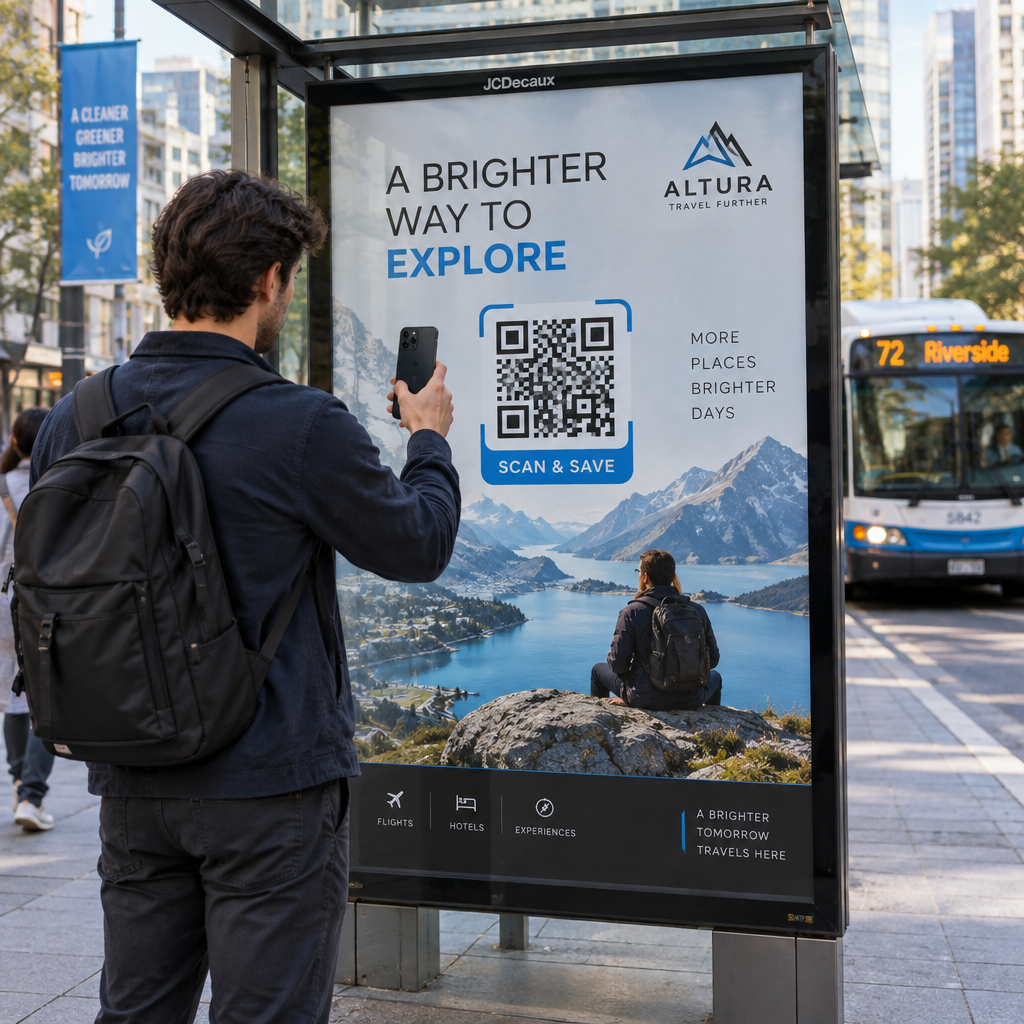
Ali se vaših AR QR kod ne uspe skenirati – ali še huje, sprožijo izkušnjo, ki jo uporabniki opustijo, preden se naloži? Slab dizajn in počasi naložljiva AR vsebina frustrirata uporabnike in zapravljata vaš proračun kampanje. Ta vodnik zajema vsako odločitev, ki vpliva na zanesljivost skeniranja in angažiranost po skeniranju, od minimalne velikosti kode do optimizacije AR datotek.
Osnove oblikovanja, ki vplivajo na zanesljivost skeniranja
Fizični videz AR QR kode določa, ali bo sploh skenirana. Preden se posvetite sami AR izkušnji, morajo biti te temeljne izbire pravilne.
Zahteve glede velikosti in formata
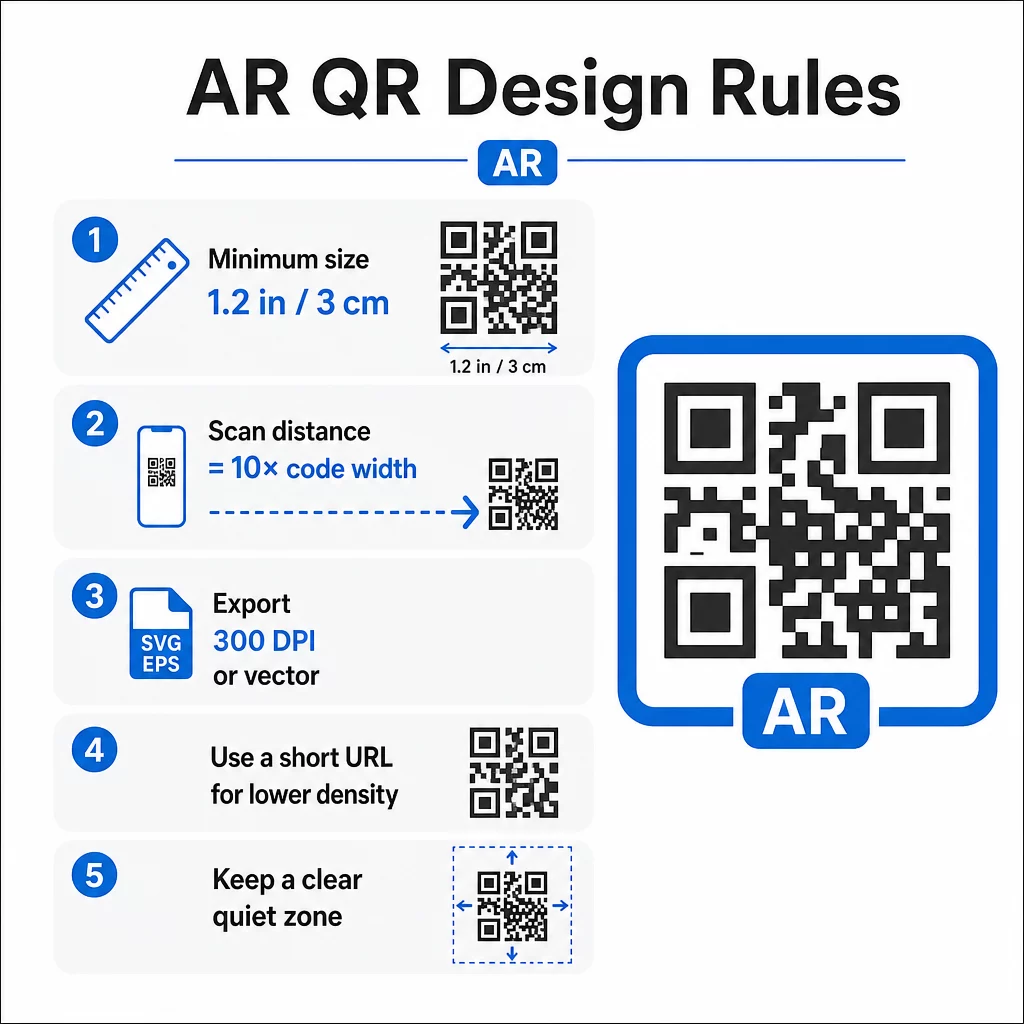
Za zanesljivo skeniranje natisnite svojo AR QR kodo v minimalni velikosti 1.2″×1.2″ (približno 3 cm×3 cm). To večini kamer pametnih telefonov zagotavlja dovolj podatkov za dekodiranje vzorca, ne da bi morali uporabniki držati telefon neprijetno blizu. Praktično pravilo: razdalja skeniranja naj bo približno desetkratna širina kode. Kodo velikosti 2″ je mogoče skenirati z razdalje približno 20 palcev.
Za specifične postavitve:
- Embalaža izdelka: vsaj 0.8″×0.8″
- Plakati ali zasloni, gledani z razdalje 3–6 čevljev: vsaj 2″×2″
- Velikoformatne površine, kot so jumbo plakati: sorazmerno pomanjšajte ali povečajte glede na pričakovano razdaljo gledanja
Vedno ohranite kvadratno razmerje stranic. Celo rahlo raztezanje popači vzorec modula in onemogoči skeniranje kode. Če vaša programska oprema za oblikovanje uporablja omejitve razmerja stranic med izvozom ali spreminjanjem velikosti, pred tiskanjem dvakrat preverite končne dimenzije datoteke.
Kakovost tiska je prav tako pomembna kot velikost. Uporabite najmanj 300 DPI za kateri koli rastrski format in izvozite v vektorskih formatih, kot sta SVG ali EPS, kadar koli je to mogoče. Ti se skalirajo brez izgube kakovosti in so standard za profesionalno tiskarsko produkcijo. Če vektor ni možnost, je PNG visoke ločljivosti naslednja najboljša izbira.
Upoštevajte tudi URL, ki ga kodirate. Krajši URL-ji ustvarjajo manj goste QR vzorce, ki jih je lažje skenirati – še posebej pri manjših velikostih ali z večjih razdalj. Če vaša AR platforma generira dolg ciljni URL, ga preženite skozi generator QR kod za povezave ki kodira kratko preusmeritev namesto celotnega URL-ja.
Barvni kontrast in zanesljivost skeniranja
Kontrast je tisto, kar kameri omogoča, da loči module kode od njenega ozadja. Klasična črno-bela kombinacija ponuja največji kontrast in ostaja najzanesljivejša izbira. Če uporabljate barve blagovne znamke, si prizadevajte za kontrastno razmerje vsaj 4:1 med moduli v ospredju in ozadjem. Če greste pod 3:1, se znatno poveča število neuspešnih skeniranj pri spremenljivi osvetlitvi.
Temna ospredja na svetlih ozadjih delujejo dobro. Mornarsko modra, temno zelena ali bordo barva na belih ali krem ozadjih so zanesljive blagovne alternative čisti črni barvi. Obratno – svetli moduli na temnem ozadju – je problematično. Mnogi QR skenerji niso kalibrirani za obrnjene zasnove, sijoče temne površine pa povzročajo bleščanje, ki dodatno poslabša delovanje.
Popolnoma se izogibajte tem barvnim kombinacijam:
- Rumena na beli
- Svetlo siva na beli
- Kakršnakoli pastelna kombinacija
- Rdeča na zeleni ali modra na oranžni (te ustvarjajo tudi ovire za uporabnike z motnjami barvnega vida)
Za AR QR kode, natisnjene na sijoči embalaži, obsežno testirajte v različnih svetlobnih pogojih. Bleščanje lahko povzroči, da popolnoma zasnovana koda postane nečitljiva. Mat površine ali UV premazi zmanjšajo odbojnost, ne da bi ogrozili trajnost. Ozadje za kodo naj bo popolnoma enotno – vzorci, prelivi ali teksture motijo sposobnost skenerja, da prebere meje modulov.
Za podrobnejši vpogled v smernice za kontrast glejte najboljšim praksam barvnega kontrasta QR kod.
Zahteve za tiho območje
Tiha cona je prazen rob, ki obdaja QR kodo. Skenerji jo uporabljajo za prepoznavanje, kje se koda začne in konča – brez nje se okoliški oblikovni elementi zlijejo v kodo in povzročijo napake.
Minimalna tiha cona je štiri module na vseh straneh. Modul je najmanjša kvadratna enota v vzorcu kode. Če vsak modul meri 0,05 palca, mora biti tiha cona vsaj 0,2 palca. Za AR kode, postavljene v vizualno obremenjena okolja, kot so maloprodajni zasloni ali muzejske stene, razširitev tihe cone na šest ali osem modulov dodaja pomembno zanesljivost.
Upoštevajte ta pravila:
- V tihi coni se ne smejo pojavljati besedilo, logotipi ali oblikovni elementi
- Robovi in okvirji morajo biti postavljeni zunaj tiho območje, ne da bi se dotikali kode
- Če imate težave s skeniranjem med testiranjem, je razširitev tihega območja pogosto prva rešitev, ki jo poskusite.
Natisnite testno različico v dejanski velikosti in jo skenirajte na več napravah. Če katera koli ne uspe, preverite tiho območje, preden prilagodite druge oblikovne elemente.
Za nadaljnje smernice o lažjem skeniranju QR kod, vključno s podrobnostmi o tihem območju in velikosti, Pagelootov vodnik za berljivost te teme obravnava v praktičnih podrobnostih.
Dodajanje blagovne znamke brez ogrožanja funkcionalnosti
QR kode z blagovno znamko lahko prejmejo bistveno več skeniranj kot navadne črno-bele kode – zaupanje in prepoznavnost igrata pomembno vlogo pri tem, ali se bo nekdo odločil za skeniranje. Oblikovalski izziv je dodajanje vizualne identitete, ne da bi pri tem motili osnovni vzorec.
Smernice za postavitev logotipa
Sredinska postavitev je standardna, ker so QR kode zgrajene s popravkom napak, ki obravnava ovire v sredini bolj elegantno kot na robovih. Logotip naj bo znotraj 15–20 % celotne površine kode. Če je logotip kompleksen ali podroben, ga poenostavite – čista, visoko kontrastna oznaka deluje bolje kot zapletena, ki vnaša dvoumnost blizu modulov kode.
Praktični koraki pri dodajanju logotipa:
- Uporabite oblikovalska orodja za natančno skaliranje logotipa, preden ga vdelate
- Zagotovite, da logotip ne zakrije treh iskalnih vzorcev v kotih, ki so bistveni za orientacijo skenerja
- Preizkusite kodirano kodo na več napravah, vključno s starejšimi modeli s kamerami nižje ločljivosti
- Uporabite Pagelootov Generator QR kod z logotipom za predogled in potrditev skenirljivosti pred dokončanjem
Razumevanje ravni popravljanja napak
Kode QR vključujejo vgrajeno popravljanje napak, ki jim omogoča, da ostanejo berljive, tudi če je del vzorca zakrit ali poškodovan. Na voljo so štiri ravni:
| Raven ECC | Obnovitev podatkov | Varna velikost logotipa | Opombe |
|---|---|---|---|
| L | ~7% | ≤10 % površine kode | Najboljše za preproste zasnove brez logotipov |
| M | ~15% | 10–15 % površine kode | Uravnoteženo za blagovno znamko in zanesljivost |
| Q | ~25% | 12–18 % površine kode | Dobro deluje s preprostimi oblikami logotipov |
| H | ~30% | 15–20 % površine kode | Idealno za centrirane logotipe; vedno temeljito preizkusite |
Za kodirane AR QR kode, Raven H je prava izbira – še posebej v okoljih, kjer se koda lahko opraska, delno prekrije ali skenira v zahtevnih svetlobnih pogojih. Če oblikujete kodo brez logotipa za preprosto, nadzorovano okolje, je raven M morda zadostna.
Za celoten vodnik o kako dodati logotipe QR kodam brez vpliva na skeniranje, vključno s pogostimi napakami in popravki, Pagelootov vodnik za logotipe pokriva postopek korak za korakom.
Izbira barv blagovne znamke za QR kode
Visok kontrast med moduli in ozadjem je nujno potreben. Če vaša barvna paleta blagovne znamke naravno ustvarja močan kontrast, je njena uporaba preprosta. Za svetlejše palete uporabite temnejše odtenke za module namesto primarne barve blagovne znamke.
Držite se dveh ali treh barv, da bo dizajn čist. Izogibajte se kombinacijam, ki zmanjšujejo kontrast, kot so svetlo siva na beli, rumena na svetlo modri ali pastelne kombinacije. Pri oblikovanju AR QR kod za kampanje preizkusite svoje barvne izbire pri različnih metodah tiskanja in svetlobnih pogojih – kar je videti dobro na zaslonu, se lahko na papirju obnaša drugače.
Pagelootova orodja za prilagajanje vam omogočajo predogled barvnih kombinacij in preverjanje kontrasta pred generiranjem končne kode. Za več primerov kod blagovnih znamk, ki dobro delujejo v resničnih kampanjah, glejte 7 primerov QR kod z blagovno znamko.
Tehnična nastavitev za AR QR kode
Oblikovanje spodbudi uporabnike k skeniranju. Tehnična nastavitev določa, kaj se zgodi naslednje in ali deluje dosledno.
Izbira pravega generatorja QR kod
Generator QR kod, ki ga uporabljate, neposredno vpliva na prilagodljivost in učinkovitost vaše AR kampanje. Najpomembnejša zmožnost, ki ji je treba dati prednost: dinamične QR kode.
Dinamična QR koda kodira kratek preusmeritveni URL namesto končne destinacije. To preusmeritev je mogoče kadar koli posodobiti – tudi potem, ko je bila koda natisnjena in razdeljena. Za AR kampanje je to pomembno, ker AR izkušnje pogosto potrebujejo prilagoditve: posodobljene 3D modele, spremenjene pristajalne strani ali nove informacije o izdelkih. Pri statični kodi vsaka sprememba zahteva ponovno tiskanje vsega. Z dinamično kodo posodobite destinacijo na svoji nadzorni plošči in vsaka obstoječa koda samodejno kaže na novo vsebino.
Dinamične kode podpirajo tudi analitiko skeniranja, ki je bistvena za razumevanje uspešnosti kampanje. Sledite lahko, kolikokrat je bila koda skenirana, kdaj, s katere lokacije in na kateri vrsti naprave.
Ohranite AR kampanje prilagodljive Morate posodobiti svojo AR izkušnjo, ne da bi ponovno tiskali fizične materiale? Uporabite QR generator za dinamične QR kode za ustvarjanje kod, ki jih lahko kadar koli uredite, z vgrajeno analitiko skeniranja za merjenje uspešnosti.
Za AR QR kode na izdelkih ali embalaži izberite generator z visokimi možnostmi popravljanja napak in popolno podporo za prilagoditev. Analitične funkcije vam pomagajo prepoznati, katere umestitve delujejo najbolje in kam usmeriti optimizacijska prizadevanja.
Kako AR QR kode dejansko delujejo
Vredno je razumeti mehanizem, da lahko sprejemate informirane odločitve o svoji AR platformi. QR koda vsebuje URL. Ko je skenirana, se ta URL odpre v brskalniku naprave ali v združljivi aplikaciji. Vsebina AR se nato dostavi prek te destinacije – bodisi kot spletna AR izkušnja (WebAR) ali prek namenske aplikacije.
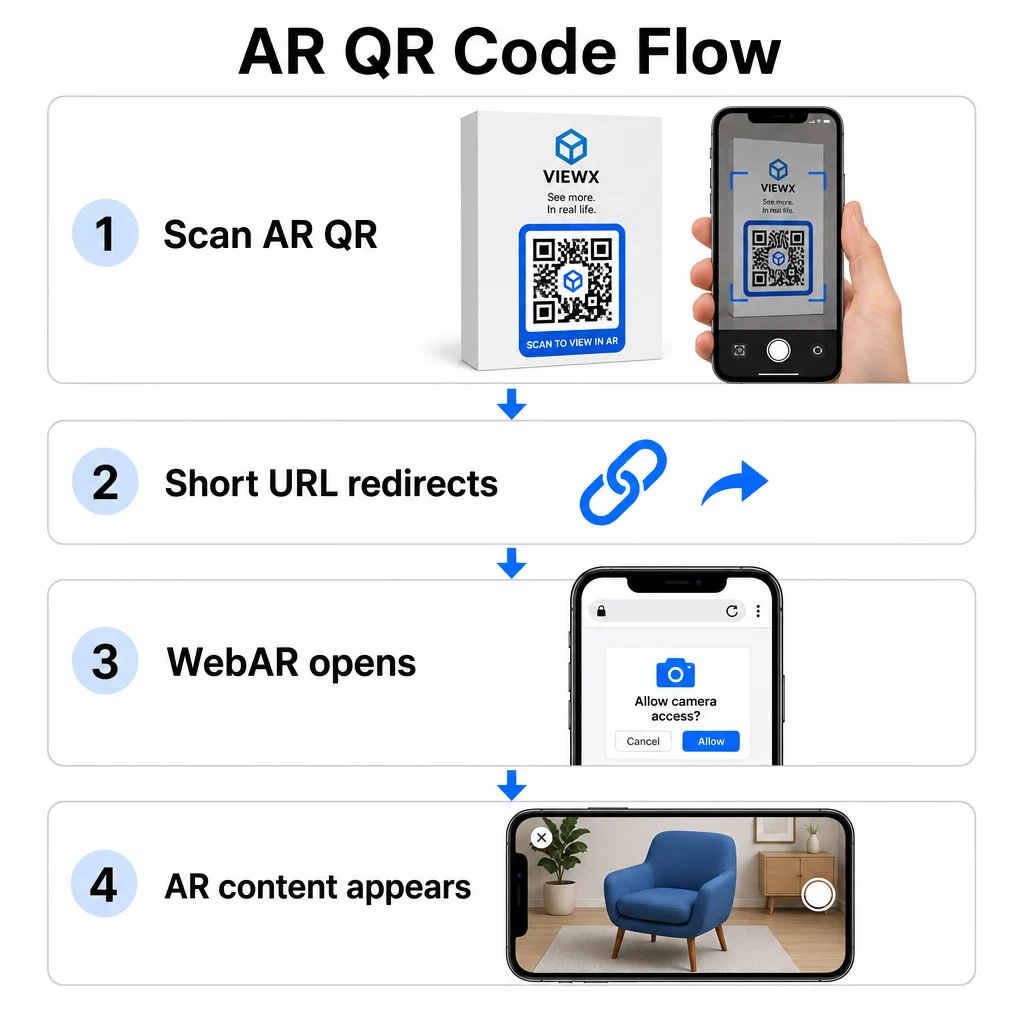
WebAR je še posebej primeren za kampanje, saj ne zahteva prenosa aplikacije. Uporabniki skenirajo kodo, odpre se njihov brskalnik in AR izkušnja se zažene z uporabo kamere in senzorjev naprave. To zmanjšuje trenje, ki povzroča opuščanje, in deluje na iOS in Android brez ločenega koraka namestitve. WebAR je mogoče zgraditi s tehnologijami, kot je A-Frame z AR.js za sledenje na podlagi markerjev ali Google-ov “ za AR brez markerjev.
Če vaša AR izkušnja zahteva zmogljivosti, ki presegajo tisto, kar podpira WebAR – kompleksne interakcije, trajno AR ali specifične strojne funkcije – je morda potreben pristop, ki temelji na aplikaciji. V tem primeru naj se vaša QR koda poveže s pametno preusmeritvijo, ki uporabnike iOS usmeri v App Store in uporabnike Android v Google Play.
Za večino primerov uporabe v marketingu, embalaži in dogodkih je WebAR, zagnan iz dinamična QR koda pristop z najmanj trenja in najlažji za vzdrževanje. AR QR kode so bile učinkovito uporabljene v muzejskem pripovedovanju zgodb, umetniških instalacijah, in kampanjah marketinških agencij – in v vsakem primeru je zmožnost posodabljanja vsebine brez ponovnega tiskanja pomembna operativna prednost.
Optimizacija AR vsebine za hitrost
Ko nekdo skenira vašo kodo, pričakuje, da se bo AR izkušnja prikazala v 2–3 sekundah. Vse, kar traja dlje, bistveno poveča možnost, da bodo odšli, preden se naloži.
Ključni cilji optimizacije:
- Ohranite datoteke 3D modelov pod 5 MB; uporabite stisnjene formate, kot sta GLTF ali GLB, za spletno AR
- Ohranite video datoteke pod 10 MB in uporabite kodiranje H.264
- Zmanjšajte ločljivost slikovnih tekstur na 1024×1024 slikovnih pik ali manj; kjer je mogoče, uporabite enobarvne ali proceduralne teksture za zmanjšanje velikosti datotek
- Uporabite progresivno nalaganje – najprej prikažite poenostavljeno različico vsebine AR, nato pa v ozadju naložite podrobnosti višje kakovosti
- Preizkusite zmogljivost nalaganja na povezavah 3G in 4G, ne le na Wi-Fi; če je zmogljivost slaba na šibkejših povezavah, poenostavite vsebino ali ponudite lažjo različico
Gostite sredstva AR na hitri in zanesljivi infrastrukturi. Počasno ali nezanesljivo gostovanje bo spodkopalo tudi najbolje optimizirane datoteke.
Testiranje in zagon AR QR kod
Nobena količina skrbnega oblikovanja ne nadomesti testiranja v realnem svetu. AR QR kode naletijo na pogoje, ki jih je nemogoče v celoti simulirati na zaslonu.
Testiranje v različnih okoljih
Testirajte v dejanskih pogojih, kjer bo vaša koda uporabljena: neposredna sončna svetloba, fluorescentna notranja razsvetljava, nastavitve šibke svetlobe. Močna sončna svetloba na sijočih površinah je še posebej zahtevna – mat materiali bistveno izboljšajo vidljivost v teh pogojih.
Za kode na zaslonih ali digitalnih prikazovalnikih preizkusite možnost skeniranja iz različnih kotov, višin in razdalj. Za tiskane kode preizkusite na točno določenih materialih, ki jih boste uporabili – zmogljivost se razlikuje med mat papirjem, sijočo embalažo in teksturiranimi podlagami.
Povezljivost vpliva na AR bolj kot na standardne destinacije QR kod. Tudi koda, ki se popolnoma skenira, lahko zagotovi pokvarjeno izkušnjo, če se sredstva AR ne naložijo ob šibkem signalu. Testirajte na območjih z različno močjo signala.
Testiranje na več platformah
Naprave iOS imajo vgrajene skenerje QR, vendar se obnašanje razlikuje med modeli iPhone in različicami iOS. Testirajte na več generacijah. Razlike pri Androidu so pomembnejše – kakovost kamere in procesorska moč se znatno razlikujeta med cenovno ugodnimi in premium modeli. Testirajte na obeh vrstah.
Za spletno AR potrdite, da se izkušnja pravilno naloži v brskalnikih Safari, Chrome in Firefox. Preverite na različnih velikostih zaslonov in usmeritvah. Če vaša AR izkušnja zahteva dovoljenja za kamero, preverite, ali se poziv brskalnika prikaže in pravilno deluje na vsaki platformi.
Za celovit pristop k testiranju med napravami si oglejte Pagelootova navodila o najboljših praks za uporabnost QR kod.
Sledenje uspešnosti z analitiko
Po zagonu vam analitika pove, kaj se dejansko dogaja z vašimi kodami. Z dinamičnimi QR kodami in sledenjem skeniranja, lahko spremljate uspešnost v realnem času in izvajate prilagoditve brez ponovnega tiskanja.
Ključne metrike za spremljanje:
| Metrika | Kaj razkriva | Ukrep, ki ga je treba sprejeti |
|---|---|---|
| Skupno število skeniranj / Edinstveni uporabniki | Doseg in obseg kampanje | Preizkusite nove umestitve ali pozive k dejanju, če število pade |
| Aktivnost glede na čas dneva | Kdaj se uporabniki najbolj angažirajo | Prilagodite čas prikaza za konice |
| Razdelitev po napravah / OS | Uspešnost platforme | Optimizirajte za platforme z nižjo angažiranostjo |
| Geografske žariščne točke | Kje se pojavijo skeniranja | Osredotočite vire na visoko učinkovita področja |
| Konverzija po skeniranju | Dejanja uporabnikov po skeniranju | Poenostavite pristajalne strani ali pojasnite ponudbo |
Tedensko pregledujte analitiko med aktivnimi kampanjami. Vzorci v vrsti naprave ali podatkih o lokaciji pogosto razkrijejo težave z umestitvijo ali oblikovanjem, ki niso bile vidne med testiranjem.
Izboljšanje izkušnje po skeniranju
Gladko skeniranje je le vstopna točka. Izkušnja po skeniranju določa, ali se bodo uporabniki angažirali z vašo vsebino AR ali jo opustili.
Mobilno optimizirano oblikovanje
Vsak vidik izkušnje po skeniranju mora biti zasnovan za zaslon telefona. Odzivne postavitve so bistvene – vaša pristajalna stran in vsebina AR se morata prilagoditi različnim velikostim in usmeritvam zaslona, ne da bi se pokvarili.
Interaktivni elementi, kot so gumbi in pozivi k dejanju, morajo biti veliki vsaj 44×44 slikovnih pik in nameščeni na območjih, prijaznih palcu – v sredini in spodnjih delih zaslona. Pustite dovolj prostora med tarčami za dotik, da preprečite nenamerne pritiske.
Poenostavite pot do vsebine AR. Za WebAR se mora izkušnja zagnati neposredno v brskalniku brez dodatnih vtičnikov, razen dostopa do kamere. Vsak dodaten korak poveča opuščanje. Za pristajalne strani mobilnih QR kod, Pagelootov vodnik zajema specifične zahteve glede oblikovanja in časa nalaganja, ki ohranjajo uporabnike angažirane po skeniranju.
Če dostavljate več možnosti vsebine iz enega skeniranja, blagovna znamka pristajalna stran da povezave do vaše izkušnje AR skupaj z drugo relevantno vsebino lahko izboljšajo celotno izkušnjo.
Jasna navodila za vsebino AR
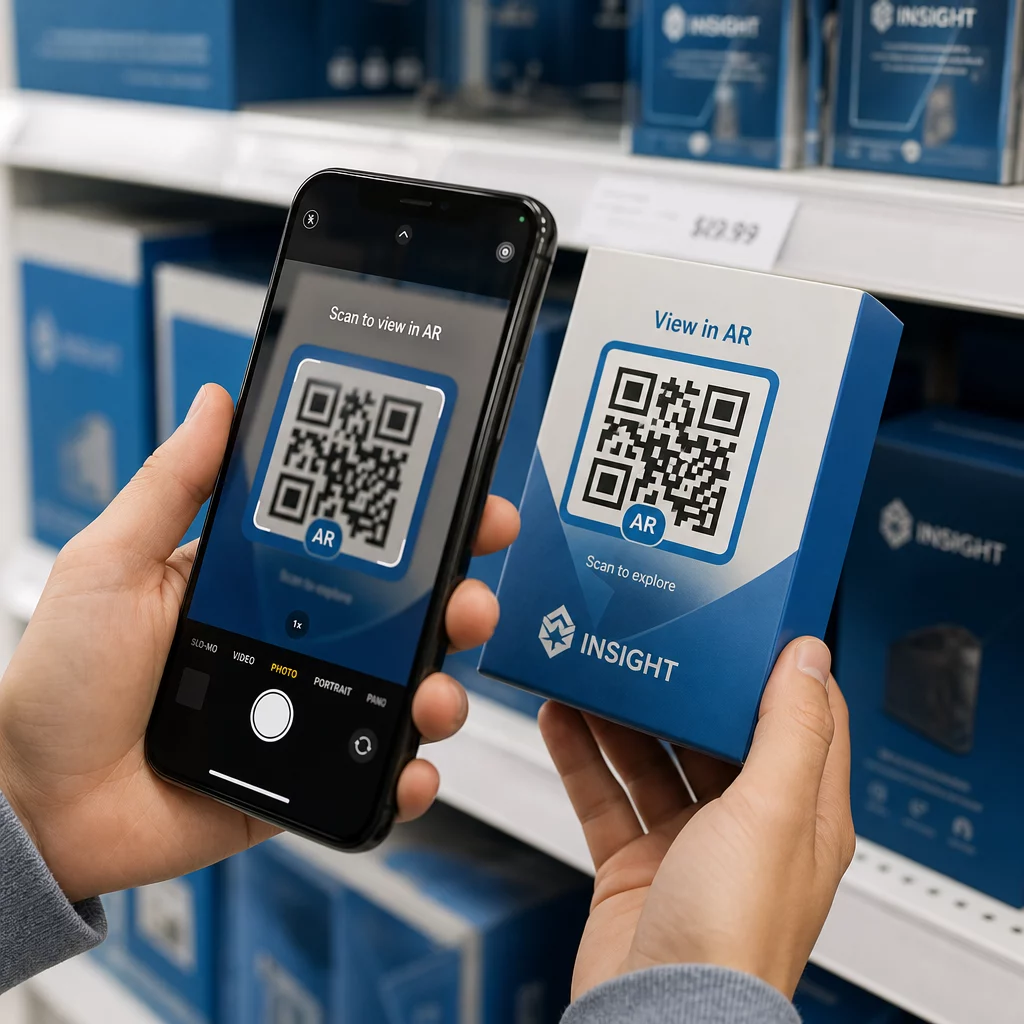
Uporabniki, ki niso seznanjeni z AR, morajo vedeti, kaj se bo zgodilo in kaj storiti. Dodajte jasen poziv k dejanju blizu same fizične QR kode – nekaj, kot je “Skeniraj za ogled v 3D” ali “Skeniraj za ogled tega izdelka v svojem prostoru.” Spodbuda za skeniranje mora biti očitna, preden kdo usmeri svojo kamero.
Ko ste v okolju AR, vodite uporabnike s preprostimi pozivi na zaslonu:
- “Usmerite kamero na embalažo izdelka, da aktivirate AR”
- “Počasi premikajte telefon, da skenirate površino”
Interaktivne elemente – “Dodaj v košarico”, “Izvedi več”, “Deli svojo izkušnjo” – postavite tako, da jih je enostavno najti, ne da bi blokirali vsebino AR. Uporabite progresivno razkritje: začnite z najpreprostejšimi kontrolami in uvedite napredne funkcije, ko se uporabniki navadijo.
Personalizacija in dostopnost
Dinamične QR kode omogočajo praktično prilagajanje vsebine glede na lokacijo, čas ali prejšnje interakcije. V maloprodajnih okoljih to lahko pomeni prikazovanje izdelkov, relevantnih za uporabnikovo regijo, ali prilagajanje jezika vsebine glede na lokacijo skeniranja.
Premisleki o dostopnosti, ki veljajo za izkušnje AR:
- Dodajte besedilne opise za vse vizualne elemente in zagotovite združljivost z bralnikom zaslona
- Ponudite nastavljive velikosti besedila, ravni kontrasta in glasnost zvoka
- Zagotovite podnapise za zvočno vsebino
- Vključite več jezikovnih možnosti, kjer je to pomembno
- Izogibajte se zanašanju izključno na barvo za posredovanje informacij – uporabite ikone, besedilne oznake ali vzorce kot dopolnila
Dinamične QR kode olajšajo posodobitve jezika: možnosti lahko dodate ali spremenite, ne da bi ponovno tiskali kakršne koli fizične materiale.
Združevanje vsega
Zanesljive AR QR kode so rezultat odločitev, sprejetih pri oblikovanju, tehnični nastavitvi in izkušnji po skeniranju – ne pa katerega koli posameznega dejavnika. Pravilno nastavite velikost, kontrast in mirno območje. Izberite popravljanje napak in blagovno znamko, ki ohranjata skeniranje. Uporabite dinamične kode, da bo vaša vsebina AR ostala posodobljena brez ponovnega tiskanja. Temeljito testirajte na različnih napravah in okoljih, nato pa uporabite analitiko za nenehno izboljševanje po zagonu.
Začnite ustvarjati AR QR kode Uporabi Generator QR kode Pageloot za ustvarjanje dinamičnih, blagovnih kod z vgrajeno analitiko – nato pa ohranite svojo AR izkušnjo posodobljeno, ne da bi jo kdaj morali ponovno natisniti.
Pogosta vprašanja
Preizkusite na različnih napravah iOS in Android, vključno s starejšimi modeli, v različnih svetlobnih okoljih – neposredni sončni svetlobi, fluorescentni notranji svetlobi in nastavitvah šibke svetlobe. Uporabite visok kontrast (vsaj razmerje 4:1), vzdržujte jasno mirno območje in se izogibajte sijočim površinam, kjer je to mogoče. Dinamične QR kode vam omogočajo posodobitev povezane izkušnje AR, če se po zagonu pojavijo težave z združljivostjo.
Logotip naj bo znotraj 15–20 % celotne površine kode, centriran, in uporabite korekcijo napak stopnje H za kompenzacijo ovire. Ohranite visok kontrast med moduli kode in ozadjem ter ohranite mirno območje okoli kode. Vedno preizkusite kodo z logotipom na več napravah in pri različni osvetlitvi, preden jo natisnete v velikem obsegu.
Ohranite datoteke 3D modelov pod 5 MB z uporabo stisnjenih formatov, kot sta GLTF ali GLB, omejite video datoteke na manj kot 10 MB s kodiranjem H.264 in zmanjšajte ločljivost tekstur slik na 1024×1024 slikovnih pik ali manj. Uporabite progresivno nalaganje, da najprej prikažete poenostavljeno različico, medtem ko se v ozadju nalagajo sredstva višje kakovosti. Preizkusite delovanje na povezavah 3G in 4G, ne le na Wi-Fi, da odražate realne pogoje.