首页 > 博客 > AR二维码设计最佳实践
Testing AR QR code

AR二维码设计最佳实践

Learn how to design AR QR codes that scan reliably. This guide covers size requirements, color contrast, branding, and technical setup for augmented reality.
Updated on 6 月 10, 2026
目录

Are your AR QR codes failing to scan – or worse, launching an experience that users abandon before it loads? Poor design and slow-loading AR content frustrate users and waste your campaign budget. This guide covers every decision that affects scan reliability and post-scan engagement, from minimum code size to AR file optimization.

Design Fundamentals That Affect Scan Reliability

The physical appearance of an AR QR code determines whether it gets scanned at all. Before worrying about the AR experience itself, these foundational choices need to be right.

Size and Format Requirements

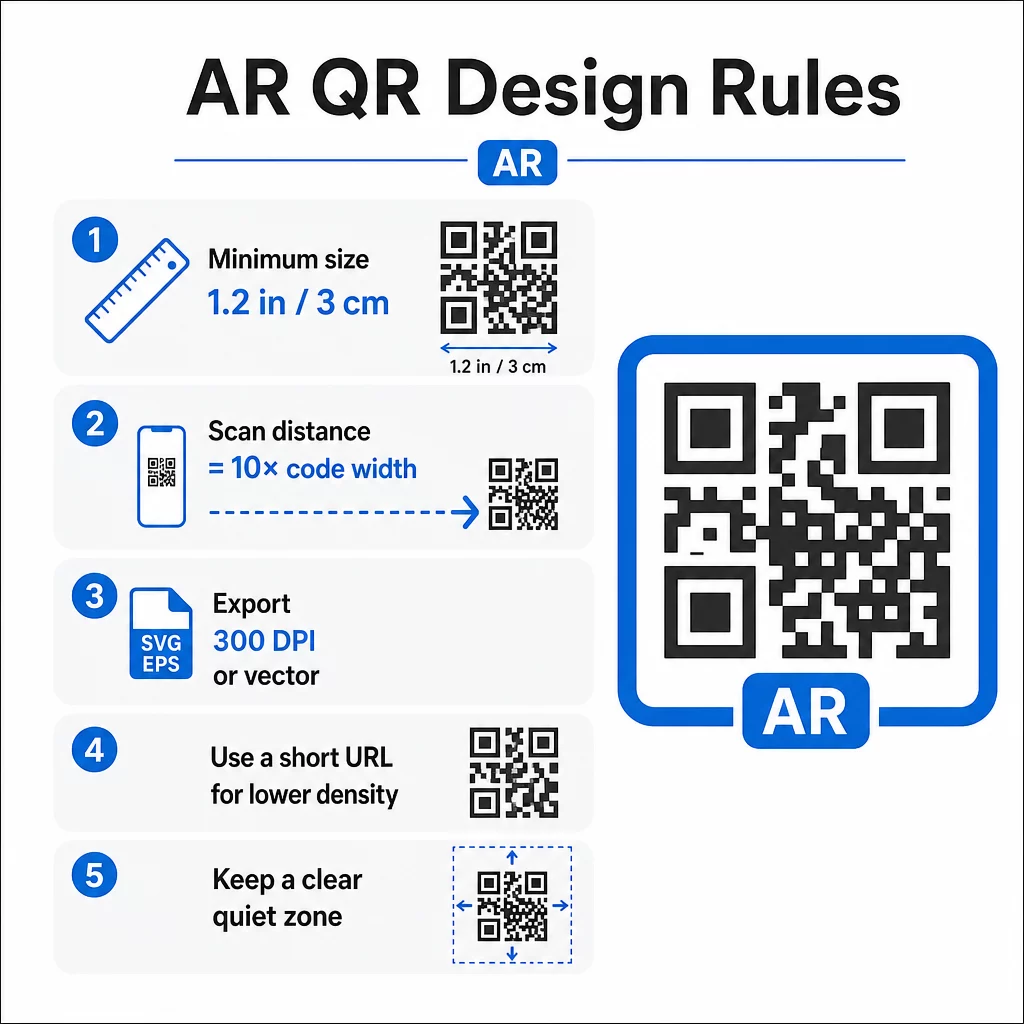
For reliable scanning, print your AR QR code at a minimum of 1.2″×1.2″ (approximately 3 cm×3 cm). This gives most smartphone cameras enough data to decode the pattern without users needing to hold their phone uncomfortably close. A practical rule: the scanning distance should be roughly ten times the code’s width. A 2″ code can be scanned from about 20 inches away.

AR QR design rules

For specific placements:

  • Product packaging: at least 0.8″×0.8″
  • Posters or displays viewed from 3–6 feet: at least 2″×2″
  • Large-format surfaces like billboards: scale proportionally for the expected viewing distance

Always maintain a square aspect ratio. Even slight stretching distorts the module pattern and makes the code unscannable. If your design software applies aspect ratio constraints during export or resizing, double-check the final file dimensions before printing.

Print quality matters just as much as size. Use a minimum of 300 DPI for any raster format, and export in vector formats like SVG or EPS whenever possible. These scale without quality loss and are the standard for professional print production. If vector isn’t an option, a high-resolution PNG is the next best choice.

Also consider the URL you’re encoding. Shorter URLs produce less dense QR patterns, which are easier to scan – especially at smaller sizes or from greater distances. If your AR platform generates a long destination URL, run it through a 链接二维码生成器 that encodes a short redirect instead of the full URL.

Color Contrast and Scanning Reliability

Contrast is what allows a camera to distinguish the code’s modules from its background. The classic black-on-white combination offers maximum contrast and remains the most reliable choice. If you’re using brand colors, aim for a contrast ratio of at least 4:1 between the foreground modules and the background. Going lower than 3:1 significantly increases scan failures in variable lighting.

Dark foregrounds on light backgrounds work well. Navy blue, dark green, or burgundy on white or cream backgrounds are reliable branded alternatives to pure black. Reversing this – light modules on a dark background – is problematic. Many QR scanners are not calibrated for inverted designs, and glossy dark surfaces introduce glare that further degrades performance.

Avoid these color combinations entirely:

  • Yellow on white
  • Light gray on white
  • Any pastel-on-pastel pairing
  • Red on green or blue on orange (these also create barriers for users with color vision deficiencies)

For AR QR codes printed on glossy packaging, test extensively under multiple lighting conditions. Glare can render a perfectly designed code unscannable. Matte finishes or UV coatings reduce reflectivity without compromising durability. Keep the background behind the code completely uniform – patterns, gradients, or textures interfere with the scanner’s ability to read module boundaries.

For a deeper look at contrast guidelines, see 二维码颜色对比度最佳实践.

静区要求

The quiet zone is the blank margin surrounding the QR code. Scanners use it to identify where the code begins and ends – without it, surrounding design elements bleed into the code and cause failures.

The minimum quiet zone is 四个模块宽 on all sides. A module is the smallest square unit in the code pattern. If each module measures 0.05 inches, the quiet zone must be at least 0.2 inches. For AR codes placed in visually busy environments like retail displays or museum walls, extending the quiet zone to six or eight modules adds meaningful reliability.

Keep these rules in mind:

  • No text, logos, or design elements should appear inside the quiet zone
  • Borders and frames must be placed outside the quiet zone, not touching the code
  • If you’re experiencing scan issues in testing, expanding the quiet zone is often the first fix to try

Print a test version at actual size and scan it across multiple devices. If any fail, check the quiet zone before adjusting other design elements.

For further guidance on making QR codes easier to scan, including quiet zone and sizing specifics, Pageloot’s readability guide covers these in practical detail.

Adding Branding Without Compromising Function

Branded QR codes can receive significantly more scans than plain black-and-white codes – trust and recognition play a real role in whether someone decides to scan. The design challenge is adding visual identity without disrupting the underlying pattern.

Logo Placement Guidelines

Center placement is standard because QR codes are built with error correction that handles obstructions in the middle more gracefully than at the edges. Keep your logo within 15–20% of the total code area. If the logo is complex or detailed, simplify it – a clean, high-contrast mark works better than an intricate one that introduces ambiguity near code modules.

Practical steps when adding a logo:

  • Use design tools to scale the logo precisely before embedding it
  • Ensure the logo doesn’t obscure the three corner finder patterns, which are essential for scanner orientation
  • Test the branded code on multiple devices, including older models with lower-resolution cameras
  • 使用Pageloot的 带标志的二维码生成器 to preview and confirm scannability before finalizing

Understanding Error Correction Levels

QR codes include built-in error correction that allows them to remain readable even when part of the pattern is obscured or damaged. Four levels are available:

ECC Level Data Recovery Safe Logo Size 说明
L ~7% ≤10% of code area Best for simple designs without logos
中号 ~15% 10–15% of code area Balanced for branding and reliability
Q ~25% 12–18% of code area Works well with simple logo shapes
H ~30% 15–20% of code area Ideal for centered logos; always test thoroughly

For branded AR QR codes, H级 is the right choice – especially in environments where the code may get scratched, partially covered, or scanned under challenging lighting. If you’re designing a logo-free code for a simple, controlled environment, Level M may be sufficient.

For a full walkthrough on 如何在二维码中添加标志 without affecting scannability, including common mistakes and fixes, Pageloot’s logo guide covers the process step by step.

Picking Brand Colors for QR Codes

High contrast between modules and background is non-negotiable. If your brand palette naturally produces strong contrast, applying it is straightforward. For lighter palettes, use darker shade variations for the modules rather than the brand’s primary color.

Stick to two or three colors to keep the design clean. Avoid combinations that reduce contrast, such as light gray on white, yellow on light blue, or pastel pairings. When designing AR QR codes for campaigns, test your color choices across different printing methods and lighting conditions – what looks good on screen can behave differently on paper.

Pageloot’s customization tools let you preview color combinations and check contrast before generating the final code. For more examples of branded codes that work well in real campaigns, see 7 examples of branded QR codes.

Technical Setup for AR QR Codes

Design gets users to scan. Technical setup determines what happens next and whether it works consistently.

Choosing the Right QR Code Generator

The QR code generator you use directly affects your AR campaign’s flexibility and performance. The most important capability to prioritize: 动态二维码.

A dynamic QR code encodes a short redirect URL rather than the final destination. That redirect can be updated at any time – even after the code has been printed and distributed. For AR campaigns, this matters because AR experiences often need adjustments: updated 3D models, revised landing pages, or new product information. With a static code, any change requires reprinting everything. With a dynamic code, you update the destination in your dashboard and every existing code points to the new content automatically.

Dynamic codes also support scan analytics, which are essential for understanding campaign performance. You can track how many times a code was scanned, when, from which location, and on which device type.

Keep AR Campaigns Flexible Need to update your AR experience without reprinting physical materials? Use the 动态二维码生成器 to create codes you can edit anytime, with built-in scan analytics to measure performance.

For AR QR codes on products or packaging, choose a generator with high error correction options and full customization support. Analytics features help you identify which placements perform best and where to focus optimization efforts.

How AR QR Codes Actually Work

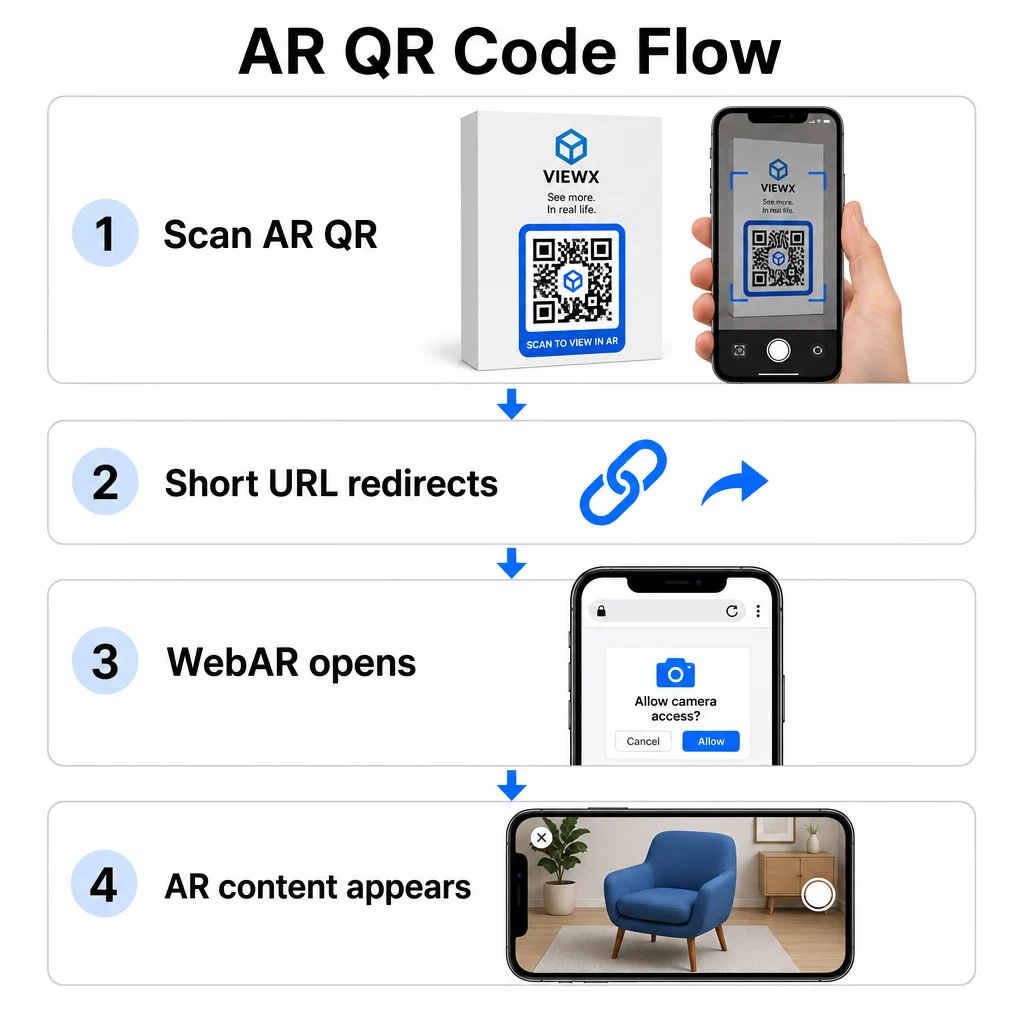
It’s worth understanding the mechanism so you can make informed decisions about your AR platform. A QR code contains a URL. When scanned, that URL opens in the device’s browser or in a compatible app. The AR content is then delivered through that destination – either as a web-based AR experience (WebAR) or through a dedicated app.

AR QR code flow

WebAR is particularly well-suited for campaigns because it requires no app download. Users scan the code, their browser opens, and the AR experience launches using the device camera and sensors. This reduces the friction that causes drop-off and works across iOS and Android without a separate installation step. WebAR can be built with technologies like A-Frame with AR.js for marker-based tracking or Google’s “ for markerless AR.

If your AR experience requires capabilities beyond what WebAR supports – complex interactions, persistent AR, or specific hardware features – an app-based approach may be necessary. In that case, your QR code should link to a smart redirect that routes iOS users to the App Store and Android users to Google Play.

For most marketing, packaging, and event use cases, WebAR launched from a 动态二维码 is the lowest-friction and most maintainable approach. AR QR codes have been used effectively across museum storytelling, art installations,以及 marketing agency campaigns – and in each case, the ability to update content without reprinting is a significant operational advantage.

Optimizing AR Content for Speed

Once someone scans your code, they expect the AR experience to appear within 2–3 seconds. Anything longer significantly increases the chance they’ll leave before it loads.

Key optimization targets:

  • Keep 3D model files under 5 MB; use compressed formats like GLTF or GLB for web-based AR
  • Keep video files under 10 MB and use H.264 encoding
  • Reduce image texture resolutions to 1024×1024 pixels or smaller; use solid colors or procedural textures where possible to minimize file sizes
  • Use progressive loading – display a simplified version of the AR content first, then load higher-quality details in the background
  • Test loading performance on 3G and 4G connections, not just Wi-Fi; if performance is poor on weaker connections, simplify the content or offer a lighter version

Host AR assets on fast, reliable infrastructure. Slow or unreliable hosting will undermine even the most well-optimized files.

Testing and Launching AR QR Codes

No amount of careful design replaces real-world testing. AR QR codes encounter conditions that are impossible to fully simulate on a screen.

Testing Across Environments

Test in the actual conditions where your code will be used: direct sunlight, fluorescent indoor lighting, low-light settings. Bright sunlight on glossy surfaces is particularly challenging – matte materials significantly improve visibility in these conditions.

For codes on screens or digital displays, test scannability from different angles, heights, and distances. For printed codes, test on the exact materials you’ll use – performance differs between matte paper, glossy packaging, and textured substrates.

Connectivity affects AR more than it affects standard QR code destinations. Even a code that scans perfectly can deliver a broken experience if the AR assets fail to load on a weak signal. Test in areas with varying signal strength.

Testing on Multiple Platforms

iOS devices have built-in QR scanners, but behavior varies across iPhone models and iOS versions. Test on several generations. Android variation is more significant – camera quality and processing power differ considerably between budget and premium models. Test on a range of both.

For web-based AR, confirm the experience loads correctly in Safari, Chrome, and Firefox. Check across different screen sizes and orientations. If your AR experience requires camera permissions, verify that the browser prompt appears and functions correctly on each platform.

For a comprehensive approach to cross-device testing, see Pageloot’s guidance on 二维码可用性最佳实践.

Tracking Performance with Analytics

After launch, analytics tell you what’s actually happening with your codes. With dynamic QR codes and scan tracking, you can monitor performance in real time and make adjustments without reprinting.

Key metrics to monitor:

指标 What It Reveals Action to Take
Total scans / Unique users Campaign reach and volume Test new placements or CTAs if numbers drop
Time-of-day activity When users engage most Adjust display timing for peak hours
Device / OS split Platform performance Optimize for platforms with lower engagement
Geographic hotspots Where scans occur Focus resources on high-performing areas
Post-scan conversion User actions after scanning Simplify landing pages or clarify the offer

Review analytics weekly during active campaigns. Patterns in device type or location data often reveal placement or design issues that weren’t visible during testing.

Improving the Experience After Scanning

A smooth scan is just the entry point. The post-scan experience determines whether users engage with your AR content or abandon it.

Mobile-Optimized Design

Every aspect of the post-scan experience should be designed for a phone screen. Responsive layouts are essential – your landing page and AR content should adapt to different screen sizes and orientations without breaking.

Interactive elements like buttons and calls-to-action should be at least 44×44 pixels and placed in thumb-friendly areas – the center and lower portions of the screen. Leave enough space between tap targets to prevent accidental presses.

Simplify the path to AR content. For WebAR, the experience should launch directly in the browser with no additional plugins required beyond camera access. Every extra step increases drop-off. For mobile QR code landing pages, Pageloot’s guide covers the specific design and load-time requirements that keep users engaged after scanning.

If you’re delivering multiple content options from a single scan, a branded landing page that links to your AR experience alongside other relevant content can improve the overall experience.

Clear Instructions for AR Content

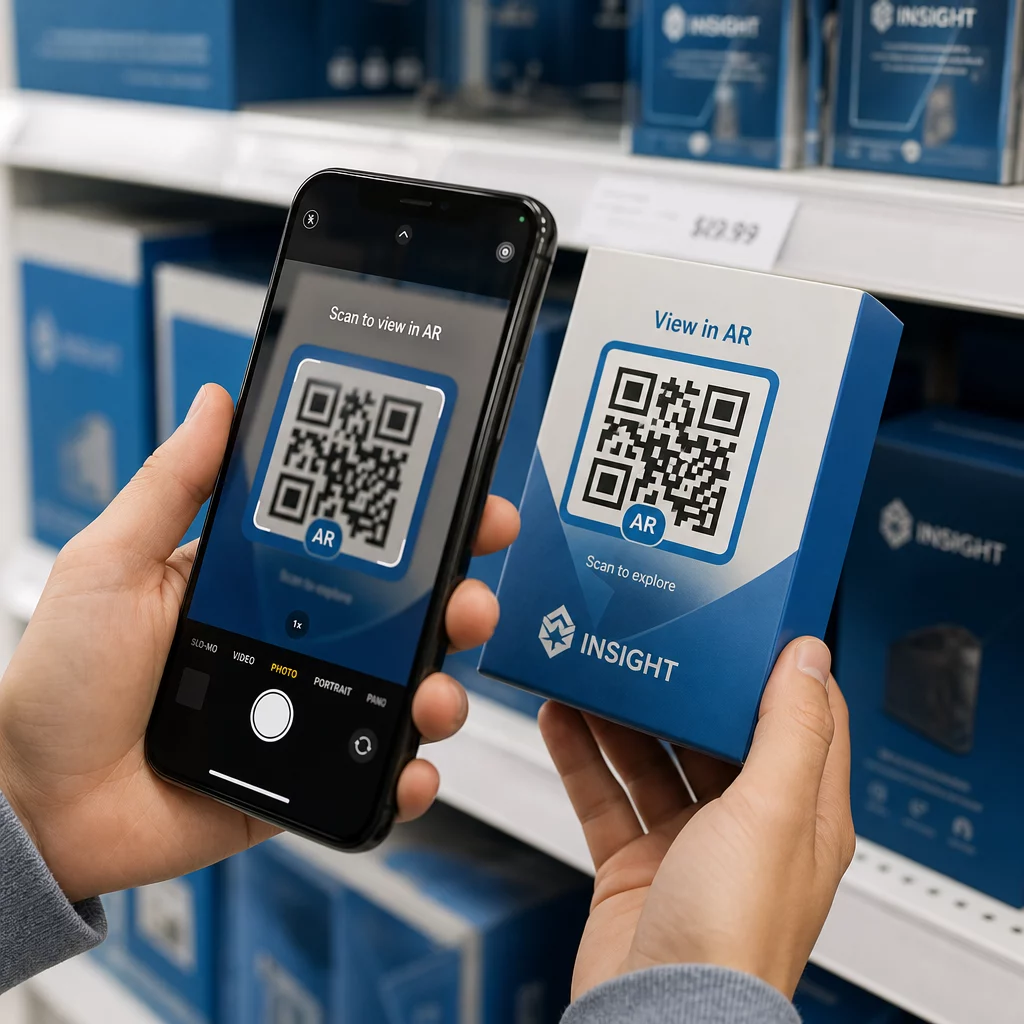
Users unfamiliar with AR need to know what’s about to happen and what to do. Add a clear call-to-action near the physical QR code itself – something like “Scan to view in 3D” or “Scan to see this product in your space.” The incentive to scan should be obvious before anyone points their camera.

Once inside the AR environment, guide users with simple on-screen prompts:

  • “Point your camera at the product packaging to activate AR”
  • “Slowly move your phone to scan the surface”

Position interactive elements – “Add to Cart,” “Learn More,” “Share Your Experience” – so they’re easy to find without blocking the AR content. Use progressive disclosure: start with the simplest controls and introduce advanced features as users get comfortable.

Personalization and Accessibility

Dynamic QR codes make it practical to tailor content based on location, time, or previous interactions. In retail settings, this could mean showing products relevant to the user’s region or adjusting content language based on scan location.

Accessibility considerations that apply to AR experiences:

  • Add text descriptions for all visuals and ensure screen reader compatibility
  • Offer adjustable text sizes, contrast levels, and audio volume
  • Provide closed captions for audio content
  • Include multiple language options where relevant
  • Avoid relying solely on color to convey information – use icons, text labels, or patterns as supplements

Dynamic QR codes make language updates easy: you can add or change options without reprinting any physical materials.

整合所有要素

Reliable AR QR codes are the result of decisions made across design, technical setup, and post-scan experience – not any single factor. Get the size, contrast, and quiet zone right. Choose error correction and branding that preserve scannability. Use dynamic codes so your AR content stays current without reprinting. Test thoroughly across devices and environments, then use analytics to keep improving after launch.

Start Building AR QR Codes 使用 Pageloot QR码生成器 to create dynamic, branded codes with built-in analytics – then keep your AR experience current without ever needing to reprint.

常见问题

How do I make sure my AR QR code works across different devices and lighting conditions?

Test on a range of iOS and Android devices, including older models, across multiple lighting environments – direct sunlight, fluorescent indoor light, and low-light settings. Use high contrast (at least 4:1 ratio), maintain a clear quiet zone, and avoid glossy surfaces where possible. Dynamic QR codes let you update the linked AR experience if compatibility issues arise after launch.

How can I add branding to an AR QR code without affecting its scannability?

Keep your logo within 15–20% of the total code area, centered, and use Level H error correction to compensate for the obstruction. Maintain high contrast between the code modules and background, and preserve the quiet zone around the code. Always test the branded code on multiple devices and under varied lighting before printing at scale.

What’s the best way to speed up AR content loading after a scan?

Keep 3D model files under 5 MB using compressed formats like GLTF or GLB, limit video files to under 10 MB with H.264 encoding, and reduce image texture resolution to 1024×1024 pixels or smaller. Use progressive loading to show a simplified version first while higher-quality assets load in the background. Test performance on 3G and 4G connections, not just Wi-Fi, to reflect real-world conditions.

关于作者

Siim Kostabi 是 Pageloot 的内容主管,负责撰写关于我们创新型二维码生成器服务的文章。凭借五年多来在二维码领域积累的深厚专业知识,Siim 是该领域的专家。他致力于利用二维码技术简化和增强数字交互,并取得了显著的成果。.

类别
了解更多关于
Gym QR code scan
适合度 二维码
QR QR码的#1解决方案

如果您需要在线创建QR码,则可以 制作二维码 就在这里免费!
Pageloot是 #1转到解决方案 创建和扫描QR码。

受到超过 20,000 个品牌的信赖,可获得更多销售、评论和关注者。

客户徽标
受到顶级品牌的信赖
评分为 4.8(共 5)

4.86 / 5 星评级

雨果·劳伦特
雨果·劳伦特
餐馆老板
有史以来最容易和最可靠的QR码生成器。PDF文件可以立即上传。我们的餐厅菜单现在是数字化的。
卢卡斯-詹森
卢卡斯-詹森
房地产开发商
这是一个很好的工具,二维码带你到你想要的地方。我们只使用位置二维码,但有许多有用的功能。
艾玛-莫雷蒂
艾玛-莫雷蒂
零售产品
易于使用和快速。它工作得很好,创造了一个完美的图像,所以员工可以下载我的vCard。
雨果·劳伦特
雨果·劳伦特
餐馆老板
有史以来最容易和最可靠的QR码生成器。PDF文件可以立即上传。我们的餐厅菜单现在是数字化的。
卢卡斯-詹森
卢卡斯-詹森
房地产开发商
这是一个很好的工具,二维码带你到你想要的地方。我们只使用位置二维码,但有许多有用的功能。
艾玛-莫雷蒂
艾玛-莫雷蒂
零售产品
易于使用和快速。它工作得很好,创造了一个完美的图像,所以员工可以下载我的vCard。
查看更多QR码
将一切转化为数字体验 不到3分钟。

免费试用 14 天。

无需信用卡。

首次购买可享受 30% 折扣

使用代码:

分享您的 MP3 文件

注册以创建 PDF QR 码

上传和显示你需要的一切。

  • 音频文件
  • 播客
  • 音乐

注册即可享 14 天免费试用。.
试用期结束后,二维码将失效。.

注册以创建音频 mp3 二维码

使用边框获得更多扫描

注册以向您的二维码添加更多框架

呼叫行动框架帮助您的客户与QR码轻松互动。试试吧!

注册即可享 14 天免费试用。.
试用期结束后,二维码将失效。.

注册以向您的二维码添加更多框架

使用形状添加更多样式

注册以创建更多形状

二维码不一定是方形的。试着改变它以适应你的品牌形象。

注册即可享 14 天免费试用。.
试用期结束后,二维码将失效。.

注册以创建更多形状

为您的二维码添加徽标

注册以将您的徽标添加到二维码中

通过在二维码上添加你的标志和品牌,使你的二维码脱颖而出。

注册即可享 14 天免费试用。.
试用期结束后,二维码将失效。.

注册以将您的徽标添加到二维码中

智能应用商店重定向

注册以创建应用商店二维码

将您的应用程序链接添加到我们的智能应用程序商店QR码。用户会根据他们的设备被重新定向。

注册即可享 14 天免费试用。.
试用期结束后,二维码将失效。.

注册以创建应用商店二维码

将图片上传到二维码

注册以创建图像二维码

轻松分享你的图像。在几秒钟内动态地改变任何图像。

注册即可享 14 天免费试用。.
试用期结束后,二维码将失效。.

注册以创建图像二维码

分享您的 PDF 文件

注册以创建 PDF QR 码

上传和显示你需要的一切。

  • 菜单和价格表
  • 使用说明
  • 任何文件

注册即可享 14 天免费试用。.
试用期结束后,二维码将失效。.

注册以创建 PDF QR 码

稍后编辑,无需打印

注册即可编辑您的二维码,无需再次打印

动态QR码让你改变你的QR码的内容,而不需要打印新的QR码。

注册即可享 14 天免费试用。.
试用期结束后,二维码将失效。.

注册即可编辑您的二维码,无需再次打印

何时?何地?追踪您的二维码扫描

注册以追踪您的二维码

发现你的哪些二维码收到了最多的扫描,以及什么最能让你的客户兴奋。

注册即可享 14 天免费试用。.
试用期结束后,二维码将失效。.

注册以追踪您的二维码

提供可打印文件

注册以创建 PDF 和 SVG 等矢量二维码

.EPS, .PDF, .SVG

想下载高清分辨率的QR码吗?获得矢量或像素格式,可随时打印。

注册即可享 14 天免费试用。.
试用期结束后,二维码将失效。.

注册以创建 PDF 和 SVG 等矢量二维码

请等待。您的二维码是 正在加载... 正在加载...

打造专属

注册以保存您的二维码以供日后使用

通过创建具有不同颜色、标识和行动呼吁框架的出色的QR码,获得更多的扫描。

注册即可享 14 天免费试用。.
试用期结束后,二维码将失效。.

注册以保存您的二维码以供日后使用