Generează ecranele tale digitale implicare, sau doar generează impresii? Un cod QR transformă un ecran pasiv într-un punct de contact interactiv – dar numai dacă este conceput și plasat corect. Acest ghid acoperă tot ce trebuie să știi pentru a face codurile QR pe ecrane să funcționeze cu adevărat.
De ce codurile QR fac ecranele digitale mai eficiente
Semnalizarea digitală și ecranele sunt deja bune la a capta atenția. Ceea ce le este greu este să transforme acea atenție în acțiune. Un privitor îți citește mesajul, se simte interesat, și apoi… merge mai departe. Nu există niciun mecanism care să lege momentul de interes de pasul următor.
Un cod QR închide acest decalaj. Când cineva scanează un cod pe ecranul tău, a ales voluntar să se implice mai departe – a semnalat intenția. Acea singură scanare îi poate conecta la o pagină de produs, o ofertă promoțională, un formular de înscriere sau un videoclip, totul de pe ecranul la care se uitau deja.
Acest lucru este util în special în situațiile în care publicul tău nu are un pix la îndemână sau nu își va aminti să caute mai târziu: târguri comerciale, spații de vânzare cu amănuntul, noduri de transport și locații publice. Codul face treaba chiar și atunci când nu ești prezent.
Unde funcționează cel mai bine codurile QR pe ecrane
Nu orice mediu de ecran este la fel de potrivit pentru codurile QR. Cele mai bune plasamente împărtășesc o trăsătură comună: privitorul are un moment natural să se oprească, să-și scoată telefonul și să scaneze.
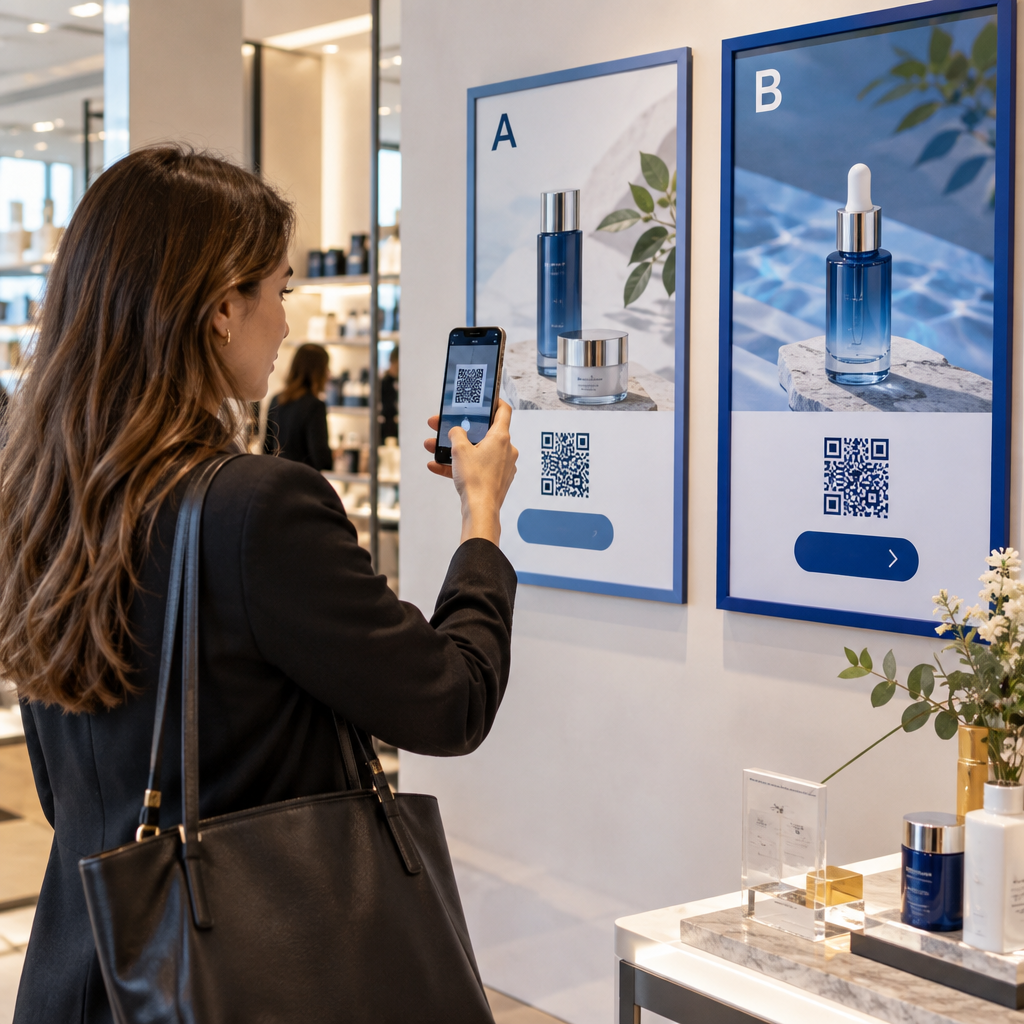
- Vitrine și fațade de magazine oferă cumpărătorilor care privesc vitrinele acces la detalii despre produse, recenzii, prețuri sau opțiuni de cumpărare online chiar și atunci când magazinul este închis
- Ecrane de târguri comerciale și expoziții sunt ideale pentru a transforma traficul din sală în lead-uri – codurile pot face legătura către broșuri digitale, înscrieri la concursuri, urmăritori pe rețelele sociale sau oferte exclusive de târg
- Ecrane LED și chioșcuri în magazine ajung la audiențe cu trafic pietonal intens și pot genera acțiuni impulsive precum scanarea pentru o reducere sau vizualizarea unei noi lansări de produs
- Ecrane de punct de vânzare și de casă sunt locații excelente pentru înscrieri de loialitate, chitanțe digitale sau promoții pentru următoarea achiziție
- Semnalizare în tranzit și vehicule extinde acoperirea la navetiști și trecători – un cod QR pe o furgonetă de livrare branduită, de exemplu, funcționează în întregime de la sine odată implementat
Pentru o privire mai aprofundată asupra modului în care strategia de plasare în magazin afectează implicarea, vezi plasări de top ale codurilor QR pentru magazinele de retail și comparația dintre coduri QR pe ambalaje versus afișaje în magazin.
Obținerea dimensiunii corecte pentru ecranele digitale
Dimensiunea este cea mai comună greșeală în cazul codurilor QR pe ecrane. Un cod care pare mare într-un fișier de design poate deveni aproape imposibil de scanat atunci când este afișat pe un monitor de la distanță.
Ghidul standard este regula 10:1: codul tău QR ar trebui să aibă cel puțin o zecime din distanța de scanare intenționată. Dacă privitorii vor sta la 1 metru de ecran, codul trebuie să aibă cel puțin 10 cm lățime. De la 3 metri, vizează 22–30 cm. De la 10 metri, te uiți la un cod care trebuie să aibă aproximativ 1 metru pe o latură.
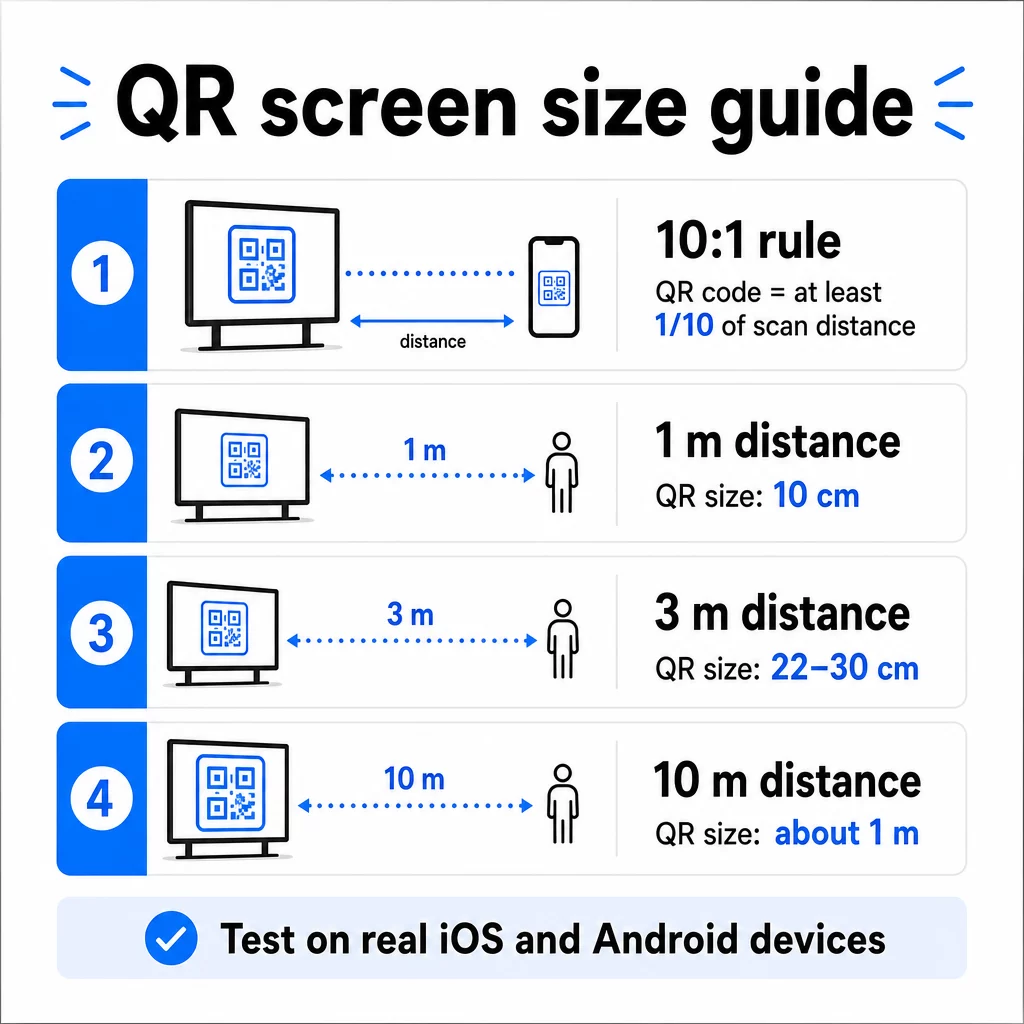
Pentru referință pe ecrane 1080p, un minim de 240 de pixeli la 72 dpi este o bază de pornire pentru scanarea de aproape, dar acest minim trebuie să crească semnificativ pe măsură ce distanța de vizualizare crește. Pentru semnalizarea digitală generală, niciun cod QR nu ar trebui să fie mai mic de aproximativ 2 × 2 inci – și mai mare este întotdeauna mai sigur atunci când oamenii scanează de la distanță.
Validează întotdeauna dimensiunea în condiții reale. Testează codul la dimensiunea reală de afișare, de la distanța de scanare intenționată, pe dispozitive iOS și Android, înainte de a finaliza designul. Consultă ghidul complet privind dimensionarea codurilor QR pentru diferite materiale și contexte atunci când scalezi pe diferite formate.
Contrast și Culoare: Ce face un cod scanabil
O cameră de smartphone citește un cod QR detectând contrastul dintre modulele întunecate și un fundal deschis. Dacă acest contrast este slab, camera se chinuie să distingă modelul – și scanarea eșuează.
Standardul fiabil este prim-plan întunecat pe un fundal deschis, cu negru pe alb fiind cea mai fiabilă combinație. Când folosești culorile brandului, păstrează modelul QR într-o culoare închisă și fundalul deschis. Evită schemele de culori inversate (cod alb pe fundal negru), deoarece multe cititoare de coduri QR nu le pot procesa în mod fiabil.
Pentru ecrane în mod specific, contrastul devine mai complicat deoarece iluminarea ambientală, strălucirea ecranului și ratele de reîmprospătare afectează toate ceea ce vede camera. Vizați un raport de contrast de cel puțin 4.5:1 între codul dvs. și fundalul său – acest prag susține, de asemenea, accesibilitatea pentru utilizatorii cu deficiențe de vedere. Evitați gradienții și umbrele în zona codului, deoarece acestea creează tonuri medii care derutează scanerele.
Pentru o analiză completă a perechilor de culori și a rezultatelor lor de scanare, consultați ghidul despre cele mai bune practici de contrast de culoare pentru codurile QR.
Zona de liniște: Spațiul care face posibilă scanarea
Zona de liniște este marginea goală care înconjoară un cod QR pe toate cele patru laturi. Nu este decorativă – este funcțională. Scanerele folosesc acest spațiu gol pentru a identifica unde începe și se termină codul, separându-l de alte elemente vizuale precum textul, imaginile sau modelele de fundal.
Zona de liniște minimă este patru module lățime pe fiecare parte, unde un modul este lățimea celui mai mic pătrat din cod. Dacă scalați codul, zona de liniște trebuie să se scaleze proporțional. Decuparea sau tăierea marginii – chiar și ușor – poate cauza eșecuri consistente de scanare.
Pe afișajele digitale, unde designerii lucrează adesea împotriva unor layout-uri aglomerate și a unui spațiu limitat pe ecran, zona de liniște este frecvent primul lucru care este comprimat. Nu permiteți asta. Păstrați zona de liniște liberă de logo-uri, text și orice elemente de design și asigurați-vă că se potrivește cu culoarea de fundal, astfel încât să separe vizual codul de împrejurimile sale.
Mai multe despre cerințele zonei de liniște și cele mai bune practici de lizibilitate a codurilor QR este disponibil dacă optimizați un design existent.
Plasarea și aspectul pe ecran
Locul în care se află codul în cadrul aspectului afișajului afectează atât vizibilitatea, cât și rata de scanare. Câteva principii se aplică în mod constant:
- Plasați la nivelul ochilor. Poziționarea codului la aproximativ 1.05 până la 1.35 metri de podea îl menține accesibil atât pentru adulții în picioare, cât și pentru utilizatorii în scaune cu rotile – nu este necesară aplecarea sau întinderea
- Puneți codul în fluxul natural de citire. Plasările în centrul ecranului sau în partea de jos-centru tind să funcționeze bine; evitați să îngropați codul într-un colț unde concurează cu alte elemente
- Utilizați un singur cod pe afișaj, atunci când este posibil. Codurile multiple îi derutează pe privitori cu privire la care să scaneze și pot determina aplicațiile camerei să se concentreze pe cel greșit
- Păstrați designul înconjurător curat. Prea mult conținut concurent pe ecran reduce ratele de scanare; oferiți codului spațiu vizual de respirație
Pentru semnalizarea digitală care rotește conținutul, afișați codul QR pe întreaga durată a intervalului său orar. Vizitatorii au nevoie de suficient timp pentru a observa codul, a decide să scaneze și a finaliza scanarea înainte ca diapozitivul să se schimbe. Pentru mai mult context privind strategiile de plasare în diferite medii, ghidul suprem pentru plasarea codurilor QR în marketing acoperă deciziile de layout pentru formate tipărite și digitale.
Scrierea unui apel la acțiune care generează scanări
Un cod QR fără context este ignorat. Vizitatorii trebuie să știe – înainte de a-și lua telefonul – ce vor obține prin scanare.
Plasați un apel la acțiune scurt și specific direct lângă cod. “Scanați pentru meniul de azi”, “Scanați pentru a participa la concurs” sau “Scanați pentru 20% reducere la următoarea comandă” funcționează toate mai bine decât îndemnurile generice precum “Scanați aici”. Cu cât beneficiul este mai concret, cu atât rata de scanare este mai mare.
Păstrați textul scurt – două până la cinci cuvinte sunt suficiente. Fonturile mai mari și contrastul ridicat pentru textul CTA aplică aceleași principii ca și codul în sine: trebuie să fie lizibil de la distanța probabilă a vizitatorului. Consultați ghidul suplimentar despre cele mai bune practici de utilizare a codurilor QR pentru mai multe despre încadrarea eficientă.
Unde ar trebui să ducă scanarea
Fiecare scanare care nu oferă imediat valoare este o oportunitate pierdută. Deoarece vizitatorii vor ajunge prin smartphone, destinația trebuie să fie o pagină de destinație optimizată pentru mobil care se încarcă rapid și respectă promisiunea specifică a apelului la acțiune.
Evitați să trimiteți utilizatorii către pagina dvs. de pornire sau un catalog generic de produse. Dacă codul este pe un afișaj de checkout care promovează un program de loialitate, pagina de destinație ar trebui să fie formularul de înscriere la programul de loialitate – nimic mai mult. Dacă este pe un afișaj de la un târg comercial, destinația ar putea fi un formular de captură de lead-uri sau o fișă tehnică descărcabilă.
A Codul QR al formularului Google este o opțiune practică pentru colectarea feedback-ului, înregistrarea la evenimente sau sondaje direct de pe un afișaj. Un cod QR cu link funcționează pentru orice destinație bazată pe URL și suportă personalizare și urmărire complete.
Păstrați-vă codurile QR de afișare flexibile Trebuie să actualizați la ce se leagă un cod fără a schimba codul în sine? Utilizați Generator de coduri QR pentru a crea coduri dinamice care vă permit să editați destinația oricând – fără a fi necesară reimprimarea sau reproiectarea.
Utilizarea codurilor QR dinamice pentru ecrane
Codurile QR statice codifică o adresă URL fixă sau o bucată de date care nu se pot schimba niciodată. Pentru afișaje – în special semnalizarea digitală care rotește campanii sau promovează oferte sensibile la timp – acest lucru creează o problemă. Dacă conținutul legat se modifică, trebuie să recreați și să redistribuiți codul.
Coduri QR dinamice rezolvă acest lucru prin codificarea unei adrese URL scurte de redirecționare. Destinația reală poate fi actualizată oricând prin intermediul tabloului de bord al contului dvs., în timp ce codul în sine rămâne același. Aceasta înseamnă că puteți:
- Actualizați o ofertă promoțională fără a reproiecta aspectul ecranului
- Redirecționați un singur cod către diferite campanii în funcție de sezon sau eveniment
- Remediați instantaneu un link rupt fără modificări ale afișajului
Codurile dinamice deblochează, de asemenea, analizele de scanare – date despre de câte ori a fost scanat un cod, din ce locație, pe ce dispozitiv și la ce oră. Aceste date vă ajută să determinați ce plasamente de afișare generează un angajament real față de cele care sunt trecute cu vederea.
Pentru ecranele cu conținut rotativ, codurile dinamice sunt deosebit de valoroase, deoarece același activ vizual poate servi diferite campanii în timp.
Urmăriți fiecare scanare de pe fiecare ecran Doriți să știți ce afișaje generează de fapt angajament? Utilizați Pageloot’s platforma de coduri QR dinamice pentru a monitoriza ratele de scanare, locațiile și datele dispozitivelor în timp real – și pentru a vă rafina strategia de afișare pe baza a ceea ce arată datele.
Testare înainte de lansare
Chiar și un cod QR bine conceput poate eșua în practică din cauza luminozității afișajului, unghiului de vizualizare, ratei de reîmprospătare a ecranului sau iluminării ambientale. Înainte ca orice afișaj să fie lansat:
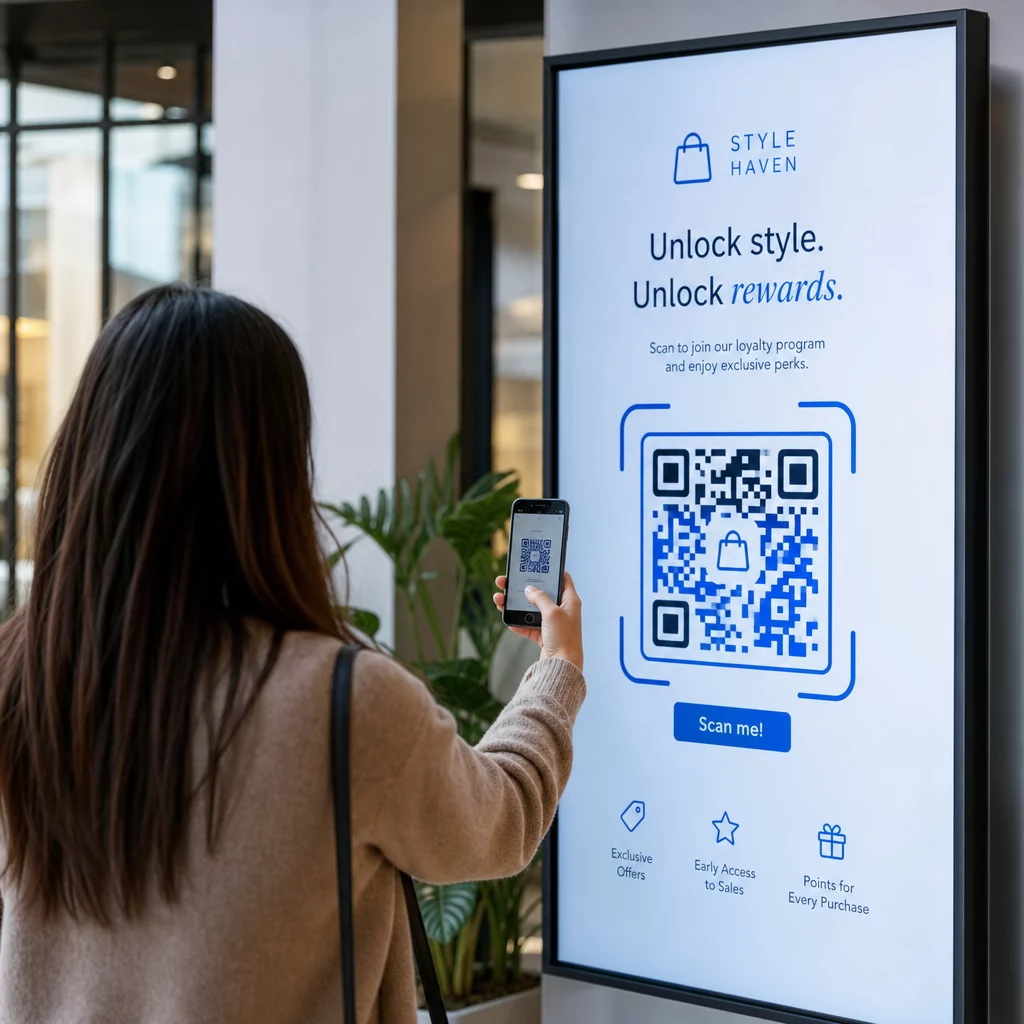
- Testați codul la dimensiunea și rezoluția reală a ecranului la care va fi afișat
- Scanați de la distanțele minime și maxime intenționate
- Testați pe mai multe dispozitive – cel puțin un telefon iOS și unul Android
- Testați la diferite ore ale zilei dacă afișajul este lângă surse de lumină naturală care se modifică pe parcursul zilei
- Verificați dacă pagina de destinație se încarcă corect pe mobil și oferă experiența așteptată
Cel Instrument de scanare a codului QR poate fi utilizat pentru a verifica conținutul unui cod și a confirma că se rezolvă corect înainte de implementare.
Explorați Prezentarea generală a funcțiilor Pageloot și soluțiile industriale pentru mai multe informații despre cum pot fi aplicate codurile QR în diferite contexte de afișare și sectoare de afaceri. Un cod QR bine plasat, dimensionat corect, cu un apel la acțiune clar, poate transforma orice ecran într-un punct de conversie. Asigurați-vă că aveți contrastul, zona de liniște, dimensiunea și destinația corecte – apoi utilizați coduri dinamice și analize pentru a continua îmbunătățirea. Începeți cu Generator de coduri QR pentru a crea astăzi primul dvs. cod de afișare scanabil.
Întrebări frecvente
Folosiți regula 10:1: codul ar trebui să fie de cel puțin o zecime din distanța de scanare așteptată. Pentru un afișaj scanat de la 1 metru, codul ar trebui să aibă o lățime de cel puțin 10 cm. Pentru semnalizarea digitală generală, un minim de 2 × 2 inci este un punct de plecare rezonabil, dimensiunea crescând pe măsură ce distanța de vizualizare crește. Testați întotdeauna la dimensiunea și distanța reală a afișajului înainte de a intra în funcțiune.
Da, dacă utilizați un cod QR dinamic. Codurile dinamice utilizează o adresă URL de redirecționare, astfel încât să puteți actualiza destinația în tabloul de bord al contului dumneavoastră în orice moment – codul în sine rămâne același. Acest lucru este util în special pentru semnalizarea digitală care promovează campanii rotative sau oferte sensibile la timp, deoarece evitați redesignul sau redeployarea afișajului de fiecare dată când conținutul legat se modifică.
Cele mai comune cauze sunt contrastul insuficient între cod și fundalul său, o zonă liniștită care a fost tăiată sau aglomerată de elemente de design înconjurătoare și un cod care este prea mic pentru distanța de vizualizare. Pe ecrane, luminozitatea afișajului și reflexiile pot, de asemenea, interfera. Verificați dacă codul dvs. utilizează un model închis pe un fundal deschis, menține o zonă liniștită clară de patru module pe toate părțile și îndeplinește cerințele de dimensiune pentru distanța de scanare așteptată. Testați pe mai multe dispozitive pentru a confirma compatibilitatea.