Mengurus peralatan perubatan di seluruh kemudahan yang sibuk adalah lebih sukar daripada yang disangka. Apabila peranti hilang, rekod penyelenggaraan tertinggal, atau kakitangan membuang masa mencari alatan kritikal, penjagaan pesakit terjejas. Panduan ini menerangkan cara melaksanakan penjejakan kod QR untuk peralatan perubatan – daripada memilih platform yang betul hingga mengekalkan label dan kekal patuh.
Mengapa Penjejakan Kod QR Masuk Akal untuk Peralatan Perubatan
Proses inventori manual – papan klip, hamparan, log penyelenggaraan kertas – mewujudkan jurang. Peralatan tersalah letak, tempoh penyelenggaraan terlepas, dan dokumentasi pematuhan menjadi sukar untuk disahkan dengan cepat. Kod QR menangani jurang ini dengan memautkan setiap peranti fizikal kepada rekod digital langsung yang boleh diakses oleh kakitangan dalam beberapa saat dengan telefon pintar standard.
Tidak seperti kod bar tradisional, kod QR boleh menyimpan lebih banyak maklumat dalam format yang padat. Apabila diletakkan pada ventilator, pam infusi, atau monitor mudah alih, kod QR boleh serta-merta memaparkan:
- Sejarah penyelenggaraan peranti dan tarikh perkhidmatan berjadual seterusnya
- Rekod penentukuran dan dokumentasi pematuhan
- Manual pengguna atau video persediaan
- Lokasi semasa dan jabatan yang ditetapkan
- Makluman untuk kerosakan atau penggantian yang diperlukan
Akses segera seperti ini adalah tepat apa yang kod QR untuk hospital dan penjagaan kesihatan model pelaksanaan direka untuk menyokong.
Dari sudut pematuhan, Pusat Perkhidmatan Medicare & Medicaid (CMS) menghendaki peralatan kritikal – peranti sokongan hayat, peralatan resusitasi utama, peranti pemantauan kritikal – diselenggara mengikut jadual pengeluar, dan semua penyelenggaraan dilakukan oleh kakitangan yang berkelayakan dan didokumenkan dengan teliti. Sistem kod QR mencipta jejak audit semula jadi yang menjadikan pemenuhan keperluan ini lebih mudah diurus dan ditunjukkan semasa pemeriksaan.
Memilih Platform Kod QR untuk Penjagaan Kesihatan
Tidak setiap alat kod QR dibina untuk tuntutan persekitaran klinikal. Apabila menilai platform, utamakan perkara berikut:
Keselamatan dan pematuhan HIPAA. Mana-mana platform yang mengendalikan maklumat kesihatan terlindung (PHI) mesti mematuhi Peraturan Privasi, Keselamatan dan Pemberitahuan Pelanggaran HIPAA. Cari penghantaran data yang disulitkan, storan awan yang selamat, kawalan akses berasaskan peranan, dan tamat masa sesi automatik. Platform juga harus menyokong perjanjian rakan kongsi perniagaan jika PHI mengalir melaluinya.
Kod QR dinamik. Tidak seperti kod statik, kod QR dinamik boleh dikemas kini selepas dicetak. Seperti yang dijelaskan oleh Pageloot, kod dinamik “boleh diubah suai walaupun selepas [ia] telah dijana dan dicetak,” membolehkan anda menukar kandungan terpaut atau URL destinasi pada bila-bila masa tanpa menggantikan label fizikal. Untuk peralatan perubatan yang menjalani kemas kini perisian yang kerap, perubahan jadual, atau semakan peraturan, ini adalah penting.
Analitik masa nyata. Keupayaan untuk menjejaki bila dan di mana kod diimbas memberikan pasukan bioperubatan keterlihatan terhadap corak penggunaan peralatan, membantu menandakan peranti yang mungkin memerlukan perhatian, dan menyokong keputusan peruntukan sumber. Metrik seperti kiraan imbasan, lokasi, dan jenis peranti semuanya menyumbang kepada perancangan penyelenggaraan yang lebih bijak.
Integrasi sistem. Platform harus berhubung dengan sistem Rekod Kesihatan Elektronik (EHR) sedia ada anda, Sistem Pengurusan Penyelenggaraan Berkomputer (CMMS), atau pangkalan data aset melalui API. Apabila jurutera bioperubatan menyelesaikan penyelenggaraan pada pam infusi, kemas kini itu harus tersebar secara automatik – tiada kemasukan duplikat diperlukan.
Antara muka mesra pengguna. Pekerja penjagaan kesihatan memerlukan alat yang memerlukan orientasi minimum. Papan pemuka yang bersih yang membolehkan kakitangan membuat, mengemas kini, dan mengurus kod tanpa mengganggu aliran kerja mereka adalah wajar diutamakan.
Jejaki Setiap Aset dari Satu Papan Pemuka Menggunakan Penjana dynamic QR code untuk mencipta kod yang boleh diedit, boleh dijejak untuk peralatan perubatan anda dan mengurus semua kemas kini dari satu tempat.
Mereka Bentuk Kod QR yang Berfungsi dalam Tetapan Klinikal
Kod QR di hospital menghadapi keadaan yang akan merosotkan label standard dengan cepat: pembasmi kuman gred hospital, pengendalian yang kerap, wap, dan pencahayaan yang berubah-ubah. Reka bentuk yang baik mengambil kira semua ini sebelum satu label dicetak.
Saiz dan Kontras
Kod QR yang terlalu kecil akan gagal diimbas dengan andal, terutamanya apabila kakitangan memakai sarung tangan atau bekerja dalam cahaya malap. Ikuti garis panduan saiz ini:
- Saiz minimum: 0.8 x 0.8 inci (2 x 2 cm) untuk data mudah seperti URL
- Saiz yang disyorkan untuk data kompleks: sekurang-kurangnya 1.2 x 1.2 inci (3 x 3 cm)
- Nisbah jarak imbasan: gunakan peraturan 10:1 – jika kod akan diimbas dari jarak 10 inci, ia mestilah sekurang-kurangnya 1 inci lebar
Untuk kontras, gunakan corak gelap pada latar belakang cerah dan kekalkan nisbah kontras sekurang-kurangnya 4:1 antara kod dan latar belakangnya. Elakkan kombinasi warna yang mengurangkan kebolehbacaan di bawah pencahayaan pendarfluor atau apabila dilihat melalui kamera dengan julat dinamik terhad. Anda boleh mendapatkan panduan tambahan dalam Pageloot’s amalan terbaik untuk kebolehbacaan kod QR.
Zon Senyap dan Penempatan Logo
Tinggalkan sempadan yang jelas – dirujuk sebagai “zon senyap” – sekurang-kurangnya empat kali lebar satu modul di sekeliling kod. Ini menghalang teks di sekeliling, label peralatan, atau tekstur permukaan daripada mengganggu keupayaan pengimbas untuk membaca kod.
Jika anda menyertakan logo hospital, pastikan ia tidak melebihi 20% daripada kawasan kod dan letakkannya di tengah. Gunakan tahap pembetulan ralat yang tinggi (Q atau H) apabila menambah logo, kerana tahap ini membolehkan kod kekal boleh dibaca walaupun sebahagiannya terhalang.
Bahan Label Tahan Lama
Label kertas standard tidak sesuai untuk kegunaan hospital. Ia merosot apabila terdedah kepada bahan kimia pembersih, kelembapan, dan pengendalian berterusan. Sebaliknya, gunakan:
- Label poliester: mengendalikan disinfektan keras dan suhu dari -40°F hingga 300°F
- Label vinil dengan pelekat gred perubatan: rintangan kimia yang sangat baik; direka untuk melekat pada keluli tahan karat, plastik, dan permukaan logam yang dicat tanpa tertanggal
- Label berlamina: menambah rintangan calar dan kelembapan, walaupun sahkan lamina tidak menghasilkan silau yang mengganggu pengimbasan
Sebelum membuat pesanan penuh, jalankan ujian lapangan selama dua minggu: lekatkan label sampel pada peranti wakil, dedahkan ia kepada protokol pembersihan standard anda, dan periksa sama ada terdapat pudar, mengelupas, atau degradasi pengimbasan.
Sistem Berkod Warna
Pertimbangkan untuk menggunakan warna sempadan untuk mengkategorikan peralatan sepintas lalu – contohnya, sempadan merah untuk peranti kecemasan, biru untuk peralatan diagnostik, dan hijau untuk bekalan am. Lapisan visual ini membantu kakitangan mencari jenis peralatan yang betul dengan cepat tanpa perlu melambatkan untuk membaca label teks.
Menyediakan Kod QR Dinamik untuk Pengurusan Aset
Kod QR dinamik sangat sesuai untuk peralatan perubatan kerana data yang berkaitan dengan peranti sentiasa berubah. Penyelenggaraan selesai, tarikh penentukuran berubah, perisian tegar dikemas kini, dan dokumentasi pematuhan disemak semula. Dengan kod dinamik, label fizikal pada peranti kekal sama – hanya kandungan yang dipautkan berubah.
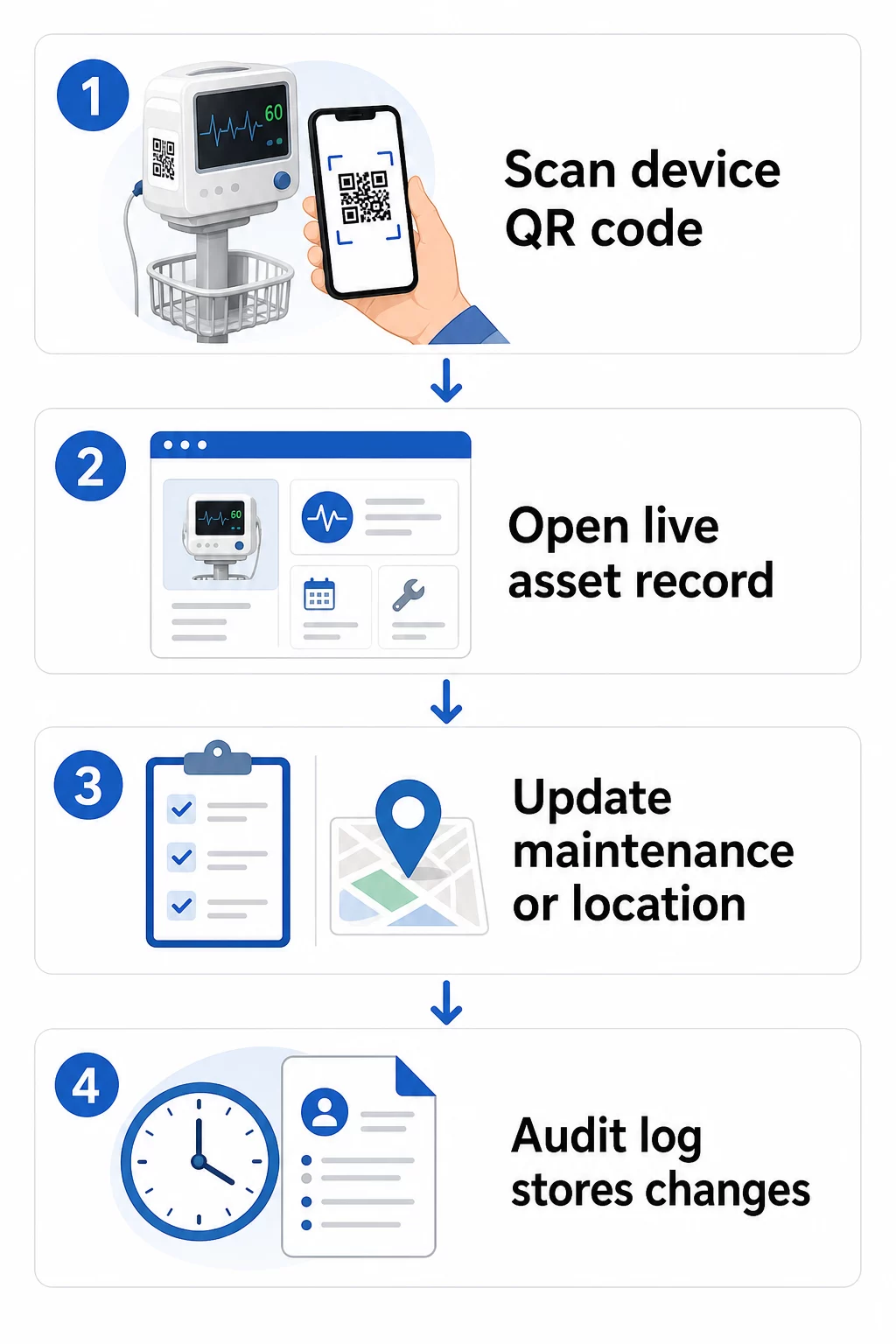
Berikut adalah aliran kerja praktikal untuk memastikan rekod peralatan sentiasa terkini:
- Log masuk ke papan pemuka pengurusan anda dan cari kod menggunakan ID peralatan peranti atau penapis jabatan
- Edit maklumat yang dipautkan – kemas kini log penyelenggaraan, rekod penentukuran, tarikh perkhidmatan seterusnya, atau dokumentasi yang dipautkan
- Perubahan berlaku serta-merta, jadi mana-mana kakitangan yang mengimbas kod selepas itu akan melihat data semasa
- Imbas kod untuk mengesahkan bahawa maklumat yang dikemas kini dipaparkan dengan betul sebelum meninggalkan rekod
- Semak log audit automatik, yang mencatat masa setiap perubahan dan merekodkan pengguna yang membuatnya
Untuk melihat dengan lebih mendalam bagaimana kod dinamik mengendalikan kemas kini yang kerap, lihat cara menggunakan kod QR untuk inventori produk dan gambaran keseluruhan Kod QR untuk penjejakan kitaran hayat produk, kedua-duanya merangkumi aliran kerja kemas kini yang boleh digunakan untuk pengurusan aset penjagaan kesihatan.
Pastikan Rekod Peralatan Dikemas Kini Tanpa Mencetak Semula Yang Penjana dynamic QR code membolehkan pasukan bioperubatan anda menolak kemas kini kepada mana-mana rekod peranti serta-merta dari papan pemuka web – tiada label baharu diperlukan.
Menghubungkan Kod QR ke Sistem Inventori dan Penyelenggaraan Anda
Kod QR memberikan nilai paling tinggi apabila ia menyalurkan data ke dalam infrastruktur pengurusan aset anda yang lebih luas dan bukannya beroperasi sebagai lapisan kendiri. Titik integrasi yang perlu dipertimbangkan termasuk:
Integrasi CMMS. Apabila juruteknik mengimbas peranti selepas menyelesaikan penyelenggaraan, rekod CMMS harus dikemas kini secara automatik. Ini menghapuskan kemasukan data manual dan memastikan log penyelenggaraan sentiasa terkini.
Aliran kerja EHR dan keselamatan pesakit. Jika peranti dipautkan ke bilik pesakit atau kawasan penjagaan, mengimbas kod QR peralatan boleh memaparkan amaran keselamatan yang berkaitan, status penarikan balik, atau bendera keserasian dalam sistem klinikal sedia ada.
Penjejakan lokasi. Setiap imbasan menangkap lokasi peranti pengimbas, memberikan pentadbir gambaran berterusan tentang di mana peralatan mudah alih sebenarnya berada berbanding dengan tempat ia direkodkan. Ini mengurangkan masa yang dihabiskan untuk mencari peranti dan membantu mengenal pasti corak pergerakan peralatan merentasi jabatan.
Makluman automatik. Sambungkan data imbasan untuk mencetuskan pemberitahuan apabila peranti telah tamat tempoh penentukuran, apabila aset bernilai tinggi belum diimbas dalam tempoh yang luar biasa lama, atau apabila populasi peranti yang ditarik balik perlu dikesan dengan cepat.
Untuk konteks yang lebih luas tentang bagaimana kod QR menyokong kebolehjejakan merentasi persekitaran aset yang kompleks, Kod QR untuk penjejakan rantaian bekalan panduan ini merangkumi prinsip integrasi yang boleh digunakan secara langsung untuk aliran kerja aset hospital.
Melabelkan Seluruh Inventori Aset Anda
Sistem penjejakan kod QR hanya berguna sejauh mana liputannya. Mulakan dengan peranti bernilai tinggi dan berisiko tinggi – mesin MRI, robot pembedahan, ventilator, monitor pesakit – kemudian kembangkan kepada peralatan mudah alih yang lebih kecil dan akhirnya kepada bahan habis pakai dan alat ganti.
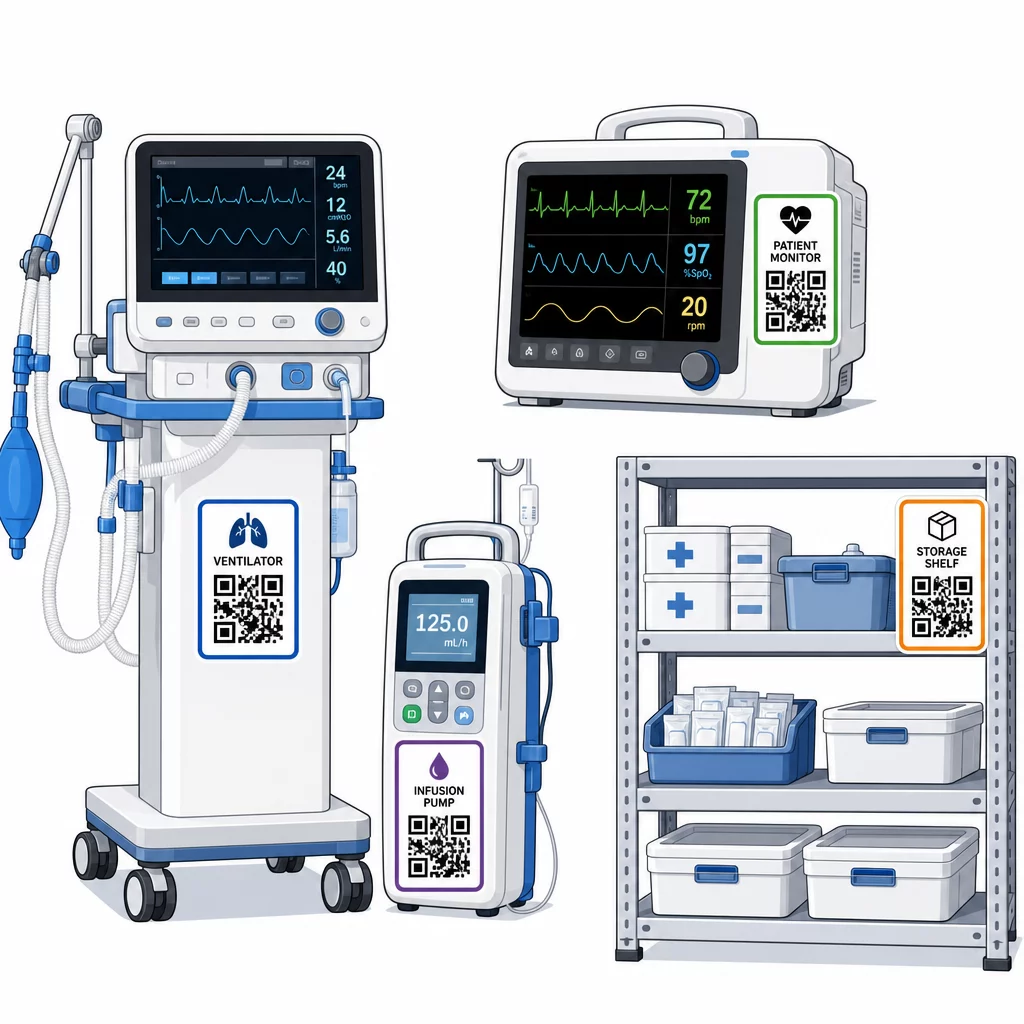
Konsistensi penempatan adalah penting. Pilih lokasi standard untuk setiap kategori peralatan: rel kepala untuk katil mudah alih dan tiang IV, paras mata untuk monitor yang dipasang di dinding, permukaan rata yang kelihatan pada peranti mudah alih. Konsistensi mengurangkan masa yang dihabiskan oleh kakitangan untuk mencari kod pada peranti yang tidak biasa.
Alat ganti dan komponen. Tandakan alat ganti kritikal dengan kod yang menghubungkan kepada tahap inventori, tarikh luput, dan maklumat keserasian. Ini menghalang komponen daripada digunakan melebihi jangka hayat perkhidmatannya atau digunakan pada peralatan yang tidak serasi.
Lokasi penyimpanan. Lampirkan kod pada bilik penyimpanan, ruang peralatan, dan almari bekalan. Apabila kakitangan mengimbas kod lokasi penyimpanan, mereka dapat melihat dengan serta-merta apa yang sepatutnya ada, apa yang hilang, dan bila aset terakhir dipindahkan. Ini mencipta peta digital aset kemudahan yang menyokong tindak balas kecemasan yang lebih cepat dan mengurangkan pesanan berlebihan.
Untuk panduan tambahan mengenai penandaan aset fizikal secara besar-besaran, panduan muktamad untuk kod QR bagi penjagaan kesihatan merangkumi pelaksanaan merentasi pelbagai kes penggunaan penjagaan kesihatan.
Melatih Kakitangan Menggunakan Sistem Kod QR dengan Berkesan
Teknologi hanya berfungsi jika orang yang menggunakannya mempercayainya dan tahu cara menggunakannya. Latihan berasaskan peranan memastikan setiap ahli pasukan mempelajari apa yang sebenarnya mereka perlukan tanpa dibebani oleh ciri-ciri yang tidak relevan dengan aliran kerja mereka.
- Jururawat dan juruteknik perlu tahu cara mengimbas kod untuk memeriksa status peralatan, melihat amaran penyelenggaraan, dan melaporkan isu.
- Jurutera bioperubatan perlu mengemas kini rekod penyelenggaraan, mengurus pemindahan, dan menjana laporan pematuhan
- Kakitangan penyelenggaraan menggunakan kod untuk merekod perkhidmatan yang telah selesai dan mengakses dokumentasi teknikal
- Pasukan pentadbiran menumpukan pada pelaporan, pengurusan kebenaran pengguna, dan pengawasan sistem
Sediakan kad rujukan pantas untuk tindakan yang paling biasa – menyemak jadual penyelenggaraan, melaporkan kerosakan, mengakses manual pengguna – dan tampalkannya berhampiran stesen pengimbasan atau kawasan penyimpanan peralatan.
Lantik pentadbir kod QR di setiap jabatan: ahli pasukan yang boleh menyelesaikan masalah pengimbasan, meluluskan kemas kini, dan menjawab soalan daripada rakan sekerja. Sediakan saluran maklum balas yang mudah supaya kakitangan boleh melaporkan masalah atau meminta latihan tambahan apabila aliran kerja berkembang.
Analitik, Keselamatan, dan Pematuhan
Menggunakan Data Imbasan untuk Meningkatkan Operasi
Setiap imbasan menjana data. Digunakan dengan baik, data ini mengalihkan pengurusan aset daripada reaktif kepada prediktif. Analitik boleh membantu anda:
- Mengenal pasti peranti mana yang diimbas luar biasa kerap semasa syif – isyarat potensi masalah prestasi
- Mengesan peralatan yang sentiasa terbiar di satu jabatan manakala jabatan lain mengalami kekurangan, membolehkan pengagihan semula sebelum kekurangan menjejaskan penjagaan
- Membina sejarah penyelenggaraan yang mewajarkan pelarasan kepada selang perkhidmatan untuk peralatan tidak kritikal, seperti yang dibenarkan oleh CMS apabila sejarah penyelenggaraan yang mencukupi wujud
- Menilai pulangan pelaburan dengan menjejaki penggunaan peralatan berbanding kos perolehan dan penyelenggaraan
Pertimbangan Keselamatan
Kod QR dalam persekitaran klinikal memperkenalkan risiko keselamatan yang memerlukan perhatian yang teliti. Penyerang boleh meletakkan pelekat QR palsu di atas kod yang sah, mengalihkan kakitangan atau pesakit ke destinasi berniat jahat – amalan yang dikenali sebagai “quishing.” Oleh kerana destinasi kod QR tidak kelihatan sebelum mengimbas, pengguna mungkin tidak mengesan penggantian.
Untuk mengurangkan risiko ini:
- Gunakan kawalan akses berasaskan peranan supaya hanya kakitangan yang diberi kuasa boleh melihat atau mengedit rekod sensitif
- Pastikan semua data yang ditukar antara kod, peranti mudah alih dan sistem hospital disulitkan melalui HTTPS
- Kuatkuasakan dasar pengurusan peranti mudah alih (MDM) – kunci skrin, padam jauh, pemasangan aplikasi terhad – pada peranti yang digunakan untuk mengimbas
- Kekalkan log audit yang komprehensif: setiap imbasan dan setiap perubahan data harus dicap masa dan dikaitkan dengan pengguna tertentu
- Hadkan pengurusan kod QR kepada platform yang diluluskan yang menawarkan perjanjian rakan kongsi perniagaan jika PHI terlibat
Jangan benamkan PHI dalam teks biasa dalam kod QR itu sendiri. Sesiapa sahaja dengan pengimbas boleh menyahkodnya. Sebaliknya, pautkan ke rekod yang disahkan dan dikawal akses yang memerlukan kelayakan untuk dilihat.
Mengekalkan dan Mengaudit Label Kod QR
Pemeriksaan Rutin
Label fizikal merosot. Masukkan pemeriksaan label ke dalam pusingan peralatan biasa: periksa calar, pudar, tepi mengelupas, dan kehausan kimia daripada pembasmi kuman. Peranti yang menjalani pensterilan kerap – alat pembedahan, monitor ICU – memerlukan pemeriksaan yang lebih kerap. Jika label rosak dan kod tidak lagi mengimbas dengan bersih, tandakannya untuk penggantian segera sebelum ia gagal pada saat kritikal.
Uji label mengikut protokol pembersihan sebenar anda, bukan hanya spesifikasi pengeluar. Jika pembasmi kuman tertentu secara konsisten menyebabkan kegagalan label awal, sama ada tukar kepada bahan yang lebih tahan atau sesuaikan pendekatan pembersihan untuk permukaan berlabel sambil mengekalkan piawaian kawalan jangkitan.
Jejaki jangka hayat label mengikut kategori peralatan. Jika label ventilator di ICU anda biasanya memerlukan penggantian setiap enam bulan, jadualkan penggantian itu secara proaktif daripada menunggu kegagalan.
Audit Inventori
Integriti label fizikal dan ketepatan data adalah masalah berasingan yang memerlukan pemeriksaan berasingan. Lakukan audit inventori sekurang-kurangnya suku tahunan, dengan pemeriksaan spot yang lebih kerap di unit rawatan rapi, jabatan kecemasan, dan bilik bedah di mana perolehan peralatan adalah pantas.
Penemuan audit biasa termasuk data lokasi yang salah, rekod penyelenggaraan yang tidak dikemas kini selepas lawatan servis, dan aset yang masih tersenarai dalam sistem yang telah dipindahkan atau ditamatkan. Apabila percanggahan ditemui, kemas kini rekod dengan segera dan dokumenkan pembetulan dengan cap masa.
Dokumentasi audit yang teliti mempunyai dua tujuan: ia menyokong pemeriksaan kawal selia dan ia mendedahkan isu-isu sistemik – seperti jabatan yang secara konsisten melangkau protokol pengimbasan – yang boleh ditangani melalui latihan tambahan atau pelarasan proses.
Memulakan
Penjejakan kod QR berfungsi paling baik apabila ia diperkenalkan secara berperingkat. Mulakan dengan peralatan keutamaan tertinggi anda – peranti di mana kegagalan penyelenggaraan atau jurang lokasi menimbulkan risiko keselamatan pesakit terbesar – dan luaskan liputan apabila pasukan anda membina kebiasaan dengan sistem tersebut.
Fokus dahulu untuk mendapatkan label yang betul: bahan tahan lasak, saiz yang betul, penempatan yang konsisten, dan kebolehimbasan yang diuji di bawah keadaan operasi sebenar anda. Setelah lapisan fizikal kukuh, integrasikan dengan sistem CMMS dan inventori anda, kemudian lapiskan analitik dan amaran automatik.
Menggunakan QR code generator percuma untuk prototaip label dan menguji aliran kerja sebelum melakukan penggunaan penuh, dan gunakan Imbas Kod QR untuk mengesahkan bahawa kod mengimbas dengan andal merentasi peranti yang digunakan oleh kakitangan anda setiap hari.
Mula Menjejak Peralatan Perubatan dengan Kod QR Dinamik Cipta kod yang boleh diedit, boleh dijejak untuk setiap aset di kemudahan anda dengan Penjana dynamic QR code – kemas kini rekod dalam masa nyata, tiada pencetakan semula diperlukan.
Soalan lazim
Kod QR statik mengekod destinasi tetap yang tidak boleh diubah selepas dicetak. Kod QR dinamik menunjuk kepada pautan ubah hala yang boleh dikemas kini pada bila-bila masa – jadi label fizikal kekal pada peranti sementara rekod penyelenggaraan, data penentukuran, atau dokumentasi yang dipautkan disemak secara digital. Untuk peralatan perubatan, kod dinamik sangat diutamakan kerana rekod peranti sering berubah, dan mencetak semula label setiap kali maklumat dikemas kini adalah tidak praktikal dan mahal.
CMS menghendaki agar peralatan perubatan kritikal diselenggara mengikut jadual yang disyorkan pengeluar dan semua penyelenggaraan dilakukan oleh kakitangan yang berkelayakan serta didokumentasikan dengan teliti. Kod QR menyokong ini dengan mencipta jejak audit bercap masa bagi setiap imbasan, setiap kemas kini penyelenggaraan, dan setiap perubahan rekod. Apabila seorang pemeriksa meminta sejarah penyelenggaraan peranti tertentu, kakitangan boleh menghasilkannya dengan satu imbasan daripada mencari melalui fail kertas atau pelbagai sistem yang terputus hubungan.
Langkah berjaga-jaga utama termasuk menggunakan sambungan HTTPS yang disulitkan untuk semua data yang ditukar melalui sistem berkaitan QR, melaksanakan kawalan akses berasaskan peranan supaya kakitangan hanya melihat maklumat yang relevan dengan peranan mereka, tidak pernah membenamkan maklumat kesihatan terlindung dalam teks biasa dalam kod QR itu sendiri, menguatkuasakan dasar pengurusan peranti mudah alih pada peranti pengimbas, dan menjalankan audit berkala label kod QR untuk memeriksa pengubahan atau pelekat palsu yang diletakkan di atas kod yang sah. Mana-mana platform QR pihak ketiga yang digunakan harus mempunyai perjanjian rakan kongsi perniagaan jika ia mengendalikan PHI.