Správa zdravotníckeho vybavenia v rušnom zariadení je ťažšia, než sa zdá. Keď sa zariadenia stratia, záznamy o údržbe zaostávajú, alebo personál stráca čas hľadaním kritických nástrojov, trpí starostlivosť o pacienta. Táto príručka vysvetľuje, ako implementovať sledovanie zdravotníckeho vybavenia pomocou QR kódov – od výberu správnej platformy po údržbu štítkov a dodržiavanie predpisov.
Prečo má sledovanie pomocou QR kódov zmysel pre zdravotnícke vybavenie
Manuálne inventúrne procesy – schránky, tabuľky, papierové záznamy o údržbe – vytvárajú medzery. Vybavenie sa stratí, termíny údržby sa zmeškajú a dokumentáciu o súlade je ťažké rýchlo overiť. QR kódy riešia tieto medzery prepojením každého fyzického zariadenia so živým digitálnym záznamom, ku ktorému má personál prístup v priebehu sekúnd pomocou štandardného smartfónu.
Na rozdiel od tradičných čiarových kódov môže QR kód uložiť oveľa viac informácií v kompaktnom formáte. Keď je umiestnený na ventilátore, infúznej pumpe alebo prenosnom monitore, QR kód môže okamžite zobraziť:
- História údržby zariadenia a ďalší plánovaný dátum servisu
- Záznamy o kalibrácii a dokumentácia o súlade
- Používateľské príručky alebo inštruktážne videá
- Aktuálna poloha a priradené oddelenie
- Upozornenia na poruchy alebo potrebné výmeny
Tento druh okamžitého prístupu je presne to, čo QR kódy pre nemocnice a zdravotníctvo implementačný model je navrhnutý tak, aby podporoval.
Z hľadiska súladu s predpismi, Centrá pre Medicare a Medicaid Services (CMS) vyžadujú, aby kritické vybavenie – zariadenia na podporu života, kľúčové resuscitačné vybavenie, kritické monitorovacie zariadenia – bolo udržiavané podľa harmonogramov výrobcu a aby všetka údržba bola vykonávaná kvalifikovaným personálom a dôkladne zdokumentovaná. Systémy QR kódov vytvárajú prirodzenú auditnú stopu, ktorá uľahčuje správu a preukazovanie splnenia týchto požiadaviek počas inšpekcií.
Výber platformy QR kódov pre zdravotníctvo
Nie každý nástroj QR kódov je stvorený pre požiadavky klinického prostredia. Pri hodnotení platforiem uprednostnite nasledujúce:
Bezpečnosť a súlad s HIPAA. Akákoľvek platforma, ktorá spracováva chránené zdravotné informácie (PHI), musí spĺňať pravidlá HIPAA o ochrane súkromia, bezpečnosti a oznamovaní porušení. Hľadajte šifrovaný prenos dát, bezpečné cloudové úložisko, riadenie prístupu na základe rolí a automatické časové limity relácií. Platforma by mala tiež podporovať dohody o obchodnej spolupráci, ak cez ňu prechádzajú PHI.
Dynamické QR kódy. Na rozdiel od statických kódov, dynamické QR kódy je možné aktualizovať aj po ich vytlačení. Ako vysvetľuje Pageloot, dynamický kód “môže byť upravený aj po tom, ako bol vygenerovaný a vytlačený”, čo vám umožňuje kedykoľvek zmeniť prepojený obsah alebo cieľové URL adresy bez výmeny fyzického štítku. Pre medicínske zariadenia, ktoré prechádzajú častými aktualizáciami softvéru, zmenami plánov alebo regulačnými revíziami, je to nevyhnutné.
Analytika v reálnom čase. Schopnosť sledovať, kedy a kde sú kódy skenované, poskytuje biomedicínskym tímom prehľad o vzorcoch používania zariadení, pomáha identifikovať zariadenia, ktoré môžu potrebovať pozornosť, a podporuje rozhodnutia o alokácii zdrojov. Metriky ako počet skenov, umiestnenie a typ zariadenia prispievajú k inteligentnejšiemu plánovaniu údržby.
Systémová integrácia. Platforma by sa mala pripojiť k vášmu existujúcemu systému elektronických zdravotných záznamov (EHR), počítačovému systému riadenia údržby (CMMS) alebo databáze majetku prostredníctvom API. Keď biomedicínsky inžinier dokončí údržbu infúznej pumpy, táto aktualizácia by sa mala automaticky rozšíriť – bez potreby duplicitného zadávania.
Užívateľsky prívetivé rozhranie. Zdravotnícki pracovníci potrebujú nástroje, ktoré si vyžadujú minimálne zaškolenie. Čistý ovládací panel, ktorý umožňuje personálu vytvárať, aktualizovať a spravovať kódy bez narušenia ich pracovných postupov, stojí za uprednostnenie.
Sledujte každý majetok z jedného ovládacieho panela Použi Dynamický QR kód generátor na vytváranie upraviteľných, sledovateľných kódov pre vaše medicínske zariadenia a správu všetkých aktualizácií z jedného miesta.
Navrhovanie QR kódov, ktoré fungujú v klinickom prostredí
QR kódy v nemocniciach čelia podmienkam, ktoré by štandardný štítok rýchlo poškodili: nemocničné dezinfekčné prostriedky, častá manipulácia, para a premenlivé osvetlenie. Dobrý dizajn zohľadňuje všetky tieto faktory predtým, ako sa vytlačí jediný štítok.
Veľkosť a kontrast
Príliš malý QR kód sa nebude spoľahlivo skenovať, najmä ak má personál rukavice alebo pracuje pri slabom osvetlení. Dodržujte tieto pokyny pre veľkosť:
- Minimálna veľkosť: 0,8 x 0,8 palca (2 x 2 cm) pre jednoduché dáta ako URL
- Odporúčaná veľkosť pre komplexné dáta: aspoň 1,2 x 1,2 palca (3 x 3 cm)
- Pomer skenovacej vzdialenosti: použite pravidlo 10:1 – ak sa kód bude skenovať zo vzdialenosti 10 palcov, mal by byť široký aspoň 1 palec
Pre kontrast použite tmavé vzory na svetlých pozadiach a udržujte kontrastný pomer aspoň 4:1 medzi kódom a jeho pozadím. Vyhnite sa farebným kombináciám, ktoré znižujú čitateľnosť pod žiarivkovým osvetlením alebo pri pohľade cez kameru s obmedzeným dynamickým rozsahom. Ďalšie pokyny nájdete v Pageloot’s osvedčených postupov pre čitateľnosť QR kódov.
Tiché zóny a umiestnenie loga
Okolo kódu ponechajte jasný okraj – označovaný ako “tichá zóna” – s šírkou aspoň štvornásobku šírky jedného modulu. Tým sa zabráni tomu, aby okolitý text, štítky zariadení alebo povrchové textúry rušili schopnosť skenera prečítať kód.
Ak zahrniete logo nemocnice, udržujte ho na maximálne 20 % plochy kódu a umiestnite ho centrálne. Pri pridávaní loga použite vysokú úroveň korekcie chýb (Q alebo H), pretože tieto úrovne umožňujú, aby kód zostal čitateľný, aj keď je časť zakrytá.
Odolné materiály štítkov
Štandardné papierové štítky nie sú vhodné pre nemocničné použitie. Degradujú pri vystavení čistiacim chemikáliám, vlhkosti a neustálej manipulácii. Namiesto toho použite:
- Polyesterové štítky: zvládajú drsné dezinfekčné prostriedky a teploty od -40°F do 300°F
- Vinylové štítky s lepidlami medicínskej kvality: vynikajúca chemická odolnosť; navrhnuté na priľnutie k povrchom z nehrdzavejúcej ocele, plastu a lakovaného kovu bez odlepovania
- Laminované štítky: pridávajú odolnosť proti poškriabaniu a vlhkosti, hoci overte, či laminát nevytvára odlesky, ktoré by rušili skenovanie
Predtým, ako sa zaviažete k plnej objednávke, vykonajte dvojtýždňový terénny test: aplikujte vzorové štítky na reprezentatívne zariadenia, podrobte ich štandardným čistiacim protokolom a skontrolujte vyblednutie, odlupovanie alebo zhoršenie skenovania.
Farebne kódované systémy
Zvážte použitie farieb okrajov na rýchle kategorizovanie vybavenia – napríklad červené okraje pre núdzové zariadenia, modré pre diagnostické zariadenia a zelené pre všeobecné zásoby. Táto vizuálna vrstva pomáha personálu rýchlo nájsť správny typ vybavenia bez toho, aby sa musel spomaľovať čítaním textových štítkov.
Nastavenie dynamických QR kódov pre správu majetku
Dynamické QR kódy sú obzvlášť vhodné pre medicínske vybavenie, pretože údaje spojené so zariadením sa neustále menia. Údržba je dokončená, dátumy kalibrácie sa posúvajú, firmvér je aktualizovaný a dokumentácia o zhode je revidovaná. S dynamickým kódom zostáva fyzický štítok na zariadení rovnaký – mení sa iba prepojený obsah.
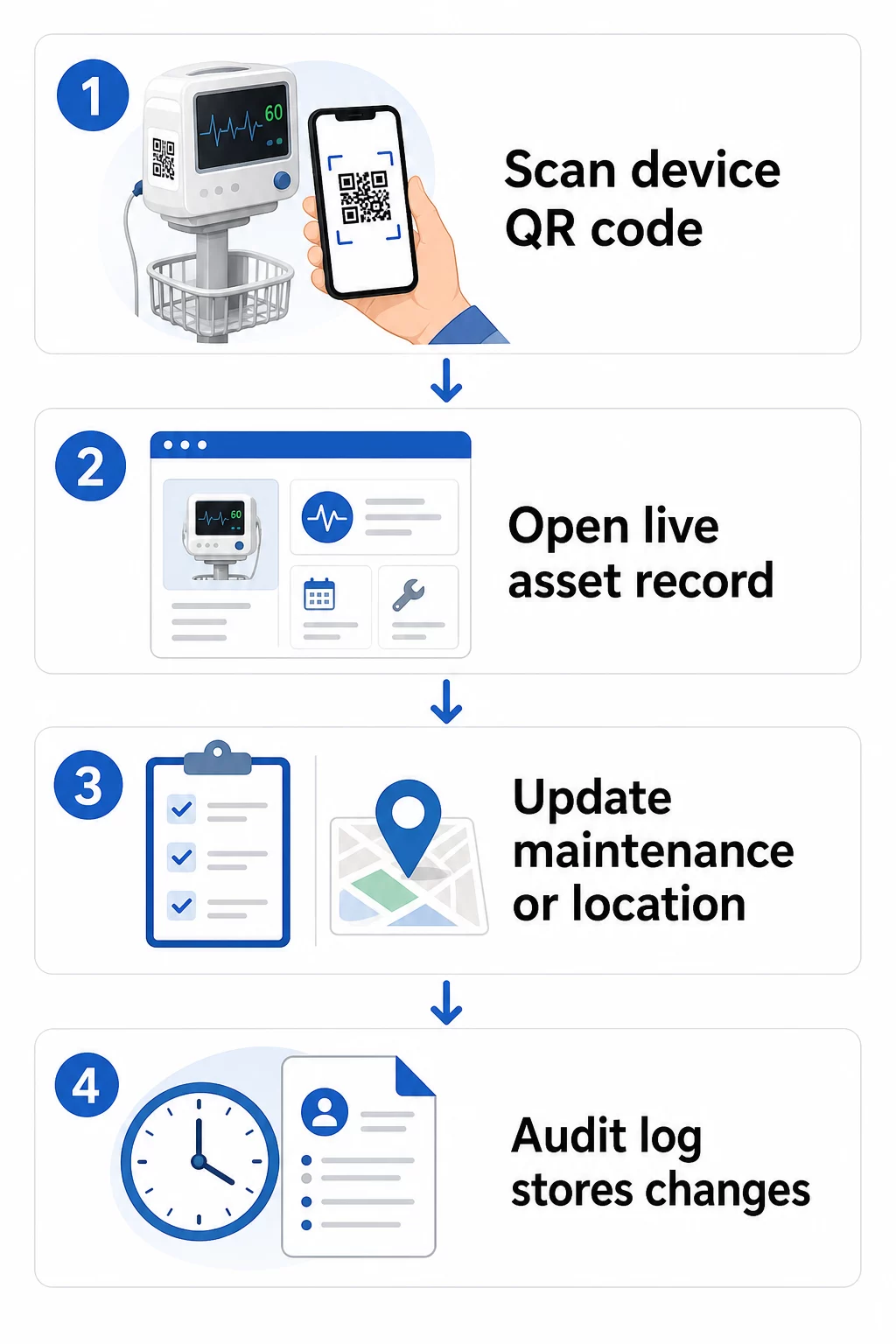
Tu je praktický pracovný postup na udržiavanie aktuálnych záznamov o vybavení:
- Prihláste sa do svojho riadiaceho panela a nájdite kód pomocou ID zariadenia alebo filtra oddelenia
- Upravte prepojené informácie – aktualizujte záznamy o údržbe, kalibračné záznamy, dátumy ďalších servisov alebo prepojenú dokumentáciu
- Zmeny sa prejavia okamžite, takže každý zamestnanec, ktorý naskenuje kód potom, uvidí aktuálne údaje
- Naskenujte kód na overenie či sa aktualizované informácie zobrazujú správne pred opustením záznamu
- Skontrolujte automatický auditný záznam, ktorý zaznamenáva čas každej zmeny a používateľa, ktorý ju vykonal
Pre hlbší pohľad na to, ako dynamické kódy zvládajú časté aktualizácie, pozrite si ako používať QR kódy pre inventár produktov a prehľad QR kódy pre sledovanie životného cyklu produktu, pričom obe pokrývajú pracovné postupy aktualizácie použiteľné pre správu majetku v zdravotníctve.
Udržujte záznamy o vybavení aktuálne bez pretlače Ten Dynamický QR kód generátor umožňuje vášmu biomedicínskemu tímu okamžite posielať aktualizácie do akéhokoľvek záznamu zariadenia z webového panelu – nie sú potrebné žiadne nové štítky.
Pripojenie QR kódov k vašim systémom inventára a údržby
QR kódy prinášajú najväčšiu hodnotu, keď vkladajú dáta do vašej širšej infraštruktúry správy majetku, namiesto toho, aby fungovali ako samostatná vrstva. Integračné body, ktoré treba zvážiť, zahŕňajú:
Integrácia CMMS. Keď technik naskenuje zariadenie po dokončení údržby, záznam CMMS by sa mal automaticky aktualizovať. Tým sa eliminuje manuálne zadávanie údajov a zabezpečí sa, že denník údržby je vždy aktuálny.
Pracovné postupy EHR a bezpečnosti pacienta. Ak je zariadenie prepojené s izbou pacienta alebo oblasťou starostlivosti, skenovanie QR kódu zariadenia by mohlo zobraziť relevantné bezpečnostné upozornenia, stav stiahnutia z obehu alebo príznaky kompatibility v rámci existujúcich klinických systémov.
Sledovanie polohy. Každé skenovanie zachytáva polohu skenovacieho zariadenia, čo správcom poskytuje priebežný obraz o tom, kde sa mobilné zariadenie skutočne nachádza, oproti tomu, kde je zaznamenané. To znižuje čas strávený hľadaním zariadení a pomáha identifikovať vzorce pohybu zariadení medzi oddeleniami.
Automatické upozornenia. Prepojte údaje zo skenovania, aby sa spustili upozornenia, keď je zariadenie po termíne kalibrácie, keď sa vysoko hodnotný majetok nebol skenovaný nezvyčajne dlho, alebo keď je potrebné rýchlo nájsť stiahnutú populáciu zariadení.
Pre širší kontext toho, ako QR kódy podporujú sledovateľnosť v zložitých prostrediach aktív, sa QR kódy pre sledovanie dodávateľského reťazca príručka zaoberá princípmi integrácie, ktoré sa priamo prenášajú do pracovných postupov s nemocničnými aktívami.
Označovanie celého vášho inventára aktív
Systém sledovania QR kódov je užitočný len do takej miery, do akej je pokrytý. Začnite s vysoko hodnotnými a vysoko rizikovými zariadeniami – MRI prístroje, chirurgické roboty, ventilátory, monitory pacientov – potom rozšírte na menšie mobilné zariadenia a nakoniec na spotrebný materiál a náhradné diely.
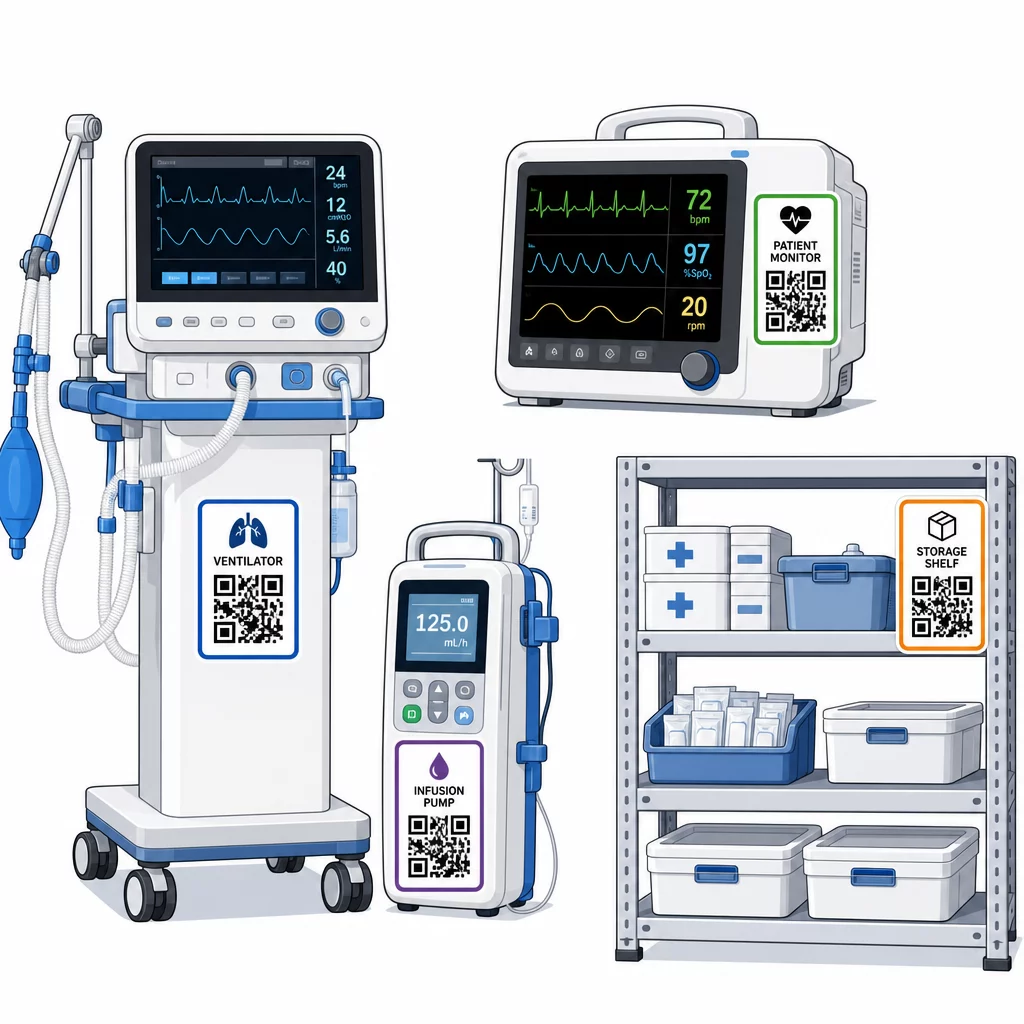
Dôležitá je konzistentnosť umiestnenia. Zvoľte štandardné umiestnenie pre každú kategóriu zariadení: hlavové lišty pre mobilné postele a infúzne stojany, úroveň očí pre nástenné monitory, viditeľný rovný povrch na prenosných zariadeniach. Konzistentnosť znižuje čas, ktorý personál strávi hľadaním kódu na neznámom zariadení.
Náhradné diely a komponenty. Označte kritické náhradné diely kódmi, ktoré odkazujú na úrovne zásob, dátumy exspirácie a informácie o kompatibilite. Tým sa zabráni použitiu komponentov po ich životnosti alebo ich aplikácii na nekompatibilné zariadenia.
Skladovacie miesta. Pripojte kódy k skladovacím miestnostiam, priestorom pre vybavenie a skladom zásob. Keď personál naskenuje kód skladovacieho miesta, okamžite uvidí, čo by tam malo byť, čo chýba a kedy boli aktíva naposledy presunuté. Tým sa vytvorí digitálna mapa aktív zariadenia, ktorá podporuje rýchlejšiu reakciu na núdzové situácie a znižuje nadmerné objednávanie.
Pre ďalšie usmernenia k označovaniu fyzických aktív vo veľkom rozsahu, sa komplexného sprievodcu QR kódmi pre zdravotníctvo zaoberá implementáciou v rámci viacerých prípadov použitia v zdravotníctve.
Školenie personálu na efektívne používanie systémov QR kódov
Technológia funguje len vtedy, ak jej ľudia, ktorí ju používajú, dôverujú a vedia ju používať. Školenie založené na úlohách zabezpečuje, že každý člen tímu sa naučí to, čo skutočne potrebuje, bez toho, aby bol preťažený funkciami, ktoré sú pre jeho pracovný postup irelevantné.
- Sestry a technici potrebujú vedieť, ako skenovať kódy na kontrolu stavu zariadenia, zobrazenie upozornení na údržbu a hlásenie problémov
- Biomedicínski inžinieri potrebujú aktualizovať záznamy o údržbe, spravovať prevody a generovať správy o súlade
- Personál údržby používa kódy na zaznamenávanie dokončených služieb a prístup k technickej dokumentácii
- Administratívne tímy sa zameriavajú na reportovanie, správu používateľských oprávnení a dohľad nad systémom
Poskytnite rýchle referenčné karty pre najbežnejšie činnosti – kontrolu plánu údržby, nahlásenie poruchy, prístup k používateľskej príručke – a umiestnite ich v blízkosti skenovacích staníc alebo skladovacích priestorov zariadení.
V každom oddelení určite správcov QR kódov: členov tímu, ktorí dokážu riešiť problémy so skenovaním, schvaľovať aktualizácie a odpovedať na otázky kolegov. Nastavte jednoduchý kanál spätnej väzby, aby personál mohol hlásiť problémy alebo žiadať o dodatočné školenie, keď sa pracovné postupy vyvíjajú.
Analytika, bezpečnosť a súlad
Používanie údajov zo skenovania na zlepšenie prevádzky
Každé skenovanie generuje dáta. Pri správnom použití tieto dáta posúvajú správu majetku z reaktívnej na prediktívnu. Analytika vám môže pomôcť:
- Identifikovať, ktoré zariadenia sú počas zmeny skenované nezvyčajne často – potenciálny signál problémov s výkonom
- Identifikovať zariadenia, ktoré sú neustále nečinné v jednom oddelení, zatiaľ čo iné zažíva nedostatok, čo umožňuje prerozdelenie predtým, ako nedostatok ovplyvní starostlivosť
- Vytvoriť históriu údržby, ktorá odôvodňuje úpravy servisných intervalov pre nekritické zariadenia, ako to povoľuje CMS, ak existuje dostatočná história údržby
- Posúdiť návratnosť investícií sledovaním používania zariadení voči nákladom na obstarávanie a údržbu
Bezpečnostné aspekty
QR kódy v klinickom prostredí prinášajú bezpečnostné riziká, ktoré si zaslúžia zámernú pozornosť. Útočníci môžu umiestniť falošné QR nálepky cez legitímne kódy, presmerujúc personál alebo pacientov na škodlivé miesta – prax známa ako “quishing”. Pretože cieľ QR kódu nie je viditeľný pred skenovaním, používatelia nemusia odhaliť zámenu.
Na zníženie týchto rizík:
- Používajte riadenie prístupu založené na rolách, aby citlivé záznamy mohol prezerať alebo upravovať iba oprávnený personál
- Zabezpečte, aby všetky údaje vymieňané medzi kódmi, mobilnými zariadeniami a nemocničnými systémami boli šifrované prostredníctvom HTTPS
- Vynucujte zásady správy mobilných zariadení (MDM) – zámky obrazovky, vzdialené vymazanie, obmedzené inštalácie aplikácií – na zariadeniach používaných na skenovanie
- Udržiavajte komplexné záznamy auditu: každé skenovanie a každá zmena údajov by mali byť označené časovou pečiatkou a priradené konkrétnemu používateľovi
- Obmedzte správu QR kódov na schválené platformy, ktoré ponúkajú dohody o obchodnej spolupráci, ak sú zapojené PHI (chránené zdravotné informácie)
Nevkladajte PHI v nešifrovanej podobe priamo do QR kódu. Ktokoľvek so skenerom ho môže dekódovať. Namiesto toho odkazujte na autentifikované záznamy s riadeným prístupom, ktoré vyžadujú poverenia na zobrazenie.
Údržba a audit štítkov s QR kódmi
Pravidelné kontroly
Fyzické štítky sa degradujú. Zahrňte kontrolu štítkov do pravidelných obhliadok zariadení: skontrolujte škrabance, vyblednutie, odlupujúce sa okraje a chemické opotrebenie od dezinfekčných prostriedkov. Zariadenia, ktoré prechádzajú častou sterilizáciou – chirurgické nástroje, monitory JIP – potrebujú častejšie kontroly. Ak je štítok poškodený a kód sa už neskenuje čisto, označte ho na okamžitú výmenu, skôr než zlyhá v kritickom momente.
Testujte štítky podľa vašich skutočných čistiacich protokolov, nielen podľa špecifikácií výrobcu. Ak konkrétny dezinfekčný prostriedok dôsledne spôsobuje predčasné zlyhanie štítku, buď prejdite na odolnejší materiál, alebo upravte prístup k čisteniu označených povrchov pri zachovaní štandardov kontroly infekcií.
Sledujte životnosť štítkov podľa kategórie zariadenia. Ak štítky ventilátorov na vašej JIP zvyčajne potrebujú výmenu každých šesť mesiacov, naplánujte túto výmenu proaktívne, namiesto čakania na zlyhania.
Audity inventára
Fyzická integrita štítkov a presnosť údajov sú samostatné problémy, ktoré si vyžadujú samostatné kontroly. Vykonávajte audity inventára minimálne štvrťročne, s častejšími náhodnými kontrolami na jednotkách intenzívnej starostlivosti, pohotovostných oddeleniach a chirurgických sálach, kde je obrat zariadení rýchly.
Bežné zistenia auditu zahŕňajú nesprávne údaje o polohe, záznamy o údržbe, ktoré neboli aktualizované po servisnej návšteve, a aktíva, ktoré sú stále uvedené v systéme, ale boli presunuté alebo vyradené. Keď sa zistia nezrovnalosti, okamžite aktualizujte záznamy a zdokumentujte opravu s časovou pečiatkou.
Dôkladná auditná dokumentácia slúži dvojakému účelu: podporuje regulačné inšpekcie a odhaľuje systémové problémy – ako napríklad oddelenie, ktoré dôsledne vynecháva skenovacie protokoly – ktoré možno riešiť dodatočným školením alebo úpravami procesov.
Začíname
Sledovanie pomocou QR kódov funguje najlepšie, keď sa zavádza postupne. Začnite s vaším najprioritnejším vybavením – zariadeniami, kde zlyhanie údržby alebo medzera v lokalizácii predstavuje najväčšie riziko pre bezpečnosť pacienta – a rozšírte pokrytie, keď si váš tím osvojí systém.
Najprv sa zamerajte na správne štítky: odolné materiály, správna veľkosť, konzistentné umiestnenie a testovaná skenovateľnosť v reálnych prevádzkových podmienkach. Keď je fyzická vrstva pevná, integrujte ju so systémami CMMS a inventárnymi systémami, potom pridajte analytiku a automatické upozornenia.
Použi Generátor QR kódov zadarmo na prototypovanie štítkov a testovanie pracovných postupov predtým, ako sa zaviažete k plnému nasadeniu, a použite Čítačka QR kódov na overenie, či sa kódy spoľahlivo skenujú naprieč zariadeniami, ktoré váš personál používa každý deň.
Začnite sledovať zdravotnícke vybavenie s dynamickými QR kódmi Vytvorte editovateľné, sledovateľné kódy pre každý majetok vo vašom zariadení s Dynamický QR kód generátor – aktualizujte záznamy v reálnom čase, nie je potrebná žiadna pretlač.
Často kladené otázky
Statický QR kód kóduje pevné miesto určenia, ktoré nemožno zmeniť po vytlačení. Dynamický QR kód odkazuje na presmerovací odkaz, ktorý možno kedykoľvek aktualizovať – takže fyzický štítok zostáva na zariadení, zatiaľ čo prepojené záznamy o údržbe, kalibračné údaje alebo dokumentácia sú digitálne revidované. Pre medicínske zariadenia sú dynamické kódy výrazne preferované, pretože záznamy o zariadeniach sa často menia a opätovné tlačenie štítkov zakaždým, keď sa informácie aktualizujú, by bolo nepraktické a nákladné.
CMS vyžaduje, aby bolo kritické medicínske vybavenie udržiavané podľa harmonogramov odporúčaných výrobcom a aby všetka údržba bola vykonávaná kvalifikovaným personálom a dôkladne zdokumentovaná. QR kódy to podporujú vytvorením časovo označenej auditnej stopy každého skenovania, každej aktualizácie údržby a každej zmeny záznamu. Keď inšpektor požiada o históriu údržby konkrétneho zariadenia, personál ju môže poskytnúť jediným skenom namiesto prehľadávania papierových súborov alebo viacerých nesúvisiacich systémov.
Medzi kľúčové opatrenia patria používanie šifrovaných HTTPS pripojení pre všetky dáta vymieňané prostredníctvom systémov prepojených s QR kódmi, implementácia riadenia prístupu na základe rolí, aby zamestnanci videli len informácie relevantné pre ich rolu, nikdy nevkladanie chránených zdravotných informácií v nešifrovanej podobe priamo do QR kódu, vynucovanie zásad správy mobilných zariadení na skenovacích zariadeniach a vykonávanie pravidelných auditov štítkov s QR kódmi na kontrolu manipulácie alebo falošných nálepiek umiestnených cez legitímne kódy. Akákoľvek použitá platforma QR tretích strán by mala mať uzavretú dohodu o obchodnej spolupráci (business associate agreement), ak spracováva PHI.