Managing medical equipment across a busy facility is harder than it sounds. When devices go missing, maintenance records fall behind, or staff waste time searching for critical tools, patient care suffers. This guide explains how to implement QR code tracking for medical equipment – from choosing the right platform to maintaining labels and staying compliant.
Why QR Code Tracking Makes Sense for Medical Equipment
Manual inventory processes – clipboards, spreadsheets, paper maintenance logs – create gaps. Equipment gets misplaced, maintenance windows get missed, and compliance documentation becomes difficult to verify quickly. QR codes address these gaps by linking each physical device to a live digital record that staff can access in seconds with a standard smartphone.
Unlike traditional barcodes, a QR code can store far more information in a compact format. When placed on a ventilator, infusion pump, or portable monitor, a QR code can instantly surface:
- The device’s maintenance history and next scheduled service date
- Calibration records and compliance documentation
- User manuals or setup videos
- Current location and assigned department
- Alerts for malfunctions or required replacements
This kind of immediate access is exactly what the QR codes for hospital and healthcare implementation model is designed to support.
From a compliance standpoint, the Centers for Medicare & Medicaid Services (CMS) requires that critical equipment – life-support devices, key resuscitation equipment, critical monitoring devices – be maintained according to manufacturer schedules, and that all maintenance be performed by qualified personnel and documented thoroughly. QR code systems create a natural audit trail that makes meeting these requirements easier to manage and demonstrate during inspections.
Choosing a QR Code Platform for Healthcare
Not every QR code tool is built for the demands of a clinical environment. When evaluating platforms, prioritize the following:
Security and HIPAA compliance. Any platform that handles protected health information (PHI) must comply with HIPAA’s Privacy, Security, and Breach Notification Rules. Look for encrypted data transmission, secure cloud storage, role-based access controls, and automatic session timeouts. The platform should also support business associate agreements if PHI flows through it.
Dynamic QR codes. Unlike static codes, dynamic QR codes can be updated after they are printed. As Pageloot explains, a dynamic code “can be modified even after [it has] been generated and printed,” allowing you to change linked content or destination URLs at any time without replacing the physical label. For medical equipment that undergoes frequent software updates, schedule changes, or regulatory revisions, this is essential.
Real-time analytics. The ability to track when and where codes are scanned gives biomedical teams visibility into equipment usage patterns, helps flag devices that may need attention, and supports resource allocation decisions. Metrics like scan count, location, and device type all contribute to smarter maintenance planning.
System integration. The platform should connect with your existing Electronic Health Records (EHR) system, Computerized Maintenance Management System (CMMS), or asset database via API. When a biomedical engineer completes maintenance on an infusion pump, that update should propagate automatically – no duplicate entry required.
User-friendly interface. Healthcare workers need tools that require minimal onboarding. A clean dashboard that lets staff create, update, and manage codes without disrupting their workflows is worth prioritizing.
Track Every Asset from a Single Dashboard Menggunakan Generator Kode QR Dinamis to create editable, trackable codes for your medical equipment and manage all updates from one place.
Designing QR Codes That Work in Clinical Settings
QR codes in hospitals face conditions that would degrade a standard label quickly: hospital-grade disinfectants, frequent handling, steam, and variable lighting. Good design accounts for all of these before a single label is printed.
Size and Contrast
A QR code that is too small will fail to scan reliably, especially when staff are wearing gloves or working in low light. Follow these sizing guidelines:
- Ukuran minimum: 0.8 x 0.8 inches (2 x 2 cm) for simple data like a URL
- Recommended size for complex data: at least 1.2 x 1.2 inches (3 x 3 cm)
- Scanning distance ratio: apply a 10:1 rule – if the code will be scanned from 10 inches away, it should be at least 1 inch wide
For contrast, use dark patterns on light backgrounds and maintain a contrast ratio of at least 4:1 between the code and its background. Avoid color combinations that reduce legibility under fluorescent lighting or when viewed through a camera with limited dynamic range. You can find additional guidance in Pageloot’s praktik terbaik untuk keterbacaan kode QR.
Quiet Zones and Logo Placement
Leave a clear border – referred to as a “quiet zone” – of at least four times the width of one module around the code. This prevents surrounding text, equipment labels, or surface textures from interfering with the scanner’s ability to read the code.
If you include a hospital logo, keep it to no more than 20% of the code area and position it centrally. Use a high error correction level (Q or H) when adding logos, since these levels allow the code to remain readable even if a portion is obscured.
Durable Label Materials
Standard paper labels are not appropriate for hospital use. They degrade when exposed to cleaning chemicals, moisture, and constant handling. Instead, use:
- Polyester labels: handle harsh disinfectants and temperatures from -40°F to 300°F
- Vinyl labels with medical-grade adhesives: excellent chemical resistance; designed to bond to stainless steel, plastic, and painted metal surfaces without lifting
- Laminated labels: add scratch and moisture resistance, though verify the laminate does not create glare that interferes with scanning
Before committing to a full order, run a two-week field test: apply sample labels to representative devices, subject them to your standard cleaning protocols, and check for fading, peeling, or scanning degradation.
Color-Coded Systems
Consider using border colors to categorize equipment at a glance – for example, red borders for emergency devices, blue for diagnostic equipment, and green for general supplies. This visual layer helps staff quickly locate the right type of equipment without slowing down to read text labels.
Setting Up Dynamic QR Codes for Asset Management
Dynamic QR codes are particularly well-suited to medical equipment because the data associated with a device changes constantly. Maintenance is completed, calibration dates roll over, firmware is updated, and compliance documentation is revised. With a dynamic code, the physical label on the device stays the same – only the linked content changes.
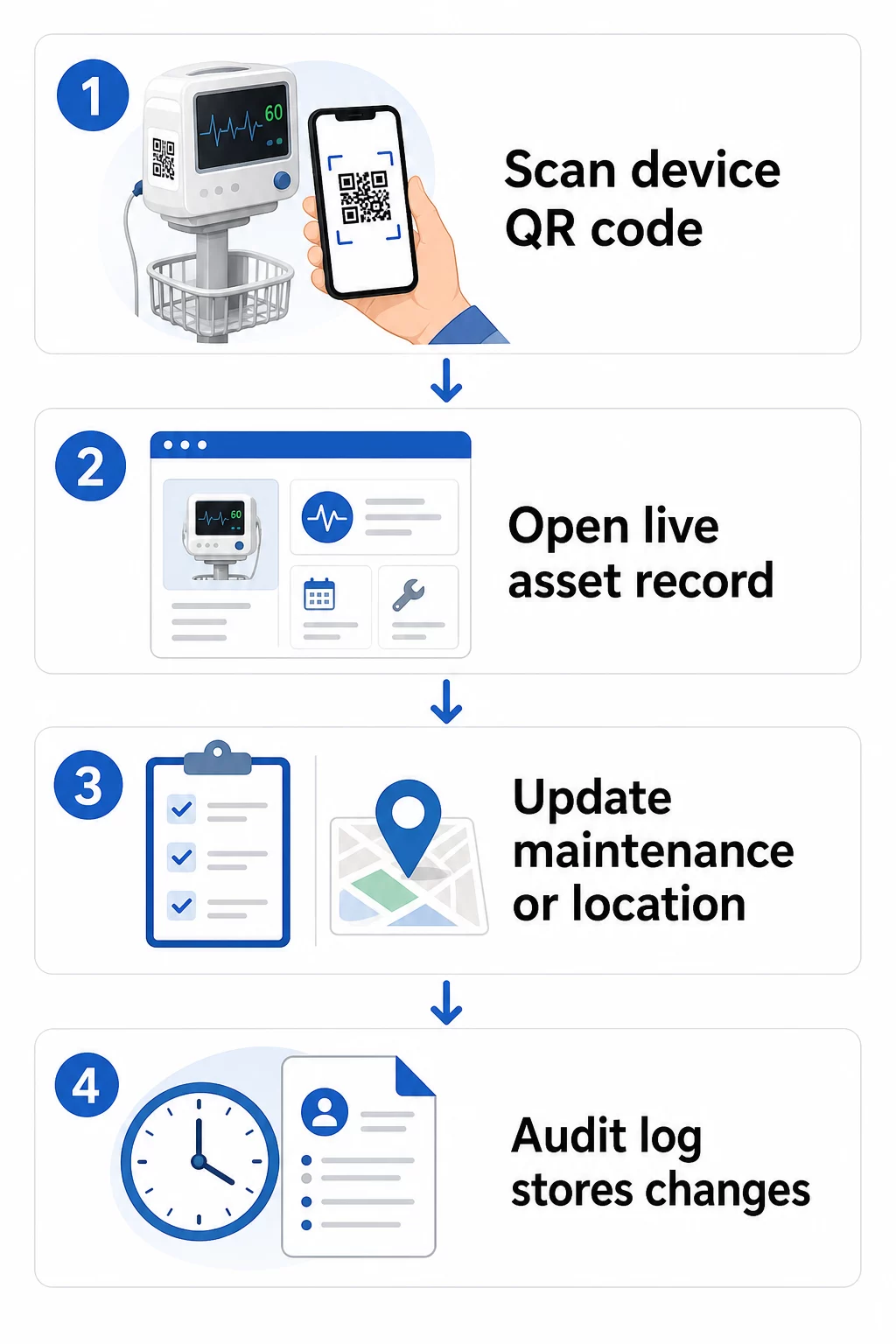
Here is a practical workflow for keeping equipment records current:
- Log into your management dashboard and locate the code using the device’s equipment ID or department filter
- Edit the linked information – update maintenance logs, calibration records, next service dates, or linked documentation
- Changes apply immediately, so any staff member who scans the code afterward sees current data
- Scan the code to verify that the updated information displays correctly before leaving the record
- Review the automatic audit log, which timestamps every change and records the user who made it
For a deeper look at how dynamic codes handle frequent updates, see how to use QR codes for product inventory and the overview of QR codes for product lifecycle tracking, both of which cover update workflows applicable to healthcare asset management.
Keep Equipment Records Up to Date Without Reprinting Itu Generator Kode QR Dinamis lets your biomedical team push updates to any device record instantly from a web dashboard – no new labels required.
Connecting QR Codes to Your Inventory and Maintenance Systems
QR codes deliver the most value when they feed data into your broader asset management infrastructure rather than operating as a standalone layer. Integration points to consider include:
CMMS integration. When a technician scans a device after completing maintenance, the CMMS record should update automatically. This eliminates manual data entry and ensures the maintenance log is always current.
EHR and patient safety workflows. If a device is linked to a patient room or care area, scanning the equipment’s QR code could surface relevant safety alerts, recall status, or compatibility flags within existing clinical systems.
Location tracking. Each scan captures the location of the scanning device, giving administrators a running picture of where mobile equipment actually is versus where it is recorded as being. This reduces time spent searching for devices and helps identify patterns in equipment movement across departments.
Automated alerts. Connect scan data to trigger notifications when a device is overdue for calibration, when a high-value asset has not been scanned in an unusually long time, or when a recalled device population needs to be located quickly.
For broader context on how QR codes support traceability across complex asset environments, the QR codes for supply chain tracking guide covers integration principles that translate directly to hospital asset workflows.
Labeling Your Entire Asset Inventory
A QR code tracking system is only as useful as its coverage. Start with high-value and high-risk devices – MRI machines, surgical robots, ventilators, patient monitors – then expand to smaller mobile equipment and eventually to consumables and spare parts.
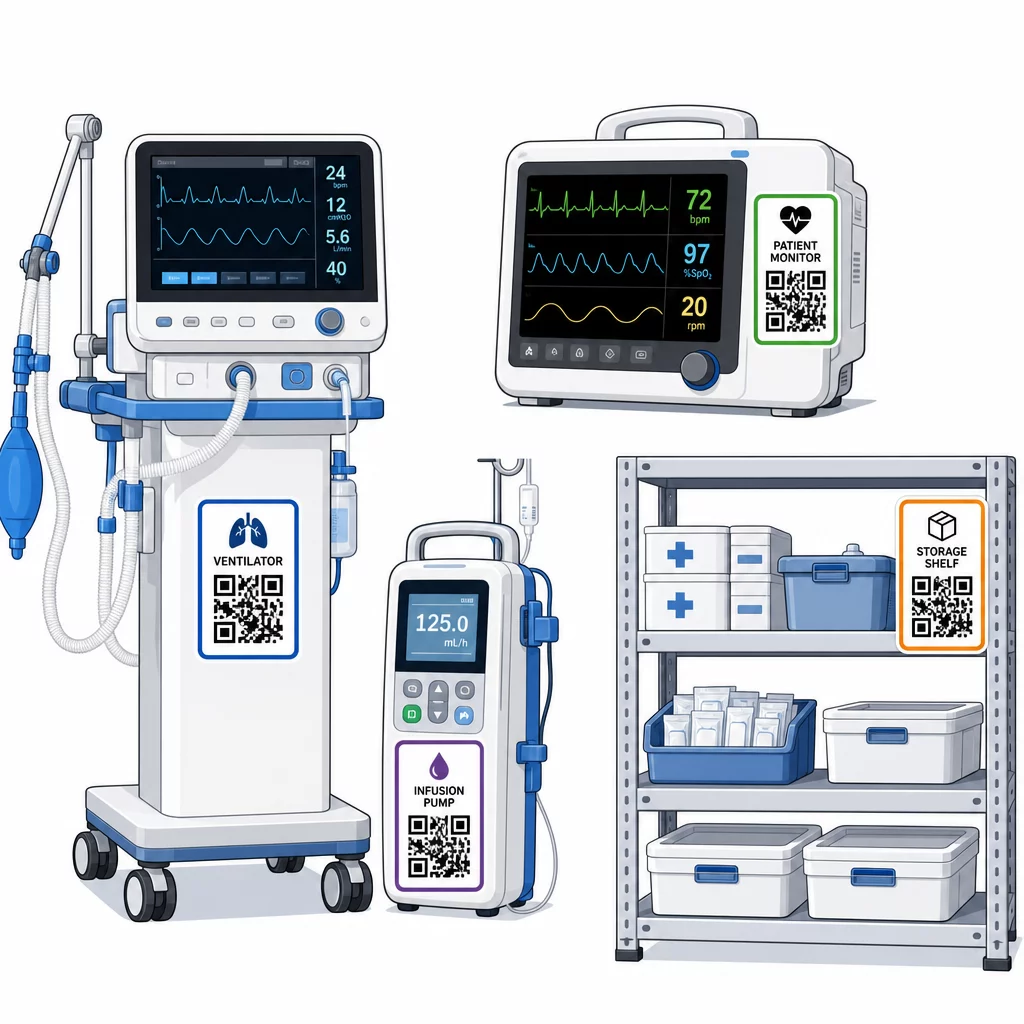
Placement consistency matters. Choose a standard location for each equipment category: head rails for mobile beds and IV poles, eye level for wall-mounted monitors, a visible flat surface on portable devices. Consistency reduces the time staff spend locating the code on an unfamiliar device.
Spare parts and components. Tag critical spare parts with codes that link to inventory levels, expiration dates, and compatibility information. This prevents components from being used past their service life or applied to incompatible equipment.
Storage locations. Attach codes to storage rooms, equipment bays, and supply closets. When staff scan a storage location code, they can immediately see what should be there, what is missing, and when assets were last moved. This creates a digital map of facility assets that supports faster emergency response and reduces over-ordering.
For additional guidance on tagging physical assets at scale, the panduan utama kode QR untuk layanan kesehatan covers implementation across multiple healthcare use cases.
Training Staff to Use QR Code Systems Effectively
Technology only works if the people using it trust it and know how to use it. Role-based training ensures each team member learns what they actually need without being overwhelmed by features irrelevant to their workflow.
- Nurses and technicians need to know how to scan codes to check equipment status, view maintenance alerts, and report issues
- Biomedical engineers need to update maintenance records, manage transfers, and generate compliance reports
- Maintenance staff use codes to log completed services and access technical documentation
- Administrative teams focus on reporting, user permission management, and system oversight
Provide quick-reference cards for the most common actions – checking a maintenance schedule, reporting a fault, accessing a user manual – and post them near scanning stations or equipment storage areas.
Designate QR code administrators in each department: team members who can troubleshoot scanning issues, approve updates, and answer questions from colleagues. Set up a simple feedback channel so staff can flag problems or request additional training as workflows evolve.
Analytics, Security, and Compliance
Using Scan Data to Improve Operations
Every scan generates data. Used well, this data moves asset management from reactive to predictive. Analytics can help you:
- Identify which devices are scanned unusually often during a shift – a potential signal of performance issues
- Spot equipment that is consistently idle in one department while another experiences shortages, enabling reallocation before a shortage affects care
- Build a maintenance history that justifies adjustments to service intervals for non-critical equipment, as CMS permits when sufficient maintenance history exists
- Assess return on investment by tracking equipment usage against procurement and maintenance costs
Security Considerations
QR codes in clinical environments introduce security risks that deserve deliberate attention. Attackers can place counterfeit QR stickers over legitimate codes, redirecting staff or patients to malicious destinations – a practice known as “quishing.” Because the destination of a QR code is not visible before scanning, users may not detect the substitution.
To reduce these risks:
- Use role-based access controls so only authorized personnel can view or edit sensitive records
- Ensure all data exchanged between codes, mobile devices, and hospital systems is encrypted via HTTPS
- Enforce mobile device management (MDM) policies – screen locks, remote wipe, restricted app installations – on devices used for scanning
- Maintain comprehensive audit logs: every scan and every data change should be timestamped and attributed to a specific user
- Restrict QR code management to approved platforms that offer business associate agreements if PHI is involved
Do not embed PHI in plaintext within the QR code itself. Anyone with a scanner can decode it. Instead, link to authenticated, access-controlled records that require credentials to view.
Maintaining and Auditing QR Code Labels
Routine Inspections
Physical labels degrade. Build label inspection into regular equipment rounds: check for scratches, fading, peeling edges, and chemical wear from disinfectants. Devices that undergo frequent sterilization – surgical tools, ICU monitors – need more frequent checks. If a label is damaged and the code no longer scans cleanly, flag it for immediate replacement before it fails during a critical moment.
Test labels against your actual cleaning protocols, not just manufacturer specifications. If a particular disinfectant consistently causes early label failure, either switch to a more resistant material or adjust the cleaning approach for labeled surfaces while maintaining infection control standards.
Track label lifespans by equipment category. If ventilator labels in your ICU typically need replacement every six months, schedule that replacement proactively rather than waiting for failures.
Inventory Audits
Physical label integrity and data accuracy are separate problems that require separate checks. Conduct inventory audits at minimum quarterly, with higher-frequency spot checks in critical care units, emergency departments, and surgical suites where equipment turnover is rapid.
Common audit findings include incorrect location data, maintenance records that were not updated after a service visit, and assets still listed in the system that have been transferred or retired. When discrepancies are found, update the records immediately and document the correction with a timestamp.
Thorough audit documentation serves a dual purpose: it supports regulatory inspections and it surfaces systemic issues – such as a department that consistently skips scanning protocols – that can be addressed through additional training or process adjustments.
Memulai
QR code tracking works best when it is introduced incrementally. Begin with your highest-priority equipment – devices where a maintenance lapse or location gap poses the greatest patient safety risk – and expand coverage as your team builds familiarity with the system.
Focus first on getting labels right: durable materials, correct sizing, consistent placement, and tested scannability under your actual operating conditions. Once the physical layer is solid, integrate with your CMMS and inventory systems, then layer in analytics and automated alerts.
Menggunakan pembuat kode QR gratis to prototype labels and test workflows before committing to a full deployment, and use the Pemindai kode QR to verify that codes scan reliably across the devices your staff use every day.
Start Tracking Medical Equipment with Dynamic QR Codes Create editable, trackable codes for every asset in your facility with the Generator Kode QR Dinamis – update records in real time, no reprinting required.
Pertanyaan yang Sering Diajukan
A static QR code encodes a fixed destination that cannot be changed after printing. A dynamic QR code points to a redirect link that can be updated at any time – so the physical label stays on the device while the linked maintenance records, calibration data, or documentation are revised digitally. For medical equipment, dynamic codes are strongly preferred because device records change frequently, and reprinting labels every time information is updated would be impractical and costly.
CMS requires that critical medical equipment be maintained on manufacturer-recommended schedules and that all maintenance be performed by qualified personnel and thoroughly documented. QR codes support this by creating a timestamped audit trail of every scan, every maintenance update, and every record change. When an inspector asks for the maintenance history of a specific device, staff can produce it with a single scan rather than searching through paper files or multiple disconnected systems.
Key precautions include using encrypted HTTPS connections for all data exchanged through QR-linked systems, implementing role-based access controls so staff only see information relevant to their role, never embedding protected health information in plaintext within the QR code itself, enforcing mobile device management policies on scanning devices, and conducting regular audits of QR code labels to check for tampering or counterfeit stickers placed over legitimate codes. Any third-party QR platform used should have a business associate agreement in place if it handles PHI.