Управлението на медицинско оборудване в натоварено съоръжение е по-трудно, отколкото звучи. Когато устройства изчезнат, записите за поддръжка изостават или персоналът губи време в търсене на критични инструменти, грижата за пациентите страда. Това ръководство обяснява как да се внедри проследяване на медицинско оборудване с QR код – от избора на правилната платформа до поддържането на етикетите и спазването на изискванията.
Защо проследяването с QR код е смислено за медицинско оборудване
Ръчните инвентарни процеси – клипбордове, електронни таблици, хартиени дневници за поддръжка – създават пропуски. Оборудването се губи, прозорците за поддръжка се пропускат, а документацията за съответствие става трудна за бърза проверка. QR кодовете преодоляват тези пропуски, като свързват всяко физическо устройство с актуален цифров запис, до който персоналът може да получи достъп за секунди със стандартен смартфон.
За разлика от традиционните баркодове, QR кодът може да съхранява много повече информация в компактен формат. Когато е поставен на вентилатор, инфузионна помпа или преносим монитор, QR кодът може незабавно да покаже:
- Историята на поддръжката на устройството и следващата планирана дата за обслужване
- Записи за калибриране и документация за съответствие
- Ръководства за потребителя или видеоклипове за настройка
- Текущо местоположение и назначен отдел
- Сигнали за неизправности или необходими замени
Този вид незабавен достъп е точно това, което QR кодове за болници и здравеопазване моделът за внедряване е предназначен да поддържа.
От гледна точка на съответствието, Центровете за услуги по Medicare и Medicaid (CMS) изискват критичното оборудване – животоподдържащи устройства, ключово реанимационно оборудване, критични мониторингови устройства – да се поддържа съгласно графиците на производителя и цялата поддръжка да се извършва от квалифициран персонал и да бъде щателно документирана. Системите с QR кодове създават естествена одитна следа, която улеснява управлението и демонстрирането на тези изисквания по време на проверки.
Избор на платформа за QR кодове за здравеопазване
Не всеки инструмент за QR кодове е създаден за изискванията на клинична среда. При оценката на платформите, приоритизирайте следното:
Сигурност и съответствие с HIPAA. Всяка платформа, която обработва защитена здравна информация (PHI), трябва да спазва правилата на HIPAA за поверителност, сигурност и уведомяване при пробив. Търсете криптиран пренос на данни, сигурно облачно съхранение, контроли за достъп, базирани на роли, и автоматични изтичания на сесии. Платформата трябва също така да поддържа споразумения с бизнес партньори, ако PHI преминава през нея.
Динамични QR кодове. За разлика от статичните кодове, динамичните QR кодове могат да бъдат актуализирани след отпечатването им. Както обяснява Pageloot, динамичният код “може да бъде променян дори след като е генериран и отпечатан”, което ви позволява да променяте свързано съдържание или целеви URL адреси по всяко време, без да подменяте физическия етикет. За медицинско оборудване, което претърпява чести софтуерни актуализации, промени в графика или регулаторни ревизии, това е от съществено значение.
Анализи в реално време. Възможността да се проследява кога и къде се сканират кодовете дава на биомедицинските екипи видимост върху моделите на използване на оборудването, помага за отбелязване на устройства, които може да се нуждаят от внимание, и подпомага решенията за разпределение на ресурсите. Показатели като брой сканирания, местоположение и тип устройство допринасят за по-интелигентно планиране на поддръжката.
Системна интеграция. Платформата трябва да се свързва с вашата съществуваща система за електронни здравни досиета (EHR), компютъризирана система за управление на поддръжката (CMMS) или база данни за активи чрез API. Когато биомедицински инженер завърши поддръжка на инфузионна помпа, тази актуализация трябва да се разпространи автоматично – не е необходимо дублиране на въвеждането.
Удобен за потребителя интерфейс. Здравните работници се нуждаят от инструменти, които изискват минимално обучение. Изчистено табло за управление, което позволява на персонала да създава, актуализира и управлява кодове, без да нарушава работния им процес, заслужава да бъде приоритизирано.
Проследявайте всеки актив от едно табло за управление Използвай Динамичен QR код генератор за създаване на редактируеми, проследяеми кодове за вашето медицинско оборудване и управление на всички актуализации от едно място.
Проектиране на QR кодове, които работят в клинични условия
QR кодовете в болниците са изправени пред условия, които бързо биха влошили стандартен етикет: болнични дезинфектанти, често боравене, пара и променливо осветление. Добрият дизайн отчита всичко това, преди да бъде отпечатан един етикет.
Размер и контраст
QR код, който е твърде малък, няма да се сканира надеждно, особено когато персоналът носи ръкавици или работи при слаба светлина. Следвайте тези указания за оразмеряване:
- Минимален размер: 0.8 x 0.8 инча (2 x 2 см) за прости данни като URL адрес
- Препоръчителен размер за сложни данни: поне 1.2 x 1.2 инча (3 x 3 см)
- Съотношение на разстоянието за сканиране: приложете правилото 10:1 – ако кодът ще бъде сканиран от 10 инча разстояние, той трябва да е широк поне 1 инч
За контраст използвайте тъмни шарки върху светъл фон и поддържайте контрастно съотношение от поне 4:1 между кода и неговия фон. Избягвайте цветови комбинации, които намаляват четливостта при флуоресцентно осветление или когато се гледат през камера с ограничен динамичен обхват. Можете да намерите допълнителни насоки в Pageloot’s най-добрите практики за четливост на QR кодовете.
Тихи зони и поставяне на лого
Оставете ясна граница – наричана “тиха зона” – с ширина поне четири пъти ширината на един модул около кода. Това предотвратява смущения от околния текст, етикети на оборудване или повърхностни текстури при четенето на кода от скенера.
Ако включите лого на болница, запазете го до не повече от 20% от площта на кода и го позиционирайте централно. Използвайте високо ниво на корекция на грешки (Q или H), когато добавяте лога, тъй като тези нива позволяват кодът да остане четим, дори ако част от него е скрита.
Издръжливи материали за етикети
Стандартните хартиени етикети не са подходящи за болнична употреба. Те се разграждат при излагане на почистващи химикали, влага и постоянно боравене. Вместо това използвайте:
- Полиестерни етикети: издържат на силни дезинфектанти и температури от -40°F до 300°F
- Винилови етикети с медицински лепила: отлична химическа устойчивост; проектирани да залепват към повърхности от неръждаема стомана, пластмаса и боядисан метал без отлепване
- Ламинирани етикети: добавят устойчивост на надраскване и влага, въпреки че трябва да се провери дали ламинатът не създава отблясъци, които пречат на сканирането
Преди да направите пълна поръчка, проведете двуседмичен полеви тест: приложете примерни етикети към представителни устройства, подложете ги на вашите стандартни протоколи за почистване и проверете за избледняване, отлепване или влошаване на сканирането.
Цветно кодирани системи
Помислете за използване на цветове на рамките, за да категоризирате оборудването с един поглед – например, червени рамки за аварийни устройства, сини за диагностично оборудване и зелени за общи консумативи. Този визуален слой помага на персонала бързо да намери правилния тип оборудване, без да се забавя, за да чете текстови етикети.
Настройване на динамични QR кодове за управление на активи
Динамичните QR кодове са особено подходящи за медицинско оборудване, тъй като данните, свързани с дадено устройство, се променят постоянно. Поддръжката е завършена, датите за калибриране се променят, фърмуерът се актуализира и документацията за съответствие се преразглежда. С динамичен код физическият етикет на устройството остава същият – променя се само свързаното съдържание.
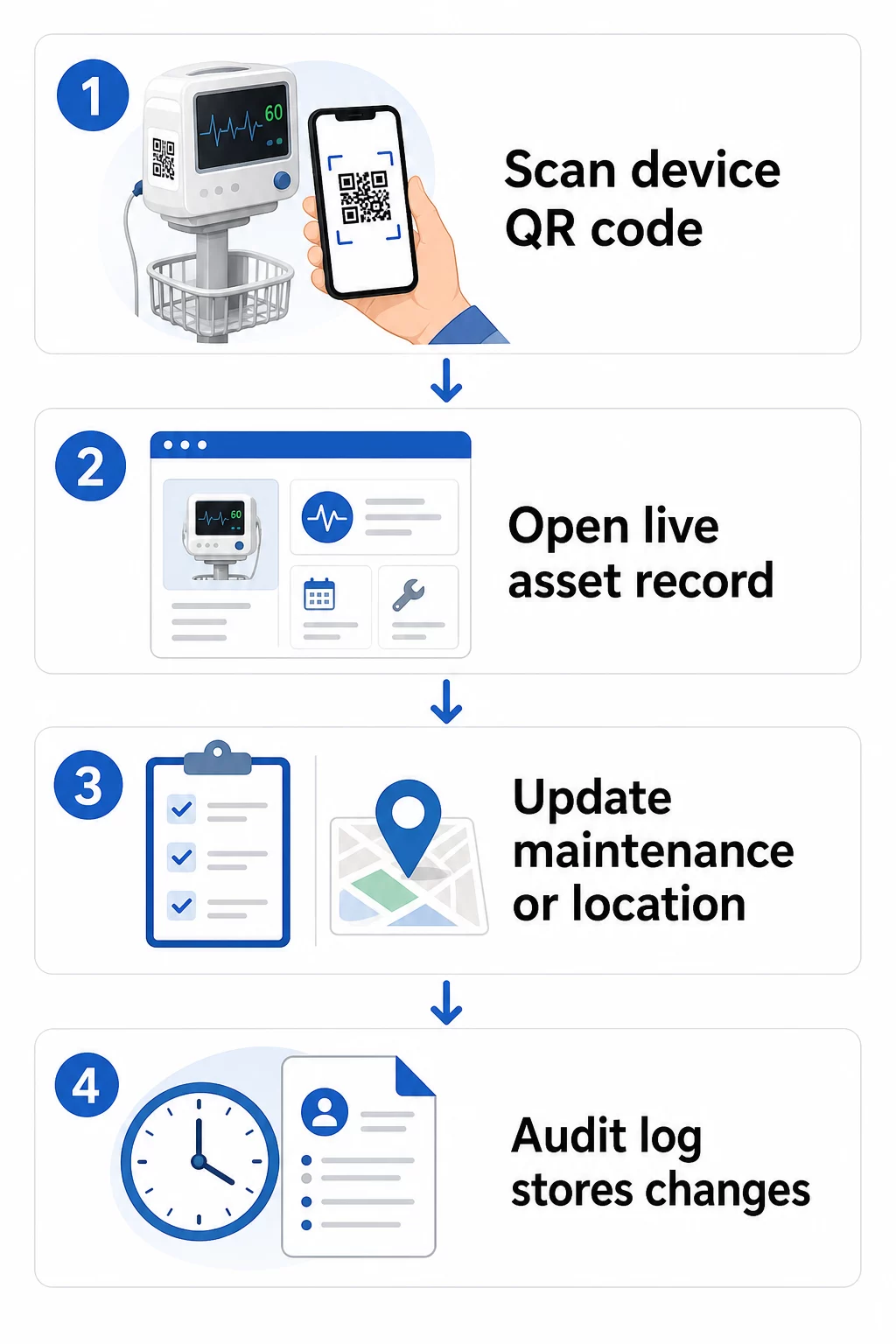
Ето един практичен работен процес за поддържане на актуални записи на оборудването:
- Влезте във вашето табло за управление и намерете кода, използвайки ID на оборудването на устройството или филтъра за отдел
- Редактирайте свързаната информация – актуализирайте дневниците за поддръжка, записите за калибриране, следващите дати за обслужване или свързаната документация
- Промените се прилагат незабавно, така че всеки служител, който сканира кода след това, вижда актуални данни
- Сканирайте кода, за да проверите дали актуализираната информация се показва правилно, преди да напуснете записа
- Прегледайте автоматичния одит лог, който отбелязва времето на всяка промяна и записва потребителя, който я е направил
За по-задълбочен поглед върху това как динамичните кодове обработват чести актуализации, вижте как да използвате QR кодове за инвентаризация на продукти и преглед на QR кодове за проследяване на жизнения цикъл на продукта, като и двете обхващат работни процеси за актуализация, приложими за управлението на активи в здравеопазването.
Поддържайте записите за оборудването актуални без препечатване На Динамичен QR код генератор позволява на вашия биомедицински екип да изпраща актуализации към всеки запис на устройство незабавно от уеб табло – не са необходими нови етикети.
Свързване на QR кодове към вашите системи за инвентаризация и поддръжка
QR кодовете предоставят най-голяма стойност, когато подават данни към вашата по-широка инфраструктура за управление на активи, вместо да функционират като самостоятелен слой. Точките за интеграция, които трябва да се имат предвид, включват:
CMMS интеграция. Когато техник сканира устройство след приключване на поддръжката, записът в CMMS трябва да се актуализира автоматично. Това елиминира ръчното въвеждане на данни и гарантира, че дневникът за поддръжка е винаги актуален.
EHR и работни процеси за безопасност на пациента. Ако устройство е свързано с пациентска стая или зона за грижи, сканирането на QR кода на оборудването може да покаже съответни предупреждения за безопасност, статус на изтегляне или флагове за съвместимост в рамките на съществуващите клинични системи.
Проследяване на местоположението. Всяко сканиране улавя местоположението на сканиращото устройство, давайки на администраторите актуална картина за това къде всъщност се намира мобилното оборудване спрямо това къде е записано, че се намира. Това намалява времето, прекарано в търсене на устройства и помага за идентифициране на модели в движението на оборудването между отделите.
Автоматизирани сигнали. Свържете данните от сканирането, за да задействате известия, когато устройство е просрочено за калибриране, когато актив с висока стойност не е бил сканиран необичайно дълго време или когато трябва бързо да се локализира група от изтеглени устройства.
За по-широк контекст относно това как QR кодовете поддържат проследимостта в сложни среди на активи, QR кодове за проследяване на веригата за доставки ръководството обхваща принципи за интеграция, които се пренасят директно към работните процеси с болнични активи.
Етикетиране на целия ви инвентар от активи
Системата за проследяване с QR кодове е толкова полезна, колкото е нейното покритие. Започнете с устройства с висока стойност и висок риск – ЯМР апарати, хирургически роботи, вентилатори, пациентски монитори – след това разширете до по-малко мобилно оборудване и в крайна сметка до консумативи и резервни части.
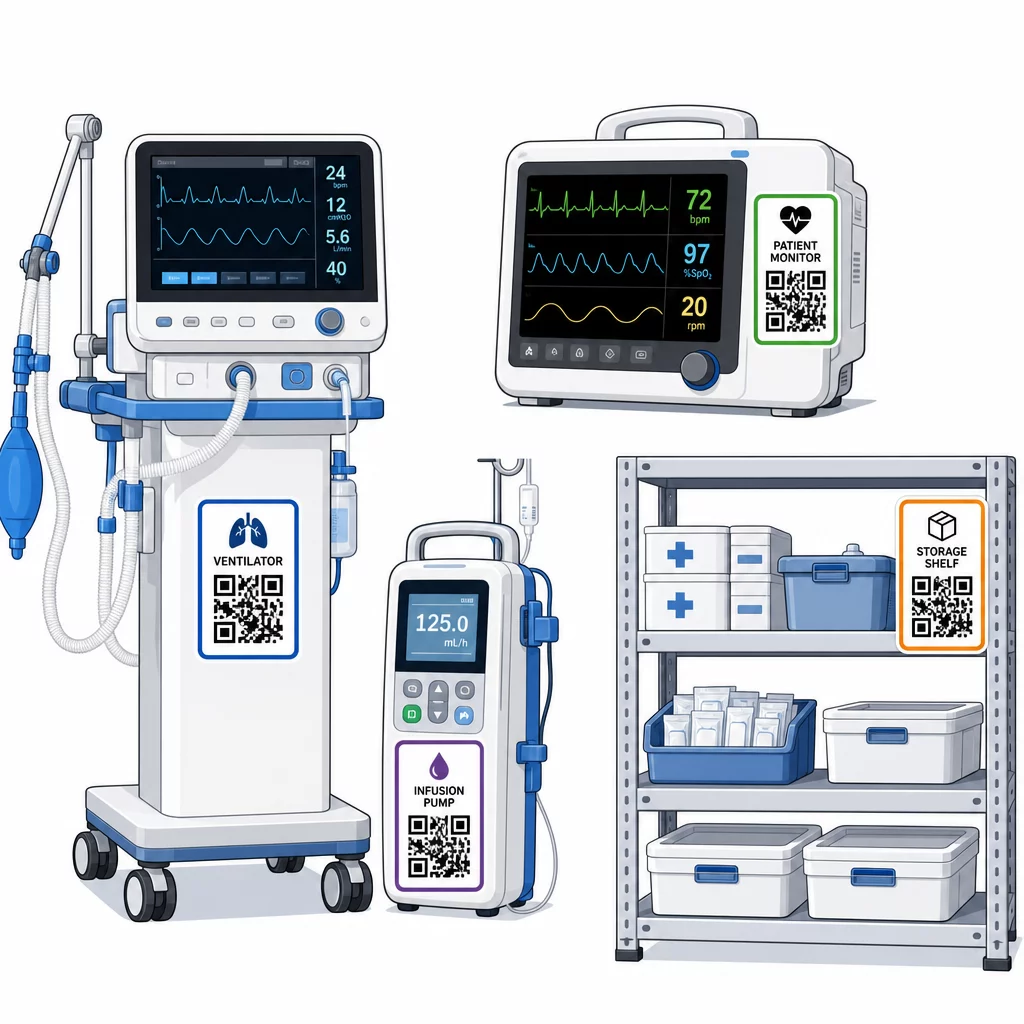
Последователността на поставяне е важна. Изберете стандартно място за всяка категория оборудване: странични релси за мобилни легла и инфузионни стойки, на нивото на очите за стенни монитори, видима равна повърхност на преносими устройства. Последователността намалява времето, което персоналът прекарва в намиране на кода на непознато устройство.
Резервни части и компоненти. Маркирайте критичните резервни части с кодове, които водят до нива на инвентара, срокове на годност и информация за съвместимост. Това предотвратява използването на компоненти след техния експлоатационен живот или прилагането им към несъвместимо оборудване.
Места за съхранение. Прикрепете кодове към складови помещения, отделения за оборудване и складове за консумативи. Когато персоналът сканира код на място за съхранение, той може незабавно да види какво трябва да има там, какво липсва и кога активите са били преместени за последно. Това създава цифрова карта на активите на съоръжението, която подпомага по-бързата реакция при извънредни ситуации и намалява прекомерните поръчки.
За допълнителни насоки относно маркирането на физически активи в голям мащаб, пълно ръководство за QR кодове за здравеопазване обхваща внедряване в множество случаи на употреба в здравеопазването.
Обучение на персонала за ефективно използване на QR код системи
Технологията работи само ако хората, които я използват, ѝ вярват и знаят как да я използват. Обучението, базирано на роли, гарантира, че всеки член на екипа научава това, от което наистина се нуждае, без да бъде претоварен от функции, които са без значение за неговия работен процес.
- Медицински сестри и техници трябва да знаят как да сканират кодове, за да проверяват състоянието на оборудването, да преглеждат предупреждения за поддръжка и да докладват проблеми.
- Биомедицински инженери трябва да актуализират записи за поддръжка, да управляват трансфери и да генерират доклади за съответствие
- Персонал по поддръжката използват кодове за регистриране на извършени услуги и достъп до техническа документация
- Административни екипи се фокусират върху отчитането, управлението на потребителските разрешения и надзора на системата
Осигурете карти за бърза справка за най-честите действия – проверка на график за поддръжка, докладване на повреда, достъп до ръководство за потребителя – и ги поставете близо до станции за сканиране или зони за съхранение на оборудване.
Определете администратори на QR кодове във всеки отдел: членове на екипа, които могат да отстраняват проблеми със сканирането, да одобряват актуализации и да отговарят на въпроси от колеги. Създайте прост канал за обратна връзка, така че персоналът да може да сигнализира за проблеми или да поиска допълнително обучение, докато работните процеси се развиват.
Анализи, сигурност и съответствие
Използване на данни от сканиране за подобряване на операциите
Всяко сканиране генерира данни. Използвани добре, тези данни преместват управлението на активите от реактивно към предсказуемо. Анализите могат да ви помогнат да:
- Идентифицирате кои устройства се сканират необичайно често по време на смяна – потенциален сигнал за проблеми с производителността
- Откривате оборудване, което постоянно е бездействащо в един отдел, докато друг изпитва недостиг, което позволява преразпределение, преди недостигът да повлияе на грижите
- Изградите история на поддръжката, която оправдава корекции на интервалите за обслужване на некритично оборудване, както CMS позволява, когато съществува достатъчна история на поддръжката
- Оцените възвръщаемостта на инвестициите, като проследявате използването на оборудването спрямо разходите за придобиване и поддръжка
Съображения за сигурност
QR кодовете в клинични среди въвеждат рискове за сигурността, които заслужават целенасочено внимание. Атакуващите могат да поставят фалшиви QR стикери върху легитимни кодове, пренасочвайки персонал или пациенти към злонамерени дестинации – практика, известна като “куишинг”. Тъй като дестинацията на QR кода не е видима преди сканиране, потребителите може да не открият подмяната.
За да намалите тези рискове:
- Използвайте контроли за достъп, базирани на роли, така че само оторизиран персонал да може да преглежда или редактира чувствителни записи
- Уверете се, че всички данни, обменяни между кодове, мобилни устройства и болнични системи, са криптирани чрез HTTPS
- Прилагайте политики за управление на мобилни устройства (MDM) – заключване на екрана, дистанционно изтриване, ограничени инсталации на приложения – на устройства, използвани за сканиране
- Поддържайте изчерпателни одиторски дневници: всяко сканиране и всяка промяна на данни трябва да бъдат с времеви печат и приписани на конкретен потребител
- Ограничете управлението на QR кодове до одобрени платформи, които предлагат споразумения с бизнес партньори, ако е замесена защитена здравна информация (PHI)
Не вграждайте защитена здравна информация (PHI) в чист текст в самия QR код. Всеки със скенер може да го декодира. Вместо това, свържете към удостоверени, контролирани за достъп записи, които изискват идентификационни данни за преглед.
Поддържане и одитиране на етикети с QR кодове
Рутинни инспекции
Физическите етикети се разграждат. Включете проверката на етикетите в редовните обходи на оборудването: проверявайте за драскотини, избледняване, отлепващи се ръбове и химическо износване от дезинфектанти. Устройствата, които преминават честа стерилизация – хирургически инструменти, монитори за интензивно отделение – се нуждаят от по-чести проверки. Ако етикетът е повреден и кодът вече не се сканира чисто, отбележете го за незабавна подмяна, преди да се повреди в критичен момент.
Тествайте етикетите спрямо вашите действителни протоколи за почистване, а не само спрямо спецификациите на производителя. Ако определен дезинфектант постоянно причинява преждевременна повреда на етикета, или преминете към по-устойчив материал, или коригирайте подхода за почистване на етикетираните повърхности, като същевременно поддържате стандартите за контрол на инфекциите.
Проследявайте живота на етикетите по категория оборудване. Ако етикетите на вентилаторите във вашето интензивно отделение обикновено се нуждаят от подмяна на всеки шест месеца, планирайте тази подмяна проактивно, вместо да чакате повреди.
Инвентарни одити
Физическата цялост на етикета и точността на данните са отделни проблеми, които изискват отделни проверки. Провеждайте инвентарни одити най-малко на тримесечие, с по-чести внезапни проверки в отделенията за интензивно лечение, спешните отделения и операционните зали, където оборотът на оборудването е бърз.
Често срещани констатации от одита включват неточни данни за местоположението, записи за поддръжка, които не са актуализирани след сервизно посещение, и активи, които все още са в системата, но са прехвърлени или изведени от експлоатация. Когато се открият несъответствия, актуализирайте записите незабавно и документирайте корекцията с времеви печат.
Подробната одитна документация служи за двойна цел: тя подпомага регулаторните проверки и разкрива системни проблеми – като например отдел, който постоянно пропуска протоколи за сканиране – които могат да бъдат отстранени чрез допълнително обучение или корекции на процесите.
Първи стъпки
Проследяването с QR кодове работи най-добре, когато се въвежда постепенно. Започнете с оборудването с най-висок приоритет – устройства, при които пропуск в поддръжката или липса на местоположение представлява най-голям риск за безопасността на пациентите – и разширете покритието, докато екипът ви свикне със системата.
Първо се съсредоточете върху правилните етикети: издръжливи материали, правилен размер, последователно поставяне и тествана възможност за сканиране при вашите реални работни условия. След като физическият слой е стабилен, интегрирайте със системите си за CMMS и инвентаризация, след което добавете анализи и автоматизирани сигнали.
Използвай Безплатен QR Code Generator за прототипиране на етикети и тестване на работни процеси, преди да се ангажирате с пълно внедряване, и използвайте Сканиране на QR код за да проверите дали кодовете се сканират надеждно на всички устройства, които персоналът ви използва всеки ден.
Започнете да проследявате медицинско оборудване с динамични QR кодове Създайте редактируеми, проследими кодове за всеки актив във вашето съоръжение с Динамичен QR код генератор – актуализирайте записите в реално време, не е необходимо препечатване.
Често задавани въпроси
Статичен QR код кодира фиксирана дестинация, която не може да бъде променяна след отпечатване. Динамичен QR код сочи към пренасочваща връзка, която може да бъде актуализирана по всяко време – така че физическият етикет остава върху устройството, докато свързаните записи за поддръжка, данни за калибриране или документация се ревизират цифрово. За медицинско оборудване динамичните кодове са силно предпочитани, тъй като записите на устройствата се променят често, а препечатването на етикети всеки път, когато информацията се актуализира, би било непрактично и скъпо.
CMS изисква критичното медицинско оборудване да се поддържа по графици, препоръчани от производителя, и цялата поддръжка да се извършва от квалифициран персонал и да бъде щателно документирана. QR кодовете подпомагат това, като създават одитна следа с времеви печат за всяко сканиране, всяка актуализация на поддръжката и всяка промяна на записа. Когато инспектор поиска историята на поддръжката на конкретно устройство, персоналът може да я предостави с едно сканиране, вместо да търси в хартиени досиета или множество несвързани системи.
Основните предпазни мерки включват използване на криптирани HTTPS връзки за всички данни, обменяни чрез системи, свързани с QR кодове, въвеждане на контроли за достъп, базирани на роли, така че персоналът да вижда само информация, свързана с тяхната роля, никога да не се вгражда защитена здравна информация в обикновен текст в самия QR код, прилагане на политики за управление на мобилни устройства на сканиращите устройства и провеждане на редовни одити на етикетите с QR кодове за проверка за подправяне или фалшиви стикери, поставени върху легитимни кодове. Всяка използвана QR платформа на трета страна трябва да има сключено споразумение за бизнес сътрудничество, ако обработва ЗЗИ.