Upravljanje medicinskom opremom u užurbanoj ustanovi teže je nego što zvuči. Kada uređaji nestanu, evidencija održavanja zaostaje ili osoblje gubi vrijeme tražeći kritične alate, pati skrb o pacijentima. Ovaj vodič objašnjava kako implementirati praćenje medicinske opreme putem QR kodova – od odabira prave platforme do održavanja naljepnica i ostajanja usklađenim.
Zašto praćenje putem QR kodova ima smisla za medicinsku opremu
Ručni procesi inventure – bilježnice, proračunske tablice, papirnati dnevnici održavanja – stvaraju praznine. Oprema se zagubi, propuštaju se rokovi održavanja, a dokumentaciju o usklađenosti postaje teško brzo provjeriti. QR kodovi rješavaju te praznine povezivanjem svakog fizičkog uređaja sa živim digitalnim zapisom kojem osoblje može pristupiti u sekundama pomoću standardnog pametnog telefona.
Za razliku od tradicionalnih bar kodova, QR kod može pohraniti mnogo više informacija u kompaktnom formatu. Kada se postavi na respirator, infuzijsku pumpu ili prijenosni monitor, QR kod može odmah prikazati:
- Povijest održavanja uređaja i sljedeći zakazani datum servisa
- Zapise o kalibraciji i dokumentaciju o usklađenosti
- Korisničke priručnike ili videozapise za postavljanje
- Trenutnu lokaciju i dodijeljeni odjel
- Upozorenja za kvarove ili potrebne zamjene
Ova vrsta trenutnog pristupa je upravo ono što QR kodovi za bolnice i zdravstvo model implementacije je osmišljen da podrži.
S gledišta usklađenosti, Centri za Medicare i Medicaid usluge (CMS) zahtijevaju da se kritična oprema – uređaji za održavanje života, ključna oprema za reanimaciju, kritični uređaji za praćenje – održava prema rasporedu proizvođača, te da sve održavanje obavlja kvalificirano osoblje i temeljito dokumentira. Sustavi QR kodova stvaraju prirodan revizijski trag koji olakšava upravljanje i dokazivanje ispunjavanja ovih zahtjeva tijekom inspekcija.
Odabir platforme za QR kodove za zdravstvo
Nije svaki alat za QR kodove izgrađen za zahtjeve kliničkog okruženja. Prilikom procjene platformi, dajte prednost sljedećem:
Sigurnost i usklađenost s HIPAA-om. Svaka platforma koja obrađuje zaštićene zdravstvene informacije (PHI) mora biti usklađena s HIPAA pravilima o privatnosti, sigurnosti i obavještavanju o povredama. Potražite šifrirani prijenos podataka, sigurnu pohranu u oblaku, kontrole pristupa temeljene na ulogama i automatsko istjecanje sesije. Platforma bi također trebala podržavati ugovore s poslovnim suradnicima ako PHI prolazi kroz nju.
Dinamički QR kodovi. Za razliku od statičkih kodova, dinamički QR kodovi mogu se ažurirati nakon što su ispisani. Kao što Pageloot objašnjava, dinamički kod “može se mijenjati čak i nakon što je generiran i ispisan”, omogućujući vam da u bilo kojem trenutku promijenite povezani sadržaj ili odredišne URL-ove bez zamjene fizičke naljepnice. Za medicinsku opremu koja prolazi česta ažuriranja softvera, promjene rasporeda ili regulatorne revizije, to je ključno.
Analitika u stvarnom vremenu. Mogućnost praćenja kada i gdje se kodovi skeniraju pruža biomedicinskim timovima uvid u obrasce korištenja opreme, pomaže u označavanju uređaja kojima je možda potrebna pažnja i podržava odluke o raspodjeli resursa. Metrike poput broja skeniranja, lokacije i vrste uređaja doprinose pametnijem planiranju održavanja.
Integracija sustava. Platforma bi se trebala povezati s vašim postojećim sustavom elektroničkih zdravstvenih zapisa (EHR), računalnim sustavom za upravljanje održavanjem (CMMS) ili bazom podataka o imovini putem API-ja. Kada biomedicinski inženjer završi održavanje infuzijske pumpe, to bi se ažuriranje trebalo automatski proširiti – nije potreban dupli unos.
Sučelje prilagođeno korisniku. Zdravstveni radnici trebaju alate koji zahtijevaju minimalnu obuku. Čista nadzorna ploča koja osoblju omogućuje stvaranje, ažuriranje i upravljanje kodovima bez ometanja njihovih radnih procesa vrijedna je prioriteta.
Pratite svu imovinu s jedne nadzorne ploče Koristiti Dinamični QR kod generator za stvaranje kodova za vašu medicinsku opremu koji se mogu uređivati i pratiti te za upravljanje svim ažuriranjima s jednog mjesta.
Dizajniranje QR kodova koji funkcioniraju u kliničkim uvjetima
QR kodovi u bolnicama suočavaju se s uvjetima koji bi brzo degradirali standardnu naljepnicu: bolnički dezinficijensi, često rukovanje, para i promjenjiva rasvjeta. Dobar dizajn uzima u obzir sve to prije nego što se ispiše ijedna naljepnica.
Veličina i kontrast
QR kod koji je premalen neće se pouzdano skenirati, pogotovo kada osoblje nosi rukavice ili radi pri slabom osvjetljenju. Slijedite ove smjernice za veličinu:
- Minimalna veličina: 0.8 x 0.8 inča (2 x 2 cm) za jednostavne podatke poput URL-a
- Preporučena veličina za složene podatke: najmanje 1,2 x 1,2 inča (3 x 3 cm)
- Omjer udaljenosti skeniranja: primijenite pravilo 10:1 – ako će se kod skenirati s udaljenosti od 10 inča, trebao bi biti širok najmanje 1 inč
Za kontrast koristite tamne uzorke na svijetlim pozadinama i održavajte omjer kontrasta od najmanje 4:1 između koda i njegove pozadine. Izbjegavajte kombinacije boja koje smanjuju čitljivost pod fluorescentnom rasvjetom ili kada se gledaju kroz kameru s ograničenim dinamičkim rasponom. Dodatne smjernice možete pronaći u Pagelootovom najbolje prakse za čitljivost QR koda.
Tihe zone i postavljanje logotipa
Ostavite jasan rub – nazvan “tihom zonom” – širine najmanje četiri puta veće od širine jednog modula oko koda. To sprječava da okolni tekst, naljepnice opreme ili površinske teksture ometaju sposobnost skenera da pročita kod.
Ako uključite logotip bolnice, neka ne zauzima više od 20% površine koda i postavite ga centralno. Koristite visoku razinu ispravljanja pogrešaka (Q ili H) prilikom dodavanja logotipa, budući da te razine omogućuju da kod ostane čitljiv čak i ako je dio zaklonjen.
Izdržljivi materijali za naljepnice
Standardne papirnate naljepnice nisu prikladne za bolničku upotrebu. One se degradiraju kada su izložene kemikalijama za čišćenje, vlazi i stalnom rukovanju. Umjesto toga, koristite:
- Poliesterske naljepnice: podnose jaka dezinfekcijska sredstva i temperature od -40°F do 300°F
- Vinilne naljepnice s ljepilima medicinske kvalitete: izvrsna kemijska otpornost; dizajnirane za lijepljenje na nehrđajući čelik, plastiku i obojene metalne površine bez odljepljivanja
- Laminirane naljepnice: dodaju otpornost na ogrebotine i vlagu, iako provjerite da laminat ne stvara odsjaj koji ometa skeniranje
Prije nego što se obvežete na punu narudžbu, provedite dvotjedno terensko testiranje: primijenite uzorke naljepnica na reprezentativne uređaje, podvrgnite ih svojim standardnim protokolima čišćenja i provjerite ima li blijeđenja, ljuštenja ili degradacije skeniranja.
Sustavi kodirani bojama
Razmislite o korištenju boja obruba za brzu kategorizaciju opreme – na primjer, crveni obrubi za uređaje za hitne slučajeve, plavi za dijagnostičku opremu i zeleni za opće potrepštine. Ovaj vizualni sloj pomaže osoblju da brzo pronađe pravu vrstu opreme bez usporavanja radi čitanja tekstualnih naljepnica.
Postavljanje dinamičkih QR kodova za upravljanje imovinom
Dinamički QR kodovi posebno su prikladni za medicinsku opremu jer se podaci povezani s uređajem stalno mijenjaju. Održavanje je završeno, datumi kalibracije se mijenjaju, firmware se ažurira, a dokumentacija o usklađenosti se revidira. S dinamičkim kodom, fizička naljepnica na uređaju ostaje ista – mijenja se samo povezani sadržaj.
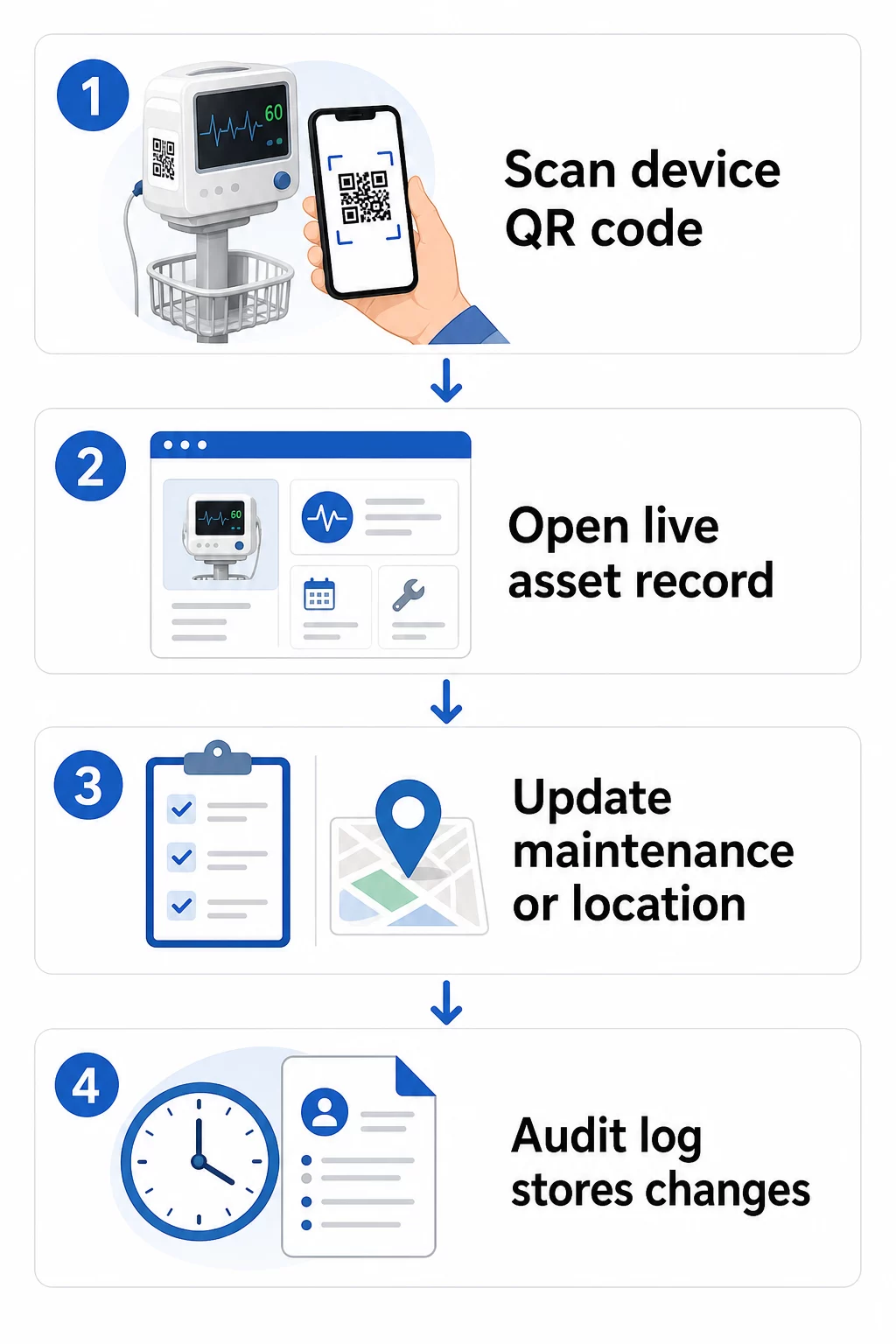
Evo praktičnog tijeka rada za održavanje ažurnih zapisa o opremi:
- Prijavite se na svoju upravljačku nadzornu ploču i pronađite kod pomoću ID-a opreme uređaja ili filtra odjela
- Uredite povezane informacije – ažurirajte dnevnike održavanja, zapise o kalibraciji, datume sljedećeg servisa ili povezanu dokumentaciju
- Promjene se primjenjuju odmah, tako da svaki član osoblja koji skenira kod nakon toga vidi trenutne podatke
- Skenirajte kod za provjeru da se ažurirane informacije ispravno prikazuju prije napuštanja zapisa
- Pregledajte automatski zapis revizije, koji bilježi vrijeme svake promjene i korisnika koji ju je napravio
Za dublji uvid u to kako dinamički kodovi obrađuju česta ažuriranja, pogledajte kako koristiti QR kodove za inventar proizvoda i pregled QR kodovi za praćenje životnog ciklusa proizvoda, a oba pokrivaju radne tokove ažuriranja primjenjive na upravljanje imovinom u zdravstvu.
Održavajte evidenciju opreme ažurnom bez ponovnog ispisa The Dinamični QR kod generator omogućuje vašem biomedicinskom timu da trenutno šalje ažuriranja bilo kojem zapisu uređaja s web nadzorne ploče – nisu potrebne nove naljepnice.
Povezivanje QR kodova s vašim sustavima inventara i održavanja
QR kodovi donose najveću vrijednost kada unose podatke u vašu širu infrastrukturu za upravljanje imovinom, umjesto da funkcioniraju kao samostalni sloj. Točke integracije koje treba uzeti u obzir uključuju:
CMMS integracija. Kada tehničar skenira uređaj nakon završetka održavanja, CMMS zapis bi se trebao automatski ažurirati. To eliminira ručni unos podataka i osigurava da je dnevnik održavanja uvijek ažuran.
EHR i radni tokovi sigurnosti pacijenata. Ako je uređaj povezan s pacijentovom sobom ili područjem skrbi, skeniranje QR koda opreme moglo bi prikazati relevantna sigurnosna upozorenja, status opoziva ili zastavice kompatibilnosti unutar postojećih kliničkih sustava.
Praćenje lokacije. Svako skeniranje bilježi lokaciju uređaja za skeniranje, dajući administratorima stalnu sliku o tome gdje se mobilna oprema zapravo nalazi u odnosu na to gdje je zabilježeno da se nalazi. To smanjuje vrijeme provedeno u traženju uređaja i pomaže u prepoznavanju obrazaca kretanja opreme među odjelima.
Automatizirana upozorenja. Povežite podatke skeniranja kako biste pokrenuli obavijesti kada je uređaj prekoračio rok za kalibraciju, kada visokovrijedna imovina nije skenirana neuobičajeno dugo vremena ili kada je potrebno brzo locirati opozvanu populaciju uređaja.
Za širi kontekst o tome kako QR kodovi podržavaju sljedivost u složenim okruženjima imovine, QR kodovi za praćenje lanca opskrbe vodič pokriva principe integracije koji se izravno primjenjuju na radne procese bolničke imovine.
Označavanje cijelog inventara imovine
Sustav praćenja QR kodovima koristan je samo onoliko koliko je širok njegov obuhvat. Započnite s uređajima visoke vrijednosti i visokog rizika – MRI uređajima, kirurškim robotima, ventilatorima, monitorima pacijenata – zatim proširite na manju mobilnu opremu i na kraju na potrošni materijal i rezervne dijelove.
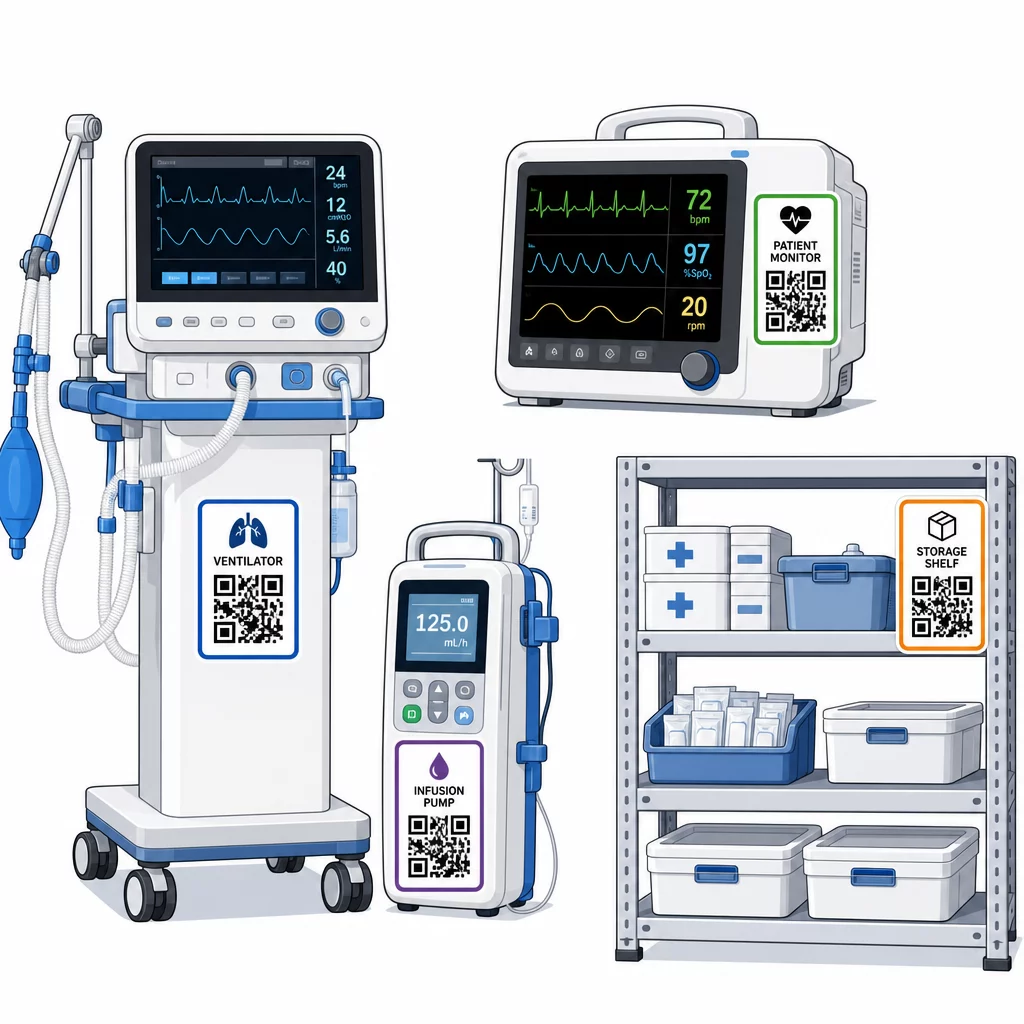
Dosljednost postavljanja je važna. Odaberite standardno mjesto za svaku kategoriju opreme: uzglavlja za mobilne krevete i stalke za infuziju, u razini očiju za zidne monitore, vidljivu ravnu površinu na prijenosnim uređajima. Dosljednost smanjuje vrijeme koje osoblje provodi tražeći kod na nepoznatom uređaju.
Rezervni dijelovi i komponente. Označite kritične rezervne dijelove kodovima koji povezuju razine zaliha, datume isteka i informacije o kompatibilnosti. To sprječava korištenje komponenti nakon isteka njihovog vijeka trajanja ili primjenu na nekompatibilnu opremu.
Lokacije skladištenja. Pričvrstite kodove na skladišne prostorije, odjeljke za opremu i ormare za opskrbu. Kada osoblje skenira kod lokacije skladištenja, odmah mogu vidjeti što bi trebalo biti tamo, što nedostaje i kada je imovina zadnji put premještena. To stvara digitalnu kartu imovine objekta koja podržava brži odgovor u hitnim slučajevima i smanjuje prekomjerno naručivanje.
Za dodatne smjernice o označavanju fizičke imovine u velikom opsegu, ultimativni vodič za QR kodove u zdravstvu pokriva implementaciju u više slučajeva upotrebe u zdravstvu.
Obuka osoblja za učinkovito korištenje sustava QR kodova
Tehnologija funkcionira samo ako joj ljudi koji je koriste vjeruju i znaju je koristiti. Obuka temeljena na ulogama osigurava da svaki član tima nauči ono što mu je stvarno potrebno, a da ga ne preplave značajke koje su irelevantne za njegov radni proces.
- Medicinske sestre i tehničari trebaju znati skenirati kodove kako bi provjerili status opreme, pregledali upozorenja o održavanju i prijavili probleme
- Biomedicinski inženjeri trebaju ažurirati evidenciju održavanja, upravljati prijenosima i generirati izvješća o usklađenosti
- Osoblje za održavanje koristi kodove za bilježenje obavljenih usluga i pristup tehničkoj dokumentaciji
- Administrativni timovi usredotočuju se na izvještavanje, upravljanje korisničkim dozvolama i nadzor sustava
Osigurajte kartice za brzi pregled za najčešće radnje – provjeru rasporeda održavanja, prijavu kvara, pristup korisničkom priručniku – i postavite ih u blizini stanica za skeniranje ili skladišnih prostora za opremu.
Odredite administratore QR kodova u svakom odjelu: članove tima koji mogu rješavati probleme sa skeniranjem, odobravati ažuriranja i odgovarati na pitanja kolega. Postavite jednostavan kanal za povratne informacije kako bi osoblje moglo prijaviti probleme ili zatražiti dodatnu obuku kako se radni procesi razvijaju.
Analitika, sigurnost i usklađenost
Korištenje podataka skeniranja za poboljšanje operacija
Svako skeniranje generira podatke. Dobro iskorišteni, ti podaci prebacuju upravljanje imovinom iz reaktivnog u prediktivno. Analitika vam može pomoći da:
- Identificirate koji se uređaji neobično često skeniraju tijekom smjene – potencijalni signal problema s performansama
- Uočite opremu koja je dosljedno neaktivna u jednom odjelu dok drugi doživljava nestašice, omogućujući preraspodjelu prije nego što nestašica utječe na skrb
- Izgradite povijest održavanja koja opravdava prilagodbe intervala servisa za nekritičnu opremu, kako CMS dopušta kada postoji dovoljna povijest održavanja
- Procijenite povrat ulaganja praćenjem korištenja opreme u odnosu na troškove nabave i održavanja
Sigurnosna razmatranja
QR kodovi u kliničkim okruženjima uvode sigurnosne rizike koji zaslužuju pažnju. Napadači mogu postaviti lažne QR naljepnice preko legitimnih kodova, preusmjeravajući osoblje ili pacijente na zlonamjerne destinacije – praksa poznata kao “quishing”. Budući da odredište QR koda nije vidljivo prije skeniranja, korisnici možda neće otkriti zamjenu.
Kako bi se smanjili ovi rizici:
- Koristite kontrole pristupa temeljene na ulogama kako bi samo ovlašteno osoblje moglo pregledavati ili uređivati osjetljive zapise
- Osigurajte da su svi podaci razmijenjeni između kodova, mobilnih uređaja i bolničkih sustava šifrirani putem HTTPS-a
- Primijenite politike upravljanja mobilnim uređajima (MDM) – zaključavanje zaslona, daljinsko brisanje, ograničene instalacije aplikacija – na uređajima koji se koriste za skeniranje
- Održavajte sveobuhvatne revizijske zapise: svako skeniranje i svaka promjena podataka trebaju biti vremenski označeni i pripisani određenom korisniku
- Ograničite upravljanje QR kodovima na odobrene platforme koje nude ugovore o poslovnoj suradnji ako su uključeni zaštićeni zdravstveni podaci (PHI)
Nemojte ugrađivati zaštićene zdravstvene podatke (PHI) u običnom tekstu unutar samog QR koda. Svatko sa skenerom može ga dekodirati. Umjesto toga, povežite se s autentificiranim zapisima s kontroliranim pristupom koji zahtijevaju vjerodajnice za pregled.
Održavanje i revizija naljepnica s QR kodovima
Rutinske inspekcije
Fizičke naljepnice se troše. Uključite inspekciju naljepnica u redovite obilaske opreme: provjerite ima li ogrebotina, blijeđenja, odlijepljenih rubova i kemijskog trošenja od dezinficijensa. Uređaji koji se često steriliziraju – kirurški alati, monitori u JIL-u – trebaju češće provjere. Ako je naljepnica oštećena i kod se više ne skenira čisto, označite je za hitnu zamjenu prije nego što zakaže u kritičnom trenutku.
Testirajte naljepnice prema vašim stvarnim protokolima čišćenja, a ne samo prema specifikacijama proizvođača. Ako određeni dezinficijens dosljedno uzrokuje rano otkazivanje naljepnice, ili prijeđite na otporniji materijal ili prilagodite pristup čišćenju označenih površina, istovremeno održavajući standarde kontrole infekcija.
Pratite vijek trajanja naljepnica po kategorijama opreme. Ako naljepnice ventilatora u vašem JIL-u obično trebaju zamjenu svakih šest mjeseci, planirajte tu zamjenu proaktivno umjesto da čekate kvarove.
Revizije inventara
Integritet fizičkih naljepnica i točnost podataka su zasebni problemi koji zahtijevaju zasebne provjere. Provodite revizije inventara najmanje kvartalno, s češćim nasumičnim provjerama u jedinicama intenzivne njege, hitnim odjelima i operacijskim dvoranama gdje je promet opreme brz.
Uobičajeni nalazi revizije uključuju netočne podatke o lokaciji, zapise o održavanju koji nisu ažurirani nakon servisnog posjeta i imovinu koja je još uvijek navedena u sustavu, a koja je prenesena ili povučena. Kada se pronađu odstupanja, odmah ažurirajte zapise i dokumentirajte ispravak s vremenskom oznakom.
Temeljita revizijska dokumentacija služi dvostrukoj svrsi: podržava regulatorne inspekcije i otkriva sistemske probleme – poput odjela koji dosljedno preskače protokole skeniranja – koji se mogu riješiti dodatnom obukom ili prilagodbama procesa.
Početak
Praćenje QR kodova najbolje funkcionira kada se uvodi postupno. Započnite s opremom najvišeg prioriteta – uređajima kod kojih propust u održavanju ili nedostatak lokacije predstavlja najveći rizik za sigurnost pacijenata – i proširite pokrivenost kako se vaš tim upoznaje sa sustavom.
Prvo se usredotočite na ispravne naljepnice: izdržljivi materijali, ispravna veličina, dosljedno postavljanje i testirana mogućnost skeniranja u vašim stvarnim radnim uvjetima. Nakon što je fizički sloj čvrst, integrirajte se sa svojim CMMS-om i sustavima inventara, a zatim dodajte analitiku i automatizirana upozorenja.
Koristiti QR kod generator: besplatno za izradu prototipova naljepnica i testiranje radnih procesa prije potpunog uvođenja, i koristite Skeniranje QR koda za provjeru da se kodovi pouzdano skeniraju na svim uređajima koje vaše osoblje koristi svaki dan.
Započnite praćenje medicinske opreme s dinamičnim QR kodovima Stvorite kodove koji se mogu uređivati i pratiti za svu imovinu u vašem objektu s Dinamični QR kod generator – ažurirajte zapise u stvarnom vremenu, nije potrebno ponovno ispisivanje.
Često postavljana pitanja
Statični QR kod kodira fiksno odredište koje se ne može promijeniti nakon ispisa. Dinamični QR kod pokazuje na preusmjeravajuću vezu koja se može ažurirati u bilo kojem trenutku – tako da fizička naljepnica ostaje na uređaju dok se povezani zapisi o održavanju, podaci o kalibraciji ili dokumentacija digitalno revidiraju. Za medicinsku opremu, dinamični kodovi su izrazito poželjni jer se zapisi o uređaju često mijenjaju, a ponovno ispisivanje naljepnica svaki put kada se informacije ažuriraju bilo bi nepraktično i skupo.
CMS zahtijeva da se kritična medicinska oprema održava prema rasporedima koje preporučuje proizvođač te da svo održavanje obavlja kvalificirano osoblje i da bude temeljito dokumentirano. QR kodovi to podržavaju stvaranjem revizijskog traga s vremenskom oznakom svakog skeniranja, svakog ažuriranja održavanja i svake promjene zapisa. Kada inspektor zatraži povijest održavanja određenog uređaja, osoblje je može predočiti jednim skeniranjem umjesto pretraživanja papirnatih datoteka ili više nepovezanih sustava.
Ključne mjere opreza uključuju korištenje šifriranih HTTPS veza za sve podatke razmijenjene putem sustava povezanih s QR kodovima, implementaciju kontrola pristupa temeljenih na ulogama tako da osoblje vidi samo informacije relevantne za njihovu ulogu, nikada ne ugrađivanje zaštićenih zdravstvenih informacija u običnom tekstu unutar samog QR koda, provođenje pravila upravljanja mobilnim uređajima na uređajima za skeniranje i provođenje redovitih revizija naljepnica s QR kodovima radi provjere manipulacije ili lažnih naljepnica postavljenih preko legitimnih kodova. Svaka korištena QR platforma treće strane trebala bi imati sklopljen ugovor o poslovnoj suradnji ako obrađuje PHI.