Az orvosi berendezések kezelése egy forgalmas létesítményben nehezebb, mint amilyennek hangzik. Amikor eszközök tűnnek el, a karbantartási nyilvántartások elmaradnak, vagy a személyzet időt pazarol a kritikus eszközök keresésére, a betegellátás szenved. Ez az útmutató elmagyarázza, hogyan lehet QR-kódos nyomon követést bevezetni az orvosi berendezésekhez – a megfelelő platform kiválasztásától a címkék karbantartásáig és a megfelelőség biztosításáig.
Miért érdemes QR-kódos nyomon követést alkalmazni az orvosi berendezéseknél?
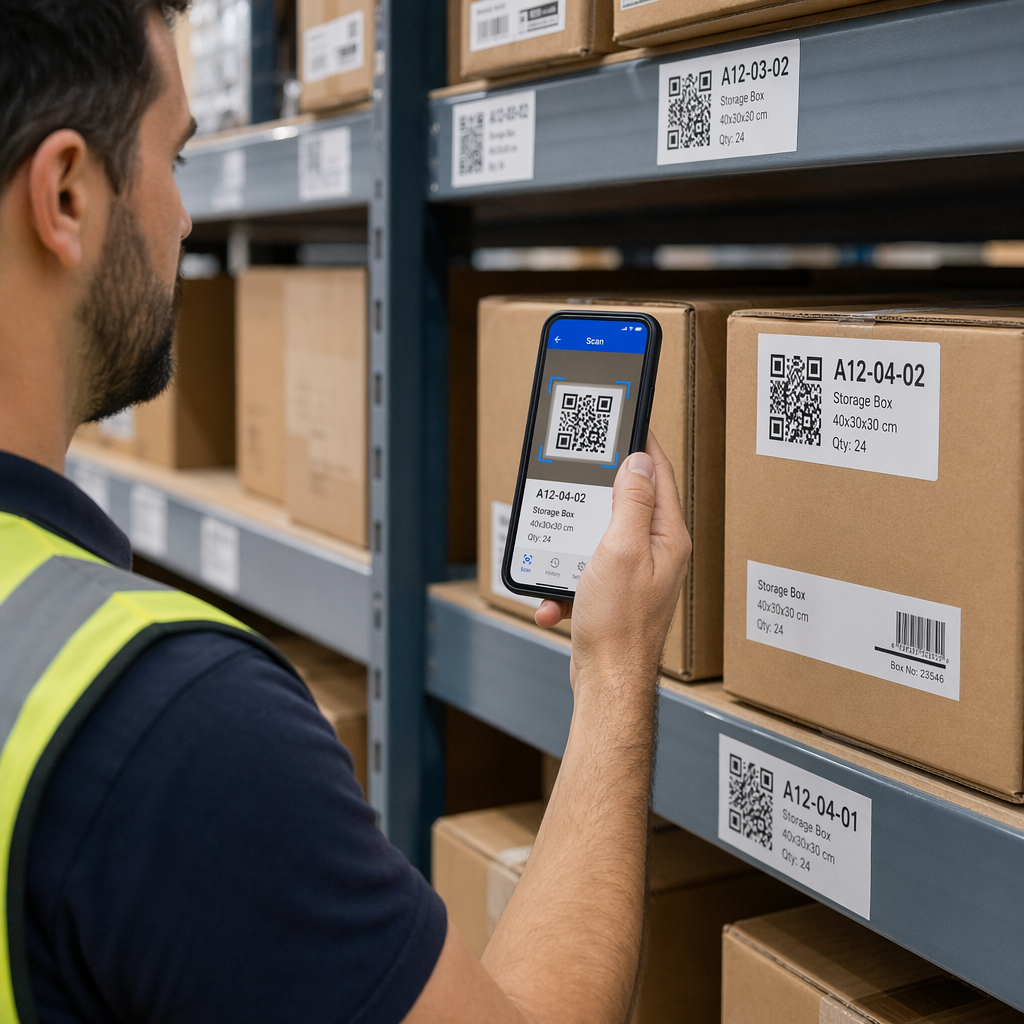
A manuális leltározási folyamatok – vágólapok, táblázatok, papír alapú karbantartási naplók – hiányosságokat teremtenek. Az eszközök elkallódnak, a karbantartási időpontok kimaradnak, és a megfelelőségi dokumentáció gyors ellenőrzése nehézkessé válik. A QR-kódok orvosolják ezeket a hiányosságokat azáltal, hogy minden fizikai eszközt egy élő digitális nyilvántartáshoz kapcsolnak, amelyet a személyzet másodpercek alatt elérhet egy szabványos okostelefonnal.
A hagyományos vonalkódokkal ellentétben a QR-kód sokkal több információt képes tárolni kompakt formátumban. Ha egy lélegeztetőgépre, infúziós pumpára vagy hordozható monitorra helyezik, a QR-kód azonnal megjelenítheti:
- Az eszköz karbantartási előzményeit és a következő ütemezett szervizdátumot
- Kalibrálási nyilvántartásokat és megfelelőségi dokumentációt
- Felhasználói kézikönyveket vagy beállítási videókat
- Jelenlegi helyét és hozzárendelt osztályát
- Riasztásokat meghibásodásokra vagy szükséges cserékre
Ez a fajta azonnali hozzáférés pontosan az, amit a QR-kódok kórházi és egészségügyi megvalósítási modell támogatására készült.
A megfelelőség szempontjából a Medicare és Medicaid Szolgáltatások Központja (CMS) előírja, hogy a kritikus berendezéseket – életmentő eszközöket, kulcsfontosságú újraélesztő berendezéseket, kritikus monitorozó eszközöket – a gyártói ütemtervek szerint kell karbantartani, és minden karbantartást képzett személyzetnek kell elvégeznie és alaposan dokumentálnia. A QR-kód rendszerek természetes ellenőrzési nyomvonalat hoznak létre, amely megkönnyíti ezen követelmények teljesítését és bemutatását az ellenőrzések során.
QR-kód platform kiválasztása az egészségügy számára
Nem minden QR-kód eszköz készült klinikai környezet igényeire. A platformok értékelésekor a következőket részesítse előnyben:
Biztonság és HIPAA megfelelőség. Minden olyan platformnak, amely védett egészségügyi információkat (PHI) kezel, meg kell felelnie a HIPAA adatvédelmi, biztonsági és adatvédelmi incidensek bejelentésére vonatkozó szabályainak. Keresse a titkosított adatátvitelt, a biztonságos felhőtárhelyet, a szerepkör alapú hozzáférés-vezérlést és az automatikus munkamenet-időtúllépéseket. A platformnak támogatnia kell az üzleti partneri megállapodásokat is, ha PHI áramlik rajta keresztül.
Dinamikus QR-kódok. A statikus kódokkal ellentétben a dinamikus QR-kódok nyomtatás után is frissíthetők. Ahogy a Pageloot magyarázza, egy dinamikus kód “módosítható még azután is, hogy [az] generálva és kinyomtatva lett”, lehetővé téve a hivatkozott tartalom vagy cél URL-ek bármikori megváltoztatását a fizikai címke cseréje nélkül. Az orvosi berendezések esetében, amelyek gyakori szoftverfrissítéseken, ütemezésváltozásokon vagy szabályozási felülvizsgálatokon esnek át, ez elengedhetetlen.
Valós idejű analitika. Az a képesség, hogy nyomon követhető, mikor és hol szkennelik be a kódokat, betekintést nyújt a biomedikai csapatoknak a berendezések használati mintáiba, segít azonosítani a figyelmet igénylő eszközöket, és támogatja az erőforrás-elosztási döntéseket. Az olyan mérőszámok, mint a szkennelések száma, helye és eszköztípusa, mind hozzájárulnak az intelligensebb karbantartási tervezéshez.
Rendszerintegráció. A platformnak API-n keresztül csatlakoznia kell a meglévő Elektronikus Egészségügyi Nyilvántartási (EHR) rendszeréhez, Számítógépes Karbantartás-kezelő Rendszeréhez (CMMS) vagy eszközadatbázisához. Amikor egy biomedikai mérnök befejezi egy infúziós pumpa karbantartását, ennek a frissítésnek automatikusan terjednie kell – nincs szükség ismételt bejegyzésre.
Felhasználóbarát felület. Az egészségügyi dolgozóknak olyan eszközökre van szükségük, amelyek minimális betanítást igényelnek. Egy tiszta műszerfal, amely lehetővé teszi a személyzet számára a kódok létrehozását, frissítését és kezelését anélkül, hogy megzavarná a munkafolyamataikat, prioritást érdemel.
Kövesse nyomon minden eszközt egyetlen műszerfalról Használja a Dinamikus QR-kód generátor szerkeszthető, nyomon követhető kódok létrehozásához orvosi berendezéseihez, és az összes frissítés kezeléséhez egy helyről.
Klinikai környezetben működő QR-kódok tervezése
A kórházakban használt QR-kódok olyan körülményekkel szembesülnek, amelyek gyorsan tönkretennék a szabványos címkéket: kórházi minőségű fertőtlenítőszerek, gyakori kezelés, gőz és változó megvilágítás. A jó tervezés mindezeket figyelembe veszi, mielőtt egyetlen címke is kinyomtatásra kerülne.
Méret és kontraszt
A túl kicsi QR-kód nem fog megbízhatóan beolvasódni, különösen akkor, ha a személyzet kesztyűt visel vagy gyenge fényviszonyok között dolgozik. Kövesse ezeket a méretezési irányelveket:
- Minimális méret: 0,8 x 0,8 hüvelyk (2 x 2 cm) egyszerű adatokhoz, például URL-hez
- Ajánlott méret komplex adatokhoz: legalább 1,2 x 1,2 hüvelyk (3 x 3 cm)
- Szkennelési távolság aránya: alkalmazzon 10:1 szabályt – ha a kódot 10 hüvelyk távolságból szkennelik, akkor legalább 1 hüvelyk szélesnek kell lennie
A kontraszt érdekében használjon sötét mintákat világos háttereken, és tartson fenn legalább 4:1 kontrasztarányt a kód és a háttere között. Kerülje azokat a színkombinációkat, amelyek csökkentik az olvashatóságot fénycsöves világítás mellett, vagy korlátozott dinamikatartományú kamerán keresztül nézve. További útmutatást talál a Pageloot oldalán a QR-kód olvashatóságára vonatkozó legjobb gyakorlatokat.
Csendes zónák és logó elhelyezése
Hagyjon egy tiszta szegélyt – amelyet “csendes zónának” neveznek – amely legalább négyszerese egy modul szélességének a kód körül. Ez megakadályozza, hogy a környező szöveg, berendezéscímkék vagy felületi textúrák zavarják a szkenner képességét a kód olvasásában.
Ha kórházi logót is elhelyez, az ne haladja meg a kód területének 20%-jét, és középre helyezze. Használjon magas hibajavítási szintet (Q vagy H) logók hozzáadásakor, mivel ezek a szintek lehetővé teszik, hogy a kód olvasható maradjon, még akkor is, ha egy része el van takarva.
Tartós címkeanyagok
A standard papírcímkék nem alkalmasak kórházi használatra. Tisztítószereknek, nedvességnek és állandó kezelésnek kitéve lebomlanak. Ehelyett használjon:
- Poliészter címkék: ellenállnak az erős fertőtlenítőszereknek és a -40°F és 300°F közötti hőmérsékletnek
- Vinyl címkék orvosi minőségű ragasztókkal: kiváló vegyszerállóság; rozsdamentes acélhoz, műanyaghoz és festett fémfelületekhez való tapadásra tervezve, anélkül, hogy felválna
- Laminált címkék: karcolás- és nedvességállóságot biztosítanak, bár ellenőrizze, hogy a laminálás nem okoz-e olyan tükröződést, amely zavarja a szkennelést
Mielőtt teljes megrendelést adna le, végezzen egy két hetes helyszíni tesztet: helyezzen fel mintacímkéket reprezentatív eszközökre, tegye ki őket a szokásos tisztítási protokolloknak, és ellenőrizze a fakulást, hámlást vagy a szkennelési minőség romlását.
Színkódolt rendszerek
Fontolja meg a szegélyszínek használatát az eszközök gyors kategorizálására – például piros szegélyek a sürgősségi eszközökhöz, kék a diagnosztikai berendezésekhez és zöld az általános kellékekhez. Ez a vizuális réteg segít a személyzetnek gyorsan megtalálni a megfelelő típusú berendezést anélkül, hogy lelassulna a szöveges címkék olvasásához.
Dinamikus QR-kódok beállítása az eszközkezeléshez
A dinamikus QR-kódok különösen alkalmasak orvosi berendezésekhez, mivel az eszközhöz kapcsolódó adatok folyamatosan változnak. A karbantartás befejeződik, a kalibrálási dátumok megújulnak, a firmware frissül, és a megfelelőségi dokumentáció felülvizsgálatra kerül. Dinamikus kóddal az eszközön lévő fizikai címke változatlan marad – csak a hivatkozott tartalom változik.
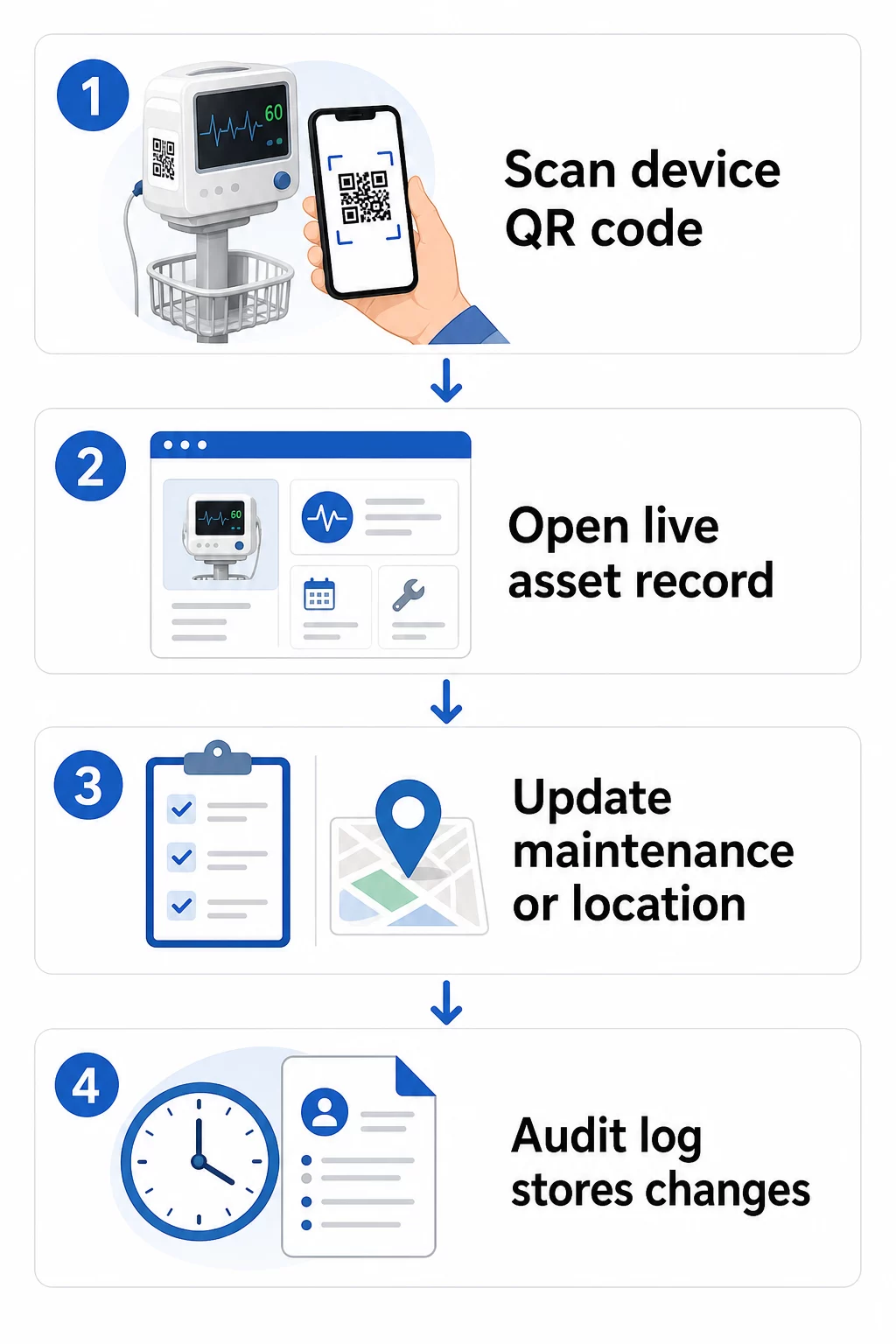
Íme egy gyakorlati munkafolyamat az eszköznyilvántartások naprakészen tartásához:
- Jelentkezzen be a kezelőpultjára és keresse meg a kódot az eszköz berendezésazonosítója vagy részlegszűrője segítségével
- Szerkessze a hivatkozott információkat – frissítse a karbantartási naplókat, kalibrálási nyilvántartásokat, következő szervizdátumokat vagy a hivatkozott dokumentációt
- A változások azonnal érvénybe lépnek, így bármelyik munkatárs, aki utána beolvassa a kódot, aktuális adatokat lát
- Olvassa be a kódot az ellenőrzéshez hogy a frissített információk helyesen jelennek meg, mielőtt elhagyja a nyilvántartást
- Tekintse át az automatikus auditnaplót, amely minden változást időbélyeggel lát el és rögzíti a felhasználót, aki azt végrehajtotta.
A dinamikus kódok gyakori frissítések kezelésének mélyebb megértéséhez lásd: hogyan használhatók a QR-kódok termékleltárhoz és az áttekintése QR-kódok a termék életciklusának nyomon követéséhez, amelyek mindegyike a frissítési munkafolyamatokat fedi le, amelyek az egészségügyi eszközkezelésre alkalmazhatók.
Tartsa naprakészen a berendezések nyilvántartását újranyomtatás nélkül A Dinamikus QR-kód generátor lehetővé teszi a biomedikai csapat számára, hogy azonnal frissítéseket küldjön bármely eszközrekordhoz egy webes irányítópultról – új címkék nélkül.
QR-kódok csatlakoztatása a leltár- és karbantartási rendszerekhez
A QR-kódok akkor nyújtanak a legnagyobb értéket, ha adatokat táplálnak a szélesebb körű eszközkezelési infrastruktúrába, ahelyett, hogy önálló rétegként működnének. Figyelembe veendő integrációs pontok:
CMMS integráció. Amikor egy technikus beolvas egy eszközt a karbantartás befejezése után, a CMMS rekordnak automatikusan frissülnie kell. Ez kiküszöböli a kézi adatbevitelt, és biztosítja, hogy a karbantartási napló mindig naprakész legyen.
EHR és betegbiztonsági munkafolyamatok. Ha egy eszköz egy betegszobához vagy gondozási területhez kapcsolódik, a berendezés QR-kódjának beolvasása releváns biztonsági figyelmeztetéseket, visszahívási állapotot vagy kompatibilitási jelzéseket jeleníthet meg a meglévő klinikai rendszerekben.
Helymeghatározás. Minden beolvasás rögzíti a beolvasó eszköz helyét, így az adminisztrátorok folyamatos képet kapnak arról, hogy a mobil berendezések hol vannak valójában, szemben azzal, hogy hol vannak nyilvántartva. Ez csökkenti az eszközök keresésére fordított időt, és segít azonosítani a berendezések mozgásának mintázatait a különböző osztályokon.
Automatizált riasztások. Csatlakoztassa a beolvasási adatokat, hogy értesítéseket indítson, ha egy eszköz kalibrálása esedékes, ha egy nagy értékű eszközt szokatlanul hosszú ideje nem olvastak be, vagy ha egy visszahívott eszközpopulációt gyorsan meg kell találni.
A QR-kódok komplex eszközök környezetében történő nyomon követhetőségének szélesebb körű kontextusához, a QR-kódok az ellátási lánc nyomon követéséhez útmutató olyan integrációs elveket tárgyal, amelyek közvetlenül alkalmazhatók a kórházi eszközök munkafolyamataira.
Teljes Eszközállományának Címkézése
Egy QR-kódos nyomon követési rendszer csak annyira hasznos, amennyire a lefedettsége. Kezdje a nagy értékű és nagy kockázatú eszközökkel – MRI gépek, sebészeti robotok, lélegeztetőgépek, betegmonitorok – majd terjeszkedjen a kisebb mobil berendezésekre, végül a fogyóeszközökre és pótalkatrészekre.
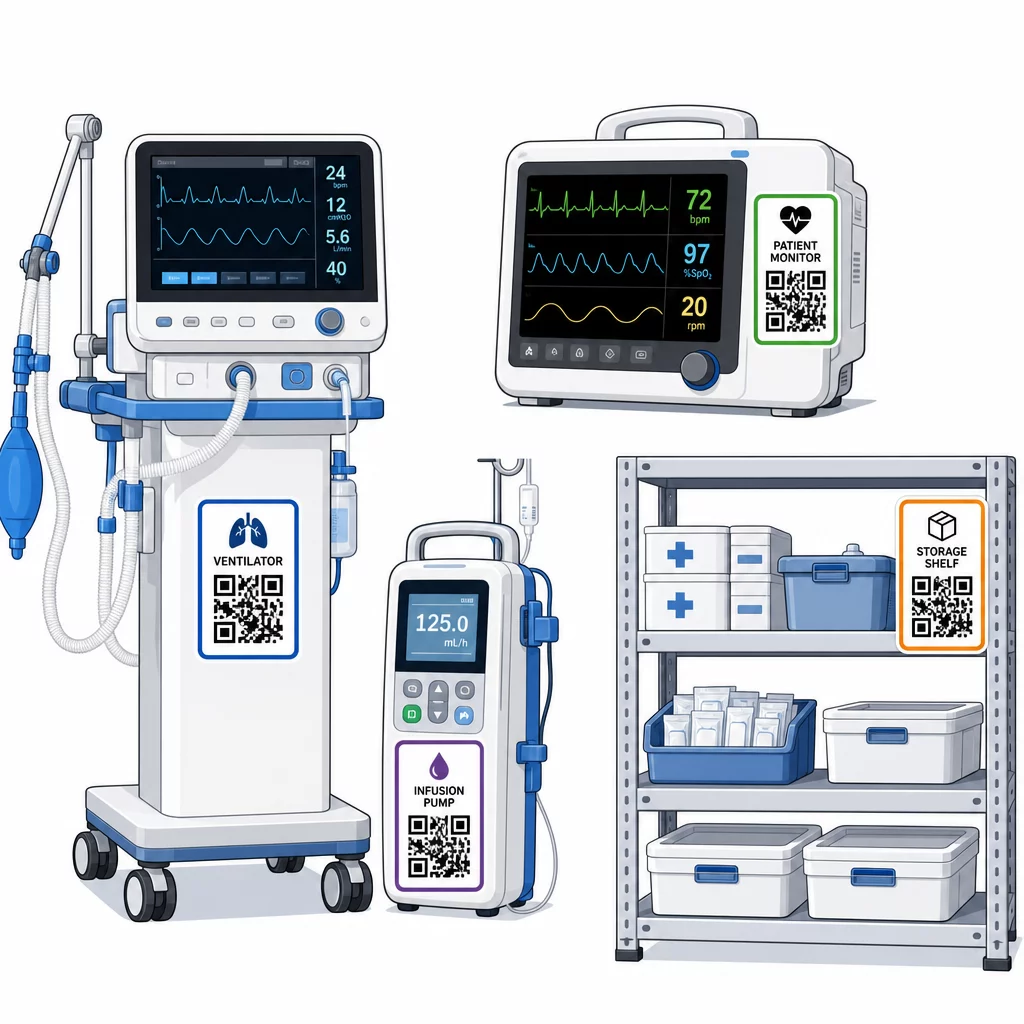
A elhelyezés következetessége számít. Válasszon szabványos helyet minden eszköz kategóriához: fejtámlák mobil ágyak és infúziós állványok esetén, szemmagasságban a falra szerelt monitoroknál, egy látható sík felület a hordozható eszközökön. A következetesség csökkenti azt az időt, amit a személyzet egy ismeretlen eszközön a kód megkeresésével tölt.
Pótalkatrészek és alkatrészek. Címkézze fel a kritikus pótalkatrészeket olyan kódokkal, amelyek a készletszintekhez, lejárati dátumokhoz és kompatibilitási információkhoz kapcsolódnak. Ez megakadályozza, hogy az alkatrészeket a tervezett élettartamukon túl használják, vagy nem kompatibilis berendezésekhez alkalmazzák.
Tárolási helyek. Rögzítsen kódokat a tárolóhelyiségekhez, eszközállomásokhoz és raktárakhoz. Amikor a személyzet beolvas egy tárolási hely kódját, azonnal láthatja, mi kellene ott lennie, mi hiányzik, és mikor mozgatták utoljára az eszközöket. Ez egy digitális térképet hoz létre a létesítmény eszközeiről, amely támogatja a gyorsabb vészhelyzeti reagálást és csökkenti a túlzott rendelést.
A fizikai eszközök nagyméretű címkézésével kapcsolatos további útmutatásért a átfogó útmutató a QR kódokhoz az egészségügyben több egészségügyi felhasználási esetre kiterjedő megvalósítást tárgyal.
A Személyzet Képzése a QR-kód Rendszerek Hatékony Használatára
A technológia csak akkor működik, ha az azt használó emberek megbíznak benne és tudják, hogyan kell használni. A szerepkör alapú képzés biztosítja, hogy minden csapattag azt tanulja meg, amire valóban szüksége van, anélkül, hogy a munkafolyamatához irreleváns funkciók elárasztanák.
- Ápolók és technikusok tudniuk kell, hogyan olvassák be a kódokat az eszközök állapotának ellenőrzéséhez, a karbantartási riasztások megtekintéséhez és a problémák jelentéséhez
- Biomedikai mérnökök frissíteniük kell a karbantartási nyilvántartásokat, kezelniük kell az átadásokat, és megfelelőségi jelentéseket kell készíteniük
- Karbantartó személyzet kódokat használnak az elvégzett szolgáltatások rögzítésére és a műszaki dokumentációk elérésére
- Adminisztratív csapatok a jelentéskészítésre, a felhasználói jogosultságok kezelésére és a rendszerfelügyeletre összpontosítanak
Biztosítson gyorsreferencia kártyákat a leggyakoribb műveletekhez – karbantartási ütemezés ellenőrzése, hiba bejelentése, felhasználói kézikönyv elérése – és helyezze ki őket a szkennelő állomások vagy berendezéstároló területek közelébe.
Jelöljön ki QR-kód adminisztrátorokat minden osztályon: olyan csapattagokat, akik képesek elhárítani a szkennelési problémákat, jóváhagyni a frissítéseket és válaszolni a kollégák kérdéseire. Hozzon létre egy egyszerű visszajelzési csatornát, hogy a személyzet jelezhesse a problémákat vagy további képzést kérhessen a munkafolyamatok fejlődésével.
Analitika, biztonság és megfelelőség
Szkennelési adatok felhasználása a működés javítására
Minden szkennelés adatokat generál. Jól felhasználva ezek az adatok az eszközkezelést reaktívból prediktívvé alakítják. Az analitika segíthet Önnek:
- Azonosítsa, mely eszközöket szkennelik szokatlanul gyakran egy műszak során – ez a teljesítményproblémák potenciális jele lehet
- Felismerje azokat a berendezéseket, amelyek folyamatosan tétlenek az egyik osztályon, miközben egy másik hiányt tapasztal, lehetővé téve az átcsoportosítást, mielőtt a hiány befolyásolná az ellátást
- Építsen fel egy karbantartási előzményt, amely indokolja a nem kritikus berendezések szervizelési intervallumainak módosítását, ahogy a CMS engedélyezi, ha elegendő karbantartási előzmény áll rendelkezésre
- Értékelje a befektetés megtérülését a berendezések használatának nyomon követésével a beszerzési és karbantartási költségekkel szemben
Biztonsági megfontolások
A klinikai környezetben használt QR-kódok biztonsági kockázatokat rejtenek, amelyek tudatos figyelmet érdemelnek. Támadók hamis QR-matricákat helyezhetnek el a valódi kódok fölé, rosszindulatú célokra irányítva a személyzetet vagy a betegeket – ezt a gyakorlatot “quishingnek” nevezik. Mivel a QR-kód célja nem látható a beolvasás előtt, a felhasználók nem észlelhetik a cserét.
E kockázatok csökkentése érdekében:
- Alkalmazzon szerepalapú hozzáférés-vezérlést, hogy csak az arra jogosult személyzet tekinthesse meg vagy szerkeszthesse az érzékeny adatokat
- Gondoskodjon arról, hogy a kódok, mobileszközök és kórházi rendszerek között kicserélt összes adat HTTPS-en keresztül titkosítva legyen
- Alkalmazzon mobileszköz-kezelési (MDM) irányelveket – képernyőzár, távoli törlés, korlátozott alkalmazástelepítés – a szkennelésre használt eszközökön
- Vezessen átfogó auditnaplókat: minden beolvasást és minden adatváltozást időbélyeggel kell ellátni, és egy adott felhasználóhoz kell rendelni
- Korlátozza a QR-kódok kezelését jóváhagyott platformokra, amelyek üzleti partneri megállapodásokat kínálnak, ha PHI (védett egészségügyi információ) érintett
Ne ágyazzon be PHI-t egyszerű szövegként magába a QR-kódba. Bárki, akinek van szkennere, dekódolhatja azt. Ehelyett hivatkozzon hitelesített, hozzáférés-vezérelt rekordokra, amelyek megtekintéséhez hitelesítő adatok szükségesek.
QR-kód címkék karbantartása és ellenőrzése
Rendszeres ellenőrzések
A fizikai címkék elhasználódnak. Építse be a címkék ellenőrzését a rendszeres eszközellenőrzésekbe: keresse a karcolásokat, fakulást, hámló széleket és a fertőtlenítőszerek okozta kémiai kopást. Azok az eszközök, amelyek gyakori sterilizáláson esnek át – sebészeti eszközök, intenzív osztályos monitorok – gyakoribb ellenőrzést igényelnek. Ha egy címke sérült, és a kód már nem olvasható be tisztán, jelölje meg azonnali cserére, mielőtt egy kritikus pillanatban meghibásodna.
Tesztelje a címkéket a tényleges tisztítási protokollok szerint, nem csak a gyártói specifikációk alapján. Ha egy adott fertőtlenítőszer következetesen korai címkehibát okoz, váltson ellenállóbb anyagra, vagy módosítsa a címkézett felületek tisztítási megközelítését, miközben fenntartja a fertőzésellenőrzési szabványokat.
Kövesse nyomon a címkék élettartamát berendezéskategória szerint. Ha az intenzív osztályon lévő lélegeztetőgépek címkéit jellemzően hat havonta cserélni kell, ütemezze be ezt a cserét proaktívan, ahelyett, hogy a meghibásodásokra várna.
Leltárellenőrzések
A fizikai címkék integritása és az adatok pontossága különálló problémák, amelyek külön ellenőrzéseket igényelnek. Végezzen leltárellenőrzéseket legalább negyedévente, gyakrabban pedig szúrópróbaszerű ellenőrzéseket az intenzív osztályokon, sürgősségi osztályokon és műtőkben, ahol az eszközforgalom gyors.
Gyakori ellenőrzési megállapítások közé tartozik a helytelen helyadatok, a szervizlátogatás után nem frissített karbantartási nyilvántartások, valamint a rendszerben még mindig szereplő, de már áthelyezett vagy leselejtezett eszközök. Ha eltéréseket találnak, azonnal frissítse a nyilvántartásokat, és dokumentálja a javítást időbélyeggel.
Az alapos audit dokumentáció kettős célt szolgál: támogatja a szabályozási ellenőrzéseket, és feltárja a rendszerszintű problémákat – például egy osztályt, amely következetesen kihagyja a szkennelési protokollokat –, amelyek további képzéssel vagy folyamatkiigazításokkal orvosolhatók.
Kezdő lépések
A QR-kódos nyomon követés akkor működik a legjobban, ha fokozatosan vezetik be. Kezdje a legmagasabb prioritású berendezésekkel – azokkal az eszközökkel, ahol a karbantartási hiányosság vagy a helymeghatározási rés a legnagyobb betegbiztonsági kockázatot jelenti –, és bővítse a lefedettséget, ahogy csapata megismeri a rendszert.
Először a címkék helyes elkészítésére összpontosítson: tartós anyagok, megfelelő méretezés, következetes elhelyezés és tesztelt szkennelhetőség a tényleges működési körülmények között. Miután a fizikai réteg szilárd, integrálja a CMMS és leltárrendszereivel, majd építse be az analitikát és az automatizált riasztásokat.
Használja a Ingyenes QR-kód generátor a címkék prototípusának elkészítéséhez és a munkafolyamatok teszteléséhez a teljes bevezetés előtt, és használja a QR-kód olvasó annak ellenőrzésére, hogy a kódok megbízhatóan szkennelhetők-e a személyzet által naponta használt eszközökön.
Kezdje el az orvosi berendezések nyomon követését dinamikus QR-kódokkal Hozzon létre szerkeszthető, nyomon követhető kódokat létesítménye minden eszközéhez a Dinamikus QR-kód generátor – valós időben frissítse a nyilvántartásokat, újranyomtatás nélkül.
Gyakori kérdések
A statikus QR-kód egy rögzített célállomást kódol, amely nyomtatás után nem módosítható. A dinamikus QR-kód egy átirányítási linkre mutat, amely bármikor frissíthető – így a fizikai címke az eszközön marad, miközben a hozzá kapcsolódó karbantartási nyilvántartások, kalibrációs adatok vagy dokumentáció digitálisan felülvizsgálhatók. Orvosi berendezések esetében a dinamikus kódok erősen előnyben részesülnek, mivel az eszköznyilvántartások gyakran változnak, és a címkék újranyomtatása minden alkalommal, amikor az információ frissül, kivitelezhetetlen és költséges lenne.
A CMS megköveteli, hogy a kritikus orvosi berendezéseket a gyártó által javasolt ütemezés szerint tartsák karban, és hogy minden karbantartást képzett személyzet végezzen, és alaposan dokumentálva legyen. A QR-kódok ezt támogatják azáltal, hogy időbélyeggel ellátott ellenőrzési nyomvonalat hoznak létre minden szkennelésről, minden karbantartási frissítésről és minden rekordváltozásról. Amikor egy ellenőr egy adott eszköz karbantartási előzményeit kéri, a személyzet egyetlen szkenneléssel elő tudja azt állítani, ahelyett, hogy papír alapú fájlokban vagy több, egymástól független rendszerben kellene keresgélnie.
A kulcsfontosságú óvintézkedések közé tartozik a titkosított HTTPS kapcsolatok használata minden, QR-kódhoz kapcsolt rendszereken keresztül cserélt adat esetében, a szerepköralapú hozzáférés-vezérlés bevezetése, hogy a személyzet csak a szerepköréhez releváns információkat lássa, soha ne ágyazzon be védett egészségügyi információkat (PHI) egyszerű szövegként magába a QR-kódba, a mobil eszközkezelési irányelvek érvényesítése a szkennelő eszközökön, és rendszeres ellenőrzések végzése a QR-kód címkéken, hogy ellenőrizzék a manipulációt vagy a hamis matricákat, amelyeket a jogos kódokra helyeztek. Bármely használt harmadik féltől származó QR platformnak rendelkeznie kell üzleti partneri megállapodással, ha PHI-t kezel.