Gérer l'équipement médical dans un établissement très fréquenté est plus difficile qu'il n'y paraît. Lorsque des appareils disparaissent, que les dossiers de maintenance prennent du retard ou que le personnel perd du temps à chercher des outils essentiels, les soins aux patients en pâtissent. Ce guide explique comment mettre en œuvre le suivi par code QR pour l'équipement médical – du choix de la bonne plateforme à l'entretien des étiquettes et au maintien de la conformité.
Pourquoi le suivi par code QR est pertinent pour l'équipement médical
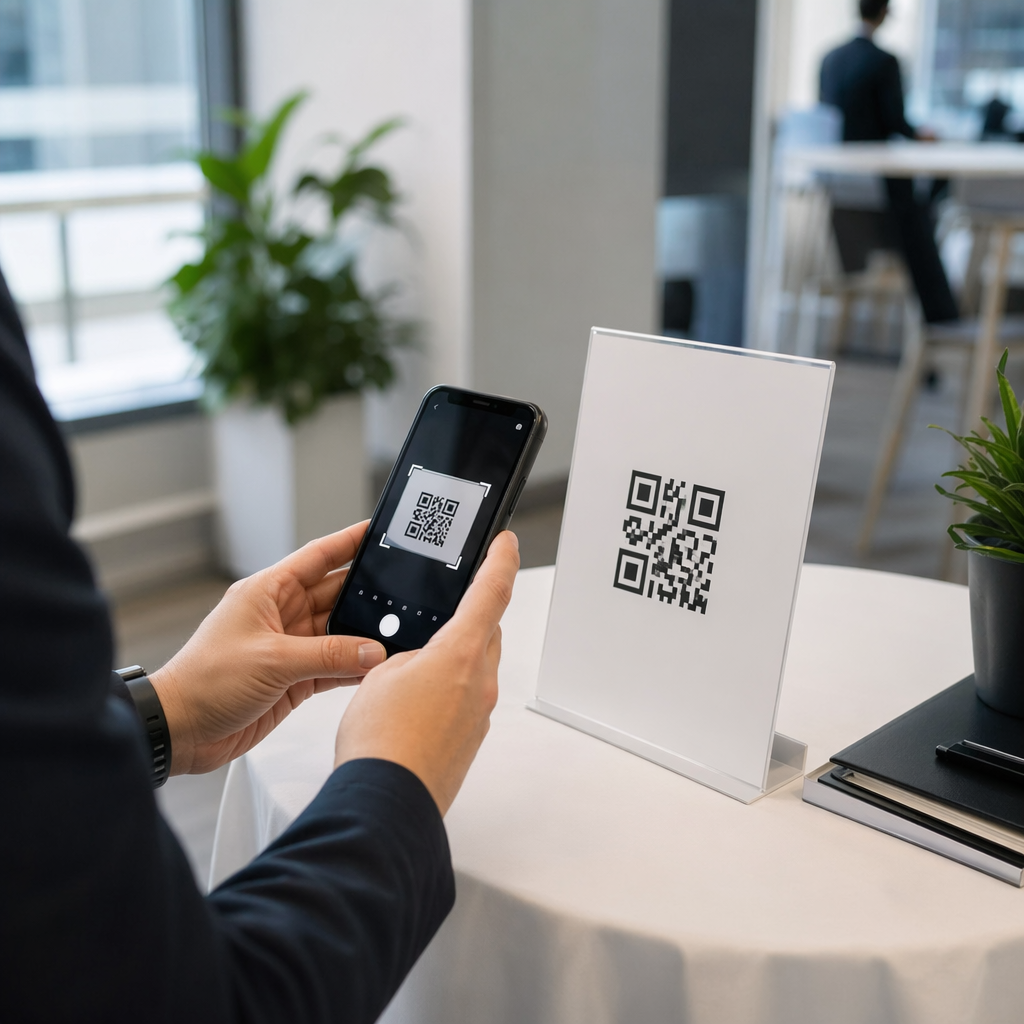
Les processus d'inventaire manuels – presse-papiers, feuilles de calcul, journaux de maintenance papier – créent des lacunes. L'équipement est égaré, les fenêtres de maintenance sont manquées et la documentation de conformité devient difficile à vérifier rapidement. Les codes QR comblent ces lacunes en reliant chaque appareil physique à un enregistrement numérique en direct que le personnel peut consulter en quelques secondes avec un smartphone standard.
Contrairement aux codes-barres traditionnels, un code QR peut stocker beaucoup plus d'informations dans un format compact. Lorsqu'il est placé sur un ventilateur, une pompe à perfusion ou un moniteur portable, un code QR peut instantanément afficher :
- L'historique de maintenance de l'appareil et la prochaine date d'entretien prévue
- Les dossiers d'étalonnage et la documentation de conformité
- Les manuels d'utilisation ou les vidéos de configuration
- L'emplacement actuel et le service assigné
- Les alertes pour les dysfonctionnements ou les remplacements nécessaires
Ce type d'accès immédiat est exactement ce que le Les codes QR pour les hôpitaux et les soins de santé modèle de mise en œuvre est conçu pour prendre en charge.
Du point de vue de la conformité, les Centers for Medicare & Medicaid Services (CMS) exigent que l'équipement critique – appareils de maintien en vie, équipement de réanimation clé, dispositifs de surveillance critiques – soit entretenu conformément aux calendriers du fabricant, et que toute la maintenance soit effectuée par du personnel qualifié et documentée de manière approfondie. Les systèmes de codes QR créent une piste d'audit naturelle qui facilite la gestion et la démonstration de ces exigences lors des inspections.
Choisir une plateforme de codes QR pour les soins de santé
Tous les outils de codes QR ne sont pas conçus pour les exigences d'un environnement clinique. Lors de l'évaluation des plateformes, privilégiez les éléments suivants :
La sécurité et la conformité HIPAA. Toute plateforme qui gère des informations de santé protégées (ISP) doit se conformer aux règles de confidentialité, de sécurité et de notification des violations de la HIPAA. Recherchez la transmission de données chiffrées, le stockage sécurisé dans le cloud, les contrôles d'accès basés sur les rôles et les délais d'expiration de session automatiques. La plateforme doit également prendre en charge les accords d'associé commercial si des ISP y transitent.
Codes QR dynamiques. Contrairement aux codes statiques, les codes QR dynamiques peuvent être mis à jour après avoir été imprimés. Comme l'explique Pageloot, un code dynamique “ peut être modifié même après avoir été généré et imprimé ”, vous permettant de modifier le contenu lié ou les URL de destination à tout moment sans remplacer l'étiquette physique. Pour les équipements médicaux qui subissent de fréquentes mises à jour logicielles, des changements d'horaire ou des révisions réglementaires, cela est essentiel.
Analyses en temps réel. La capacité de suivre quand et où les codes sont scannés donne aux équipes biomédicales une visibilité sur les modèles d'utilisation des équipements, aide à signaler les appareils qui pourraient nécessiter une attention et soutient les décisions d'allocation des ressources. Des métriques comme le nombre de scans, l'emplacement et le type d'appareil contribuent toutes à une planification de maintenance plus intelligente.
Intégration du système. La plateforme doit se connecter à votre système de dossiers de santé électroniques (DSE) existant, à votre système de gestion de maintenance assistée par ordinateur (GMAO) ou à votre base de données d'actifs via une API. Lorsqu'un ingénieur biomédical effectue la maintenance d'une pompe à perfusion, cette mise à jour doit se propager automatiquement – aucune double saisie n'est requise.
Interface conviviale. Les professionnels de la santé ont besoin d'outils qui nécessitent une formation minimale. Un tableau de bord clair qui permet au personnel de créer, mettre à jour et gérer des codes sans perturber leurs flux de travail est une priorité.
Suivez chaque actif depuis un tableau de bord unique Utilisez le Générateur de QR code dynamique pour créer des codes modifiables et traçables pour votre équipement médical et gérer toutes les mises à jour depuis un seul endroit.
Conception de codes QR fonctionnels en milieu clinique
Les codes QR dans les hôpitaux sont confrontés à des conditions qui dégraderaient rapidement une étiquette standard : désinfectants de qualité hospitalière, manipulations fréquentes, vapeur et éclairage variable. Une bonne conception tient compte de tous ces éléments avant même l'impression d'une seule étiquette.
Taille et contraste
Un code QR trop petit ne sera pas scanné de manière fiable, surtout lorsque le personnel porte des gants ou travaille dans des conditions de faible luminosité. Suivez ces directives de taille :
- Taille minimale : 0,8 x 0,8 pouces (2 x 2 cm) pour des données simples comme une URL
- Taille recommandée pour les données complexes : au moins 1,2 x 1,2 pouces (3 x 3 cm)
- Rapport de distance de balayage : appliquer une règle de 10:1 – si le code doit être scanné à 10 pouces de distance, il doit mesurer au moins 1 pouce de large
Pour le contraste, utilisez des motifs sombres sur des fonds clairs et maintenez un rapport de contraste d'au moins 4:1 entre le code et son arrière-plan. Évitez les combinaisons de couleurs qui réduisent la lisibilité sous un éclairage fluorescent ou lorsqu'elles sont vues à travers un appareil photo avec une plage dynamique limitée. Vous pouvez trouver des conseils supplémentaires dans le guide de Pageloot les meilleures pratiques pour la lisibilité des codes QR.
Zones de silence et placement du logo
Laissez une bordure claire – appelée “ zone de silence ” – d'au moins quatre fois la largeur d'un module autour du code. Cela empêche le texte environnant, les étiquettes d'équipement ou les textures de surface d'interférer avec la capacité du scanner à lire le code.
Si vous incluez un logo d'hôpital, ne le laissez pas dépasser 20% de la zone du code et positionnez-le au centre. Utilisez un niveau de correction d'erreur élevé (Q ou H) lors de l'ajout de logos, car ces niveaux permettent au code de rester lisible même si une partie est obscurcie.
Matériaux d'étiquettes durables
Les étiquettes en papier standard ne conviennent pas à un usage hospitalier. Elles se dégradent lorsqu'elles sont exposées aux produits chimiques de nettoyage, à l'humidité et à une manipulation constante. Utilisez plutôt :
- Étiquettes en polyester : résistent aux désinfectants agressifs et aux températures de -40°F à 300°F
- Étiquettes en vinyle avec adhésifs de qualité médicale : excellente résistance chimique ; conçues pour adhérer à l'acier inoxydable, au plastique et aux surfaces métalliques peintes sans se décoller
- Étiquettes laminées : ajoutent une résistance aux rayures et à l'humidité, mais vérifiez que le laminage ne crée pas d'éblouissement qui interfère avec le balayage
Avant de vous engager sur une commande complète, effectuez un test sur le terrain de deux semaines : appliquez des étiquettes échantillons sur des appareils représentatifs, soumettez-les à vos protocoles de nettoyage standard, et vérifiez l'absence de décoloration, de décollement ou de dégradation du scan.
Systèmes à code couleur
Envisagez d'utiliser des couleurs de bordure pour catégoriser l'équipement en un coup d'œil – par exemple, des bordures rouges pour les appareils d'urgence, bleues pour l'équipement de diagnostic et vertes pour les fournitures générales. Cette couche visuelle aide le personnel à localiser rapidement le bon type d'équipement sans ralentir pour lire les étiquettes textuelles.
Mise en place de codes QR dynamiques pour la gestion des actifs
Les codes QR dynamiques sont particulièrement bien adaptés à l'équipement médical car les données associées à un appareil changent constamment. La maintenance est effectuée, les dates de calibration sont renouvelées, le firmware est mis à jour et la documentation de conformité est révisée. Avec un code dynamique, l'étiquette physique sur l'appareil reste la même – seul le contenu lié change.
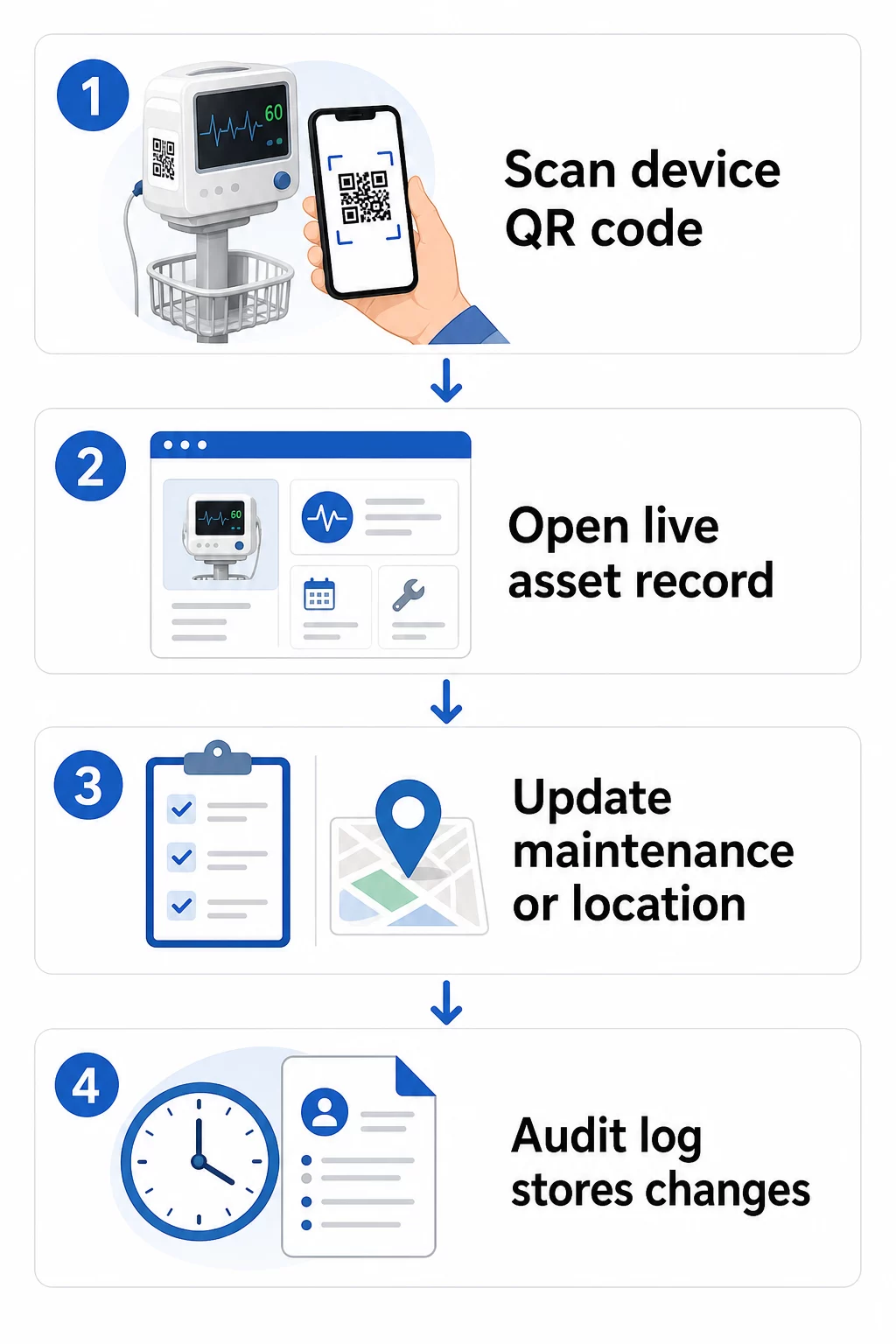
Voici un flux de travail pratique pour maintenir les dossiers d'équipement à jour :
- Connectez-vous à votre tableau de bord de gestion et localisez le code en utilisant l'ID d'équipement de l'appareil ou le filtre de département
- Modifiez les informations liées – mettez à jour les journaux de maintenance, les enregistrements de calibration, les prochaines dates de service ou la documentation liée
- Les modifications s'appliquent immédiatement, de sorte que tout membre du personnel qui scanne le code par la suite voit les données actuelles
- Scannez le code pour vérifier que les informations mises à jour s'affichent correctement avant de quitter l'enregistrement
- Examinez le journal d'audit automatique, qui horodate chaque modification et enregistre l'utilisateur qui l'a effectuée
Pour un aperçu plus approfondi de la façon dont les codes dynamiques gèrent les mises à jour fréquentes, voir comment utiliser les codes QR pour l'inventaire des produits et l'aperçu de Codes QR pour le suivi du cycle de vie des produits, qui couvrent tous deux les flux de travail de mise à jour applicables à la gestion des actifs de santé.
Maintenez les dossiers d'équipement à jour sans réimpression Le Générateur de QR code dynamique permet à votre équipe biomédicale de pousser instantanément des mises à jour vers n'importe quel dossier d'appareil depuis un tableau de bord web – aucune nouvelle étiquette requise.
Connecter les codes QR à vos systèmes d'inventaire et de maintenance
Les codes QR offrent le plus de valeur lorsqu'ils alimentent en données votre infrastructure de gestion des actifs plus large plutôt que d'opérer comme une couche autonome. Les points d'intégration à considérer incluent :
Intégration du GMAO. Lorsqu'un technicien scanne un appareil après avoir effectué la maintenance, l'enregistrement du GMAO doit se mettre à jour automatiquement. Cela élimine la saisie manuelle des données et garantit que le journal de maintenance est toujours à jour.
Flux de travail du DSE et de la sécurité des patients. Si un appareil est lié à une chambre de patient ou à une zone de soins, la numérisation du code QR de l'équipement pourrait faire apparaître des alertes de sécurité pertinentes, l'état de rappel ou des indicateurs de compatibilité au sein des systèmes cliniques existants.
Suivi de localisation. Chaque scan capture l'emplacement de l'appareil de numérisation, donnant aux administrateurs une image continue de l'endroit où se trouve réellement l'équipement mobile par rapport à l'endroit où il est enregistré. Cela réduit le temps passé à rechercher des appareils et aide à identifier les schémas de mouvement de l'équipement entre les départements.
Alertes automatisées. Connectez les données de scan pour déclencher des notifications lorsqu'un appareil est en retard de calibration, lorsqu'un actif de grande valeur n'a pas été scanné depuis une période inhabituellement longue, ou lorsqu'une population d'appareils rappelés doit être localisée rapidement.
Pour un contexte plus large sur la façon dont les codes QR soutiennent la traçabilité dans des environnements d'actifs complexes, le Codes QR pour le suivi de la chaîne d'approvisionnement guide couvre les principes d'intégration qui se traduisent directement aux flux de travail des actifs hospitaliers.
Étiquetage de l'ensemble de votre inventaire d'actifs
Un système de suivi par code QR n'est utile que dans la mesure de sa couverture. Commencez par les appareils de grande valeur et à haut risque – machines IRM, robots chirurgicaux, ventilateurs, moniteurs patient – puis étendez-vous aux équipements mobiles plus petits et finalement aux consommables et pièces de rechange.
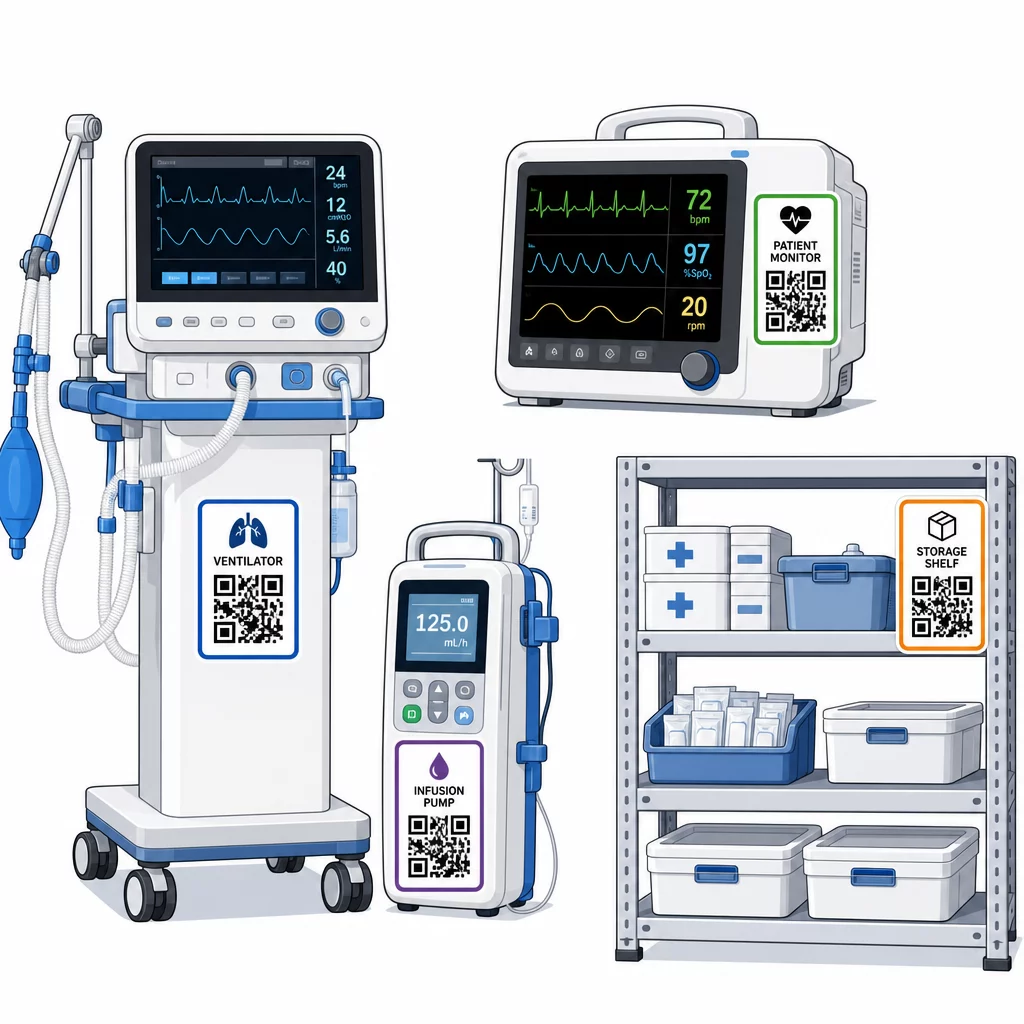
La cohérence du placement est importante. Choisissez un emplacement standard pour chaque catégorie d'équipement : barres de tête pour les lits mobiles et les potences à perfusion, à hauteur des yeux pour les moniteurs muraux, une surface plane visible sur les appareils portables. La cohérence réduit le temps que le personnel passe à localiser le code sur un appareil inconnu.
Pièces de rechange et composants. Étiquetez les pièces de rechange critiques avec des codes qui renvoient aux niveaux de stock, aux dates d'expiration et aux informations de compatibilité. Cela empêche l'utilisation de composants au-delà de leur durée de vie utile ou leur application à des équipements incompatibles.
Emplacements de stockage. Attachez des codes aux salles de stockage, aux baies d'équipement et aux placards de fournitures. Lorsque le personnel scanne un code d'emplacement de stockage, il peut immédiatement voir ce qui devrait s'y trouver, ce qui manque et quand les actifs ont été déplacés pour la dernière fois. Cela crée une carte numérique des actifs de l'établissement qui soutient une réponse d'urgence plus rapide et réduit les commandes excessives.
Pour des conseils supplémentaires sur l'étiquetage des actifs physiques à grande échelle, le guide ultime des codes QR pour les soins de santé couvre la mise en œuvre dans de multiples cas d'utilisation des soins de santé.
Former le personnel à utiliser efficacement les systèmes de codes QR
La technologie ne fonctionne que si les personnes qui l'utilisent lui font confiance et savent comment l'utiliser. Une formation basée sur les rôles garantit que chaque membre de l'équipe apprend ce dont il a réellement besoin sans être submergé par des fonctionnalités non pertinentes pour son flux de travail.
- Infirmières et techniciens doivent savoir comment scanner les codes pour vérifier l'état de l'équipement, consulter les alertes de maintenance et signaler les problèmes
- Ingénieurs biomédicaux doivent mettre à jour les dossiers de maintenance, gérer les transferts et générer des rapports de conformité
- Personnel de maintenance utilisent des codes pour enregistrer les services effectués et accéder à la documentation technique
- Équipes administratives se concentrent sur le reporting, la gestion des autorisations utilisateur et la supervision du système
Fournissez des fiches de référence rapide pour les actions les plus courantes – vérifier un calendrier de maintenance, signaler une panne, accéder à un manuel d'utilisation – et affichez-les près des stations de scan ou des zones de stockage d'équipement.
Désignez des administrateurs de codes QR dans chaque service : des membres de l'équipe qui peuvent résoudre les problèmes de scan, approuver les mises à jour et répondre aux questions des collègues. Mettez en place un canal de feedback simple afin que le personnel puisse signaler les problèmes ou demander une formation supplémentaire à mesure que les flux de travail évoluent.
Analyse, Sécurité et Conformité
Utiliser les données de scan pour améliorer les opérations
Chaque scan génère des données. Bien utilisées, ces données font passer la gestion des actifs du réactif au prédictif. L'analyse peut vous aider à :
- Identifier les appareils qui sont scannés inhabituellement souvent pendant un quart de travail – un signal potentiel de problèmes de performance
- Repérer les équipements qui sont constamment inactifs dans un service tandis qu'un autre connaît des pénuries, permettant une réaffectation avant qu'une pénurie n'affecte les soins
- Construire un historique de maintenance qui justifie les ajustements des intervalles de service pour les équipements non critiques, comme le permet le CMS lorsqu'un historique de maintenance suffisant existe
- Évaluer le retour sur investissement en suivant l'utilisation de l'équipement par rapport aux coûts d'acquisition et de maintenance
Considérations de sécurité
Les codes QR dans les environnements cliniques introduisent des risques de sécurité qui méritent une attention particulière. Des attaquants peuvent placer de faux autocollants QR sur des codes légitimes, redirigeant le personnel ou les patients vers des destinations malveillantes – une pratique connue sous le nom de “ quishing ”. Étant donné que la destination d'un code QR n'est pas visible avant le scan, les utilisateurs peuvent ne pas détecter la substitution.
Pour réduire ces risques :
- Utilisez des contrôles d'accès basés sur les rôles afin que seul le personnel autorisé puisse consulter ou modifier les dossiers sensibles
- Assurez-vous que toutes les données échangées entre les codes, les appareils mobiles et les systèmes hospitaliers sont chiffrées via HTTPS
- Appliquez des politiques de gestion des appareils mobiles (MDM) – verrouillage d'écran, effacement à distance, installations d'applications restreintes – sur les appareils utilisés pour le scan
- Maintenez des journaux d'audit complets : chaque scan et chaque modification de données doivent être horodatés et attribués à un utilisateur spécifique
- Restreignez la gestion des codes QR aux plateformes approuvées qui proposent des accords de partenariat commercial si des informations de santé protégées (PHI) sont impliquées
N'intégrez pas d'informations de santé protégées (PHI) en texte clair dans le code QR lui-même. Toute personne disposant d'un scanner peut le décoder. Au lieu de cela, liez à des dossiers authentifiés et contrôlés par accès qui nécessitent des identifiants pour être consultés.
Maintenance et Audit des Étiquettes de Codes QR
Inspections Routinières
Les étiquettes physiques se dégradent. Intégrez l'inspection des étiquettes aux rondes d'équipement régulières : vérifiez les rayures, la décoloration, les bords qui se décollent et l'usure chimique due aux désinfectants. Les appareils qui subissent une stérilisation fréquente – outils chirurgicaux, moniteurs d'USI – nécessitent des vérifications plus fréquentes. Si une étiquette est endommagée et que le code ne scanne plus correctement, signalez-la pour un remplacement immédiat avant qu'elle ne tombe en panne à un moment critique.
Testez les étiquettes par rapport à vos protocoles de nettoyage réels, et non pas seulement aux spécifications du fabricant. Si un désinfectant particulier provoque systématiquement une défaillance précoce de l'étiquette, passez à un matériau plus résistant ou ajustez l'approche de nettoyage pour les surfaces étiquetées tout en maintenant les normes de contrôle des infections.
Suivez la durée de vie des étiquettes par catégorie d'équipement. Si les étiquettes des ventilateurs de votre USI nécessitent généralement un remplacement tous les six mois, planifiez ce remplacement de manière proactive plutôt que d'attendre les défaillances.
Audits d'Inventaire
L'intégrité physique des étiquettes et l'exactitude des données sont des problèmes distincts qui nécessitent des vérifications distinctes. Effectuez des audits d'inventaire au minimum trimestriellement, avec des contrôles ponctuels plus fréquents dans les unités de soins intensifs, les services d'urgence et les blocs opératoires où le renouvellement de l'équipement est rapide.
Les constatations d'audit courantes incluent des données de localisation incorrectes, des dossiers de maintenance qui n'ont pas été mis à jour après une visite de service, et des actifs toujours répertoriés dans le système qui ont été transférés ou retirés. Lorsque des écarts sont constatés, mettez à jour les dossiers immédiatement et documentez la correction avec un horodatage.
Une documentation d'audit approfondie sert un double objectif : elle soutient les inspections réglementaires et elle met en lumière les problèmes systémiques – tels qu'un service qui ignore systématiquement les protocoles de numérisation – qui peuvent être résolus par une formation supplémentaire ou des ajustements de processus.
Commencer
Le suivi par code QR fonctionne mieux lorsqu'il est introduit progressivement. Commencez par votre équipement le plus prioritaire – les appareils où un manquement à l'entretien ou un écart de localisation présente le plus grand risque pour la sécurité des patients – et étendez la couverture à mesure que votre équipe se familiarise avec le système.
Concentrez-vous d'abord sur l'exactitude des étiquettes : matériaux durables, taille correcte, placement cohérent et scannabilité testée dans vos conditions d'exploitation réelles. Une fois la couche physique solide, intégrez-la à vos systèmes de GMAO et d'inventaire, puis ajoutez des analyses et des alertes automatisées.
Utilisez le Générateur de QR code gratuit pour prototyper les étiquettes et tester les flux de travail avant de s'engager dans un déploiement complet, et utilisez le Scanner QR code pour vérifier que les codes sont scannés de manière fiable sur tous les appareils que votre personnel utilise quotidiennement.
Commencez le suivi de l'équipement médical avec des codes QR dynamiques Créez des codes modifiables et traçables pour chaque actif de votre établissement avec le Générateur de QR code dynamique – mettez à jour les enregistrements en temps réel, aucune réimpression n'est nécessaire.
Questions fréquentes
Un code QR statique encode une destination fixe qui ne peut pas être modifiée après impression. Un code QR dynamique pointe vers un lien de redirection qui peut être mis à jour à tout moment – ainsi l'étiquette physique reste sur l'appareil tandis que les dossiers de maintenance, les données de calibration ou la documentation liés sont révisés numériquement. Pour les équipements médicaux, les codes dynamiques sont fortement préférés car les dossiers des appareils changent fréquemment, et réimprimer les étiquettes chaque fois que les informations sont mises à jour serait peu pratique et coûteux.
Le CMS exige que les équipements médicaux critiques soient entretenus selon les calendriers recommandés par le fabricant et que toute la maintenance soit effectuée par du personnel qualifié et minutieusement documentée. Les codes QR soutiennent cela en créant une piste d'audit horodatée de chaque scan, de chaque mise à jour de maintenance et de chaque modification d'enregistrement. Lorsqu'un inspecteur demande l'historique de maintenance d'un appareil spécifique, le personnel peut le produire avec un seul scan plutôt que de chercher dans des dossiers papier ou plusieurs systèmes déconnectés.
Les principales précautions comprennent l'utilisation de connexions HTTPS chiffrées pour toutes les données échangées via les systèmes liés aux codes QR, la mise en œuvre de contrôles d'accès basés sur les rôles afin que le personnel ne voie que les informations pertinentes pour sa fonction, ne jamais intégrer d'informations de santé protégées en texte clair dans le code QR lui-même, l'application de politiques de gestion des appareils mobiles sur les dispositifs de numérisation, et la réalisation d'audits réguliers des étiquettes de codes QR pour vérifier toute altération ou tout autocollant contrefait placé sur des codes légitimes. Toute plateforme QR tierce utilisée devrait avoir un accord de partenariat commercial en place si elle traite des informations de santé protégées.