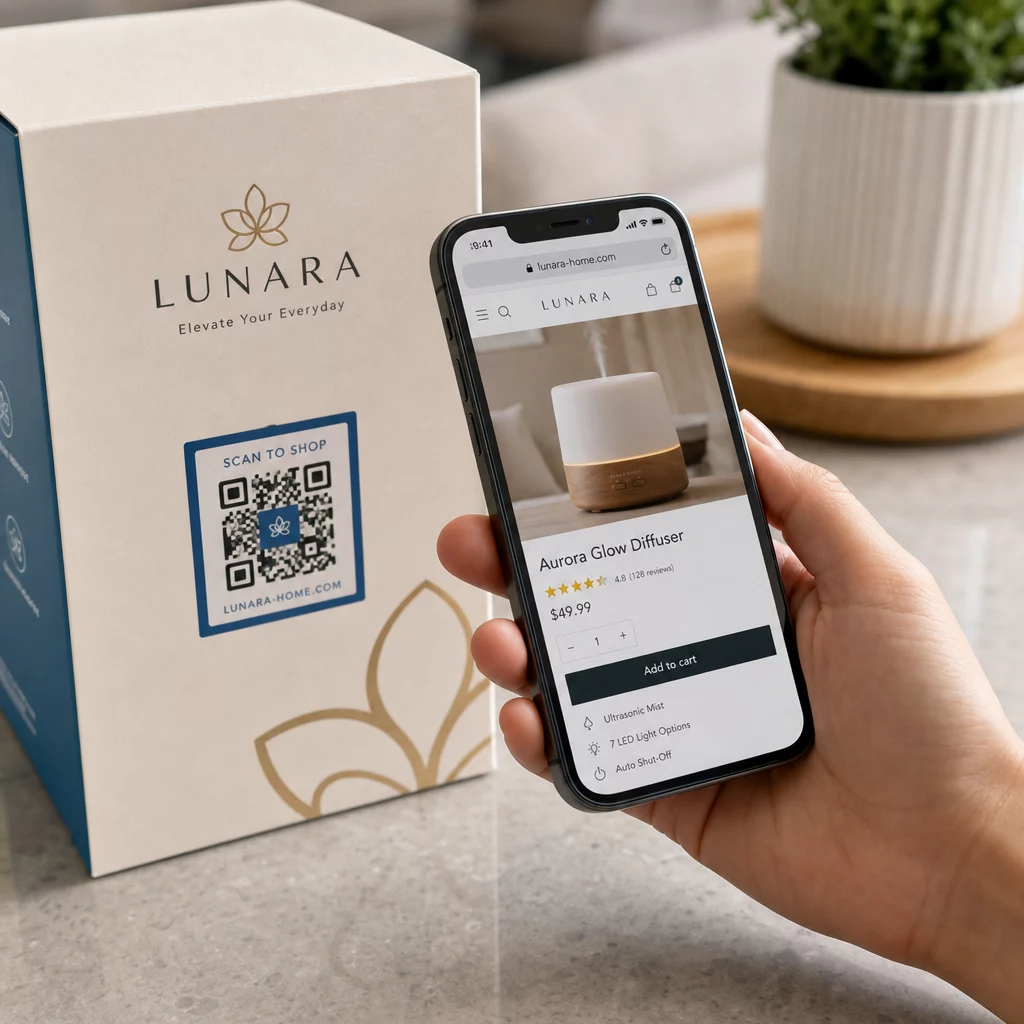
Vai jūsu mārketinga centieni piesaista datplūsmu, bet nepārvērš to pārdošanā? Atšķirība starp klientu, kurš atklāj jūsu produktu, un pirkuma pabeigšanu ir vieta, kur tiek zaudēta lielākā daļa e-komercijas ieņēmumu. QR kodi aizpilda šo plaisu, savienojot fiziskos saskares punktus tieši ar digitālās pirkšanas pieredzi – un tie ir izmērāmi katrā solī.
Kāpēc QR kodiem ir vieta jūsu e-komercijas stratēģijā
Patērētāju QR kodu pieņemšana ir sasniegusi punktu, kur skenēšanas berze ir minimāla. Saskaņā ar nozares datiem, 64% pircēju skenēja QR kodu uz produkta, iepērkoties veikalos, un 42% teica, ka QR kodi ir ievērojami uzlabojuši viņu iepirkšanās pieredzi klātienē. Šī uzvedības maiņa rada reālu iespēju e-komercijas zīmoliem satikt klientus tur, kur viņi jau atrodas.
Tiešsaistes pārdevējiem QR kodi kalpo divējādi: tie paātrina ceļu uz pirkumu, novēršot papildu soļus, un tie ģenerē skenēšanas līmeņa datus, kas palīdz precīzi saprast, kā darbojas jūsu kampaņas. A dinamiskais QR kods iet tālāk – tas ļauj jebkurā laikā atjaunināt mērķa URL, nepārprintējot, kas nozīmē, ka kods uz produkta iepakojuma šodien var norādīt uz sezonas akciju un nākamajā mēnesī uz produkta pamācību.
Galvenās priekšrocības e-komercijas uzņēmumiem ietver:
- Samazināta pirkuma berze – Klienti skenē un nonāk tieši uz produkta lapas vai norēķinu plūsmas, pilnībā apejot meklēšanu
- Starpkanālu nepārtrauktība – Fiziskais iepakojums, drukātās reklāmas un e-pasta materiāli visi nemanāmi savienojas ar jūsu digitālo veikalu
- Izmērāma iesaiste – Skenēšanas analīze atklāj, kuri izvietojumi piesaista visvairāk datplūsmas un kuri pārvēršas par pirkumiem
- Elastīgs saturs – Dinamiskie kodi ļauj mainīt galamērķus, neizdodot jaunus drukātos materiālus
- Pēcpirkuma iesaiste – Iepakojuma ieliktņi un piegādes materiāli kļūst par aktīviem mārketinga kanāliem
Galvenie e-komercijas QR kodu lietošanas gadījumi
Izpratne par to, kur QR kodi sniedz vislielāko vērtību, palīdz noteikt prioritātes, ar ko sākt. Katrs tālāk aprakstītais lietošanas gadījums risina konkrētu berzes punktu klienta ceļojumā.
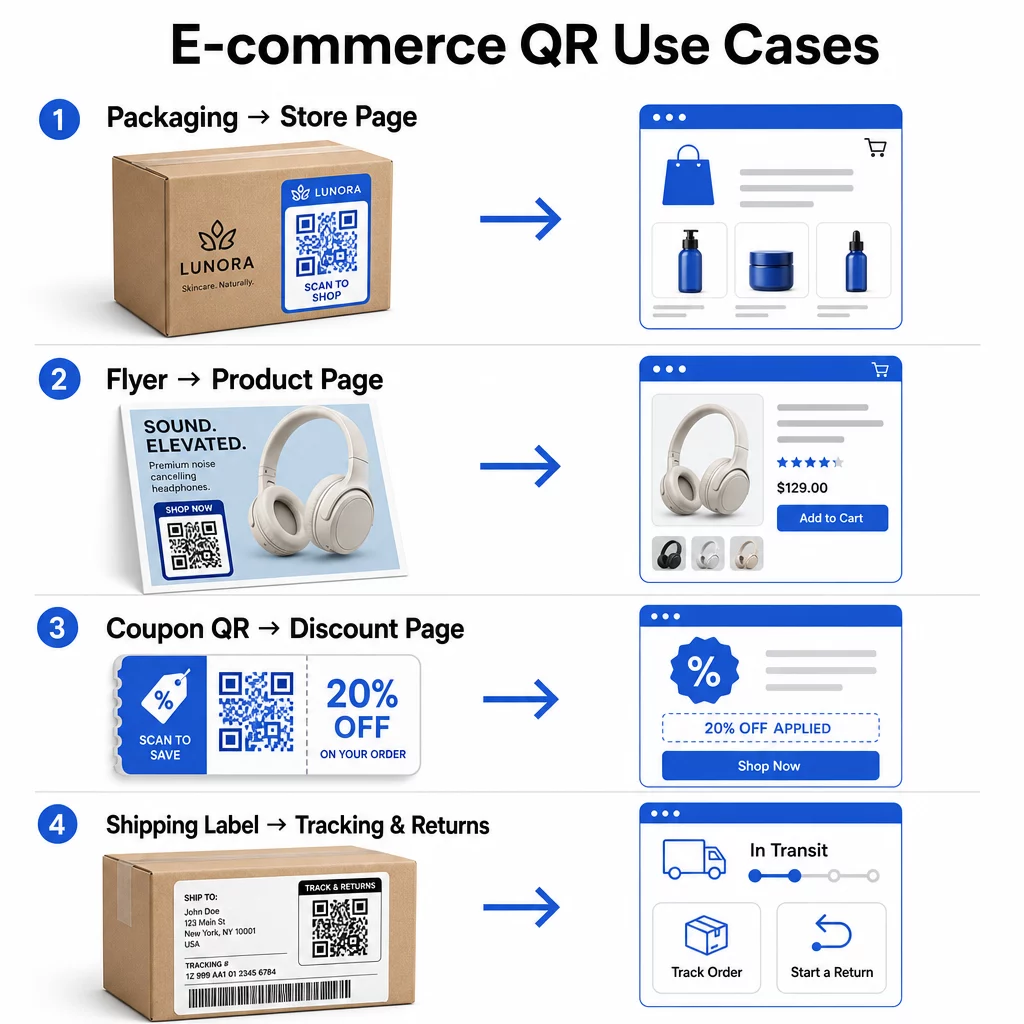
Saistīt fiziskos produktus ar tiešsaistes veikaliem
Produkta iepakojums ir vis tiešākais tilts starp fizisku preci un jūsu digitālo veikalu. QR kods uz kastes vai etiķetes var nosūtīt klientus uz pilnu produkta lapu, saistītiem aksesuāriem, instrukciju video vai atkārtotas pasūtīšanas saiti. Viens Pageloot klients ievietoja QR kodus savā iepakojumā un ziņoja par 27% pieaugumu atkārtotos apmeklējumos viņu Shopify veikalā divu nedēļu laikā.
Šī pieeja ir īpaši vērtīga produktiem ar vairāk detaļām, nekā var ievietot uz etiķetes – sastāvdaļas, sertifikāti, pamācības un garantijas informācija var būt pieejama aiz viena skenējama koda. Uzziniet vairāk par QR kodiem uz iepakojuma un to, kā tie nāk par labu mazumtirdzniecībai.
Veiciniet pārdošanu ar iepērkamiem QR kodiem
Kad klients redz jūsu produktu drukātā reklāmā, katalogā vai veikalā, QR kods novērš soļus starp interesi un pirkumu. Tā vietā, lai meklētu jūsu produktu vai ievadītu URL, viņi skenē un nonāk tieši uz produkta lapas vai atlasītas kolekcijas.
Izmantojiet saites QR koda ģenerators lai katrs kods norādītu uz konkrētu URL. Ar dinamiskiem kodiem jūs varat atjaunināt šo galamērķi, lai atspoguļotu krājumu pieejamību, sezonas cenas vai ierobežota laika komplektu, nepārprintējot nekādus materiālus.
Piedāvājiet kuponus un laika ierobežotas akcijas
QR kodi ir īpaši efektīvi atlaižu kodu un reklāmas piedāvājumu piegādei, jo pieredze ir tūlītēja un bez berzes. Klients skenē, redz kupona galveno lapu un var nekavējoties izmantot piedāvājumu, nevis meklēt savā iesūtnē reklāmas kodu.
Ievietojiet reklāmas kodus uz produktu iepakojuma, drukātām kvītīm, tiešā pasta sūtījumos un fiziskās izkārtnēs, lai veicinātu gan pirmos pirkumus, gan atkārtotus pasūtījumus. Kupona QR koda ģenerators ļauj jums izveidot īpašu galveno lapu ar vairākiem piedāvājumiem un skaidru aicinājumu uz darbību.
Izveidojiet kuponu QR kodus savam veikalam Parādiet laika ierobežotus piedāvājumus, reklāmas kodus un ekskluzīvus piedāvājumus zīmola galvenajā lapā, ko jūsu klienti sasniedz ar vienu skenēšanu. Izmantojiet Kupona QR koda ģenerators lai sāktu darbu.
Iespējot QR kodu maksājumus
Bezkontakta norēķini ir pieaugoša cerība, īpaši mazumtirdzniecības un hibrīda tirdzniecības vidēs, kur klienti vēlas maksāt bez rindas pie kases vai manuālas karšu datu ievadīšanas. QR kodu maksājumi darbojas, novirzot klientu uz mitinātu maksājumu lapu – viņi skenē, apstiprina summu un maksā, izmantojot saglabātu karti vai mobilo maku, piemēram, Apple Pay vai Google Pay.
Statiskie QR kodi saite uz vispārīgu maksājumu lapu, kur klienti paši ievada summu. Dinamiskie QR kodi var ģenerēt ar darījumam specifiskiem datiem, lai klientam būtu tikai jāapstiprina un jāautorizē. Uzņēmumiem, kas apstrādā atkārtotus maksājumus vai mainīgas summas, dinamiskie maksājumu kodi samazina ievades kļūdas un paātrina norēķināšanos.
Drošība šeit ir kritiski svarīgs apsvērums. Katram maksājuma QR kodam jāizmanto pārbaudīts, ar HTTPS nodrošināts galamērķis. Izmantojiet dinamiskos kodus, kur tas ir iespējams, jo tos var deaktivizēt vai atjaunināt, ja tie ir tikuši bojāti. The PayPal QR kodu ģenerators nodrošina vienkāršu veidu, kā izveidot maksājumu kodus, kas novirza klientus uz jūsu maksājumu plūsmu. Varat arī pārskatīt labāko praksi pieejamiem QR kodu maksājumiem lai nodrošinātu, ka jūsu ieviešana ir gan droša, gan iekļaujoša.
Vāciet Google atsauksmes un klientu atsauksmes
Sociālais pierādījums ir viens no visvērtīgākajiem e-komercijas uzņēmuma aktīviem. Izaicinājums ir tas, ka lielākā daļa apmierināto klientu neatstāj atsauksmes, ja vien process nav bez berzes. QR kods uz iepakojuma ieliktņa, piegādes kastes vai čeka samazina šo berzi līdz vienai skenēšanai.
Novirziet kodu tieši uz jūsu Google atsauksmju iesniegšanas lapu, lai klienti nonāktu tieši tur, kur jums nepieciešams. The Google atsauksmju QR koda ģenerators ļauj jums izveidot un pielāgot atsauksmju kodus, ko varat iegult savos fiziskajos materiālos. Plašākai atsauksmju vākšanai QR kodi var arī novirzīt uz pēcpārdošanas aptaujām, ļaujot jums apkopot strukturētus ieskatus par pirkšanas pieredzi. Lasiet vairāk par to, kā QR kodi atbalsta e-komercijas klientu apkalpošanu.
Uzlabojiet piegādes un atgriešanas loģistiku
Piegādes etiķetes un pasūtījuma apstiprinājuma e-pasta ziņojumi ir nepietiekami izmantoti mārketinga un pakalpojumu kanāli. QR kods uz piegādes etiķetes var nodrošināt klientiem tūlītēju piekļuvi reāllaika izsekošanas atjauninājumiem, bez nepieciešamības atrast izsekošanas numuru un ievadīt to manuāli.
Attiecībā uz atgriešanu, QR kods, kas tieši saistīts ar atgriešanas pieprasījuma veidlapu, novērš visfrustrējošāko pēcpārdošanas pieredzes daļu. Zīmoli, piemēram, IKEA, ir pieņēmuši šo modeli – nosūtot QR kodus pa e-pastu vai SMS pēc tam, kad klients ir reģistrējis atgriešanu – lai racionalizētu atgriešanas loģistiku un samazinātu atbalsta kontaktus. Izpētiet, kā QR kodi uzlabo e-komercijas piegādes pieredzi sīkāk.
Audzēt sociālo mediju auditorijas
Katrs fiziskā iepakojuma gabals ir potenciāls kanāls jūsu sociālo mediju sekotāju skaita palielināšanai. QR kods, kas tieši saistīts ar jūsu Instagram, TikTok vai YouTube profilu, var pārvērst pirmo reizi pircēju par ilgtermiņa sekotāju bez papildu reklāmas izdevumiem.
Tas īpaši labi darbojas izpakošanas brīžos, kad klientu uzmanība ir augsta un entuziasms par produktu ir maksimālais.
Kā izsekot QR kodu kampaņas veiktspējai
QR koda ģenerēšana ir tikai puse no darba – izpratne par tā veiktspēju ir tas, kas atšķir taktisku eksperimentu no mērogojamas stratēģijas.
Dinamiskie QR kodi un iebūvētā analītika
Dinamiskie QR kodi nodrošina visaptverošāko izsekošanu, jo tie novirza skenēšanu caur pārvaldītu novirzīšanu, kas reāllaikā reģistrē metrikas datus. QR kodu pārvaldības platforma, piemēram, Pageloot, fiksē:
- Kopējais skenējumu skaits un unikālie skenējumi
- Katras skenēšanas laiks un datums
- Skenēšanas ģeogrāfiskā atrašanās vieta
- Ierīces tips un operētājsistēma
Šie dati parāda, kuri izvietojumi nodrošina vislielāko iesaisti, kad klienti visbiežāk skenē un kur koncentrējas ģeogrāfiskais pieprasījums. Lai iegūtu dziļāku ieskatu par to, kā darbojas izsekošana, skatiet ceļvedi QR kodu skenēšanas un analītikas izsekošanai.
Uzraugiet savu kampaņu reāllaikā Vai vēlaties precīzi redzēt, kur un kad jūsu klienti skenē jūsu materiālus? Izmantojiet Dinamisks QR kodu ģenerators lai izveidotu izsekojamus kodus un piekļūtu pilnam veiktspējas informācijas panelim jau šodien.
UTM parametri atribūcijai Google Analytics
Kampaņām, kurās vēlaties, lai QR koda veiktspēja parādītos kopā ar citiem kanālu datiem Google Analytics, pievienojiet UTM parametrus mērķa URL pirms koda ģenerēšanas. UTM parametri ir īsi fragmenti, kas pievienoti URL un kas jūsu analītikas platformai norāda apmeklējuma avotu, vidi un kampaņas nosaukumu.
Pamata UTM atzīmēts URL QR kodam uz produkta iepakojuma varētu izskatīties šādi:
“```
https://yourstore.com/product?utmsource=packaging&utmvide=QRkods&utmcampaign=spring_launch
“```
Pieci standarta UTM parametri ir:
- utm_source – Kur satiksme rodas (piemēram, `iepakojums`, `skrejlapa`, `čeks`)
- utmmedium – Mārketinga kanāls (piemēram, `qrkods`)
- utmcampaign – Konkrētais kampaņas nosaukums (piemēram, `pavasarapalaišana`)
- utm_term – Atslēgvārdi, parasti apmaksātām meklēšanas kampaņām
- utm_content – Lai atšķirtu līdzīgas saites vai radošās variācijas
Kad atzīmēts, saīsiniet URL un ģenerējiet savu QR kodu no saīsinātās saites. Skenējumi pēc tam parādīsies kā atšķirīgs datplūsmas avots jūsu analītikas pārskatos, ļaujot jums izmērīt konversijas rādītājus, ieņēmumus un uzvedību, kas raksturīga ar QR kodu virzītai datplūsmai.
QR kodu dizaina labākā prakse e-komercijai
QR kods, ko klienti nevar vai nevēlas skenēt, nesniedz nekādu vērtību. Šie dizaina principi nodrošina, ka jūsu kodi darbojas uzticami visās izvietojuma vietās:
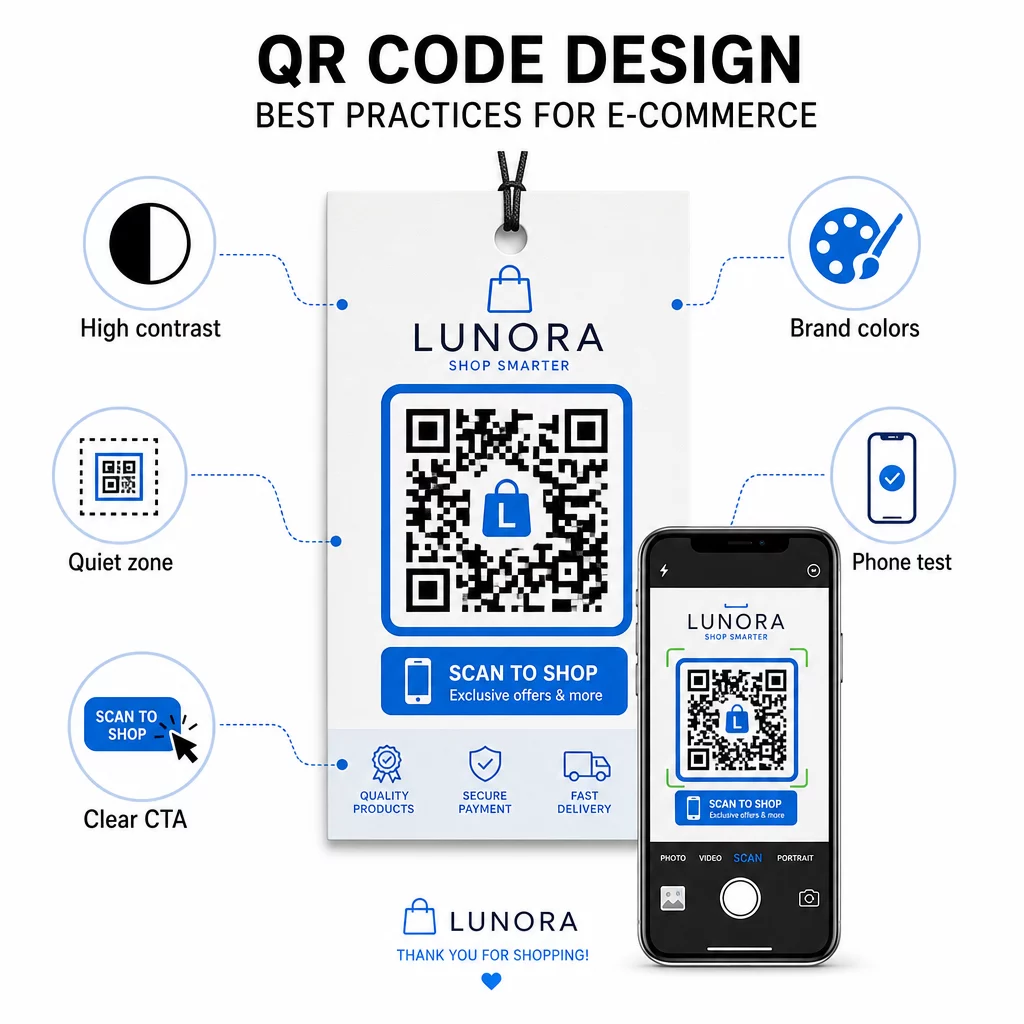
- Izmantojiet tumšus moduļus uz gaiša fona – Melns uz balta nodrošina spēcīgāko kontrastu kameras atpazīšanai un ir pieejamāks lietotājiem vāja apgaismojuma apstākļos
- Saglabājiet kluso zonu – Ap kodu atstājiet vismaz četrus tukšas vietas moduļus, lai apkārtējā grafika netraucētu skenēšanai
- Ievērojiet minimālā izmēra vadlīnijas – Vismaz 1 colla × 1 colla drukātiem materiāliem; lielāks izkārtnēm, kur pamatprincips ir, ka maksimālajam skenēšanas attālumam jābūt aptuveni desmit reizes lielākam par koda platumu
- Iekļaujiet skaidru aicinājumu uz darbību – Apzīmējiet kodu ar īsu instrukciju, piemēram, “Skenējiet, lai saņemtu 10% atlaidi” vai “Skenējiet, lai izsekotu savu pasūtījumu”, lai samazinātu vilcināšanos un palielinātu skenēšanas rādītājus
- Pārbaudiet pirms drukāšanas – Pārbaudiet, vai kods tiek pareizi skenēts galīgajā drukātajā izmērā, no paredzētajiem attālumiem, reālistiskā apgaismojumā un dažādos tālruņu modeļos
Mobilajām galvenajām lapām, kas saistītas ar jūsu QR kodiem, ielādes ātrums un mobilajām ierīcēm pielāgots izkārtojums ir kritiski svarīgi. Lapām jāielādējas mazāk nekā trīs sekundēs, un pogām jābūt pietiekami lielām, lai tās varētu viegli pieskarties. Skatiet mobilās QR koda galvenās lapas labākās prakses detalizētam kontrolsarakstam.
Kā izveidot QR kodu savam e-komercijas veikalam
Lai sāktu lietot QR kodus savam veikalam, ir jāveic trīs soļi:
- Ģenerējiet kodu – Izmantojiet Pageloot QR kodu ģenerators lai izveidotu dinamisku QR kodu, kas saistīts ar produkta lapu, maksājumu plūsmu, atsauksmju veidlapu vai jebkuru citu galamērķi. Izvēlieties dinamisku, nevis statisku, ja vēlaties vēlāk atjaunināt galamērķi vai izsekot veiktspējai.
- Pielāgojiet un zīmolojiet to – Pievienojiet savu logotipu, saskaņojiet ar savām zīmola krāsām un iekļaujiet rāmi ar aicinājuma uz darbību etiķeti. Zīmoloti kodi veido atpazīstamību un parasti ģenerē vairāk skenējumu nekā vienkārši melnbalti kodi.
- Izvietojiet un uzraugiet – Novietojiet kodu uz iepakojuma, e-pastos, drukātajos materiālos vai veikala izkārtnēs. Izmantojiet analītikas informācijas paneli, lai pārskatītu skenēšanas veiktspēju un pielāgotu kampaņas, pamatojoties uz to, kas darbojas.
Lai iegūtu nozarei specifiskas ieviešanas idejas, e-komercijas QR kodu risinājumu lapa aptver lietošanas gadījumus Shopify, WooCommerce un citās platformās. Varat arī pārlūkot QR kodu risinājumi pa nozarēm lai iegūtu kontekstu par to, kā citas nozares risina līdzīgas problēmas.
Reālās pasaules rezultāti demonstrē iespējamā mērogu: vadošo e-komercijas zīmolu gadījumu izpētes liecina par tādiem rezultātiem kā 130% tiešsaistes pārdošanas apjoma pieaugums un 239% lietotņu iesaistes pieaugums no mērķtiecīgas QR kodu izvietošanas. The e-komercijas QR kodu gadījumu izpētes lapa detalizēti aptver šos piemērus.
QR kodi vislabāk darbojas, ja tie atrisina konkrētu klienta problēmu – ātrāk iegūt informāciju, vieglāk veikt maksājumu vai bez grūtībām pabeigt atgriešanu. Sāciet ar vienu vai diviem augstas vērtības saskares punktiem, izmēriet rezultātus un paplašiniet no turienes.
Biežāk uzdotie jautājumi
Statisks QR kods tieši kodē galamērķa URL shēmā un to nevar mainīt pēc izveides. Dinamisks QR kods norāda uz īsu pāradresācijas saiti, ko var atjaunināt jebkurā laikā, pat pēc koda izdrukāšanas. E-komercijai dinamiskie kodi parasti ir vēlami, jo tie atbalsta reāllaika analīzi, ļauj atjaunināt galamērķi, mainoties akcijām, un rada tīrāku vizuālo shēmu, kas skenējas ātrāk. Uzziniet vairāk statisko un dinamisko QR kodu lapā.
Visuzticamākā metode apvieno divas pieejas. Pirmkārt, izmantojiet dinamiskos QR kodus, izmantojot pārvaldības platformu, piemēram, Pageloot, kas automātiski reģistrē skenēšanas skaitu, laika zīmogus, ierīču tipus un ģeogrāfiskās atrašanās vietas. Otrkārt, pievienojiet UTM parametrus saviem galamērķa URL, lai skenēšanas parādītos kā atšķirīgs datplūsmas avots pakalpojumā Google Analytics, kur varat izmērīt konversijas rādītājus un ieņēmumus, kas attiecināmi uz katru kodu. Skatiet QR kodu izsekošanas rokasgrāmatu, lai iegūtu soli pa solim norādījumus.
Izvietojumi ar visaugstāko iesaisti e-komercijā ir produktu iepakojums, piegādes kastes, iepakojuma ieliktņi un pasūtījuma apstiprinājuma e-pasta ziņojumi. Šie saskares punkti sasniedz klientus augstas nodomu intensitātes brīžos – tūlīt pēc pirkuma vai izpakošanas pieredzes laikā – padarot tos ideālus atsauksmju veicināšanai, atkārtotiem pirkumiem un sociālo tīklu sekošanai. Pēcpirkuma materiāli, piemēram, čeki un atgriešanas instrukcijas, ir arī efektīvi, jo klienti tajā brīdī aktīvi iesaistās ar jūsu zīmolu.