Jsou vaše marketingové snahy hnací silou návštěvnosti, ale nepřeměňují ji v prodeje? Mezera mezi objevením vašeho produktu zákazníkem a dokončením nákupu je místem, kde se ztrácí většina příjmů z e-commerce. QR kódy tuto mezeru uzavírají tím, že propojují fyzické kontaktní body přímo s digitálními nákupními zážitky – a jsou měřitelné na každém kroku.
Proč QR kódy patří do vaší e-commerce strategie
Přijetí QR kódů spotřebiteli dosáhlo bodu, kdy je tření při skenování minimální. Podle průmyslových dat 64 % nakupujících naskenovalo QR kód na produktu při nakupování v obchodech a 42 % uvedlo, že QR kódy výrazně zlepšily jejich osobní nákupní zážitek. Tento posun v chování vytváří skutečnou příležitost pro e-commerce značky, aby se setkaly se zákazníky tam, kde už jsou.
Pro online prodejce slouží QR kódy dvojímu účelu: urychlují cestu k nákupu odstraněním dalších kroků a generují data na úrovni skenování, která vám pomohou přesně pochopit, jak vaše kampaně fungují. A dynamický QR kód jde dál – umožňuje vám kdykoli aktualizovat cílovou URL bez nutnosti přetisku, což znamená, že kód na obalu produktu může dnes odkazovat na sezónní akci a příští měsíc na tutoriál k produktu.
Mezi hlavní výhody pro e-commerce podniky patří:
- Snížené tření při nákupu – Zákazníci skenují a dostanou se přímo na stránku produktu nebo do platebního procesu, zcela obejdou vyhledávání
- Kontinuita napříč kanály – Fyzické obaly, tištěné reklamy a e-mailové materiály se bezproblémově propojují s vaším digitálním obchodem
- Měřitelná angažovanost – Analýza skenování odhaluje, která umístění generují nejvíce návštěvnosti a která konvertují
- Flexibilní obsah – Dynamické kódy vám umožňují měnit cíle bez nutnosti opětovného vydávání tištěných materiálů
- Angažovanost po nákupu – Vložky do obalů a přepravní materiály se stávají aktivními marketingovými kanály
Klíčové případy použití QR kódů v e-commerce
Pochopení, kde QR kódy přinášejí největší hodnotu, vám pomůže určit priority, kde začít. Každý z níže uvedených případů použití řeší konkrétní problém v zákaznické cestě.
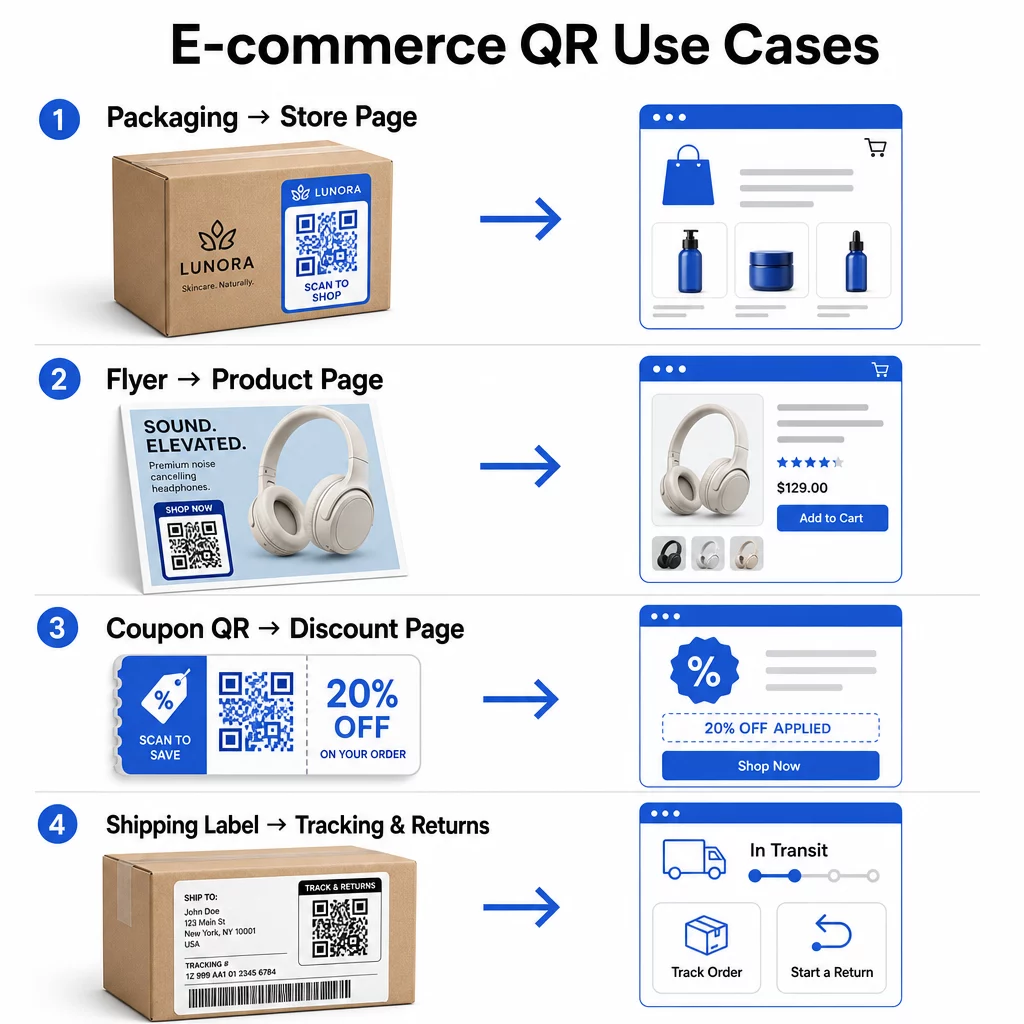
Propojte fyzické produkty s online obchody
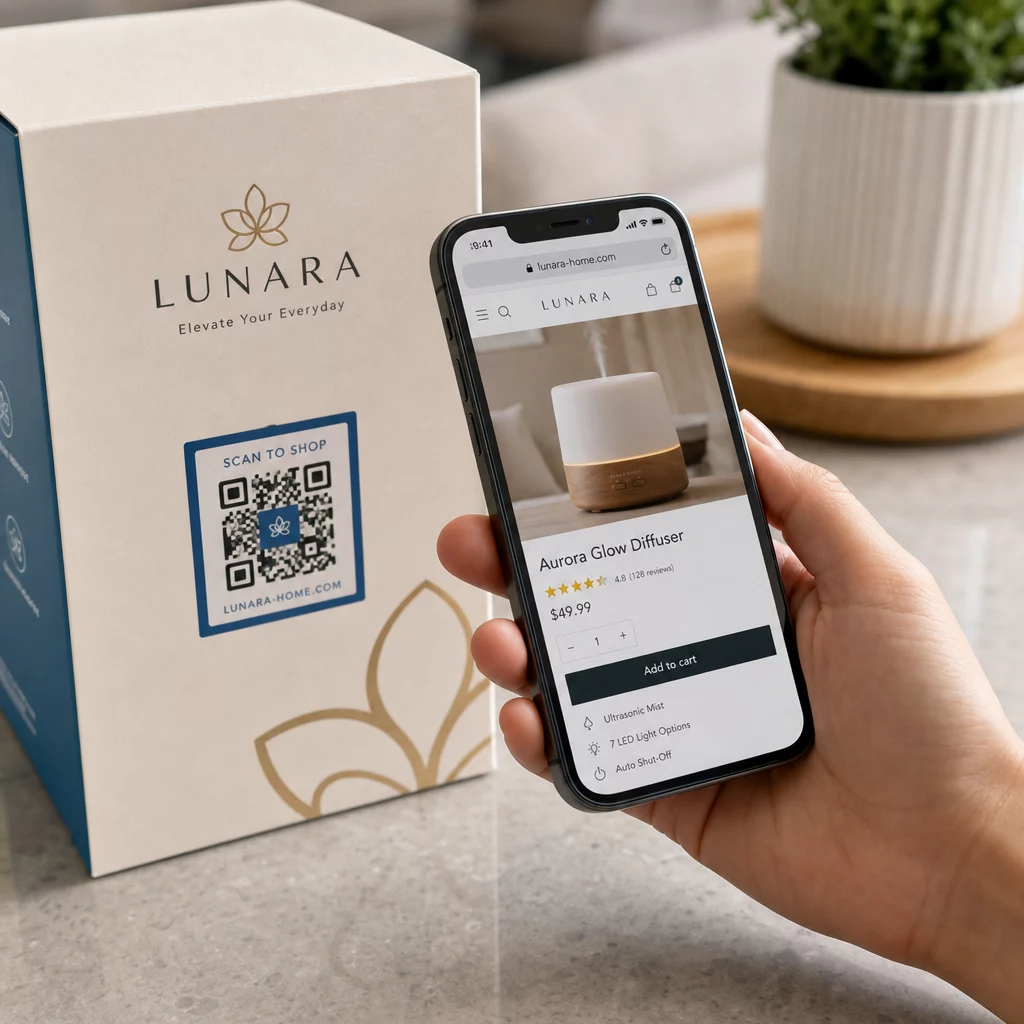
Obal produktu je nejpřímějším mostem mezi fyzickou položkou a vaším digitálním obchodem. QR kód na krabici nebo štítku může zákazníky přesměrovat na celou stránku produktu, související příslušenství, instruktážní videa nebo odkaz pro opětovnou objednávku. Jeden zákazník Pageloot umístil QR kódy dovnitř svého balení a nahlásil 27% nárůst opakovaných návštěv jejich obchodu Shopify během dvou týdnů.
Tento přístup je obzvláště cenný pro produkty s více detaily, než se vejde na štítek – složení, certifikace, návody a informace o záruce mohou být všechny dostupné za jediným skenovatelným kódem. Zjistěte více o QR kódech na obalech a jak prospívají maloobchodu.
Zvyšte prodeje pomocí nakupovatelných QR kódů
Když zákazník uvidí váš produkt v tištěné reklamě, katalogu nebo na prodejní výstavě, QR kód eliminuje kroky mezi zájmem a nákupem. Namísto hledání vašeho produktu nebo zadávání URL adresy naskenují a dostanou se přímo na stránku produktu nebo na vybranou kolekci.
Použijte a generátor QR kódů odkazů nasměrovat každý kód na konkrétní URL adresu. S dynamickými kódy můžete aktualizovat tuto destinaci tak, aby odrážela dostupnost zásob, sezónní ceny nebo časově omezený balíček, aniž byste museli přetiskovat jakékoli materiály.
Nabízejte kupóny a časově omezené akce
QR kódy jsou obzvláště účinné pro doručování slevových kódů a propagačních nabídek, protože zážitek je okamžitý a bezproblémový. Zákazník naskenuje, uvidí vstupní stránku s kupónem a může nabídku okamžitě uplatnit, namísto hledání promo kódu ve své schránce.
Umístěte propagační kódy na obaly produktů, tištěné účtenky, přímou poštu a fyzické značení, abyste podpořili jak první nákupy, tak opakované objednávky. The QR kód kupón generátor vám umožní vytvořit vyhrazenou vstupní stránku s více nabídkami a jasnou výzvou k akci.
Vytvořte kupónové QR kódy pro váš obchod Zobrazte časově omezené nabídky, promo kódy a exkluzivní nabídky na značkové vstupní stránce, na kterou se vaši zákazníci dostanou jedním skenováním. Použijte QR kód kupón generátor začít.
Povolte platby QR kódem
Bezkontaktní platba je rostoucí očekávání, zejména v maloobchodním a hybridním obchodním prostředí, kde zákazníci chtějí platit bez čekání u pokladny nebo ručního zadávání údajů o kartě. Platby QR kódem fungují tak, že zákazníka přesměrují na hostovanou platební stránku – naskenují, potvrdí částku a zaplatí pomocí uložené karty nebo mobilní peněženky, jako je Apple Pay nebo Google Pay.
Statické QR kódy odkaz na obecnou platební stránku, kde zákazníci sami zadávají částku. Dynamické QR kódy lze generovat s daty specifickými pro transakci, takže zákazník potřebuje pouze potvrdit a autorizovat. Pro podniky, které zpracovávají opakované platby nebo variabilní částky, dynamické platební kódy snižují chyby při zadávání a urychlují platbu.
Bezpečnost je zde klíčovým faktorem. Každý platební QR kód by měl používat ověřenou, HTTPS-zabezpečenou destinaci. Používejte dynamické kódy, kde je to možné, protože je lze deaktivovat nebo aktualizovat, pokud s nimi bylo manipulováno. The QR kód pro platbu přes PayPal poskytuje jednoduchý způsob, jak vytvářet platební kódy, které směrují zákazníky k vašemu platebnímu toku. Můžete si také prohlédnout osvědčené postupy pro přístupné platby QR kódem abyste zajistili, že vaše implementace bude bezpečná a inkluzivní.
Sbírejte recenze Google a zpětnou vazbu od zákazníků
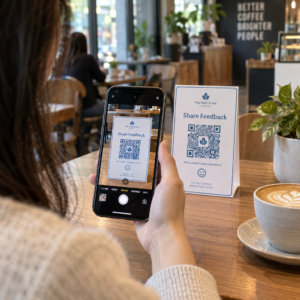
Sociální důkaz je jedním z nejvýznamnějších aktiv, které má e-commerce podnik. Výzvou je, že většina spokojených zákazníků nezanechává recenze, pokud proces není bezproblémový. QR kód na vložce do obalu, přepravním boxu nebo účtence snižuje toto tření na jediné skenování.
Nasměrujte kód přímo na vaši stránku pro odesílání recenzí Google, aby se zákazníci dostali přesně tam, kam potřebujete. The Google recenze QR kód generátor vám umožňuje vytvářet a přizpůsobovat kódy recenzí, které můžete vložit do svých fyzických materiálů. Pro širší sběr zpětné vazby mohou QR kódy také odkazovat na průzkumy po nákupu, což vám umožní shromažďovat strukturované poznatky o nákupním zážitku. Přečtěte si více o tom, jak QR kódy podporují zákaznický servis v e-commerce.
Zlepšete logistiku doručení a vracení zboží
Přepravní štítky a e-maily s potvrzením objednávky jsou nedostatečně využívané marketingové a servisní kanály. QR kód na přepravním štítku může zákazníkům poskytnout okamžitý přístup k aktualizacím sledování v reálném čase, aniž by museli hledat sledovací číslo a zadávat ho ručně.
Pro vrácení zboží QR kód odkazující přímo na formulář žádosti o vrácení odstraňuje nejfrustrující část poprodejního zážitku. Značky jako IKEA přijaly tento model – zasílání QR kódů e-mailem nebo SMS poté, co zákazník zaregistruje vrácení – k zefektivnění reverzní logistiky a snížení kontaktů s podporou. Prozkoumejte, jak QR kódy zlepšují zážitky z doručení v e-commerce podrobněji.
Rozšiřte publikum na sociálních sítích
Každý kus fyzického obalu je potenciálním kanálem pro růst vašeho sociálního dosahu. QR kód, který odkazuje přímo na váš profil na Instagramu, TikToku nebo YouTube, může proměnit prvního kupujícího v dlouhodobého sledujícího bez jakýchkoli dalších výdajů na reklamu.
To funguje obzvláště dobře při rozbalování, kdy je pozornost zákazníka vysoká a nadšení z produktu je na vrcholu.
Jak sledovat výkon kampaní s QR kódy
Generování QR kódu je jen polovina práce – pochopení jeho výkonu je to, co odděluje taktický experiment od škálovatelné strategie.
Dynamické QR kódy a vestavěná analytika
Dynamické QR kódy poskytují nejkomplexnější sledování, protože směrují skeny přes řízené přesměrování, které zaznamenává metriky v reálném čase. Platforma pro správu QR kódů, jako je Pageloot, zaznamenává:
- Celkový počet skenů a unikátní skeny
- Čas a datum každého skenu
- Geografická poloha skenu
- Typ zařízení a operační systém
Tato data vám řeknou, která umístění generují největší zapojení, kdy zákazníci s největší pravděpodobností skenují a kde je koncentrována geografická poptávka. Pro hlubší pohled na to, jak sledování funguje, viz průvodce sledováním skenů QR kódů a analýzou.
Monitorujte svou kampaň v reálném čase Chcete přesně vidět, kde a kdy vaši zákazníci skenují vaše materiály? Použijte Dynamický QR kód k vytvoření sledovatelných kódů a přístupu k plnému výkonnostnímu panelu ještě dnes.
Parametry UTM pro atribuci v Google Analytics
Pro kampaně, kde potřebujete, aby se výkon QR kódu zobrazoval vedle dat z jiných kanálů v Google Analytics, přidejte parametry UTM k cílové URL před vygenerováním kódu. Parametry UTM jsou krátké úryvky připojené k URL, které vaší analytické platformě sdělují zdroj, médium a název kampaně spojené s návštěvou.
Základní URL s UTM tagy pro QR kód na obalu produktu může vypadat takto:
“`
https://yourstore.com/product?utmsource=packaging&utmmedium=qrkód&utmcampaign=spring_launch
“`
Pět standardních parametrů UTM je:
- utm_source – Odkud provoz pochází (např. `obal`, `leták`, `účtenka`)
- utmmedium – Marketingový kanál (např. `qrkód`)
- utmcampaign – Konkrétní název kampaně (např. `jarospuštění`)
- utm_term – Klíčová slova, typicky pro placené vyhledávací kampaně
- utm_content – Pro rozlišení podobných odkazů nebo kreativních variant
Jakmile je označeno, zkraťte URL a vygenerujte svůj QR kód ze zkráceného odkazu. Skenování se pak objeví jako zřetelný zdroj provozu ve vašich analytických reportech, což vám umožní měřit konverzní poměry, příjmy a chování specifické pro provoz řízený QR kódy.
Nejlepší postupy pro design QR kódů pro e-commerce
QR kód, který zákazníci nemohou nebo nechtějí naskenovat, nepřináší žádnou hodnotu. Tyto principy designu zajišťují, že vaše kódy fungují spolehlivě na všech místech:
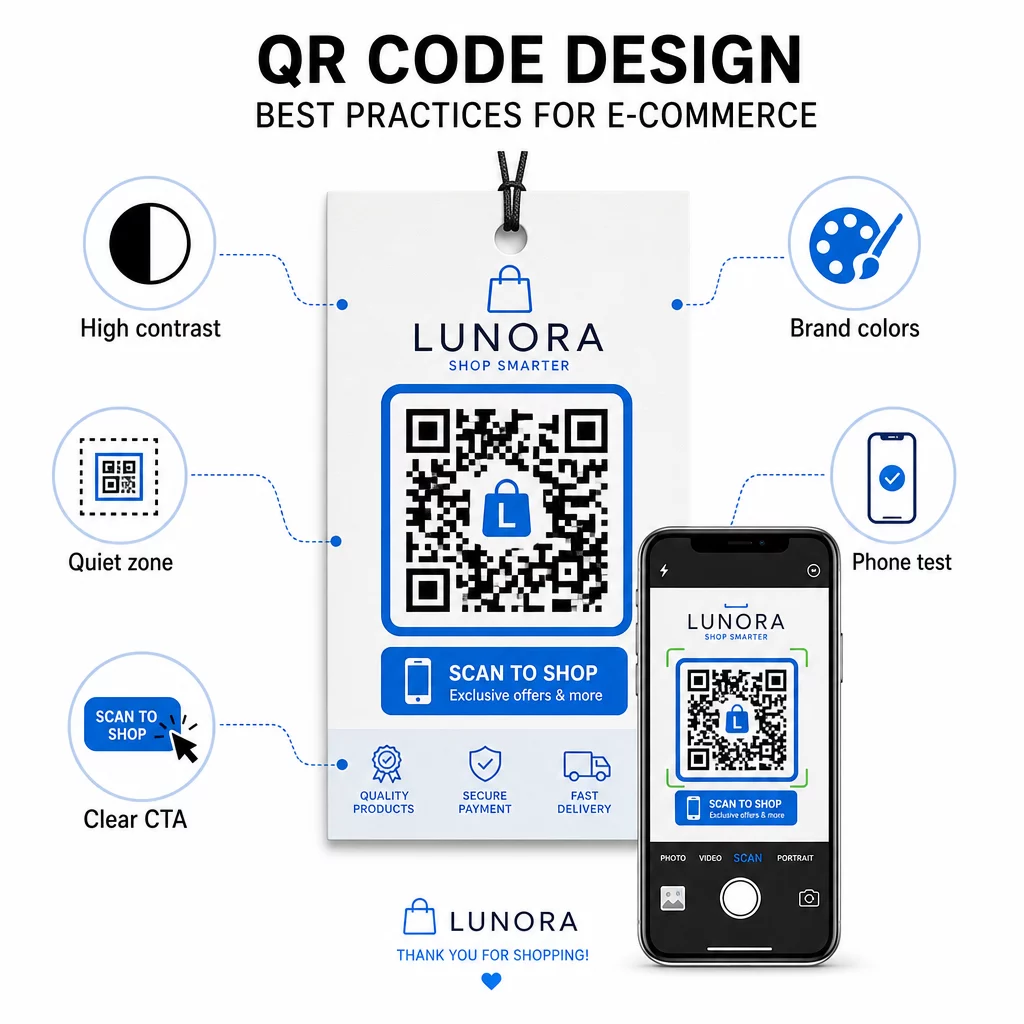
- Používejte tmavé moduly na světlém pozadí – Černá na bílé poskytuje nejsilnější kontrast pro rozpoznání kamerou a je přístupnější pro uživatele v podmínkách slabého osvětlení
- Udržujte klidovou zónu – Kolem kódu ponechte alespoň čtyři moduly prázdného prostoru, aby okolní grafika nerušila skenování
- Dodržujte pokyny pro minimální velikost – Minimálně 1 palec × 1 palec pro tištěné materiály; větší pro značení, kde platí pravidlo, že maximální vzdálenost skenování by měla být zhruba desetinásobek šířky kódu
- Zahrňte jasnou výzvu k akci – Označte kód krátkou instrukcí, jako je “Naskenujte pro 10% slevu” nebo “Naskenujte pro sledování objednávky”, abyste snížili váhání a zvýšili míru skenování
- Otestujte před tiskem – Ověřte, že se kód správně skenuje ve finální tištěné velikosti, z očekávaných vzdáleností, v realistickém osvětlení a napříč více modely telefonů
Pro mobilní vstupní stránky propojené z vašich QR kódů jsou klíčové rychlost načítání a rozložení optimalizované pro mobilní zařízení. Stránky by se měly načíst do tří sekund a tlačítka by měla být dostatečně velká pro snadné klepnutí. Viz osvědčené postupy pro mobilní vstupní stránky s QR kódem pro podrobný kontrolní seznam.
Jak vytvořit QR kód pro váš e-commerce obchod
Začít s QR kódy pro váš obchod vyžaduje tři kroky:
- Vygenerujte kód – Použijte Generátor QR kódů Pageloot k vytvoření dynamického QR kódu propojeného s produktovou stránkou, platebním tokem, formulářem pro recenze nebo jakoukoli jinou destinací. Zvolte dynamický před statickým, pokud chcete později aktualizovat destinaci nebo sledovat výkon.
- Přizpůsobte a označte značkou – Přidejte své logo, slaďte barvy své značky a zahrňte rámeček s výzvou k akci. Značkové kódy budují rozpoznatelnost a mají tendenci generovat více skenů než obyčejné černobílé kódy.
- Nasaďte a monitorujte – Umístěte kód na obaly, e-maily, tištěné materiály nebo do prodejních cedulí. Použijte analytický panel k přezkoumání výkonu skenování a úpravě kampaní na základě toho, co funguje.
Pro nápady na implementaci specifické pro dané odvětví, stránka řešení QR kódů pro e-commerce pokrývá případy použití napříč Shopify, WooCommerce a dalšími platformami. Můžete si také prohlédnout řešení QR kódů podle odvětví pro kontext, jak se jiná odvětví vypořádávají s podobnými výzvami.
Reálné výsledky demonstrují rozsah toho, co je možné: případové studie předních e-commerce značek ukazují výsledky jako 130% nárůst online prodejů a 239% nárůst zapojení do aplikací z cílených nasazení QR kódů. případové studie QR kódů pro e-commerce stránka podrobně pokrývá tyto příklady.
QR kódy fungují nejlépe, když řeší konkrétní problém pro zákazníka – rychlejší získání informací, snazší platba nebo dokončení vrácení zboží bez potíží. Začněte s jedním nebo dvěma vysoce hodnotnými kontaktními body, změřte výsledky a odtud se rozšiřujte.
Často kladené otázky
Statický QR kód kóduje cílovou URL přímo do vzoru a nelze jej po vytvoření změnit. Dynamický QR kód odkazuje na krátký přesměrovací odkaz, který lze kdykoli aktualizovat, i poté, co byl kód vytištěn. Pro e-commerce jsou dynamické kódy obecně preferovány, protože podporují analýzu v reálném čase, umožňují aktualizace cíle při změně akcí a vytvářejí čistší vizuální vzor, který se skenuje rychleji. Zjistěte více na stránce statických vs. dynamických QR kódů.
Nejspolehlivější metoda kombinuje dva přístupy. Zaprvé, použijte dynamické QR kódy prostřednictvím správcovské platformy, jako je Pageloot, která automaticky zaznamenává počty skenování, časová razítka, typy zařízení a geografické polohy. Zadruhé, přidejte parametry UTM do svých cílových URL, aby se skenování zobrazovalo jako odlišný zdroj návštěvnosti v Google Analytics, kde můžete měřit míru konverze a příjmy připisované jednotlivým kódům. Podrobné pokyny naleznete v průvodci sledováním QR kódů.
Umístění s nejvyšší angažovaností v e-commerce jsou obaly produktů, přepravní krabice, vložky do balení a e-maily s potvrzením objednávky. Tyto kontaktní body oslovují zákazníky v okamžicích vysokého záměru – hned po nákupu nebo během rozbalování – což je činí ideálními pro získávání recenzí, opakovaných nákupů a sledování na sociálních sítích. Poprodejní materiály, jako jsou účtenky a pokyny k vrácení zboží, jsou také účinné, protože zákazníci jsou v tu chvíli aktivně zapojeni do vaší značky.