> 산업 > QR Codes for Product Recalls: How They Work and Why They Matter
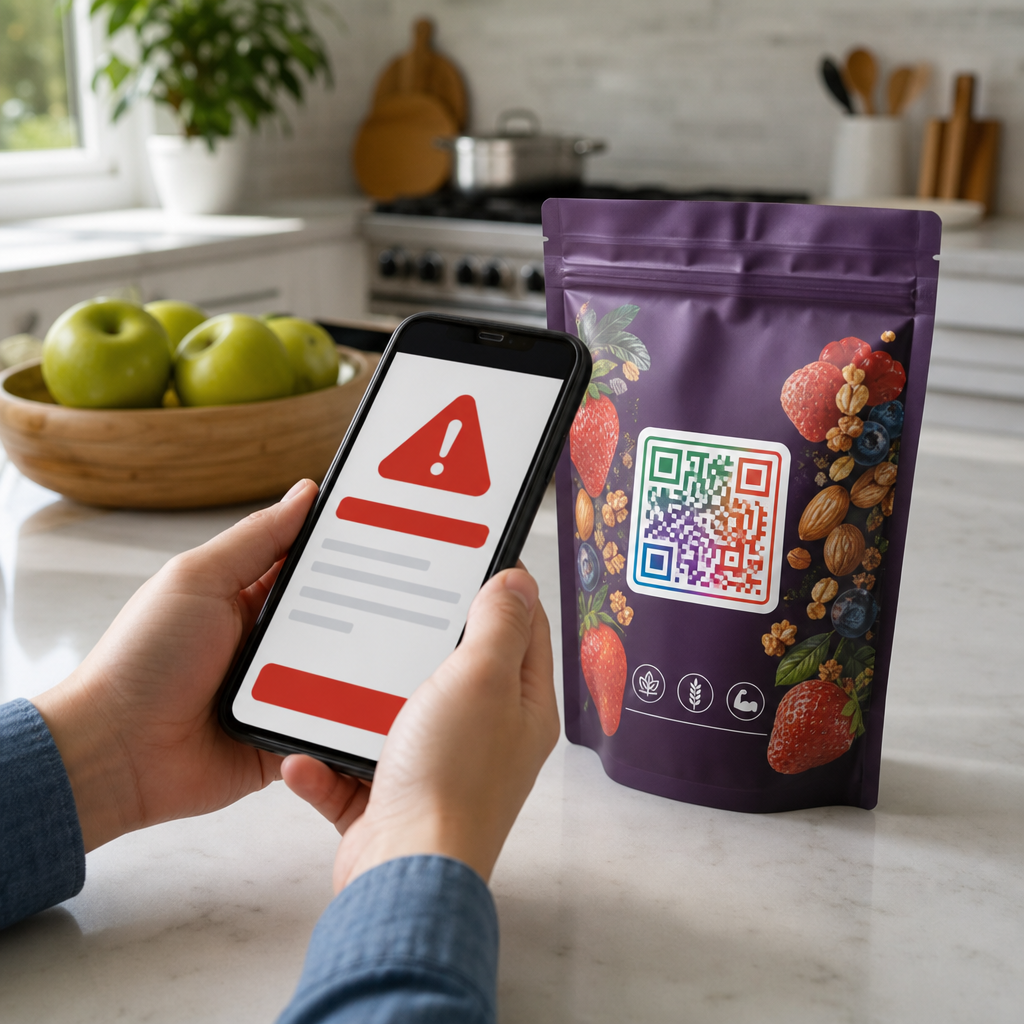
Scanning recall QR code

QR Codes for Product Recalls: How They Work and Why They Matter

Improve product recall efficiency using QR codes. Learn how dynamic codes support lot-level traceability, real-time notifications, and regulatory compliance.
Updated on 7월 2, 2026
목차

Does your recall communication plan rely on static notices that can’t be updated after printing? When a safety issue emerges, outdated or incomplete information reaching consumers can turn a manageable recall into a serious liability. This guide explains how QR codes fit into product recall workflows – from traceability and lot-level identification to real-time consumer notifications – and what to consider when implementing them.

Why Product Recalls Need Better Communication Tools

A product recall is a race against time. Regulators, retailers, consumers, and your own supply chain all need accurate information quickly, and the channel you use to deliver it matters enormously.

The CPSC’s recall handbook is explicit: recall outreach must be comprehensive, using emails, letters, advertisements, social media, and other technological means to reach as many consumers as possible. Even with direct notice – sending communications to consumers known to have the product – the CPSC may require additional notices to ensure full coverage. The handbook specifically recommends that recall posters include QR codes so consumers can act on the recall immediately.

The FDA echoes this urgency on the traceability side. Under the FSMA Final Rule on Additional Traceability Records, covered firms must provide electronic, sortable records to the FDA within 24 hours of a request, and those records must be linked to a Traceability Lot Code (TLC) at every Critical Tracking Event (CTE) – from harvesting and initial packing through shipping and receiving. When a recall hits, the ability to quickly pull lot-level records isn’t a nice-to-have; it’s a regulatory requirement.

QR codes address both sides of this problem: they connect physical products to digital records for traceability, and they connect consumers to live recall information at the moment of scanning.

How QR Codes Support Product Traceability

The foundation of any effective recall is knowing exactly which units are affected, where they went, and who has them. QR codes help manufacturers build this foundation before a recall ever occurs.

Encoding Lot and Batch Data

A traditional 1D barcode stores 20–85 characters – enough for a simple product ID. A QR code can hold over 7,000 characters, which means you can encode the TLC, batch number, expiration date, and production site in a single symbol. When a QR code is scanned at each step of the supply chain, that data feeds directly into your traceability records.

The GS1 Digital Link standard takes this further by turning GS1 product identifiers – like a GTIN – into a web URI encoded in a QR code. A single scan can then serve multiple audiences: a point-of-sale system reads the GTIN for checkout, a retailer’s compliance system checks whether the product has been recalled, and a consumer’s phone opens a branded product page, all from the same code on the package. For food manufacturers, these QR codes can embed the GTIN alongside lot and batch numbers, serial numbers, expiration dates, and country of origin. Retailers scanning at point-of-sale can be automatically notified if a product has been recalled, has expired, or is flagged as counterfeit.

If you’re navigating FDA digital labeling requirements alongside traceability, the guide on QR codes for FDA compliance covers how GS1 Digital Link and FSMA Rule 204 interact in practice.

Tracking at Critical Points

Each time a QR-coded product is scanned – whether at a warehouse receiving dock, a distribution center, or a retail shelf – your system captures a timestamped, location-attributed record. This is the kind of audit trail that supports rapid lot isolation during a recall. If you need to identify which retail locations received units from a specific lot, scannable QR codes on cases and units give you that data without manual cross-referencing.

For a deeper look at how QR codes operate throughout the supply chain, see the guides on QR codes for supply chain tracking제조 과정에 QR 코드를 통합하여.

Using Dynamic QR Codes in Recall Notices

This is where QR codes move from traceability into active recall communication – and where the distinction between static and dynamic QR codes becomes critical.

정적 QR 코드 encodes a fixed destination. Once printed, the destination cannot change. If you distribute a recall notice with a static QR code pointing to your recall landing page and that page URL changes – or you need to update the information it contains – every printed notice becomes obsolete.

동적 QR 코드 works differently. The code itself points to a short redirect link, and you control where that redirect sends the user. You can edit the destination after printing without generating a new code or reprinting anything. For recall communications – which may need updating as new lot numbers are identified, remedies change, or contact information is revised – this flexibility is essential.

What to Put Behind a Recall QR Code

The FDA’s guidance on public warnings provides a useful checklist for what recall-related web content should include:

  • Product identification information, including images, numerical product codes, packaging descriptions, and brand names
  • Geographic areas and dates of distribution of the affected product
  • A clear description of the defect and health hazard, written to prompt an urgent response
  • Name and contact information for the recalling firm
  • Instructions for consumers on what to do with the product
  • Number and nature of any reported illnesses or injuries associated with the defect
  • Common symptoms of any illness of concern, where applicable

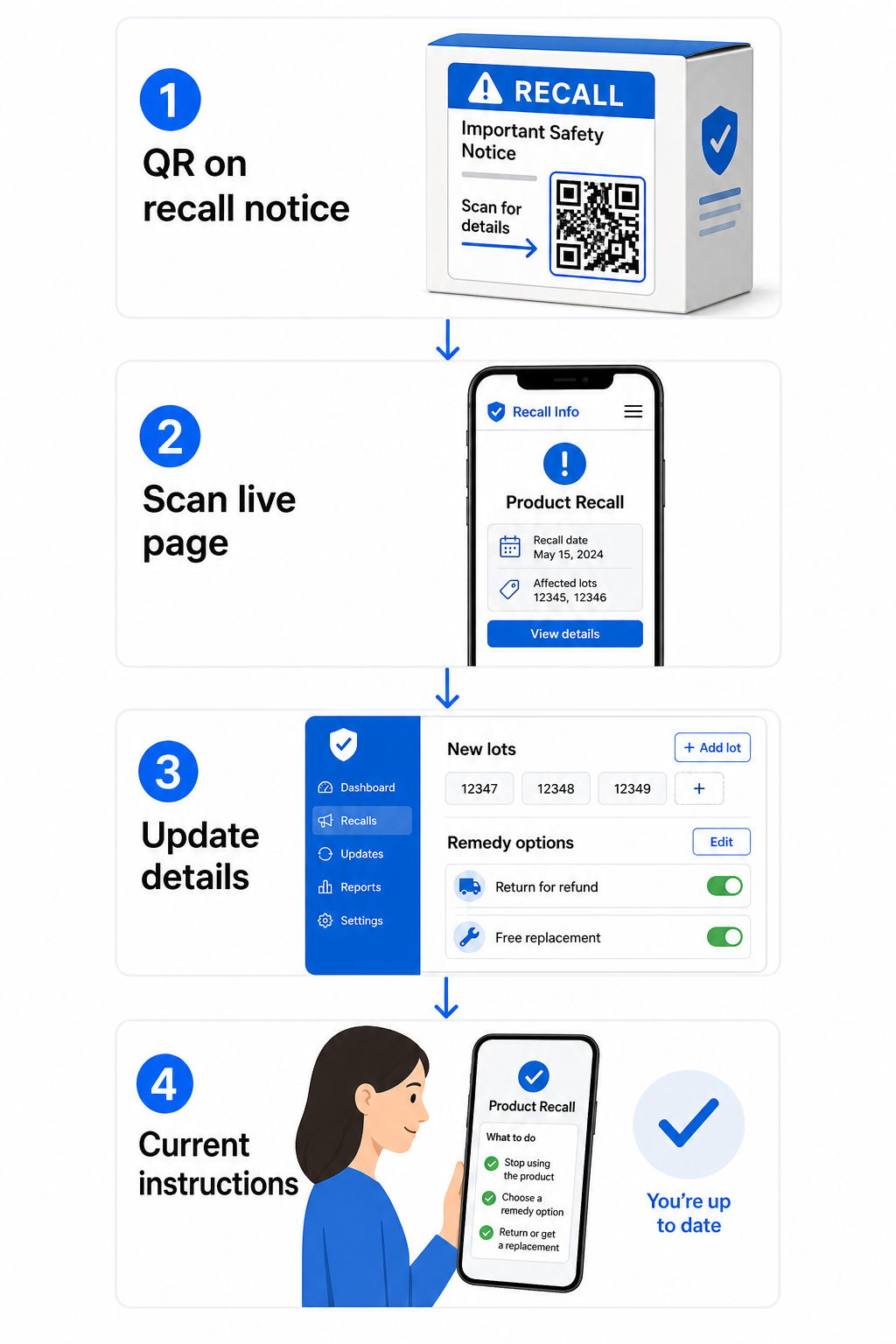
A dynamic QR code on a recall poster, package insert, or retailer notice can link directly to a page containing all of this. As the recall evolves – new lots added, remedy options confirmed, hotline numbers updated – you update the destination page, and every previously printed code automatically points to current information.

Dynamic recall workflow

Keep Your Recall Content Editable After Print Need to update your recall landing page without reprinting thousands of notices? Use Pageloot’s 동적 QR 코드 생성기 to create codes whose destinations you can change anytime from a central dashboard.

Applying QR Codes to Different Recall Communication Formats

Recall Posters and In-Store Notices

The CPSC handbook recommends that recall posters show a clear photograph or drawing of the product, a toll-free number in large type, a “Post until [date]” instruction, and tear-off sheets or QR codes for immediate consumer action. A dynamic QR code on a poster can link to a mobile-optimized recall page with the full FDA-recommended information, and the same poster remains accurate even if details are updated after distribution.

Mailed Recall Notices

For direct mail recalls, the CPSC recommends that the words “Safety Recall” or “Recall Notice” appear prominently on the envelope and at the top of the letter. Adding a QR code to the letter body gives recipients a one-scan path to the full recall page, a digital response form, or a returns portal – without needing to type a URL.

The FDA also recommends including a return response card with mailed recall notices, asking recipients to confirm they followed the instructions. A QR code linking to a digital version of that response form makes it easier to collect and track responses.

제품 포장

For manufacturers who want to build recall-readiness into packaging from the start, a dynamic QR code printed on the package itself can serve everyday purposes – linking to product information, certifications, or usage instructions – and be redirected to a recall notice if that specific product is ever affected. This approach is particularly relevant for 제품 포장의 QR 코드를 스캔하여food packaging, where lot-specific traceability is already expected by regulators.

PDF Recall Documents

When a recall involves detailed technical documentation – safety data sheets, corrective action instructions for distributors, or multi-page consumer advisories – a PDF QR 코드 lets you link directly to the document from any printed surface. Upload your recall document, generate the QR code, and anyone who scans it gets the full PDF immediately on their phone. Because the document is hosted dynamically, you can replace it with an updated version without changing the printed code.

Communicating with Retailers and Distributors

Recall communications to the trade channel have their own requirements. The FDA recommends that written communications to direct account consignees include:

  • Accurate product identification, including lot numbers, expiration dates, serial numbers, and UPC codes
  • A clear description of the hazard and reason for the recall
  • Depth of the recall, specifying whether it extends to wholesale, retail, or consumer level
  • Specific instructions for handling inventory and returning or disposing of product
  • A response mechanism for consignees to confirm they have complied

A QR code in the retailer notice can link to a distributor-specific portal with all of this information, a digital acknowledgment form, and step-by-step instructions for pulling product from shelves. The CPSC also notes that notices to retailers should explain how to display recall posters and inform consumers – a QR code linking to downloadable poster files makes that logistics step simpler.

Tracking Recall Response with QR Code Analytics

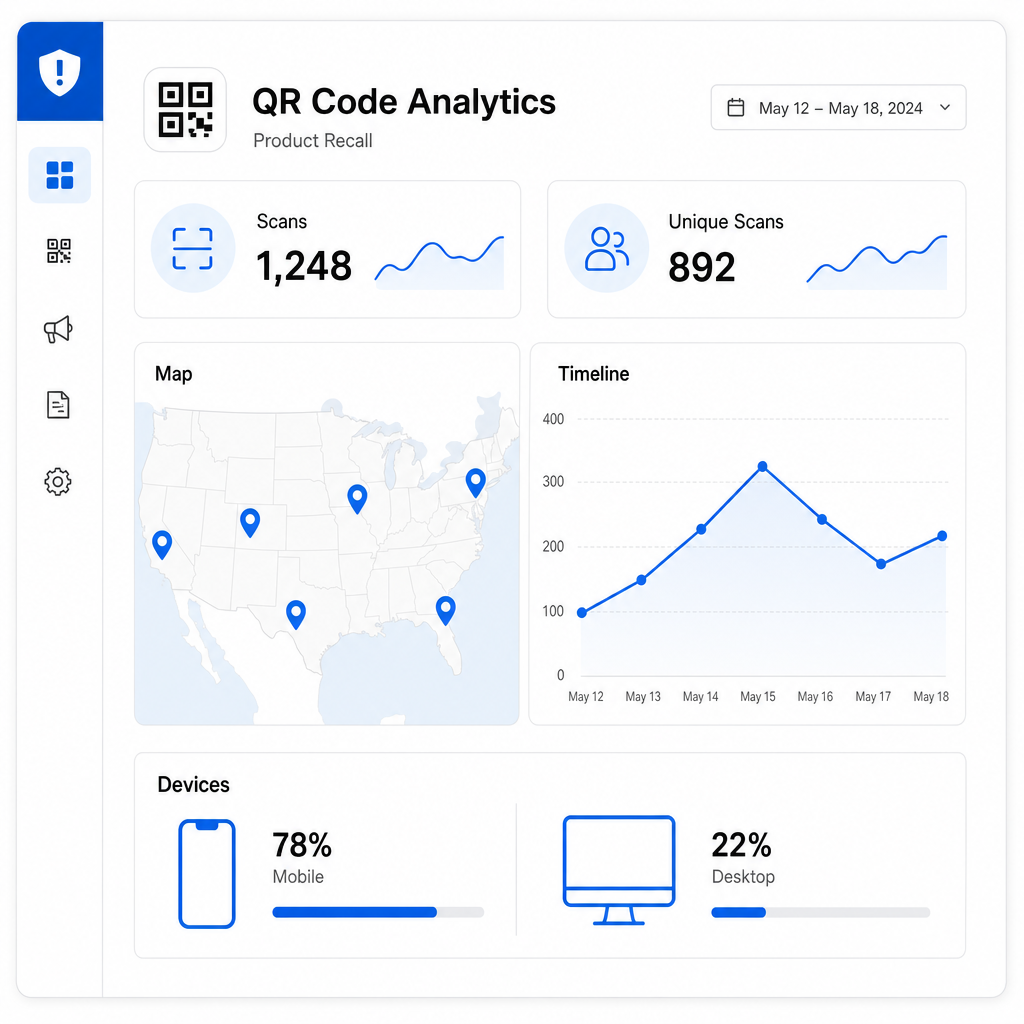
One of the practical advantages of dynamic QR codes is that every scan generates data. Pageloot’s dynamic QR codes collect scan counts, unique versus repeat scans, timestamps, geographic location data (country, city, and GPS coordinates), device type, and browser or OS information.

Recall scan analytics

In a recall context, this data lets you monitor which regions are engaging with the recall notice – helping identify where consumer awareness is low – as well as scan velocity over time, which indicates whether your outreach is reaching consumers or losing momentum. Device type data also tells you whether your recall landing page needs better mobile optimization.

This kind of real-time visibility helps you assess whether your recall communication is working before regulators ask that question. If scan activity is low in a state where significant inventory was distributed, that signals a need for additional outreach in that area.

For more on what data dynamic QR codes collect and how to interpret it, see the guide on tracking QR code scans and analytics.

Monitor Your Recall Response in Real Time See exactly where and when consumers are engaging with your recall notices. Use the 동적 QR 코드 생성기 to create trackable codes and access a full performance dashboard from the moment your recall goes live.

Practical Guidelines for Recall QR Codes

Size and Print Quality

For QR codes to scan reliably in real-world conditions – on a grocery store poster, a consumer mailer, or a product package – physical placement and print quality matter significantly.

  • 최소 크기: Print recall QR codes at no smaller than 2 × 2 cm (0.8 × 0.8 inches) for close-range scanning; for posters and signage, 3 × 3 cm (1.2 × 1.2 inches) or larger is more appropriate
  • 대비: Use a dark code on a light background; avoid reversed designs or placing the code over a busy background
  • 콰이어트 존: Leave a clear margin of at least 0.25 inches around the code on all sides so scanners can locate it reliably
  • 파일 형식: Export print-ready QR codes in vector formats such as SVG or EPS to maintain clarity at any print size
  • Test before printing: Always verify the QR code scan on the actual printed material before committing to a full print run

For complete label design guidance, see the guide to QR codes for product labels.

Keep Recall Content Mobile-Optimized

Most consumers will scan a recall QR code on a smartphone. The landing page behind the code should load quickly, display clearly on a small screen, and lead with the critical information – product description, hazard, and what to do – before anything else. The FDA guidance is clear that brief, succinct warnings are more effective than lengthy ones, and that content which distracts consumers from the hazard message should be avoided.

Privacy and Data Compliance

QR code scan analytics collect data about the devices and locations of people who scan. If your recall QR code is consumer-facing, be aware of applicable privacy regulations – particularly GDPR for EU consumers, CCPA for California residents, and any sector-specific requirements. For a full overview of how these laws apply to QR code data collection, see the guide on QR code privacy laws and key regulations.

Scaling Recall Codes Across Large Product Lines

If you manufacture products across multiple SKUs, production runs, or geographic markets, you may need to generate unique QR codes for each lot, batch, or product variant. Pageloot supports bulk QR code generation via CSV uploads, capable of producing up to 100,000 codes for enterprise-scale operations. Each code can be individually tracked and managed from a centralized dashboard.

For industries that need QR code solutions at this scale, the manufacturing QR code solutionsproduct QR code tools pages cover relevant use cases and platform capabilities. You can also explore the full range of industry-specific QR code applications to see how other regulated sectors use QR codes for compliance and safety communication.

***

When a recall happens, the speed and clarity of your communication directly affects consumer safety, regulatory outcomes, and brand trust. Building QR codes into your recall communication plan – and using dynamic codes that can be updated after distribution – gives you a flexible, trackable layer that static notices simply cannot provide. Start by creating a 동적 QR 코드 for your next safety notice or product label, and give your recall response the real-time flexibility it needs.

자주 묻는 질문

What is the difference between a static and dynamic QR code for a product recall?

A static QR code encodes a fixed destination that cannot be changed after printing. If your recall page URL changes or you need to update the information, every printed notice with a static code becomes outdated. A dynamic QR code points to a redirect link that you control – so you can update the destination page, swap in a new PDF, or change the linked content at any time without reprinting the code. For recall communications that may evolve as new lot numbers are identified or remedies change, dynamic QR codes are the practical choice.

What information should a recall QR code link to?

FDA guidance recommends that recall public warnings include a clear product description with lot numbers, expiration dates, and images to help with identification; the geographic area and dates of distribution; a plain-language description of the defect and associated health hazard; instructions for consumers on what to do with the product; the recalling firm’s name and contact information; and, where applicable, the number and nature of any reported illnesses or injuries. The landing page should be mobile-optimized, load quickly, and lead with the hazard and required action steps before any other content.

Can QR codes help with FDA traceability requirements for food recalls?

Yes. Under the FSMA Final Rule on Additional Traceability Records, covered firms must maintain records linking a Traceability Lot Code (TLC) to Key Data Elements at each Critical Tracking Event, and must be able to provide those records electronically to the FDA within 24 hours of a request. QR codes – particularly those using the GS1 Digital Link standard – can encode the TLC, batch number, expiration date, and GTIN in a single symbol, making it easier to trace affected product through the supply chain rapidly. When a recall is triggered, lot-level QR code data helps isolate which units are affected and where they were distributed.

작성자 정보

시임 코스타비는 페이지루트의 콘텐츠 책임자입니다. 그는 페이지루트의 혁신적인 QR 코드 생성 서비스에 대한 글을 쓰고 있습니다. 5년 이상 QR 코드 분야에서 쌓아온 깊이 있는 전문 지식을 바탕으로, 시임은 이 분야의 전문가로 인정받고 있습니다. 그는 QR 기술을 활용하여 디지털 상호작용을 간소화하고 향상시키는 데 크게 기여하고 있습니다.

범주
에 대해 자세히 알아보기
미용 제품 용 QR 코드 메이커
QR 코드 화장품

온라인으로 QR 코드를 생성해야하는 경우 QR 코드 만들기 무료로 여기!
Pageloot는 #1 Go-To 솔루션 QR 코드를 만들고 스캔합니다.

BL-0299

블로그 세대

20,000개 이상의 브랜드로부터 신뢰를 받아 더 많은 매출, 리뷰, 팔로워를 확보했습니다.

클라이언트 로고
최고 브랜드의 신뢰
5 중 4.8 평가

4.86 / 5 별점

휴고 로랑
휴고 로랑
레스토랑 주인
가장 쉽고 안정적인 QR 코드 생성기. PDF 파일을 즉시 업로드할 수 있습니다. 이제 레스토랑 메뉴가 디지털화되었습니다.
루카스 얀센
루카스 얀센
부동산 개발사
이것은 훌륭한 도구이며 QR 코드를 사용하면 원하는 곳으로 이동할 수 있습니다. 우리는 위치 QR 코드만 사용하지만 유용한 기능이 너무 많습니다.
엠마 모레티
엠마 모레티
소매 제품
사용하기 쉽고 빠릅니다. 그것은 훌륭하게 작동하고 완벽한 이미지를 생성하므로 직원들이 내 vCard를 다운로드할 수 있습니다.
휴고 로랑
휴고 로랑
레스토랑 주인
가장 쉽고 안정적인 QR 코드 생성기. PDF 파일을 즉시 업로드할 수 있습니다. 이제 레스토랑 메뉴가 디지털화되었습니다.
루카스 얀센
루카스 얀센
부동산 개발사
이것은 훌륭한 도구이며 QR 코드를 사용하면 원하는 곳으로 이동할 수 있습니다. 우리는 위치 QR 코드만 사용하지만 유용한 기능이 너무 많습니다.
엠마 모레티
엠마 모레티
소매 제품
사용하기 쉽고 빠릅니다. 그것은 훌륭하게 작동하고 완벽한 이미지를 생성하므로 직원들이 내 vCard를 다운로드할 수 있습니다.
더 많은 QR 코드보기
QR 티켓 이벤트 입장
QR 코드 사용 티켓 및 페스티벌 패스
무엇이든 디지털 경험으로 전환하세요 3분 이내에.

14일 무료 체험.

신용카드는 필요 없습니다.

첫 구매 시 30% 할인

코드를 사용하세요:

MP3 파일 공유

PDF QR 코드를 생성하려면 가입하세요

필요한 모든 것을 업로드하고 표시합니다.

  • 오디오 파일
  • 팟캐스트
  • 음악

가입 시 14일 무료 체험.
체험 기간 후 QR 코드 만료.

오디오 mp3 QR 코드를 생성하려면 가입하세요

프레임으로 더 많은 스캔 확보

QR 코드에 더 많은 프레임을 추가하려면 가입하세요

클릭 유도 문안 프레임은 고객이 QR 코드와 쉽게 상호 작용할 수 있도록 도와줍니다. 사용해 보세요!

가입 시 14일 무료 체험.
체험 기간 후 QR 코드 만료.

QR 코드에 더 많은 프레임을 추가하려면 가입하세요

도형으로 더 많은 스타일 추가

더 많은 도형을 만들려면 가입하세요

QR 코드는 정사각형일 필요가 없습니다. 브랜드 이미지에 맞게 전환해 보세요.

가입 시 14일 무료 체험.
체험 기간 후 QR 코드 만료.

더 많은 도형을 만들려면 가입하세요

QR 코드에 로고 추가

QR 코드에 로고를 추가하려면 가입하세요

로고와 브랜드를 추가하여 QR 코드를 돋보이게 만드세요.

가입 시 14일 무료 체험.
체험 기간 후 QR 코드 만료.

QR 코드에 로고를 추가하려면 가입하세요

스마트 앱 스토어 리디렉션

앱 스토어 QR 코드를 생성하려면 가입하세요

스마트 앱 스토어 QR 코드에 앱 링크를 추가하세요. 사용자는 장치에 따라 리디렉션됩니다.

가입 시 14일 무료 체험.
체험 기간 후 QR 코드 만료.

앱 스토어 QR 코드를 생성하려면 가입하세요

QR 코드에 이미지 업로드

이미지 QR 코드를 생성하려면 가입하세요

이미지를 쉽게 공유하세요. 몇 초 안에 동적으로 이미지를 변경하십시오.

가입 시 14일 무료 체험.
체험 기간 후 QR 코드 만료.

이미지 QR 코드를 생성하려면 가입하세요

PDF 파일 공유

PDF QR 코드를 생성하려면 가입하세요

필요한 모든 것을 업로드하고 표시합니다.

  • 메뉴 및 가격표
  • 명령
  • 모든 문서

가입 시 14일 무료 체험.
체험 기간 후 QR 코드 만료.

PDF QR 코드를 생성하려면 가입하세요

인쇄 없이 나중에 편집

다시 인쇄하지 않고 QR 코드를 편집하려면 가입하세요

동적 QR 코드를 사용하면 새 QR 코드를 인쇄하지 않고도 QR 코드의 내용을 변경할 수 있습니다.

가입 시 14일 무료 체험.
체험 기간 후 QR 코드 만료.

다시 인쇄하지 않고 QR 코드를 편집하려면 가입하세요

언제? 어디서? QR 코드 스캔 추적

QR 코드를 추적하려면 가입하세요

어떤 QR 코드가 가장 많이 스캔되고 무엇이 고객을 가장 흥분시키는지 알아보십시오.

가입 시 14일 무료 체험.
체험 기간 후 QR 코드 만료.

QR 코드를 추적하려면 가입하세요

인쇄 준비 파일 제공

PDF 및 SVG와 같은 벡터 QR 코드를 생성하려면 가입하세요.

.EPS, .PDF, .SVG

HD 해상도로 QR 코드를 다운로드하고 싶으신가요? 인쇄할 준비가 된 벡터 또는 픽셀 형식을 가져옵니다.

가입 시 14일 무료 체험.
체험 기간 후 QR 코드 만료.

PDF 및 SVG와 같은 벡터 QR 코드를 생성하려면 가입하세요.

기다리세요. 귀하의 QR 코드는 로드 중... 로드 중...

나만의 것으로 만들기

나중을 위해 QR 코드를 저장하려면 가입하세요.

다양한 색상, 로고 및 클릭 유도문안 프레임으로 멋진 QR 코드를 만들어 더 많은 스캔을 받으세요.

가입 시 14일 무료 체험.
체험 기간 후 QR 코드 만료.

나중을 위해 QR 코드를 저장하려면 가입하세요.