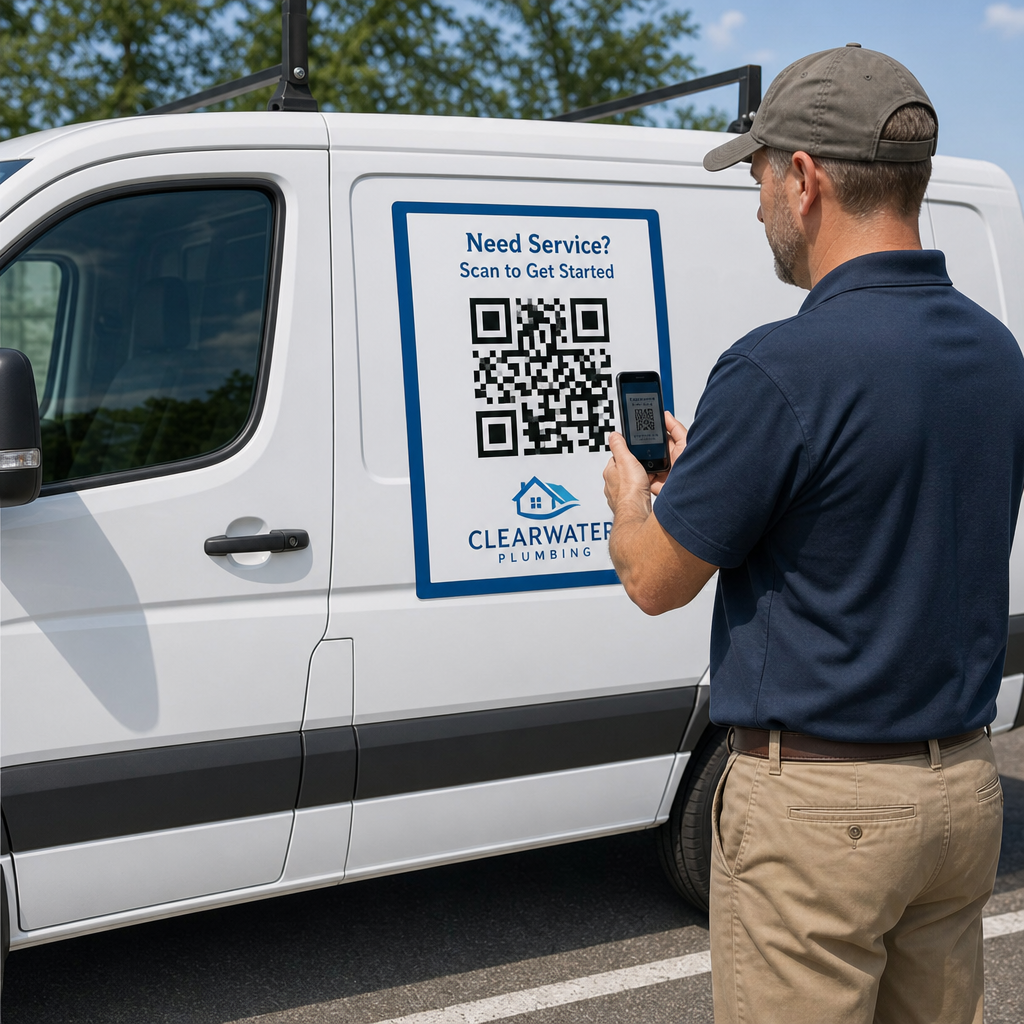
Haben Sie schon einmal einen Autoaufkleber drucken lassen und dann festgestellt, dass Smartphone-Kameras ihn aus wenigen Metern Entfernung nicht scannen können? Nicht scannbare Codes verschwenden Druckkosten und führen zu potenziellen Kundenverlusten unterwegs. Hier erfahren Sie, wie Sie die Abmessungen berechnen, den Kontrast optimieren und einen scannbaren Autoaufkleber für Ihr Unternehmen anbringen.
Berechnung der Codegröße für Betrachtungsabstände
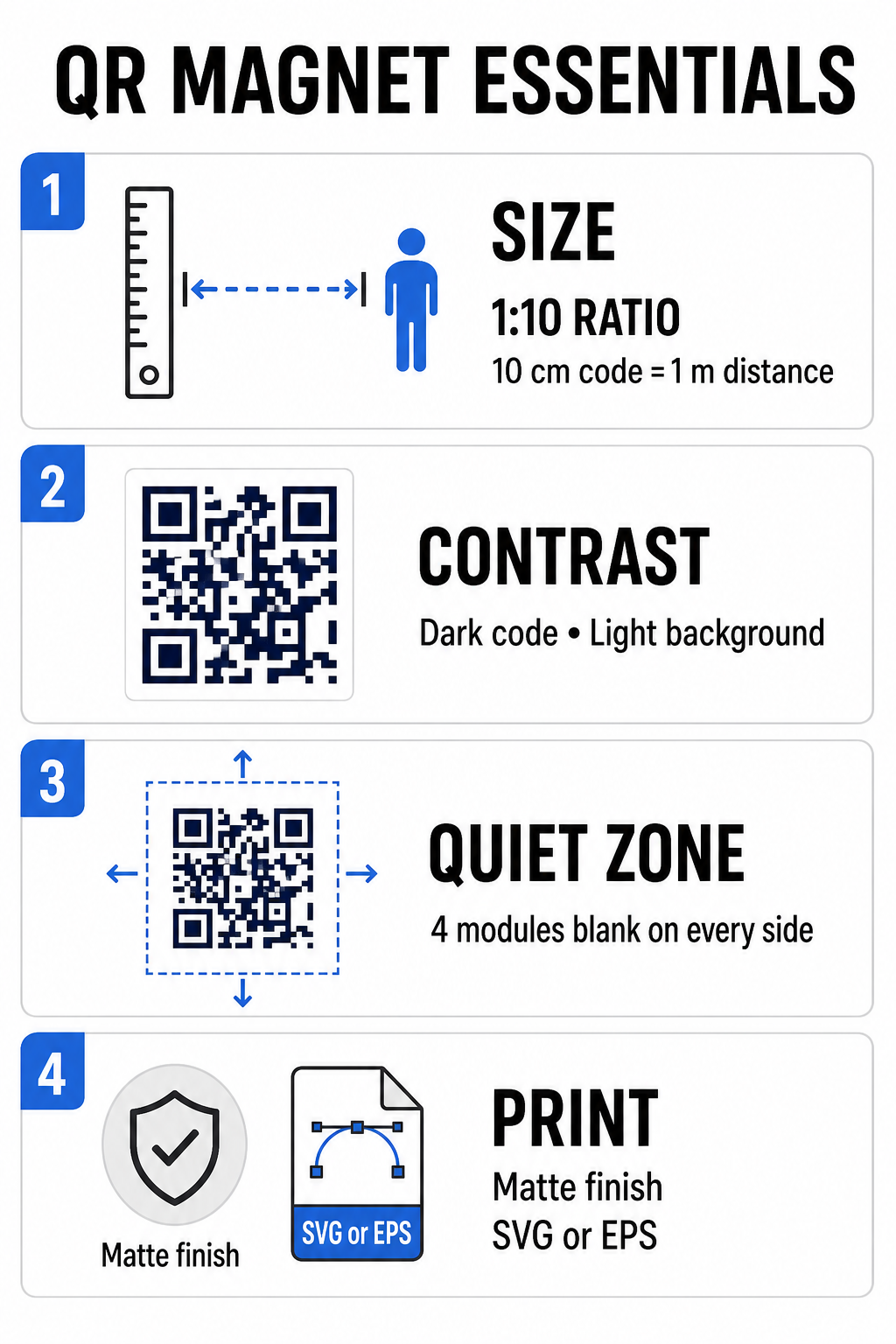
Ein Autoaufkleber benötigt einen deutlich größeren QR-Code als eine Visitenkarte oder ein Flyer, da die Interaktion aus der Ferne erfolgt. Standard-Smartphone-Kameras benötigen hingegen einen größeren QR-Code. Verhältnis 1:10 Es besteht ein Zusammenhang zwischen Codegröße und Scanabstand. Stehen potenzielle Kunden 1 Meter (ca. 3,3 Fuß) von Ihrem geparkten Fahrzeug entfernt, muss das quadratische QR-Code-Muster mindestens 10 cm (4 Zoll) breit sein.
Die Datendichte beeinflusst direkt, wie leicht ein Kamerasensor Ihr Kunstwerk aus der Ferne erfassen kann. Das Packen vollständiger Webadressen in ein statisches Muster erzeugt winzige, dicht gedrängte Module, die Objektive nur schwer auflösen können. Link QR-Code-Generator Die Erstellung eines dynamischen Codes hält die Nutzdaten kurz und die Modulstruktur dünn. Eine geringere Matrixdichte beschleunigt den Kamera-Autofokus und verbessert die Scan-Zuverlässigkeit. Eine detaillierte Überprüfung ist erforderlich. Leitfaden zur QR-Code-Größe wird Ihnen dabei helfen, die genauen Abmessungen basierend auf Ihren vorgesehenen Parkplätzen und Fahrzeugtürgrößen auszuwählen.
Erstellen Sie verfolgbare, dynamische QR-Codes für Ihre Fahrzeuge Sie wünschen sich einen sauberen, ressourcenschonenden Code, den Sie jederzeit aktualisieren können, ohne Ihren Magneten neu drucken zu müssen? Verwenden Sie den QR-Code erstellen kostenlos um bearbeitbare Codes zu entwerfen und die Kampagnenleistung zu verfolgen.
Gestaltung kontrastreicher Kunstwerke für den Außenbereich
Da sich die Lichtverhältnisse im Freien im Laufe des Tages ändern, ist die Farbwahl für die Lesbarkeit auf Mobilgeräten entscheidend. Scanner erkennen Codes, indem sie das von kontrastierenden Modulen reflektierte Licht messen. Verwenden Sie daher immer ein dunkles Vordergrundmuster auf einem einfarbigen, hellen Hintergrund, z. B. Schwarz oder Dunkelblau auf mattweißem Papier.
Kontrastarme Farbkombinationen wie Gelb auf Weiß oder Hellblau auf Grau wirken bei direkter Sonneneinstrahlung oder starkem Schatten unvorteilhaft. Sie können etablierte Beispiele überprüfen. Best Practices für den Farbkontrast von QR-Codes um sicherzustellen, dass Ihre Farbpalette zuverlässige Messwerte liefert.
- Ruhezone einhaltenHalten Sie um das QR-Code-Muster herum einen mindestens vier Module breiten, freien Bereich frei. Fahrzeugfotos, Hintergrundtexturen oder Rahmenlinien dürfen diesen Bereich nicht überschreiten.
- Vermeiden Sie reflektierende oder glänzende Laminate.Hochglänzende Vinylfolien erzeugen Sonnenreflexionen, die Smartphone-Kameras blenden. Wählen Sie daher eine matte Oberfläche für Ihre magnetische Vinylfolie, um direktes Sonnenlicht zu streuen.
- Export in VektordateiformatenDruckereien benötigen hochauflösende Grafiken, um weiche Kanten zu vermeiden. Exportieren Sie Ihren Code daher immer als Vektorformat. SVG oder EPS Das Muster skaliert also ohne Pixelierung. Erfahren Sie mehr über wie Drucktechniken die Scannbarkeit von QR-Codes beeinflussen.
| Gestaltungselement | Bewährte Vorgehensweise | Häufiger Fehler, den es zu vermeiden gilt |
|---|---|---|
| Farbkombination | Dunkler, satter Code auf mattem, hellem Hintergrund | Dunkelgrauer Code auf gemustertem oder dunklem Fahrzeuglack |
| Ruhezonenrand |
Mindestens 4 Module leerer Raum auf allen Seiten | Platzieren von Text oder Grafiken innerhalb des leeren Rahmens |
| Dateiformat | EPS- oder SVG-Vektorgrafiken | Niedrig auflösende PNG- oder JPG-Bilder hochskaliert |
| Oberflächenbeschaffenheit des Magneten | Matte, blendfreie UV-Schutzbeschichtung | Hochglänzende oder metallische Beschichtungen, die Sonnenlicht reflektieren |
Hinzufügen von Handlungsaufforderungstexten und Logos
Ein schlichtes Quadratmuster bietet potenziellen Kunden keinen Anreiz, ihre Kamera-App zu öffnen. Die Kombination Ihres QR-Codes mit einem prägnanten Handlungsaufruf (CTA) erklärt den genauen Nutzen des Scannens. Direkte Anweisungen wie “Scannen für 15% Aus”, “Scannen für kostenloses Angebot” oder “Scannen zum Anzeigen des Menüs” verbessern die Scanraten deutlich.
Die Platzierung eines Firmenlogos im Zentrum Ihres Codes stärkt die visuelle Markenidentität und schafft Vertrauen. Wählen Sie beim Hinzufügen eines individuellen zentralen Grafiken … QR-Code Generator mit Logo Optionen und stellen Sie den Fehlerkorrekturgrad ein auf Level Q (25%) oder Stufe H (30%). Eine höhere Fehlerkorrektur fügt dem Muster redundante Datenblöcke hinzu, sodass Handykameras den Ziellink auch dann dekodieren können, wenn Ihr Logo bis zu 30% des mittleren Bereichs verdeckt. Achten Sie darauf, die drei großen quadratischen Suchmuster in den Ecken des Codes niemals zu verdecken oder zu verzerren.
Weitere Hinweise zur Gestaltung von Marketinggrafiken finden Sie in unserer [Website/Publikation einfügen]. ultimativer Leitfaden zur Platzierung von QR-Codes im Marketing.
Sichere Montage und Wartung von Automagneten
Der Standort eines Auto-Magneten entscheidet darüber, ob Betrachter sicher damit interagieren können. Das Scannen von fahrenden Fahrzeugen aus der Fahrt ist aufgrund von Bewegungsunschärfe ineffektiv und birgt erhebliche Verkehrsgefahren. Konzentrieren Sie sich bei Ihrer Kampagne daher auf geparkte Fahrzeuge, wie z. B. Servicefahrzeuge auf Baustellen, Lieferwagen in Bereitstellungsbereichen oder Privatwagen auf Parkplätzen.
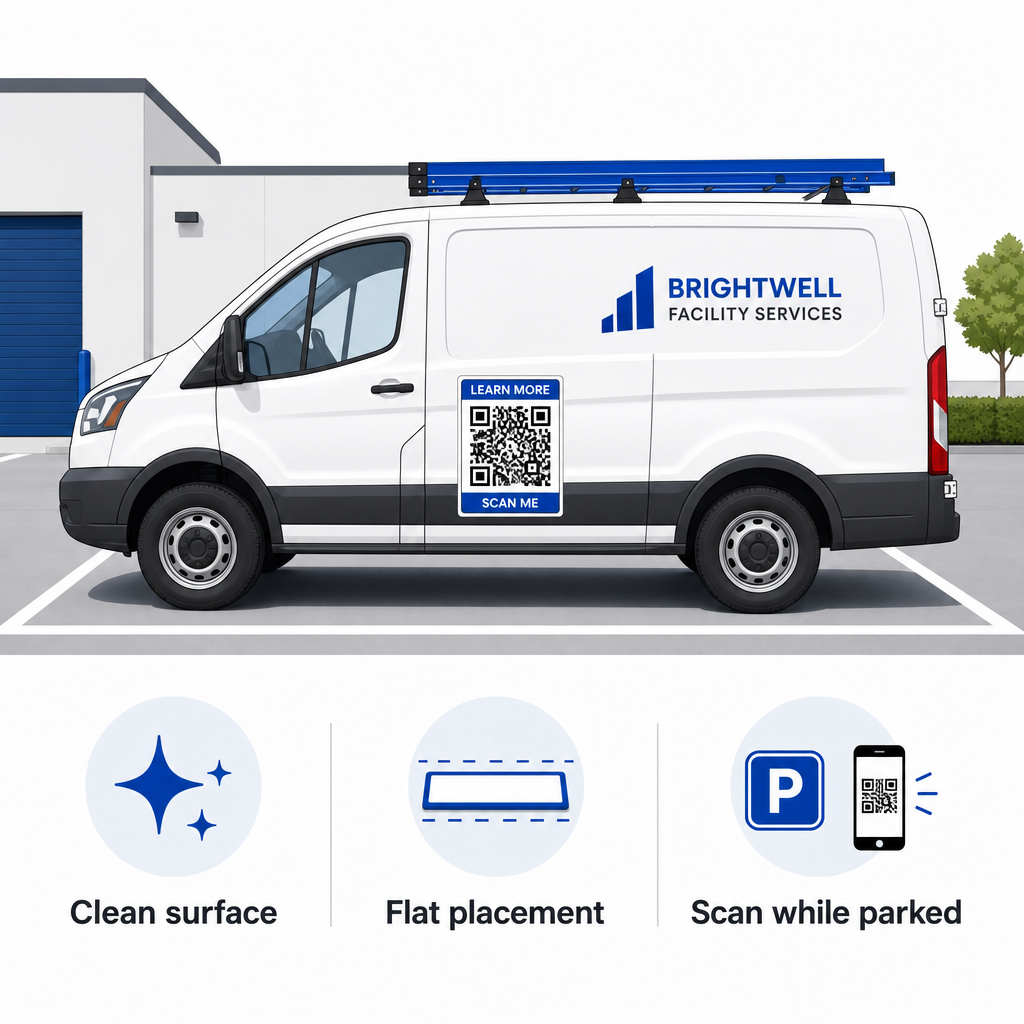
- An flachen Metallplatten befestigenPlatzieren Sie die Magnete auf flachen Seitentüren, glatten Seitenwänden oder flachen Heckklappen. Vermeiden Sie Karosseriekonturen, Zierleisten, Griffe und scharfe Kurven. Magnete haften nicht auf Fiberglas, Aluminiumblechen, Kunststoffstoßstangen oder mit Spachtelmasse verspachtelten Stellen.
- Reinigen Sie die ApplikationsflächeSchmutz, Staub und Wachsablagerungen schwächen die magnetische Haftung und ziehen Partikel an, die den Fahrzeuglack zerkratzen. Waschen und trocknen Sie sowohl das Fahrzeugteil als auch die magnetische Rückseite vor dem Anbringen mit einer milden Seifenlauge.
- Legen Sie das Blatt vollständig flach auf.Richten Sie eine Kante des Magneten an der Platte aus und lassen Sie den Rest von selbst haften. Drücken Sie ihn fest an, um Lufteinschlüsse, Blasen oder abstehende Kanten zu vermeiden, die während der Fahrt Wind fangen könnten.
- Führen Sie regelmäßige Reinigungsroutinen durch.Entfernen Sie den Magneten mindestens einmal wöchentlich, um eingeschlossene Feuchtigkeit und Straßenstaub zu entfernen. Bewahren Sie unbenutzte Fahrzeugmagnete flach an einem kühlen, trockenen Ort auf, um Verformungen oder ein Aufrollen der Ecken zu vermeiden.
Detaillierte Installationshinweise für gewerbliche Fahrzeugflotten finden Sie in unserem Leitfaden unter QR-Codes auf Fahrzeugen.
Testen der Scanbarkeit unter realen Außenbedingungen
Bevor Sie Ihren Fahrzeugmagneten auf aktiven Servicerouten einsetzen, müssen Sie die Lesbarkeit in verschiedenen realen Umgebungen überprüfen. Ein Muster, das unter Bürobeleuchtung problemlos erkannt wird, kann bei starkem Sonnenlicht im Freien oder tiefen Schatten versagen.
Testen Sie Ihren gedruckten Magneten unter drei kritischen Bedingungen:
- Begeben Sie sich zurück in die realistische Betrachtungsdistanz, die Ihre Kunden verwenden werden, und vergewissern Sie sich, dass der Autofokus der Kamera schnell einrastet.
- Überprüfen Sie die Scanleistung bei hellem Mittagslicht, bedecktem Himmel und Halbschatten.
- Scannen Sie den Magneten mit mehreren iOS- und Android-Smartphones, einschließlich günstigerer Geräte mit niedrigerer Kameraauflösung.
Sie können Ihre Zielverbindung auch online testen. QR-Code Scanner um sicherzustellen, dass die Landingpage über Mobilfunknetze schnell geladen wird. (Befolgen Sie die etablierten Richtlinien.) Best Practices für die Lesbarkeit von QR-Codes stellt sicher, dass Ihre mobilen Marketingmagnete die Offline-Fahrzeugsichtbarkeit konsequent in nachverfolgbare Online-Interaktionen umwandeln.
Um Ihre eigene, hochkonvertierende Fahrzeuganzeige zu erstellen, wählen Sie Ihren Ziellink aus, wenden Sie eine dynamische Formatierung mit hohem Kontrast an und generieren Sie Vektorgrafiken, die für den professionellen Druck geeignet sind.
Häufig gestellte Fragen
Die empfohlene Größe hängt von der Scanentfernung ab (Verhältnis 1:10). Scannen Betrachter Ihren Magneten aus etwa einem Meter Entfernung im geparkten Zustand, sollte der QR-Code mindestens 9 bis 10 cm breit sein. Bei größeren Entfernungen vergrößern Sie den Code und reduzieren Sie die kodierten Daten auf ein Minimum.
Nein. Bewegungsunschärfe, Fahrzeuggeschwindigkeit und Verzögerungen beim Autofokus der Kamera machen das Scannen von fahrenden Fahrzeugen unsicher und unzuverlässig. Konzipieren Sie QR-Code-Kampagnen für Fahrzeuge immer für Situationen, in denen das Fahrzeug an gut zugänglichen Orten wie Baustellen, Parkplätzen oder Ladezonen geparkt ist.
Verwenden Sie stets Vektordateiformate wie SVG, EPS oder hochauflösende Vektor-PDFs. Vektordateien gewährleisten scharfe Kanten in jeder Druckgröße und stellen sicher, dass die QR-Code-Module auch beim großformatigen Magnetdruck klar und ohne Pixelierung oder Unschärfe erkennbar bleiben.