Už ste niekedy vytlačili magnet na auto a zistili ste, že fotoaparáty smartfónov ho nedokážu naskenovať zo vzdialenosti niekoľkých metrov? Neskenovateľné kódy plytvajú nákladmi na tlač a strácajú cenných zákazníkov na cestách. Tu je návod, ako vypočítať rozmery, optimalizovať kontrast a použiť skenovateľný magnet na vozidlo pre vašu firmu.
Výpočet veľkosti kódu pre pozorovacie vzdialenosti
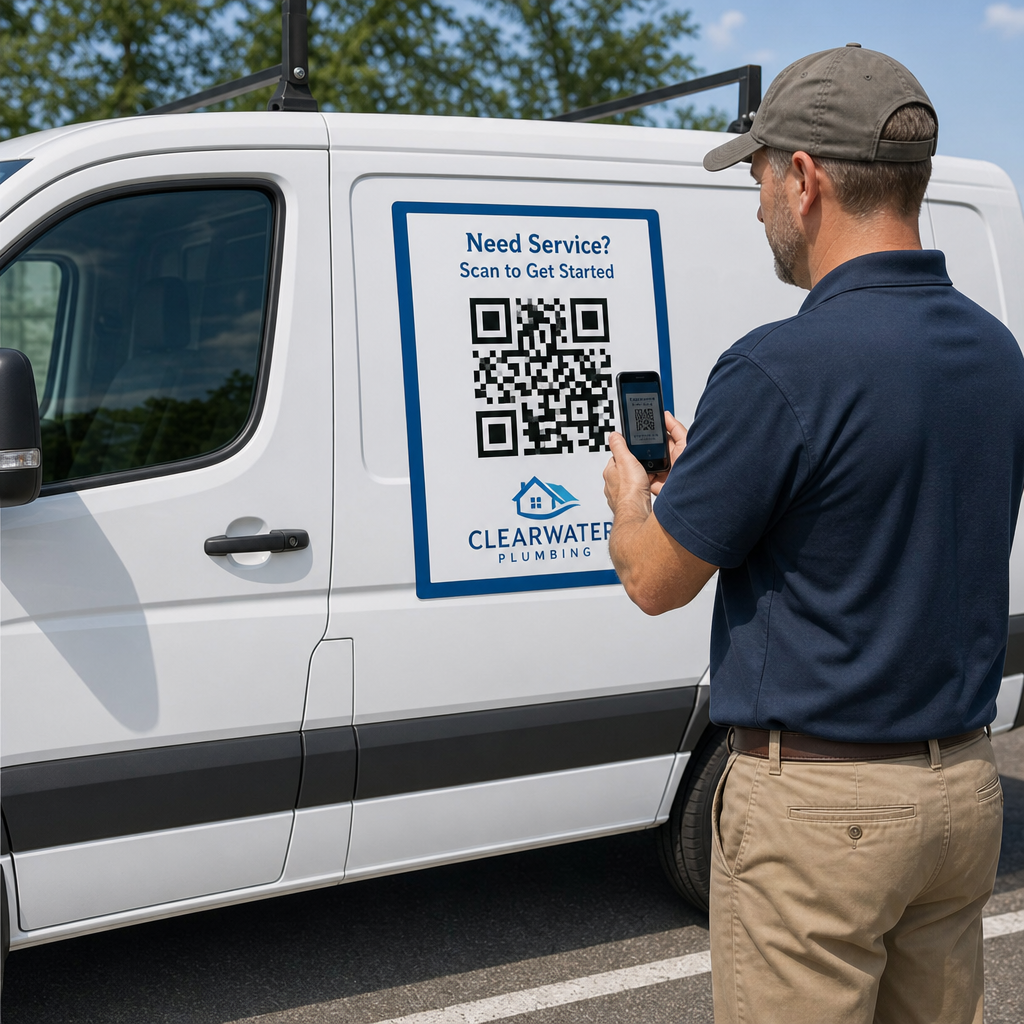
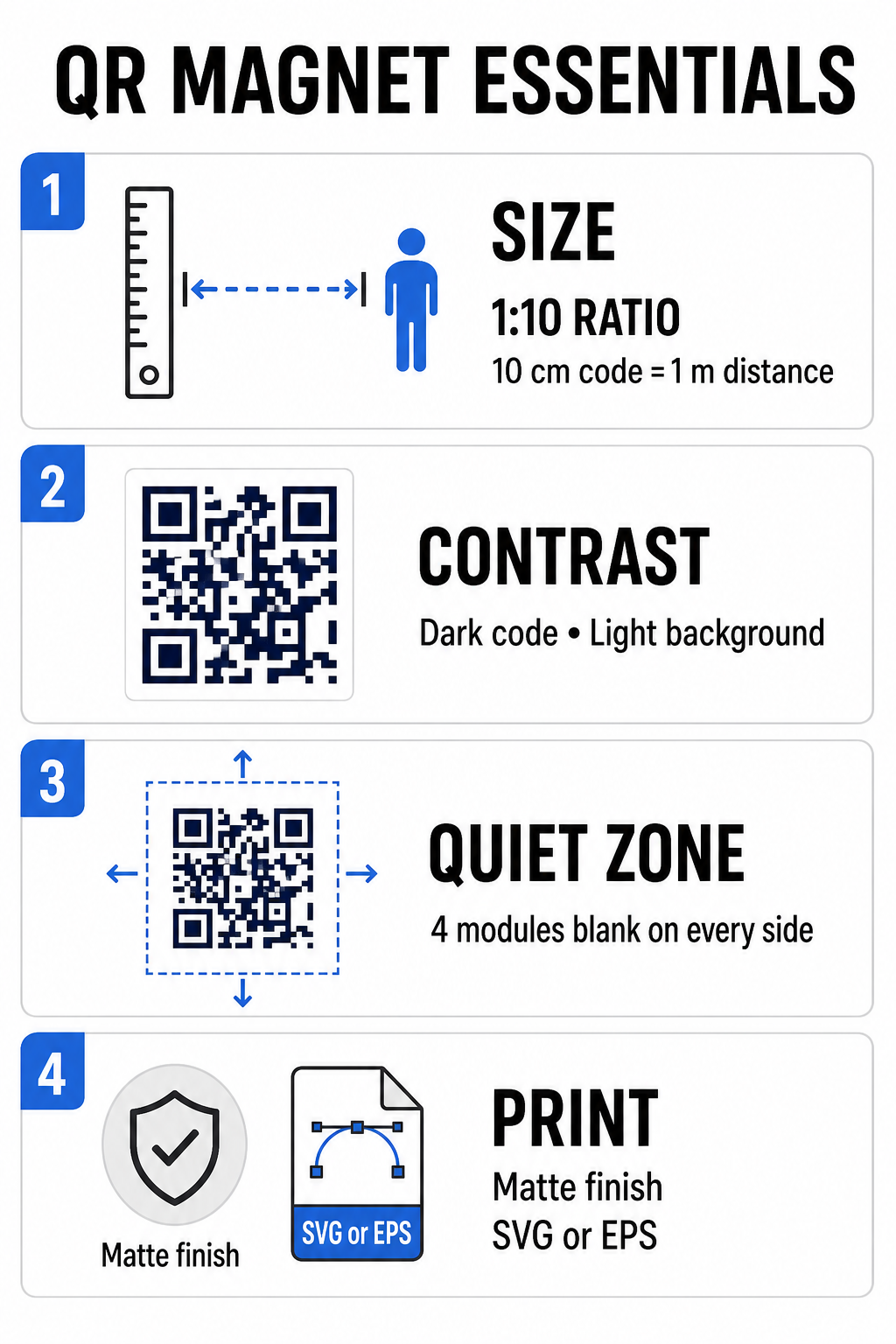
Automagnet vyžaduje oveľa väčší QR kód ako vizitka alebo leták, pretože s ním diváci interagujú z diaľky. Štandardné fotoaparáty smartfónov sa spoliehajú na... pomer 1:10 medzi veľkosťou kódu a vzdialenosťou skenovania. Ak potenciálni zákazníci stoja 1 meter (približne 3,3 stopy) od vášho zaparkovaného vozidla, štvorcový vzor QR kódu musí mať šírku aspoň 10 cm (4 palce).
Hustota dát priamo ovplyvňuje, ako ľahko sa snímač fotoaparátu zameria na vaše umelecké dielo z diaľky. Zabalenie celých webových adries do statického vzoru vytvára malé, preplnené moduly, ktoré objektívy len ťažko rozlišujú. Použitie Generátor QR kódov pre odkazy Vytvorenie dynamického kódu udržiava užitočné zaťaženie krátke a štruktúru modulov riedku. Nižšia hustota matice zrýchľuje automatické zaostrovanie fotoaparátu a zlepšuje spoľahlivosť skenovania. Prehľad podrobného príručke veľkosti QR kódov vám pomôže vybrať presné rozmery na základe vašich cieľových parkovacích miest a veľkostí dverí vozidla.
Vytvorte sledovateľné dynamické QR kódy pre vaše vozidlá Chcete čistý kód s nízkou hustotou, ktorý môžete kedykoľvek aktualizovať bez nutnosti opätovnej tlače magnetu? Použite Generátor QR kódov zadarmo navrhovať upraviteľné kódy a sledovať výkonnosť kampaní.
Navrhovanie vysoko kontrastných vonkajších umeleckých diel
Vonkajšie svetelné podmienky sa počas dňa menia, takže výber farieb je kritický pre skenovateľnosť mobilnými zariadeniami. Skenery detekujú kódy meraním svetla odrazeného od kontrastných modulov. Vždy by ste mali použiť tmavý vzor v popredí vytlačený na jednoliatom, svetlom pozadí, napríklad čiernom alebo námorníckom moridle na matnom bielom.
Párovanie s nízkym kontrastom, ako je žltá na bielej alebo svetlomodrá na sivej, zlyháva na priamom slnečnom svetle alebo v silnom tieni. Môžete si pozrieť osvedčené postupy. osvedčené postupy pre farebný kontrast QR kódov aby ste zabezpečili, že vaša paleta spĺňa spoľahlivé prahy čítania.
- Dodržujte tichú zónuOkolo všetkých štyroch strán vzoru QR kódu ponechajte voľný, prázdny priestor široký aspoň štyri moduly. Nikdy nedovoľte, aby fotografie vozidiel, textúry pozadia alebo okraje presahovali tento okraj.
- Vyhnite sa reflexným alebo lesklým laminátomVysoko lesklé vinylové prekrytia vytvárajú slnečné odlesky, ktoré oslepujú fotoaparáty smartfónov. Na rozptyľovanie priameho slnečného žiarenia zvoľte matný povrch magnetickej vinylovej fólie.
- Export do vektorových súborových formátovTlačiarne vyžadujú grafiku s vysokým rozlíšením, aby sa predišlo zmäkčeným okrajom. Kód vždy exportujte vo vektorovom formáte, ako napríklad SVG alebo EPS takže vzor sa škáluje bez pixelizácie. Zistite viac o ako tlačové techniky ovplyvňujú skenovateľnosť QR kódov.
| Dizajnový prvok | Najlepšie postupy | Častá chyba, ktorej sa treba vyhnúť |
|---|---|---|
| Farebná kombinácia | Plný tmavý kód na matnom svetlom pozadí | Tmavosivý kód na vzorovanom alebo tmavom nátere vozidla |
| Okraj tichej zóny | Najmenej 4 moduly prázdneho priestoru na všetkých stranách | Umiestnenie textu alebo grafiky do prázdneho okraja |
| Formát súboru | Vektorová grafika EPS alebo SVG | Zväčšené obrázky PNG alebo JPG s nízkym rozlíšením |
| Povrchová úprava magnetu | Matný, neoslňujúci UV ochranný náter | Vysoko lesklé alebo metalické prekrytia odrážajúce slnečné svetlo |
Pridanie textu a loga s výzvou na akciu
Jednoduchý štvorcový vzor neponúka potenciálnym zákazníkom žiadnu motiváciu otvárať aplikácie fotoaparátu. Kombinácia QR kódu s výstižným textom výzvy na akciu (CTA) vysvetľuje presnú výhodu skenovania. Priame pokyny ako “Skenujte pre zľavu 15%”, “Skenujte pre bezplatný odhad” alebo “Skenujte pre zobrazenie ponuky” výrazne zvyšujú mieru skenovania.
Umiestnenie loga spoločnosti do stredu kódu posilňuje vizuálny branding a buduje dôveru. Pri pridávaní vlastnej centrálnej grafiky vyberte Logo QR kód: generátor QR kódov s logom možnosti a nastavte úroveň korekcie chýb na Úroveň Q (25%) alebo Úroveň H (30%). Vyššia korekcia chýb pridáva do vzoru redundantné dátové bloky, čo umožňuje fotoaparátom telefónov dekódovať cieľový odkaz, aj keď vaše logo pokrýva až 30% strednej oblasti. Dávajte pozor, aby ste nezakryli alebo neskreslili tri veľké štvorcové vyhľadávacie vzory umiestnené v rohoch kódu.
Ďalšie pokyny k aranžovaniu marketingovej grafiky nájdete v našich kompletný sprievodca umiestnením QR kódu v marketingu.
Bezpečná inštalácia a údržba automobilových magnetov
Umiestnenie magnetu na auto určuje, či s ním diváci môžu bezpečne interagovať. Skenovanie z pohľadu prejazdu cez pohybujúce sa vozidlá je neúčinné kvôli rozmazaniu pohybom a vytvára vážne dopravné nebezpečenstvo. Navrhnite svoju kampaň s ohľadom na zaparkované vozidlá, ako sú servisné vozidlá umiestnené na pracoviskách, dodávky v odkladacích priestoroch alebo osobné autá zaparkované na komerčných parkoviskách.
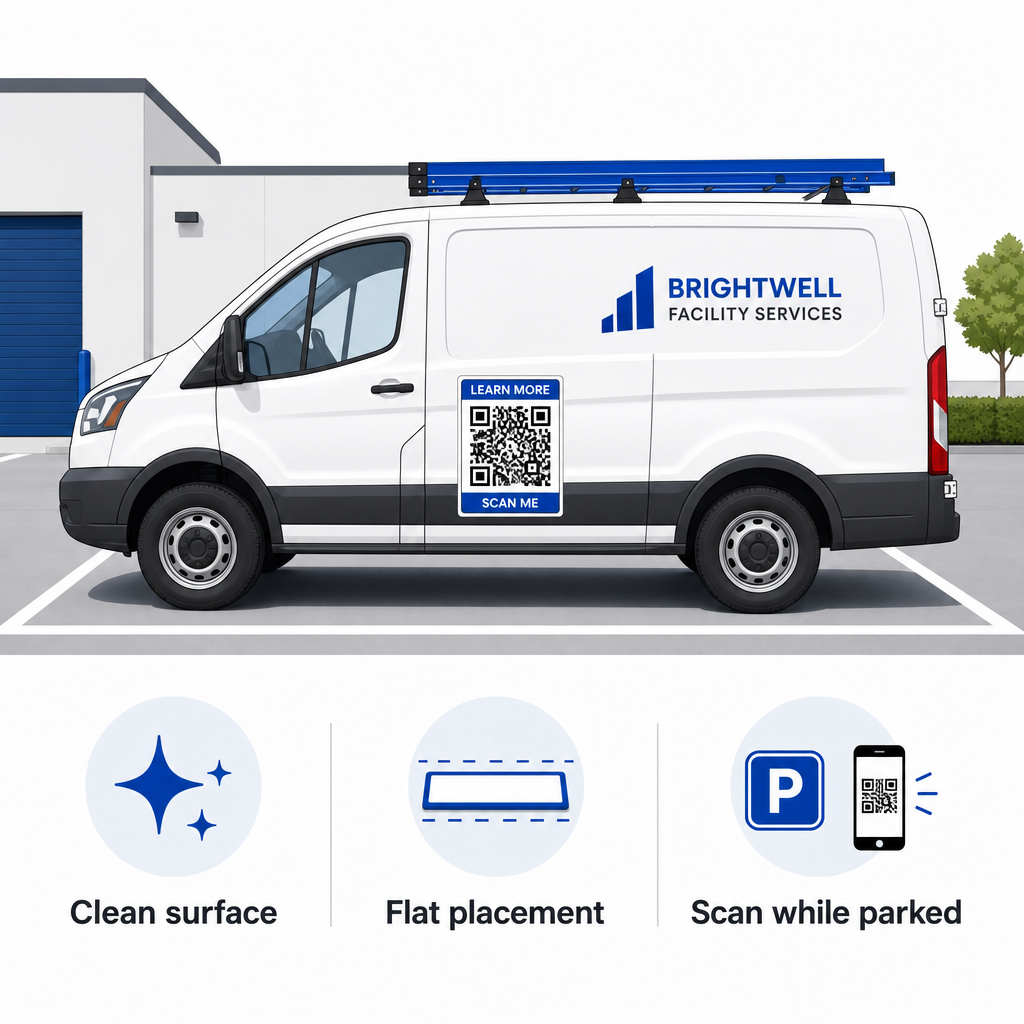
- Pripevnite na ploché kovové panelyUmiestnite magnety na ploché bočné dvere, hladké bočné panely alebo ploché zadné dvere. Vyhnite sa kontúram karosérie, ozdobným lištam, kľučkám a ostrým krivkám. Magnety sa neprilepia na sklolaminát, hliníkové panely, plastové nárazníky ani na oblasti s výplňou karosérie.
- Vyčistite povrch aplikácieNečistoty, prach a usadeniny vosku oslabujú magnetické priľnavosť a zachytávajú nečistoty, ktoré škrabú lak vozidla. Pred aplikáciou umyte a osušte panel vozidla aj magnetickú podložku jemným mydlovým roztokom.
- Priložte plachtu úplne naplochoZarovnajte jeden okraj magnetu s panelom a zvyšok nechajte prirodzene pripevniť. Pevne pritlačte na povrch, aby ste odstránili vzduchové bubliny, bubliny alebo zdvihnuté okraje, ktoré by mohli počas jazdy zachytiť vietor.
- Dodržiavajte pravidelné čistiace postupyMagnet odstráňte aspoň raz týždenne, aby ste utreli zachytenú vlhkosť a prach z cestnej premávky. Nepoužívané magnety vozidiel skladujte vodorovne na chladnom a suchom mieste, aby ste predišli deformácii alebo zvlneniu rohov.
Podrobné tipy na inštaláciu pre komerčné vozové parky nájdete v našom sprievodcovi na QR kódov na vozidlách.
Testovanie skenovateľnosti v reálnych vonkajších podmienkach
Pred nasadením magnetu vozidla na aktívnych dopravných trasách musíte overiť jeho skenovateľnosť vo viacerých reálnych prostrediach. Vzor, ktorý sa ľahko dekóduje pod kancelárskym osvetlením, môže zlyhať pri vystavení ostrému vonkajšiemu oslneniu alebo hlbokým tieňom.
Otestujte si vytlačený magnet v troch kritických podmienkach:
- Vráťte sa do realistickej pozorovacej vzdialenosti, ktorú vaši zákazníci budú používať, a rýchlo si overte, či sa automatické zaostrovanie fotoaparátu zablokovalo.
- Skontrolujte výkon skenovania za jasného poludňajšieho slnka, zamračenej oblohy a čiastočného tieňa.
- Naskenujte magnet pomocou viacerých smartfónov so systémom iOS a Android, vrátane lacných zariadení s nižším rozlíšením fotoaparátu.
Cieľový odkaz si môžete otestovať aj online Čítačka QR kódov aby sa vstupná stránka rýchlo otvorila cez mobilné siete. Po zavedení osvedčených postupov pre čitateľnosť QR kódov zabezpečuje, aby vaše magnety mobilného marketingu konzistentne premieňali offline viditeľnosť vozidla na sledovateľnú online interakciu.
Ak chcete začať vytvárať vlastnú reklamu na vozidlo s vysokou mierou konverzie, vyberte cieľový odkaz, použite dynamické formátovanie s vysokým kontrastom a vygenerujte vektorovú grafiku pripravenú na profesionálnu tlač.
Často kladené otázky
Odporúčaná veľkosť závisí od vzdialenosti skenovania s použitím pomeru 1:10. Ak diváci skenujú váš magnet zo vzdialenosti 90 cm počas parkovania, vzor QR kódu by mal byť široký aspoň 9 až 10 cm. Pre dlhšie vzdialenosti pozorovania zväčšite kód a minimalizujte kódované údaje.
Nie. Rozmazanie pohybu, rýchlosť vozidla a oneskorenia automatického zaostrovania kamery spôsobujú, že skenovanie pohybujúcich sa vozidiel je nebezpečné a nespoľahlivé. Kampane s QR kódmi vozidiel vždy navrhujte pre situácie, keď je vozidlo zaparkované na prístupných miestach, ako sú pracoviská, parkoviská alebo nakladacie plochy.
Vždy poskytujte vektorové súbory vo formátoch, ako napríklad SVG, EPS alebo vektorový PDF s vysokým rozlíšením. Vektorové súbory si zachovávajú ostré hrany pri akejkoľvek veľkosti tlače, čím sa zabezpečí, že moduly QR kódu zostanú zreteľné bez pixelizácie alebo rozmazania počas tlače magnetických polí vo veľkom formáte.