Heb je ooit een automagneet laten printen die vervolgens niet scanbaar is met een smartphonecamera vanaf een paar meter afstand? Niet-scanbare codes leiden tot onnodige printkosten en het verlies van waardevolle potentiële klanten onderweg. Hier lees je hoe je de afmetingen berekent, het contrast optimaliseert en een scanbare automagneet voor jouw bedrijf aanbrengt.
Codegrootte berekenen voor kijkafstanden
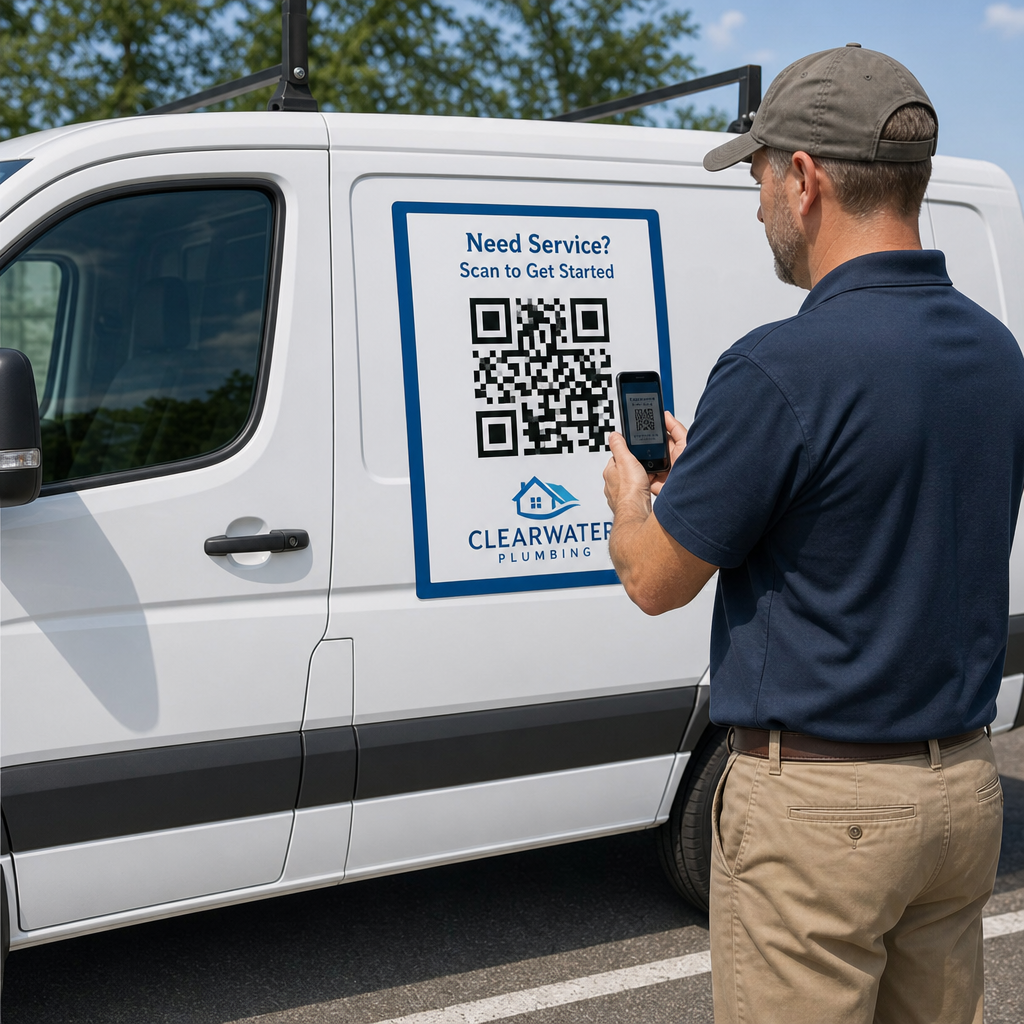
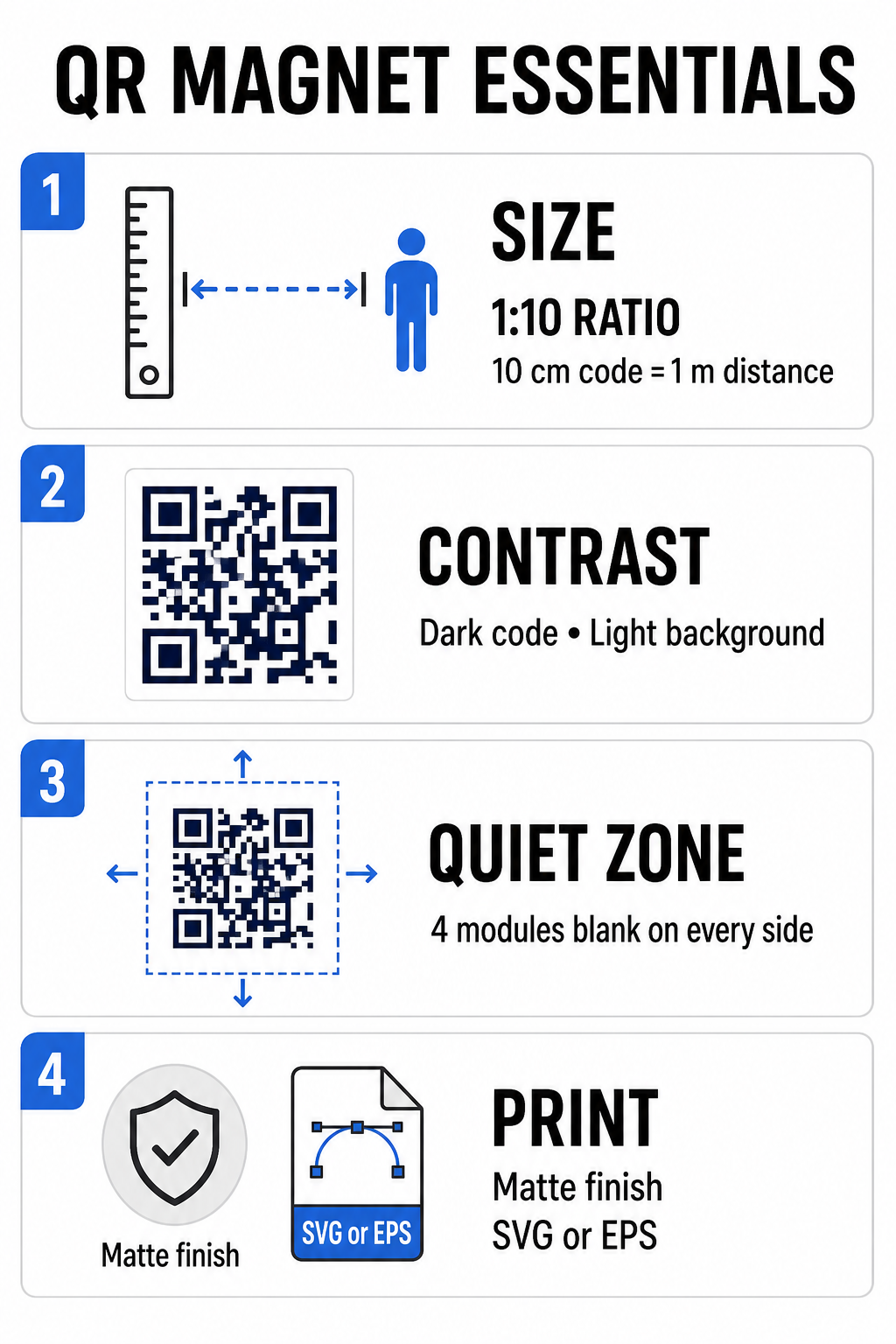
Een automagneet vereist een veel grotere QR-code dan een visitekaartje of flyer, omdat kijkers er van een afstand mee interageren. Standaard smartphonecamera's zijn afhankelijk van een 1:10 verhouding De grootte van de code en de scanafstand hangen samen. Als potentiële klanten op 1 meter afstand van uw geparkeerde voertuig staan, moet het vierkante QR-codepatroon minstens 10 cm breed zijn.
De datadichtheid heeft direct invloed op hoe gemakkelijk een camerasensor uw kunstwerk van grote afstand kan scherpstellen. Het samenpakken van volledige webadressen in een statisch patroon creëert kleine, dicht opeengepakte modules die lenzen moeilijk kunnen onderscheiden. Door gebruik te maken van een Link QR-codegenerator Het bouwen van dynamische code zorgt ervoor dat de payload kort blijft en de modulestructuur compact. Een lagere matrixdichtheid versnelt de autofocus van de camera en verbetert de betrouwbaarheid van de scan. Een gedetailleerde analyse gids voor QR-codeformaten Dit helpt u bij het selecteren van de exacte afmetingen op basis van de gewenste parkeerplaatsen en de afmetingen van de autodeuren.
Maak traceerbare dynamische QR-codes voor uw voertuigen. Wil je een schone, compacte code die je op elk moment kunt bijwerken zonder je magneet opnieuw te hoeven printen? Gebruik dan de Gratis QR-code maken Om bewerkbare codes te ontwerpen en de prestaties van campagnes te volgen.
Ontwerpen van contrastrijke kunstwerken voor buiten
De lichtomstandigheden buiten veranderen gedurende de dag, waardoor de kleurkeuze cruciaal is voor scanbaarheid met mobiele apparaten. Scanners detecteren codes door het licht te meten dat wordt weerkaatst door contrasterende modules. Gebruik daarom altijd een donker voorgrondpatroon op een effen, lichte achtergrond, zoals zwart of donkerblauw op mat wit.
Combinaties met weinig contrast, zoals geel op wit of lichtblauw op grijs, werken niet goed in direct zonlicht of in diepe schaduw. Je kunt gevestigde voorbeelden bekijken. best practices voor kleurcontrast van QR-codes om ervoor te zorgen dat uw kleurenpalet voldoet aan betrouwbare leesdrempels.
- Houd de rustzone in standHoud rondom alle vier zijden van het QR-codepatroon een vrije, lege ruimte van minimaal vier modules breed vrij. Laat nooit voertuigfoto's, achtergrondtexturen of randlijnen binnen deze marge vallen.
- Vermijd reflecterende of glanzende laminaten.Hoogglanzende vinylfolies veroorzaken zonlichtreflecties die smartphonecamera's verblinden. Kies voor een matte afwerking van je magnetische vinylfolie om direct zonlicht te filteren.
- Exporteren in vectorbestandsformatenDrukkerijen hebben afbeeldingen met een hoge resolutie nodig om onscherpe randen te voorkomen. Exporteer uw code altijd als een vectorbestand, zoals bijvoorbeeld... SVG of EPS Het patroon schaalt dus mee zonder pixelering. Lees meer over hoe printtechnieken de scanbaarheid van QR-codes beïnvloeden.
| Ontwerpelement | Beste praktijk | Veelgemaakte fout die je moet vermijden |
|---|---|---|
| Kleurcombinatie | Donkere, effen code op een matte, lichte achtergrond. | Donkergrijze code op een voertuig met patroon of donkere lak. |
| Stillezonemarge | Minimaal 4 modules lege ruimte aan alle zijden | Tekst of afbeeldingen binnen de lege rand plaatsen |
| Bestandsformaat | EPS- of SVG-vectorafbeeldingen | PNG- of JPG-afbeeldingen met een lage resolutie die zijn vergroot. |
| Magnetische oppervlakteafwerking | Matte, niet-reflecterende UV-beschermende coating | Hoogglanzende of metallic overlays die zonlicht reflecteren |
Tekst en logo's toevoegen die aanzetten tot actie.
Een eenvoudig vierkant patroon biedt potentiële klanten geen enkele reden om hun camera-app te openen. Door uw QR-code te combineren met een beknopte call-to-action (CTA) tekst, wordt het precieze voordeel van het scannen uitgelegd. Directe instructies zoals "Scan voor 15% Off", "Scan voor een gratis offerte" of "Scan om het menu te bekijken" verhogen de scanfrequentie aanzienlijk.
Door uw bedrijfslogo in het midden van uw code te plaatsen, versterkt u de visuele merkidentiteit en wekt u vertrouwen. Wanneer u een aangepast centraal logo toevoegt, selecteer dan een QR code met logo maken opties en stel het foutcorrectieniveau in op Niveau Q (25%) of Niveau H (30%). Een hogere foutcorrectie voegt redundante datablokken toe aan het patroon, waardoor telefooncamera's de doellink kunnen decoderen, zelfs als uw logo tot 30% van het centrale gebied bedekt. Zorg ervoor dat u de drie grote vierkante zoekpatronen in de hoeken van de code nooit verbergt of vervormt.
Raadpleeg onze website voor meer informatie over het samenstellen van marketingafbeeldingen. ultieme gids voor de plaatsing van QR-codes in marketing.
Veilig installeren en onderhouden van automagneten
De plaatsing van een automagneet bepaalt of kijkers er veilig mee kunnen interageren. Scannen vanaf rijdende voertuigen is ineffectief vanwege bewegingsonscherpte en creëert ernstige verkeersrisico's. Ontwerp uw campagne daarom rond geparkeerde voertuigen, zoals servicevoertuigen op werklocaties, bestelwagens op laad- en losplaatsen of personenauto's geparkeerd op bedrijfsterreinen.
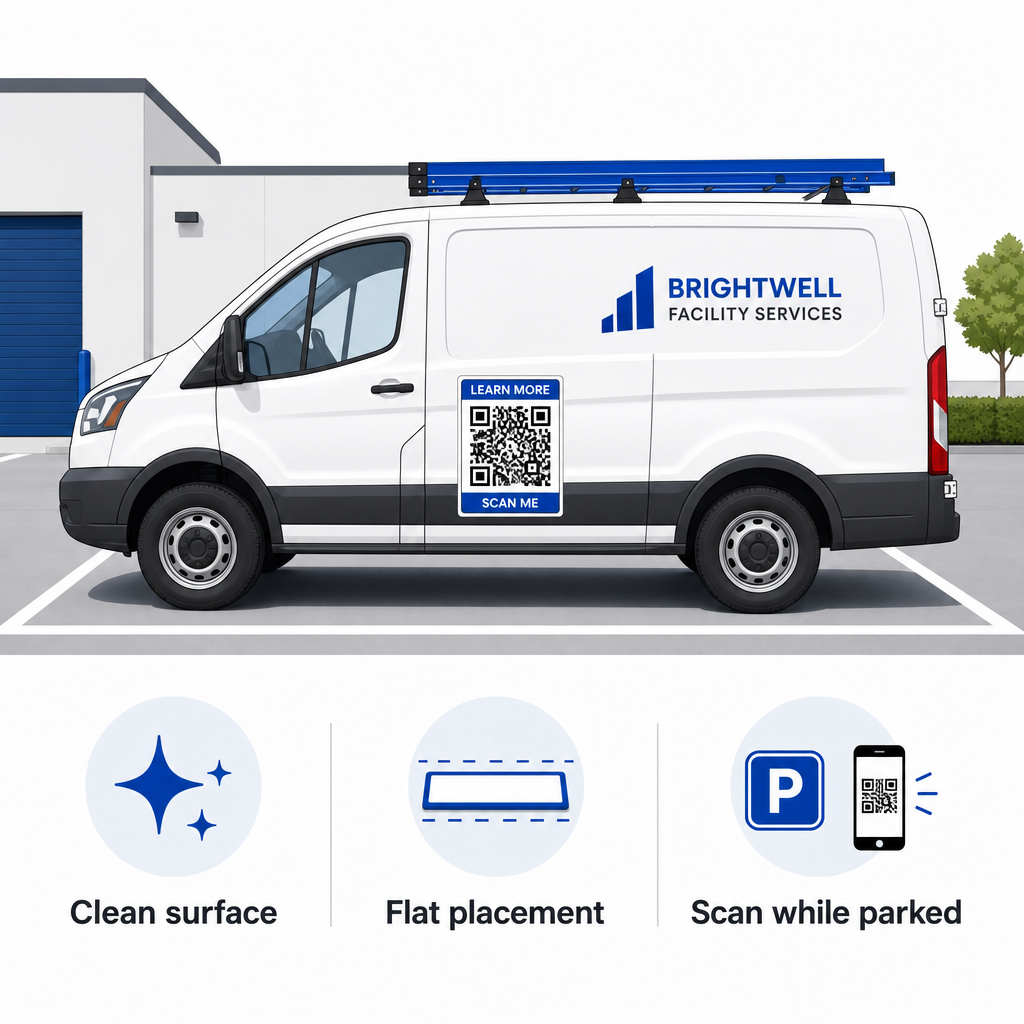
- Bevestigen aan vlakke metalen panelenPlaats de magneten op vlakke zijdeuren, gladde zijpanelen of vlakke achterkleppen. Vermijd carrosseriecontouren, sierlijsten, handgrepen en scherpe rondingen. Magneten hechten niet aan glasvezel, aluminium panelen, plastic bumpers of plekken met plamuur.
- Reinig het oppervlak waarop de applicatie moet worden uitgevoerd.Vuil, stof en wasophoping verzwakken de magnetische hechting en houden vuil vast dat krassen op de autolak kan veroorzaken. Was en droog zowel het autopaneel als de magnetische achterkant met een milde zeepoplossing voordat u de sticker aanbrengt.
- Leg het vel volledig plat neerPlaats één rand van de magneet tegen het paneel en laat de rest zich vanzelf hechten. Druk stevig op het oppervlak om luchtbellen, bubbels of opstaande randen te verwijderen die tijdens het rijden wind kunnen vangen.
- Houd een regelmatige schoonmaakroutine aan.Verwijder de magneet minstens één keer per week om ingesloten vocht en stof van de weg te verwijderen. Bewaar ongebruikte automagneten plat op een koele, droge plaats om kromtrekken of omkrullen van de hoeken te voorkomen.
Gedetailleerde installatie-instructies voor commerciële wagenparken vindt u in onze handleiding. QR-codes op voertuigen.
Testen van de scanbaarheid onder reële buitenomstandigheden
Voordat u uw voertuigmagneet inzet op actieve serviceroutes, moet u de scanbaarheid ervan in verschillende praktijksituaties valideren. Een patroon dat gemakkelijk te decoderen is onder kantoorverlichting, kan bijvoorbeeld problemen opleveren bij fel zonlicht of diepe schaduwen.
Test je geprinte magneet onder drie cruciale omstandigheden:
- Ga terug naar de realistische kijkafstand die uw klanten zullen gebruiken en controleer of de autofocus van de camera snel scherpstelt.
- Test de scanprestaties bij fel middagzonlicht, bewolkte lucht en gedeeltelijke schaduw.
- Scan de magneet met meerdere iOS- en Android-smartphones, waaronder budgettoestellen met een lagere cameraresolutie.
Je kunt je bestemmingslink ook online testen. QR-code scanner om ervoor te zorgen dat de landingspagina snel laadt via mobiele netwerken. Na de vastgestelde best practices voor de leesbaarheid van QR-codes Zorgt ervoor dat uw mobiele marketingcampagnes de offline zichtbaarheid van voertuigen consistent omzetten in meetbare online betrokkenheid.
Om je eigen conversieverhogende voertuigadvertentie te maken, selecteer je de gewenste link, pas je dynamische opmaak met hoog contrast toe en genereer je vectorafbeeldingen die klaar zijn voor professioneel drukwerk.
Veelgestelde vragen
De aanbevolen grootte is afhankelijk van de scanafstand, met een verhouding van 1:10. Als kijkers uw magneet scannen vanaf een afstand van 90 cm (3 voet) terwijl de auto geparkeerd staat, moet het QR-codepatroon minstens 9 tot 10 cm (3,6 tot 4 inch) breed zijn. Voor grotere kijkafstanden kunt u de code vergroten en de hoeveelheid gecodeerde gegevens minimaliseren.
Nee. Bewegingsonscherpte, voertuigsnelheid en vertragingen in de autofocus van de camera maken het scannen van bewegende voertuigen onveilig en onbetrouwbaar. Ontwerp QR-campagnes voor voertuigen altijd voor situaties waarin het voertuig geparkeerd staat op toegankelijke locaties, zoals bouwplaatsen, parkeerterreinen of laad- en loszones.
Lever altijd vectorbestanden aan in formaten zoals SVG, EPS of een vector-PDF met hoge resolutie. Vectorbestanden behouden scherpe randen bij elk afdrukformaat, waardoor de QR-codemodules duidelijk zichtbaar blijven zonder pixelatie of onscherpte tijdens het afdrukken op grootformaat magneten.