¿Alguna vez has impreso un imán para coche y te has dado cuenta de que las cámaras de los smartphones no lo escanean a pocos metros de distancia? Los códigos ilegibles suponen un derroche de costes de impresión y la pérdida de valiosos clientes potenciales en la carretera. Aquí te explicamos cómo calcular las dimensiones, optimizar el contraste y crear un imán para vehículos que se pueda escanear, ideal para tu negocio.
Cálculo del tamaño del código para distancias de visualización
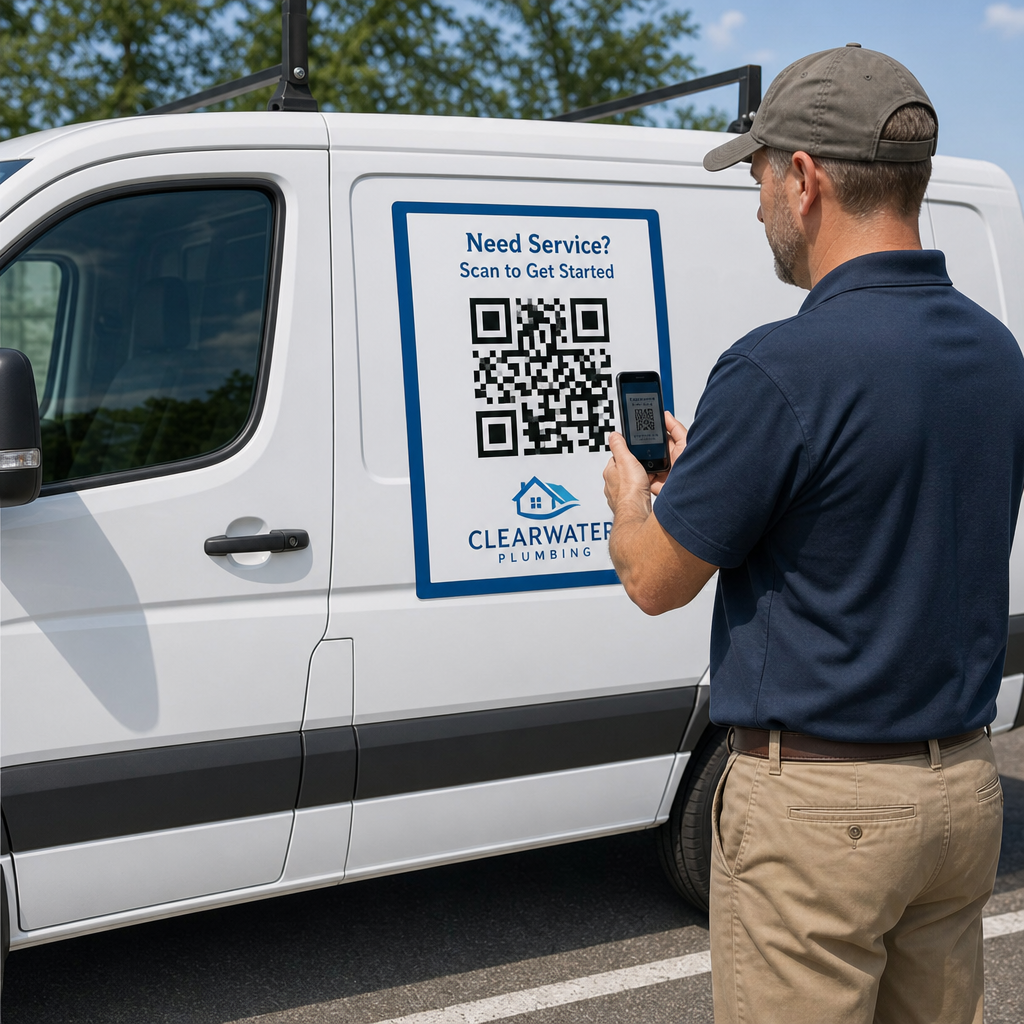
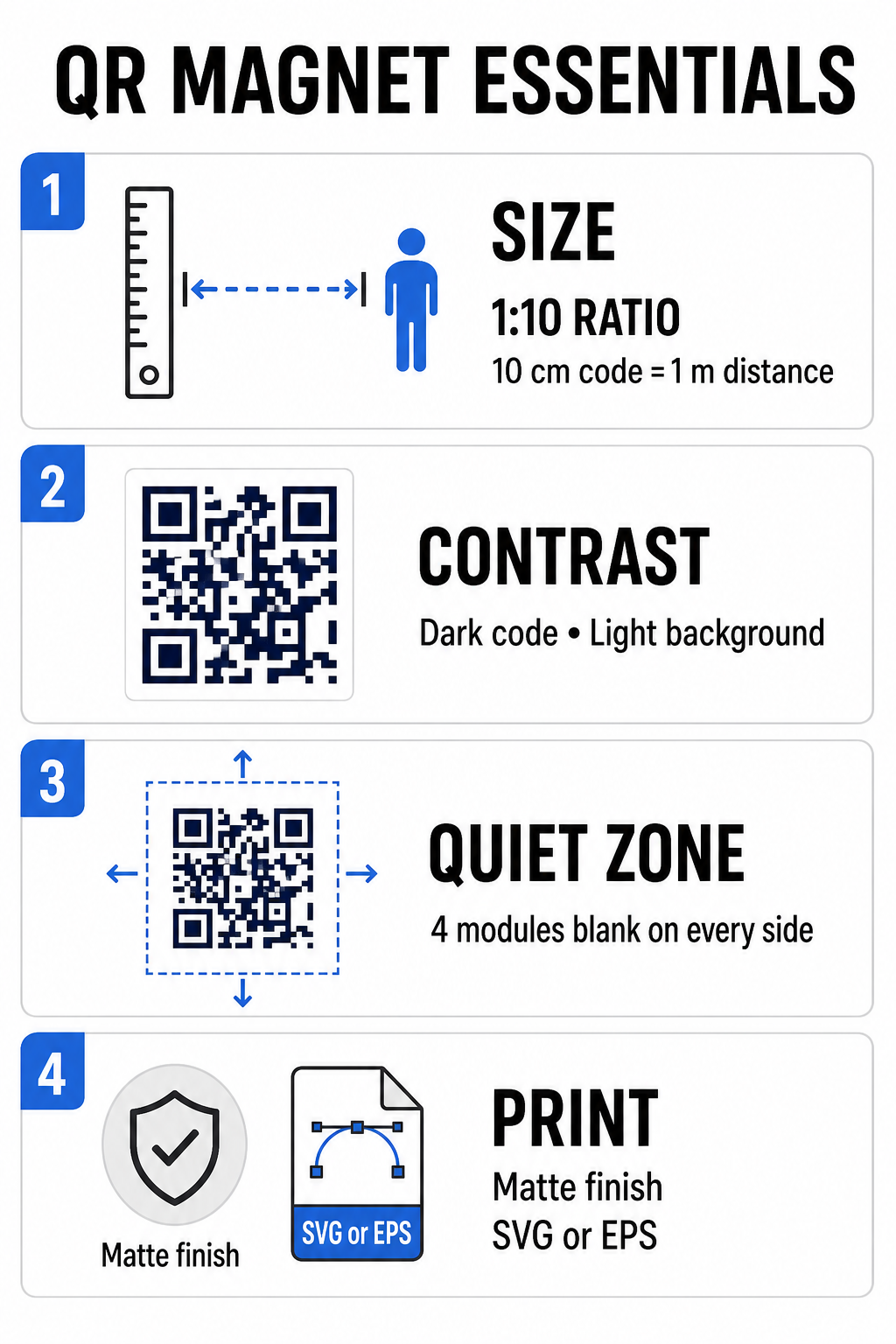
Un imán para coche requiere un código QR mucho más grande que una tarjeta de visita o un folleto porque los espectadores interactúan con él desde la distancia. Las cámaras de los teléfonos inteligentes estándar dependen de un proporción 1:10 entre el tamaño del código y la distancia de escaneo. Si los clientes potenciales se encuentran a 1 metro (aproximadamente 3,3 pies) de distancia de su vehículo estacionado, el patrón cuadrado del código QR debe medir al menos 10 cm (4 pulgadas) de ancho.
La densidad de datos afecta directamente la facilidad con la que un sensor de cámara enfoca su obra de arte desde lejos. Empaquetar direcciones web completas en un patrón estático crea módulos pequeños y abarrotados que las lentes tienen dificultades para resolver. Usando una Generador de códigos QR de enlace Construir un código dinámico mantiene la carga útil corta y la estructura del módulo dispersa. Una menor densidad de matriz acelera el enfoque automático de la cámara y mejora la fiabilidad del escaneo. Revisar un documento detallado guía de tamaño de códigos QR Le ayudará a seleccionar las dimensiones exactas en función de las plazas de aparcamiento que desee y del tamaño de las puertas de su vehículo.
Cree códigos QR dinámicos y rastreables para sus vehículos. ¿Quieres un código limpio y de baja densidad que puedas actualizar en cualquier momento sin tener que volver a imprimir tu imán? Usa el Generador de códigos QR gratis para diseñar códigos editables y realizar un seguimiento del rendimiento de las campañas.
Diseño de obras de arte para exteriores de alto contraste
Las condiciones de iluminación exterior varían a lo largo del día, por lo que la selección de colores es fundamental para la correcta lectura de códigos en dispositivos móviles. Los escáneres detectan los códigos midiendo la luz reflejada por módulos de colores contrastantes. Siempre se debe usar un patrón oscuro en primer plano impreso sobre un fondo claro y uniforme, como negro o azul marino sobre blanco mate.
Las combinaciones de bajo contraste, como el amarillo sobre blanco o el azul claro sobre gris, no funcionan bien bajo la luz solar directa o en sombra densa. Puede revisar las combinaciones establecidas. mejores prácticas de contraste de color de códigos QR para garantizar que su paladar cumpla con los umbrales de lectura fiables.
- Mantenga la zona tranquilaMantenga un espacio en blanco de al menos cuatro módulos de ancho alrededor de los cuatro lados del código QR. Nunca permita que fotos de vehículos, texturas de fondo o líneas de borde entren en este margen.
- Evite los laminados reflectantes o brillantes.Las láminas de vinilo de alto brillo producen reflejos de luz solar que deslumbran las cámaras de los teléfonos inteligentes. Opta por un acabado mate en tu lámina de vinilo magnético para difuminar la luz solar directa.
- Exportar en formatos de archivo vectorial: Las imprentas requieren ilustraciones de alta resolución para evitar bordes borrosos. Exporte siempre su código en formato vectorial como SVG o EPS de modo que el patrón se escala sin pixelación. Obtenga más información sobre cómo las técnicas de impresión impactan la escaneabilidad del código QR.
| Elemento de diseño | Mejores prácticas | Errores comunes que se deben evitar |
|---|---|---|
| Combinación de Colores | Código oscuro sólido sobre un fondo claro mate | Código gris oscuro sobre pintura de vehículos estampada o de color oscuro. |
| Margen de Zona Silenciosa | Al menos 4 módulos de espacio vacío en todos los lados. | Colocar texto o ilustraciones dentro del borde en blanco |
| Formato de archivo | Gráficos vectoriales EPS o SVG | Imágenes PNG o JPG de baja resolución ampliadas |
| Acabado superficial magnético | Recubrimiento mate antirreflejos con protección UV. | Revestimientos de alto brillo o metalizados que reflejan la luz solar. |
Agregar texto y logotipos de llamada a la acción
Un diseño cuadrado simple no incentiva a los clientes potenciales a usar la cámara de su dispositivo. Combinar el código QR con un texto de llamada a la acción (CTA) conciso explica el beneficio exacto de escanearlo. Instrucciones directas como “Escanee para obtener un descuento en 15%”, “Escanee para obtener un presupuesto gratuito” o “Escanee para ver el menú” mejoran significativamente la tasa de escaneo.
Colocar el logotipo de la empresa en el centro del código refuerza la imagen de marca visual y genera confianza. Al agregar un diseño central personalizado, seleccione un Generador de código QR con logo opciones y establecer el nivel de corrección de errores en Nivel Q (25%) o Nivel H (30%). La corrección de errores avanzada añade bloques de datos redundantes al patrón, lo que permite que las cámaras de los teléfonos decodifiquen el enlace de destino incluso si el logotipo cubre hasta 30% del área central. Tenga cuidado de no ocultar ni distorsionar los tres grandes patrones cuadrados de búsqueda ubicados en las esquinas del código.
Para obtener orientación adicional sobre cómo organizar los gráficos de marketing, consulte nuestra guía definitiva para la colocación de códigos QR en marketing.
Instalación y mantenimiento seguros de imanes para automóviles
La ubicación de un imán para coches determina si los usuarios pueden interactuar con él de forma segura. El escaneo desde vehículos en movimiento resulta ineficaz debido al desenfoque por movimiento y genera graves riesgos para el tráfico. Diseñe su campaña en torno a escenarios con vehículos estacionados, como vehículos de servicio en obras, furgonetas de reparto en zonas de preparación o coches particulares aparcados en aparcamientos comerciales.
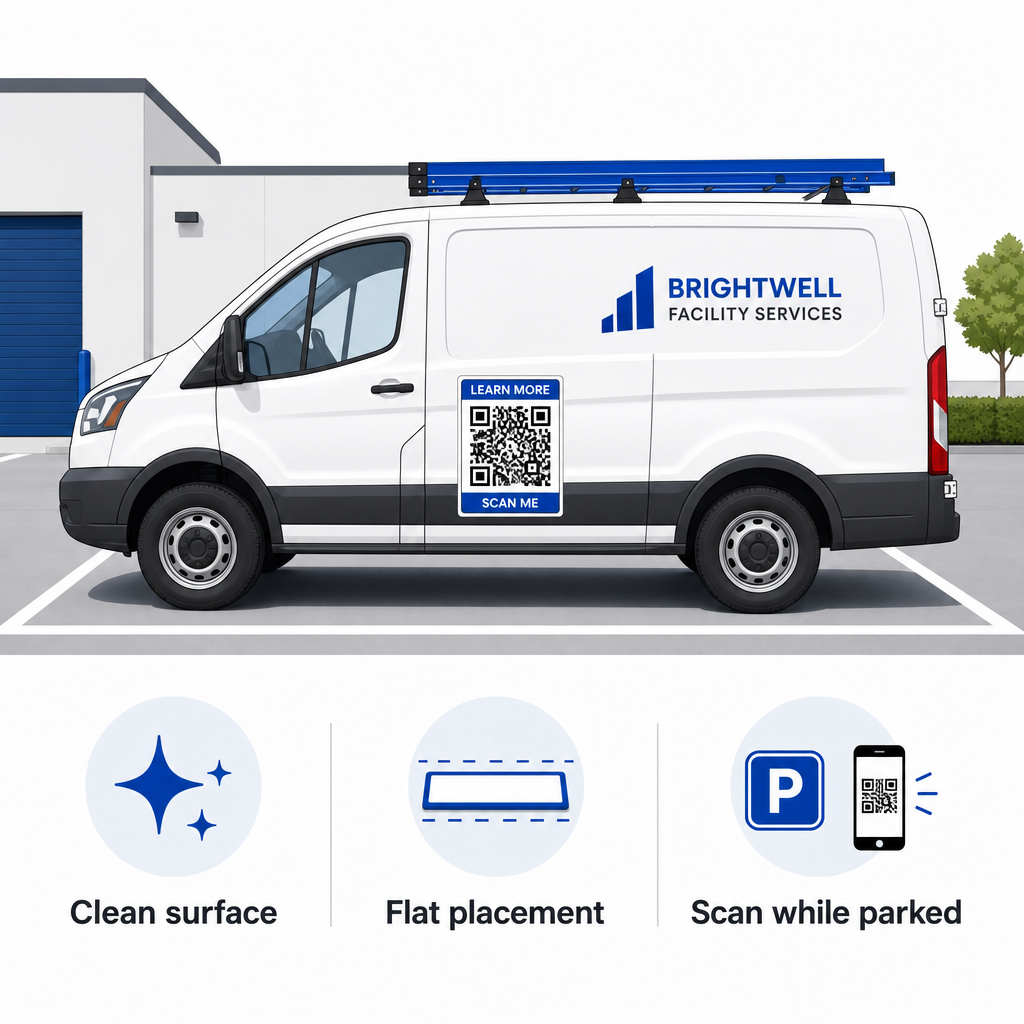
- Fijar a paneles metálicos planosColoque los imanes en las puertas laterales planas, los paneles laterales lisos o el portón trasero plano. Evite los contornos de la carrocería, las molduras, las manijas y las curvas pronunciadas. Los imanes no se adhieren a la fibra de vidrio, los paneles de aluminio, los parachoques de plástico ni las zonas con masilla.
- Limpie la superficie de aplicación.La suciedad, el polvo y la acumulación de cera debilitan la sujeción magnética y atrapan partículas que rayan la pintura del vehículo. Lave y seque tanto el panel del vehículo como el soporte magnético con una solución de jabón suave antes de la aplicación.
- Aplique la lámina completamente plana.Alinea un borde del imán contra el panel y deja que el resto se adhiera de forma natural. Presiona firmemente sobre la superficie para eliminar burbujas de aire o bordes levantados que podrían engancharse con el viento al conducir.
- Mantenga rutinas de limpieza regulares.Retire el imán al menos una vez por semana para eliminar la humedad acumulada y el polvo de la carretera. Guarde los imanes para vehículos que no utilice en posición horizontal en un lugar fresco y seco para evitar que se deformen o se doblen las esquinas.
En nuestra guía encontrará consejos detallados sobre la instalación para flotas comerciales. códigos QR en vehículos.
Prueba de la capacidad de escaneo en condiciones reales al aire libre
Antes de desplegar el imán para vehículos en rutas de servicio activas, debe validar su capacidad de escaneo en diversos entornos reales. Un patrón que se decodifica fácilmente bajo la iluminación de una oficina podría fallar al exponerse a la luz intensa del exterior o a sombras profundas.
Prueba tu imán impreso en tres condiciones críticas:
- Retroceda hasta la distancia de visualización realista que usarán sus clientes y confirme que el enfoque automático de la cámara se fija rápidamente.
- Compruebe el rendimiento del escaneo bajo la luz solar intensa del mediodía, cielos nublados y sombra parcial.
- Escanea el imán utilizando varios teléfonos inteligentes iOS y Android, incluidos dispositivos económicos con resoluciones de cámara más bajas.
También puedes probar tu enlace de destino con una herramienta en línea. Lector QR online para garantizar que la página de destino se abra rápidamente en redes celulares. Siguiendo los procedimientos establecidos las mejores prácticas para la legibilidad de los códigos QR garantiza que sus imanes de marketing móvil conviertan de forma consistente la visibilidad del vehículo fuera de línea en interacción online rastreable.
Para empezar a crear tu propio anuncio para vehículos de alta conversión, selecciona tu enlace de destino, aplica un formato dinámico con alto contraste y genera un diseño vectorial listo para la impresión profesional.
Preguntas frecuentes
El tamaño recomendado depende de la distancia de escaneo, utilizando una proporción de 1:10. Si los usuarios escanean el imán desde 90 cm de distancia mientras el vehículo está estacionado, el código QR debe tener un ancho de al menos 9 a 10 cm. Para distancias de visualización mayores, aumente el tamaño del código y mantenga la información codificada al mínimo.
No. El desenfoque por movimiento, la velocidad del vehículo y los retrasos en el enfoque automático de la cámara hacen que escanear vehículos en movimiento sea inseguro y poco fiable. Diseñe siempre las campañas de códigos QR para vehículos en situaciones donde el vehículo esté estacionado en lugares accesibles, como obras, aparcamientos o zonas de carga.
Proporcione siempre archivos en formatos vectoriales como SVG, EPS o PDF vectorial de alta resolución. Los archivos vectoriales conservan bordes nítidos en cualquier tamaño de impresión, lo que garantiza que los módulos del código QR permanezcan definidos sin pixelación ni borrosidad durante la impresión magnética de gran formato.