Jak víte, zda vaše kampaň s QR kódy založená na poloze skutečně funguje? Bez správných metrik utrácíte peníze za tištěné materiály, aniž byste mohli prokázat jejich dopad. Tento průvodce rozebírá sedm metrik, které vám poskytnou jasný, daty podložený obraz výkonu kampaně – od prvního skenu po konečnou konverzi.
Co dělá kampaně s QR kódy založené na poloze měřitelnými
Kampaně s QR kódy založené na poloze propojují offline umístění – plakáty, obaly, vystavení v obchodech, materiály pro události – s digitálními zážitky. Na rozdíl od návštěvnosti webových stránek tyto interakce začínají ve fyzickém světě, což vytváří problém s atribucí: jak propojíte sken v Austinu s nákupem na vaší e-commerce platformě?
Odpověď je dynamické QR kódy. Na rozdíl od statických kódů, dynamické QR kódy směrují skeny přes přesměrovací server, který zaznamenává data před odesláním uživatele na cíl. Tento mezikrok umožňuje sledování. Můžete zachytit, kdy, kde a jak došlo ke skenu – a aktualizovat cílovou URL, aniž byste museli přetisknout jediný materiál.
Sledování QR kódu funguje tak, že každému kódu přiřadí jedinečný přesměrovací odkaz spojený s vaší kampaní. Každý sken generuje datovou událost, kterou zaznamenává vaše analytická platforma. Spojte to s parametry UTM vloženými do cílové URL a můžete data o skenech posílat přímo do Google Analytics 4, vašeho CRM nebo nástroje pro marketingovou automatizaci.
S tímto základem jsou zde sedm metrik, které stojí za sledování.
1. Celkový počet skenů
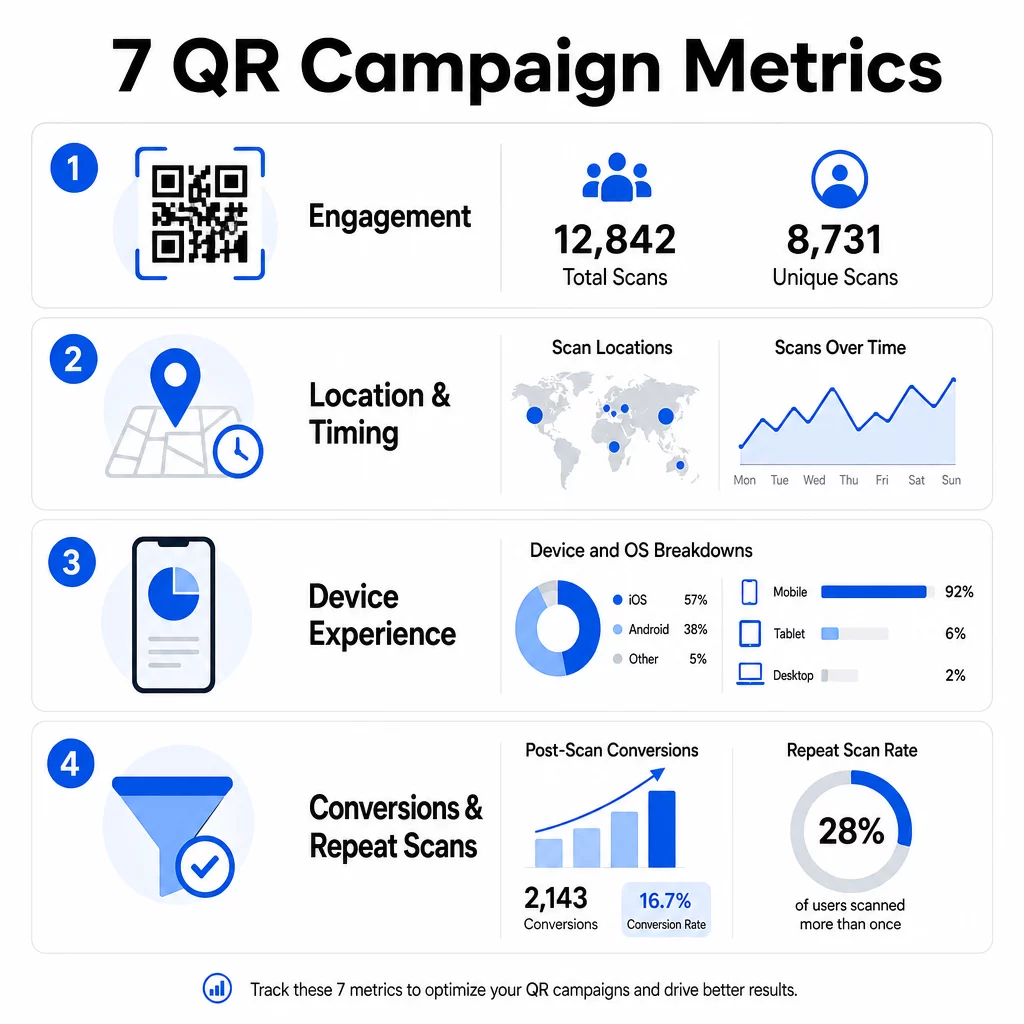
Celkový počet skenů počítá každou interakci s vaším QR kódem, včetně vícenásobných skenů stejnou osobou. Toto je vaše základní metrika zapojení – říká vám, zda je vaše umístění dostatečně viditelné a přesvědčivé, aby podnítilo akci.
Míra skenování se výrazně liší v závislosti na kontextu:
- Tištěné reklamy obvykle dosahují míry skenování 1–3 %
- Obaly produktů mají tendenci dosahovat 2–5 %
- Vystavení v obchodech často generují 5–10 %
- Materiály pro události mohou dosáhnout 10–20 %
Nárůst celkového počtu skenů po spuštění kampaně je pozitivním signálem, ale je třeba poznamenat, že 70 % celoživotních skenů se obvykle odehraje během prvních 30 dnů. Silné spuštění je důležité. Jasná výzva k akci, jako je “Skenujte pro 10% slevu”, generuje výrazně více počátečních skenů než kód umístěný bez kontextu.
Pro umístění umístěte QR kódy do úrovně očí – zhruba 4 až 5 stop vysoko – a ujistěte se, že jsou velké alespoň 1 palec pro spolehlivé skenování. Celkový počet skenů vám dává dosah; níže uvedené metriky vám řeknou, co s ním dělat.
Sledujte své QR kampaně v reálném čase Sledujte celkový počet skenů, unikátní návštěvníky a geografické trendy v reálném čase. Prozkoumejte funkce analýzy a sledování QR kódů a začněte měřit to, na čem záleží.
2. Unikátní skeny
Unikátní skeny filtrují opakované interakce a počítají pouze odlišná zařízení nebo uživatele. Rozdíl mezi celkovým a unikátním počtem skenů je jedním z nejinformativnějších poměrů ve vaší analytice.
Pokud máte 10 000 celkových skenů a 8 000 unikátních skenů, 20 % vašich interakcí jsou opakované návštěvy. Zda je to dobré nebo špatné, závisí na vašem cíli. Pro věrnostní program nebo digitální menu jsou opakované skeny smyslem. Pro kampaň zaměřenou na oslovení nových lidí nízký počet unikátních skenů signalizuje, že nerozšiřujete své publikum.
Pro sledování unikátních skenů jsou vyžadovány dynamické QR kódy. Platformy používají identifikátory na úrovni zařízení nebo signály založené na IP adrese k rozlišení jednotlivých uživatelů při zachování anonymity dat. Toto rozlišení je důležité i z provozního hlediska – pokud synchronizujete data skenů s CRM, unikátní skeny zabraňují duplicitním záznamům a nafouknutým počtům potenciálních zákazníků.
Praktický signál: uživatelé, kteří naskenují stejný kód dvakrát během 48 hodin, často vykazují vyšší nákupní záměr, což z nich činí užitečný segment pro následné cílení nebo bodování potenciálních zákazníků.
3. Místa skenování
Geografická data skenování vám přesně ukazují, kde jsou vaše kódy přístupné, obvykle až na úroveň města. Zde si kampaně založené na poloze získávají své jméno – a zde se rozhodování o rozpočtu stává mnohem snazší ospravedlnit.
Většina analytických panelů QR zobrazuje data o poloze jako teplotní mapy nebo rozdělení na úrovni měst, což vám umožňuje identifikovat, která umístění přinášejí výsledky a které regiony zaostávají vzhledem k investicím. U národní kampaně s rovnoměrným rozložením data o poloze často odhalují překvapivou koncentraci. Kampaň s letáky napříč několika státy může vygenerovat 500 skenů v jednom středně velkém městě a méně než 100 na hlavních trzích – poznatek, který by byl bez sledování polohy neviditelný.
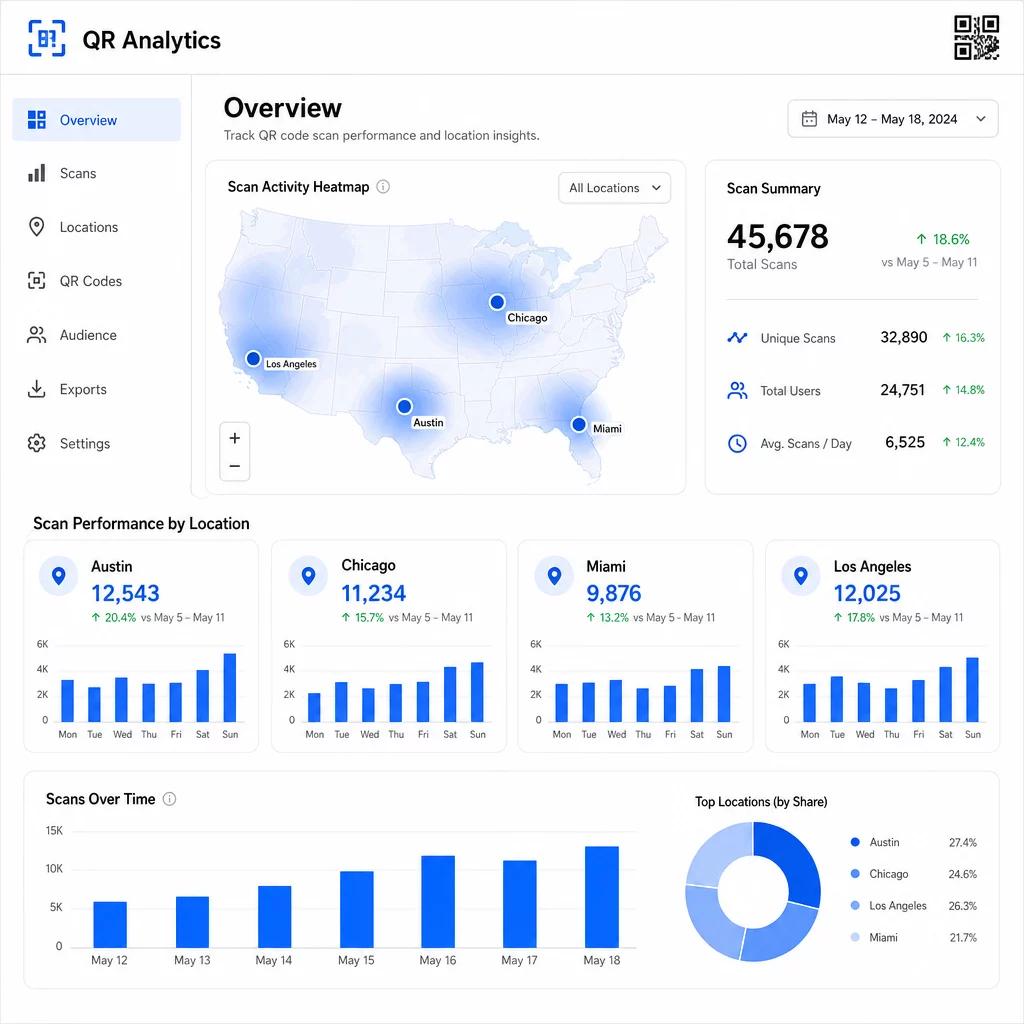
Přiřazení unikátních QR kódů každému umístění je nejspolehlivější způsob, jak izolovat výkonnost lokality. Jeden kód napříč více lokalitami vám poskytne agregovaná data; unikátní kódy vám poskytnou přímé srovnání.
Data o poloze také umožňují personalizaci. Geocílené QR kódy mohou přesměrovat uživatele na různé vstupní stránky na základě jejich polohy skenování – například řetězec potravin může propagovat teplé nápoje v chladnějších oblastech a studené nápoje tam, kde jsou vyšší teploty, aniž by tiskl samostatné materiály.
Poznámka k ochraně soukromí: Podle kalifornského zákona o ochraně soukromí spotřebitelů (California Consumer Privacy Act) jsou přesné geolokační údaje – definované jako poloha v okruhu přibližně 1 850 stop – klasifikovány jako citlivé osobní údaje. Sledování na úrovni města na základě IP adresy obvykle spadá mimo tuto hranici, ale sledování na základě GPS vyžaduje výslovný souhlas uživatele. Zkontrolujte datové postupy své platformy a získejte řádný souhlas před shromažďováním podrobných údajů o poloze.
4. Skenování v čase
Údaje o načasování odhalují vzorce v tom, jak a kdy se vaše publikum zapojuje. Sledování objemu skenování podle hodiny, dne a týdne vám pomůže pochopit nejen to, kolik lidí skenuje, ale také kdy je nejpravděpodobnější, že budou jednat.
Obecné vzorce se liší podle typu kampaně:
- B2B kampaně mají tendenci vrcholit od úterý do čtvrtka, mezi 12:00 a 14:00
- B2C kampaně obvykle zaznamenávají největší aktivitu od pátku do neděle, mezi 18:00 a 20:00
Místní podmínky jsou však důležitější než obecné referenční hodnoty. Displej v kavárně může zaznamenat špičky v 8:00; QR kód na místě konání akce může vrcholit 30 minut před otevřením dveří. Sledování rychlosti skenování – počtu skenů za hodinu – vám pomůže odhalit tyto vzorce a zachytit rané známky úpadku kampaně, kdy zájem začíná klesat po počátečním období spuštění.
Údaje o načasování se stávají použitelnými, když je zkombinujete s kontrolou obsahu. Dynamické QR kódy vám umožní aktualizovat cílové URL adresy v reálném čase, takže můžete spouštět bleskové prodeje nebo časově omezené akce, které se shodují s obdobími největšího zapojení, aniž byste museli přetiskovat materiály. Naplánování sociálních nebo e-mailových push notifikací těsně před vašimi špičkovými hodinami skenování může zesílit účinek.
U probíhajících umístění kontrolujte údaje o načasování měsíčně. U aktivních kampaní jsou týdenní kontroly často dostatečné k zachycení významných změn.
5. Rozdělení podle zařízení a OS
Údaje o zařízeních vám řeknou, co vaše publikum používá ke skenování – a zda pro ně vaše vstupní stránka skutečně funguje. Do roku 2025 budou mobilní zařízení tvořit přibližně 96 % všech skenů QR kódů, přičemž iOS a Android si rozdělí většinu tohoto provozu.
Toto rozdělení má přímé technické důsledky. Vstupní stránka, která se čistě načítá v Safari/iOS, se může chovat jinak v Chrome/Android, zejména pokud obsahuje video, prvky formuláře nebo výzvy ke stažení aplikace. Údaje o zařízeních vám umožní zachytit tyto problémy dříve, než vás budou stát konverze.
Praktický příklad: kampaň propagující mobilní aplikaci může směrovat uživatele iOS přímo do Apple App Store a uživatele Androidu do Google Play. Tento druh chytrého směrování – založený na detekovaném typu zařízení – odstraňuje tření a zlepšuje míru instalací. Analytický panel Pagelootu zobrazuje rozdělení podle zařízení a OS spolu s údaji o skenování, takže můžete provádět tyto optimalizace bez dohadů.
Také stojí za zmínku: 78 % uživatelů nyní skenuje QR kódy pomocí nativní aplikace fotoaparátu svého telefonu namísto vyhrazeného skeneru. Váš obsah musí bezproblémově fungovat s vestavěnými aplikacemi fotoaparátu napříč platformami, nejen s aplikacemi třetích stran.
Pokud si všimnete vysoké míry okamžitého opuštění z konkrétního typu zařízení, hledejte nejprve problémy s výkonem – velké obrázky, neoptimalizované video nebo formuláře, které se na určitých velikostech obrazovky nezobrazují správně, jsou běžnými viníky.
6. Konverze po skenování
Konverze po skenování jsou místem, kde se zapojení stává příjmem. Každá metrika před touto měří pozornost; tato měří výsledky – nákupy, registrace, stažení aplikací nebo jakoukoli akci, kterou má vaše kampaň podpořit.
Běžné referenční hodnoty konverzí podle typu akce:
- Sledování na sociálních sítích: 20–30 %
- Registrace e-mailu: 15–25 %
- Stažení aplikací: 10–15 %
- Nákupy: 2–5 %
Pokud vaše čísla výrazně klesají pod tyto rozsahy, problém je obvykle v zážitku po skenování: pomalé načítání stránky, příliš složitý formulář nebo cíl, který neodpovídá tomu, co QR kód sliboval.
Nastavení sledování konverzí vyžaduje dvě věci, které fungují společně. Nejprve přidejte parametry UTM do svých cílových URL – například `utmsource=storedisplay&utmmedium=qrkód&utmcampaign=springpromo` – aby Google Analytics 4 mohl připsat návštěvnost vaší QR kampani. Za druhé, nakonfigurujte sledování událostí GA4 tak, aby zaznamenávalo konkrétní akce, na kterých vám záleží: kliknutí na tlačítka, odeslání formulářů, dokončení videí nebo nákupy. Tento průvodce parametry UTM pro QR kódy podrobně popisuje toto nastavení.
Pro hlubší atribuci propojte svá data ze skenování QR kódů s CRM nebo platformou pro marketingovou automatizaci. To vám umožní odesílat personalizované následné zprávy na základě chování při skenování a sledovat konverze napříč relacemi, nejen v bezprostředním okně po skenování.
Výpočet ROI jakmile máte data o konverzích, je přímočarý: odečtěte celkové náklady kampaně (design, tisk, poplatky za platformu) od vygenerovaných příjmů, vydělte náklady a vynásobte 100. Kampaň, která stojí $500 a generuje $2,000 v prodeji, vrací 300%.
Propojte skeny QR kódů s následnými konverzemi Použití Sledování QR kódu s parametry UTM pro propojení každého skenu s kampaní a měření toho, co se stane po skenu.
7. Míra opakovaných skenů
Míra opakovaných skenů měří, jak často se uživatelé vracejí ke skenování kódu po své první interakci. Je to signál hodnoty obsahu – pokud se uživatelé vracejí, zážitek přináší něco, pro co se vyplatí vracet.
Správná míra opakovaných skenů závisí zcela na tom, co provozujete. Věrnostní programy, digitální menu a produktové manuály jsou navrženy pro opakovanou interakci. Kampaně na zvýšení povědomí a jednorázové akce se obvykle zaměřují na široký unikátní dosah spíše než na opakovanou angažovanost. Porovnání vaší míry opakování s typem kampaně vám řekne, zda je chování očekávané, nebo je známkou problému.
| Míra opakovaných skenů | Co signalizuje | Navrhovaná akce |
|---|---|---|
| Vysoký | Obsah je cenný; uživatelé se vracejí záměrně | Rozšiřte na podobná místa; přidejte věrnostní odměny; retargetujte angažované uživatele |
| Nízký | Obsah vzbuzuje jednorázový zájem, ale postrádá přitažlivost pro následné akce | Zlepšete obsah vstupní stránky; zjednodušte uživatelskou cestu; testujte nové CTA |
| Vysoký celkový / nízký unikátní | Malé, ale vysoce angažované publikum | Zaměřte se na budování specializovaného publika; nabídněte personalizované nabídky nejlepším uživatelům |
Sledujte anomálie: extrémně rychlé opakované skenování – více zásahů během několika sekund – může naznačovat aktivitu botů spíše než skutečné chování uživatelů. Pokud je vaše míra opakování vysoká, ale konverze nízké, obsah je poutavý, ale konverzní cesta má tření.
Spárujte časové značky opakovaného skenování s vašimi časovými údaji, abyste identifikovali své nejangažovanější uživatele. Někdo, kdo skenuje dvakrát během 48 hodin, vyjadřuje silný záměr – užitečný spouštěč pro následnou komunikaci založenou na CRM nebo personalizovaný dosah.
Porovnání výkonu napříč lokalitami
Jedním z nejpraktičtějších využití QR analytiky je srovnání umístění vedle sebe. Přiřazením jedinečných kódů každé lokalitě můžete přímo připsat výkon – nejen hádat, která výkladní skříň nebo město funguje.
Zde je příklad, jak by takové srovnání mohlo vypadat:
| Místo skenování | CELKEM SKENŮ | Unikátní skeny | Míra konverze | Navrhovaná akce |
|---|---|---|---|---|
| Austin, TX | 500 | 420 | 12% | Zvyšte místní výdaje na reklamu; posilte aktuální nabídku |
| Chicago, IL | 95 | 80 | 3% | Přehodnoťte umístění; otestujte silnější CTA |
| Miami, FL | 88 | 75 | 2.5% | Přesuňte rozpočet do výkonnějších regionů |
| Los Angeles, CA | 450 | 390 | 10% | Udržujte strategii; použijte jako měřítko pro jiné městské trhy |
Vysoký objem skenování s nízkými konverzemi často poukazuje na problém s post-skenovací zkušeností. Nízké skenování v oblastech s vysokým provozem obvykle naznačuje problém s viditelností nebo umístěním – zkuste kód zvětšit, přemístit jej do úrovně očí nebo zvýraznit CTA.
Pravidelné přezkoumávání tohoto srovnání mění syrová čísla v rozpočtová rozhodnutí. Pro hlubší pohled na to, jak číst geografické trendy skenování, se podívejte na Průvodce analytickým panelem QR kódů podrobně pokrývá nastavení a interpretaci.
Vše dohromady
Sledování těchto sedmi metrik transformuje kampaně s QR kódy založené na poloze z taktiky „vytiskni a doufej“ na měřitelný, optimalizovatelný systém. Celkové a unikátní skeny vám řeknou o dosahu. Data o poloze a čase vám řeknou, kde a kdy se zaměřit. Rozdělení podle zařízení zajistí, že váš obsah skutečně funguje. Konverze propojují skeny s příjmy. A míra opakovaných skenů vám řekne, zda uživatelé nacházejí dostatečnou hodnotu k návratu.
Základem všeho je používání dynamických QR kódů – bez nich většina těchto metrik jednoduše není k dispozici. Kampaně, které tato data důsledně sledují, mohou rychleji identifikovat vysoce výkonná umístění, opravit ta s nízkým výkonem dříve, než promrhají rozpočet, a vytvořit jasnější obrázek o offline ROI, než většina tradičních mediálních kanálů umožňuje.
Začněte sledovat svou kampaň založenou na poloze Vytvářejte dynamické QR kódy, sledujte data o skenování v reálném čase a porovnávejte výkon podle polohy – vše z jednoho panelu. Vyzkoušejte Dynamický QR kód zdarma na 14 dní.
Často kladené otázky
Celkové skeny počítají každou interakci s vaším QR kódem, včetně vícenásobných skenů stejnou osobou. Unikátní skeny počítají pouze odlišná zařízení nebo uživatele, což vám dává jasnější představu o tom, kolik jednotlivých lidí se zapojilo do vaší kampaně. Rozdíl mezi těmito dvěma údaji vám řekne, kolik opakovaných zapojení generujete.
Ano. Statické QR kódy vkládají pevnou URL adresu a negenerují žádná analytická data. Dynamické QR kódy směrují skeny přes přesměrovací server, který zaznamenává čas skenování, polohu, typ zařízení a další metadata. Bez dynamických kódů nejsou k dispozici metriky jako unikátní skeny, údaje o poloze a načasování skenování.
Přidejte parametry UTM do své cílové URL – například `utmsource=storedisplay&utmmedium=qrcode&utmcampaign=campaignname` – aby GA4 mohla přiřadit příchozí provoz k vašemu QR kódu. Poté nakonfigurujte sledování událostí GA4 pro záznam konkrétních akcí, které chcete měřit, jako jsou odeslání formulářů nebo nákupy. Dynamické QR kódy to usnadňují, protože můžete aktualizovat nebo opravit parametry UTM bez opětovného tisku vašich materiálů.