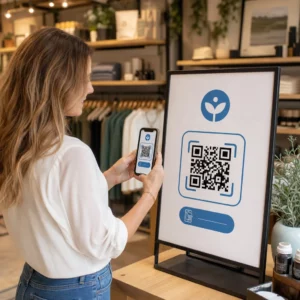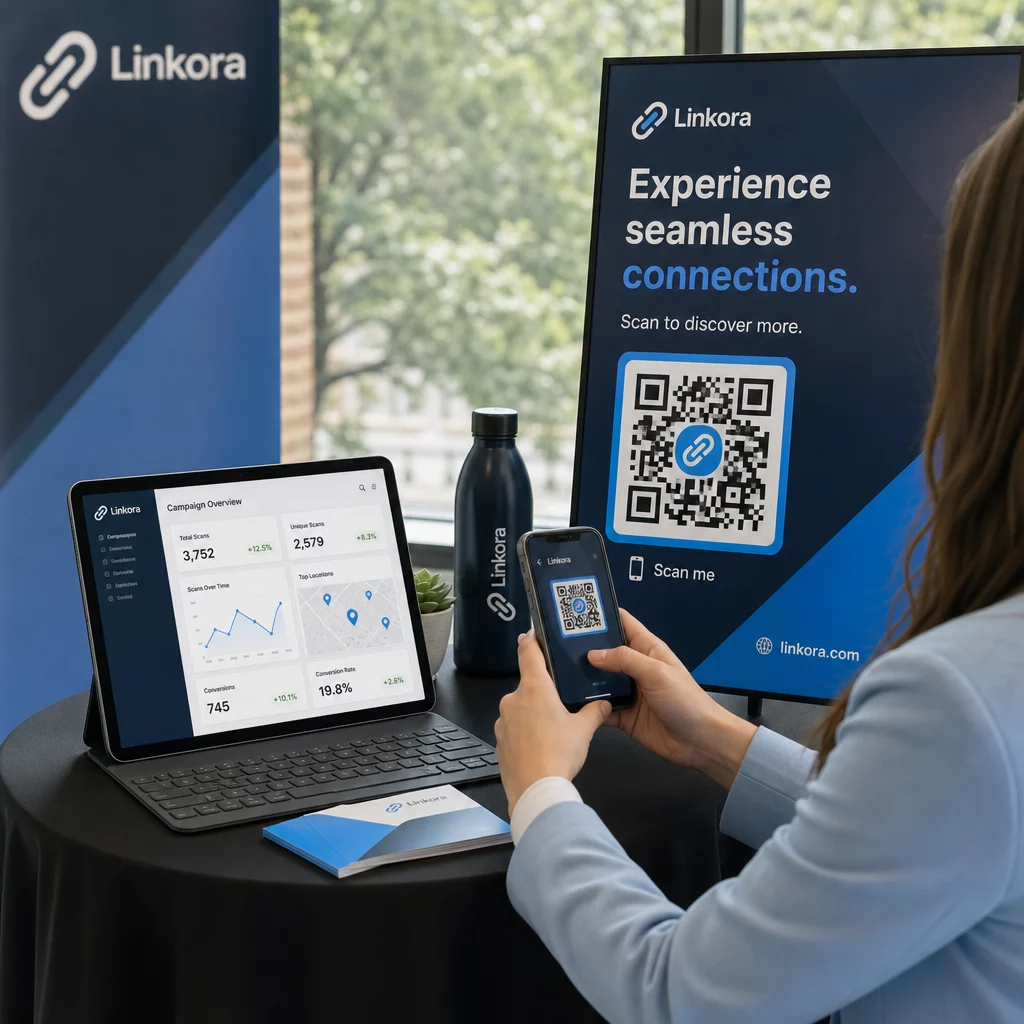
Kuidas teada saada, kas teie asukohapõhine QR-kampania tegelikult töötab? Ilma õigete mõõdikuteta kulutate raha trükimaterjalidele, mille mõju pole võimalik tõestada. See juhend käsitleb seitset mõõdikut, mis annavad teile selge ja andmepõhise pildi kampaania toimivusest – alates esimesest skaneerimisest kuni lõpliku konversioonini.
Mis teeb asukohapõhised QR-kampaaniad mõõdetavaks
Asukohapõhised QR-koodi kampaaniad ühendavad võrguvälised paigutused – plakatid, pakendid, kauplusesisesed väljapanekud, ürituste materjalid – digitaalsete kogemustega. Erinevalt veebisaidi liiklusest algavad need interaktsioonid füüsilises maailmas, mis tekitab omistamise probleemi: kuidas siduda Austini skaneering ostuga teie e-kaubanduse platvormil?
Vastus on dünaamilised QR-koodid. Erinevalt staatilistest koodidest suunavad dünaamilised QR-koodid skaneeringud ümbersuunamisserveri kaudu, mis logib andmed enne kasutaja sihtkohta saatmist. See vaheetapp teeb jälgimise võimalikuks. Saate jäädvustada, millal, kus ja kuidas skaneerimine toimus – ning värskendada sihtkoha URL-i ilma ühtegi materjali uuesti trükkimata.
QR-koodi jälgimine töötab, määrates igale koodile teie kampaaniaga seotud unikaalse ümbersuunamislingi. Iga skaneering genereerib andmesündmuse, mille teie analüütikaplatvorm salvestab. Siduge see sihtkoha URL-i manustatud UTM-parameetritega ja saate skaneerimisandmed otse Google Analytics 4-sse, oma CRM-i või turundusautomaatika tööriista edastada.
Selle aluse olemasolul on siin seitse jälgimist väärt mõõdikut.
1. Skaneeringute koguarv
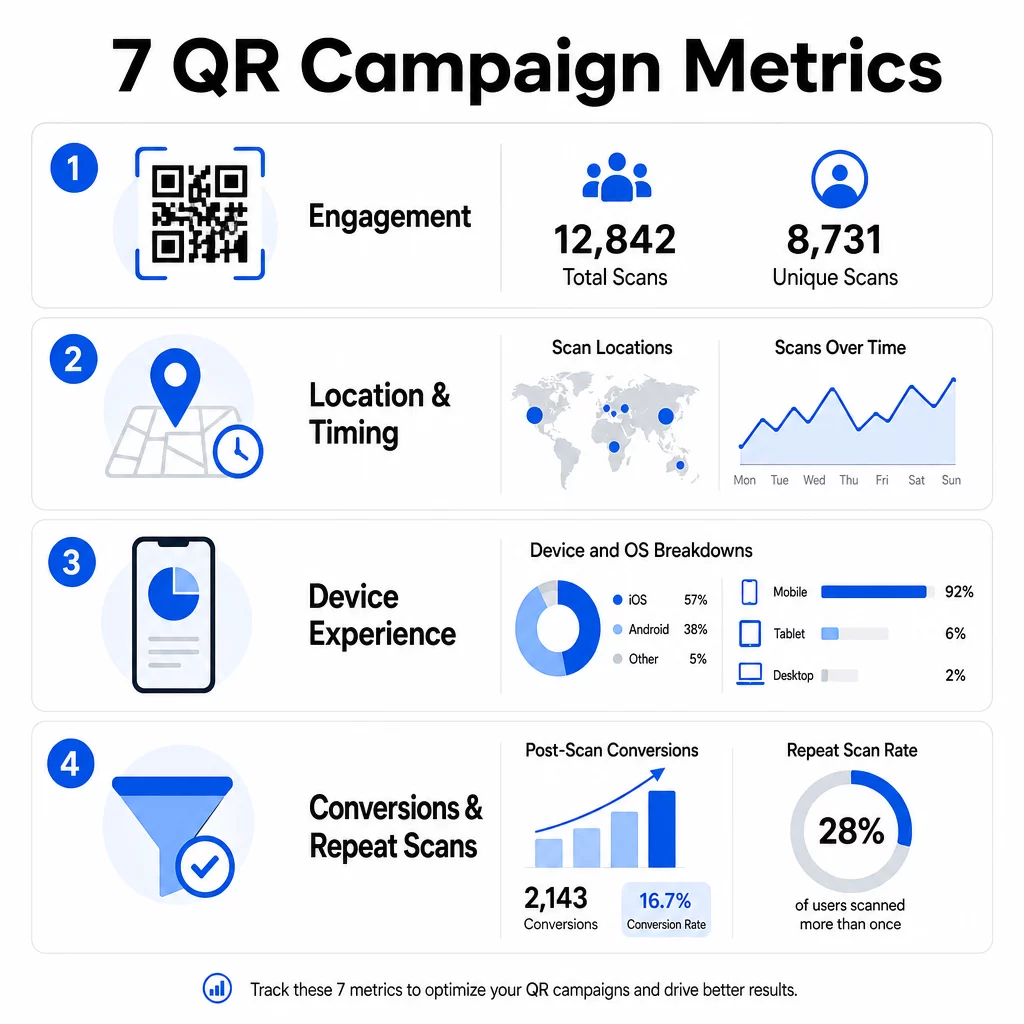
Skaneeringute koguarv loeb iga interaktsiooni teie QR-koodiga, sealhulgas sama isiku mitmekordsed skaneeringud. See on teie baasjooneline kaasamise mõõdik – see ütleb teile, kas teie paigutus on piisavalt nähtav ja veenev, et tegevust esile kutsuda.
Skaneerimismäärad varieeruvad oluliselt kontekstist olenevalt:
- Trükireklaamide skaneerimismäärad on tavaliselt 1–3%
- Tootepakendid toimivad tavaliselt 2–5% ulatuses
- Kauplusesisesed väljapanekud genereerivad sageli 5–10%
- Ürituste materjalid võivad ulatuda 10–20%-ni
Skaneeringute koguarvu hüppeline tõus pärast kampaania käivitamist on positiivne märk, kuid tasub märkida, et 70% eluaegsetest skaneeringutest toimub tavaliselt esimese 30 päeva jooksul. Tugev käivitamine on oluline. Selge üleskutse tegevusele, näiteks “Skaneeri 10% allahindluse saamiseks”, toob oluliselt rohkem varajasi skaneeringuid kui kontekstita paigutatud kood.
Paigutuse osas asetage QR-koodid silmade kõrgusele – umbes 4 kuni 5 jalga kõrgele – ja veenduge, et need oleksid usaldusväärseks skaneerimiseks vähemalt 1 tolli suurused. Skaneeringute koguarv annab teile ulatuse; allpool olevad mõõdikud ütlevad teile, mida sellega peale hakata.
Jälgi oma QR-kampaaniaid reaalajas Vaata skannimiste koguarvu, unikaalseid külastajaid ja geograafilisi trende nende toimumise ajal. Uuri QR-koodi analüüsi ja jälgimise funktsioone et hakata mõõtma seda, mis on oluline.
2. Unikaalsed skannimised
Unikaalsed skannimised filtreerivad välja korduvad interaktsioonid, lugedes ainult erinevaid seadmeid või kasutajaid. Koguskannimiste ja unikaalsete skannimiste vahe on üks informatiivsemaid suhtarve teie analüütikas.
Kui teil on 10 000 koguskannimist ja 8 000 unikaalset skannimist, on 20% teie interaktsioonidest korduvkülastused. See, kas see on hea või halb, sõltub teie eesmärgist. Püsikliendiprogrammi või digitaalse menüü puhul on korduvad skannimised eesmärk. Teadlikkuse tõstmise kampaania puhul, mille eesmärk on jõuda uute inimesteni, annab madal unikaalsete skannimiste arv märku, et te ei laienda oma publikut.
Unikaalsete skannimiste jälgimiseks on vaja dünaamilisi QR-koode. Platvormid kasutavad seadme taseme identifikaatoreid või IP-põhiseid signaale üksikute kasutajate eristamiseks, hoides samal ajal andmed anonüümsena. See eristus on oluline ka operatiivselt – kui sünkroniseerite skannimisandmeid CRM-iga, hoiavad unikaalsed skannimised ära duplikaatkirjed ja ülepaisutatud müügivihjete arvu.
Praktiline signaal: kasutajad, kes skannivad sama koodi kaks korda 48 tunni jooksul, näitavad sageli kõrgemat ostukavatsust, muutes nad kasulikuks segmendiks järelsihtimiseks või müügivihjete hindamiseks.
3. Skannimiskohad
Geograafilised skannimisandmed näitavad teile täpselt, kus teie koodidele ligi pääsetakse, tavaliselt linna tasandil. See on koht, kus asukohapõhised kampaaniad oma nime teenivad – ja kus eelarveotsuseid on palju lihtsam õigustada.
Enamik QR-analüütika armatuurlaudu kuvab asukohaandmeid soojuskaartide või linna tasandi jaotustena, võimaldades teil tuvastada, millised paigutused annavad tulemusi ja millised piirkonnad jäävad investeeringu suhtes alla. Ühtlase jaotusega riikliku kampaania puhul näitavad asukohaandmed sageli üllatavat kontsentratsiooni. Flaierikampaania mitmes osariigis võib genereerida 500 skannimist ühes keskmise suurusega linnas ja vähem kui 100 suurematel turgudel – teadmine, mis oleks ilma asukoha jälgimiseta nähtamatu.
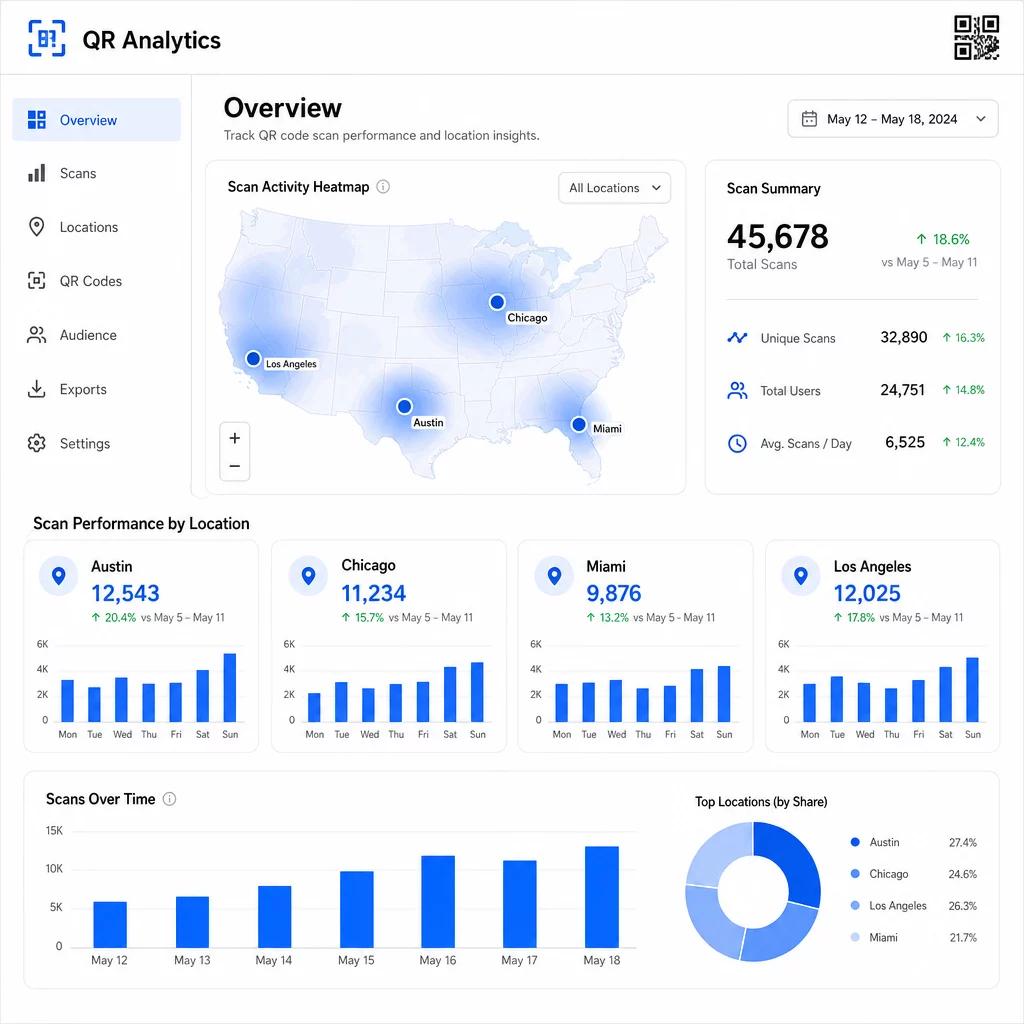
Unikaalsete QR-koodide määramine igale paigutusele on kõige usaldusväärsem viis asukoha toimivuse eraldamiseks. Üks kood mitmes asukohas annab teile koondandmed; unikaalsed koodid annavad teile otsese võrdluse.
Asukohaandmed võimaldavad ka isikupärastamist. Geosihtotud QR-koodid saavad suunata kasutajaid erinevatele sihtlehtedele vastavalt nende skannimiskohale – näiteks toidupoodide kett saab reklaamida kuumi jooke külmemates piirkondades ja külmi jooke kõrgemate temperatuuridega kohtades, ilma et peaks trükkima eraldi materjale.
Märkus privaatsuse kohta: California tarbijaandmete privaatsuse seaduse kohaselt klassifitseeritakse täpne geolokatsiooniandmed – mis on määratletud kui asukoht ligikaudu 1850 jala raadiuses – tundlike isikuandmetena. Linna tasandi IP-põhine jälgimine jääb tavaliselt sellest piirist välja, kuid GPS-põhine jälgimine nõuab kasutaja selgesõnalist nõusolekut. Vaadake üle oma platvormi andmetöötluspraktikad ja hankige enne täpse asukohaandmete kogumist nõuetekohane nõusolek.
4. Skaneeringud aja jooksul
Ajastuse andmed näitavad mustreid, kuidas teie publik suhtleb – ja millal. Skaneeringute mahu vaatamine tunni, päeva ja nädala kaupa aitab teil mõista mitte ainult seda, kui palju inimesi skaneerib, vaid ka seda, millal nad kõige tõenäolisemalt tegutsevad.
Üldised mustrid varieeruvad kampaania tüübi järgi:
- B2B kampaaniad kipuvad tippu jõudma teisipäevast neljapäevani, kella 12:00 ja 14:00 vahel.
- B2C kampaaniad näevad tavaliselt kõige rohkem aktiivsust reedest pühapäevani, kella 18:00 ja 20:00 vahel.
Kuid kohalikud tingimused on olulisemad kui üldised võrdlusalused. Kohviku väljapanekul võivad olla tipud kell 8:00; ürituse toimumiskoha QR-kood võib tippu jõuda 30 minutit enne uste avamist. Skaneerimiskiiruse – skaneeringute arvu tunnis – jälgimine aitab teil neid mustreid märgata ja tabada kampaania languse varajasi märke, kui huvi hakkab pärast esialgset käivitusperioodi langema.
Ajastuse andmed muutuvad rakendatavaks, kui ühendate need sisu kontrolliga. Dünaamilised QR-koodid võimaldavad teil siht-URL-e reaalajas värskendada, et saaksite korraldada välkmüüke või ajatundlikke kampaaniaid, mis ühtivad tipptasemel kaasamise akendega, ilma materjale uuesti trükkimata. Sotsiaalmeedia või e-posti teavituste ajastamine vahetult enne teie tippskaneerimistunde võib efekti võimendada.
Pidevaks paigutuseks vaadake ajastuse andmeid igakuiselt. Aktiivsete kampaaniate puhul piisab sageli iganädalastest ülevaadetest, et tabada olulisi muutusi.
5. Seadme ja OS-i jaotused
Seadmeandmed ütlevad teile, mida teie publik skaneerimiseks kasutab – ja kas teie sihtleht neile tegelikult töötab. Aastaks 2025 moodustavad mobiilseadmed ligikaudu 96% kõigist QR-koodi skaneeringutest, kusjuures iOS ja Android jagavad enamiku sellest liiklusest.
See jaotusel on otsesed tehnilised tagajärjed. Sihtleht, mis laadib puhtalt Safari/iOS-is, võib Chrome/Android-is käituda erinevalt, eriti kui see sisaldab videot, vormielemente või rakenduse allalaadimise viipasid. Seadmeandmed võimaldavad teil need probleemid tabada enne, kui need teile konversioone maksma lähevad.
Praktiline näide: mobiilirakendust reklaamiv kampaania võib suunata iOS-i kasutajad otse Apple App Store'i ja Androidi kasutajad Google Play'sse. Selline nutikas marsruutimine – mis põhineb tuvastatud seadmetüübil – eemaldab hõõrdumise ja parandab installimismäärasid. Pagelooti analüütika armatuurlaud kuvab seadme ja OS-i jaotused koos skaneerimisandmetega, et saaksite neid optimeerimisi teha ilma oletusteta.
Samuti väärib märkimist: 78% kasutajatest skaneerib nüüd QR-koode oma telefoni natiivse kaamerarakendusega, mitte spetsiaalse skanneriga. Teie sisu peab sujuvalt töötama sisseehitatud kaamerarakendustega kõigil platvormidel, mitte ainult kolmandate osapoolte rakendustega.
Kui märkate kõrget põrkemäära teatud seadmetüübilt, otsige esmalt jõudlusprobleeme – suured pildid, optimeerimata videod või vormid, mis ei kuvata teatud ekraanisuurustel õigesti, on tavalised süüdlased.
6. Skannimisjärgsed konversioonid
Skannimisjärgsed konversioonid on koht, kus kaasamine muutub tuluks. Iga mõõdik enne seda mõõdab tähelepanu; see mõõdab tulemusi – oste, registreerumisi, rakenduste allalaadimisi või mis tahes tegevust, mida teie kampaania on loodud esile kutsuma.
Levinud konversioonide võrdlusalused tegevuse tüübi järgi:
- Sotsiaalmeedia jälgijad: 20–30%
- E-posti registreerumised: 15–25%
- Rakenduste allalaadimised: 10–15%
- Ostud: 2–5%
Kui teie numbrid jäävad oluliselt alla nende vahemike, on probleem tavaliselt skannimisjärgses kogemuses: aeglaselt laadiv leht, liiga keeruline vorm või sihtkoht, mis ei vasta sellele, mida QR-kood lubas.
Konversioonide jälgimise seadistamine nõuab kahe asja koos töötamist. Esiteks lisage oma siht-URL-idele UTM-parameetrid – näiteks `utmsource=storedisplay&utmmeedia=qrkood&utmcampaign=springpromo` – et Google Analytics 4 saaks liikluse teie QR-kampaaniale omistada. Teiseks konfigureerige GA4 sündmuste jälgimine, et salvestada konkreetsed tegevused, mis teile olulised on: nupuvajutused, vormide esitamised, videote lõpetamised või ostud. See UTM-parameetrite juhend QR-koodidele kirjeldab seda seadistust üksikasjalikult.
Sügavama omistamise jaoks linkige oma QR-skannimise andmed CRM-i või turundusautomaatika platvormiga. See võimaldab teil saata isikupärastatud järelteateid skannimiskäitumise põhjal ja jälgida konversioone üle sessioonide, mitte ainult vahetus skannimisjärgses aknas.
ROI arvutamine kui teil on konversiooniandmed, on lihtne: lahutage teenitud tulust kampaania kogukulud (disain, trükkimine, platvormitasud), jagage kuludega ja korrutage 100-ga. Kampaania, mis maksab $500 ja genereerib $2000 müüki, annab 300% tagasi.
Ühendage QR-skaneeringud järgnevate konversioonidega Kasutage QR-koodi jälgimine UTM-parameetritega, et siduda iga skaneering kampaaniaga ja mõõta, mis juhtub pärast skaneeringut.
7. Korduvskaneerimise määr
Korduvskaneerimise määr mõõdab, kui tihti kasutajad pärast esimest interaktsiooni koodi uuesti skaneerima tulevad. See on sisu väärtuse signaal – kui kasutajad naasevad, pakub kogemus midagi, mille pärast tasub tagasi tulla.
Õige korduvskaneerimise määr sõltub täielikult sellest, mida te käitate. Püsikliendiprogrammid, digitaalsed menüüd ja tootejuhendid on loodud korduvaks interaktsiooniks. Teadlikkuse kampaaniad ja ühekordsed pakkumised on tavaliselt suunatud laiale unikaalsele haardele, mitte korduvale kaasamisele. Oma korduvskaneerimise määra võrdlemine kampaania tüübiga annab teada, kas käitumine on ootuspärane või probleemi märk.
| Korduvskaneerimise määr | Mida see annab märku | Soovitatav tegevus |
|---|---|---|
| Kõrge | Sisu on väärtuslik; kasutajad naasevad tahtlikult | Laiendage sarnastesse asukohtadesse; lisage püsikliendiboonuseid; suunake uuesti kaasatud kasutajatele |
| Madal | Sisu tekitab ühekordset huvi, kuid puudub järelhuvi | Parandage sihtlehe sisu; lihtsustage kasutajate teekonda; testige uusi CTA-sid |
| Kõrge koguarv / madal unikaalsus | Väike, kuid väga kaasatud publik | Keskendu niši publiku loomisele; paku parimatele kasutajatele isikupärastatud pakkumisi |
Jälgi anomaaliaid: äärmiselt kiired korduvskaneeringud – mitu tabamust sekundite jooksul – võivad viidata robotite tegevusele, mitte ehtsatele kasutajakäitumisele. Kui teie korduvskaneeringute määr on kõrge, kuid konversioonid madalad, on sisu kaasahaarav, kuid konversiooniteel on hõõrdumist.
Ühenda korduvskaneeringute ajatemplid oma ajastuse andmetega, et tuvastada oma kõige kaasatumad kasutajad. Keegi, kes skaneerib kaks korda 48 tunni jooksul, väljendab tugevat kavatsust – kasulik käivitaja CRM-põhiseks järeltegevuseks või isikupärastatud teavituseks.
Jõudluse võrdlemine asukohtade vahel
Üks QR-analüütika praktilisemaid kasutusviise on paigutuste kõrvuti võrdlemine. Määrates igale asukohale unikaalsed koodid, saate jõudlust otse omistada – mitte lihtsalt arvata, milline poeaken või linn töötab.
Siin on näide, milline see võrdlus välja näha võiks:
| Skannimise asukoht | SKANEERINGUID KOKKU | Unikaalsed skaneeringud | Konversioonimäär | Soovitatav tegevus |
|---|---|---|---|---|
| Austin, TX | 500 | 420 | 12% | Suurenda kohalikku reklaamikulu; tugevda praegust pakkumist |
| Chicago, IL | 95 | 80 | 3% | Hinda paigutust uuesti; testi tugevamat CTA-d |
| Miami, FL | 88 | 75 | 2.5% | Suuna eelarve suurema jõudlusega piirkondadesse |
| Los Angeles, CA | 450 | 390 | 10% | Säilita strateegia; kasuta võrdlusalusena teiste linnaturgude jaoks |
Suur skaneerimismaht madalate konversioonidega viitab sageli skaneerimisjärgse kogemuse probleemile. Madal skaneerimiste arv tiheda liiklusega piirkondades viitab tavaliselt nähtavuse või paigutuse probleemile – proovi koodi suurendada, paigutada see silmade kõrgusele või muuta CTA silmatorkavamaks.
Selle võrdluse regulaarne ülevaatamine muudab toored numbrid eelarveotsusteks. Geograafiliste skaneerimistrendide lugemise sügavama ülevaate saamiseks, the QR-koodi analüüsi armatuurlaua juhend hõlmab seadistamist ja tõlgendamist üksikasjalikult.
Kõik kokku pannes
Nende seitsme mõõdiku jälgimine muudab asukohapõhised QR-kampaaniad print-ja-looda taktikast mõõdetavaks ja optimeeritavaks süsteemiks. Skannimiste koguarv ja unikaalsed skannimised annavad teavet ulatuse kohta. Asukoha- ja ajastuse andmed näitavad, kus ja millal keskenduda. Seadmete jaotused tagavad, et teie sisu tegelikult töötab. Konversioonid ühendavad skannimised tuludega. Ja korduvate skannimiste määr näitab, kas kasutajad leiavad piisavalt väärtust, et tagasi tulla.
Kõige selle aluseks on dünaamiliste QR-koodide kasutamine – ilma nendeta pole enamik neist mõõdikutest lihtsalt saadaval. Kampaaniad, mis neid andmeid järjepidevalt jälgivad, suudavad kiiremini tuvastada hästi toimivad paigutused, parandada alatoimivaid enne, kui need eelarvet raiskavad, ja luua selgema pildi võrguvälisest ROI-st, kui enamik traditsioonilisi meediakanaleid võimaldavad.
Alustage oma asukohapõhise kampaania jälgimist Looge dünaamilisi QR-koode, jälgige reaalajas skannimisandmeid ja võrrelge jõudlust asukoha järgi – kõik ühest armatuurlaualt. Proovige Dünaamilise QR koodi generaator tasuta 14 päeva.
Korduma kippuvad küsimused
Skannimiste koguarv loeb iga interaktsiooni teie QR-koodiga, sealhulgas sama isiku mitmekordsed skannimised. Unikaalsed skannimised loevad ainult erinevaid seadmeid või kasutajaid, andes teile selgema pildi sellest, kui palju üksikuid inimesi teie kampaaniaga tegeles. Nende kahe vahe näitab, kui palju korduvat kaasatust te genereerite.
Jah. Staatilised QR-koodid sisaldavad fikseeritud URL-i ega genereeri analüütilisi andmeid. Dünaamilised QR-koodid suunavad skaneeringud ümbersuunamisserveri kaudu, mis logib skaneerimisaega, asukohta, seadme tüüpi ja muid metaandmeid. Ilma dünaamiliste koodideta ei ole saadaval mõõdikud nagu unikaalsed skaneeringud, asukohaandmed ja skaneerimise ajastus.
Lisage oma siht-URL-ile UTM-parameetrid – näiteks `utmsource=storedisplay&utmmedium=qrcode&utmcampaign=campaignname` – et GA4 saaks omistada sissetuleva liikluse teie QR-koodile. Seejärel konfigureerige GA4 sündmuste jälgimine, et salvestada konkreetsed toimingud, mida soovite mõõta, näiteks vormide esitamised või ostud. Dünaamilised QR-koodid muudavad selle lihtsamaks, sest saate UTM-parameetreid värskendada või parandada ilma oma materjale uuesti printimata.