Miten tiedät, toimiiko sijaintiin perustuva QR-kampanjasi todella? Ilman oikeita mittareita käytät rahaa painettuihin materiaaleihin etkä voi todistaa niiden vaikutusta. Tämä opas esittelee seitsemän mittaria, jotka antavat sinulle selkeän, dataan perustuvan kuvan kampanjan suorituskyvystä – ensimmäisestä skannauksesta lopulliseen konversioon.
Mikä tekee sijaintiin perustuvista QR-kampanjoista mitattavia
Sijaintiin perustuvat QR-koodikampanjat yhdistävät offline-sijoittelut – julisteet, pakkaukset, myymälänäytöt, tapahtumamateriaalit – digitaalisiin kokemuksiin. Toisin kuin verkkosivustoliikenne, nämä vuorovaikutukset alkavat fyysisessä maailmassa, mikä luo attribuutiohaasteen: miten yhdistät Austinissa tehdyn skannauksen verkkokauppa-alustallasi tehtyyn ostokseen?
Vastaus on dynaamiset QR-koodit. Toisin kuin staattiset koodit, dynaamiset QR-koodit reitittävät skannaukset uudelleenohjauspalvelimen kautta, joka kirjaa tiedot ennen käyttäjän lähettämistä kohteeseen. Tämä välivaihe tekee seurannasta mahdollista. Voit tallentaa, milloin, missä ja miten skannaus tapahtui – ja päivittää kohde-URL-osoitteen tulostamatta yhtään materiaalia uudelleen.
QR-koodin seuranta toimii siten, että jokaiselle koodille annetaan yksilöllinen uudelleenohjauslinkki, joka on sidottu kampanjaasi. Jokainen skannaus luo datatapahtuman, jonka analytiikka-alustasi tallentaa. Yhdistä tämä kohde-URL-osoitteeseen upotettuihin UTM-parametreihin, ja voit siirtää skannaustiedot suoraan Google Analytics 4:ään, CRM:ääsi tai markkinoinnin automaatiotyökaluun.
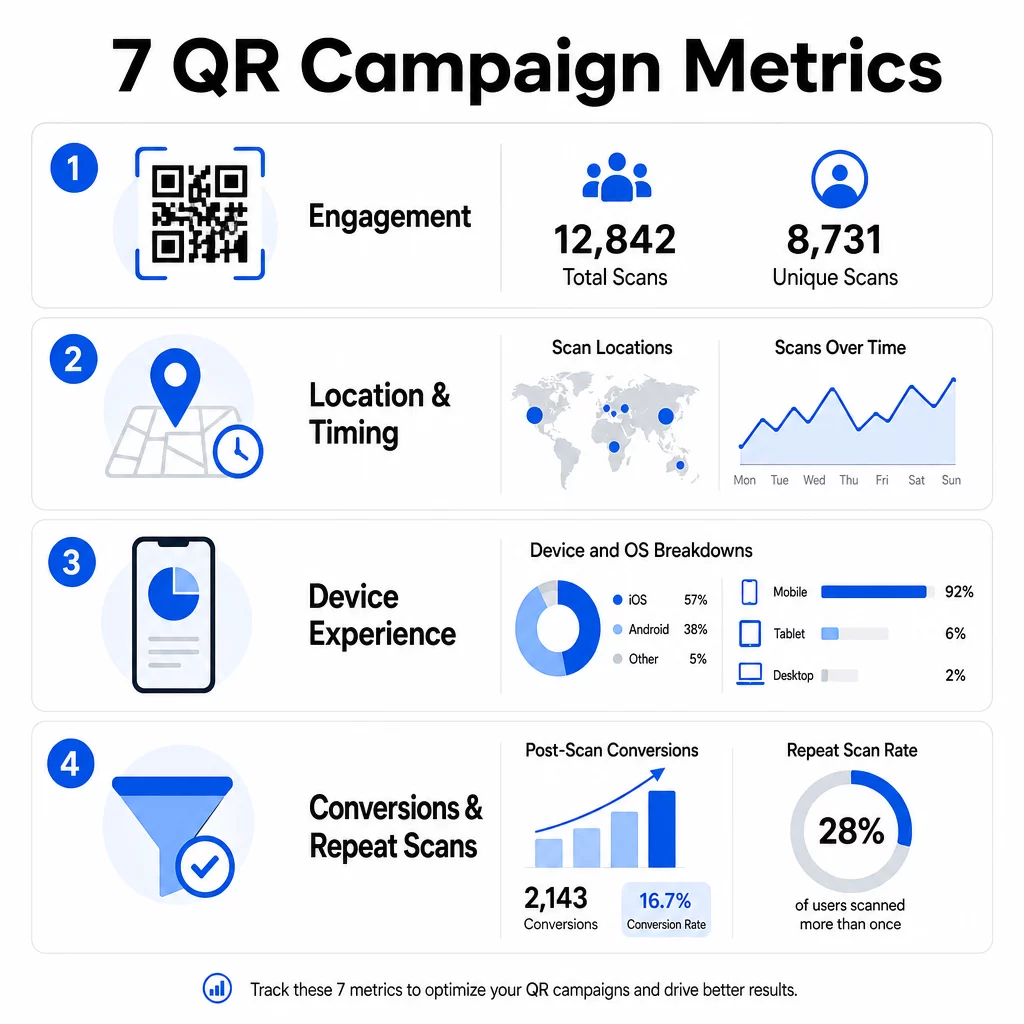
Kun tämä perusta on luotu, tässä ovat seitsemän seurattavaa mittaria.
1. Skannausten kokonaismäärä
Skannausten kokonaismäärä laskee jokaisen vuorovaikutuksen QR-koodisi kanssa, mukaan lukien saman henkilön useat skannaukset. Tämä on perus sitoutumismittarisi – se kertoo, onko sijoittelusi riittävän näkyvä ja houkutteleva toimenpiteen käynnistämiseksi.
Skannausprosentit vaihtelevat merkittävästi kontekstin mukaan:
- Painetut mainokset saavat tyypillisesti 1–3 % skannausprosentin
- Tuotepakkaukset toimivat yleensä 2–5 %:n tasolla
- Myymälänäytöt tuottavat usein 5–10 %
- Tapahtumamateriaalit voivat saavuttaa 10–20 %
Skannausten kokonaismäärän nousu kampanjan käynnistämisen jälkeen on positiivinen merkki, mutta on syytä huomata, että 70 % elinkaaren skannauksista tapahtuu tyypillisesti ensimmäisten 30 päivän aikana. Vahvalla lanseerauksella on merkitystä. Selkeä toimintakehote, kuten “Skannaa ja saat 10 % alennuksen”, tuottaa huomattavasti enemmän varhaisia skannauksia kuin ilman kontekstia sijoitettu koodi.
Sijoittelussa QR-koodit tulee asettaa silmien tasolle – noin 4–5 jalkaa korkeuteen – ja varmistaa, että ne ovat vähintään 1 tuuman kokoisia luotettavan skannauksen varmistamiseksi. Skannausten kokonaismäärä antaa sinulle kattavuuden; alla olevat mittarit kertovat, mitä sillä tehdään.
Seuraa QR-kampanjoitasi reaaliajassa Näe kokonaisskannaukset, yksilölliset kävijät ja maantieteelliset trendit niiden tapahtuessa. Tutustu QR-koodianalytiikka- ja seurantatoimintoihin aloittaaksesi sen mittaamisen, mikä on tärkeää.
2. Yksilölliset skannaukset
Yksilölliset skannaukset suodattavat pois toistuvat vuorovaikutukset laskien vain erilliset laitteet tai käyttäjät. Kokonais- ja yksilöllisten skannausten välinen ero on yksi informatiivisimmista suhteista analytiikassasi.
Jos sinulla on 10 000 kokonaisskannausta ja 8 000 yksilöllistä skannausta, 20 % vuorovaikutuksistasi on uusintakäyntejä. Onko se hyvä vai huono, riippuu tavoitteestasi. Kanta-asiakasohjelmassa tai digitaalisessa menussa toistuvat skannaukset ovat asian ydin. Uusien ihmisten tavoitteluun suunnitellussa tiedotuskampanjassa alhainen yksilöllisten skannausten määrä kertoo, ettet laajenna yleisöäsi.
Dynaamiset QR-koodit vaaditaan yksilöllisten skannausten seurantaan. Alustat käyttävät laitetason tunnisteita tai IP-pohjaisia signaaleja yksittäisten käyttäjien erottamiseen pitäen tiedot anonyymeinä. Tällä erolla on merkitystä myös toiminnallisesti – jos synkronoit skannaustietoja CRM:ään, yksilölliset skannaukset estävät päällekkäiset tietueet ja liian suuret liidimäärät.
Käytännöllinen signaali: käyttäjät, jotka skannaavat saman koodin kahdesti 48 tunnin sisällä, osoittavat usein korkeampaa ostoaikeita, mikä tekee heistä hyödyllisen segmentin jatkoseurantaan tai liidien pisteytykseen.
3. Skannauspaikat
Maantieteelliset skannaustiedot näyttävät tarkalleen, mistä koodejasi käytetään, tyypillisesti kaupunkitasolle asti. Tässä sijaintiin perustuvat kampanjat ansaitsevat nimensä – ja tässä budjettipäätöksiä on paljon helpompi perustella.
Useimmat QR-analytiikan hallintapaneelit näyttävät sijaintitiedot lämpökarttoina tai kaupunkitason erittelyinä, jolloin voit tunnistaa, mitkä sijoittelut tuottavat tuloksia ja mitkä alueet alisuoriutuvat suhteessa investointiin. Valtakunnallisessa kampanjassa, jossa jakelu on tasaista, sijaintitiedot paljastavat usein yllättävän keskittymisen. Useiden osavaltioiden kattava lentolehtiskampanja saattaa tuottaa 500 skannausta yhdessä keskikokoisessa kaupungissa ja alle 100 suurilla markkinoilla – tieto, joka olisi näkymätön ilman sijainnin seurantaa.
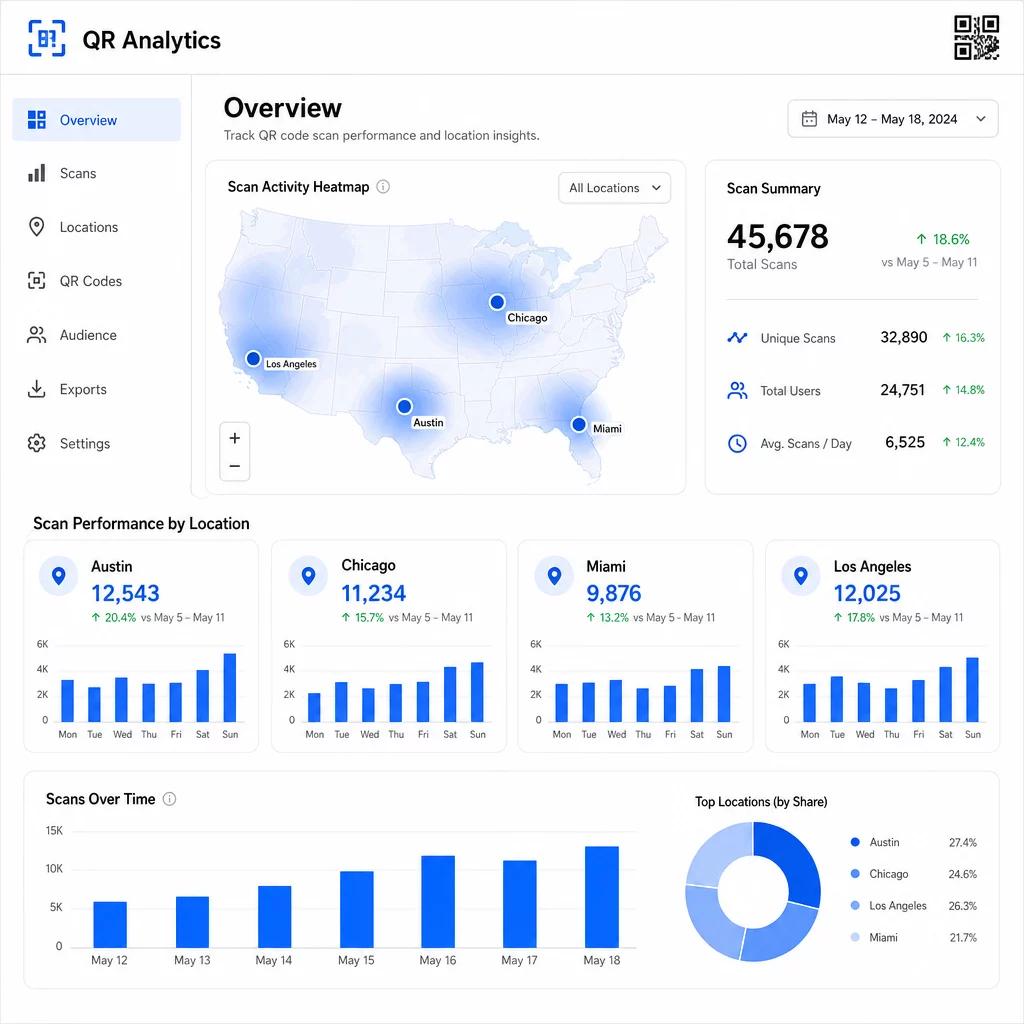
Yksilöllisten QR-koodien määrittäminen kullekin sijoittelulle on luotettavin tapa eristää sijainnin suorituskyky. Yksi koodi useissa paikoissa antaa sinulle yhdistettyjä tietoja; yksilölliset koodit antavat sinulle suoran vertailun.
Sijaintitiedot mahdollistavat myös personoinnin. Maantieteellisesti kohdennetut QR-koodit voi ohjata käyttäjiä eri laskeutumissivuille heidän skannauspaikkansa perusteella – esimerkiksi ruokakauppaketju voi mainostaa kuumia juomia kylmemmillä alueilla ja kylmiä juomia, joissa lämpötilat ovat korkeammat, ilman erillisten materiaalien painamista.
Huomautus yksityisyydestä: Kalifornian kuluttajatietosuojalain (California Consumer Privacy Act) mukaan tarkka maantieteellinen sijaintitieto – määritelty sijainniksi noin 1 850 jalan säteellä – luokitellaan arkaluonteiseksi henkilötiedoksi. Kaupunkitason IP-pohjainen seuranta jää tyypillisesti tämän kynnyksen ulkopuolelle, mutta GPS-pohjainen seuranta vaatii käyttäjän nimenomaisen suostumuksen. Tarkista alustasi tietokäytännöt ja hanki asianmukainen suostumus ennen yksityiskohtaisten sijaintitietojen keräämistä.
4. Skannaukset ajan mittaan
Ajoitustiedot paljastavat yleisösi sitoutumismalleja – ja milloin. Skannausmäärien tarkastelu tunneittain, päivittäin ja viikoittain auttaa ymmärtämään paitsi kuinka monta ihmistä skannaa, myös milloin he todennäköisimmin toimivat.
Yleiset mallit vaihtelevat kampanjatyypin mukaan:
- B2B-kampanjat saavuttavat yleensä huippunsa tiistaista torstaihin, klo 12:00 ja 14:00 välillä.
- B2C-kampanjoissa nähdään tyypillisesti eniten toimintaa perjantaista sunnuntaihin, klo 18:00 ja 20:00 välillä.
Mutta paikalliset olosuhteet ovat tärkeämpiä kuin yleiset vertailuarvot. Kahvilan näyttö voi nähdä piikkejä klo 8:00; tapahtumapaikan QR-koodi voi saavuttaa huippunsa 30 minuuttia ennen ovien avaamista. Skannausnopeuden – skannausten määrä tunnissa – seuranta auttaa sinua havaitsemaan nämä mallit ja tunnistamaan kampanjan hiipumisen varhaiset merkit, kun kiinnostus alkaa laskea alkuperäisen lanseerausjakson jälkeen.
Ajoitustiedoista tulee hyödynnettäviä, kun yhdistät ne sisällönhallintaan. Dynaamiset QR-koodit voit päivittää kohde-URL-osoitteita reaaliaikaisesti, jotta voit järjestää pikamyyntejä tai aikaherkkiä kampanjoita, jotka vastaavat sitoutumisen huippuaikoja ilman materiaalien uudelleenpainatusta. Sosiaalisen median tai sähköpostin push-ilmoitusten ajoittaminen juuri ennen skannauksen huipputunteja voi tehostaa vaikutusta.
Jatkuvien sijoittelujen osalta ajoitustiedot tulee tarkistaa kuukausittain. Aktiivisten kampanjoiden osalta viikoittaiset tarkistukset riittävät usein havaitsemaan merkittäviä muutoksia.
5. Laite- ja käyttöjärjestelmäkohtaiset erittelyt
Laitetiedot kertovat, mitä yleisösi käyttää skannaukseen – ja toimiiko laskeutumissivusi heille todella. Vuoteen 2025 mennessä mobiililaitteet vastaavat noin 96 % kaikista QR-koodiskannauksista, ja iOS ja Android jakavat suurimman osan tästä liikenteestä.
Tällä erittelyllä on suoria teknisiä vaikutuksia. Laskeutumissivu, joka latautuu puhtaasti Safari/iOS-ympäristössä, voi käyttäytyä eri tavalla Chrome/Android-ympäristössä, erityisesti jos se sisältää videota, lomake-elementtejä tai sovelluksen latauskehotteita. Laitetiedot auttavat sinua havaitsemaan nämä ongelmat ennen kuin ne maksavat sinulle konversioita.
Käytännön esimerkki: mobiilisovellusta mainostava kampanja voi ohjata iOS-käyttäjät suoraan Apple App Storeen ja Android-käyttäjät Google Playhin. Tällainen älykäs reititys – havaittuun laitetyyppiin perustuen – poistaa kitkaa ja parantaa asennusmääriä. Pagelootin analytiikan hallintapaneeli näyttää laite- ja käyttöjärjestelmäkohtaiset erittelyt skannaustietojen rinnalla, jotta voit tehdä nämä optimoinnit ilman arvailua.
On myös syytä huomata: 78 % käyttäjistä skannaa nyt QR-koodeja puhelimensa alkuperäisellä kamerasovelluksella erillisen skannerin sijaan. Sisältösi on toimittava saumattomasti sisäänrakennettujen kamerasovellusten kanssa eri alustoilla, ei vain kolmannen osapuolen sovellusten kanssa.
Jos huomaat korkeita poistumisprosentteja tietystä laitetyypistä, etsi ensin suorituskykyongelmia – suuret kuvat, optimoimaton video tai lomakkeet, jotka eivät näy oikein tietyillä näyttökooilla, ovat yleisiä syyllisiä.
6. Skannauksen jälkeiset konversiot
Skannauksen jälkeiset konversiot ovat kohtia, joissa sitoutuminen muuttuu tuotoksi. Jokainen tätä edeltävä mittari mittaa huomiota; tämä mittaa tuloksia – ostoksia, rekisteröitymisiä, sovelluslatauksia tai mitä tahansa toimintoa, jota kampanjasi on suunniteltu edistämään.
Yleisiä konversiovertailuarvoja toimintatyypin mukaan:
- Sosiaalisen median seuraajat: 20–30 %
- Sähköpostirekisteröitymiset: 15–25 %
- Sovelluslataukset: 10–15 %
- Ostokset: 2–5 %
Jos numerosi jäävät merkittävästi näiden alueiden alapuolelle, ongelma on yleensä skannauksen jälkeisessä kokemuksessa: hitaasti latautuva sivu, liian monimutkainen lomake tai kohde, joka ei vastaa sitä, mitä QR-koodi lupasi.
Konversioseurannan määrittäminen vaatii kahden asian toimivan yhdessä. Lisää ensin UTM-parametrit kohde-URL-osoitteisiisi – esimerkiksi `utmsource=storedisplay&utmmedium=qrkoodi&utmcampaign=springpromo` – jotta Google Analytics 4 voi kohdistaa liikenteen QR-kampanjaasi. Toiseksi, määritä GA4-tapahtumaseuranta tallentamaan tietyt toiminnot, joista välität: painikkeen napsautukset, lomakkeiden lähetykset, videoiden katselut tai ostokset. The UTM-parametrien opas QR-koodeille käy läpi tämän asetuksen yksityiskohtaisesti.
Syvempää attribuutiota varten linkitä QR-skannaustietosi CRM- tai markkinoinnin automaatioalustaan. Tämä antaa sinun lähettää henkilökohtaisia jatkotoimia skannaustottumusten perusteella ja seurata konversioita useiden istuntojen yli, ei vain välittömässä skannauksen jälkeisessä ikkunassa.
ROI:n laskeminen kun sinulla on konversiodata, on suoraviivaista: vähennä kampanjan kokonaiskustannukset (suunnittelu, painatus, alustamaksut) tuotetuista tuloista, jaa kustannuksilla ja kerro 100:lla. Kampanja, joka maksaa 500 dollaria ja tuottaa 2 000 dollaria myyntiä, tuottaa 300 %:n tuoton.
Yhdistä QR-skannaukset jatkokonversioihin Käyttää QR-koodin seuranta UTM-parametrien avulla voit yhdistää jokaisen skannauksen kampanjaan ja mitata, mitä skannauksen jälkeen tapahtuu.
7. Toistuvien skannausten määrä
Toistuvien skannausten määrä mittaa, kuinka usein käyttäjät palaavat skannaamaan koodin ensimmäisen vuorovaikutuksensa jälkeen. Se on merkki sisällön arvosta – jos käyttäjät palaavat, kokemus tarjoaa jotain, minkä vuoksi kannattaa palata.
Oikea toistuvien skannausten määrä riippuu täysin siitä, mitä olet käynnissä. Kanta-asiakasohjelmat, digitaaliset ruokalistat ja tuoteoppaat on suunniteltu toistuvaan vuorovaikutukseen. Tietoisuuskampanjat ja kertaluonteiset kampanjat pyrkivät yleensä laajaan ainutkertaiseen tavoittavuuteen pikemminkin kuin toistuvaan sitoutumiseen. Toistuvien skannausten määrän vertailu kampanjatyyppiisi kertoo, onko käyttäytyminen odotettua vai merkki ongelmasta.
| Toistuvien skannausten määrä | Mitä se viestii | Ehdotettu toimenpide |
|---|---|---|
| Korkea | Sisältö on arvokasta; käyttäjät palaavat tarkoituksella | Laajenna vastaaviin paikkoihin; lisää kanta-asiakasetuja; kohdista uudelleen sitoutuneisiin käyttäjiin |
| Matala | Sisältö herättää kertaluonteista kiinnostusta, mutta siitä puuttuu jatkokiinnostavuus | Paranna laskeutumissivun sisältöä; yksinkertaista käyttäjäpolkua; testaa uusia toimintakehotuksia |
| Korkea kokonaismäärä / matala ainutkertainen määrä | Pieni mutta erittäin sitoutunut yleisö | Keskity kapean yleisön rakentamiseen; tarjoa henkilökohtaisia tarjouksia parhaille käyttäjille |
Tarkkaile poikkeamia: erittäin nopeat toistuvat skannaukset – useita osumia sekunneissa – voivat viitata bottitoimintaan aidon käyttäytymisen sijaan. Jos toistuvien skannausten määrä on korkea mutta konversiot ovat alhaiset, sisältö on kiinnostavaa, mutta konversiopolussa on kitkaa.
Yhdistä toistuvien skannausten aikaleimat ajoitustietoihisi tunnistaaksesi sitoutuneimmat käyttäjäsi. Joku, joka skannaa kahdesti 48 tunnin sisällä, ilmaisee vahvaa aikomusta – hyödyllinen laukaisin CRM-pohjaiselle seurannalle tai henkilökohtaiselle yhteydenotolle.
Suorituskyvyn vertailu eri sijainneissa
Yksi QR-analytiikan käytännöllisimmistä käyttötarkoituksista on sijoittelujen rinnakkaisvertailu. Määrittämällä yksilölliset koodit kullekin sijainnille voit suoraan kohdistaa suorituskyvyn – et vain arvailla, mikä myymälä tai kaupunki toimii.
Tässä esimerkki siitä, miltä vertailu voisi näyttää:
| Skannauspaikka | SKANNAUKSET YHTEENSÄ | Ainutlaatuiset skannaukset | Konversioprosentti | Ehdotettu toimenpide |
|---|---|---|---|---|
| Austin, TX | 500 | 420 | 12% | Lisää paikallista mainosbudjettia; vahvista nykyistä tarjousta |
| Chicago, IL | 95 | 80 | 3% | Arvioi sijoittelua uudelleen; testaa vahvempaa toimintakehotusta |
| Miami, FL | 88 | 75 | 2.5% | Siirrä budjettia paremmin menestyville alueille |
| Los Angeles, CA | 450 | 390 | 10% | Ylläpidä strategiaa; käytä vertailukohtana muille kaupunkimarkkinoille |
Suuri skannausmäärä alhaisilla konversioilla viittaa usein skannauksen jälkeiseen kokemusongelmaan. Alhaiset skannaukset vilkkailla alueilla viittaavat yleensä näkyvyys- tai sijoitteluongelmaan – kokeile suurentaa koodia, sijoittaa se uudelleen silmien tasolle tai tehdä toimintakehotuksesta näkyvämmän.
Tämän vertailun säännöllinen tarkastelu muuttaa raa'at luvut budjettipäätöksiksi. Syvempää tietoa maantieteellisten skannaustrendien lukemisesta, katso QR-koodin analytiikan hallintapaneelin opas kattaa asennuksen ja tulkinnan yksityiskohtaisesti.
Kaiken yhdistäminen
Näiden seitsemän mittarin seuraaminen muuttaa sijaintiin perustuvat QR-kampanjat "tulosta ja toivo" -taktiikasta mitattavaksi, optimoitavaksi järjestelmäksi. Kokonais- ja yksilölliset skannaukset kertovat kattavuudesta. Sijainti- ja ajoitustiedot kertovat, mihin ja milloin keskittyä. Laitteiden erittelyt varmistavat, että sisältösi todella toimii. Konversiot yhdistävät skannaukset tuloihin. Ja toistuvien skannausten määrä kertoo, löytävätkö käyttäjät tarpeeksi arvoa palatakseen.
Kaiken tämän perustana on dynaamisten QR-koodien käyttö – ilman niitä suurin osa näistä mittareista ei yksinkertaisesti ole saatavilla. Kampanjat, jotka seuraavat näitä tietoja johdonmukaisesti, voivat tunnistaa tehokkaat sijoittelut nopeammin, korjata alisuoriutuvat ennen kuin ne tuhlaavat budjettia, ja rakentaa selkeämmän kuvan offline-ROI:sta kuin useimmat perinteiset mediakanavat sallivat.
Aloita sijaintiin perustuvan kampanjasi seuranta Luo dynaamisia QR-koodeja, seuraa reaaliaikaista skannaustietoa ja vertaa suorituskykyä sijainnin mukaan – kaikki yhdestä hallintapaneelista. Kokeile Dynaaminen QR-koodi generaattori ilmaiseksi 14 päivän ajan.
Usein kysytyt kysymykset
Kokonaiskannaukset laskevat jokaisen vuorovaikutuksen QR-koodisi kanssa, mukaan lukien saman henkilön useat skannaukset. Yksilölliset skannaukset laskevat vain erilliset laitteet tai käyttäjät, antaen sinulle selkeämmän kuvan siitä, kuinka monta yksittäistä henkilöä osallistui kampanjaasi. Näiden kahden välinen ero kertoo, kuinka paljon toistuvaa sitoutumista luot.
Kyllä. Staattiset QR-koodit upottavat kiinteän URL-osoitteen eivätkä tuota analytiikkatietoja. Dynaamiset QR-koodit reitittävät skannaukset uudelleenohjauspalvelimen kautta, joka kirjaa skannausajan, sijainnin, laitetyypin ja muut metatiedot. Ilman dynaamisia koodeja mittarit, kuten yksilölliset skannaukset, sijaintitiedot ja skannausajankohdat, eivät ole saatavilla.
Lisää UTM-parametrit kohde-URL-osoitteeseesi – esimerkiksi `utmsource=storedisplay&utmmedium=qrcode&utmcampaign=campaignname` – jotta GA4 voi yhdistää saapuvan liikenteen QR-koodiisi. Määritä sitten GA4:n tapahtumaseuranta tallentamaan tietyt toiminnot, jotka haluat mitata, kuten lomakkeiden lähetykset tai ostokset. Dynaamiset QR-koodit tekevät tästä helpompaa, koska voit päivittää tai korjata UTM-parametreja tulostamatta materiaalejasi uudelleen.