首页 > 行业 > 营销机构如何使用二维码来推动营销活动
Agency QR campaign

营销机构如何使用二维码来推动营销活动

Learn how marketing agencies use dynamic QR codes to track offline results, manage client accounts, and update campaign links instantly without reprinting.
Updated on 6 月 10, 2026
目录

Managing QR code campaigns across multiple clients is harder than it looks – especially when you need consistent tracking, clean reporting, and the flexibility to update materials without reprinting. This guide covers how marketing agencies can create, manage, and measure QR code campaigns that deliver measurable results for every client account.

Why QR Codes Matter for Marketing Agencies

QR codes have moved well beyond novelty. In 2025, 89 million Americans scanned a QR code, with that figure projected to exceed 100 million in 2026. For agencies, that adoption rate means QR codes are now a viable – and expected – channel across almost every client industry.

What makes them particularly valuable at the agency level is their dual role: they connect print and physical materials to trackable digital experiences. A poster, a business card, or a product label becomes a measurable touchpoint the moment it carries a 动态二维码.

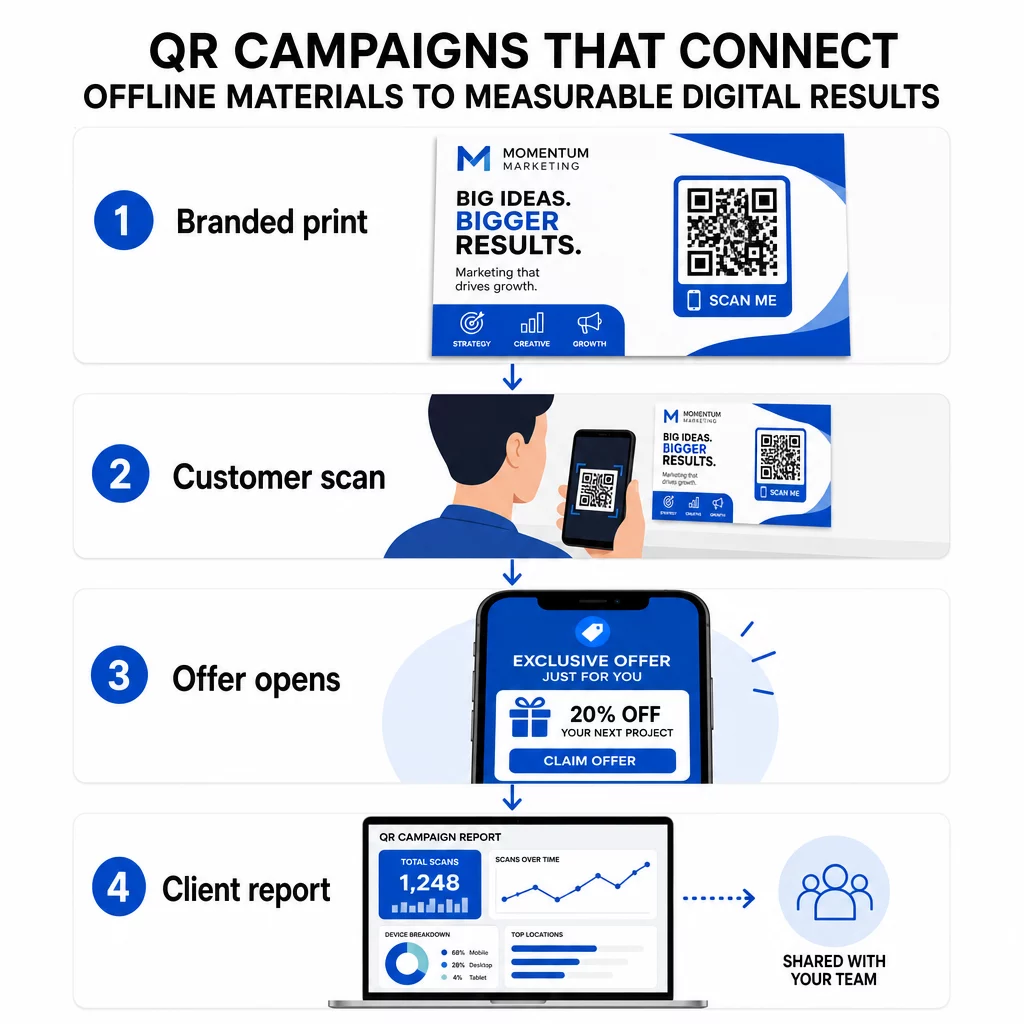
QR campaign workflow

Key reasons agencies should build QR codes into their standard toolkit:

  • Measurable offline performance – Track which physical placements drive the most engagement across scan volume, location, and time of day
  • Flexible campaign management – Update destination URLs without reprinting, so a single code can serve an entire campaign lifecycle
  • Client-ready reporting – Share live scan data directly with clients through shareable reports, without requiring them to log in
  • Brand consistency – Custom colors, logos, and design templates keep every code aligned with each client’s visual identity

Manage Every Client Campaign in One PlacePageloot Agency Platform gives marketing teams shareable client reports, white-label dashboards, built-in UTM parameters, and role-based access control – so you can scale QR code management across any number of accounts.

QR Code Types Agencies Use Most

Different campaign goals call for different QR code formats. Here are the types that tend to deliver the most value in agency work:

Link QR Codes – Drive Traffic to Any URL

A link QR code sends users directly to any webpage – a landing page, a product page, a registration form, or a social profile. These are the most versatile type for campaign use.

Common applications:

  • Printed flyers and direct mail linking to promotional offers
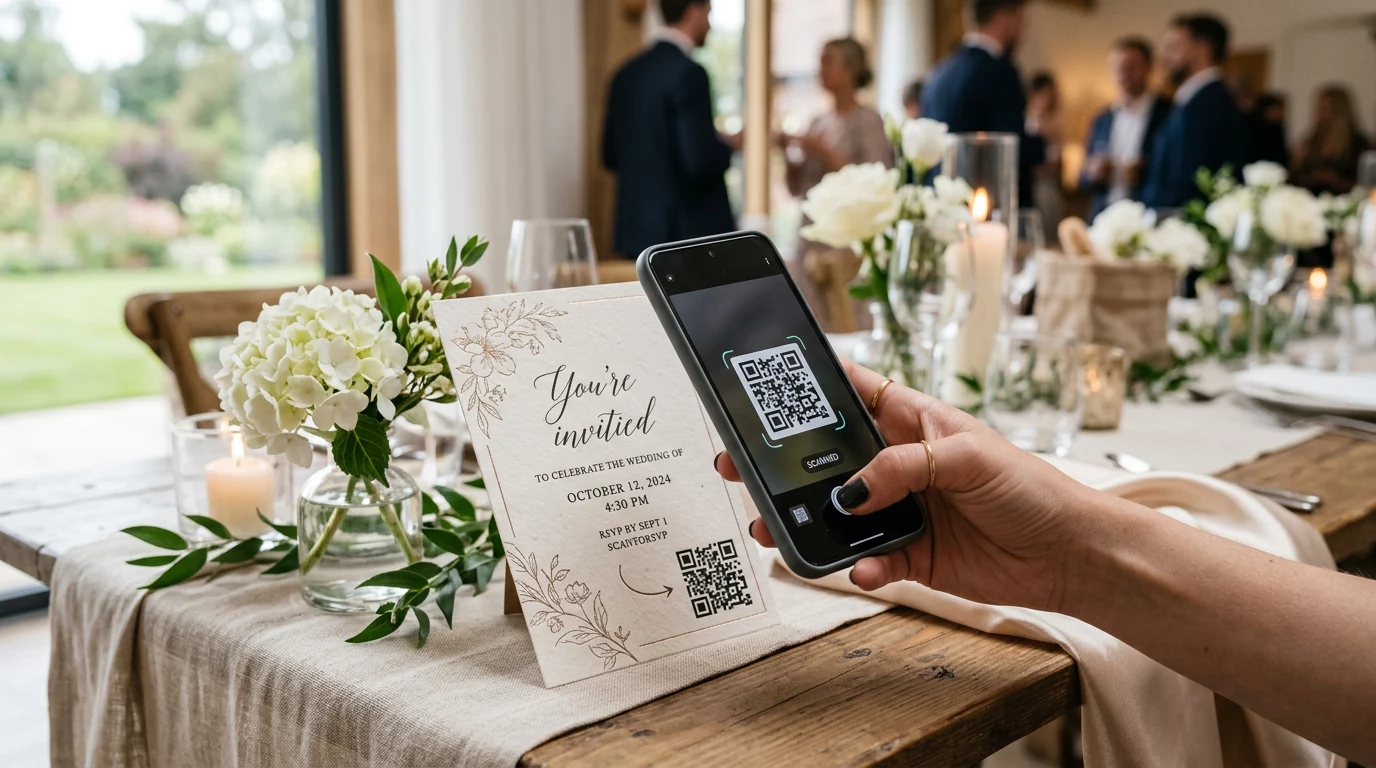
  • Event invitations that connect to RSVP pages
  • Out-of-home placements directing audiences to social channels or campaign microsites

PDF QR Codes – Share Documents Without Printing Them

When a client’s campaign involves content-heavy assets – case studies, product brochures, whitepapers – a PDF QR code lets you distribute them cleanly.

  • Attach detailed product information to in-store signage without printing every page
  • Track how often a document is accessed and for how long
  • Update the file behind the code whenever content changes, without issuing a new code

vCard QR Codes – Simplify Networking and Lead Capture

Sales teams and executives at trade shows and events benefit from digital business cards. A vCard QR code instantly shares contact details when scanned, and can be embedded in printed business cards, email signatures, and event badges.

Agencies can integrate these with CRM workflows so every scan from a lead becomes an automatic entry, reducing manual data entry and follow-up delays.

Image QR Codes – Visual Content Without a Link

Image QR codes deliver visual content directly – useful for portfolio showcases, product galleries, or infographics that don’t require a full landing page experience.

Email QR Codes – Reduce Newsletter Subscription Friction

Placing an email QR code on physical materials – packaging, posters, event handouts – triggers a pre-written email or newsletter signup prompt when scanned. This removes the barrier of manually entering an email address and works especially well at live events.

App QR Codes – Increase Download Rates

For clients promoting a mobile app, a smart app QR code detects the user’s device and routes them to the correct app store – App Store for iOS, Google Play for Android. This single code replaces two separate links and reduces confusion for end users.

Setting Up QR Code Campaigns for Clients

How you structure and manage QR codes matters as much as which type you use. Agencies handling multiple clients need a system that keeps campaigns organized, auditable, and easy to report on.

Use Dynamic QR Codes for Every Active Campaign

动态 QR 码 encode a short redirect URL rather than the final destination. This means you can change where the code points at any time – even after materials have been printed and distributed.

For agencies, this eliminates one of the most expensive problems in print marketing: the need to reprint everything when a URL changes, a campaign ends, or a client pivots messaging mid-flight.

Dynamic codes also unlock analytics. Every scan is logged with timestamp, location, device type, and operating system – data that would be invisible with a static code. You can learn more about what’s trackable on the QR code tracking guide.

Organize Codes by Client and Campaign

Use folders to keep each client’s QR codes separate and clearly labeled. Pageloot’s folder system lets you group codes by project, compare performance across campaigns, and immediately identify top-performing placements. Team members can be granted access to specific folders, and role-based permissions prevent unauthorized edits or deletions.

Apply UTM Parameters Consistently

UTM parameters are the connective tissue between QR scan data and your broader analytics stack. By tagging every destination URL with standardized UTM values, you can attribute traffic from any QR code placement directly to the correct campaign, channel, and creative in Google Analytics or your client’s CRM.

Follow these formatting conventions to keep data clean across accounts:

  • Use all lowercase (e.g., `utm_source=pageloot` not `Pageloot`)
  • Avoid spaces – use dashes or underscores for multi-word values
  • Maintain consistent definitions: `source` = platform or partner, `medium` = channel type (e.g., `print`, `email`), `campaign` = the specific initiative
  • Never apply UTMs to internal links, as this overwrites the original acquisition source and corrupts attribution

Pageloot’s agency platform includes built-in UTM capabilities so parameters can be appended automatically during code creation rather than manually per link.

Customize Codes for Each Client’s Brand

Generic black-and-white QR codes blend into the background of any design. A 带有徽标的二维码 and brand colors stands out, signals trustworthiness, and increases scan rates.

When designing branded codes, keep these technical requirements in mind:

  • Maintain a quiet zone of at least four modules on all sides – no logos, text, or patterns in this margin
  • Use high contrast: a dark pattern on a light background is the most reliable combination for scanning
  • Keep logos small enough that they don’t obstruct the pattern itself
  • Export in vector formats (SVG, EPS, or PDF) for print to avoid pixelation

Build Branded QR Codes for Every Client 使用 带标志的二维码生成器 to create fully customized codes that match any brand’s colors, fonts, and visual identity – then download in print-ready formats.

Tracking and Reporting Campaign Performance

The analytics layer is where QR codes earn their place in a professional agency workflow. Rather than estimating whether a print campaign drove results, you get concrete data.

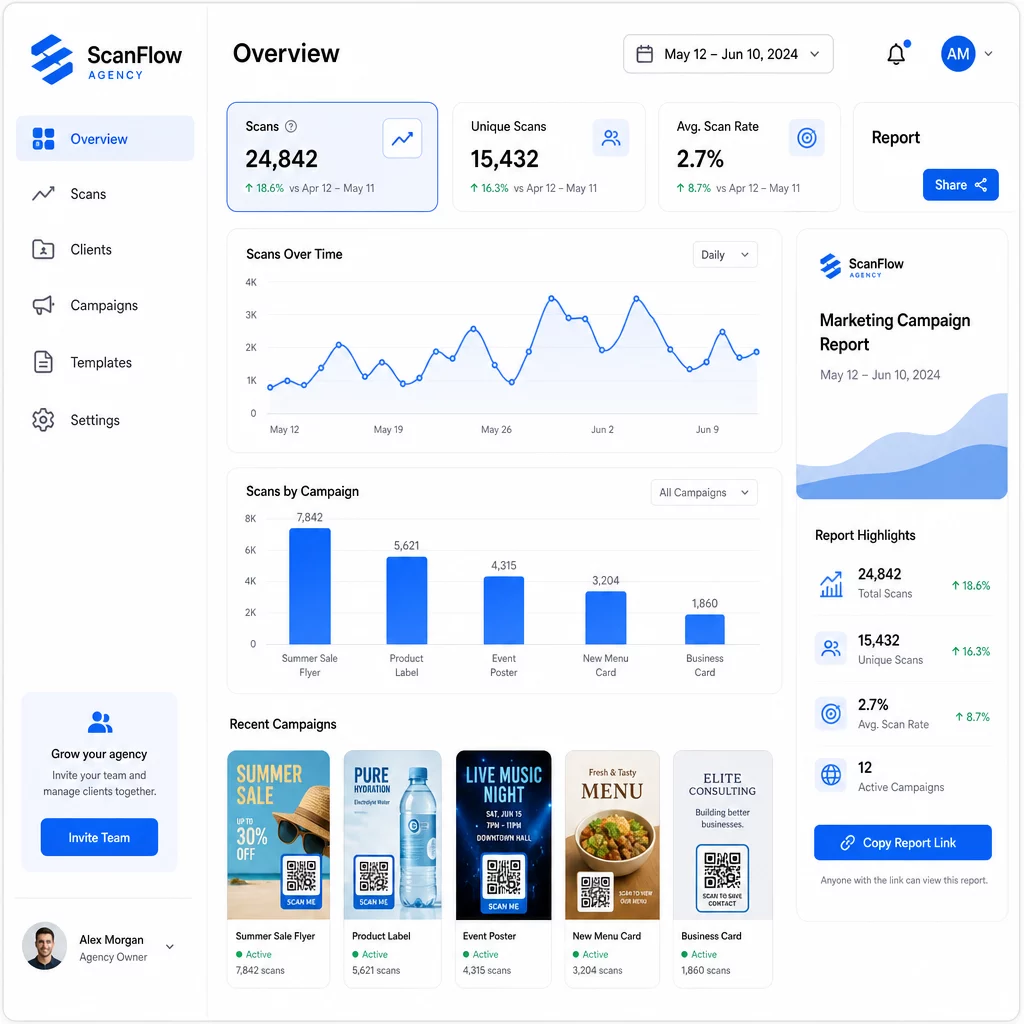
Agency analytics dashboard

What You Can Track

二维码分析仪表板 captures:

  • Total scans and unique scans – Distinguish between overall engagement and individual users
  • Scan timestamps – Identify peak engagement times and day-of-week patterns
  • Geographic location – See which markets, regions, or even specific venues drive the most activity
  • Device and OS breakdown – Understand whether your audience is primarily iOS or Android, desktop or mobile

This data lets you identify high-traffic placements, shift budget toward what works, and make concrete recommendations to clients about where to concentrate future campaigns.

Share Results Without Requiring a Login

One of the most time-consuming parts of agency client management is preparing performance reports. Pageloot’s shareable client reports give clients a live stats page – branded with their own logo – where they can check scan data in real time without needing their own account. This saves hours of report preparation each month while keeping clients informed and confident in campaign performance.

A/B Test Placements and Destinations

Dynamic QR codes make A/B testing significantly easier. Because the destination URL can be swapped without issuing a new code, you can run the same physical placement against different landing pages, CTAs, or offers and compare scan-to-conversion rates directly.

Test one variable at a time – destination page, offer language, or code placement on the material – and use scan analytics to determine which version drives better outcomes before scaling.

Place Codes Where They’ll Actually Be Scanned

Analytics only help if people are scanning. The 二维码放置指南 covers this in depth, but the core rules are:

  • Position codes at eye level (roughly 3.5 to 5.5 feet from the floor) in physical environments
  • Include a clear call to action near every code – state what the user will get when they scan
  • Keep codes large enough for the expected viewing distance (a common guideline: minimum width in centimeters equals scanning distance in centimeters divided by 10)
  • Test every code across multiple devices and lighting conditions before materials go to print

Privacy and Compliance Considerations

QR codes collect data – device type, OS, browser, geographic location, and behavior after the scan. For agencies working across multiple clients and markets, understanding the regulatory context is important.

If any client’s audience includes EU residents, the campaign needs to account for GDPR requirements: explicit consent, clear privacy notices, and data minimization. California-based campaigns touch CCPA, which requires transparency and opt-out mechanisms. Healthcare clients bring HIPAA requirements that extend to any platform handling patient-related data.

QR code privacy regulations guide covers the major frameworks in detail. Dynamic QR codes are particularly useful for compliance because you can update privacy policies, terms, or data collection disclosures without issuing a new code or reprinting materials.

常见问题

What is the difference between static and dynamic QR codes for agency campaigns?

Static QR codes encode a fixed destination and cannot be changed after creation – they also provide no analytics. Dynamic QR codes point to a redirect URL that can be updated at any time, and they log scan data including timestamp, location, and device type. For active client campaigns, dynamic QR codes are the standard choice because they offer flexibility and measurable performance.

How can agencies track QR code performance across multiple client accounts?

Use a QR code management platform that supports folder-based organization, real-time analytics, and shareable client reports. By assigning each client their own folder and applying consistent UTM parameters to destination URLs, you can pull clean, attributable data for every account without mixing campaign metrics.

Do QR codes need to follow privacy regulations?

Yes. Every QR code scan can collect data such as device information, location, and browsing behavior. Depending on the audience geography, campaigns may need to comply with GDPR (EU), CCPA (California), or HIPAA (healthcare). Using dynamic QR codes helps because destination pages and privacy notices can be updated without reprinting materials. Consult the relevant regulations for each client’s market before launch.

关于作者

Siim Kostabi 是 Pageloot 的内容主管,负责撰写关于我们创新型二维码生成器服务的文章。凭借五年多来在二维码领域积累的深厚专业知识,Siim 是该领域的专家。他致力于利用二维码技术简化和增强数字交互,并取得了显著的成果。.

类别
了解更多关于
QR码生成器如何帮助拯救旅游业
QR码救援 旅游产业
客户扫描二维码
的QR码 小本生意

如果您需要在线创建QR码,则可以 制作二维码 就在这里免费!
Pageloot是 #1转到解决方案 创建和扫描QR码。

QF-52

博客生成器

受到超过 20,000 个品牌的信赖,可获得更多销售、评论和关注者。

客户徽标
受到顶级品牌的信赖
评分为 4.8(共 5)

4.86 / 5 星评级

雨果·劳伦特
雨果·劳伦特
餐馆老板
有史以来最容易和最可靠的QR码生成器。PDF文件可以立即上传。我们的餐厅菜单现在是数字化的。
卢卡斯-詹森
卢卡斯-詹森
房地产开发商
这是一个很好的工具,二维码带你到你想要的地方。我们只使用位置二维码,但有许多有用的功能。
艾玛-莫雷蒂
艾玛-莫雷蒂
零售产品
易于使用和快速。它工作得很好,创造了一个完美的图像,所以员工可以下载我的vCard。
雨果·劳伦特
雨果·劳伦特
餐馆老板
有史以来最容易和最可靠的QR码生成器。PDF文件可以立即上传。我们的餐厅菜单现在是数字化的。
卢卡斯-詹森
卢卡斯-詹森
房地产开发商
这是一个很好的工具,二维码带你到你想要的地方。我们只使用位置二维码,但有许多有用的功能。
艾玛-莫雷蒂
艾玛-莫雷蒂
零售产品
易于使用和快速。它工作得很好,创造了一个完美的图像,所以员工可以下载我的vCard。
查看更多QR码
访客扫描入口二维码
的QR码 Airbnb预订
Android QR code scanning
使用扫描二维码 安卓
将一切转化为数字体验 不到3分钟。

免费试用 14 天。

无需信用卡。

首次购买可享受 30% 折扣

使用代码:

分享您的 MP3 文件

注册以创建 PDF QR 码

上传和显示你需要的一切。

  • 音频文件
  • 播客
  • 音乐

注册即可享 14 天免费试用。.
试用期结束后,二维码将失效。.

注册以创建音频 mp3 二维码

使用边框获得更多扫描

注册以向您的二维码添加更多框架

呼叫行动框架帮助您的客户与QR码轻松互动。试试吧!

注册即可享 14 天免费试用。.
试用期结束后,二维码将失效。.

注册以向您的二维码添加更多框架

使用形状添加更多样式

注册以创建更多形状

二维码不一定是方形的。试着改变它以适应你的品牌形象。

注册即可享 14 天免费试用。.
试用期结束后,二维码将失效。.

注册以创建更多形状

为您的二维码添加徽标

注册以将您的徽标添加到二维码中

通过在二维码上添加你的标志和品牌,使你的二维码脱颖而出。

注册即可享 14 天免费试用。.
试用期结束后,二维码将失效。.

注册以将您的徽标添加到二维码中

智能应用商店重定向

注册以创建应用商店二维码

将您的应用程序链接添加到我们的智能应用程序商店QR码。用户会根据他们的设备被重新定向。

注册即可享 14 天免费试用。.
试用期结束后,二维码将失效。.

注册以创建应用商店二维码

将图片上传到二维码

注册以创建图像二维码

轻松分享你的图像。在几秒钟内动态地改变任何图像。

注册即可享 14 天免费试用。.
试用期结束后,二维码将失效。.

注册以创建图像二维码

分享您的 PDF 文件

注册以创建 PDF QR 码

上传和显示你需要的一切。

  • 菜单和价格表
  • 使用说明
  • 任何文件

注册即可享 14 天免费试用。.
试用期结束后,二维码将失效。.

注册以创建 PDF QR 码

稍后编辑,无需打印

注册即可编辑您的二维码,无需再次打印

动态QR码让你改变你的QR码的内容,而不需要打印新的QR码。

注册即可享 14 天免费试用。.
试用期结束后,二维码将失效。.

注册即可编辑您的二维码,无需再次打印

何时?何地?追踪您的二维码扫描

注册以追踪您的二维码

发现你的哪些二维码收到了最多的扫描,以及什么最能让你的客户兴奋。

注册即可享 14 天免费试用。.
试用期结束后,二维码将失效。.

注册以追踪您的二维码

提供可打印文件

注册以创建 PDF 和 SVG 等矢量二维码

.EPS, .PDF, .SVG

想下载高清分辨率的QR码吗?获得矢量或像素格式,可随时打印。

注册即可享 14 天免费试用。.
试用期结束后,二维码将失效。.

注册以创建 PDF 和 SVG 等矢量二维码

请等待。您的二维码是 正在加载... 正在加载...

打造专属

注册以保存您的二维码以供日后使用

通过创建具有不同颜色、标识和行动呼吁框架的出色的QR码,获得更多的扫描。

注册即可享 14 天免费试用。.
试用期结束后,二维码将失效。.

注册以保存您的二维码以供日后使用