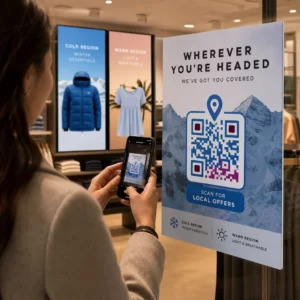
Zarządzanie kampaniami z kodami QR dla wielu klientów jest trudniejsze, niż się wydaje – zwłaszcza gdy potrzebujesz spójnego śledzenia, przejrzystych raportów i elastyczności w aktualizowaniu materiałów bez ponownego drukowania. Ten przewodnik opisuje, jak agencje marketingowe mogą tworzyć, zarządzać i mierzyć kampanie z kodami QR, które przynoszą wymierne rezultaty dla każdego konta klienta.
Dlaczego kody QR są ważne dla agencji marketingowych
Kody QR dawno przestały być nowinką. W 2025 roku 89 milionów Amerykanów zeskanowało kod QR, a liczba ta ma przekroczyć 100 milionów w 2026 roku. Dla agencji ten wskaźnik adopcji oznacza, że kody QR są obecnie realnym – i oczekiwanym – kanałem w niemal każdej branży klienta.
To, co czyni je szczególnie cennymi na poziomie agencji, to ich podwójna rola: łączą materiały drukowane i fizyczne z cyfrowymi doświadczeniami, które można śledzić. Plakat, wizytówka czy etykieta produktu staje się mierzalnym punktem styku w momencie, gdy zawiera dynamiczny kod QR.
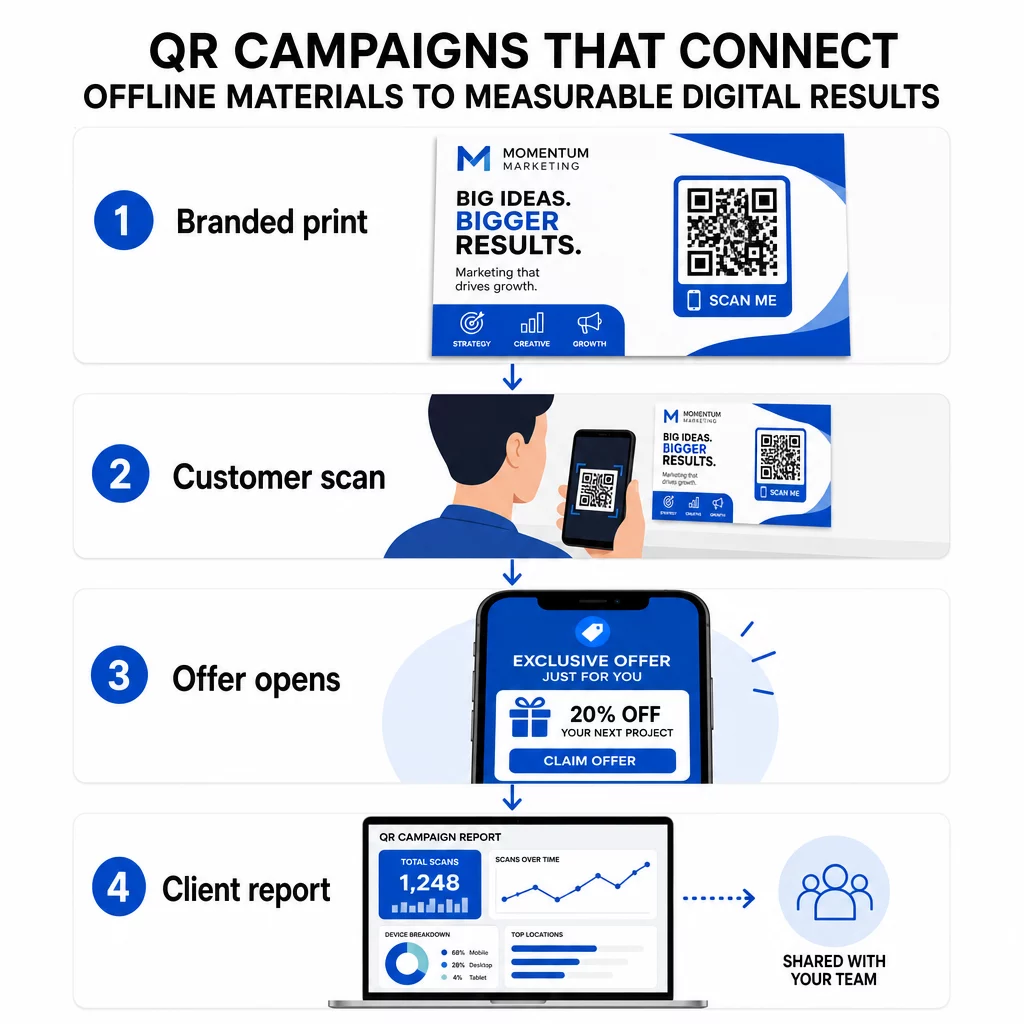
Kluczowe powody, dla których agencje powinny włączyć kody QR do swojego standardowego zestawu narzędzi:
- Mierzalna wydajność offline – Śledź, które fizyczne umiejscowienia generują największe zaangażowanie pod względem liczby skanów, lokalizacji i pory dnia
- Elastyczne zarządzanie kampaniami – Aktualizuj docelowe adresy URL bez ponownego drukowania, dzięki czemu jeden kod może służyć przez cały cykl życia kampanii
- Raportowanie gotowe dla klienta – Udostępniaj dane ze skanów na żywo bezpośrednio klientom za pośrednictwem raportów, bez konieczności logowania się
- Spójność marki – Niestandardowe kolory, logotypy i szablony projektów zapewniają zgodność każdego kodu z identyfikacją wizualną każdego klienta
Zarządzaj każdą kampanią klienta w jednym miejscu Plik Platforma Agencji Pageloot zapewnia zespołom marketingowym udostępniane raporty dla klientów, panele white-label, wbudowane parametry UTM i kontrolę dostępu opartą na rolach – dzięki czemu możesz skalować zarządzanie kodami QR na dowolną liczbę kont.
Typy kodów QR najczęściej używane przez agencje
Różne cele kampanii wymagają różnych formatów kodów QR. Oto typy, które zazwyczaj przynoszą największą wartość w pracy agencji:
Kody QR z linkiem – Kieruj ruch do dowolnego adresu URL
Kod QR z linkiem wysyła użytkowników bezpośrednio do dowolnej strony internetowej – strony docelowej, strony produktu, formularza rejestracyjnego lub profilu społecznościowego. Są to najbardziej wszechstronne typy do wykorzystania w kampaniach.
Typowe zastosowania:
- Drukowane ulotki i mailingi bezpośrednie prowadzące do ofert promocyjnych
- Zaproszenia na wydarzenia, które łączą się ze stronami RSVP
- Reklamy zewnętrzne kierujące odbiorców do kanałów społecznościowych lub mikrowitryn kampanii
Kody QR PDF – Udostępniaj dokumenty bez ich drukowania
Gdy kampania klienta obejmuje zasoby bogate w treść – studia przypadków, broszury produktów, białe księgi – kod QR PDF pozwala na ich czyste rozpowszechnianie.
- Dołącz szczegółowe informacje o produkcie do oznakowania w sklepie bez drukowania każdej strony
- Śledź, jak często dokument jest otwierany i jak długo
- Aktualizuj plik stojący za kodem za każdym razem, gdy zmienia się treść, bez wydawania nowego kodu
Kody QR vCard – Uprość networking i pozyskiwanie leadów
Zespoły sprzedażowe i kadra kierownicza na targach i wydarzeniach korzystają z cyfrowych wizytówek. Kod QR vCard natychmiast udostępnia dane kontaktowe po zeskanowaniu i może być osadzony w drukowanych wizytówkach, podpisach e-mail i identyfikatorach wydarzeń.
Agencje mogą integrować je z przepływami pracy CRM, dzięki czemu każde skanowanie od leada staje się automatycznym wpisem, redukując ręczne wprowadzanie danych i opóźnienia w dalszych działaniach.
Kody QR obrazów – Treści wizualne bez linku
Kody QR obrazów dostarczają treści wizualne bezpośrednio – przydatne do prezentacji portfolio, galerii produktów lub infografik, które nie wymagają pełnego doświadczenia strony docelowej.
Kody QR e-mail – Zmniejsz tarcie przy subskrypcji newslettera
Umieszczenie kodu QR e-mail na materiałach fizycznych – opakowaniach, plakatach, materiałach rozdawanych na wydarzeniach – uruchamia wstępnie napisaną wiadomość e-mail lub monit o zapisanie się do newslettera po zeskanowaniu. Usuwa to barierę ręcznego wpisywania adresu e-mail i działa szczególnie dobrze na wydarzeniach na żywo.
Kody QR aplikacji – Zwiększ wskaźniki pobierania
Dla klientów promujących aplikację mobilną, inteligentny kod QR aplikacji wykrywa urządzenie użytkownika i kieruje ich do właściwego sklepu z aplikacjami – App Store dla iOS, Google Play dla Androida. Ten pojedynczy kod zastępuje dwa oddzielne linki i zmniejsza zamieszanie dla użytkowników końcowych.
Konfigurowanie kampanii z kodami QR dla klientów
Sposób strukturyzowania i zarządzania kodami QR jest równie ważny, jak rodzaj, którego używasz. Agencje obsługujące wielu klientów potrzebują systemu, który utrzymuje kampanie zorganizowane, możliwe do audytu i łatwe do raportowania.
Używaj dynamicznych kodów QR dla każdej aktywnej kampanii
Dynamiczne kody QR kodują krótki adres URL przekierowania zamiast ostatecznego miejsca docelowego. Oznacza to, że możesz zmienić, dokąd prowadzi kod w dowolnym momencie – nawet po wydrukowaniu i rozprowadzeniu materiałów.
Dla agencji eliminuje to jeden z najdroższych problemów w marketingu drukowanym: konieczność ponownego drukowania wszystkiego, gdy zmienia się adres URL, kończy się kampania lub klient zmienia komunikację w trakcie jej trwania.
Dynamiczne kody odblokowują również analitykę. Każde skanowanie jest rejestrowane z datą i godziną, lokalizacją, typem urządzenia i systemem operacyjnym – danymi, które byłyby niewidoczne w przypadku kodu statycznego. Możesz dowiedzieć się więcej o tym, co można śledzić na przewodniku śledzenia kodów QR.
Organizuj kody według klienta i kampanii
Używaj folderów, aby kody QR każdego klienta były oddzielne i wyraźnie oznaczone. System folderów Pageloot pozwala grupować kody według projektu, porównywać wydajność w różnych kampaniach i natychmiast identyfikować najlepiej działające miejsca. Członkowie zespołu mogą otrzymać dostęp do określonych folderów, a uprawnienia oparte na rolach zapobiegają nieautoryzowanym edycjom lub usunięciom.
Stosuj parametry UTM konsekwentnie
Parametry UTM są tkanką łączną między danymi ze skanów QR a szerszym stosem analitycznym. Oznaczając każdy docelowy adres URL ustandaryzowanymi wartościami UTM, możesz przypisać ruch z dowolnego miejsca kodu QR bezpośrednio do właściwej kampanii, kanału i kreacji w Google Analytics lub CRM Twojego klienta.
Przestrzegaj tych konwencji formatowania, aby dane były uporządkowane we wszystkich kontach:
- Używaj małych liter (np. `utm_source=pageloot`, a nie `Pageloot`)
- Unikaj spacji – używaj myślników lub podkreśleń dla wartości wielowyrazowych
- Zachowaj spójne definicje: `source` = platforma lub partner, `medium` = typ kanału (np. `print`, `email`), `campaign` = konkretna inicjatywa
- Nigdy nie stosuj UTM-ów do linków wewnętrznych, ponieważ nadpisuje to oryginalne źródło pozyskania i zakłóca atrybucję
Platforma agencyjna Pageloot zawiera wbudowane funkcje UTM, dzięki czemu parametry mogą być dodawane automatycznie podczas tworzenia kodu, a nie ręcznie dla każdego linku.
Dostosuj kody do marki każdego klienta
Ogólne czarno-białe kody QR wtapiają się w tło każdego projektu. A Kod QR z logo i kolory marki wyróżniają się, sygnalizują wiarygodność i zwiększają wskaźniki skanowania.
Projektując markowe kody, pamiętaj o tych wymaganiach technicznych:
- Zachowaj strefę ciszy o szerokości co najmniej czterech modułów ze wszystkich stron – bez logo, tekstu ani wzorów w tym marginesie
- Używaj wysokiego kontrastu: ciemny wzór na jasnym tle to najbardziej niezawodne połączenie do skanowania
- Zachowaj logo na tyle małe, aby nie zasłaniały samego wzoru
- Eksportuj w formatach wektorowych (SVG, EPS lub PDF) do druku, aby uniknąć pikselizacji
Twórz markowe kody QR dla każdego klienta Użyj Generator kodów QR z logo tworzyć w pełni spersonalizowane kody, które pasują do kolorów, czcionek i identyfikacji wizualnej dowolnej marki – a następnie pobrać w formatach gotowych do druku.
Śledzenie i raportowanie wyników kampanii
Warstwa analityczna to miejsce, gdzie kody QR zyskują swoje miejsce w profesjonalnym przepływie pracy agencji. Zamiast szacować, czy kampania drukowana przyniosła rezultaty, otrzymujesz konkretne dane.
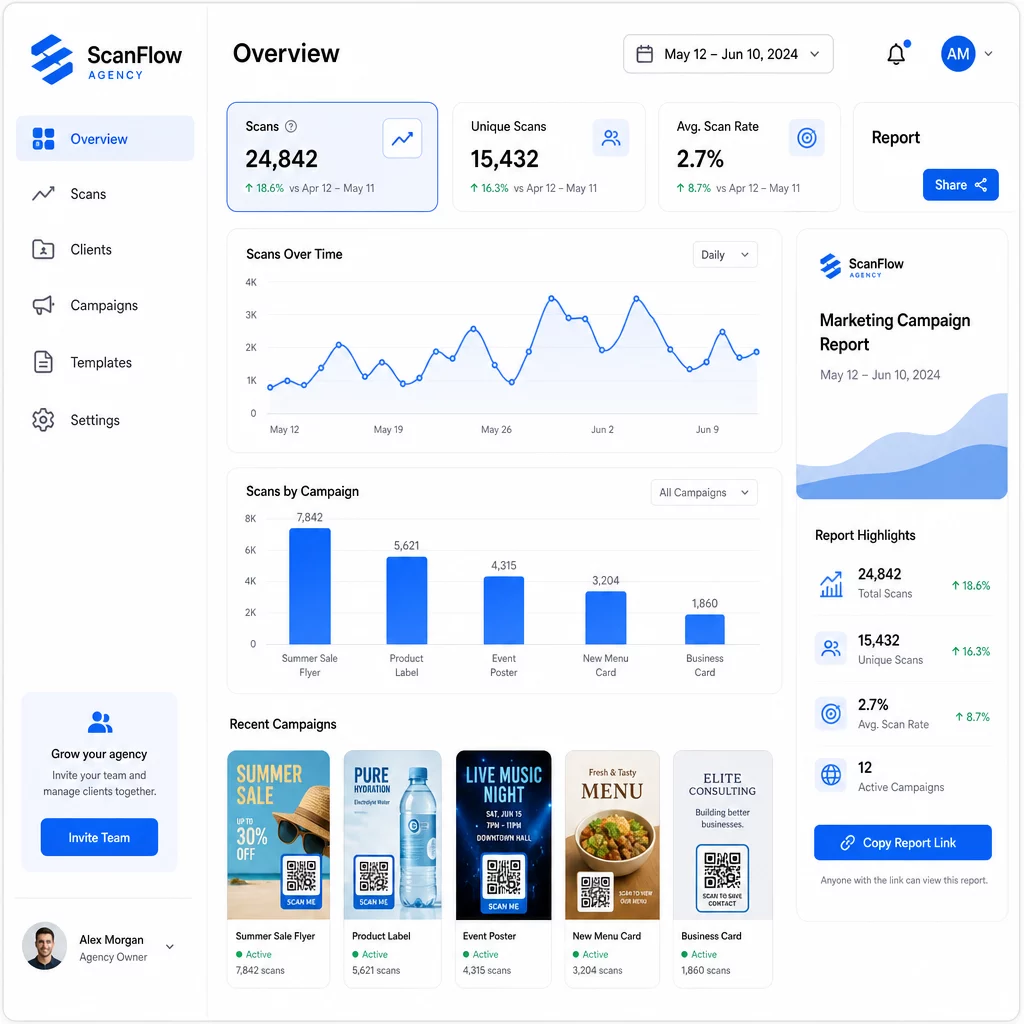
Co możesz śledzić
Plik panel analityczny kodów QR przechwytuje:
- Całkowita liczba skanów i unikalne skany – Rozróżniaj między ogólnym zaangażowaniem a indywidualnymi użytkownikami
- Znaczniki czasu skanowania – Identyfikuj szczytowe czasy zaangażowania i wzorce dni tygodnia
- Lokalizacja geograficzna – Zobacz, które rynki, regiony, a nawet konkretne miejsca generują największą aktywność
- Podział według urządzeń i systemów operacyjnych – Zrozum, czy Twoja publiczność to głównie iOS czy Android, komputery stacjonarne czy urządzenia mobilne
Te dane pozwalają Ci identyfikować miejsca o dużym ruchu, przesuwać budżet na to, co działa, i przedstawiać klientom konkretne rekomendacje dotyczące tego, gdzie skoncentrować przyszłe kampanie.
Udostępniaj wyniki bez konieczności logowania
Jedną z najbardziej czasochłonnych części zarządzania klientami agencji jest przygotowywanie raportów wydajności. Udostępniane raporty dla klientów Pageloot dają klientom stronę ze statystykami na żywo – z ich własnym logo – gdzie mogą sprawdzać dane skanowania w czasie rzeczywistym bez potrzeby posiadania własnego konta. To oszczędza godziny przygotowywania raportów każdego miesiąca, jednocześnie utrzymując klientów poinformowanych i pewnych wyników kampanii.
Testuj A/B miejsca umieszczenia i miejsca docelowe
Dynamiczne kody QR sprawiają, że Testy A/B znacznie łatwiejsze. Ponieważ docelowy adres URL można zmienić bez wydawania nowego kodu, można użyć tej samej fizycznej lokalizacji dla różnych stron docelowych, wezwań do działania (CTA) lub ofert i bezpośrednio porównać współczynniki skanowania do konwersji.
Testuj jedną zmienną naraz – stronę docelową, język oferty lub umiejscowienie kodu na materiale – i użyj analityki skanowania, aby określić, która wersja przynosi lepsze rezultaty, zanim zaczniesz skalować.
Umieszczaj kody tam, gdzie faktycznie zostaną zeskanowane
Analityka pomaga tylko wtedy, gdy ludzie skanują. Przewodnik po rozmieszczaniu kodów QR omawia to szczegółowo, ale podstawowe zasady to:
- Umieszczaj kody na wysokości wzroku (około 107 do 168 cm od podłogi) w środowiskach fizycznych
- Dołącz wyraźne wezwanie do działania obok każdego kodu – określ, co użytkownik otrzyma po zeskanowaniu
- Utrzymuj kody wystarczająco duże dla oczekiwanej odległości oglądania (powszechna wskazówka: minimalna szerokość w centymetrach równa się odległości skanowania w centymetrach podzielonej przez 10)
- Testuj każdy kod na wielu urządzeniach i w różnych warunkach oświetleniowych, zanim materiały trafią do druku
Kwestie prywatności i zgodności
Kody QR zbierają dane – typ urządzenia, system operacyjny, przeglądarka, lokalizacja geograficzna i zachowanie po zeskanowaniu. Dla agencji pracujących z wieloma klientami i na różnych rynkach, zrozumienie kontekstu regulacyjnego jest ważne.
Jeśli odbiorcy któregokolwiek klienta obejmują mieszkańców UE, kampania musi uwzględniać wymagania RODO: wyraźną zgodę, jasne powiadomienia o prywatności i minimalizację danych. Kampanie z siedzibą w Kalifornii podlegają CCPA, co wymaga przejrzystości i mechanizmów rezygnacji. Klienci z branży opieki zdrowotnej podlegają wymaganiom HIPAA, które obejmują każdą platformę obsługującą dane związane z pacjentami.
Plik przewodnik po przepisach dotyczących prywatności kodów QR omawia szczegółowo główne ramy. Dynamiczne kody QR są szczególnie przydatne dla zgodności, ponieważ można aktualizować polityki prywatności, warunki lub ujawnienia dotyczące zbierania danych bez wydawania nowego kodu lub ponownego drukowania materiałów.
Najczęściej zadawane pytania
Statyczne kody QR kodują stałe miejsce docelowe i nie mogą być zmienione po utworzeniu – nie dostarczają również żadnych analiz. Dynamiczne kody QR wskazują na adres URL przekierowania, który można aktualizować w dowolnym momencie, i rejestrują dane skanowania, w tym znacznik czasu, lokalizację i typ urządzenia. W przypadku aktywnych kampanii klientów, dynamiczne kody QR są standardowym wyborem, ponieważ oferują elastyczność i mierzalną wydajność.
Użyj platformy do zarządzania kodami QR, która obsługuje organizację opartą na folderach, analizy w czasie rzeczywistym i raporty dla klientów, które można udostępniać. Przypisując każdemu klientowi własny folder i stosując spójne parametry UTM do docelowych adresów URL, możesz uzyskać czyste, przypisywalne dane dla każdego konta bez mieszania metryk kampanii.
Tak. Każde skanowanie kodu QR może zbierać dane, takie jak informacje o urządzeniu, lokalizacja i zachowanie podczas przeglądania. W zależności od geografii odbiorców, kampanie mogą wymagać zgodności z RODO (UE), CCPA (Kalifornia) lub HIPAA (opieka zdrowotna). Użycie dynamicznych kodów QR pomaga, ponieważ strony docelowe i powiadomienia o prywatności mogą być aktualizowane bez ponownego drukowania materiałów. Przed uruchomieniem należy skonsultować odpowiednie przepisy dla rynku każdego klienta.