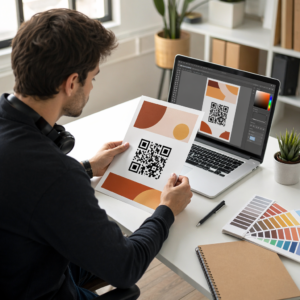
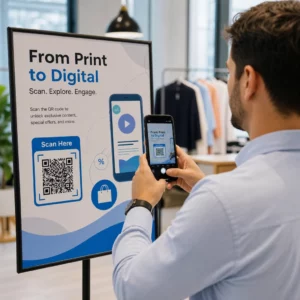
QR kod u oglasu u novinama ili časopisu šalje čitaoce sa štampane stranice na veb-sajt, video, kupon ili PDF. Da biste ga dodali: kreirajte kod, odštampajte ga veličine najmanje 2 x 2 cm (0,8 x 0,8 inča) sa praznom marginom oko njega, stavite kratak poziv na akciju pored njega i testirajte ga na stvarnom papiru pre štampanja. Ovaj vodič pokriva svaki korak za QR kodove za štampane oglase u časopisima i novinama.
Brzi odgovori za QR kodove u novinama i časopisima
- Величина: najmanje 2 x 2 cm (0,8 x 0,8 inča). Koristite 3 do 4 cm (1,2 do 1,6 inča) za većinu oglasa u časopisima i malo više za novinski papir.
- Tiha zona: zadržite praznu marginu od najmanje četiri modula (malih kvadrata) sa svake strane.
- Boje: taman kod na svetloj, jednobojnoj pozadini. Crno na belom je najsigurniji izbor.
- Постављање: srednji ili donji deo oglasa, dalje od prevoja ili poveza.
- Tip koda: dinamički kod ako se oglas prikazuje nedeljama ili želite statistiku skeniranja. Statički kod je dovoljan za jednokratnu vezu koja se nikada neće promeniti.
- Pre štampanja: skenirajte probni otisak na stvarnom papiru sa barem jednim iPhone-om i jednim Android telefonom.
Zašto štampani mediji i dalje funkcionišu sa QR kodom
Čitaoci novina i časopisa usporavaju i čitaju. Štampani oglas takođe ima prostora da objasni šta kod radi i zašto bi ga čitalac trebalo da skenira. Red poput „Skenirajte da biste pogledali video recepta“ govori čitaocu šta se dalje dešava, što sam kod ne čini.
Hrana, izdavaštvo, obrazovanje, maloprodaja i lokalne usluge – svi koriste štampu. QR kod povezuje tu publiku sa vašim veb-sajtom, video-snimkom, ponudom ili aplikacijom bez traženja od ikoga da ukuca URL.
Povežite svoje štampane oglase sa digitalnim kampanjama Користити Generator QR kodova za linkove da kreirate QR kod za bilo koji URL, spreman za ubacivanje u vaš sledeći oglas u novinama ili časopisu.
Na šta povezati QR kod časopisa ili QR kod novina
Odlučite šta kod radi pre nego što dizajnirate oglas. Odredište određuje poziv na akciju, veličinu i poziciju na stranici.
- Veb-sajt ili odredišna stranica: stranica kampanje, stranica proizvoda ili obrazac za prijavu, napravljen sa Generator QR kodova za linkove
- PDF dokument: katalog, meni, press kit ili dodatak, napravljen sa PDF QR kod generator
- Video: video proizvoda, recepta ili intervjua, napravljen sa YouTube QR kod generator
- Kupon samo za štampu: ponuda koju mogu da iskoriste samo čitaoci ovog izdanja, napravljena sa Generator QR koda za kupone
- Audio: MP3 snimak intervjua novinara ili segmenta podkasta
- Društveni profil ili kontakt podaci: kod pored imena autora kako bi čitaoci mogli da prate ili kontaktiraju saradnika
Pravi primeri: magazin o hrani može da poveže stranicu sa receptom sa celim videom. Oglas u novinama može da se poveže sa oglasom za nekretnine sa fotografijama. Lokalna prodavnica može da odštampa kod kupona u nedeljnim novinama i prebroji koliko ga ljudi iskoristi. Što je brži i relevantniji rezultat skeniranja, više skeniranja ćete dobiti.
Kako dodati QR kod u oglas u novinama ili časopisu
- Отвори Генератор QR kodova i odaberite tip: link, PDF, video ili kupon.
- Unesite odredište. Koristite kratak, konačan URL. Duži URL-ovi stvaraju gušći kod koji zahteva više prostora u štampi.
- Izaberite tamnu boju koda i svetlu pozadinu. Dodajte logotip samo ako je kod i dalje lako skenirati. Nemojte dodavati logotip malom kodu na novinskoj hartiji.
- Preuzmite vektorsku datoteku (SVG ili PDF) za štampača. PNG bi trebalo da bude širok najmanje 1000 piksela ako vektorska datoteka nije moguća.
- Postavite kod u raspored oglasa na 2 x 2 cm ili veće, sa praznom tihom zonom oko njega.
- Dodajte poziv na akciju pored koda koji govori šta čitalac dobija.
- Zatražite probni otisak od publikacije ili štampača, zatim ga skenirajte sa nekoliko telefona pre konačnog tiraža.
Kako dizajnirati QR kod koji se skenira
Vizuelno brendirajte kod
Običan crni kod se uklapa u stranicu. Boje brenda i mali logo u centru pokazuju čitaocima kome kod pripada. Koristite Генератор QR kodova da podesite boje, dodate logo i izaberete oblik koji odgovara rasporedu vašeg oglasa.
Održavajte jak kontrast. Moduli koda moraju biti mnogo tamniji od pozadine. Crno na belom je najpouzdanije. Nemojte obrćati boje (svetli kod na tamnoj pozadini) i nemojte postavljati kod preko fotografije ili šare.
Odaberite dinamički umesto statičkog
А. динамички КР код skladišti kratak link za preusmeravanje umesto konačne adrese. Možete promeniti na šta kod upućuje nakon što se odštampa na hiljade kopija, a odštampani kod ostaje isti. Dinamički kodovi takođe prikazuju statistiku skeniranja: kada, gde i na kom uređaju su ljudi skenirali. Saznajte više o kako urediti QR kodove nakon štampanja.
Statički kod je dovoljan kada se link nikada neće promeniti i ne trebaju vam statistike, na primer, trajni link ka vašoj početnoj stranici. Za oglas koji traje nedeljama, ili oglas čija ponuda može isteći, dinamički kod se isplati. Statički kod nikada ne ističe. Dinamički kod na mesečnom ili godišnjem planu prestaje da radi kada se plan završi, zato održavajte plan aktivnim dok je izdanje u opticaju.
Dinamički kodovi imaju 14-dnevni besplatni probni period. Pogledajte planove na pageloot.com\/pricing.
Ažurirajte svoje oglase bez ponovnog štampanja Тхе Dinamički QR kod generator omogućava vam da promenite svoju odredišnu URL adresu u bilo kom trenutku i da vidite skeniranja po datumu, lokaciji i tipu uređaja.
Napišite jasan poziv na akciju
Stavite jedan kratak redak blizu koda koji govori šta čitalac dobija. „Skenirajte da pogledate video recepta“ ili „Skenirajte za popust za čitaoce“ funkcioniše. „Skenirajte ovde“ ne govori ništa. Ako čitalac ne zna šta je iza koda, većina će ga preskočiti.
Optimizujte odredište za mobilne uređaje
Svaki čitalac koji skenira kod u štampi, sletiće na telefon. Stranica mora brzo da se učita, da se prilagodi malom ekranu i da prikaže ponudu na vrhu. Pre nego što štampate, testirajte ceo put od skeniranja do odredišne stranice na iOS i Android uređajima.
Smernice za postavljanje i dimenzionisanje QR kodova na časopisima i novinama
Veličina, položaj i papir odlučuju da li se kod skenira. Ovo su glavna pravila.

Minimalna veličina
Odštampajte kod barem 2 x 2 cm (oko 0.8 x 0.8 inča). Radna veličina za većinu oglasa u časopisima je 1.2 do 1.6 inča (30 do 40 mm). Gusti kodovi, sa dugim URL-ovima, zahtevaju više prostora. Pogledajte smernice za veličinu QR koda za različite štampane materijale za savete specifične za format.
Novinski papir naspram sjajnog papira za časopise
Novinski papir je porozan i upija mastilo, pa sitni detalji izgledaju mekše, a kod se može odštampati tamnije i mutnije nego na ekranu. Koristite veći kod (3 cm ili više), jednostavan kvadratni dizajn, bez logotipa u sredini i čisto crnu boju na beloj pozadini. Sjajni magazin papir štampa oštrije, ali odsjaj može otežati skeniranje. Zatražite mat područje oko koda ako izdavač to može učiniti. Ove veličine su sigurna početna tačka. Vaša proba odlučuje o konačnoj veličini.
Tiha zona
Ostavite praznu marginu od najmanje četiri modula sa svih strana. Ova margina omogućava kameri da pronađe kod. Ne dozvolite da tekst, fotografije ili ivice uđu u nju.
Postavljanje na stranici
Postavite kod u srednji ili donji deo oglasa, gde čitalac može držati stranicu i usmeriti telefon. Uglovi se lako propuštaju. Držite kod dalje od poveza ili prevoja magazina, jer ga savijanje izobličava. Ne postavljajte kod na ivicu stranice koja se seče. Pogledajte najbolje prakse za postavljanje QR kodova u marketingu.
Kvalitet štampe
Pošaljite štampaču vektorski fajl (SVG, PDF ili EPS) kako bi kod ostao oštar u bilo kojoj veličini. Kod niske rezolucije je najčešći razlog neuspeha odštampanog koda. Pogledajte kako tehnike štampanja utiču na skeniranje QR koda.
Uvek testirajte pre štampanja
Skenirajte probu u njenoj konačnoj veličini, na stvarnom papiru, sa nekoliko telefona, na dnevnom svetlu i sobnom svetlu. Kod koji se skenira na vašem monitoru može zakazati na papiru. Pogledajte najbolje prakse za čitljivost QR kodova za kontrolnu listu.
Ne skenira? Proverite ove uzroke
- Premalo: ispod 2 cm, ili manji nego što proba dozvoljava. Uvećajte ga.
- Nema mirne zone: tekst ili slike dodiruju kod. Dodajte praznu marginu.
- Nizak kontrast ili obrnute boje: koristite taman kod na svetloj pozadini.
- Kod na prevoju: odmaknite ga od poveza.
- Razlivanje mastila na novinskom papiru: uvećajte kod i uklonite logo.
- Gust kod: skratite URL, ili koristite dinamički kod, koji ima kratak link i manje gust obrazac.
- Mrtav link: dinamički kod na isteklom planu, ili odredišna stranica koja je uklonjena.
Kako pratiti i meriti vašu štampanu QR kampanju
Štampane reklame je teško izmeriti. Kada čitalac vidi reklamu i kasnije unese vašu adresu, ne znate da li je reklama uzrokovala posetu. Skenirani kod vam to govori.

Са dinamički QR kodovi možete videti:
- Ukupno skeniranja i jedinstvena skeniranja: koliko puta je kod korišćen
- Datum i vreme skeniranja: koje izdanje ili dan je dalo najviše skeniranja
- Lokacija: koji regioni su odgovorili
- Tip uređaja: iOS ili Android, što vam pomaže da proverite mobilnu stranicu
Napravite jedan kod za svaku publikaciju, izdanje ili poziciju oglasa. Zatim možete uporediti naslove i pozicije. Nivo detalja zavisi od vašeg plana. Saznajte više o kako QR kodovi prate angažovanje štampanih oglasa и kako QR kodovi povezuju štampani i digitalni marketing.
Pogledajte Ko Skenira i Kada Pratite skeniranja po datumu, lokaciji i uređaju uz Pageloot’s Dinamički QR kod generator.
Sastavljanje svega
QR kod u novinama ili časopisu funkcioniše kada čitalac dobije nešto što vredi skeniranja: video, ponudu ili informaciju koja ne staje na stranicu. Neka kod bude dovoljno velik, zadržite praznu marginu, objasnite ga u jednom redu i testirajte ga na pravom papiru.
Koristite dinamički kod ako želite da promenite odredište ili vidite rezultate. Koristite statički kod za trajnu vezu.
Za više o štampi, pogledajte како користити КР кодове у штампаним медијима.
Često postavljana pitanja
Štampajte kod veličine najmanje 2 x 2 cm (približno 0.8 x 0.8 inča). Za većinu reklama u časopisima, 3 do 4 cm (1.2 do 1.6 inča) je sigurnije. Na novinskom papiru, idite na veću veličinu, jer se mastilo razliva po papiru. Uvek testirajte probni otisak.
Koristite dinamički kod ako se oglas prikazuje dugo, ponuda se može promeniti ili želite statistiku skeniranja kao što su datum, lokacija i uređaj. Odredište možete urediti nakon štampanja. Koristite statički kod za stalnu vezu koju nikada ne morate menjati. Statički kodovi ne ističu.
Postavite ga u srednji ili donji deo oglasa. Izbegavajte uglove, prevoj i hrbat časopisa. Ostavite praznu marginu od najmanje četiri modula oko njega i dodajte kratak poziv na akciju.
Da. Novinski oglasi, mali oglasi i članci mogu svi sadržati QR kod. Koristite veću veličinu, tamno mastilo na svetloj pozadini i bez logotipa, jer novinski papir upija mastilo i omekšava sitne detalje.
Koristite dinamički QR kod. Prikazuje kada, gde i na kom uređaju su ljudi skenirali. Svakom časopisu, izdanju ili oglasu dajte sopstveni kod kako biste ih mogli uporediti. Dinamički kodovi Pageloot imaju 14-dnevni besplatni probni period.
Stranica prilagođena mobilnim uređajima koja ispunjava obećanje poziva na akciju, kao što su video, kupon ili stranica proizvoda. Nemojte povezivati na opštu početnu stranicu.
Uobičajeni uzroci su kod koji je premali, bez prazne margine oko njega, nizak kontrast, postavljanje na pregib ili slika niske rezolucije. Testirajte probni otisak na pravom papiru sa nekoliko telefona.
Statički kod ne ističe. Dinamički kod na mesečnom ili godišnjem planu postaje neaktivan nakon isteka plana, zato održavajte plan aktivnim dok je izdanje u opticaju.