Potrebujete zdieľať odkaz alebo dokument s vaším publikom uprostred prezentácie? Tápanie s dlhými URL adresami na snímke narúša váš tok a frustruje divákov. Táto príručka vás prevedie dvoma praktickými metódami pridania skenovateľného QR kódu na akúkoľvek snímku PowerPointu v priebehu niekoľkých minút.
Prečo QR kódy fungujú dobre v prezentáciách
QR kód na snímke poskytuje vášmu publiku okamžitý prístup k podpornému obsahu – bez nutnosti písania. Namiesto čítania URL adresy alebo dúfania, že si ju účastníci zapíšu, umiestnite kód na snímku a necháte ich naskenovať ho telefónom.
Bežné prípady použitia zahŕňajú:
- Odkazovanie na vstupnú stránku alebo registračný formulár po prezentácii
- Zdieľanie PDF – ako je správa, whitepaper alebo podklad – bez tlače kópií
- Smerovanie divákov na video, portfólio alebo stránku produktu
- Zbieranie spätnej väzby prostredníctvom formulára alebo prieskumu počas alebo po relácii
Samotný QR kód je len obrazový súbor. Akonáhle ho vygenerujete, vloženie do PowerPointu trvá približne 30 sekúnd.
Metóda 1: Vygenerujte QR kód externým nástrojom a potom ho vložte
Táto metóda vám poskytuje najväčšiu kontrolu nad prispôsobením, dynamickými aktualizáciami a sledovaním skenov – a funguje s akoukoľvek verziou PowerPointu.
Krok 1: Vytvorte si svoj QR kód
Choďte na Generátor QR kódov Pageloot a vyberte typ obsahu, ktorý chcete zakódovať:
- URL alebo odkaz – použite Generátor QR kódov pre odkazy na zakódovanie akejkoľvek webovej adresy
- dokument PDF – použite PDF QR kód generátor na priame nahranie a zdieľanie súboru
- Obrázok alebo vizuálny obsah – použite QR kód tvorba: generátor QR kódu pre obrázok na prepojenie s fotogalériou alebo vizuálnym aktívom
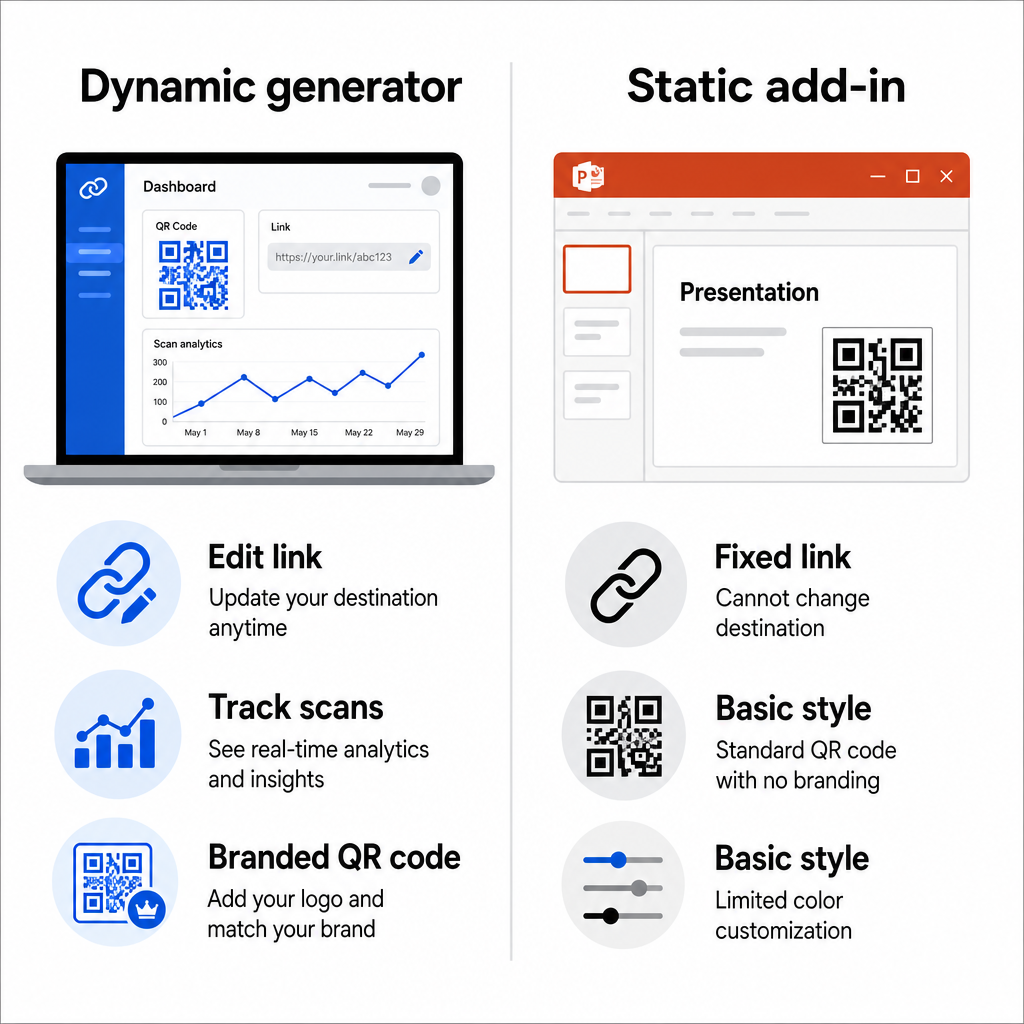
Ak sa cieľová URL adresa môže zmeniť po dokončení prezentácie, vyberte dynamický QR kód. Dynamické kódy vám umožňujú aktualizovať prepojený obsah kedykoľvek bez opätovného generovania alebo nahradenia obrázka vo vašich snímkach – obzvlášť užitočné, ak prezentujete rovnakú sadu snímok na viacerých podujatiach.
Krok 2: Prispôsobte dizajn
Prispôsobte QR kód vizuálnemu štýlu vašej prezentácie. Môžete upraviť:
- Farby popredia a pozadia
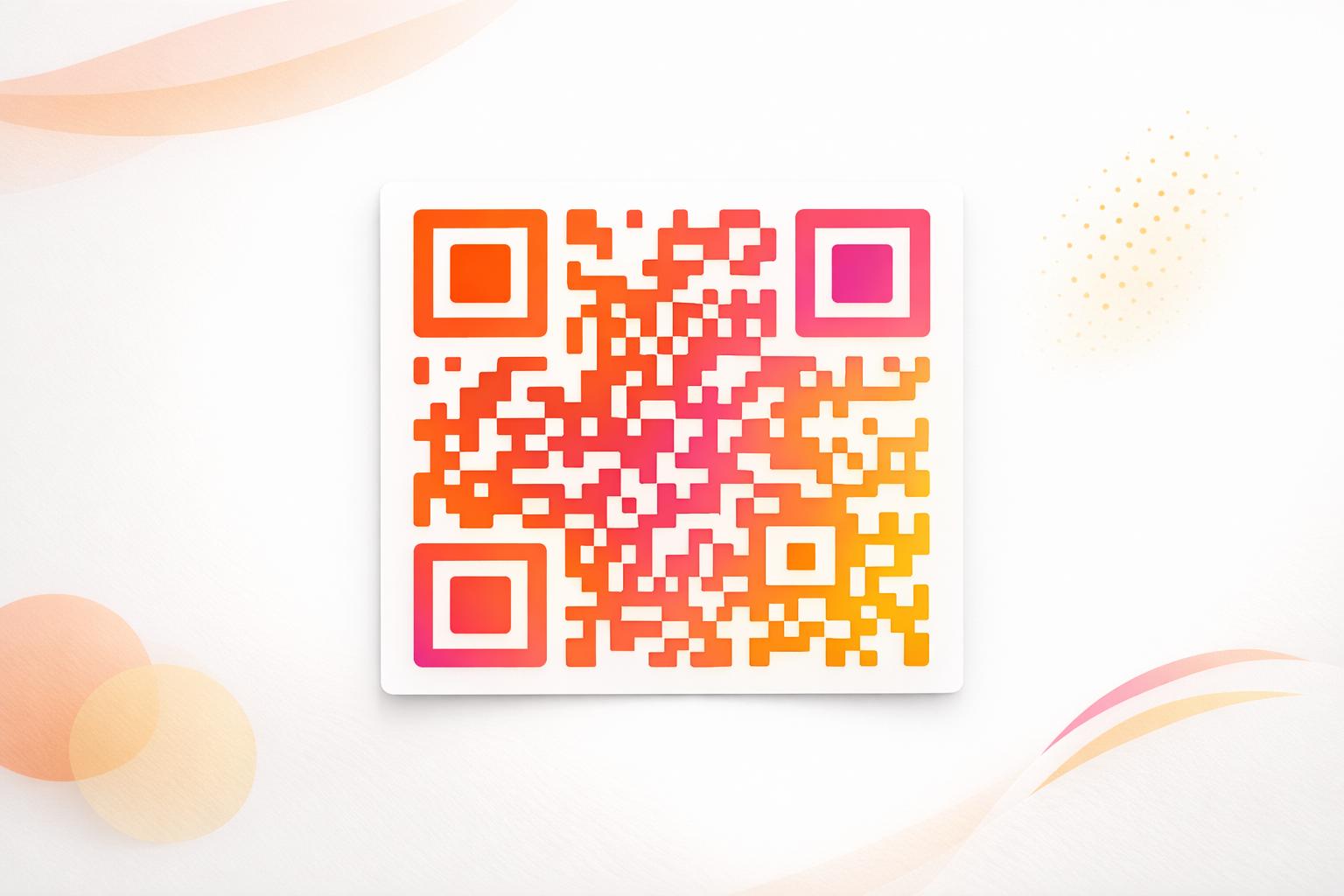
- Tvary bodiek a štýly rohov
- Logo umiestnené v strede kódu
- Rámik s výzvou na akciu (napr. “Naskenujte pre stiahnutie príručky”)
Ak pridáte logo, použite vysokú úroveň korekcie chýb (Q alebo H), aby kód zostal skenovateľný, aj keď je časť vzoru zakrytá. Dodržujte jedno pevné pravidlo: tmavý vzor na svetlom pozadí. Inverzné návrhy – svetlé kódy na tmavom pozadí – môžu zmiasť skenovacie aplikácie, najmä staršie. Zamerajte sa na kontrastný pomer minimálne 4:1 medzi farbami popredia a pozadia.
Krok 3: Stiahnite si obrázok QR kódu
Stiahnite si kód ako PNG pre všeobecné použitie, alebo ako súbor SVG alebo EPS, ak chcete vektorový formát, ktorý sa čisto škáluje v akejkoľvek veľkosti. Pre väčšinu snímok PowerPointu je dostatočný PNG s vysokým rozlíšením.
Otestujte kód pred pokračovaním. Naskenujte ho telefónom, aby ste potvrdili, že vedie na správny cieľ.
Krok 4: Vložte obrázok do PowerPointu
- Otvorte svoju prezentáciu v PowerPointe a prejdite na snímku, kam chcete QR kód.
- Kliknite na Vložiť kartu na páse s nástrojmi.
- V skupine snímky skupina, kliknite Obrázky, potom vyberte Toto zariadenie (alebo Obrázok zo súboru v závislosti od vašej verzie).
- Prejdite na stiahnutý obrázok QR kódu, vyberte ho a kliknite na Vložiť.
- Zmeňte veľkosť a premiestnite obrázok na snímke podľa potreby.
Premeňte svoj prezentačný odkaz na sledovateľný QR kód Chcete vedieť, koľko ľudí naskenuje vašu snímku a kedy? Použite Generátor QR kódov Pageloot na vytvorenie dynamického kódu so vstavanou analýzou – nie je potrebné opätovné tlačenie, ak sa váš obsah zmení.
Metóda 2: Použite doplnok QR4Office v PowerPointe
Ak uprednostňujete generovanie QR kódu bez opustenia PowerPointu, QR4Office doplnok zvládne celý proces priamo v aplikácii. Funguje s PowerPointom 2013 alebo novším na Windows, PowerPointom na webe, PowerPointom na iPade a PowerPointom 2016 alebo novším na Macu.
Krok 1: Nainštalujte QR4Office
- Otvorte PowerPoint a kliknite na Vložiť kartu.
- Kliknite na Získať doplnky (alebo Doplnky v závislosti od vašej verzie) v skupine Doplnky.
- Do vyhľadávacieho panela zadajte QR a stlačte Enter.
- Vyhľadajte stránku QR4Office vo výsledkoch a kliknite na Pridať.
- Prijmite podmienky na dokončenie inštalácie.
Krok 2: Vygenerujte a vložte QR kód
- Po inštalácii otvorte QR4Office z karty Vložiť alebo z panela doplnkov.
- Zadajte URL adresu alebo text, ktorý chcete zakódovať.
- Upravte farbu, pozadie, veľkosť a úroveň korekcie chýb v rámci panela.
- Kliknite na Vložiť na umiestnenie QR kódu priamo na aktívnu snímku.
Doplnok vloží QR kód ako obrazový objekt, takže ho môžete presúvať a meniť jeho veľkosť ako akýkoľvek iný tvar na snímke.
Hlavný kompromis pri tejto metóde je, že QR4Office produkuje statický kód so základnými možnosťami prispôsobenia. Nezískate dynamické úpravy, sledovanie skenov alebo pokročilé funkcie značky. Pre jednorazovú snímku, kde je prioritou jednoduchosť, to funguje dobre. Pre prebiehajúce prezentácie alebo kampane, kde sa cieľ môže zmeniť alebo chcete merať angažovanosť, prístup externého generátora vám poskytuje výrazne väčšiu flexibilitu.
Dimenzovanie vášho QR kódu pre prezentáciu
Veľkosť záleží viac v kontexte prezentácie ako v tlači, pretože vaše publikum skenuje z diaľky, a nie zblízka.
Pageloot pokynov pre čitateľnosť QR kódu dodržujte pravidlo 10:1: QR kód by mal byť široký aspoň 1 cm na každých 10 cm očakávanej vzdialenosti skenovania. V typickej konferenčnej miestnosti, kde môžu byť účastníci vzdialení 4–7 stôp, je vykreslenie kódu v štedrej veľkosti na snímke praktickým východiskovým bodom.
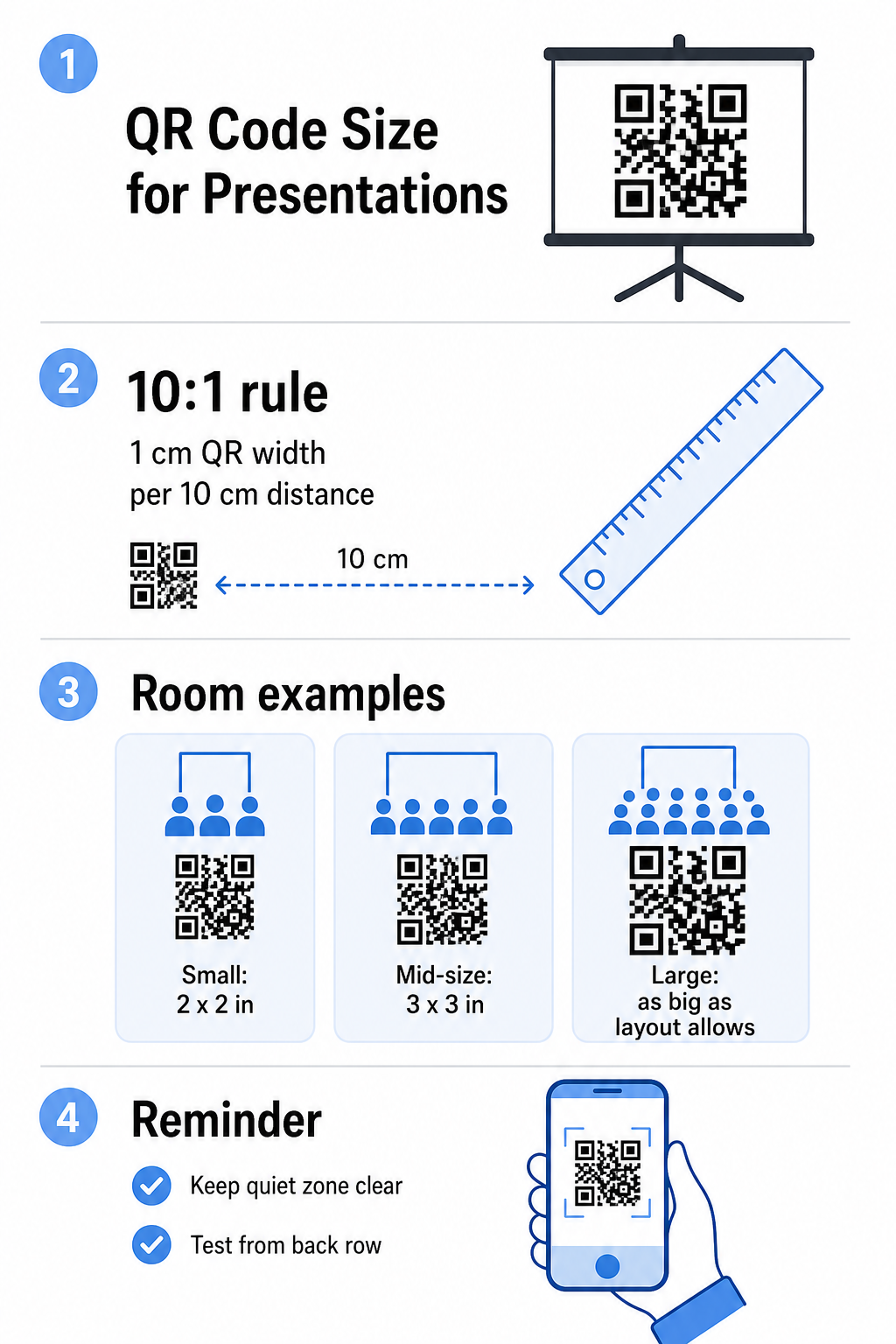
- Malá miestnosť alebo priestor na stretnutia: zamerajte sa na aspoň 2 × 2 palce na vykreslenej snímke
- Stredne veľká zasadacia miestnosť: 3 × 3 palce alebo väčšie
- Veľká konferenčná alebo eventová sála: urobte kód taký veľký, ako to rozloženie umožňuje, a zvážte umiestnenie URL ako textu pod ním ako záložnú možnosť
Vyhnite sa preplneniu QR kódu okolitým textom alebo grafikou. Tichá zóna – prázdny okraj okolo kódu – musí zostať čistá, aby skenery mohli správne nájsť a prečítať hraničný vzor.
Tipy pre dizajn a prezentáciu
Niekoľko praktických úvah predtým, ako pôjdete naživo:
- Otestujte v miestnosti, ak môžete. Jas projektora, odlesky obrazovky a okolité osvetlenie ovplyvňujú skenovateľnosť. Matné projekčné plochy majú tendenciu fungovať lepšie ako lesklé.
- Dajte QR kódu vlastnú snímku alebo čas na zotrvanie. Neumiestňujte ho na snímku, ktorou rýchlo prechádzate – vaše publikum potrebuje chvíľu na otvorenie aplikácie fotoaparátu a skenovanie.
- Pridajte krátky inštrukčný riadok. Niečo ako “Skenujte fotoaparátom telefónu” odstraňuje akékoľvek váhanie u členov publika, ktorí sú menej oboznámení s QR kódmi.
- Použite dynamický kód pre opakované prezentácie. Ak aktualizujete prepojený zdroj medzi reláciami, dynamický kód znamená, že zmeníte cieľ raz z vášho ovládacieho panela – nie je potrebné upravovať snímku alebo regenerovať obrázok.
Pre hlbší pohľad na dizajnové rozhodnutia, ktoré ovplyvňujú, či sa váš kód skutočne naskenuje, príručka kontrastu farieb QR kódu pokrýva kontrastné pomery, farebné kombinácie, ktorým sa treba vyhnúť, a ako testovať naprieč zariadeniami a svetelnými podmienkami.
Akonáhle ste oboznámení so základmi, preskúmajte celý rad funkcií QR kódu Pageloot aby ste prekonali jednoduché kódy odkazov – od zdieľania PDF a galérií obrázkov po analýzu skenov a plne značkové návrhy.
Často kladené otázky
Áno, ak použijete dynamický QR kód z nástroja ako Pageloot. Dynamické kódy ukladajú presmerovaciu URL adresu, ktorú môžete kedykoľvek zmeniť z vášho ovládacieho panela. Obrázok vo vašom PowerPointe zostáva rovnaký – mení sa iba cieľ. Statické kódy, vrátane tých, ktoré generuje väčšina doplnkov, nemožno aktualizovať po vytvorení.
PNG funguje dobre pre väčšinu prezentácií. Podporuje priehľadné pozadia a zachováva čisté okraje pri štandardných veľkostiach snímok. Ak plánujete výrazne zmeniť veľkosť kódu alebo ho použiť vo viacerých formátoch, stiahnite si namiesto toho vektorový súbor SVG alebo EPS – tie sa škálujú bez straty ostrosti.
Použite pravidlo veľkosti 10:1 – pre každých 10 cm skenovacej vzdialenosti by kód mal byť široký aspoň 1 cm na obrazovke. Pre miestnosť, kde je najvzdialenejší divák asi 15 stôp ďaleko, chcete, aby sa kód zobrazoval veľký a neprekážaný na premietanom displeji. Ak je to možné, otestujte skutočnú snímku na premietanom povrchu a vždy si kód naskenujte sami pred prezentáciou, aby ste potvrdili, že sa správne rozlíši.