Cherchez-vous des moyens pratiques de moderniser votre installation de golf ? Les processus papier, la signalisation obsolète et les opportunités d'engagement manquées coûtent du temps et des revenus aux parcours chaque saison. Ce guide vous présente les moyens les plus efficaces d'utiliser les codes QR dans votre installation – des cartes de score numériques et des repères de départ aux paiements et aux commentaires des joueurs.
Pourquoi les parcours de golf adoptent les codes QR
La participation au golf aux États-Unis a atteint un record de 48,1 millions de participants au total en 2025, en hausse de 50% au cours de la dernière décennie. Avec environ 16 000 parcours en concurrence pour cette demande, l'expérience du joueur est devenue un facteur de différenciation clé – et les codes QR offrent un moyen peu coûteux et à fort impact de l'améliorer.
Les codes QR fonctionnent en encodant une URL, un document ou une autre destination dans une image scannable. Lorsqu'un joueur pointe l'appareil photo de son smartphone vers le code, il ouvre instantanément le contenu que vous avez lié – aucun téléchargement d'application n'est requis pour la plupart des appareils modernes. Les installations de golf peuvent placer ces codes sur des supports imprimés, des panneaux, des voiturettes de golf et des repères de départ pour connecter le parcours physique aux ressources numériques.
Le véritable avantage opérationnel vient de les codes QR dynamiques – des codes qui vous permettent de mettre à jour le contenu lié à tout moment sans réimprimer le code physique. Si le lien de votre carte de score change, votre menu est mis à jour ou votre carte de parcours est révisée, vous modifiez simplement la destination dans votre tableau de bord. Pour une explication complète de son fonctionnement, consultez le différences entre les codes QR statiques et dynamiques.
Cartes de score numériques via code QR
L'une des applications les plus pratiques pour toute installation de golf est le remplacement des cartes de score papier par des versions numériques accessibles via code QR.
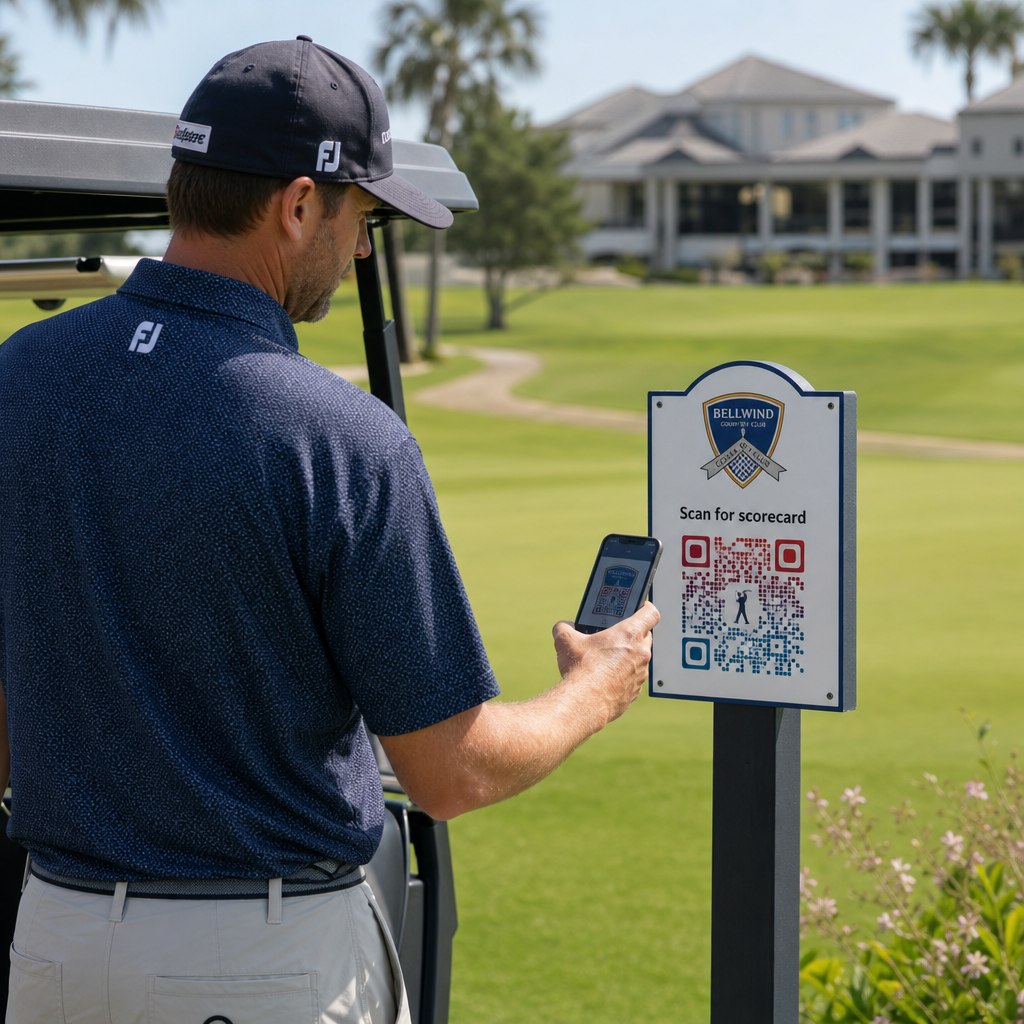
Une carte de score numérique est toute interface adaptée aux mobiles qui permet aux joueurs d'enregistrer leur score trou par trou sur leur smartphone. Les joueurs scannent un code QR au premier départ, au pro shop ou sur la voiturette, et la carte de score s'ouvre directement dans leur navigateur – pas de papier, pas de crayon, pas de redistribution après les parties.
Les Règles de golf de l'USGA confirment qu'une carte de score peut être sous toute forme papier ou électronique approuvée par le Comité, à condition qu'elle permette d'enregistrer les scores par trou, d'être certifiée par le joueur et le marqueur, et d'identifier correctement chaque trou. Les Comités peuvent même exiger des joueurs qu'ils utilisent une carte de score électronique plutôt qu'une carte papier. Cela donne à votre installation une flexibilité totale pour rendre le passage officiel pour les compétitions et les parties occasionnelles.
Du point de vue opérationnel, les cartes de score numériques réduisent la précipitation administrative après la partie, donnent au personnel une visibilité en temps réel sur la progression de la partie et alimentent les classements en direct pendant les tournois. Les joueurs bénéficient d'un suivi des scores intégré, de l'historique des parties et de statistiques de jeu que le papier n'a jamais offertes.
Pour configurer cela, liez l'URL de votre plateforme de carte de score numérique à un QR code de lien et placez ce code sur :
- Signalisation du premier départ
- Voiturettes de golf (autocollants montés sur voiturette ou cartes plastifiées)
- Cartes de score imprimées en complément
- Le comptoir d'enregistrement du pro shop
L'utilisation d'un code QR dynamique ici est particulièrement pratique – si vous changez de fournisseur de cartes de score ou mettez à jour l'URL, vous mettez à jour le lien dans votre tableau de bord et chaque code imprimé continue de fonctionner.
Passez aux cartes de score numériques sans réimpression Créez un code QR dynamique pour le lien de votre carte de score et mettez à jour la destination à tout moment sans toucher à vos supports imprimés. Essayez le Générateur de codes QR gratuitement pendant 14 jours.
Codes QR pour repères de départ et informations sur les trous
Les codes QR sur les repères de départ donnent aux joueurs un accès instantané aux tracés des trous, aux tableaux de distances, aux règles locales et aux conseils de jeu – un contenu qui nécessiterait autrement des encarts imprimés ou des affichages au club-house.
Une approche courante consiste à lier le code QR de chaque repère de départ à un PDF adapté aux mobiles ou à une page de destination spécifique à ce trou. Les joueurs scannent au départ, voient le diagramme du trou, comprennent la ligne optimale et jouent plus vite et avec plus de confiance. Ceci est particulièrement précieux pour les visiteurs novices naviguant sur un parcours inconnu.
Vous pouvez les créer en utilisant un Générateur de QR code PDF si vos guides de trou sont des documents PDF, ou un générateur de code QR de lien si vous hébergez le contenu sur une page web ou une page de destination. Les opérateurs soucieux de la durabilité ont également utilisé des codes QR sur les repères de départ pour les informations sur les règles locales “ Scanner et Apprendre ”, remplaçant les feuilles de règles imprimées et réduisant le temps administratif sur le parcours.
Menus du Pro Shop et du Club-house
Si votre club-house ou votre café de mi-parcours sert des plats et des boissons, un menu à code QR élimine le coût et les tracas de la réimpression des menus physiques chaque fois que les articles ou les prix changent. Les joueurs scannent le code au bar, à la fenêtre du garage des voiturettes ou à une table dans la salle à manger et consultent un menu numérique actuel. Lorsque votre cuisine modifie ses offres pour la saison, vous mettez à jour le contenu lié – et non le code QR lui-même.
Celui de Pageloot Générateur de QR code pour menu prend en charge les menus PDF et les menus web, et vous permet d'ajouter le logo de votre club et les couleurs de votre marque pour que le code soit cohérent avec l'identité visuelle de votre installation. Pour le placement, un code QR sur un chevalet de table dans la salle à manger est l'un des formats les plus efficaces – les joueurs le voient à hauteur des yeux et ont un moment naturel pour scanner en étant assis.
Paiements sans contact sur le parcours
Les codes QR peuvent simplifier le paiement à plusieurs points de contact : le pro shop, le chariot de boissons, le practice et l'inscription aux tournois. Les joueurs scannent un code QR de paiement lié à votre processeur de paiement et effectuent la transaction sur leur téléphone sans manipuler d'argent liquide ou de terminal de carte.
Vous pouvez créer un code QR lié au paiement en utilisant un Générateur de QR code PayPal ou un standard QR code de lien pointant vers votre page de paiement. Ceux-ci fonctionnent bien sur les chariots de boissons, les présentoirs de marchandises, et partout où un terminal physique est peu pratique.
Navigation sur le parcours et codes QR de localisation
Pour les grandes installations, les joueurs ont souvent besoin d'aide pour trouver des commodités spécifiques – le practice, le relais, un pro shop satellite ou l'entrée du club-house depuis le parking. Un Code QR de Google Maps ouvre l'emplacement de votre installation ou un point spécifique de la propriété directement dans l'application de cartes du joueur avec un seul scan.
Ceux-ci sont utiles sur :
- Panneaux directionnels aux entrées du parcours
- Kits de bienvenue pour les tournois
- Pages de contact du site web pour les joueurs naviguant depuis l'extérieur du site
Accès Wi-Fi pour les joueurs et le personnel
Offrez-vous le Wi-Fi dans le club-house, le vestiaire ou la salle à manger ? Un code QR Wi-Fi permet aux joueurs de se connecter instantanément sans que le personnel ait besoin de dicter un mot de passe. Les joueurs scannent le code et se connectent automatiquement – aucune saisie manuelle n'est requise. Vous pouvez en créer un en utilisant le Générateur de code QR en entrant le nom de votre réseau, le type de sécurité et le mot de passe, puis en affichant le code résultant dans le club-house ou la zone de préparation des chariots.
Commentaires des joueurs et avis Google
Après une partie, les joueurs sont souvent dans le bon état d'esprit pour laisser un avis ou remplir un formulaire de commentaires – mais la friction nuit à la concrétisation. Un code QR sur la carte de score, le reçu ou un panneau près de la sortie élimine entièrement cette friction.
- UNE QR code avis Google envoie les joueurs directement à votre page d'avis Google My Business, en faisant une action en un seul clic.
- UNE code QR de commentaires client peut renvoyer à une enquête où les joueurs évaluent le rythme de jeu, les conditions du parcours, le personnel et les commodités.
Placez ces codes là où les joueurs s'arrêtent naturellement après avoir terminé – la table du marqueur, le dépôt de sacs, le bar – et associez-les à une simple question comme “ Comment s'est passée votre partie aujourd'hui ? ”
Signalisation, Marketing et Promotions d'événements
Les codes QR fonctionnent sur pratiquement toutes les surfaces imprimées de votre installation. Les panneaux d'inscription aux tournois et les flyers peuvent renvoyer directement à une page d'inscription en ligne. Les bannières du club-house et du practice peuvent pointer vers une page de destination de demande d'adhésion. La signalisation des sponsors sur les départs peut renvoyer au site web d'un sponsor, rendant les forfaits de parrainage plus mesurables et précieux pour les partenaires. Les promotions saisonnières sont particulièrement faciles à gérer – mettez à jour la destination d'un code QR affiché lorsque les offres changent et aucune nouvelle impression n'est requise.
Pour la signalisation extérieure, suivez les directives de placement des codes QR et positionnez les codes entre 1,07 et 1,68 mètre du sol à hauteur des yeux, avec un fond propre et très contrasté. Les codes placés sur des surfaces réfléchissantes ou incurvées scannent mal, optez donc pour des substrats plats à finition mate chaque fois que possible.
Suivi des performances des codes QR
Un avantage que la signalisation papier n'a jamais offert est l'engagement mesurable. Les codes QR dynamiques enregistrent chaque scan avec des données incluant l'emplacement, le type d'appareil, l'heure de la journée, le nombre total de scans et les scans uniques. Cela vous indique quels départs génèrent le plus d'activité sur les cartes de score, quelles stations de menu génèrent le plus de commandes de nourriture, et quels supports marketing génèrent un trafic réel.
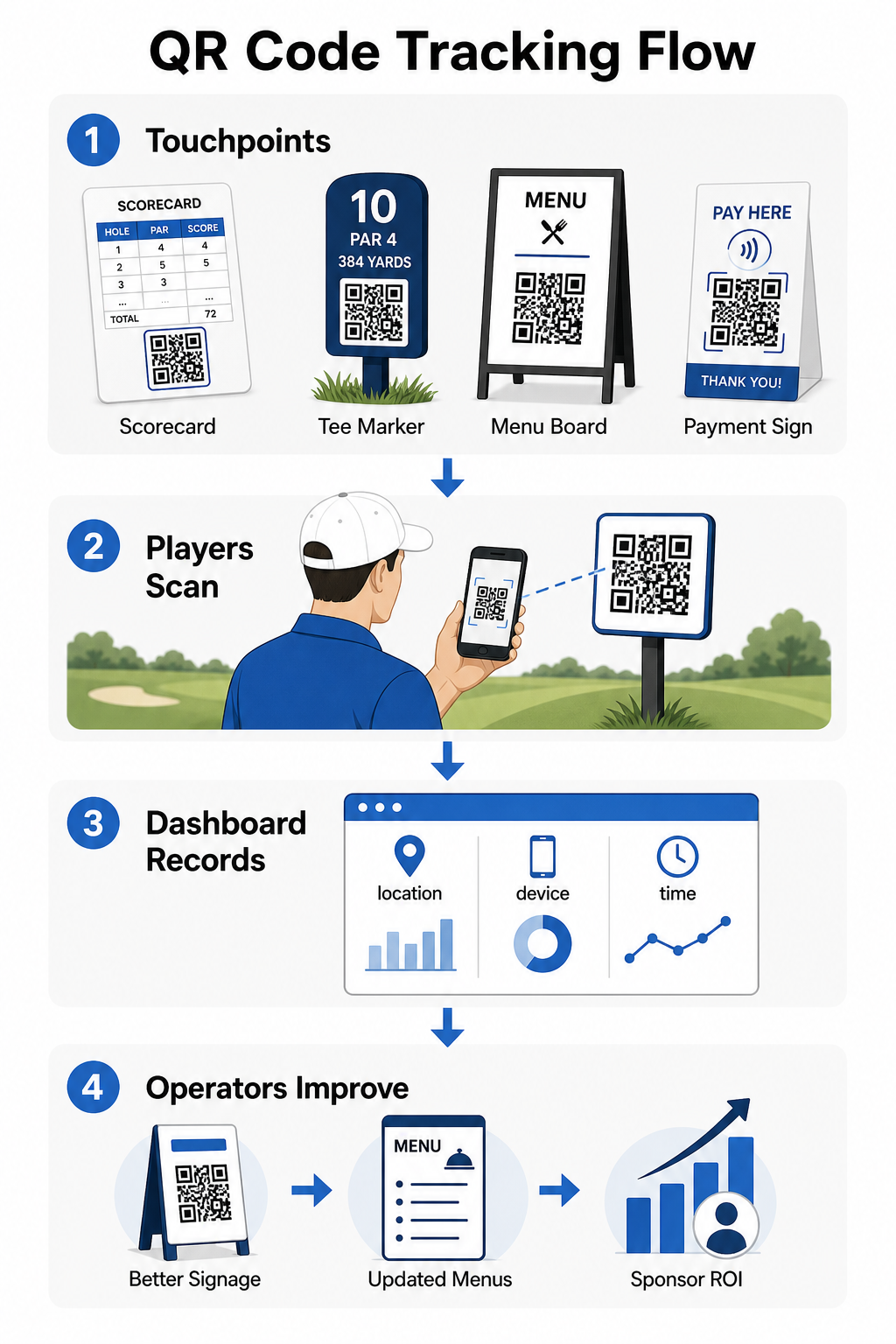
Vous pouvez utiliser ces données pour affiner le placement, améliorer la signalisation sous-performante, et démontrer le retour sur investissement des activations de sponsors. En savoir plus sur le fonctionnement du suivi des codes QR et les métriques à surveiller dans votre installation.
Voyez exactement où les joueurs s'engagent Suivez les scans par emplacement, appareil et heure dans toute votre installation à partir d'un seul tableau de bord. Commencez avec les solutions de codes QR de Pageloot et accédez à des analyses en temps réel sur chaque code que vous déployez.
Principes de base de la conception et du placement pour les environnements de golf
Avant d'imprimer des codes QR pour une utilisation en extérieur ou à fort trafic, quelques considérations techniques sont très importantes pour les performances réelles.
Contraste est le facteur le plus critique. Utilisez une couleur de module foncée sur un fond clair et visez un rapport de contraste d'au moins 4:1 entre le motif foncé et son arrière-plan. Cela garantit une lecture fiable dans des conditions d'éclairage extérieur variables, des matins nuageux au soleil éclatant de l'après-midi.
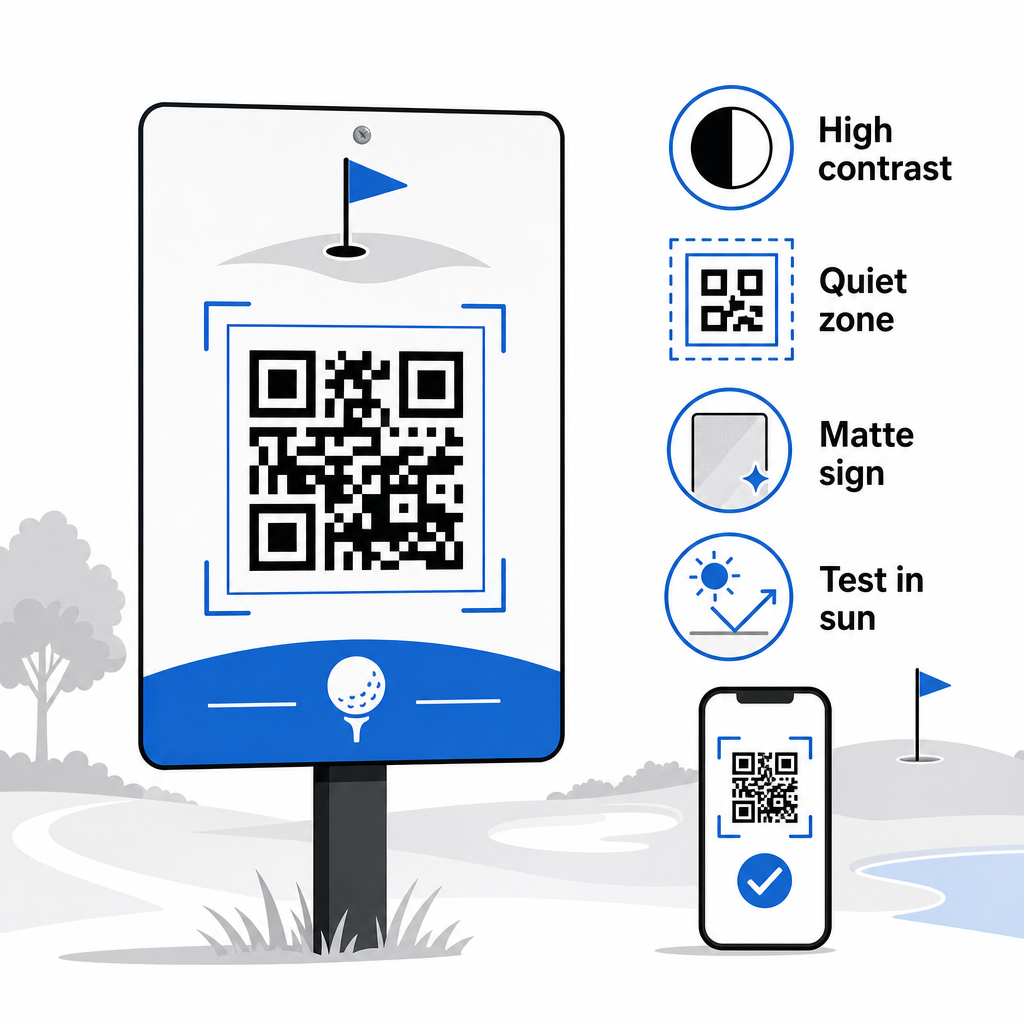
Taille doit correspondre à la distance de balayage attendue. Pour les marqueurs de départ ou les codes montés sur chariot scannés à bout de bras, 2 × 2 cm est la base minimale – mais plus grand est toujours mieux pour une utilisation en extérieur. Une règle pratique : pour chaque 10 cm de distance de balayage attendue, augmentez la largeur du code de 1 cm.
Zone de silence fait référence à la marge claire d'espace blanc entourant le code QR. Entourer le code de texte ou de graphiques directement adjacents entraînera des échecs de balayage, alors préservez cette bordure de tous les côtés.
Logos peuvent améliorer l'attrait visuel et renforcer l'identité de marque de votre club au sein du code QR lui-même, mais gardez tout logo à pas plus de 30% de la zone du code et utilisez une correction d'erreur élevée (niveau Q ou H) pour maintenir la fiabilité. Tous les détails sont disponibles dans Les directives de lisibilité des codes QR de Pageloot.
Test doit toujours avoir lieu avant l'impression à grande échelle. Scannez chaque code sur plusieurs appareils et dans l'environnement réel – lumière du soleil extérieure vive, environnements intérieurs à faible luminosité et conditions d'éblouissement – pour confirmer qu'il fonctionne comme prévu. En savoir plus sur comment utiliser efficacement les codes QR avant votre premier déploiement.
Les codes QR offrent aux opérateurs de golf un moyen pratique et actualisable de connecter chaque point de contact physique sur le parcours avec un contenu numérique utile. Les installations les plus efficaces les utilisent de manière cohérente sur les cartes de score, la signalisation, les menus et l'engagement des joueurs – et suivent les performances pour continuer à s'améliorer. Commencez par un ou deux cas d'utilisation à fort impact, mesurez les résultats et développez-vous à partir de là. Visitez le site de Pageloot Générateur de code QR pour créer votre premier code, ou explorez solutions de codes QR spécifiques à l'industrie pour trouver le bon format pour votre installation.
Questions fréquentes
Oui. Les Règles de Golf de l'USGA stipulent qu'une carte de score peut être sous n'importe quelle forme papier ou électronique approuvée par le Comité, tant qu'elle permet d'enregistrer les scores par trou, certifiée par le joueur et le marqueur, et correctement identifiée pour chaque trou. Les Comités peuvent même exiger des cartes de score électroniques à la place des cartes papier. Toujours confirmer l'approbation auprès de votre comité de tournoi avant utilisation.
Si vous utilisez un code QR dynamique, vous mettez à jour l'URL de destination dans votre tableau de bord et les codes imprimés existants redirigent automatiquement vers le nouveau contenu – aucune réimpression de marqueurs de départ, d'autocollants de chariot ou de signalisation n'est requise. Les codes QR statiques encodent l'URL de manière permanente, de sorte que tout changement de lien nécessite la production de nouveaux supports imprimés.
Utilisez des couleurs à contraste élevé – des modules sombres sur un fond clair avec un rapport de contraste d'au moins 4:1. Dimensionnez les codes pour la distance de balayage prévue en utilisant la règle du 10:1 : 1 cm de largeur de code pour 10 cm de distance. Choisissez des matériaux plats, à finition mate pour éviter l'éblouissement, et testez chaque code dans un éclairage extérieur réel avant le déploiement. Les directives complètes de lisibilité des codes QR couvrent des détails supplémentaires sur la taille, le contraste et les zones de silence.