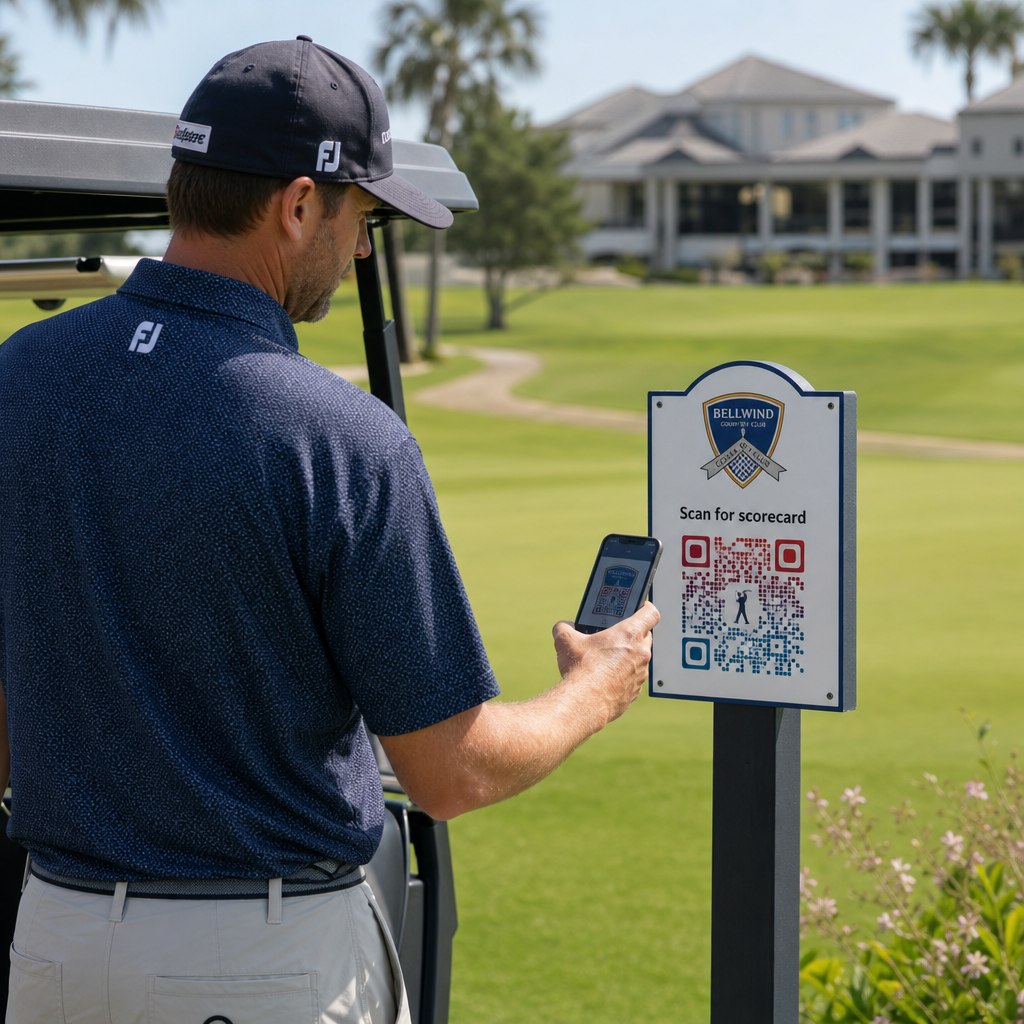
Kas otsite praktilisi viise oma golfikeskuse moderniseerimiseks? Paberipõhised protsessid, vananenud sildid ja kasutamata suhtlusvõimalused maksavad golfiväljakutele igal hooajal aega ja tulu. See juhend tutvustab teile kõige tõhusamaid viise QR-koodide kasutamiseks kogu teie keskuses – alates digitaalsetest tulemuskaartidest ja tiimärkidest kuni maksete ja mängijate tagasisideni.
Miks golfiväljakud QR-koode kasutusele võtavad
Golfis osalemine USA-s saavutas 2025. aastal kõigi aegade kõrgeima taseme, 48,1 miljonit osalejat, mis on viimase kümne aasta jooksul kasvanud 50%. Kuna umbes 16 000 väljakut konkureerivad selle nõudluse pärast, on mängijakogemusest saanud peamine eristaja – ja QR-koodid pakuvad odavat ja suure mõjuga viisi selle parandamiseks.
QR-koodid toimivad, kodeerides URL-i, dokumendi või muu sihtkoha skaneeritavasse pilti. Kui mängija suunab oma nutitelefoni kaamera koodile, avab see koheselt mis tahes sisu, mille olete linkinud – enamiku kaasaegsete seadmete puhul pole rakenduse allalaadimine vajalik. Golfikeskused saavad paigutada need koodid trükistele, siltidele, golfikärudele ja tiimärkidele, et ühendada füüsiline väljak digitaalsete ressurssidega.
Tõeline operatiivne eelis tuleneb dünaamilised QR-koodid – koodidest, mis võimaldavad teil lingitud sisu igal ajal värskendada, ilma füüsilist koodi uuesti printimata. Kui teie tulemuskaardi link muutub, teie menüü uuendatakse või teie väljaku kaart vaadatakse üle, muudate lihtsalt sihtkohta oma juhtpaneelil. Kuidas see täpselt töötab, vaadake staatiliste ja dünaamiliste QR-koodide erinevused.
Digitaalsed tulemuskaardid QR-koodi kaudu
Üks praktilisemaid rakendusi igale golfikeskusele on paberist tulemuskaartide asendamine QR-koodiga ligipääsetavate digitaalsete versioonidega.
Digitaalne tulemuskaart on mis tahes mobiilisõbralik liides, mis võimaldab mängijatel oma nutitelefonis auku-augu haaval tulemusi salvestada. Mängijad skaneerivad QR-koodi esimesel tiil, pro-poes või kärul ning tulemuskaart avaneb otse nende brauseris – ei paberit, ei pliiatsit, ei ümberjagamist pärast ringe.
USGA golfireeglid kinnitavad, et tulemuskaart võib olla mis tahes paber- või elektroonilisel kujul, mille komitee on heaks kiitnud, tingimusel et see võimaldab sisestada tulemusi iga raja kohta, on mängija ja märkija poolt kinnitatud ning identifitseerib iga raja õigesti. Komiteed võivad isegi nõuda mängijatelt elektroonilise tulemuskaardi kasutamist paberkaardi asemel. See annab teie rajatisele täieliku paindlikkuse muuta üleminek ametlikuks nii võistluste kui ka tavaliste mänguringide jaoks.
Operatiivsest seisukohast vähendavad digitaalsed tulemuskaardid mängujärgset paberimajanduse kiirustamist, annavad personalile reaalajas ülevaate mänguringi edenemisest ja edastavad turniiride ajal reaalajas edetabeleid. Mängijad saavad kasu sisseehitatud tulemuste jälgimisest, mänguringide ajaloost ja mängustatistikast, mida paber kunagi ei pakkunud.
Selle seadistamiseks linkige oma digitaalse tulemuskaardi platvormi URL lingi QR-koodile ja asetage see kood:
- Esimese tii sildid
- Golfikärud (kärudele kinnitatud kleebised või lamineeritud kaardid)
- Trükitud tulemuskaardid lisana
- Pro-poe sisseregistreerimislett
Dünaamilise QR-koodi kasutamine on siin eriti praktiline – kui vahetate tulemuskaardi pakkujaid või uuendate URL-i, uuendate linki oma juhtpaneelil ja iga trükitud kood töötab edasi.
Lülitu digitaalsetele tulemuskaartidele ilma uuesti printimata Looge oma tulemuskaardi lingi jaoks dünaamiline QR-kood ja värskendage sihtkohta igal ajal, puudutamata oma trükimaterjale. Proovige QR-koodi generaator tasuta 14 päeva.
Tii-märkide ja raja teabe QR-koodid
QR-koodid tii-märkidel annavad mängijatele kohese juurdepääsu raja paigutustele, vahemaa tabelitele, kohalikele reeglitele ja mängunõuannetele – sisule, mis muidu nõuaks trükitud lisasid või klubihoone ekraane.
Levinud lähenemine on linkida iga tii-märgi QR-kood mobiilisõbraliku PDF-i või sellele rajale spetsiifilise sihtlehega. Mängijad skaneerivad tiil, näevad raja skeemi, mõistavad optimaalset joont ja mängivad kiiremini ning enesekindlamalt. See on eriti väärtuslik esmakordsetele külastajatele, kes navigeerivad tundmatul rajal.
Saate neid luua, kasutades PDF QR-koodi generaator kui teie raja juhendid on PDF-dokumendid, või a lingi QR-koodi generaator kui majutate sisu veebilehel või maandumislehel. Jätkusuutlikkusele keskendunud operaatorid on kasutanud ka tiimärgi QR-koode kohalike reeglite teabe jaoks “Skaneeri ja õpi”, asendades trükitud reeglilehti ja vähendades haldusaega rajal.
Pro-pood ja Klubihoone menüüd
Kui teie klubihoone või pöördekohvik pakub toitu ja jooke, kaotab QR-koodiga menüü ära füüsiliste menüüde uuesti trükkimisega seotud kulud ja vaeva alati, kui tooted või hinnad muutuvad. Mängijad skaneerivad koodi baaris, kärude kuuri aknas või söögisaali lauas ja vaatavad praegust digitaalset menüüd. Kui teie köök muudab hooajaks pakkumisi, uuendate lingitud sisu – mitte QR-koodi ennast.
Pagelooti QR menu: menüü QR-koodi generaator toetab nii PDF-menüüsid kui ka veebipõhiseid menüüsid ja võimaldab teil lisada oma klubi logo ja brändivärvid, et hoida koodi kooskõlas teie rajatise visuaalse identiteediga. Paigutuse osas on QR-kood lauatelgil söögisaalis üks tõhusamaid formaate – mängijad näevad seda silmade kõrgusel ja neil on istudes loomulik hetk skannimiseks.
Kontaktivabad maksed väljakul
QR-koodid saavad maksmist lihtsustada mitmes puutepunktis: pro-poes, joogikärul, harjutusväljakul ja turniiriregistreerimisel. Mängijad skannivad teie makseprotsessoriga lingitud makse-QR-koodi ja sooritavad tehingu oma telefonis ilma sularaha või kaarditerminaliga tegelemata.
Saate luua maksega lingitud QR-koodi, kasutades PayPali QR koodi loomine või standardset lingi QR-koodile mis suunab teie makselehele. Need toimivad hästi joogikärudel, kaubaväljapanekutel ja kõikjal, kus füüsiline terminal on ebapraktiline.
Väljaku navigeerimine ja asukoha QR-koodid
Suurte rajatiste puhul vajavad mängijad sageli abi konkreetsete mugavuste leidmisel – harjutusväljak, vahepeatus, satelliit-pro-pood või klubihoone sissepääs parklast. A Google Maps QR-kood avab teie rajatise asukoha või konkreetse punkti kinnistul otse mängija kaardirakenduses ühe skannimisega.
Need on kasulikud:
- Suunaviidad väljaku sissepääsude juures
- Turniiri tervituspaketid
- Veebisaidi kontaktlehed mängijatele, kes navigeerivad väljastpoolt
Wi-Fi ligipääs mängijatele ja personalile
Pakute Wi-Fi-t klubihoones, riietusruumis või söögisaalis? Wi-Fi QR-kood võimaldab mängijatel koheselt ühenduda ilma et personal peaks parooli ette lugema. Mängijad skannivad koodi ja ühenduvad automaatselt – käsitsi sisestamine pole vajalik. Saate luua ühe Pagelooti QR-koodi generaator sisestades oma võrgu nime, turvatüübi ja parooli, seejärel postitades saadud koodi klubihoonesse või kärude kogumisalale.
Mängijate tagasiside ja Google'i arvustused
Pärast ringi on mängijad sageli õiges meeleolus, et jätta arvustus või täita tagasisidevorm – kuid hõõrdumine tapab järeltegevuse. QR-kood tulemuskaardil, kviitungil või väljapääsu lähedal asuval sildil eemaldab selle hõõrdumise täielikult.
- A Google'i arvustuse QR-koodile saadab mängijad otse teie Google Businessi arvustuste lehele, muutes selle ühe puudutusega toiminguks.
- A kliendi tagasiside QR-kood saab linkida küsitlusele, kus mängijad hindavad mängutempot, väljaku tingimusi, personali ja mugavusi.
Asetage need koodid sinna, kus mängijad pärast lõpetamist loomulikult peatuvad – punktiarvestuslaud, kottide hoiukoht, baar – ja siduge need lihtsa küsimusega nagu “Kuidas teie tänane ring oli?”
Sildid, turundus ja ürituste reklaamid
QR-koodid toimivad praktiliselt igal trükitud pinnal teie rajatises. Turniirile registreerimise sildid ja flaierid saavad linkida otse veebipõhisele registreerimislehele. Klubihoone ja harjutusväljaku bännerid saavad suunata liikmelisuse päringu sihtlehele. Sponsorite sildid tiiboksides saavad linkida sponsori veebisaidile, muutes sponsorluspaketid partneritele mõõdetavamaks ja väärtuslikumaks. Hooajalisi kampaaniaid on eriti lihtne hallata – uuendage postitatud QR-koodi sihtkohta, kui pakkumised muutuvad ja uut trükki pole vaja.
Välisviitade puhul järgige QR-koodi paigutuse juhiseid ja asetage koodid maapinnast 3,5 kuni 5,5 jala kõrgusele silmade kõrgusele, puhta, suure kontrastsusega taustaga. Peegeldavatele või kumeratele pindadele paigutatud koodid skannivad halvasti, seega valige võimaluse korral lamedad, mattviimistlusega aluspinnad.
Milliste QR-koodide toimivuse jälgimine
Üks eelis, mida paberist sildid kunagi ei pakkunud, on mõõdetav kaasatus. Dünaamilised QR-koodid salvestavad iga skannimise andmetega, sealhulgas asukoht, seadme tüüp, kellaaeg, skannimiste koguarv ja unikaalsed skannimised. See ütleb teile, millised tiiboksid saavad kõige rohkem tulemuskaardi tegevust, millised menüüjaamad genereerivad kõige rohkem toidutellimusi ja millised turundusmaterjalid tekitavad reaalset liiklust.
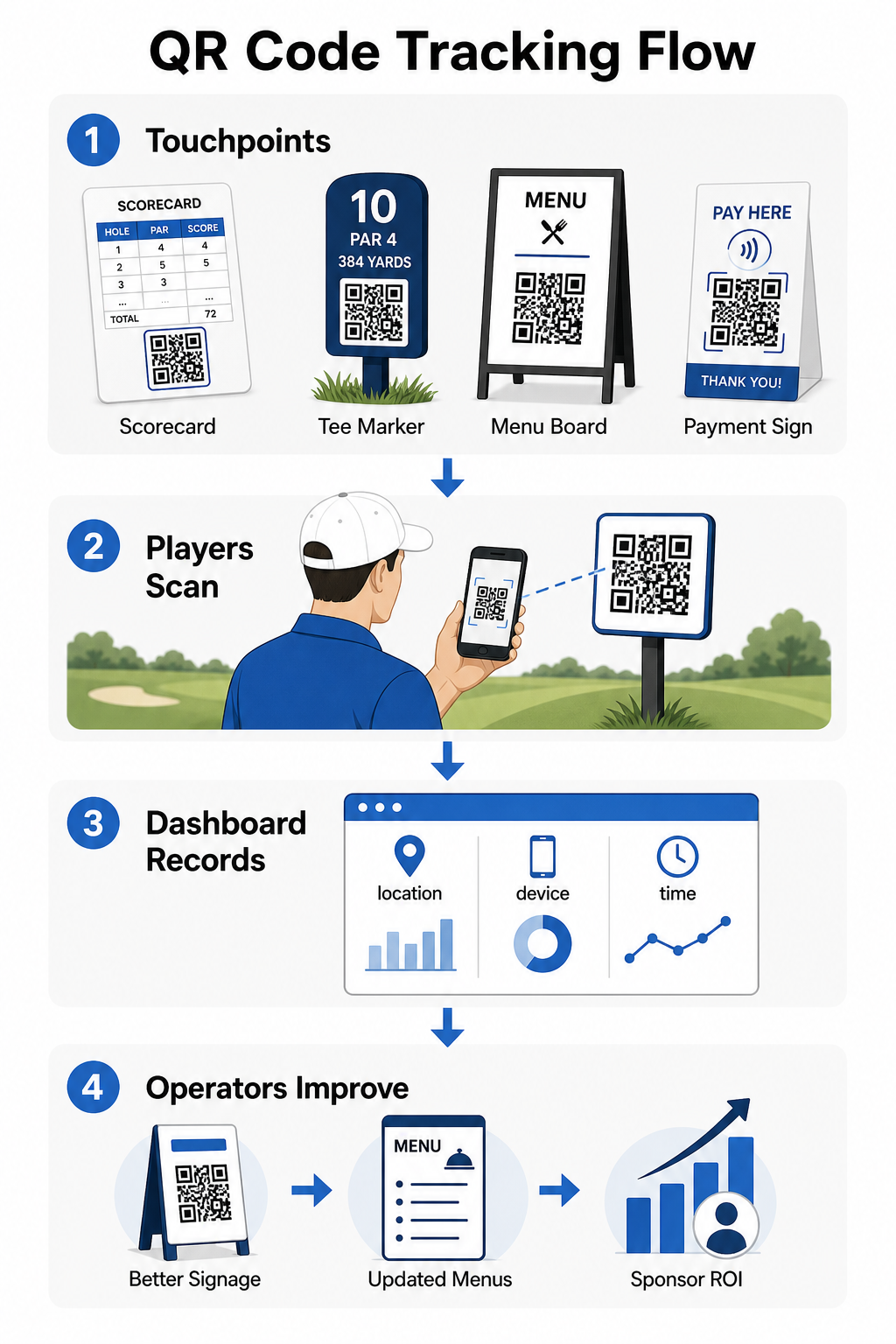
Saate neid andmeid kasutada paigutuse täpsustamiseks, alatoimivate siltide parandamiseks ja sponsorite aktiveerimiste ROI demonstreerimiseks. Lisateavet kuidas QR-koodi jälgimine töötab ja milliseid mõõdikuid oma rajatises jälgida.
Vaadake täpselt, kus mängijad tegelevad Jälgige skannimisi asukoha, seadme ja aja järgi kogu oma rajatises ühest juhtpaneelist. Alustage Pagelooti QR-koodi lahendustega ja pääsete ligi reaalajas analüütikale iga koodi kohta, mille te kasutusele võtate.
Disaini ja paigutuse põhitõed golfikeskkondade jaoks
Enne QR-koodide printimist välitingimustes või suure liiklusega kasutamiseks on mõned tehnilised kaalutlused reaalse toimivuse jaoks olulised.
Kontrast on kõige kriitilisem tegur. Kasutage tumedat moodulvärvi heledal taustal ja püüdke saavutada kontrastisuhte vähemalt 4:1 tumedate mustri ja selle tausta vahel. See tagab usaldusväärse skaneerimise muutuvates välistingimustes valgustingimustes, alates pilvistest hommikutest kuni eredate pärastlõunapäikeseni.
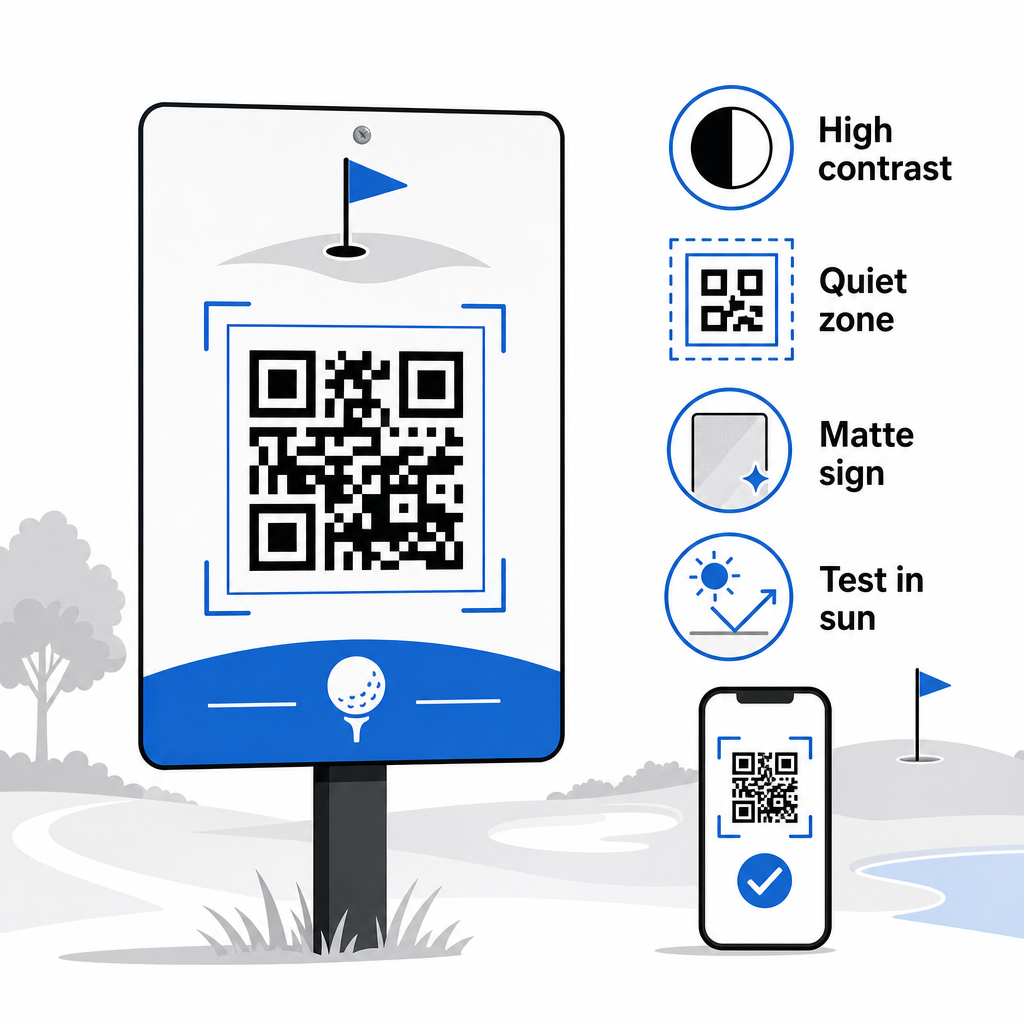
Suurus peaks vastama eeldatavale skaneerimiskaugusele. Tiimärkide või käru külge kinnitatud koodide puhul, mis on skaneeritud käeulatusest, on 2 × 2 cm minimaalne alus – kuid suurem on välistingimustes kasutamiseks alati parem. Praktiline reegel: iga 10 cm eeldatava skaneerimiskauguse kohta suurendage koodi laiust 1 cm võrra.
Vaikne tsoon viitab selgele valge ruumi marginaalile, mis ümbritseb QR-koodi. Koodi ülerahvastamine teksti või otse külgnevate graafikaga põhjustab skaneerimisvigu, seega säilitage see piir kõikidel külgedel.
Logod saavad parandada visuaalset atraktiivsust ja tugevdada teie klubi brändi identiteeti QR-koodi sees, kuid hoidke logo mitte rohkem kui 30% koodi alast ja kasutage kõrget veaparandust (Q või H tase) usaldusväärsuse säilitamiseks. Täielikud üksikasjad on saadaval Pagelooti QR-koodi loetavuse juhised.
Testimine peaks alati toimuma enne suuremahulist printimist. Skaneerige iga kood mitmel seadmel ja tegelikus keskkonnas – eredas välipäikesevalguses, hämaras siseruumides ja pimestamistingimustes – et kinnitada, et see toimib ootuspäraselt. Lisateavet leiate kuidas QR-koode tõhusalt kasutada enne oma esimest kasutuselevõttu.
QR-koodid annavad golfi operaatoritele praktilise, uuendatava viisi ühendada iga füüsiline puutepunkt rajal kasuliku digitaalse sisuga. Kõige tõhusamad rajatised kasutavad neid järjepidevalt tulemuskaartidel, siltidel, menüüdes ja mängijate kaasatuses – ja jälgivad jõudlust, et pidevalt paraneda. Alustage ühe või kahe suure mõjuga kasutusjuhtumiga, mõõtke tulemusi ja laiendage sealt edasi. Külastage Pagelooti QR-koodi generaator oma esimese koodi loomiseks, või uurige valdkonnaspetsiifilisi QR-koodi lahendusi et leida õige formaat oma rajatise jaoks.
Korduma kippuvad küsimused
Jah. USGA golfireeglid sätestavad, et tulemuskaart võib olla mis tahes paber- või elektroonilisel kujul, mille Komitee on heaks kiitnud, eeldusel, et see võimaldab sisestada tulemusi iga raja kohta, on kinnitatud mängija ja märkija poolt ning õigesti tuvastatud iga rajaga. Komiteed võivad isegi nõuda elektroonilisi tulemuskaarte paberkaartide asemel. Kinnitage alati heakskiit oma turniirikomiteega enne kasutamist.
Kui te kasutate dünaamilist QR-koodi, uuendate siht-URL-i oma juhtpaneelil ja olemasolevad prinditud koodid suunavad automaatselt uuele sisule – ei ole vaja uuesti printida tiimarkereid, kärukleebiseid ega silte. Staatilised QR-koodid kodeerivad URL-i püsivalt, nii et iga lingi muutus nõuab uute trükimaterjalide tootmist.
Kasutage suure kontrastsusega värve – tumedad moodulid heledal taustal, mille kontrastsussuhe on vähemalt 4:1. Mõõtke koodid oodatava skaneerimiskauguse jaoks, kasutades 10:1 reeglit: 1 cm koodi laiust 10 cm kauguse kohta. Valige lamedad, mattviimistlusega materjalid, et vältida pimestamist, ja testige iga koodi tegelikus välisvalgustuses enne kasutuselevõttu. Täielikud QR-koodi loetavuse juhised hõlmavad lisateavet suuruse, kontrasti ja vaiksete tsoonide kohta.