Как добавить богатый цифровой контекст к физическому произведению искусства, не загромождая стены галереи и не нарушая очарования произведения? Это напряжение – между информацией и погружением – именно то, что призваны разрешить QR-коды в художественных инсталляциях. Это руководство охватывает реальные примеры, принципы дизайна и практические шаги для кураторов и художников, которые хотят встроить сканируемые цифровые слои в свои выставки.
Примеры из практики: Как музеи и художники используют QR-коды
Художественная инсталляция с QR-кодом в стиле мехенди
Этот временный проект объединил традицию искусства хны с практичностью QR-кодов. Посетители могли сканировать узоры на основе хны для совершения цифровых транзакций или пожертвований. Поскольку хна естественным образом выцветает, инсталляция стала размышлением о непостоянстве, одновременно демонстрируя, как QR-коды могут связывать культурные традиции с современными цифровыми взаимодействиями.
Пространственная интеграция QR-кодов в Коллекции Пино
В Коллекции Пино в Ренне, Франция, кураторы встроили QR-коды в полы музеев и переходные пространства, вместо того чтобы загромождать стены галерей текстовыми панелями. Используя платформу MySmartJourney, коды предоставляли геймифицированный контент – уроки по поп-арту и визуальные головоломки – в моменты, которые иначе были бы бездейственными, например, во время ожидания в очереди. Результатом стало повышение вовлеченности без нарушения визуального потока галереи, что является моделью, достойной изучения для любого учреждения, балансирующего между предоставлением информации и эстетической целостностью.
Расширенный опыт посетителей Музея Эрарта
Музей Эрарта использовал QR-коды для расширения посещения за пределы самой галереи. Коды, размещенные рядом с произведениями искусства, позволяли гостям изучать подробную информацию о выставке, узнавать о художниках и приобретать высококачественные репродукции. Вместо того чтобы заставлять каждого посетителя проходить через один и тот же линейный опыт, этот подход давал людям свободу углубляться настолько, насколько позволяло их любопытство – более персонализированное взаимодействие, чем может предложить любая фиксированная настенная этикетка.
QR-коды, вдохновленные Баухаусом, от художественного коллектива Elkoy
Художественный коллектив Elkoy переосмыслил QR-коды через призму принципов Баухауса. Включив геометрические формы, смелые цвета и минималистичный дизайн, они превратили стандартные черно-белые коды в композиционные элементы. Каждый код ссылался на эссе, объясняющие взаимосвязь между историческими дизайнерскими движениями и современными технологиями. Их работа является яркой демонстрацией того, что QR-код может быть частью произведения искусства, а не его аннотацией.
Уроки раннего внедрения Бруклинского музея
Бруклинский музей был одним из первых, кто внедрил QR-коды, но их первоначальные усилия столкнулись с реальными трудностями – посетителям требовались сторонние приложения для сканирования, которых у большинства людей не было. Вовлеченность резко возросла только после того, как Apple и Android интегрировали QR-считыватели непосредственно в камеры смартфонов. Урок практичен: даже хорошо продуманная идея может потерпеть неудачу без соответствующей инфраструктуры. Время и техническая доступность имеют такое же значение, как и творческое видение.
Преимущества QR-кодов в художественных инсталляциях
Более глубокое вовлечение посетителей
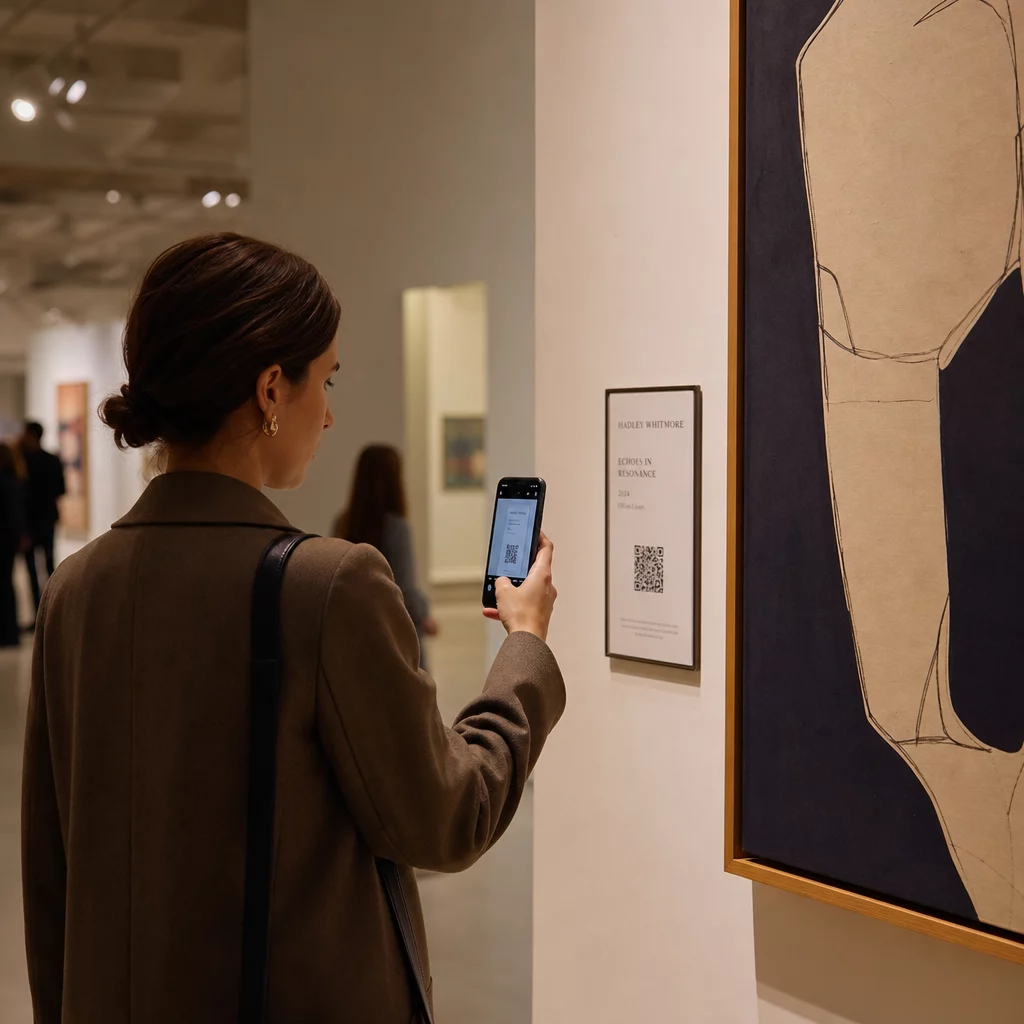
QR-коды превращают посетителей из пассивных наблюдателей в активных участников. Вместо того чтобы поглощать то, что помещается на настенной этикетке, посетитель может отсканировать и получить доступ к интервью с художниками, закулисным видео, аудиогидам или наложениям дополненной реальности, которые оживляют статичное произведение. Музеи также могут использовать коды для запуска цифровых квестов или викторин, которые особенно эффективны для семей и младшей аудитории.
QR-коды для музеев также открывают значительные улучшения доступности. Многоязычные аудиогиды, скрытые субтитры и видео с повторным воспроизведением для посетителей с нарушениями обучаемости становятся возможными благодаря одному сканированию на собственном устройстве посетителя. Исследования подтверждают, что посетители с нарушениями обучаемости особенно ценят возможность просматривать или прослушивать контент несколько раз в своем собственном темпе.
Одно практическое предостережение: не каждый посетитель носит с собой смартфон – школьные группы часто приводятся в качестве примера. QR-коды следует рассматривать как дополнительный слой, а не единственный путь к информации. Всегда предоставляйте альтернативный способ доступа к тому же контенту, будь то ближайший URL-адрес, печатная раздатка или вариант с помощью персонала.
Добавьте цифровой слой к вашей следующей выставке В Динамический QR код: генератор позволяет обновлять связанный контент в любое время – без необходимости перепечатки – так что ваши коды остаются актуальными на протяжении всего периода работы инсталляции.
Гибкость дизайна и художественная интеграция
QR-коды больше не должны выглядеть как QR-коды в традиционном смысле. Цвета, формы, встроенные логотипы и пользовательские узоры могут быть применены с сохранением возможности сканирования, при условии соблюдения контраста и тихих зон (подробнее об этом ниже). Коды, вдохновленные Баухаусом, от Elkoy Collective и коды, встроенные в пол, от Pinault Collection показывают, что продуманное размещение и визуальный дизайн могут сделать код органичной частью инсталляции, а не прикрепленным к ней элементом.
Полезный руководящий принцип из кураторской практики: “QR-код должен быть разработан таким образом, чтобы быть незаметным и элегантным, дополняя экспонат, а не отвлекая от него”.” Этот стандарт применяется независимо от того, появляется ли код на небольшой этикетке рядом с картиной или интегрирован непосредственно в поверхность скульптурного произведения.
Аналитика и данные о посетителях в реальном времени
Один из самых практичных аргументов в пользу QR-кодов на выставках — это данные, которые они генерируют. Каждое сканирование — это сигнал: какие работы вызывают устойчивый интерес, когда происходит пик вовлеченности, в каких зонах галереи посетители задерживаются и какие форматы контента — видео, аудио, текст — потребляются чаще всего.
| Точка данных | Предоставляемые данные |
|---|---|
| ВСЕГО СКАНИРОВАНИЙ | Измеряет общий интерес к конкретному произведению или зоне |
| Уникальные сканирования | Отслеживает индивидуальное взаимодействие посетителей |
| Время сканирования | Определяет часы пик и схемы потока посетителей |
| Операционная система | Предлагает технические рекомендации по мобильной оптимизации |
| Место сканирования | Оценивает эффективность размещения QR-кодов |
Динамические QR-коды делают эти данные еще более применимыми. Поскольку URL-адрес назначения можно изменить без перепечатки физического кода, куратор может реагировать на данные сканирования в реальном времени – заменять видео, которое не находит отклика, на то, которое находит, или добавлять контент для обеспечения доступности в процессе работы на основе отзывов посетителей. Для более полной картины того, как QR-коды AR преобразуют музейное повествование, слои дополненной реальности могут быть добавлены или обновлены таким же образом.
Что ссылаться: Контент, который добавляет ценность
Контент, стоящий за кодом, важен так же, как и сам код. Музеи и художники постоянно находят следующие типы контента полезными:
- Заявления художников и интервью – услышать, как художник описывает свой процесс своими словами, создает связь, которую не может повторить никакой текст на стене; а QR-код YouTube справляется с этим чисто
- Аудиогиды – озвученные описания или звуковые ландшафты, связанные через MP3 QR-код особенно хорошо подходят для работ, где визуальный опыт должен оставаться нетронутым
- Расширенное содержание каталога – подробное происхождение, научные эссе или каталоги выставок, представленные в виде PDF QR-код
- Галереи изображений – обрабатывать фотографии, виды инсталляций или сравнительные работы, доступные через QR-код галереи изображений
- Виртуальные туры – для посетителей, желающих изучить связанные работы или дочерние учреждения, QR-код, ведущий на виртуальный тур расширяет впечатления за пределы физического пространства
- Формы обратной связи для посетителей – размещаются у выходов или рядом с ключевыми работами для сбора качественных отзывов
Делайте целевую ссылку простой. Более короткие URL-адреса кодируются как менее плотные узоры, которые сканируются быстрее и надежнее. Динамические QR-коды решают эту проблему систематически, кодируя только короткую ссылку перенаправления, независимо от того, насколько сложным становится пункт назначения.
Дизайн и размещение: Как сделать коды сканируемыми и ненавязчивыми
Правильное визуальное и физическое исполнение — это то, где многие инсталляции спотыкаются. Приведенные ниже принципы основаны на рекомендациях по доступности и исследованиях читаемости QR-кодов.
Контраст и цвет
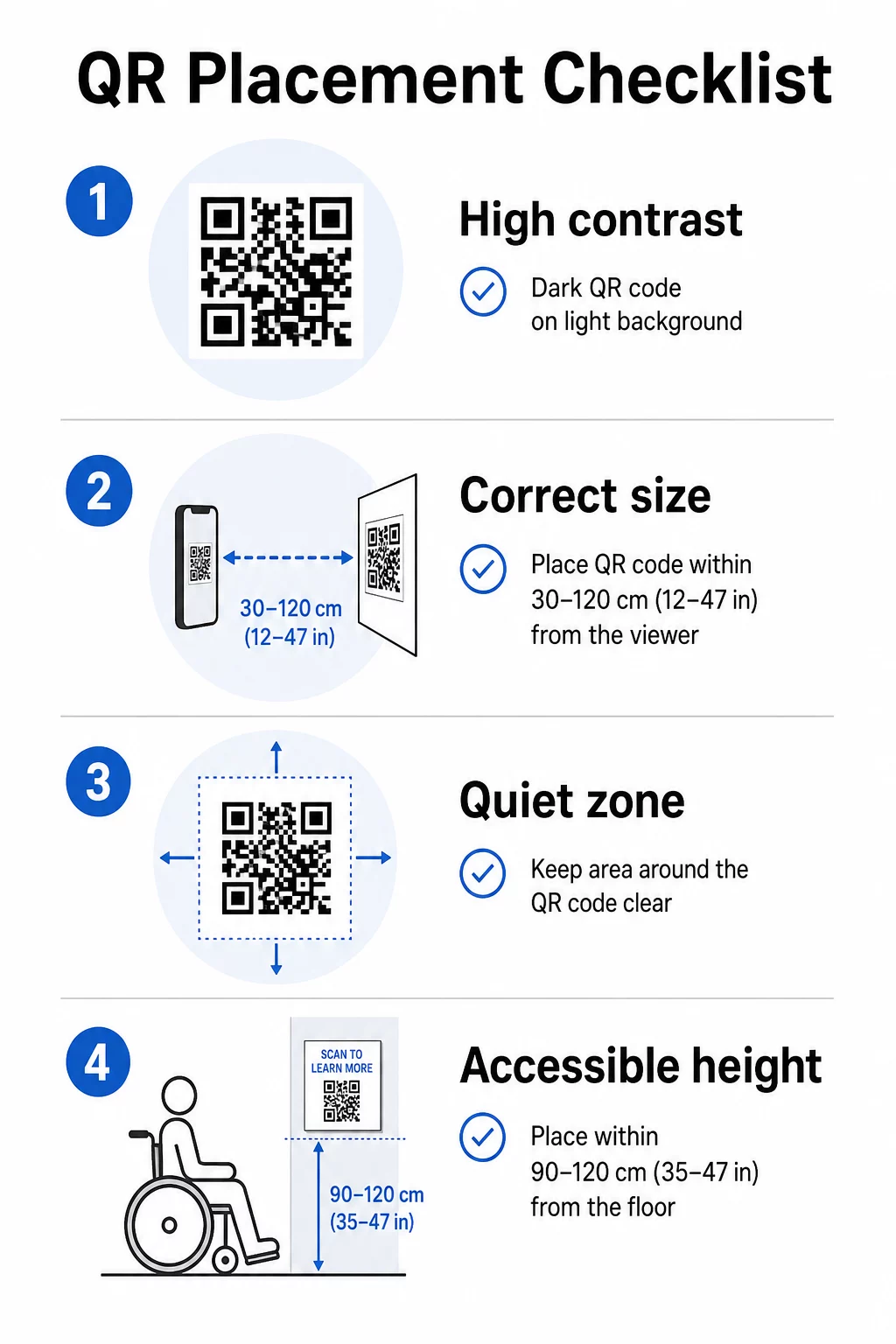
Передний план кода должен быть темным, а фон светлым – не наоборот. Инвертированные коды (светлый узор на темном фоне) не работают на значительной части камер смартфонов. Для пользовательских цветных кодов стремитесь к контрастности не менее 3:1 между модулями кода и фоновой поверхностью. Подробный обзор правил контрастности доступен в руководство по лучшим практикам контрастности цветов QR-кодов.
Градиенты и тени создают полутона, которые сбивают с толку сканеры. Если вы хотите стилизованный код, соответствующий палитре инсталляции, используйте сплошные цвета и тщательно протестируйте.
Размер и расстояние сканирования
Надежное правило: код должен быть примерно в одну десятую от ожидаемого расстояния сканирования. Код, предназначенный для сканирования с расстояния вытянутой руки (около 10 дюймов), должен быть не менее 1 квадратного дюйма. Для вывесок инсталляций, просматриваемых с большего расстояния, масштабируйте соответствующим образом. Абсолютный минимум для сканирования с близкого расстояния составляет 2 × 2 см (приблизительно 0,8 × 0,8 дюйма). Более подробная информация о размерах доступна в Руководство по размещению QR-кода.
Тихие зоны
Каждый QR-код требует четкого поля – называемого тихой зоной – не менее четырех модулей со всех сторон. Никакой текст, узоры или декоративные элементы не должны вторгаться в это пространство. Если вы встраиваете код в узорчатую поверхность или край произведения искусства, это ограничение, скорее всего, приведет к сбоям сканирования.
Физическая доступность
Высота и расположение определяют, кто на самом деле может использовать код. Размещение должно быть доступно для посетителей в инвалидных колясках или людей с ограниченным ростом – примерно от 2,5 до 4 футов от пола для удобного доступа. Избегайте размещения кодов на изогнутых поверхностях, отражающем стекле или материалах, которые создают блики при галерейном освещении.
Текст этикетки
Этикетка рядом с кодом должна ясно объяснять, что посетитель найдет после сканирования и как это сканировать. Не каждый посетитель знаком с этим процессом, и даже опытные пользователи получают пользу от знания, увидят ли они трехминутное видео или 12-страничное эссе из каталога. Простой язык, короткие предложения и адекватный размер шрифта — все это способствует удобству использования. Делайте этикетки лаконичными — посетители просматривают их бегло, и самая важная информация должна появляться первой.
Обновляйте контент выставки без перепечатки Художественные галереи могут использовать Динамический QR код: генератор для обновления биографий художников, замены аудиогидов или добавления нового контента даже после открытия выставки – не затрагивая физические вывески.
Протестируйте перед установкой
Распечатайте код в окончательном размере и отсканируйте его как минимум двумя устройствами – iPhone и телефоном Android – при условиях освещения, которые будут фактически использоваться при инсталляции. Освещение в галереях часто бывает теплым и направленным, что может влиять на контрастность иначе, чем стандартное офисное освещение. Матовые покрытия уменьшают блики и, как правило, превосходят глянцевые поверхности для надежного сканирования. Дополнительные рекомендации по тестированию находятся в руководство по лучшим практикам читаемости QR-кодов.
Использование динамических QR-кодов для развивающихся выставок
Статический QR-код кодирует фиксированное назначение. После печати единственный способ изменить его указатель — это перепечатать его. Динамические QR-коды работают иначе: сам код указывает на короткий редирект, и вы можете изменить назначение редиректа в любое время из панели управления.
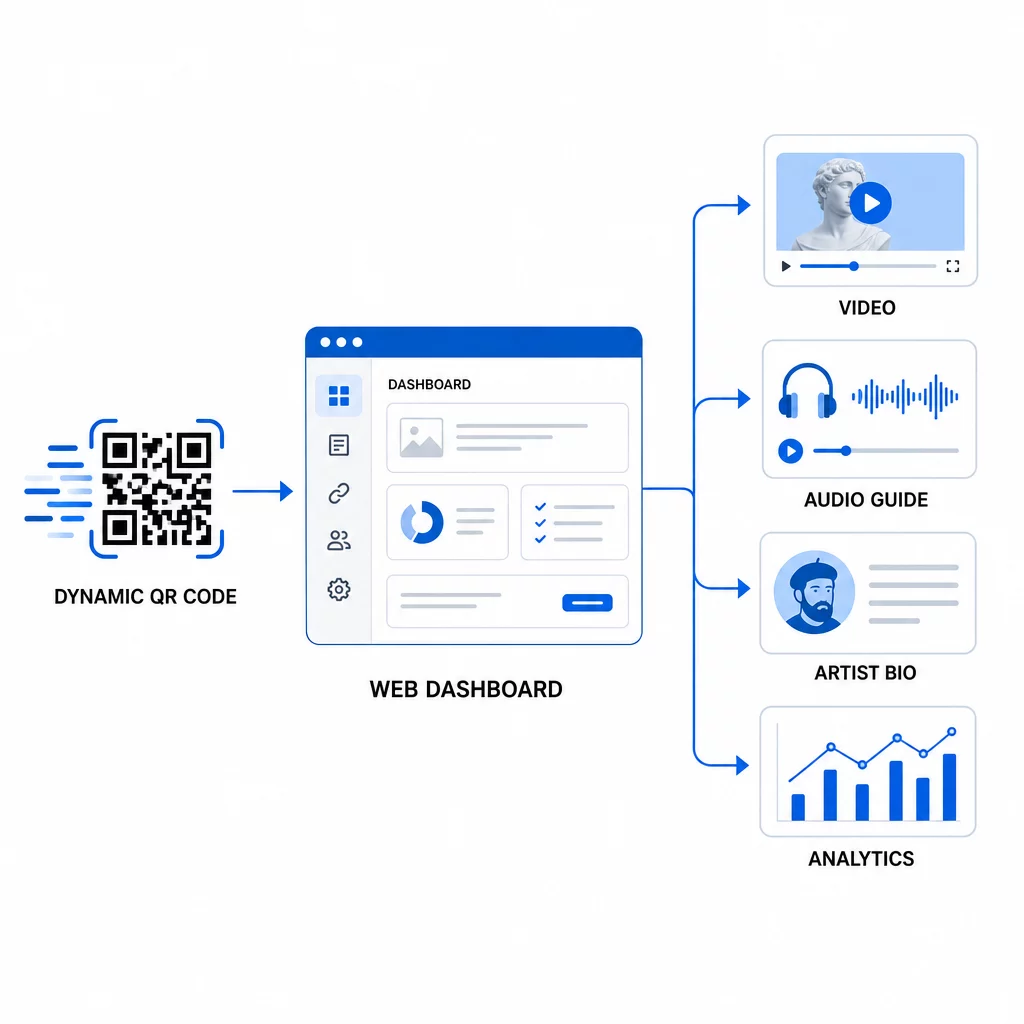
Для художественных инсталляций это различие значительно:
- Выставка, которая длится несколько месяцев, может изменять свой связанный контент по мере развития шоу – добавляя новые комментарии художников, заменяя тизерное видео на полный документальный фильм или обновляя детали происхождения по мере развития исследований.
- Временные инсталляции могут повторно использовать один и тот же физический код для нескольких событий, просто обновляя назначение.
- Аналитика остается привязанной к одному и тому же коду, обеспечивая непрерывную запись производительности, а не фрагментированные данные по перепечаткам.
Смитсоновский институт использовал этот подход для эффективного управления доступом к крупным цифровым коллекциям, сокращая как затраты, так и экологические отходы от перепечатанных материалов. Для кураторов, управляющих многоплощадочными или передвижными выставками, возможность настроить виртуальный художественный тур с QR-кодами и обновлять его централизованно является значительным операционным преимуществом.
Часто задаваемые вопросы
Разработайте код, используя цвета из палитры произведения искусства, но сохраняйте темный передний план на светлом фоне и стремитесь к контрастности не менее 3:1. Сохраняйте тихую зону чистой со всех сторон и протестируйте печатную версию на нескольких устройствах перед установкой. Более высокие уровни коррекции ошибок (Q или H) позволяют больше визуальной настройки – включая встроенные логотипы – при сохранении надежности сканирования.
Наиболее эффективные типы контента — это интервью с художниками или видеозаявления, аудиогиды, расширенные каталожные эссе или документы о происхождении, изображения процесса и формы обратной связи с посетителями. Сопоставьте формат с аудиторией и произведением: видео подходит для произведений, ориентированных на процесс, или перформансов, в то время как аудио хорошо работает с произведениями, где визуальный опыт должен оставаться непрерывным.
Динамические QR-коды со встроенной аналитикой записывают агрегированные данные – общее количество сканирований, уникальные сканирования, время сканирования, тип устройства и географическое местоположение – без сбора личной информации от отдельных посетителей. Платформы, такие как генератор динамических QR-кодов Pageloot, предоставляют эти данные в виде панели управления, предоставляя кураторам полезные сведения, соблюдая при этом конфиденциальность посетителей.