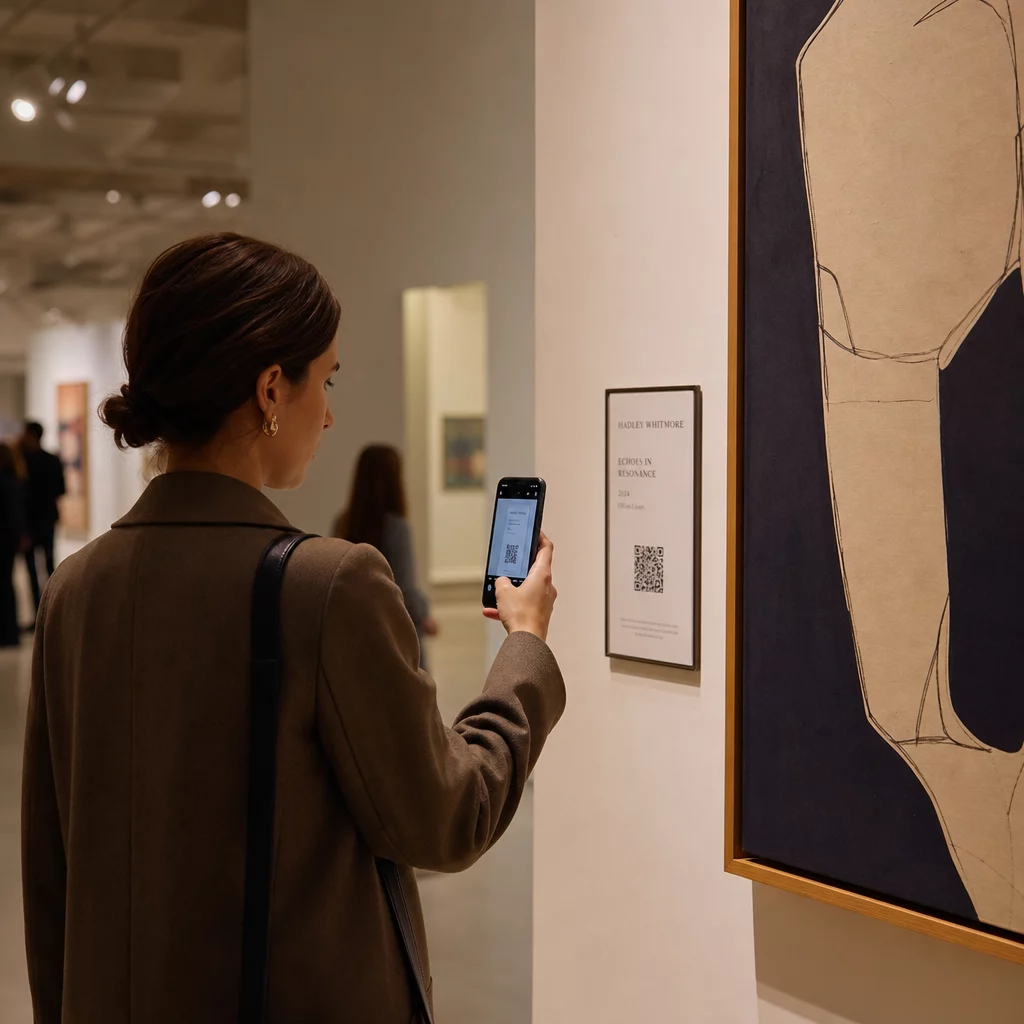
Kako dodati bogat digitalni kontekst fizičkom umjetničkom djelu bez zatrpavanja zida galerije ili narušavanja čarolije djela? Ta napetost – između informacija i uranjanja – upravo je ono što QR kodovi u umjetničkim instalacijama rješavaju. Ovaj vodič pokriva primjere iz stvarnog svijeta, principe dizajna i praktične korake za kustose i umjetnike koji žele ugraditi digitalne slojeve koji se mogu skenirati u svoje izložbe.
Studije slučaja: Kako muzeji i umjetnici koriste QR kodove
Mehendi umjetnička instalacija s QR kodom
Ovaj privremeni projekt spojio je tradiciju umjetnosti kane s praktičnošću QR kodova. Posjetitelji su mogli skenirati dizajne temeljene na kani kako bi izvršili digitalne transakcije ili dali donacije. Budući da kana prirodno blijedi, instalacija je postala meditacija o prolaznosti, istovremeno pokazujući kako QR kodovi mogu povezati kulturne tradicije s modernim digitalnim interakcijama.
Prostorna integracija QR kodova u kolekciji Pinault
U kolekciji Pinault u Rennesu, Francuska, kustosi su ugradili QR kodove u podove muzeja i prijelazne prostore umjesto da zatrpavaju zidove galerije tekstualnim panelima. Koristeći platformu MySmartJourney, kodovi su pružali gamificirani sadržaj – tutorijale pop-arta i vizualne zagonetke – tijekom trenutaka koji bi inače bili neiskorišteni, poput vremena čekanja u redu. Rezultat je bio povećan angažman bez narušavanja vizualnog toka galerije, model vrijedan proučavanja za svaku instituciju koja uravnotežuje isporuku informacija s estetskim integritetom.
Prošireno iskustvo posjetitelja muzeja Erarta
Muzej Erarta koristio je QR kodove kako bi proširio posjet izvan same galerije. Kodovi postavljeni pored umjetničkih djela omogućili su gostima da istraže detaljne informacije o izložbi, saznaju o umjetnicima i kupe visokokvalitetne reprodukcije. Umjesto da svakog posjetitelja prisiljava na isto linearno iskustvo, ovaj pristup dao je ljudima slobodu da idu onoliko duboko koliko ih znatiželja odvede – personaliziranija interakcija nego što to može ponuditi bilo koja fiksna zidna oznaka.
QR kodovi inspirirani Bauhausom umjetničkog kolektiva Elkoy
Umjetnički kolektiv Elkoy preoblikovao je QR kodove kroz prizmu Bauhaus principa. Uključivanjem geometrijskih oblika, smjelih boja i minimalističkog dizajna, transformirali su standardne crno-bijele kodove u kompozicijske elemente. Svaki kod povezan je s esejima koji objašnjavaju odnos između povijesnih dizajnerskih pokreta i moderne tehnologije. Njihov rad je jasna demonstracija da QR kod može biti dio umjetničkog djela, a ne samo bilješka na njemu.
Lekcije ranog usvajanja Brooklynskog muzeja
Brooklynski muzej bio je rani usvojitelj QR kodova, ali njihovi početni napori naišli su na stvarne poteškoće – posjetiteljima su bile potrebne aplikacije trećih strana za skeniranje, koje većina ljudi nije imala. Angažman je porastao tek nakon što su Apple i Android integrirali QR čitače izravno u kamere pametnih telefona. Lekcija je praktična: čak i dobro osmišljena ideja može propasti bez odgovarajuće infrastrukture. Vrijeme i tehnička dostupnost važni su jednako kao i kreativna vizija.
Prednosti QR kodova u umjetničkim instalacijama
Dublji angažman posjetitelja
QR kodovi prebacuju posjetitelje iz pasivnih promatrača u aktivne sudionike. Umjesto da upijaju ono što stane na zidnu oznaku, posjetitelj može skenirati i pristupiti intervjuima s umjetnicima, videozapisima iza scene, audio vodičima ili proširenoj stvarnosti koja animira statično djelo. Muzeji također mogu koristiti kodove za pokretanje digitalnih potraga za blagom ili kvizova, što je posebno učinkovito za obitelji i mlađu publiku.
QR kodovi za muzeje također otvaraju značajna poboljšanja pristupačnosti. Višejezični audio vodiči, titlovi i videozapisi s ponovljenom reprodukcijom za posjetitelje s poteškoćama u učenju postaju mogući jednim skeniranjem na vlastitom uređaju posjetitelja. Istraživanja potvrđuju da posjetitelji s poteškoćama u učenju posebno cijene mogućnost gledanja ili slušanja sadržaja više puta vlastitim tempom.
Jedna praktična napomena: ne nosi svaki posjetitelj pametni telefon – školske grupe su često navođen primjer. QR kodovi bi se trebali tretirati kao sloj poboljšanja, a ne kao jedini put do informacija. Uvijek osigurajte alternativni način pristupa istom sadržaju, bilo da je to obližnji URL, ispisani letak ili opcija uz pomoć osoblja.
Dodajte digitalni sloj svojoj sljedećoj izložbi The Dinamični QR kod generator omogućuje vam ažuriranje povezanog sadržaja u bilo kojem trenutku – bez potrebe za ponovnim ispisom – tako da vaši kodovi ostaju aktualni tijekom trajanja instalacije.
Fleksibilnost dizajna i umjetnička integracija
QR kodovi više ne moraju izgledati kao QR kodovi u tradicionalnom smislu. Boje, oblici, ugrađeni logotipi i prilagođeni uzorci mogu se primijeniti uz očuvanje mogućnosti skeniranja, pod uvjetom da se poštuju kontrast i tihe zone (više o tome u nastavku). Bauhaus-inspirirani kodovi kolektiva Elkoy i kodovi ugrađeni u pod zbirke Pinault pokazuju da promišljeno postavljanje i vizualni dizajn mogu učiniti da se kod osjeća kao sastavni dio instalacije, a ne kao nešto naknadno dodano.
Korisno vodeće načelo iz kustoske prakse: “QR kod treba biti dizajniran da bude diskretan i elegantan, nadopunjujući izložak, a ne odvlačeći pažnju od njega.” Taj se standard primjenjuje bez obzira pojavljuje li se kod na maloj etiketi pored slike ili je izravno integriran u površinu skulpturalnog djela.
Analitika i uvidi o posjetiteljima u stvarnom vremenu
Jedan od najpraktičnijih argumenata za QR kodove na izložbama su podaci koje generiraju. Svako skeniranje je signal: koja djela privlače dugotrajni interes, kada dolazi do vrhunca angažmana, u kojim se galerijskim zonama posjetitelji zadržavaju i koji se formati sadržaja – video, audio, tekst – najviše konzumiraju.
| Podatkovna točka | Pruženi uvid |
|---|---|
| UKUPNO SKENIRANJA | Mjeri ukupni interes za određeni izložak ili zonu |
| Jedinstvena skeniranja | Prati angažman pojedinih posjetitelja |
| Vrijeme skeniranja | Identificira vršne sate i obrasce protoka posjetitelja |
| Operacijski sustav | Nudi tehničke uvide za mobilnu optimizaciju |
| Lokacija skeniranja | Procjenjuje učinkovitost postavljanja QR koda |
Dinamički QR kodovi čine ove podatke još primjenjivijima. Budući da se odredišni URL može promijeniti bez ponovnog ispisa fizičkog koda, kustos može reagirati na podatke skeniranja u stvarnom vremenu – zamijeniti videozapis koji ne rezonira s onim koji rezonira, ili dodati sadržaj pristupačnosti usred izložbe na temelju povratnih informacija posjetitelja. Za potpuniju sliku kako AR QR kodovi transformiraju muzejsko pripovijedanje, slojevi proširene stvarnosti mogu se dodati ili ažurirati na isti način.
Što povezati: Sadržaj koji dodaje vrijednost
Sadržaj iza koda jednako je važan kao i sam kod. Muzeji i umjetnici dosljedno su smatrali sljedeće vrste sadržaja korisnima:
- Izjave umjetnika i intervjui – slušanje umjetnika kako opisuje svoj proces vlastitim riječima stvara vezu koju nijedan zidni tekst ne može replicirati; a YouTube QR kod to čisto obrađuje
- Audio vodiči – narativni opisi ili zvučni pejzaži povezani putem MP3 QR kod posebno dobro funkcioniraju za djela gdje vizualno iskustvo treba ostati netaknuto
- Prošireni sadržaj kataloga – detaljno porijeklo, znanstveni eseji ili katalozi izložbi isporučeni kao PDF QR kod
- Galerije slika – obrađene fotografije, prikazi instalacija ili usporedni radovi dostupni putem QR koda galerije slika
- Virtualne ture – za posjetitelje koji žele istražiti srodne radove ili sestrinske institucije, QR kod koji vodi na virtualnu turu proširuje iskustvo izvan fizičkog prostora
- Obrasci za povratne informacije posjetitelja – postavljeni na izlaznim točkama ili blizu ključnih radova za prikupljanje kvalitativnih odgovora
Neka povezano odredište bude jednostavno. Kraći URL-ovi kodiraju se kao manje gusti uzorci, koji se brže i pouzdanije skeniraju. Dinamički QR kodovi to sustavno rješavaju kodiranjem samo kratke preusmjeravajuće veze bez obzira na to koliko odredište postane složeno.
Dizajn i postavljanje: Kako kodove učiniti skenabilnima i nenametljivima
Pravilna vizualna i fizička izvedba je ono gdje mnoge instalacije posrću. Dolje navedena načela proizašla su iz smjernica za pristupačnost i istraživanja čitljivosti QR kodova.
Kontrast i boja
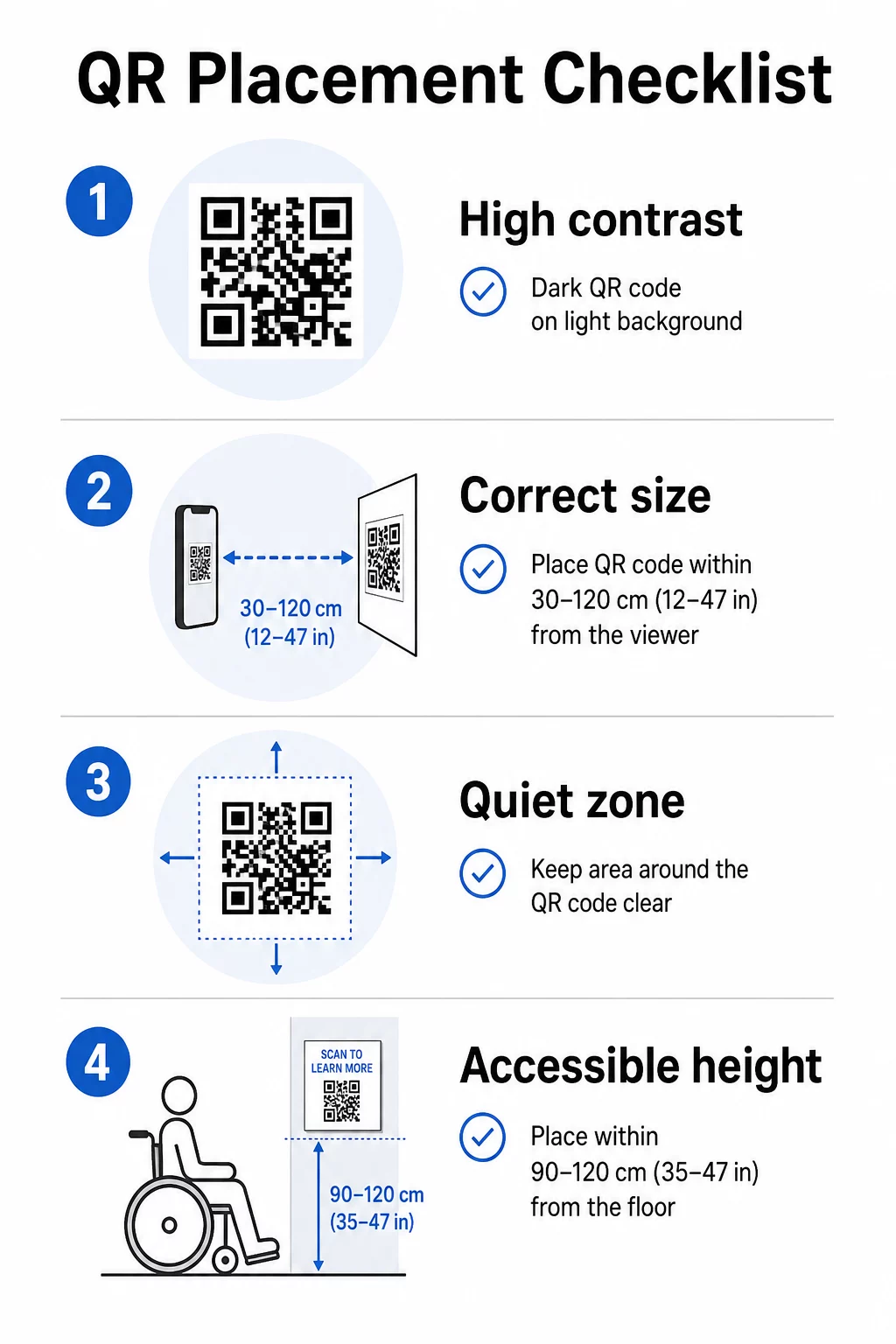
Prednji plan koda mora biti taman, a pozadina svijetla – ne obrnuto. Inverzni kodovi (svijetli uzorak na tamnoj pozadini) ne funkcioniraju na značajnom dijelu kamera pametnih telefona. Za kodove prilagođenih boja, ciljajte na omjer kontrasta od najmanje 3:1 između modula koda i pozadinske površine. Detaljan pregled pravila kontrasta dostupan je u vodič za najbolje prakse kontrasta boja QR koda.
Gradijenti i sjene uvode srednje tonove koji zbunjuju skenere. Ako želite stilizirani kod koji odgovara paleti instalacije, koristite jednobojne boje i temeljito testirajte.
Veličina i udaljenost skeniranja
Pouzdano pravilo: kod bi trebao biti otprilike jedne desetine veličine očekivane udaljenosti skeniranja. Kod namijenjen skeniranju s duljine ruke (oko 25 cm) mora biti najmanje 2,5 cm kvadratni. Za signalizaciju instalacije gledanu s veće udaljenosti, skalirajte u skladu s tim. Apsolutni minimum za skeniranje iz blizine je 2 × 2 cm (približno 0,8 × 0,8 inča). Više detalja o dimenzioniranju dostupno je u Vodič za postavljanje QR koda.
Tihe zone
Svaki QR kod zahtijeva jasan rub – nazvan tiha zona – od najmanje četiri modula sa svih strana. Nikakav tekst, uzorci ili dekorativni elementi ne smiju zadirati u ovaj prostor. Ako ugrađujete kod u površinu s uzorkom ili rub umjetničkog djela, ovo je ograničenje koje najvjerojatnije uzrokuje neuspjehe skeniranja.
Fizička pristupačnost
Visina i lokacija određuju tko zapravo može koristiti kod. Postavljanje bi trebalo biti dohvatljivo posjetiteljima u invalidskim kolicima ili onima s ograničenim rastom – otprilike 0,75 do 1,2 metra od poda za udoban pristup. Izbjegavajte postavljanje kodova na zakrivljene površine, reflektirajuće staklo ili materijale koji stvaraju odsjaj pod galerijskom rasvjetom.
Tekst oznake
Oznaka pored koda trebala bi jasno objasniti što će posjetitelj pronaći nakon skeniranja i kako skenirati. Nisu svi posjetitelji upoznati s postupkom, a čak i iskusni skeneri imaju koristi od saznanja hoće li vidjeti trominutni videozapis ili esej iz kataloga na 12 stranica. Jednostavan jezik, kratke rečenice i odgovarajuća veličina fonta doprinose upotrebljivosti. Neka oznake budu sažete – posjetitelji prelijeću tekst, a najvažnije informacije trebale bi se pojaviti prve.
Održavajte sadržaj izložbe ažurnim bez ponovnog tiskanja Umjetničke galerije mogu koristiti Dinamični QR kod generator za ažuriranje biografija umjetnika, zamjenu audio vodiča ili dodavanje novog sadržaja čak i nakon otvaranja izložbe – bez dodirivanja fizičkih natpisa.
Testirajte prije instalacije
Ispišite kod u konačnoj veličini i skenirajte ga s najmanje dva uređaja – iPhoneom i Android telefonom – pod uvjetima osvjetljenja koje će instalacija stvarno koristiti. Osvjetljenje galerije često je toplo i usmjereno, što može utjecati na kontrast drugačije od standardnog uredskog svjetla. Mat završne obrade smanjuju odsjaj i općenito su bolje od sjajnih površina za pouzdano skeniranje. Više smjernica za testiranje nalazi se u vodič za najbolje prakse čitljivosti QR kodova.
Korištenje dinamičkih QR kodova za izložbe koje se razvijaju
Statički QR kod kodira fiksno odredište. Jednom isprintan, jedini način da promijenite na što pokazuje je ponovno ga isprintati. Dinamički QR kodovi rade drugačije: sam kod pokazuje na kratko preusmjeravanje, a odredište preusmjeravanja možete promijeniti u bilo kojem trenutku s nadzorne ploče.
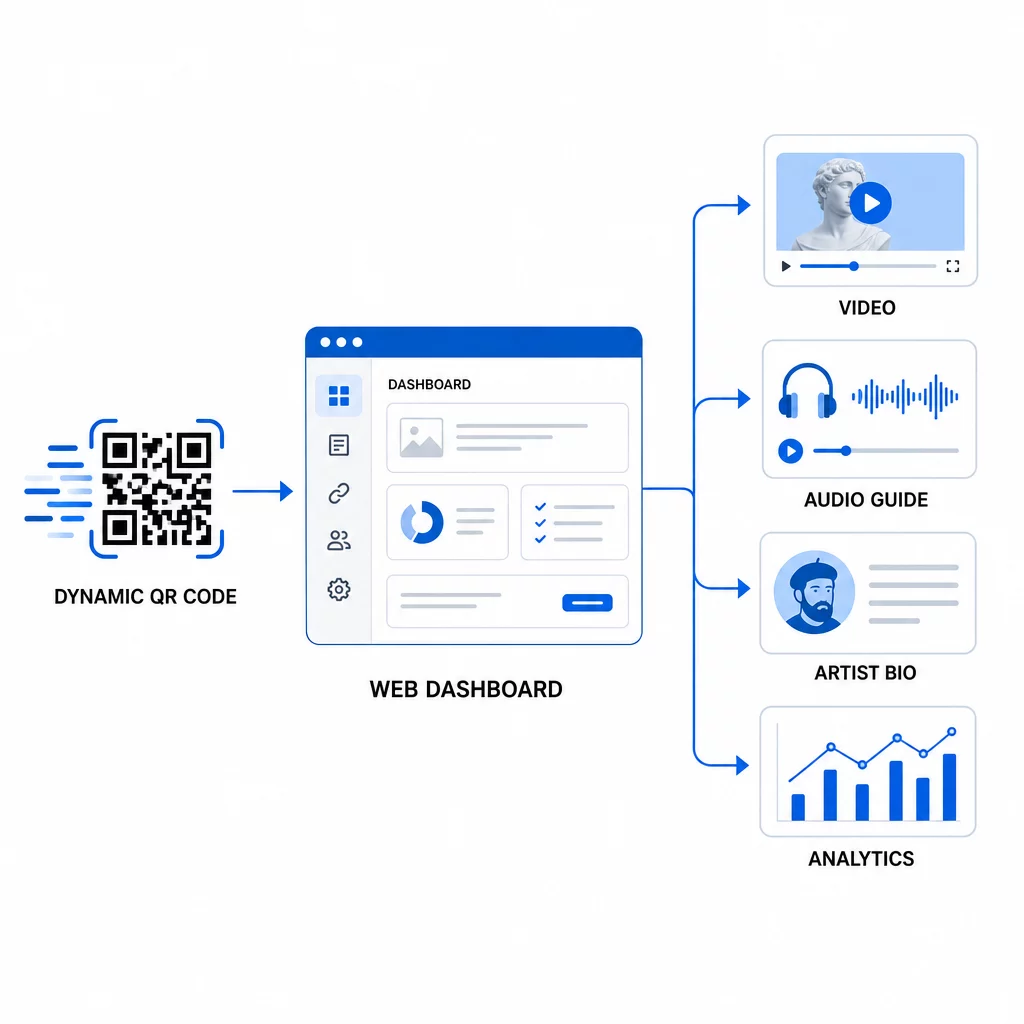
Za umjetničke instalacije, ova je razlika značajna:
- Izložba koja traje nekoliko mjeseci može mijenjati svoj povezani sadržaj kako se izložba razvija – dodavanjem novih komentara umjetnika, zamjenom kratkog promotivnog videa za cijeli dokumentarac ili ažuriranjem detalja o podrijetlu kako se istraživanje razvija
- Privremene instalacije mogu ponovno koristiti isti fizički kod za više događaja jednostavnim ažuriranjem odredišta
- Analitika ostaje vezana za isti kod, pružajući kontinuirani zapis o izvedbi umjesto fragmentiranih podataka kroz ponovna tiskanja
Smithsonian je koristio ovaj pristup za učinkovito upravljanje pristupom velikim digitalnim zbirkama, smanjujući i troškove i ekološki otpad od ponovno tiskanih materijala. Za kustose koji upravljaju izložbama na više lokacija ili putujućim izložbama, mogućnost da postave virtualnu umjetničku turu s QR kodovima i centralno je ažuriraju značajna je operativna prednost.
Često postavljana pitanja
Dizajnirajte kod koristeći boje iz palete umjetničkog djela, ali zadržite tamnu prednju stranu na svijetloj pozadini i ciljajte na omjer kontrasta od najmanje 3:1. Održavajte tihu zonu čistom sa svih strana i testirajte ispisnu verziju s više uređaja prije instalacije. Više razine ispravljanja pogrešaka (Q ili H) omogućuju više vizualne prilagodbe – uključujući ugrađene logotipe – uz očuvanje pouzdanosti skeniranja.
Najefikasniji tipovi sadržaja su intervjui s umjetnicima ili video izjave, audio vodiči, prošireni kataloški eseji ili dokumenti o provenijenciji, slike procesa i obrasci za povratne informacije posjetitelja. Prilagodite format publici i djelu: video odgovara djelima koja su bogata procesom ili su bazirana na izvedbi, dok audio dobro funkcionira uz djela kod kojih vizualno iskustvo treba ostati neprekinuto.
Dinamički QR kodovi s ugrađenom analitikom bilježe agregirane podatke – ukupna skeniranja, jedinstvena skeniranja, vrijeme skeniranja, vrsta uređaja i geografska lokacija – bez prikupljanja osobnih podataka od pojedinačnih posjetitelja. Platforme poput Pagelootovog generatora dinamičkih QR kodova pružaju ove podatke u prikazu nadzorne ploče, dajući kustosima korisne uvide uz poštivanje privatnosti posjetitelja.