Ako pridáte bohatý digitálny kontext k fyzickému umeleckému dielu bez preplnenia steny galérie alebo narušenia kúzla diela? Toto napätie – medzi informáciami a ponorením – je presne to, čo sú QR kódy v umeleckých inštaláciách navrhnuté riešiť. Táto príručka pokrýva príklady z reálneho sveta, princípy dizajnu a praktické kroky pre kurátorov a umelcov, ktorí chcú do svojich výstav zabudovať skenovateľné digitálne vrstvy.
Prípadové štúdie: Ako múzeá a umelci používajú QR kódy
Umelecká inštalácia QR kódu Mehendi
Tento dočasný projekt spojil tradíciu henovej maľby s praktickosťou QR kódov. Návštevníci mohli skenovať dizajny na báze heny, aby dokončili digitálne transakcie alebo darovali. Pretože hena prirodzene bledne, inštalácia sa stala meditáciou o pominuteľnosti a zároveň demonštrovala, ako môžu QR kódy spájať kultúrne tradície s modernými digitálnymi interakciami.
Priestorová integrácia QR kódov v zbierke Pinault
V zbierke Pinault v Rennes vo Francúzsku kurátori vložili QR kódy do podláh múzea a prechodných priestorov namiesto preplňovania stien galérie textovými panelmi. Pomocou platformy MySmartJourney kódy poskytovali gamifikovaný obsah – tutoriály pop-artu a vizuálne hádanky – počas momentov, ktoré by inak boli nečinné, ako napríklad čakanie v rade. Výsledkom bolo zvýšenie angažovanosti bez narušenia vizuálneho toku galérie, čo je model hodný štúdia pre každú inštitúciu, ktorá vyvažuje poskytovanie informácií s estetickou integritou.
Rozšírený zážitok návštevníkov múzea Erarta
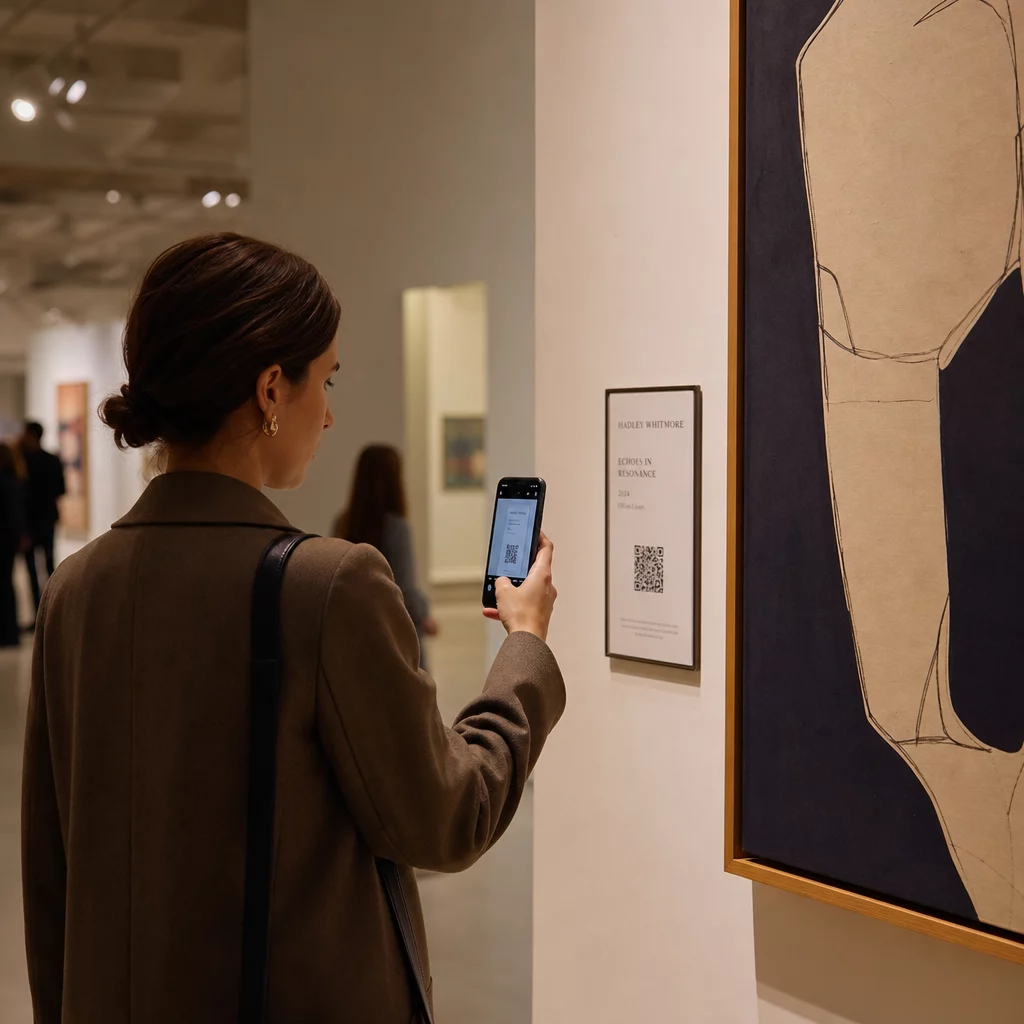
Múzeum Erarta použilo QR kódy na rozšírenie návštevy za hranice samotnej galérie. Kódy umiestnené v blízkosti umeleckých diel umožnili hosťom preskúmať podrobné informácie o výstave, dozvedieť sa o umelcoch a zakúpiť si vysokokvalitné reprodukcie. Namiesto toho, aby každý návštevník prechádzal rovnakým lineárnym zážitkom, tento prístup dal ľuďom slobodu ísť tak hlboko, ako ich zvedavosť zavedie – personalizovanejšia interakcia, než akú môže ponúknuť akýkoľvek pevný štítok na stene.
QR kódy inšpirované Bauhausom od umeleckého kolektívu Elkoy
Umelecký kolektív Elkoy prehodnotil QR kódy optikou princípov Bauhausu. Začlenením geometrických tvarov, výrazných farieb a minimalistického dizajnu premenili štandardné čiernobiele kódy na kompozičné prvky. Každý kód odkazoval na eseje vysvetľujúce vzťah medzi historickými dizajnovými hnutiami a modernou technológiou. Ich práca je jasnou demonštráciou toho, že QR kód môže byť súčasťou umeleckého diela, a nie jeho anotáciou.
Poučenia z raného prijatia v Brooklynskom múzeu
Brooklynské múzeum bolo jedným z prvých, ktoré prijalo QR kódy, ale ich počiatočné snahy narazili na skutočné problémy – návštevníci potrebovali na skenovanie aplikácie tretích strán, ktoré väčšina ľudí nemala. Angažovanosť prudko vzrástla až po tom, čo Apple a Android integrovali čítačky QR kódov priamo do fotoaparátov smartfónov. Poučenie je praktické: aj dobre premyslený nápad môže zlyhať bez správnej infraštruktúry. Načasovanie a technická dostupnosť sú rovnako dôležité ako kreatívna vízia.
Výhody QR kódov v umeleckých inštaláciách
Hlbšia angažovanosť návštevníkov
QR kódy menia návštevníkov z pasívnych pozorovateľov na aktívnych účastníkov. Namiesto absorbovania toho, čo sa zmestí na štítok na stene, môže návštevník naskenovať a získať prístup k rozhovorom s umelcami, videám zo zákulisia, zvukovým sprievodcom alebo prekrytiam rozšírenej reality, ktoré oživia statické dielo. Múzeá môžu tiež použiť kódy na spustenie digitálnych hľadaní pokladov alebo kvízov, ktoré sú obzvlášť účinné pre rodiny a mladšie publikum.
QR kódy pre múzeá tiež otvárajú zmysluplné zlepšenia prístupnosti. Viacjazyčné zvukové sprievodcovia, skryté titulky a video s opakovaným prehrávaním pre návštevníkov s poruchami učenia sa stávajú možnými jediným skenovaním na vlastnom zariadení návštevníka. Výskum potvrdzuje, že návštevníci s poruchami učenia si obzvlášť cenia možnosť pozerať alebo počúvať obsah viackrát vlastným tempom.
Jedna praktická výhrada: nie každý návštevník nosí smartfón – školské skupiny sú často uvádzaným príkladom. QR kódy by sa mali považovať za vrstvu vylepšenia, nie za jedinú cestu k informáciám. Vždy poskytnite alternatívny spôsob prístupu k rovnakému obsahu, či už je to blízka URL adresa, tlačený leták alebo možnosť s pomocou personálu.
Pridajte digitálnu vrstvu k vašej ďalšej výstave Ten Dynamický QR kód generátor umožňuje kedykoľvek aktualizovať prepojený obsah – bez potreby opätovnej tlače – takže vaše kódy zostanú aktuálne počas celej doby trvania inštalácie.
Flexibilita dizajnu a umelecká integrácia
QR kódy už nemusia vyzerať ako QR kódy v tradičnom zmysle. Farby, tvary, vložené logá a vlastné vzory môžu byť všetky aplikované pri zachovaní skenovateľnosti, za predpokladu, že sa rešpektuje kontrast a tiché zóny (viac o tom nižšie). Kódy inšpirované Bauhausom od Elkoy Collective a kódy vložené do podlahy od Pinault Collection ukazujú, že premyslené umiestnenie a vizuálny dizajn môžu spôsobiť, že kód pôsobí ako prirodzená súčasť inštalácie, a nie ako niečo na ňu naroubované.
Užitočný riadiaci princíp z kurátorskej praxe: “QR kód by mal byť navrhnutý tak, aby bol diskrétny a elegantný, dopĺňal exponát, namiesto toho, aby od neho odvádzal pozornosť.” Tento štandard platí bez ohľadu na to, či sa kód objaví na malej etikete vedľa obrazu alebo je integrovaný priamo do povrchu sochárskeho diela.
Analytika a prehľady návštevníkov v reálnom čase
Jedným z najpraktickejších argumentov pre QR kódy na výstavách sú dáta, ktoré generujú. Každé skenovanie je signálom: ktoré diela priťahujú trvalý záujem, kedy dochádza k vrcholu angažovanosti, v ktorých zónach galérie sa návštevníci zdržiavajú a ktoré formáty obsahu – video, audio, text – sú najviac konzumované.
| Dátový bod | Poskytnutý prehľad |
|---|---|
| SKENY SPOLU | Merá celkový záujem o konkrétne dielo alebo zónu |
| Unikátne skeny | Sleduje individuálnu angažovanosť návštevníkov |
| Čas skenovania | Identifikuje špičkové hodiny a vzorce toku návštevníkov |
| Operačný systém | Ponúka technické poznatky pre mobilnú optimalizáciu |
| Miesto skenovania | Hodnotí účinnosť umiestnenia QR kódu |
Dynamické QR kódy robia tieto dáta ešte viac použiteľnými. Pretože cieľová URL adresa môže byť zmenená bez opätovnej tlače fyzického kódu, kurátor môže reagovať na údaje zo skenovania v reálnom čase – vymeniť video, ktoré nerezonuje, za také, ktoré áno, alebo pridať obsah pre prístupnosť počas trvania výstavy na základe spätnej väzby od návštevníkov. Pre úplnejší obraz o tom, ako AR QR kódy transformujú rozprávanie príbehov v múzeách, vrstvy rozšírenej reality môžu byť pridané alebo aktualizované rovnakým spôsobom.
Čo prepojiť: Obsah, ktorý pridáva hodnotu
Obsah za kódom je rovnako dôležitý ako samotný kód. Múzeá a umelci zistili, že nasledujúce typy obsahu sú neustále užitočné:
- Vyhlásenia a rozhovory s umelcami – počuť umelca opísať svoj proces vlastnými slovami vytvára spojenie, ktoré žiadny text na stene nedokáže replikovať; a Kód QR YouTube to zvládne čisto
- Audioprievodcovia – rozprávané popisy alebo zvukové scenérie prepojené prostredníctvom MP3 QR kód fungujú obzvlášť dobre pre diela, kde by vizuálny zážitok mal zostať nerušený
- Rozšírený obsah katalógu – podrobná proveniencia, vedecké eseje alebo katalógy výstav dodané ako Kód QR vo formáte PDF
- Galérie obrázkov – spracovať fotografie, pohľady na inštalácie alebo porovnávacie diela prístupné prostredníctvom QR kódu galérie obrázkov
- Virtuálne prehliadky – pre návštevníkov, ktorí chcú preskúmať súvisiace diela alebo sesterské inštitúcie, QR kód odkazujúci na virtuálnu prehliadku rozširuje zážitok za fyzický priestor
- Formuláre spätnej väzby pre návštevníkov – umiestnené pri východoch alebo v blízkosti kľúčových diel na zachytenie kvalitatívnych odpovedí
Udržujte prepojený cieľ jednoduchý. Kratšie URL adresy sa kódujú ako menej husté vzory, ktoré sa skenujú rýchlejšie a spoľahlivejšie. Dynamické QR kódy to riešia systematicky tým, že kódujú iba krátky presmerovací odkaz bez ohľadu na to, aký zložitý sa cieľ stane.
Dizajn a umiestnenie: Ako urobiť kódy skenovateľnými a nenápadnými
Správne vizuálne a fyzické prevedenie je miesto, kde mnohé inštalácie zlyhávajú. Nižšie uvedené princípy sú odvodené z pokynov pre prístupnosť a výskumu čitateľnosti QR kódov.
Kontrast a farba
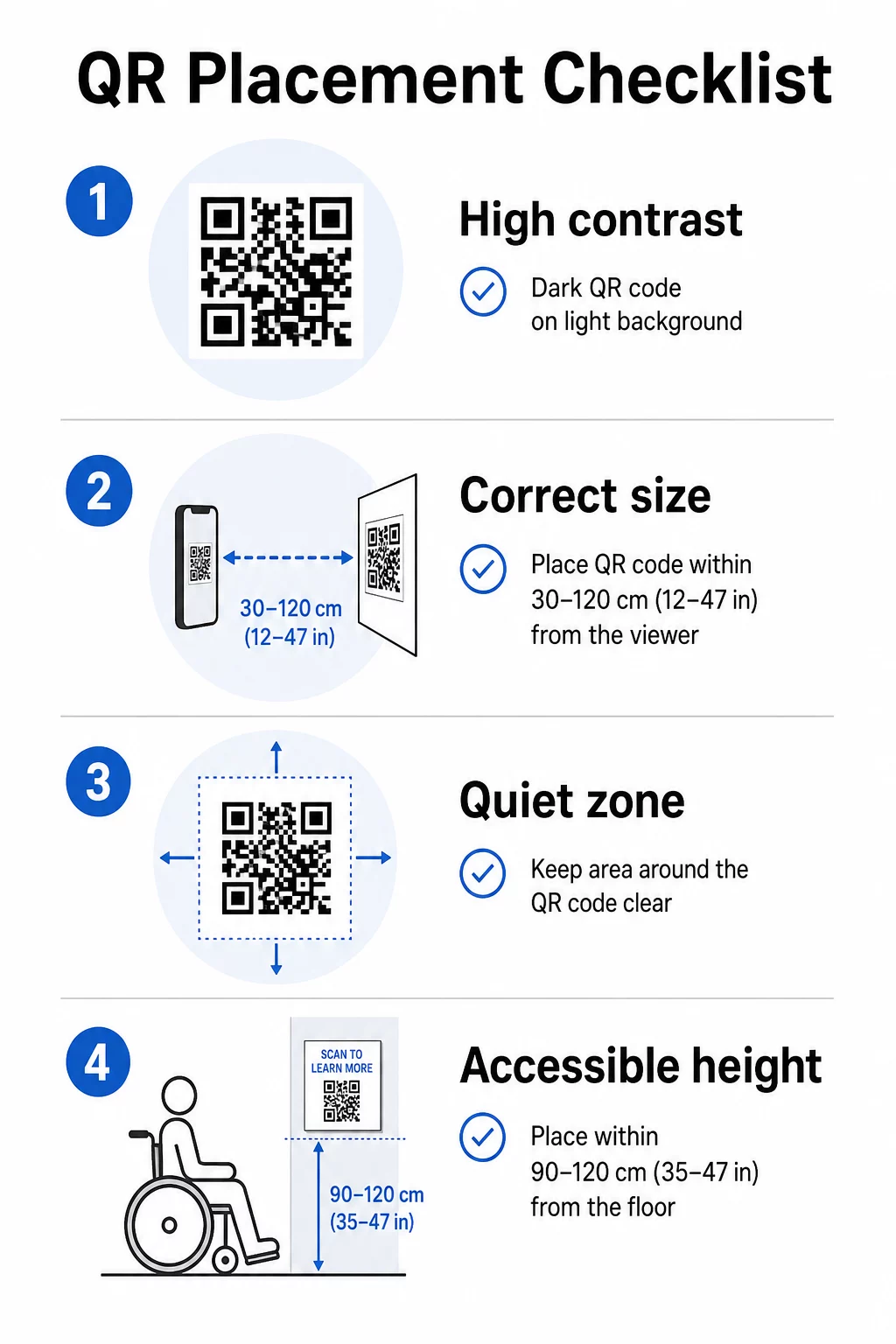
Popredie kódu musí byť tmavé a pozadie svetlé – nie naopak. Invertované kódy (svetlé vzory na tmavom pozadí) zlyhávajú na značnej časti fotoaparátov smartfónov. Pre vlastné farebné kódy cieľte na kontrastný pomer minimálne 3:1 medzi modulmi kódu a povrchom pozadia. Komplexný rozpis pravidiel kontrastu je k dispozícii v príručku osvedčených postupov pre farebný kontrast QR kódov.
Prechody a tiene zavádzajú stredné tóny, ktoré mätú skenery. Ak chcete štylizovaný kód, ktorý zapadá do palety inštalácie, použite plné farby a dôkladne otestujte.
Veľkosť a vzdialenosť skenovania
Spoľahlivé pravidlo: kód by mal byť približne desatinou očakávanej skenovacej vzdialenosti. Kód určený na skenovanie z dĺžky paže (asi 25 cm) musí mať minimálne 2,5 cm štvorcový. Pre inštalačné značenie, ktoré sa pozerá z väčšej vzdialenosti, prispôsobte mierku. Absolútne minimum pre skenovanie zblízka je 2 × 2 cm (približne 0,8 × 0,8 palca). Viac podrobností o veľkosti je k dispozícii v Sprievodca umiestnením QR kódu.
Tiché zóny
Každý QR kód vyžaduje jasný okraj – nazývaný tichá zóna – s minimálne štyrmi modulmi na všetkých stranách. Žiadny text, vzory ani dekoratívne prvky by nemali zasahovať do tohto priestoru. Ak vkladáte kód do vzorovaného povrchu alebo okraja umeleckého diela, toto je obmedzenie, ktoré s najväčšou pravdepodobnosťou spôsobí zlyhanie skenovania.
Fyzická prístupnosť
Výška a umiestnenie určujú, kto môže kód skutočne použiť. Umiestnenie by malo byť dosiahnuteľné pre návštevníkov na invalidných vozíkoch alebo pre osoby s obmedzeným rastom – približne 0,75 až 1,2 metra od podlahy pre pohodlný prístup. Vyhnite sa umiestňovaniu kódov na zakrivené povrchy, reflexné sklo alebo materiály, ktoré vytvárajú odlesky pod osvetlením galérie.
Popis štítku
Štítok v blízkosti kódu by mal jasne vysvetliť, čo návštevník nájde po naskenovaní a ako ho naskenovať. Nie každý návštevník je oboznámený s týmto procesom a dokonca aj skúsení skeneri ocenia, ak vedia, či sa chystajú pozrieť trojminútové video alebo 12-stranovú katalógovú esej. Jednoduchý jazyk, krátke vety a primeraná veľkosť písma prispievajú k použiteľnosti. Udržujte štítky stručné – návštevníci ich len prebehnú očami a najdôležitejšie informácie by sa mali objaviť ako prvé.
Udržujte obsah výstavy aktuálny bez predtlače Umelecké galérie môžu použiť Dynamický QR kód generátor na aktualizáciu životopisov umelcov, výmenu zvukových sprievodcov alebo pridanie nového obsahu aj po otvorení výstavy – bez dotyku fyzického označenia.
Otestujte pred inštaláciou
Vytlačte kód v konečnej veľkosti a naskenujte ho aspoň dvoma zariadeniami – iPhonom a telefónom s Androidom – za svetelných podmienok, ktoré bude inštalácia skutočne používať. Osvetlenie galérie je často teplé a smerové, čo môže ovplyvniť kontrast inak ako štandardné kancelárske svetlo. Matné povrchy znižujú odlesky a vo všeobecnosti prekonávajú lesklé povrchy pre spoľahlivé skenovanie. Viac pokynov k testovaniu nájdete v sprievodca osvedčenými postupmi čitateľnosti QR kódov.
Používanie dynamických QR kódov pre vyvíjajúce sa výstavy
Statický QR kód kóduje pevné miesto určenia. Po vytlačení je jediný spôsob, ako zmeniť, kam smeruje, opätovná tlač. Dynamické QR kódy fungujú inak: samotný kód smeruje na krátke presmerovanie a cieľ presmerovania môžete kedykoľvek zmeniť z ovládacieho panela.
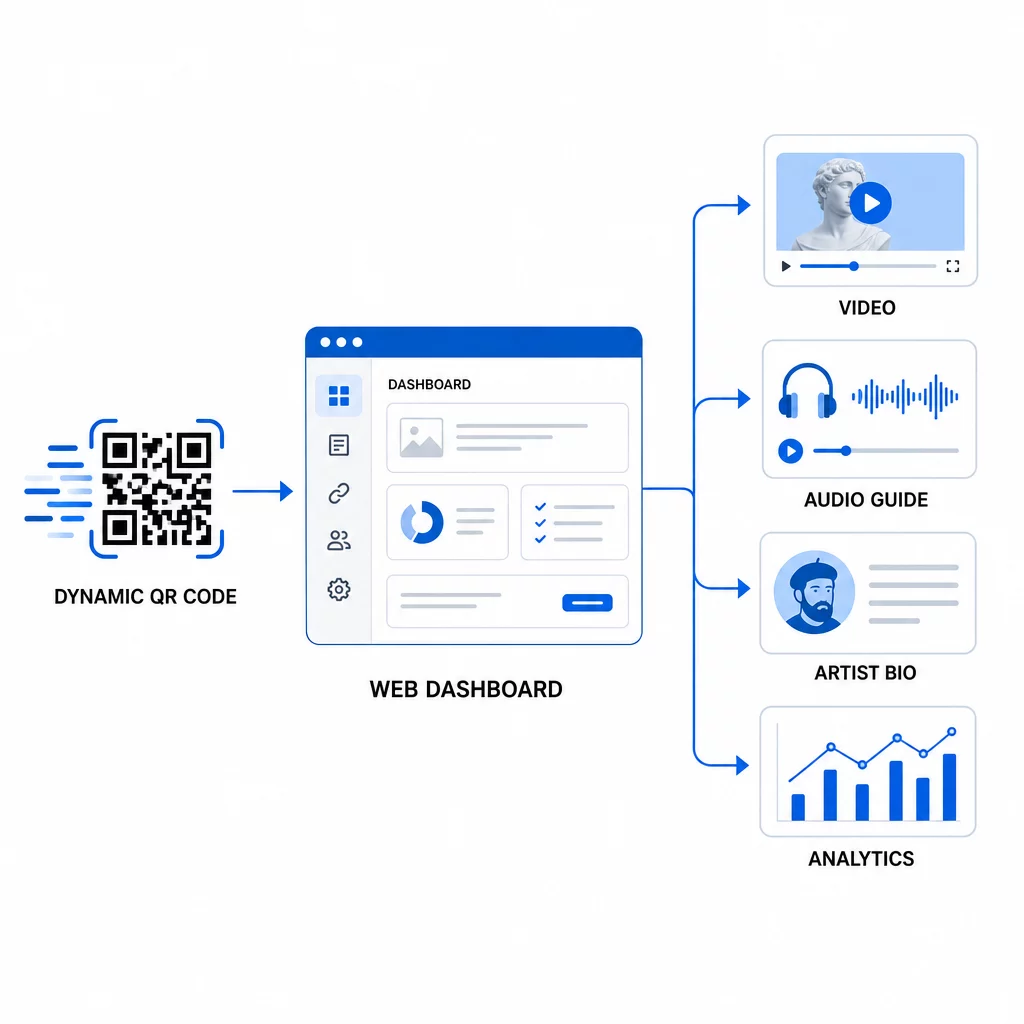
Pre umelecké inštalácie je tento rozdiel významný:
- Výstava, ktorá trvá niekoľko mesiacov, môže meniť svoj prepojený obsah s vývojom prehliadky – pridávaním nových komentárov umelcov, výmenou upútavkového videa za plnohodnotný dokument alebo aktualizáciou podrobností o pôvode s rozvojom výskumu
- Dočasné inštalácie môžu opätovne použiť rovnaký fyzický kód pre viacero udalostí jednoduchou aktualizáciou cieľa
- Analytika zostáva viazaná na rovnaký kód, čo poskytuje nepretržitý záznam výkonu namiesto fragmentovaných údajov z viacerých predtlačí
Smithsonian použil tento prístup na efektívne riadenie prístupu k rozsiahlym digitálnym zbierkam, čím znížil náklady aj environmentálny odpad z predtlačených materiálov. Pre kurátorov spravujúcich výstavy na viacerých miestach alebo putovné výstavy je schopnosť nastaviť virtuálnu umeleckú prehliadku s QR kódmi a centrálne ju aktualizovať je významnou prevádzkovou výhodou.
Často kladené otázky
Navrhnite kód s použitím farieb z palety umeleckého diela, ale zachovajte tmavé popredie na svetlom pozadí a cieľte na kontrastný pomer aspoň 3:1. Udržujte tichú zónu čistú zo všetkých strán a otestujte vytlačenú verziu s viacerými zariadeniami pred inštaláciou. Vyššie úrovne korekcie chýb (Q alebo H) umožňujú väčšiu vizuálnu prispôsobiteľnosť – vrátane vložených log – pri zachovaní spoľahlivosti skenovania.
Najefektívnejšie typy obsahu sú rozhovory s umelcami alebo video vyhlásenia, zvukové sprievodcovia, rozšírené katalógové eseje alebo dokumenty o pôvode, obrázky procesu a formuláre spätnej väzby od návštevníkov. Prispôsobte formát publiku a dielu: video sa hodí k dielam náročným na proces alebo k performance, zatiaľ čo zvuk funguje dobre pri dielach, kde by vizuálny zážitok nemal byť prerušený.
Dynamické QR kódy so vstavanou analýzou zaznamenávajú agregované údaje – celkový počet skenov, unikátne skeny, čas skenovania, typ zariadenia a geografickú polohu – bez zachytávania osobných informácií od jednotlivých návštevníkov. Platformy ako generátor dynamických QR kódov Pageloot poskytujú tieto údaje v zobrazení palubnej dosky, čo kurátorom poskytuje použiteľné poznatky pri rešpektovaní súkromia návštevníkov.