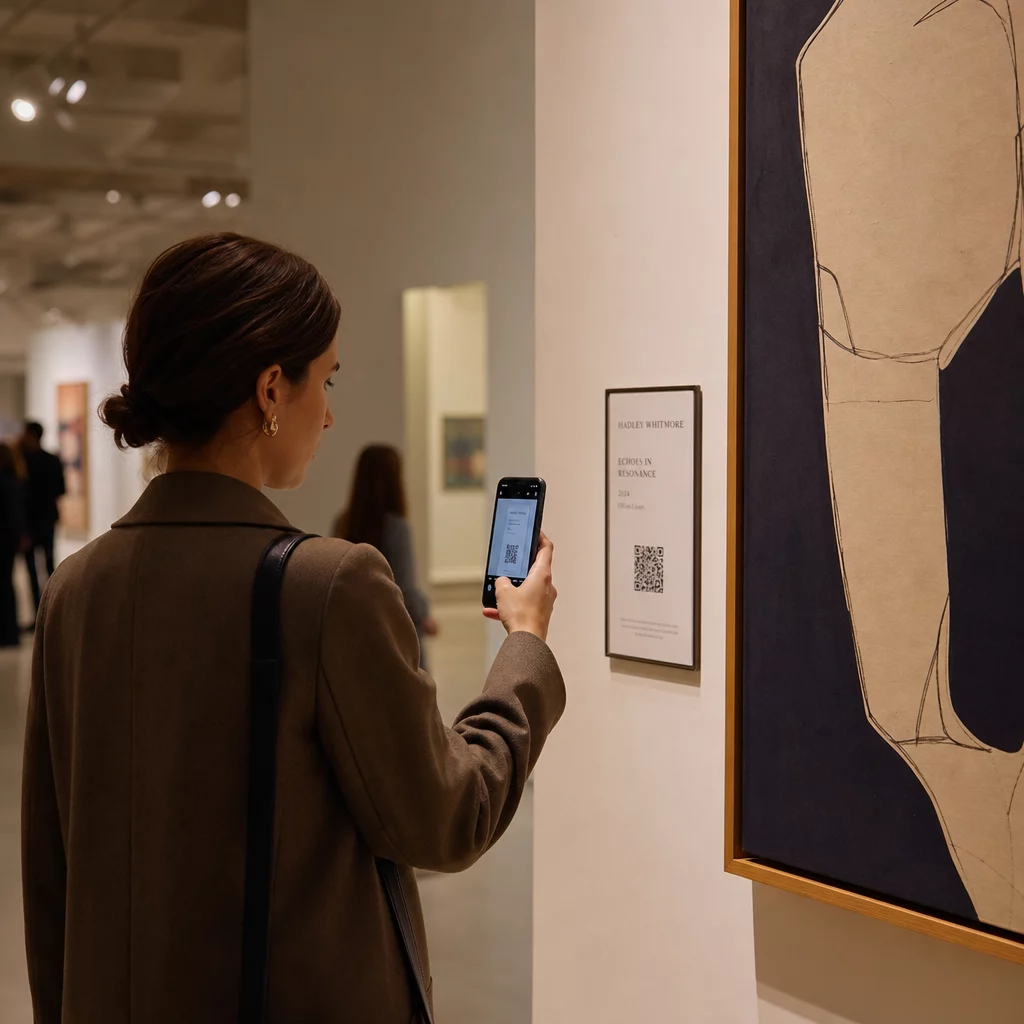
Hvordan legger du til rik digital kontekst til et fysisk kunstverk uten å overfylle galleriveggen eller bryte magien i verket? Den spenningen – mellom informasjon og fordypning – er nøyaktig hva QR-koder i kunstinstallasjoner er designet for å løse. Denne guiden dekker eksempler fra virkeligheten, designprinsipper og praktiske trinn for kuratorer og kunstnere som ønsker å bygge skannbare digitale lag inn i utstillingene sine.
Casestudier: Hvordan museer og kunstnere bruker QR-koder
Mehendi QR-kode kunstinstallasjon
Dette midlertidige prosjektet smeltet sammen tradisjonen med henna-kunst med det praktiske ved QR-koder. Besøkende kunne skanne de hennapregede designene for å fullføre digitale transaksjoner eller gi donasjoner. Fordi henna naturlig falmer, ble installasjonen en meditasjon over forgjengelighet, samtidig som den demonstrerte hvordan QR-koder kan koble kulturelle tradisjoner til moderne digitale interaksjoner.
Romlig QR-kodeintegrasjon ved Pinault-samlingen
Ved Pinault-samlingen i Rennes, Frankrike, integrerte kuratorer QR-koder i museumsgulv og overgangsrom i stedet for å overfylle galleriveggene med tekstpaneler. Ved å bruke MySmartJourney-plattformen leverte kodene gamifisert innhold – pop-art-veiledninger og visuelle gåter – i øyeblikk som ellers ville vært inaktive, som køtider. Resultatet var økt engasjement uten å forstyrre galleriets visuelle flyt, en modell verdt å studere for enhver institusjon som balanserer informasjonsformidling med estetisk integritet.
Erarta Museums utvidede besøksopplevelse
Erarta Museum brukte QR-koder for å utvide besøket utover selve galleriet. Koder plassert nær kunstverk gjorde det mulig for gjester å utforske detaljert utstillingsinformasjon, lære om kunstnere og kjøpe reproduksjoner av høy kvalitet. I stedet for å tvinge hver besøkende gjennom den samme lineære opplevelsen, ga denne tilnærmingen folk friheten til å gå så dypt som nysgjerrigheten deres ville ta dem – en mer personlig interaksjon enn noen fast veggmerking kan tilby.
Elkoy Artist Collectives Bauhaus-inspirerte QR-koder
Elkoy Artist Collective forestilte seg QR-koder på nytt gjennom Bauhaus-prinsippene. Ved å inkorporere geometriske former, dristige farger og minimalistisk design, forvandlet de standard svart-hvitt-koder til komposisjonelle elementer. Hver kode lenket til essays som forklarte forholdet mellom historiske designbevegelser og moderne teknologi. Arbeidet deres er en klar demonstrasjon av at en QR-kode kan være en del av kunstverket snarere enn en merknad på det.
Brooklyn Museums tidlige adopsjonslærdommer
Brooklyn Museum var tidlig ute med å ta i bruk QR-koder, men deres første forsøk møtte reell friksjon – besøkende trengte tredjepartsapper for å skanne, noe de fleste ikke hadde. Engasjementet økte først etter at Apple og Android integrerte QR-lesere direkte i smarttelefonkameraer. Lærdommen er praktisk: selv en godt uttenkt idé kan mislykkes uten riktig infrastruktur på plass. Timing og teknisk tilgjengelighet betyr like mye som kreativ visjon.
Fordeler med QR-koder i kunstinstallasjoner
Dypere besøksengasjement
QR-koder flytter besøkende fra passive observatører til aktive deltakere. I stedet for å absorbere det som passer på en veggmerking, kan en besøkende skanne og få tilgang til kunstnerintervjuer, bak-kulissene-video, lydguider eller utvidet virkelighet-overlegg som animerer et statisk verk. Museer kan også bruke koder til å utløse digitale skattejakter eller quizer, som er spesielt effektive for familier og yngre publikum.
QR-koder for museer også åpne opp for meningsfulle tilgjengelighetsforbedringer. Flerspråklige lydguider, teksting og video med gjentatt avspilling for besøkende med lærevansker blir alt mulig gjennom en enkelt skanning på den besøkendes egen enhet. Forskning bekrefter at besøkende med lærevansker spesielt verdsetter muligheten til å se eller lytte til innhold flere ganger i sitt eget tempo.
En praktisk forbehold: ikke alle besøkende har med seg en smarttelefon – skolegrupper er et ofte sitert eksempel. QR-koder bør behandles som et forbedringslag, ikke den eneste veien til informasjon. Gi alltid en alternativ måte å få tilgang til det samme innholdet på, enten det er en URL i nærheten, et trykt utdelingsark eller et personalassistert alternativ.
Legg til et digitalt lag i din neste utstilling De Dynamisk QR-kode generator lar deg oppdatere lenket innhold når som helst – ingen ny utskrift er nødvendig – slik at kodene dine holder seg oppdaterte gjennom hele installasjonens varighet.
Designfleksibilitet og kunstnerisk integrasjon
QR-koder trenger ikke lenger å se ut som QR-koder i tradisjonell forstand. Farger, former, innebygde logoer og tilpassede mønstre kan alle brukes samtidig som skannbarheten bevares, forutsatt at kontrast og stille soner respekteres (mer om det nedenfor). Elkoy Collective sine Bauhaus-inspirerte koder og Pinault Collection sine gulvinnfelte koder viser begge at gjennomtenkt plassering og visuell design kan få en kode til å føles som en naturlig del av en installasjon i stedet for å være påklistret.
Et nyttig veiledende prinsipp fra kuratorisk praksis: “QR-koden bør utformes for å være diskret og elegant, og komplementere utstillingen i stedet for å distrahere fra den.” Den standarden gjelder enten koden vises på en liten etikett ved siden av et maleri eller er integrert direkte i overflaten av et skulpturelt verk.
Analyse og sanntidsbesøksinnsikt
Et av de mest praktiske argumentene for QR-koder i utstillinger er dataene de genererer. Hver skanning er et signal: hvilke verk som vekker vedvarende interesse, når toppengasjement oppstår, hvilke gallerisoner besøkende oppholder seg i, og hvilke innholdsformater – video, lyd, tekst – som blir mest konsumert.
| Datapunkt | Innsikt gitt |
|---|---|
| TOTALT ANTALL SKANNINGER | Måler generell interesse for et spesifikt verk eller en sone |
| Unike skanninger | Sporer individuell besøksengasjement |
| Skanningstid | Identifiserer topptimer og besøksflytmønstre |
| Operativsystem | Tilbyr teknisk innsikt for mobiloptimalisering |
| Skannested | Evaluerer effektiviteten av QR-kodeplassering |
Dynamiske QR-koder gjør disse dataene enda mer handlingsrettede. Fordi destinasjons-URL-en kan endres uten å trykke den fysiske koden på nytt, kan en kurator svare på skannedata i sanntid – bytte ut en video som ikke resonnerer med en som gjør det, eller legge til tilgjengelighetsinnhold midtveis basert på besøkendes tilbakemeldinger. For et fyldigere bilde av hvordan AR QR-koder transformerer museumsfortellinger, kan utvidet virkelighet-lag legges til eller oppdateres på samme måte.
Hva du skal lenke til: Innhold som tilfører verdi
Innholdet bak koden betyr like mye som koden selv. Museer og kunstnere har funnet følgende innholdstyper konsekvent nyttige:
- Kunstneruttalelser og intervjuer – å høre en kunstner beskrive prosessen sin med egne ord skaper en forbindelse ingen veggtekst kan gjenskape; en YouTube QR-kode håndterer dette rent
- Lydguider – fortalte beskrivelser eller lydlandskap lenket via en MP3 QR-kode fungerer spesielt godt for verk der den visuelle opplevelsen bør forbli uforstyrret
- Utvidet kataloginnhold – detaljert proveniens, vitenskapelige essays eller utstillingskataloger levert som en PDF QR-kode
- Bildegallerier – behandle fotografier, installasjonsvisninger, eller sammenlignende verk tilgjengelig via en bildegalleri QR-kode
- Virtuelle turer – for besøkende som ønsker å utforske relaterte verk eller søsterinstitusjoner, en QR-kode som lenker til en virtuell omvisning utvider opplevelsen utover det fysiske rommet
- Tilbakemeldingsskjemaer for besøkende – plassert ved utgangspunkter eller nær ankerverk for å fange kvalitative svar
Hold den lenkede destinasjonen enkel. Kortere URL-er kodes som mindre tette mønstre, som skanner raskere og mer pålitelig. Dynamiske QR-koder løser dette systematisk ved å kode kun en kort omdirigeringslenke uavhengig av hvor kompleks destinasjonen blir.
Design og plassering: Gjør koder skannbare og diskrete
Å få den visuelle og fysiske utførelsen riktig er der mange installasjoner snubler. Prinsippene nedenfor er hentet fra veiledning om tilgjengelighet og forskning på lesbarhet av QR-koder.
Kontrast og farge
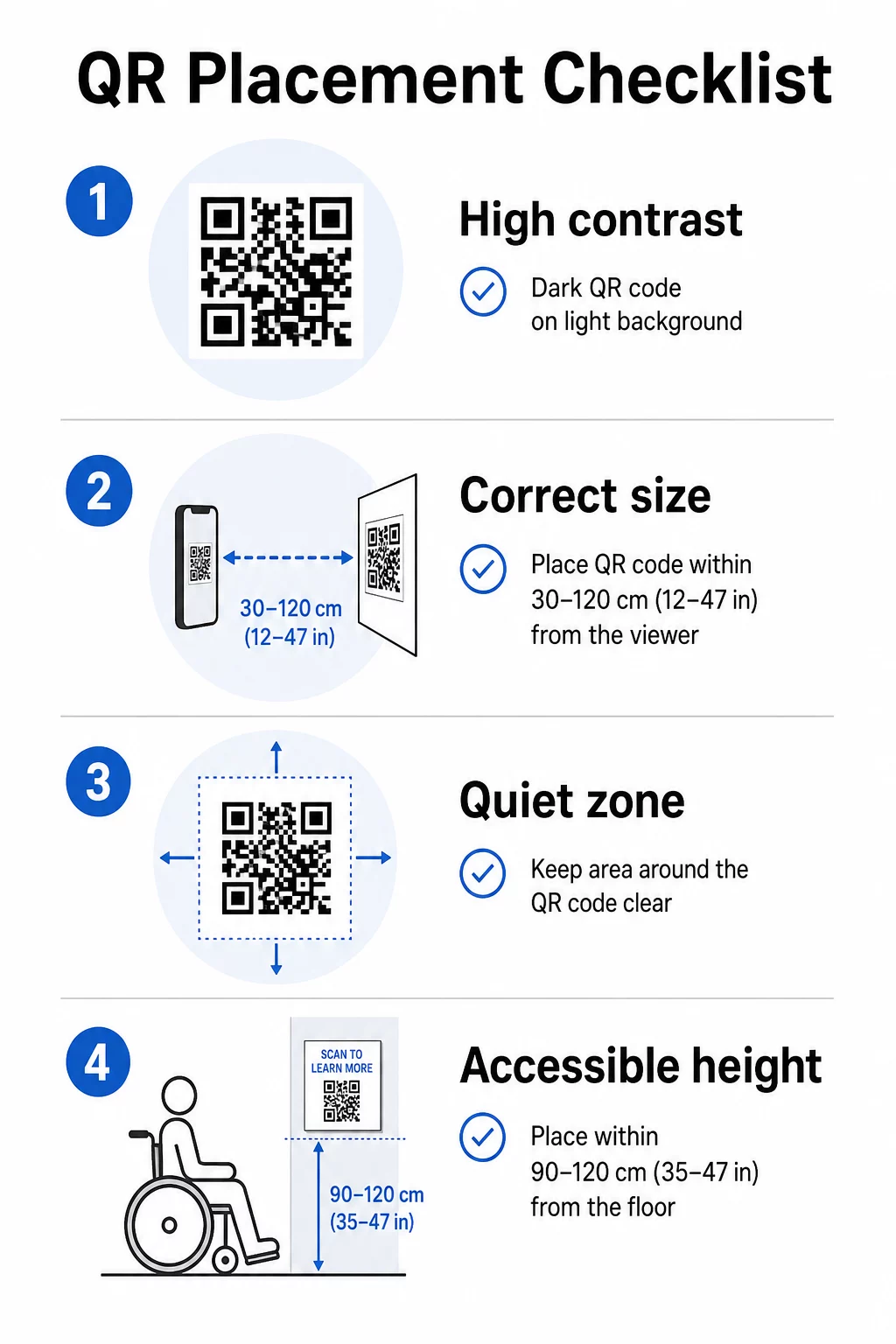
Forgrunnen av koden må være mørk og bakgrunnen lys – ikke omvendt. Inverterte koder (lyst mønster på mørk bakgrunn) feiler på en betydelig del av smarttelefonkameraer. For spesialfargede koder, sikt på minst et 3:1 kontrastforhold mellom kodemodulene og bakgrunnsflaten. En omfattende oversikt over kontrastregler er tilgjengelig i veiledningen for beste praksis for fargekontrast i QR-koder.
Graderinger og skygger introduserer mellomtoner som forvirrer skannere. Hvis du ønsker en stilisert kode som passer installasjonens palett, bruk solide farger og test grundig.
Størrelse og skanneavstand
En pålitelig regel: koden bør være omtrent en tidel av størrelsen på den forventede skanneavstanden. En kode ment å skannes fra armlengdes avstand (omtrent 10 tommer) må være minst 1 tomme kvadratisk. For installasjonsskilt sett fra lengre avstand, skaler deretter. Det absolutte minimum for nærområdeskanning er 2 × 2 cm (omtrent 0,8 × 0,8 tommer). Mer detaljer om størrelse er tilgjengelig i Veiledning for plassering av QR-kode.
Stille soner
Hver QR-kode krever en klar margin – kalt den stille sonen – på minst fire moduler på alle sider. Ingen tekst, mønstre eller dekorative elementer skal trenge inn i dette området. Hvis du bygger inn en kode i en mønstret overflate eller kanten av et kunstverk, er dette begrensningen som mest sannsynlig vil forårsake skannefeil.
Fysisk tilgjengelighet
Høyde og plassering avgjør hvem som faktisk kan bruke koden. Plasseringen bør være innen rekkevidde for besøkende som bruker rullestol eller de med begrenset vekst – omtrent 2,5 til 4 fot fra gulvet for komfortabel tilgang. Unngå å plassere koder på buede overflater, reflekterende glass eller materialer som skaper gjenskinn under galleribelysning.
Etiketttekst
En etikett nær koden bør tydelig forklare hva besøkende vil finne etter skanning og hvordan man skanner den. Ikke alle besøkende er kjent med prosessen, og selv erfarne skannere drar nytte av å vite om de er i ferd med å se en tre-minutters video eller et 12-siders katalogessay. Klart språk, korte setninger og tilstrekkelig skriftstørrelse bidrar alle til brukervennlighet. Hold etikettene konsise – besøkende skumleser, og den viktigste informasjonen bør vises først.
Hold utstillingsinnholdet oppdatert uten å trykke på nytt Kunstgallerier kan bruke Dynamisk QR-kode generator til å oppdatere kunstnerbiografier, bytte ut lydguider eller legge til nytt innhold selv etter at en utstilling åpner – uten å røre den fysiske skiltingen.
Test før du installerer
Skriv ut koden i endelig størrelse og skann den med minst to enheter – en iPhone og en Android-telefon – under de lysforholdene installasjonen faktisk vil bruke. Galleribelysning er ofte varm og retningsbestemt, noe som kan påvirke kontrasten annerledes enn standard kontorbelysning. Matte overflater reduserer gjenskinn og presterer generelt bedre enn blanke overflater for pålitelig skanning. Mer testveiledning finnes i veiledningen for beste praksis for lesbarhet av QR-koder.
Bruke dynamiske QR-koder for utstillinger i utvikling
En statisk QR-kode koder for en fast destinasjon. Når den er skrevet ut, er den eneste måten å endre hvor den peker på å skrive den ut på nytt. Dynamiske QR-koder fungerer annerledes: selve koden peker til en kort omdirigering, og du kan endre omdirigeringsdestinasjonen når som helst fra et dashbord.
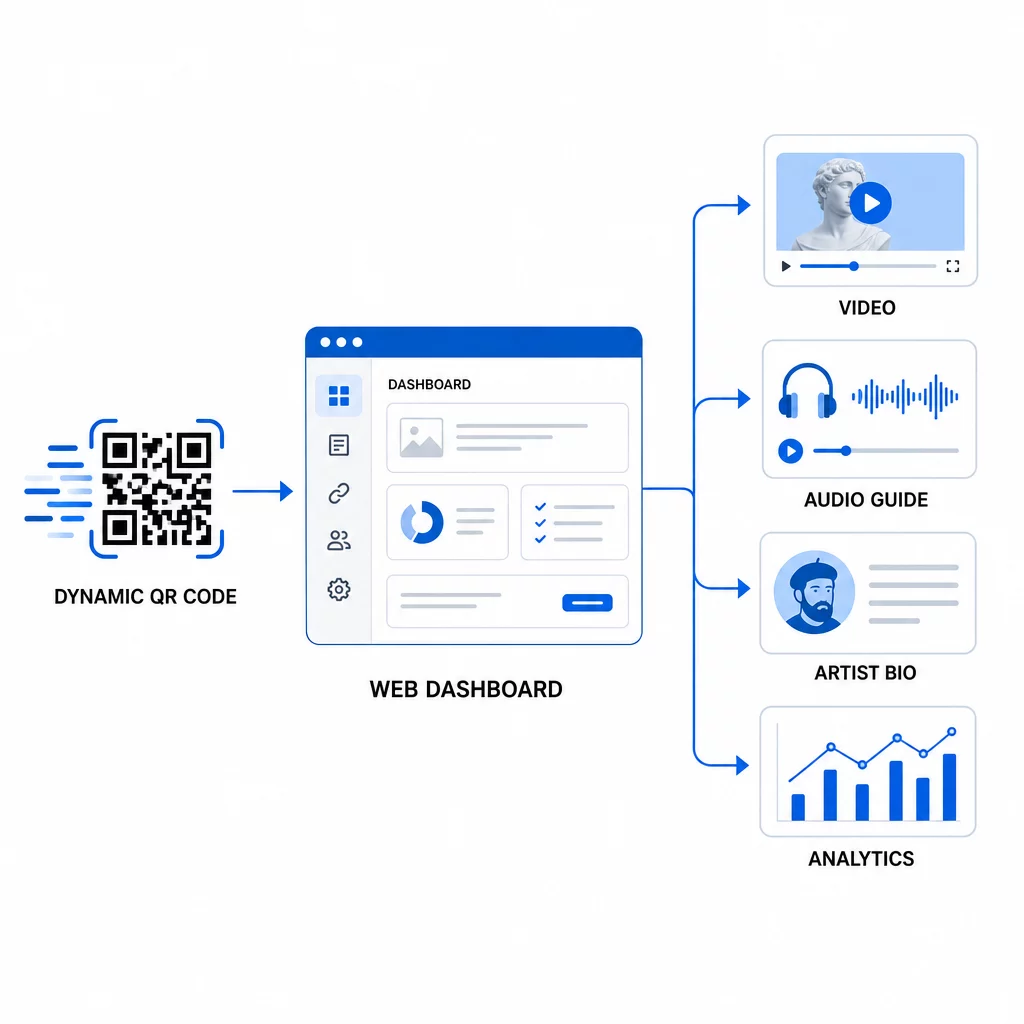
For kunstinstallasjoner er dette skillet betydelig:
- En utstilling som varer i flere måneder kan endre sitt lenkede innhold etter hvert som utstillingen utvikler seg – legge til nye kunstnerkommentarer, bytte ut en teaser-video med en full dokumentar, eller oppdatere proveniensdetaljer etter hvert som forskning utvikles
- Midlertidige installasjoner kan gjenbruke den samme fysiske koden på tvers av flere arrangementer ved å ganske enkelt oppdatere destinasjonen
- Analyse forblir knyttet til den samme koden, noe som gir en kontinuerlig ytelseslogg i stedet for fragmenterte data på tvers av nye utskrifter
Smithsonian har brukt denne tilnærmingen for å effektivt administrere tilgang til store digitale samlinger, noe som reduserer både kostnader og miljøavfall fra gjenutskrevne materialer. For kuratorer som administrerer utstillinger på flere steder eller vandreutstillinger, er evnen til å sette opp en virtuell kunstomvisning med QR-koder og oppdatere den sentralt er en betydelig operasjonell fordel.
Ofte stilte spørsmål
Design koden ved å bruke farger hentet fra kunstverkets palett, men oppretthold en mørk forgrunn på en lys bakgrunn og sikt på minst et kontrastforhold på 3:1. Hold den stille sonen klar på alle sider og test den utskrevne versjonen med flere enheter før installasjon. Høyere feilrettingsnivåer (Q eller H) tillater mer visuell tilpasning – inkludert innebygde logoer – samtidig som skannepåliteligheten bevares.
De mest effektive innholdstypene er kunstnerintervjuer eller videoerklæringer, lydguider, utvidede katalogessays eller proveniensdokumenter, prosessbilder og skjemaer for tilbakemelding fra besøkende. Tilpass formatet til publikum og verket: video passer til prosess-tunge eller performance-baserte verk, mens lyd fungerer godt sammen med verk der den visuelle opplevelsen bør forbli uforstyrret.
Dynamiske QR-koder med innebygd analyse registrerer aggregerte data – totale skanninger, unike skanninger, skannetid, enhetstype og geografisk plassering – uten å fange personlig informasjon fra individuelle besøkende. Plattformer som Pageloot's dynamiske QR-kodegenerator gir disse dataene i en oversiktlig dashbordvisning, noe som gir kuratorer handlingsrettet innsikt samtidig som besøkendes personvern respekteres.