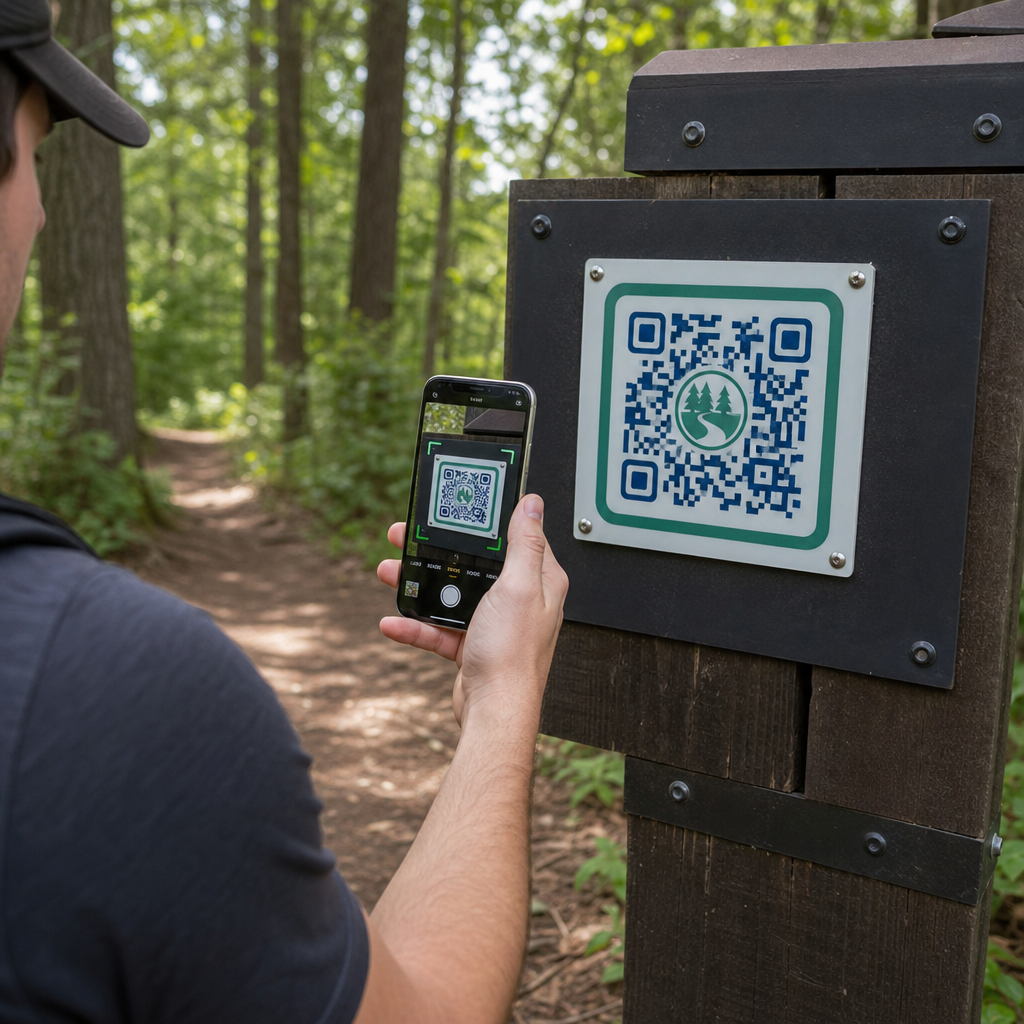
Jak zarządcy parków mogą dostarczać aktualne mapy szlaków i alerty bezpieczeństwa bez ciągłego wymieniania fizycznych znaków? Zniszczone panele i brakujące papierowe mapy frustrują odwiedzających, jednocześnie drenując budżet operacyjny. Umieszczenie trwałych kodów QR na oznaczeniach szlaków pozwala natychmiast udostępniać aktualne warunki, cyfrowe mapy i treści edukacyjne osobom aktywnie spędzającym czas na świeżym powietrzu.
Jak projektować czytelne kody QR do oznakowania szlaków zewnętrznych
Projektowanie kodów QR do środowisk zewnętrznych wymaga szczególnej uwagi na odległości oglądania, zmienność oświetlenia i zużycie środowiskowe. Kod, który łatwo skanuje się w pomieszczeniach na błyszczącym wyświetlaczu, może nie działać na słonecznym szlaku, jeśli kontrast i rozmiar nie są zoptymalizowane.
- Zachowaj wysoki kontrast kolorów, umieszczając ciemne moduły pierwszego planu na jasnym tle. Aby zapoznać się z kompletnymi wytycznymi projektowymi, przejrzyj nasze najlepszymi praktykami kontrastu kolorów kodów QR.
- Skaluj wymiary kodu zgodnie z oczekiwanymi odległościami oglądania, stosując zasadę proporcji 10:1. Skonsultuj się z naszym przewodniku po rozmiarach kodów QR aby wybrać dokładne wymiary dla swojej instalacji.
- Zachowaj wyraźny margines strefy ciszy, który ma co najmniej cztery moduły szerokości po wszystkich stronach kodu.
- Ustaw korekcję błędów na poziom Q lub H, aby kod pozostał skanowalny nawet po częściowym zadrapaniu lub zabrudzeniu.
- Eksportuj pliki projektowe w skalowalnych formatach wektorowych, takich jak SVG lub EPS, aby zapobiec pikselizacji podczas drukowania. Dowiedz się więcej o zachowaniu przejrzystości symboli w naszym przewodniku na temat najlepszymi praktykami w zakresie czytelności kodów QR.
Strategiczne rozmieszczenie i ergonomia dla oznaczeń szlaków
Umiejscowienie bezpośrednio wpływa na to, czy odwiedzający zauważą i zeskanują Twoje kody. Montowanie znaczników na wygodnych fizycznie wysokościach i w logicznych punktach zatrzymania zapewnia dostępność i bezpieczne korzystanie dla wszystkich odwiedzających park.
Umieszczaj kody w zasięgu ręki, zazwyczaj od 3,5 do 5,5 stopy (1,0 do 1,7 metra) od ziemi. Ta wysokość jest odpowiednia dla stojących dorosłych, dzieci i osób na wózkach inwalidzkich. Utrzymuj fizyczne słupki lekko odsunięte od głównej ścieżki, aby uniknąć tworzenia przeszkód, zapewniając, że znaczniki pozostaną wykrywalne za pomocą laski dla osób niedowidzących, zgodnie z wytycznymi ADA.
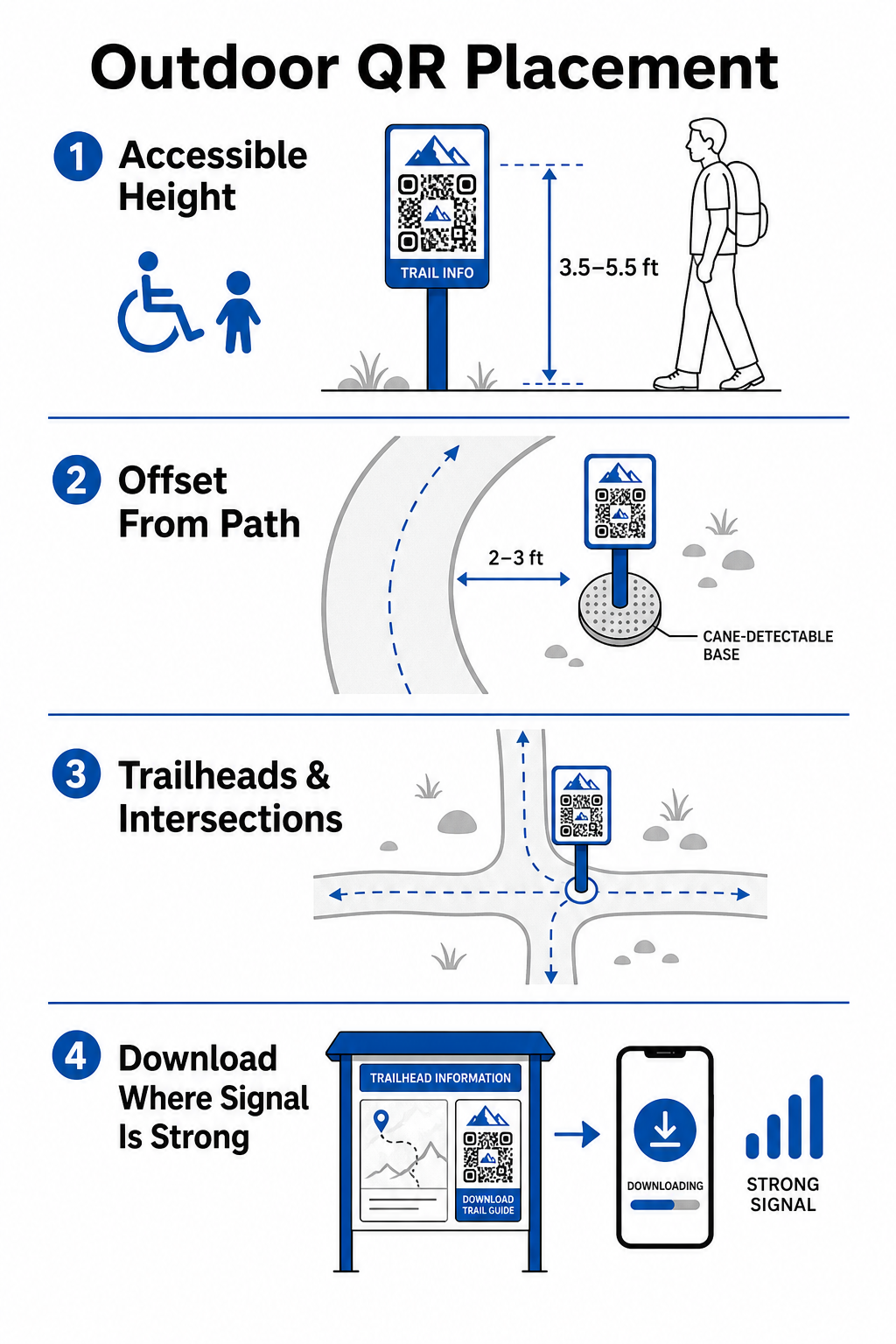
Umieść znaczniki w naturalnych punktach zatrzymania wzdłuż ścieżki, gdzie turyści naturalnie się zatrzymują:
- Zainstaluj kody w punktach wejścia na szlak, gdzie odwiedzający zbierają się i przygotowują sprzęt.
- Umieść znaczniki na kluczowych skrzyżowaniach i punktach decyzyjnych szlaku, gdzie potrzebna jest pomoc nawigacyjna.
- Umieść znaki w pobliżu ławek, punktów widokowych i wyznaczonych miejsc odpoczynku.
- Rozmieść znaczniki obok unikalnych cech przyrodniczych i edukacyjnych punktów zainteresowania.
Łączność na zewnątrz różni się w zależności od odległości od terenów parku. Aby uwzględnić słaby zasięg sieci komórkowej, umieść wyraźne komunikaty „Pobierz przed wyruszeniem” w głównych punktach wejściowych lub centrach dla odwiedzających, gdzie Wi-Fi lub zasięg sieci komórkowej jest najsilniejszy. Utrzymuj powiązane strony internetowe lekkie, zoptymalizowane pod kątem szybkiego ładowania w sieciach mobilnych i proste w nawigacji.
Aktualizuj Treści Szlaku Bez Ponownego Drukowania Oznakowania Chcesz na bieżąco aktualizować mapy szlaków, komunikaty bezpieczeństwa lub treści edukacyjne? Użyj Generator dynamicznych kodów QR aby utrzymać aktualność znaczników szlaku bez wymiany fizycznych słupków.
Zwiększanie Zaangażowania Turystów za pomocą Cyfrowych Treści QR
Kod QR na znaczniku szlaku powinien natychmiastowo zapewniać praktyczną wartość dla odwiedzającego. Dodanie wyraźnych wezwań do działania obok kodu – takich jak „Skanuj po Cyfrową Mapę” lub „Skanuj po Przewodnik Audio” – wyjaśnia, co odwiedzający zyskają, skanując.
| Skrzynia użytkowa | Zalecane Powiązane Treści | Główna Korzyść dla Odwiedzającego |
|---|---|---|
| Nawigacja Początkowa Szlaku | Interaktywne mapy cyfrowe i pinezki GPS | Zastępuje zużyte mapy papierowe i zapewnia śledzenie lokalizacji na żywo za pomocą Generator kodów QR do Google Maps. |
| Bezpieczeństwo & Warunki | Alerty szlakowe na żywo, aktualizacje pogody, kontakty alarmowe | Dostarcza informacji w czasie rzeczywistym dotyczących tymczasowych zamknięć, obserwacji dzikich zwierząt lub stromego terenu. |
| Interpretacje Edukacyjne | Przewodniki do identyfikacji roślin, tło historyczne, krótkie filmy | Wzbogaca samodzielne wycieczki za pomocą generator kodów QR z linkiem wskazującego na strony internetowe zoptymalizowane pod kątem urządzeń mobilnych. |
| Dokumentacja Offline | Przewodniki szlakowe PDF do pobrania, listy kontrolne flory i fauny | Daje turystom dostęp do pełnych zasobów zapisanych bezpośrednio na ich telefonie za pomocą Generator kodów QR do PDF. |
| Opinie odwiedzających | Proste formularze zgłaszania problemów dotyczących powalonych drzew lub uszkodzonych obiektów | Pomaga ekipom konserwacyjnym zbierać dokładne raporty z terenu bezpośrednio od użytkowników szlaków. |
Dla systemów parkowych działających na obszarach z ograniczonym zasięgiem sieci komórkowej, mapy cyfrowe i przewodniki po szlakach powinny być oferowane jako pliki do pobrania, które odwiedzający mogą zapisać w pamięci lokalnego urządzenia na początku szlaku.
Wybór materiałów odpornych na warunki atmosferyczne i technik druku
Oznakowanie zewnętrzne jest stale narażone na promienie ultrafioletowe, wilgoć, ekstremalne temperatury i fizyczne zużycie. Wybór odpowiednich podłoży i powłok ochronnych zapobiega wczesnemu blaknięciu i problemom ze skanowaniem.
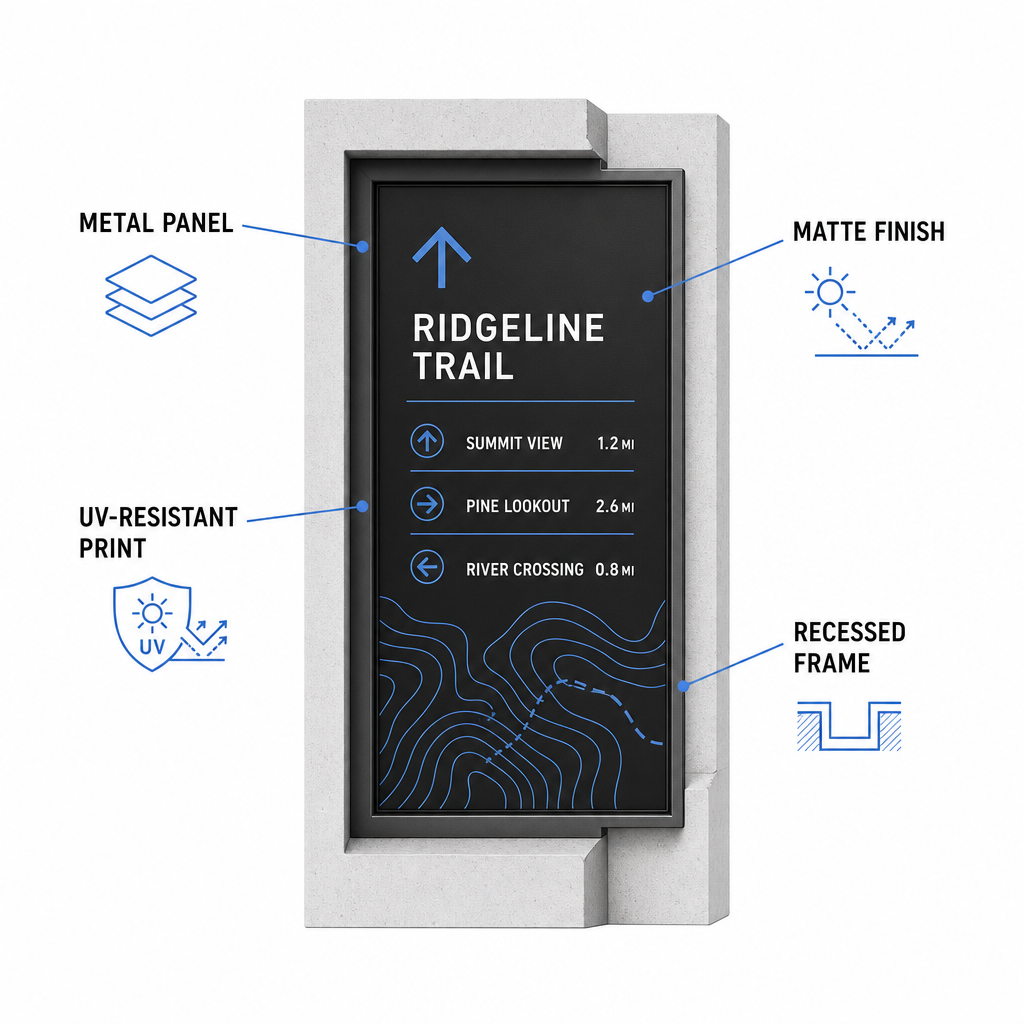
- Wybierz trwałe podłoża, takie jak aluminiowe panele kompozytowe, polietylen wysokiej gęstości lub grawerowane tabliczki metalowe.
- Zastosuj matową laminację lub powłoki antyodblaskowe, aby wyeliminować ostre refleksy światła słonecznego.
- Użyj atramentów z inhibitorem UV, aby chronić drukowane grafiki przed szybkim blaknięciem. Przeczytaj nasz przewodnik dotyczący jak techniki druku wpływają na skanowalność kodów QR aby wybrać odpowiednią metodę produkcji.
- Zainstaluj ochronne ramy, zagłębione drewniane słupki lub zadaszenia, aby chronić powierzchnie znaków przed deszczem i żywicą drzewną.
Zawsze wykonuj testy terenowe na rzeczywistych próbkach materiałów przed rozpoczęciem pełnej produkcji. Umieść markery prototypowe na miejscu, aby zweryfikować możliwość skanowania w bezpośrednim świetle słonecznym, silnym cieniu i pochmurnej pogodzie na wielu modelach urządzeń.
Utrzymywanie fizycznych markerów i śledzenie zaangażowania odwiedzających
Ustanowienie harmonogramu bieżącej konserwacji zapewnia, że fizyczne oznakowanie pozostaje czyste, czytelne i funkcjonalne przez cały rok.
Przeprowadzaj fizyczne inspekcje oznakowania co najmniej dwa razy w roku, najlepiej po ciężkich warunkach zimowych i przed szczytem letnich odwiedzin. Sprawdzaj markery pod kątem wandalizmu, pleśni, żywicy drzewnej lub wyblakłej grafiki. Czyść powierzchnie znaków, używając rozcieńczonego łagodnego detergentu, ciepłej wody i miękkiej ściereczki z mikrofibry. Unikaj szorstkich gąbek, ręczników papierowych lub silnych rozpuszczalników chemicznych, takich jak wybielacze i amoniak, które mogą porysować matową laminację lub zmatowić powłoki ochronne. Dokładnie spłucz resztki mydła, aby wyeliminować smugi powodujące błędy skanowania.
Korzystanie z dynamicznych kodów QR pozwala ocenić zaangażowanie odwiedzających dzięki wbudowanemu oprogramowaniu analitycznemu. Poprzez śledzisz wydajność kodów QR, zarządcy parku mogą mierzyć parametry takie jak całkowita liczba skanów, popularne godziny odwiedzin, typy urządzeń i szczytowe lokalizacje w całym parku. Jeśli określony odcinek szlaku zostanie zamknięty z powodu konserwacji sezonowej, dynamiczne kody pozwalają natychmiast przekierować odwiedzających do alternatywnych map tras z pulpitu nawigacyjnego – eliminując czas i koszty ponownego drukowania fizycznych znaków szlakowych.
Przejmij kontrolę nad swoim oznakowaniem szlaków zewnętrznych
Modernizacja fizycznej infrastruktury Twojego parku za pomocą cyfrowych punktów dostępu sprawia, że utrzymanie szlaków staje się łatwiejsze, a odwiedzający są zawsze informowani. Wybierając trwałe materiały, zapewniając wysoki kontrast wizualny i łącząc się ze stronami docelowymi zoptymalizowanymi pod kątem urządzeń mobilnych, tworzysz płynne doświadczenie offline-do-online na każdej ścieżce.
Zacznij tworzyć śledzone, edytowalne znaki dla swojego systemu parkowego, korzystając z Pageloot Generator kodów QR już dziś.
Najczęściej zadawane pytania
Minimalny zalecany rozmiar fizyczny dla skanowania z bliskiej odległości (20–30 cm) to 2 × 2 cm (0,8 × 0,8 cala). Dla znaków oglądanych z większej odległości, należy przestrzegać zasady widoczności 10:1, co oznacza, że szerokość kodu powinna wynosić co najmniej jedną dziesiątą oczekiwanej odległości skanowania.
Umieść kody QR „Pobierz przed wyruszeniem” na początku szlaków lub w miejscach parkingowych, gdzie sygnał Wi-Fi lub komórkowy jest najsilniejszy. Połącz te kody z lekkimi stronami internetowymi lub plikami PDF do pobrania, które odwiedzający mogą zapisać w pamięci lokalnej do przeglądania offline wzdłuż szlaku.
Czyść znaki, używając ciepłej wody zmieszanej z łagodnym mydłem, delikatnie nakładając roztwór miękką ściereczką z mikrofibry lub nieścierną gąbką. Unikaj ręczników papierowych, silnych chemikaliów, takich jak wybielacz lub amoniak, oraz szorstkich szczotek, które rysują ochronne matowe laminaty.