ホーム > ユースケース > Guidelines for Using QR Codes on Trail Markers
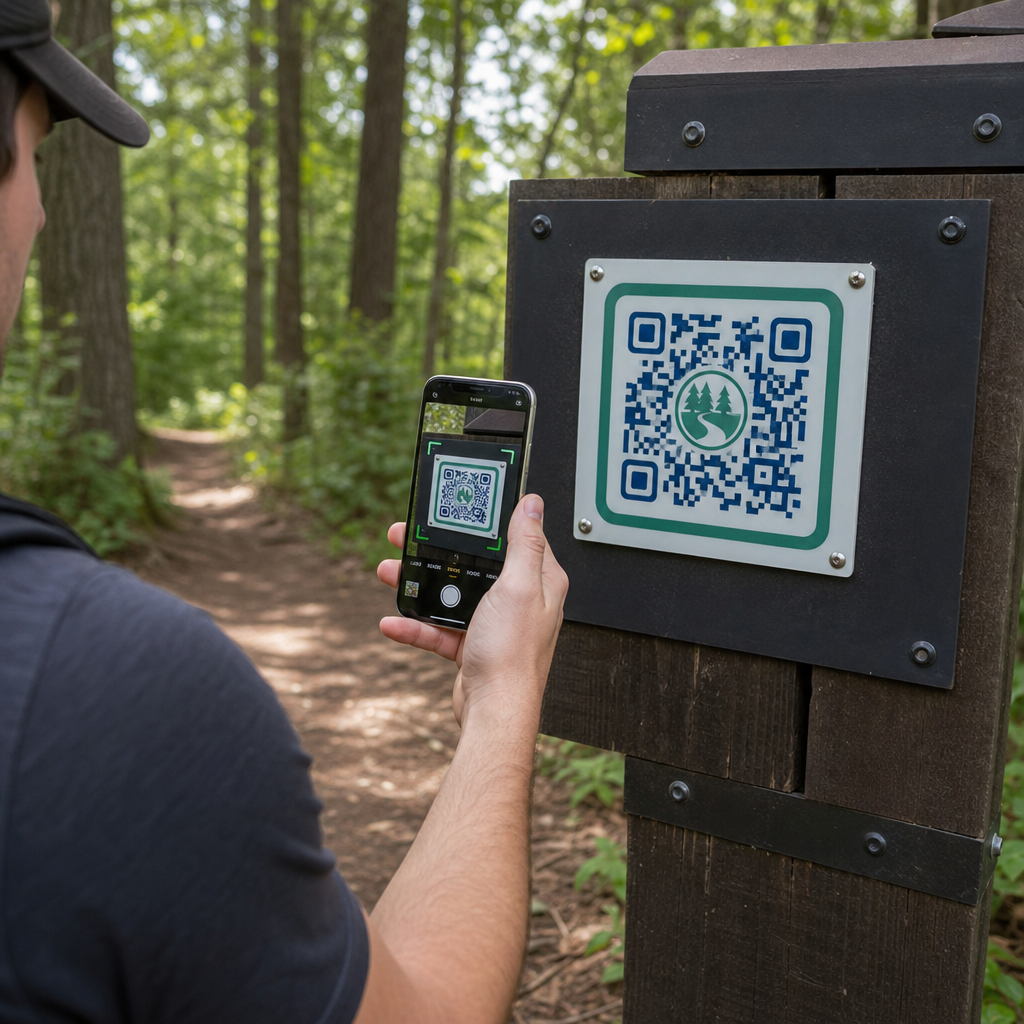
Hiker scanning trail marker

Guidelines for Using QR Codes on Trail Markers

Learn how to implement QR codes on trail markers to provide digital maps, live updates, and educational guides. Explore design, placement, and material tips.
Updated on 7月 27, 2026
目次

How can park managers deliver updated trail maps and safety alerts without constantly replacing physical signs? Weathered panels and missing paper maps frustrate visitors while draining your operational budget. Placing durable QR codes on trail markers lets you instantly share live conditions, digital maps, and educational content with outdoor recreationists.

How to Design Readable QR Codes for Outdoor Trail Signs

Designing QR codes for outdoor environments requires special attention to viewing distances, lighting variations, and environmental wear. A code that scans easily indoors on a glossy display may fail on a sunny trail if contrast and sizing are not optimized.

Strategic Placement and Ergonomics for Trail Markers

Placement directly influences whether visitors notice and scan your codes. Mounting markers at comfortable physical heights and logical stopping points ensures accessible, safe engagement for all park visitors.

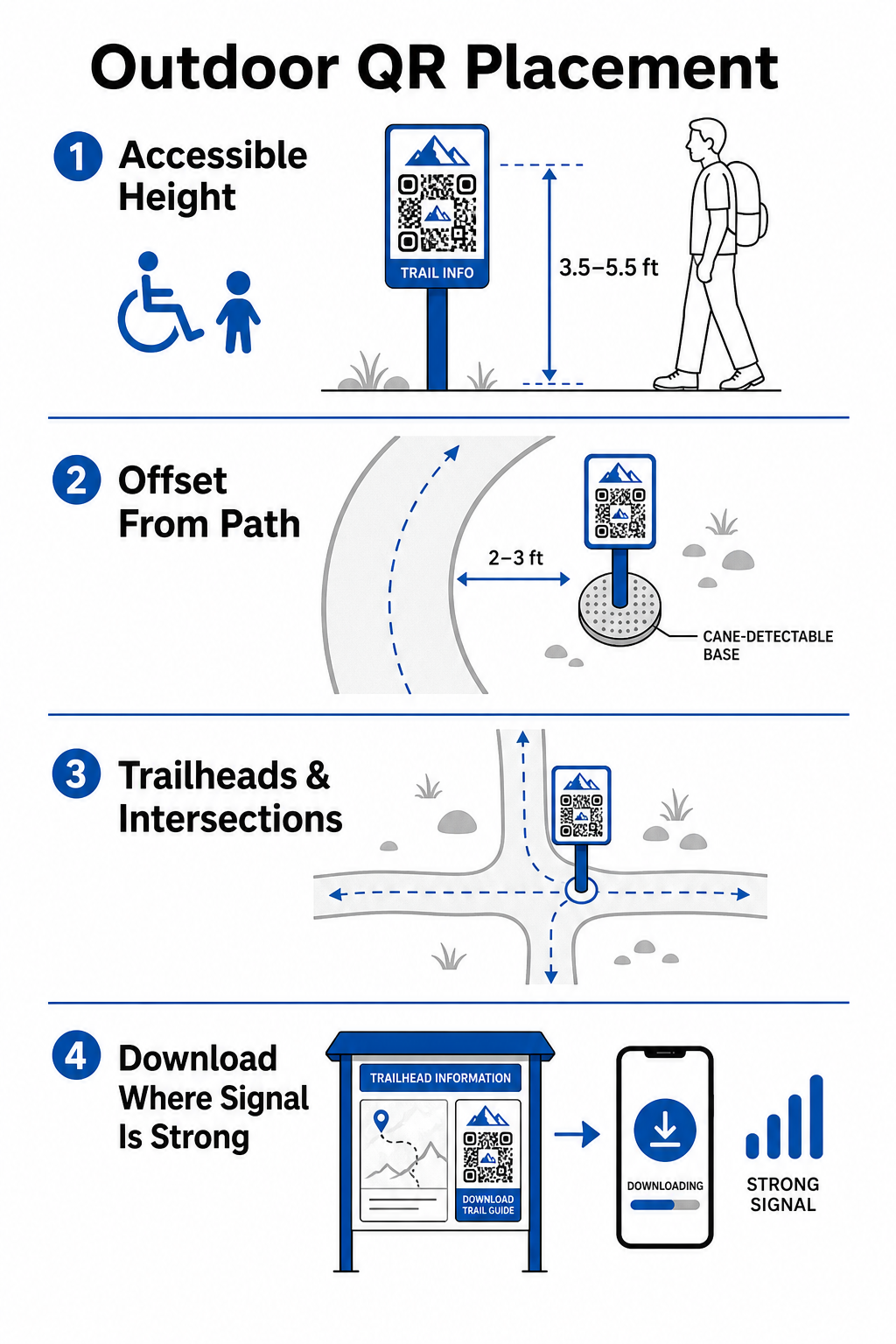
Position codes within an accessible reach range, typically between 3.5 and 5.5 feet (1.0 to 1.7 meters) from the ground. This height accommodates standing adults, children, and visitors in wheelchairs. Keep physical posts slightly offset from the main travel lane to avoid creating obstacles, ensuring markers remain cane-detectable for visually impaired visitors adhering to ADA guidelines.

Trail marker placement guide

Mount markers at natural pausing points along the path where hikers naturally stop:

  • Install codes at trailhead entry points where visitors gather and prepare gear.
  • Mount markers at key intersections and trail decision points where navigation aid is needed.
  • Place signs near benches, scenic overlooks, and designated resting areas.
  • Post markers beside unique natural features and educational points of interest.

Outdoor connectivity varies across remote park acreage. To account for weak cellular service, post clear “Download Before You Go” prompts at main entrance hubs or visitor centers where Wi-Fi or cellular service is strongest. Keep linked web pages lightweight, optimized for fast loading on mobile networks, and simple to navigate.

Update Trail Content Without Reprinting Signage Want to update trail maps, safety notices, or educational content on the fly? Use the ダイナミックQRコードジェネレーター to keep your trail markers current without replacing physical posts.

Enhancing Hiker Engagement with Digital QR Content

A QR code on a trail marker should immediately provide practical value to the visitor. Adding clear calls to action next to your code – such as “Scan for Digital Map” or “Scan for Audio Guide” – explains what visitors will gain by scanning.

使用事例 Recommended Linked Content Primary Visitor Benefit
Trailhead Navigation Interactive digital maps and GPS drop pins Replaces depleted paper maps and provides live location tracking via a Google マップ QR コード ジェネレーター.
Safety & Conditions Live trail alerts, weather updates, emergency contacts Delivers real-time information regarding temporary closures, wildlife sightings, or steep terrain.
Educational Interpretations Plant identification guides, historical background, short videos Enriches self-guided tours using a リンクQRコードジェネレーター pointing to mobile-optimized web pages.
Offline Documentation Downloadable PDF trail guides, flora and fauna checklists Gives hikers access to full-length resources saved directly to their phone using a PDF QRコードジェネレーター.
Visitor Feedback Simple issue-reporting forms for fallen trees or damaged facilities Helps maintenance crews gather accurate field reporting directly from trail users.

For park systems operating in areas with limited cell service, digital maps and trail guides should be offered as downloadable files that visitors can save to local device storage at the trailhead.

Selecting Weather-Resistant Materials and Printing Techniques

Outdoor signage faces constant exposure to ultraviolet rays, moisture, extreme temperatures, and physical wear. Selecting appropriate substrates and protective coatings prevents early fading and scanning failures.

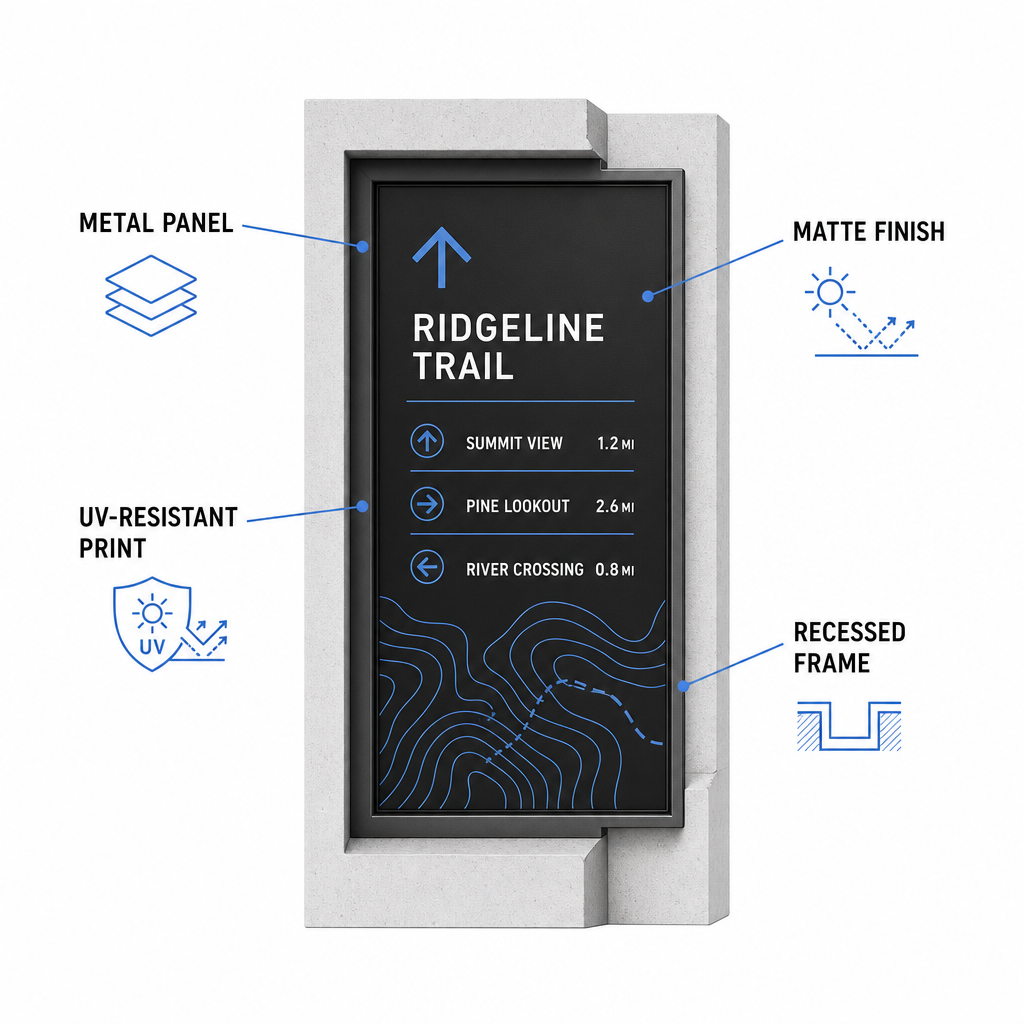
Weatherproof trail sign features
  • Select durable substrates like aluminum composite panels, high-density polyethylene, or engraved metal plaques.
  • Apply matte lamination or anti-glare finishes to eliminate harsh sunlight reflections.
  • Utilize UV-inhibiting inks to protect printed graphics against rapid fading. Read our guide on 印刷技術がQRコードのスキャン可能性にどのように影響するか to choose the right production method.
  • Install protective framing, recessed wooden posts, or overhead overhangs to shield sign faces from rain and tree sap.

Always perform field tests on actual material samples before completing full production runs. Place prototype markers on site to verify scannability under direct sunlight, heavy shadow, and overcast weather across multiple device models.

Maintaining Physical Markers and Tracking Visitor Engagement

Establishing an ongoing maintenance schedule ensures that physical signage remains clean, legible, and operational year-round.

Conduct physical sign inspections at least twice a year, ideally after severe winter conditions and before peak summer visitation. Inspect markers for physical vandalism, mold growth, tree sap, or faded graphics. Clean sign surfaces using diluted mild detergent, warm water, and a soft microfiber cloth. Avoid abrasive sponges, paper towels, or strong chemical solvents like bleach and ammonia, which can scratch matte lamination or dull protective coatings. Thoroughly rinse away soap residue to eliminate streaks that cause scanning errors.

Using dynamic QR codes allows you to evaluate visitor engagement through built-in analytics software. By QRコードのパフォーマンスを追跡する, park managers can measure parameters like total scan volume, popular visiting hours, device types, and peak locations across the park. If a specific trail section closes for seasonal maintenance, dynamic codes let you instantly redirect visitors to alternative route maps from your management dashboard – eliminating the time and expense of reprinting physical trail signs.

Taking Control of Your Outdoor Trail Signage

Modernizing your park’s physical infrastructure with digital access points makes trail maintenance manageable and keeps visitors informed. By choosing durable materials, ensuring high visual contrast, and linking to mobile-optimized landing pages, you create a seamless offline-to-online experience on every path.

Start building trackable, editable signs for your park system using the Pageloot QRコードジェネレータ で今すぐ利用可能なツールをご覧ください。.

よくある質問

What is the minimum physical size for a QR code on a trail marker?

The minimum recommended physical size for close-range scanning (20–30 cm away) is 2 × 2 cm (0.8 × 0.8 inches). For signs viewed from further away, follow the 10:1 viewing rule, making the code width at least one-tenth of the expected scanning distance.

How do QR codes work on trails with poor cellular reception?

Place “Download Before You Go” QR codes at trailheads or parking areas where Wi-Fi or cellular signals are strongest. Link these codes to lightweight web pages or downloadable PDFs that visitors can save to local storage for offline viewing along the trail.

How should outdoor QR codes be cleaned without causing damage?

Clean signs using warm water mixed with mild soap, applying the solution gently with a soft microfiber cloth or non-abrasive sponge. Avoid paper towels, harsh chemicals like bleach or ammonia, and abrasive scrubbers that scratch protective matte laminates.

著者について

Siim KostabiはPagelootのコンテンツリードです。Pagelootの革新的なQRコード生成サービスについて執筆しています。5年以上にわたるQRコードに関する深い専門知識を持つSiimは、この分野の専門家です。QRテクノロジーを活用してデジタルインタラクションを簡素化・拡張する上で、大きな進歩を遂げています。.

カテゴリー
について詳しくはこちら
スマートフォンでQRポスターをスキャン
QRコードをスキャンして スマートフォン
✅ QRコードの#1ソリューション

オンラインでQRコードを作成する必要がある場合は QRコードを作る ここで無料で
ページルートは #1のGo-Toソリューション でQRコードを作成してスキャンすることができます。

BL-0322

ブログジェネ

売上、レビュー、フォロワーを増やすために 20,000 を超えるブランドから信頼されています。

クライアントのロゴ
トップブランドから信頼される
5 のうち 4.8 と評価しました

4.86 / 5つ星評価

ユーゴ・ローラン
ユーゴ・ローラン
レストランオーナー
最も簡単で信頼性の高いQRコードジェネレータです。PDFファイルを即座にアップロードできます。レストランのメニューがデジタル化されました。
ルーカス・ジャンセン
ルーカス・ジャンセン
不動産開発業者
これは優れたツールで、QRコードでちょうど欲しいところに連れて行ってくれます。私たちは位置情報のQRコードしか使っていませんが、とても便利な機能がたくさんあります。
エマ・モレッティ
エマ・モレッティ
小売製品
使いやすいし、早い。素晴らしい機能で、完璧な画像を作成してくれるので、社員は私のvCardをダウンロードすることができます。
ユーゴ・ローラン
ユーゴ・ローラン
レストランオーナー
最も簡単で信頼性の高いQRコードジェネレータです。PDFファイルを即座にアップロードできます。レストランのメニューがデジタル化されました。
ルーカス・ジャンセン
ルーカス・ジャンセン
不動産開発業者
これは優れたツールで、QRコードでちょうど欲しいところに連れて行ってくれます。私たちは位置情報のQRコードしか使っていませんが、とても便利な機能がたくさんあります。
エマ・モレッティ
エマ・モレッティ
小売製品
使いやすいし、早い。素晴らしい機能で、完璧な画像を作成してくれるので、社員は私のvCardをダウンロードすることができます。
QRコードをもっと見る
Modern barcode scanning
バーコードは 死んだ?
iPhoneでのQRコードスキャン
QRコードをスキャンして アイフォン
あらゆるものをデジタル体験に変えよう 3分以内に。

14日間の無料トライアル。

クレジットカードは必要ありません。

初回購入で30%オフ

次のコードを使用してください:

MP3ファイルを共有

PDF QRコードを作成するにはサインアップしてください

必要なものをすべてアップロードして表示する。

  • オーディオファイル
  • ポッドキャスト
  • 音楽

サインアップで14日間無料トライアル。.
トライアル終了後、QRコードは期限切れになります。.

オーディオmp3 QRコードを作成するにはサインアップしてください

フレームでより多くのスキャンを獲得

QRコードにフレームを追加するにはサインアップしてください

コールトゥアクションフレームは、お客様が簡単にQRコードと対話できるようにします。ぜひお試しください。

サインアップで14日間無料トライアル。.
トライアル終了後、QRコードは期限切れになります。.

QRコードにフレームを追加するにはサインアップしてください

シェイプでスタイルを追加

より多くの図形を作成するにはサインアップしてください

QRコードは四角いものである必要はありません。あなたのブランドのイメージに合わせて変えてみてください。

サインアップで14日間無料トライアル。.
トライアル終了後、QRコードは期限切れになります。.

より多くの図形を作成するにはサインアップしてください

QRコードにロゴを追加

QRコードにロゴを追加するにはサインアップしてください

QRコードにロゴやブランドを入れることで、目立たせることができます。

サインアップで14日間無料トライアル。.
トライアル終了後、QRコードは期限切れになります。.

QRコードにロゴを追加するにはサインアップしてください

スマートなApp Storeリダイレクト

アプリストアのQRコードを作成するにはサインアップしてください

スマートなApp StoreのQRコードに、あなたのアプリのリンクを追加します。ユーザーは、デバイスに応じてリダイレクトされます。

サインアップで14日間無料トライアル。.
トライアル終了後、QRコードは期限切れになります。.

アプリストアのQRコードを作成するにはサインアップしてください

QRコードに画像をアップロード

画像QRコードを作成するにはサインアップしてください

画像を簡単に共有できます。どんな画像も、数秒でダイナミックに変化します。

サインアップで14日間無料トライアル。.
トライアル終了後、QRコードは期限切れになります。.

画像QRコードを作成するにはサインアップしてください

PDFファイルを共有

PDF QRコードを作成するにはサインアップしてください

必要なものをすべてアップロードして表示する。

  • メニュー&プライスリスト
  • 指示
  • 任意の書類

サインアップで14日間無料トライアル。.
トライアル終了後、QRコードは期限切れになります。.

PDF QRコードを作成するにはサインアップしてください

印刷せずに後で編集

再度印刷せずにQRコードを編集するにはサインアップしてください

ダイナミックQRコードは、新たにQRコードを印刷することなく、QRコードの内容を変更することができます。

サインアップで14日間無料トライアル。.
トライアル終了後、QRコードは期限切れになります。.

再度印刷せずにQRコードを編集するにはサインアップしてください

いつ?どこで?QRコードのスキャンを追跡

QRコードを追跡するにはサインアップしてください

どのQRコードが最も多くスキャンされ、何が最も顧客を喜ばせているのかを知ることができます。

サインアップで14日間無料トライアル。.
トライアル終了後、QRコードは期限切れになります。.

QRコードを追跡するにはサインアップしてください

印刷可能なファイルが利用可能

PDFやSVGのようなベクターQRコードを作成するにはサインアップしてください

.eps、.pdf、.svg

QRコードをHD解像度でダウンロードしたいですか?すぐに印刷できるベクターまたはピクセル形式を入手しましょう。

サインアップで14日間無料トライアル。.
トライアル終了後、QRコードは期限切れになります。.

PDFやSVGのようなベクターQRコードを作成するにはサインアップしてください

しばらくお待ちください。あなたのQRコードは ロード... ロード...

あなただけのものに

サインアップしてQRコードを後で保存してください

異なる色、ロゴ、コールトゥアクションフレームで素晴らしいQRコードを作成することで、より多くのスキャンを得ることができます。

サインアップで14日間無料トライアル。.
トライアル終了後、QRコードは期限切れになります。.

サインアップしてQRコードを後で保存してください