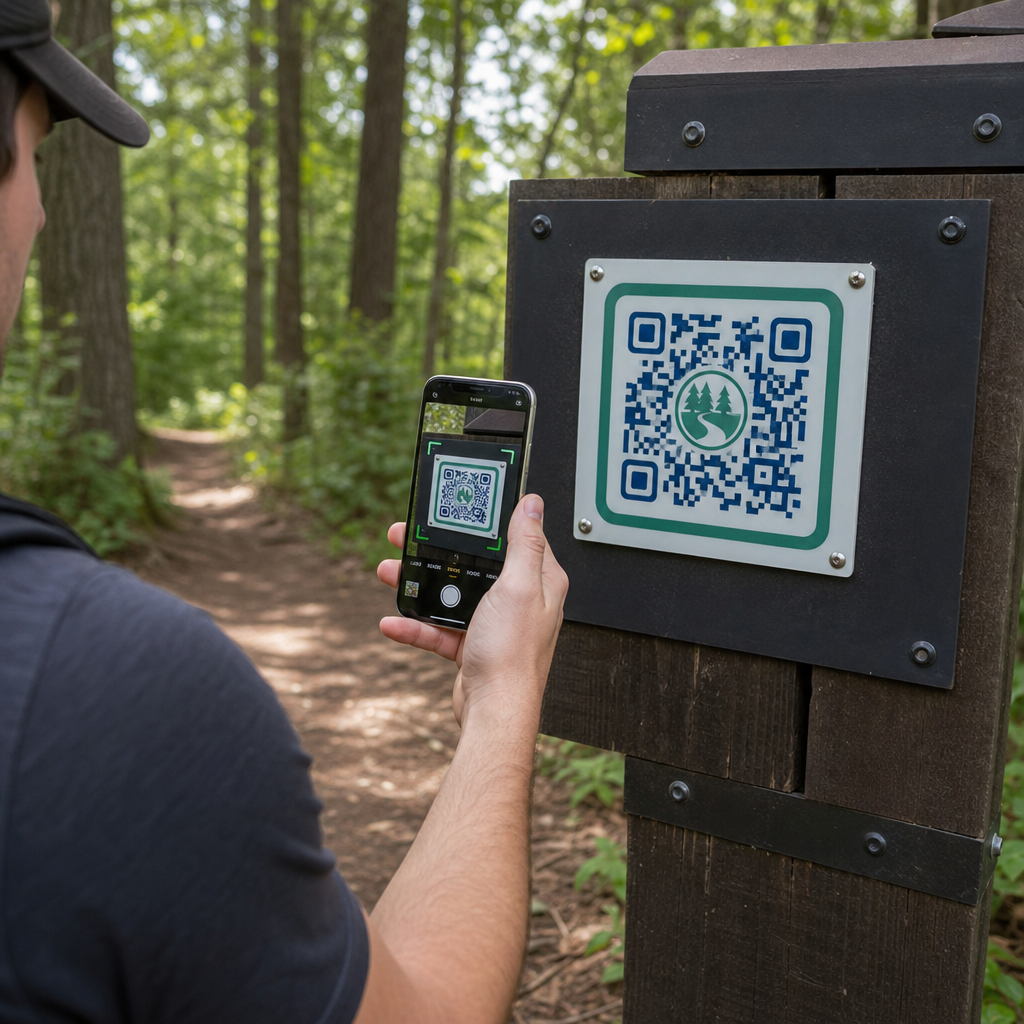
ผู้จัดการอุทยานจะส่งมอบแผนที่เส้นทางที่อัปเดตและแจ้งเตือนความปลอดภัยได้อย่างไรโดยไม่ต้องเปลี่ยนป้ายกายภาพอยู่ตลอดเวลา? ป้ายที่ทรุดโทรมและแผนที่กระดาษที่หายไปทำให้ผู้เยี่ยมชมไม่พอใจในขณะที่ยังทำให้งบประมาณการดำเนินงานของคุณหมดไป การวางรหัส QR ที่ทนทานบนป้ายบอกเส้นทางช่วยให้คุณสามารถแบ่งปันสภาพเส้นทางแบบเรียลไทม์ แผนที่ดิจิทัล และเนื้อหาการศึกษาให้แก่นักท่องเที่ยวกลางแจ้งได้ทันที
วิธีออกแบบรหัส QR ที่อ่านง่ายสำหรับป้ายบอกเส้นทางกลางแจ้ง
การออกแบบรหัส QR สำหรับสภาพแวดล้อมกลางแจ้งต้องให้ความสำคัญเป็นพิเศษกับระยะการมองเห็น ความผันแปรของแสง และการสึกหรอจากสภาพแวดล้อม รหัสที่สแกนง่ายในอาคารบนจอแสดงผลที่มันวาวอาจล้มเหลวบนเส้นทางที่มีแดดจัดหากไม่ได้ปรับความคมชัดและขนาดให้เหมาะสม
- รักษาสีที่มีความคมชัดสูงโดยการวางโมดูลสีเข้มบนพื้นหลังสีอ่อน สำหรับแนวทางการออกแบบฉบับสมบูรณ์ โปรดดูที่ แนวทางปฏิบัติที่ดีที่สุดสำหรับความคมชัดของสีรหัส QR.
- ปรับขนาดของรหัสตามระยะการมองเห็นที่คาดไว้โดยใช้กฎอัตราส่วน 10:1 ปรึกษา คู่มือขนาดรหัส QR เพื่อเลือกขนาดที่แน่นอนสำหรับการติดตั้งของคุณ
- รักษาระยะขอบโซนเงียบที่ชัดเจนซึ่งมีความกว้างอย่างน้อยสี่โมดูลในทุกด้านของรหัส
- ตั้งค่าการแก้ไขข้อผิดพลาดเป็นระดับ Q หรือ H เพื่อให้รหัสยังคงสแกนได้แม้ว่าจะเกิดรอยขีดข่วนหรือสกปรกบางส่วนก็ตาม
- ส่งออกไฟล์ออกแบบในรูปแบบเวกเตอร์ที่ปรับขนาดได้ เช่น SVG หรือ EPS เพื่อป้องกันการแตกของพิกเซลระหว่างการพิมพ์ เรียนรู้เพิ่มเติมเกี่ยวกับการรักษาสัญลักษณ์ให้ชัดเจนในคู่มือของเราเรื่อง แนวทางปฏิบัติที่ดีที่สุดสำหรับการอ่านรหัส QR.
การจัดวางเชิงกลยุทธ์และการยศาสตร์สำหรับป้ายบอกเส้นทาง
การจัดวางส่งผลโดยตรงว่าผู้เยี่ยมชมจะสังเกตเห็นและสแกนรหัสของคุณหรือไม่ การติดตั้งป้ายบอกเส้นทางในระดับความสูงที่เหมาะสมและจุดหยุดที่สมเหตุสมผลช่วยให้ผู้เยี่ยมชมอุทยานทุกคนสามารถเข้าถึงและมีส่วนร่วมได้อย่างปลอดภัย
วางรหัสให้อยู่ในระยะที่เข้าถึงได้ โดยปกติจะอยู่ระหว่าง 3.5 ถึง 5.5 ฟุต (1.0 ถึง 1.7 เมตร) จากพื้นดิน ความสูงนี้รองรับผู้ใหญ่ที่ยืน เด็ก และผู้เยี่ยมชมที่ใช้รถเข็น ให้เสาตั้งอยู่เยื้องจากช่องทางเดินหลักเล็กน้อยเพื่อหลีกเลี่ยงการสร้างสิ่งกีดขวาง และให้แน่ใจว่าป้ายยังคงตรวจจับได้ด้วยไม้เท้าสำหรับผู้พิการทางสายตาตามแนวทาง ADA
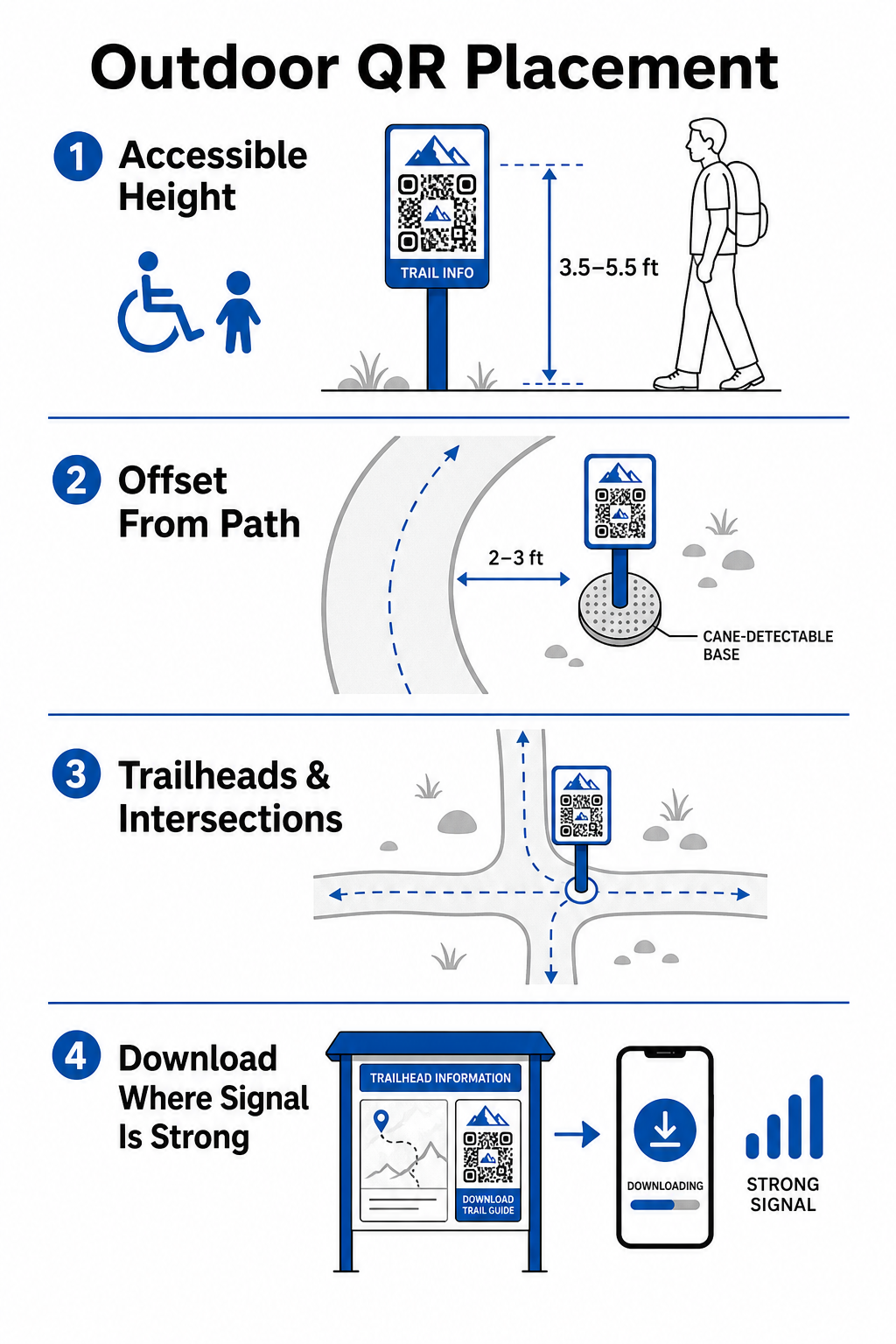
ติดตั้งป้ายบอกทาง ณ จุดพักธรรมชาติริมเส้นทางที่นักปีนเขาแวะพัก:
- ติดตั้งรหัส ณ จุดเริ่มต้นเส้นทางที่ผู้เยี่ยมชมรวมตัวและเตรียมอุปกรณ์
- ติดตั้งป้ายบอกทาง ณ ทางแยกสำคัญและจุดตัดสินใจบนเส้นทางที่จำเป็นต้องใช้ตัวช่วยนำทาง
- วางป้ายใกล้กับม้านั่ง จุดชมวิว และพื้นที่พักผ่อนที่กำหนดไว้
- ติดตั้งป้ายบอกทางข้างคุณสมบัติทางธรรมชาติที่เป็นเอกลักษณ์และจุดสนใจทางการศึกษา
การเชื่อมต่อภายนอกอาคารแตกต่างกันไปในพื้นที่อุทยานที่ห่างไกล เพื่อรองรับสัญญาณโทรศัพท์มือถือที่อ่อนแอ ให้ติดข้อความแจ้งเตือนที่ชัดเจนว่า “ดาวน์โหลดก่อนเดินทาง” ณ จุดทางเข้าหลักหรือศูนย์บริการนักท่องเที่ยวที่มี Wi-Fi หรือสัญญาณโทรศัพท์มือถือที่แรงที่สุด เว็บเพจที่เชื่อมโยงควรมีขนาดเบา ปรับแต่งให้โหลดเร็วบนเครือข่ายมือถือ และใช้งานง่าย
อัปเดตเนื้อหาเส้นทางโดยไม่ต้องพิมพ์ป้ายใหม่ ต้องการอัปเดตแผนที่เส้นทาง ประกาศความปลอดภัย หรือเนื้อหาทางการศึกษาอย่างรวดเร็วใช่ไหม? ใช้ สร้าง Dynamic QR Code เพื่อให้ป้ายบอกทางของคุณเป็นปัจจุบันโดยไม่ต้องเปลี่ยนเสาจริง
เพิ่มการมีส่วนร่วมของนักปีนเขาด้วยเนื้อหา QR ดิจิทัล
รหัส QR บนป้ายบอกทางควรให้ประโยชน์ใช้สอยที่เป็นรูปธรรมแก่ผู้เยี่ยมชมทันที การเพิ่มคำกระตุ้นการตัดสินใจที่ชัดเจนถัดจากรหัสของคุณ – เช่น “สแกนเพื่อดูแผนที่ดิจิทัล” หรือ “สแกนเพื่อฟังคู่มือเสียง” – จะอธิบายว่าผู้เยี่ยมชมจะได้รับอะไรจากการสแกน
| ใช้ Case | เนื้อหาที่เชื่อมโยงที่แนะนำ | ประโยชน์หลักสำหรับผู้เยี่ยมชม |
|---|---|---|
| การนำทางจุดเริ่มต้นเส้นทาง | แผนที่ดิจิทัลแบบโต้ตอบและหมุดปัก GPS | ใช้แทนแผนที่กระดาษที่หมดไปและให้การติดตามตำแหน่งแบบเรียลไทม์ผ่าน ทำคิวอาร์โค้ด แผนที่ Google Maps. |
| ความปลอดภัย & สภาพอากาศ | การแจ้งเตือนเส้นทางสด การอัปเดตสภาพอากาศ รายชื่อติดต่อฉุกเฉิน | ให้ข้อมูลแบบเรียลไทม์เกี่ยวกับการปิดชั่วคราว การพบเห็นสัตว์ป่า หรือพื้นที่ลาดชัน |
| การตีความทางการศึกษา | คู่มือระบุพืช ภูมิหลังทางประวัติศาสตร์ วิดีโอสั้น | เพิ่มพูนประสบการณ์การเดินทางด้วยตัวเองโดยใช้ เครื่องสร้างรหัส QR สำหรับลิงก์ ที่ชี้ไปยังหน้าเว็บที่ปรับให้เหมาะกับมือถือ |
| เอกสารออฟไลน์ | คู่มือเส้นทาง PDF ที่ดาวน์โหลดได้ รายการตรวจสอบพืชและสัตว์ | ช่วยให้นักปีนเขาสามารถเข้าถึงแหล่งข้อมูลฉบับเต็มที่บันทึกลงในโทรศัพท์ได้โดยตรงโดยใช้ แปลงไฟล์ PDF เป็น QR Code ฟรี. |
| ข้อเสนอแนะจากผู้เยี่ยมชม | แบบฟอร์มรายงานปัญหาอย่างง่ายสำหรับต้นไม้ล้มหรือสิ่งอำนวยความสะดวกที่เสียหาย | ช่วยให้ทีมซ่อมบำรุงรวบรวมรายงานภาคสนามที่แม่นยำได้โดยตรงจากผู้ใช้เส้นทาง |
สำหรับระบบอุทยานที่ดำเนินการในพื้นที่ที่มีสัญญาณโทรศัพท์จำกัด ควรมีแผนที่ดิจิทัลและคู่มือเส้นทางให้ดาวน์โหลดเป็นไฟล์ที่ผู้เยี่ยมชมสามารถบันทึกไปยังที่เก็บข้อมูลอุปกรณ์ในเครื่องได้ที่จุดเริ่มต้นของเส้นทาง
การเลือกใช้วัสดุที่ทนทานต่อสภาพอากาศและเทคนิคการพิมพ์
ป้ายกลางแจ้งต้องเผชิญกับการสัมผัสรังสีอัลตราไวโอเลต ความชื้น อุณหภูมิที่รุนแรง และการสึกหรอทางกายภาพอย่างต่อเนื่อง การเลือกพื้นผิวที่เหมาะสมและการเคลือบป้องกันจะช่วยป้องกันการซีดจางก่อนเวลาอันควรและความล้มเหลวในการสแกน
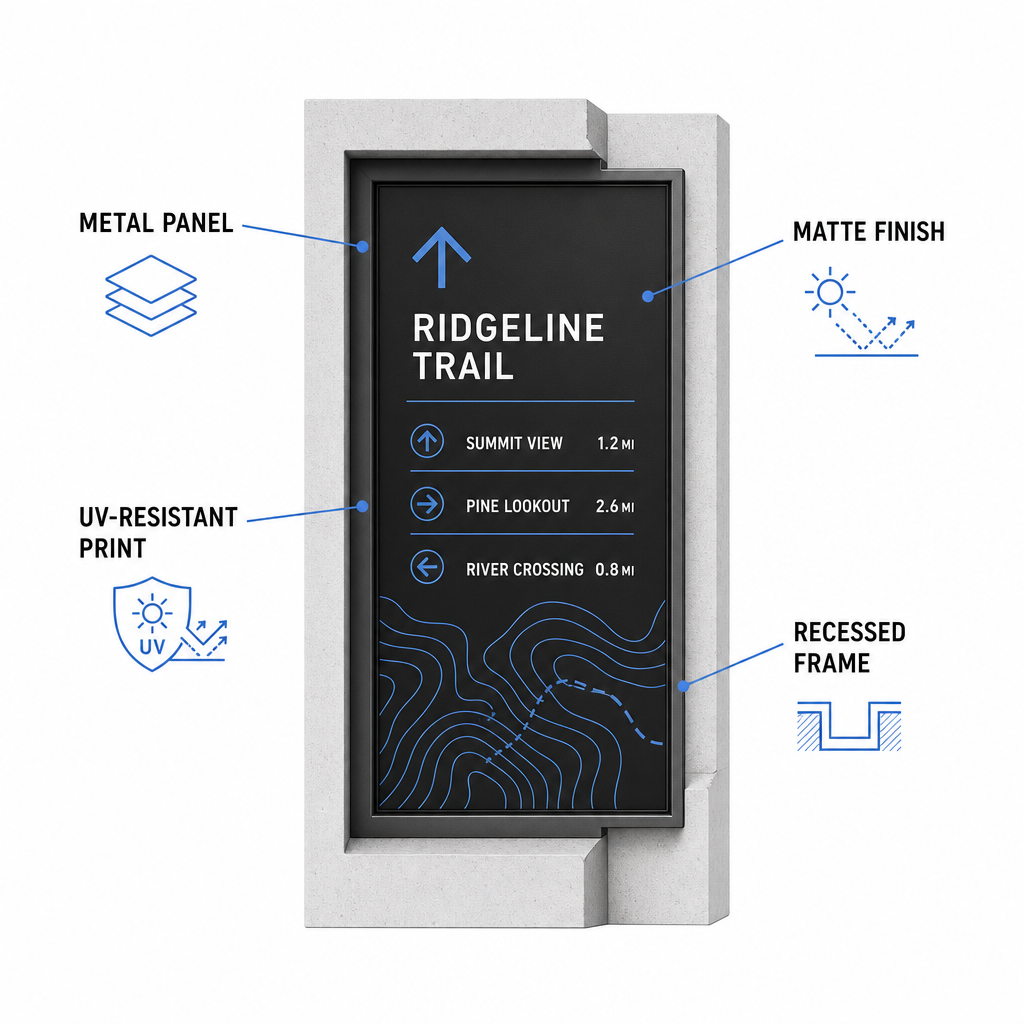
- เลือกพื้นผิวที่ทนทาน เช่น แผ่นคอมโพสิตอะลูมิเนียม, โพลีเอทิลีนความหนาแน่นสูง หรือป้ายโลหะแกะสลัก
- เคลือบด้านหรือใช้สารเคลือบกันแสงสะท้อนเพื่อขจัดแสงแดดที่สะท้อนจ้า
- ใช้หมึกป้องกันรังสียูวีเพื่อปกป้องกราฟิกที่พิมพ์จากการซีดจางอย่างรวดเร็ว อ่านคู่มือของเราเกี่ยวกับ ผลกระทบของเทคนิคการพิมพ์ต่อความสามารถในการสแกนรหัส QR เพื่อเลือกวิธีการผลิตที่ถูกต้อง
- ติดตั้งโครงป้องกัน เสาไม้ฝัง หรือกันสาดเหนือศีรษะเพื่อป้องกันพื้นผิวป้ายจากฝนและยางไม้
ควรทำการทดสอบภาคสนามกับตัวอย่างวัสดุจริงเสมอก่อนที่จะดำเนินการผลิตเต็มรูปแบบ วางเครื่องหมายต้นแบบในสถานที่เพื่อตรวจสอบความสามารถในการสแกนภายใต้แสงแดดโดยตรง เงาจัด และสภาพอากาศที่มีเมฆมากในอุปกรณ์หลายรุ่น
การบำรุงรักษาป้ายกายภาพและติดตามการมีส่วนร่วมของผู้เยี่ยมชม
การกำหนดตารางการบำรุงรักษาอย่างต่อเนื่องช่วยให้มั่นใจว่าป้ายกายภาพยังคงสะอาด อ่านง่าย และใช้งานได้ตลอดทั้งปี
ตรวจสอบป้ายกายภาพอย่างน้อยปีละสองครั้ง โดยเฉพาะหลังสภาพอากาศหนาวจัดและก่อนช่วงฤดูร้อนที่มีผู้เยี่ยมชมหนาแน่น ตรวจสอบเครื่องหมายเพื่อหาสัญญาณของการทำลายทรัพย์สิน, เชื้อรา, ยางไม้ หรือกราฟิกที่ซีดจาง ทำความสะอาดพื้นผิวป้ายโดยใช้น้ำยาซักผ้าอ่อนๆ ผสมน้ำอุ่น และผ้าไมโครไฟเบอร์นุ่มๆ หลีกเลี่ยงฟองน้ำขัด, กระดาษทิชชู หรือสารเคมีรุนแรง เช่น สารฟอกขาวและแอมโมเนีย ซึ่งอาจทำให้เคลือบด้านเป็นรอยหรือทำให้สารเคลือบป้องกันหมองคล้ำ ล้างคราบสบู่ให้หมดจดเพื่อกำจัดรอยด่างที่อาจทำให้เกิดข้อผิดพลาดในการสแกน
การใช้คิวอาร์โค้ดแบบไดนามิกช่วยให้คุณสามารถประเมินการมีส่วนร่วมของผู้เยี่ยมชมผ่านซอฟต์แวร์วิเคราะห์ข้อมูลในตัว ด้วย ติดตามประสิทธิภาพของคิวอาร์โค้ดผู้จัดการอุทยานสามารถวัดพารามิเตอร์ต่างๆ เช่น ปริมาณการสแกนทั้งหมด, ช่วงเวลาเข้าชมที่ได้รับความนิยม, ประเภทอุปกรณ์ และจุดที่มีผู้เข้าชมหนาแน่นทั่วทั้งอุทยาน หากส่วนใดส่วนหนึ่งของเส้นทางปิดปรับปรุงตามฤดูกาล คิวอาร์โค้ดแบบไดนามิกจะช่วยให้คุณเปลี่ยนเส้นทางผู้เยี่ยมชมไปยังแผนที่เส้นทางสำรองได้ทันทีจากแดชบอร์ดการจัดการของคุณ ซึ่งช่วยลดเวลาและค่าใช้จ่ายในการพิมพ์ป้ายเส้นทางใหม่
การควบคุมป้ายบอกเส้นทางกลางแจ้งของคุณ
การปรับปรุงโครงสร้างพื้นฐานทางกายภาพของอุทยานให้ทันสมัยด้วยจุดเชื่อมต่อดิจิทัลช่วยให้การบำรุงรักษาเส้นทางทำได้ง่ายขึ้น และให้ข้อมูลแก่ผู้เยี่ยมชม การเลือกใช้วัสดุที่ทนทาน การรับรองความคมชัดในการมองเห็นสูง และการเชื่อมโยงไปยังหน้า Landing Page ที่ปรับให้เหมาะกับมือถือ คุณจะสร้างประสบการณ์ที่ไร้รอยต่อระหว่างออฟไลน์และออนไลน์ในทุกเส้นทาง
เริ่มสร้างป้ายที่สามารถติดตามและแก้ไขได้สำหรับระบบอุทยานของคุณโดยใช้ Pageloot เครื่องสร้างรหัส QR วันนี้.
คำถามที่พบบ่อย
ขนาดทางกายภาพที่แนะนำขั้นต่ำสำหรับการสแกนในระยะใกล้ (ห่างออกไป 20–30 ซม.) คือ 2 × 2 ซม. (0.8 × 0.8 นิ้ว) สำหรับป้ายที่ดูจากระยะไกลขึ้น ให้ปฏิบัติตามกฎการมอง 10:1 โดยทำให้ความกว้างของโค้ดอย่างน้อยหนึ่งในสิบของระยะการสแกนที่คาดหวัง
วางคิวอาร์โค้ด “ดาวน์โหลดก่อนเดินทาง” ไว้ที่ต้นทางของเส้นทางหรือลานจอดรถที่มีสัญญาณ Wi-Fi หรือสัญญาณโทรศัพท์มือถือแรงที่สุด เชื่อมโยงรหัสเหล่านี้ไปยังหน้าเว็บขนาดเล็กหรือไฟล์ PDF ที่สามารถดาวน์โหลดได้ ซึ่งผู้เยี่ยมชมสามารถบันทึกไว้ในเครื่องเพื่อดูแบบออฟไลน์ระหว่างเส้นทาง
ทำความสะอาดป้ายโดยใช้น้ำอุ่นผสมสบู่อ่อนๆ ทาน้ำยาเบาๆ ด้วยผ้าไมโครไฟเบอร์นุ่มๆ หรือฟองน้ำที่ไม่ขัดถู หลีกเลี่ยงการใช้กระดาษเช็ดมือ, สารเคมีรุนแรง เช่น สารฟอกขาวหรือแอมโมเนีย, และแปรงขัดถูที่อาจทำให้พื้นผิวเคลือบด้านป้องกันเป็นรอยได้