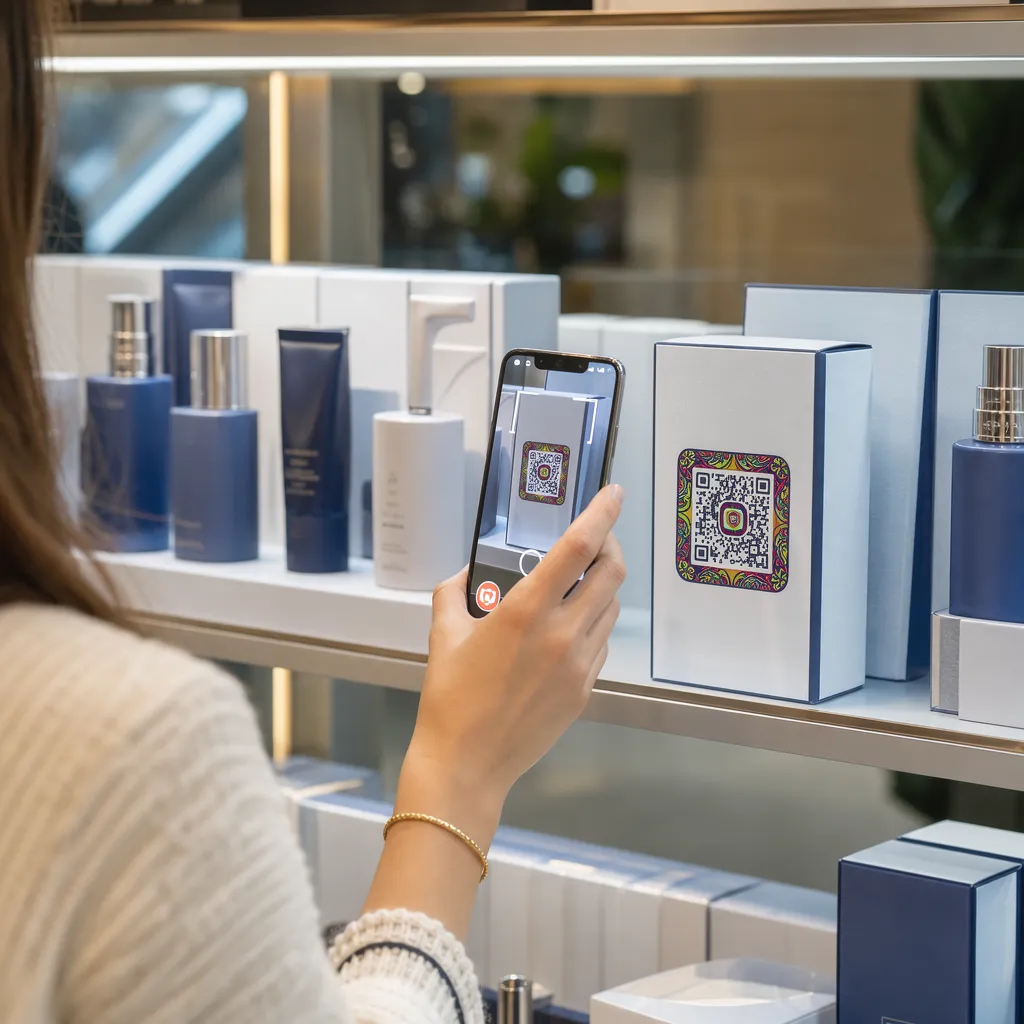

Betrekken uw productverpakkingen klanten niet meer bij hun aankoop zodra ze het schap verlaten? Door de beperkte ruimte op fysieke etiketten zijn merken genoodzaakt essentiële instructies, ingrediënten en aanbiedingen weg te laten. Het toevoegen van dynamische QR-codes aan productverpakkingen verbindt fysieke producten met digitale ervaringen en stimuleert meetbare klantbetrokkenheid.
Wat is interactieve verpakking en waarom is het belangrijk?
Interactieve verpakkingen maken gebruik van digitale toegangspunten om fysieke productverpakkingen, dozen of wikkels te verbinden met online content. In plaats van uitsluitend te vertrouwen op statische gedrukte tekst, kunnen merken van elke verpakking een actief digitaal communicatiekanaal maken.
Moderne consumenten verwachten directe transparantie en gemak. Of kopers nu de herkomst willen controleren, installatiehandleidingen willen bekijken of zich willen aanmelden voor een loyaliteitsprogramma, fysieke etiketten bieden zelden voldoende ruimte voor uitgebreide informatie. Door digitale touchpoints toe te voegen, wordt het ruimtegebrek op fysieke verpakkingen opgelost en krijgen marketeers een meetbare manier om de interactie van de consument na aankoop te meten.
Ook de retailstandaarden evolueren richting 2D-barcodes. Wereldwijde brancheorganisaties stappen over op 2D-codes die zowel scannen bij de kassa als een rijke klantinteractie mogelijk maken. Implementatie QR-codes op productverpakkingen Hiermee stemt u uw fysieke producten af op de moderne eisen van de detailhandel en legt u tegelijkertijd directe digitale verbindingen met uw klantenbestand.
5 manieren om klanten te betrekken met QR-codes op verpakkingen
Interactieve verpakkingen werken het best wanneer ze de klant direct na het scannen duidelijke meerwaarde bieden. Je kunt QR-codes op productverpakkingen gebruiken om de klantbetrokkenheid op vijf praktische manieren te vergroten:
- Demonstreer producten met behulp van augmented reality (AR): Geef klanten de mogelijkheid om 3D-productmodellen of interactieve demonstraties rechtstreeks op hun smartphonescherm te bekijken. AR QR-code Door de informatie op de primaire verpakking kunnen kopers zich een beeld vormen van hoe het product er in hun eigen huis uitziet of de interne kenmerken bekijken voordat ze het product uitpakken.
- Bied recepten, tutorials en gebruikershandleidingen aan: Koppel cosmetica, apparaten of voedselverpakkingen aan video-rondleidingen en stapsgewijze instructies. Plaats QR-codes op voedselverpakkingen Kan thuiskoks doorverwijzen naar aanbevelingen van chefs en maaltijdideeën, waardoor consumenten direct profijt hebben van hun aankoop.
- Deel gegevens over transparantie en naleving van de regelgeving met betrekking tot ingrediënten: Geef gezondheidsbewuste kopers direct toegang tot voedingsinformatie, gegevens over de ethische herkomst van ingrediënten en allergeneninformatie. Digitale landingspagina's stellen u in staat om alle relevante informatie te verstrekken zonder de fysieke etiketten te overladen.
- Stimuleer aanmeldingen voor loyaliteitsprogramma's en herhaalaankopen: Bied direct kortingen, abonnementsmogelijkheden of snelle nabestellinks aan. Door gerichte digitale aanbiedingen op secundaire verpakkingen of verzenddozen te plaatsen, moedig je klanten aan om je winkel opnieuw te bezoeken, wat helpt bij... klantbetrokkenheid aanzienlijk vergroten en de klantwaarde gedurende de gehele klantlevenscyclus.
- Verzamel realtime feedback van klanten: Verwijs consumenten direct na het uitpakken door naar korte feedbackenquêtes of beoordelingsplatformen. Door direct de mening van klanten te verzamelen, kunt u productproblemen vroegtijdig signaleren en authentieke feedback over uw merk opbouwen.
Betrek je e-commerceklanten bij het uitpakken. Wilt u het aantal winkelbezoeken en herhaalaankopen direct vanuit uw verzenddozen verhogen? Ontdek hoe! QR codes voor e-commerce Wij helpen u bij het opzetten van geautomatiseerde loyaliteitscampagnes en het stimuleren van de verkoop.
Belangrijke ontwerp- en drukrichtlijnen voor verpakkingscodes
Een QR-code op een verpakking stimuleert alleen klantbetrokkenheid als deze in één keer betrouwbaar gescand kan worden. Het printen van codes op diverse materialen – zoals golfkarton, transparant plastic of aluminium – vereist nauwkeurige ontwerpnormen om scanfouten te voorkomen.
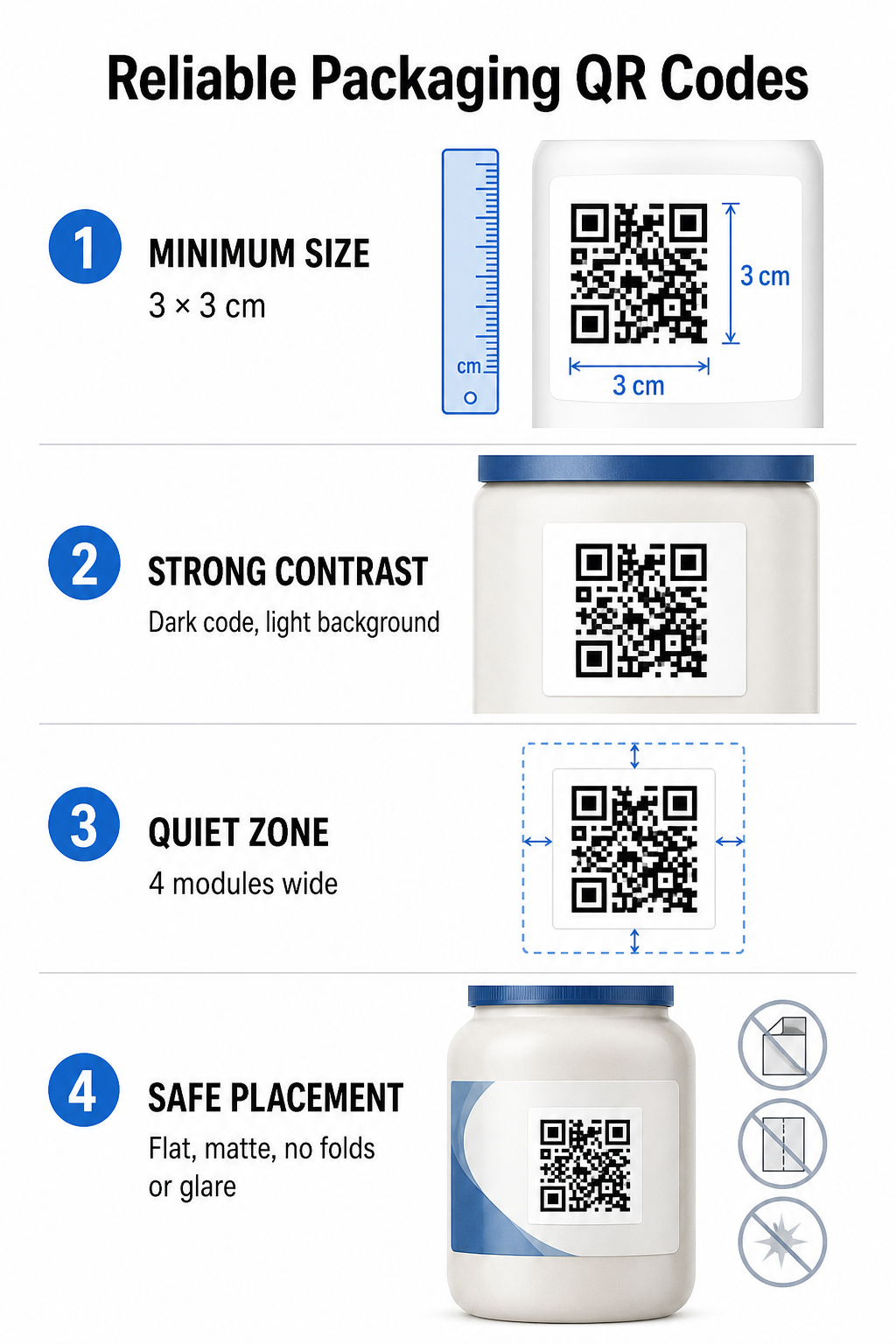
Printformaat en afstandsverhoudingen
Om betrouwbare scanbaarheid te garanderen, dient u QR-codes af te drukken op een minimale fysieke afmeting van... 3 x 3 cm (1,2 x 1,2 inch) Op consumentenverpakkingen. Als een code vanaf een afstand gescand moet worden, hanteer dan de scanverhouding van 10:1 tussen afstand en grootte: de breedte van de code moet minstens een tiende van de verwachte scanafstand zijn. Een code die bijvoorbeeld vanaf 50 cm (20 inch) gescand moet worden, moet minstens 5 cm (2 inch) in het vierkant zijn.
Kleurcontrast en visuele helderheid
Optische camerasensoren detecteren QR-codes door middel van contrastrijke modulepatronen. Gebruik altijd een donker voorgrondpatroon (zoals zwart of donkerblauw) tegen een lichte achtergrond (zoals effen wit of lichte neutrale tinten). Vermijd rode, oranje of pastelkleuren op de voorgrond, omdat sensoren in het rode spectrum deze moeilijk kunnen detecteren. Houd de patroonkleuren effen en uniform en vermijd kleurverlopen, schaduwen of drukke achtergrondafbeeldingen.
Grenzen van de stiltezone
Houd rondom de gehele buitenrand van het codepatroon een lege, onbelemmerde marge aan, de zogenaamde stille zone. Deze marge moet minimaal de volgende afmetingen hebben: vier keer de breedte van een enkele QR-module. Door de QR-code te overladen met merklogo's, grafische randen of tekst, kan de software van de mobiele camera niet herkennen waar het codepatroon begint en eindigt.
Materiaaloppervlak en plaatsing
De fysieke plaatsing is sterk afhankelijk van de structuur en de materiaalkeuze van uw pakket:
- Primaire verpakkingen (flessen, blikken, potten): Plaats codes zoveel mogelijk op vlakke oppervlakken. Bij het printen op gebogen verpakkingen dient u de codegrootte iets te vergroten om de visuele vervorming aan de randen te compenseren.
- Afsluiting en reflectie: Vermijd glanzende laminaten, reflecterende folies of transparante ondergronden die het omgevingslicht in de winkel weerkaatsen. Kies voor matte vernissen of matte coatings om lichtreflectie te minimaliseren.
- Vouwen en naden: Houd codes uit de buurt van vouwen in de doos, geperforeerde scheurstrips, naden van de verpakking en randen van de container om scheuren of vervorming te voorkomen.
Voordat u met grootschalige productie begint, dient u de gedetailleerde informatie te controleren. Regels voor de leesbaarheid van QR-codes en testdrukproeven maken met behulp van meerdere telefooncamera's onder diverse lichtomstandigheden.
Dynamische versus statische QR-codes voor verpakkingen
Het kiezen van de juiste QR-codestructuur is een cruciale strategische beslissing bij het ontwerpen van interactieve verpakkingen.
| FUNCTIE | Statische QR-codes | Dynamische QR-codes |
|---|---|---|
| Inhoud bewerken | Vastgelegd bij aanmaak; kan na het afdrukken niet meer worden gewijzigd. | De bestemmingslink kan op elk moment in het dashboard worden bijgewerkt zonder opnieuw te hoeven afdrukken. |
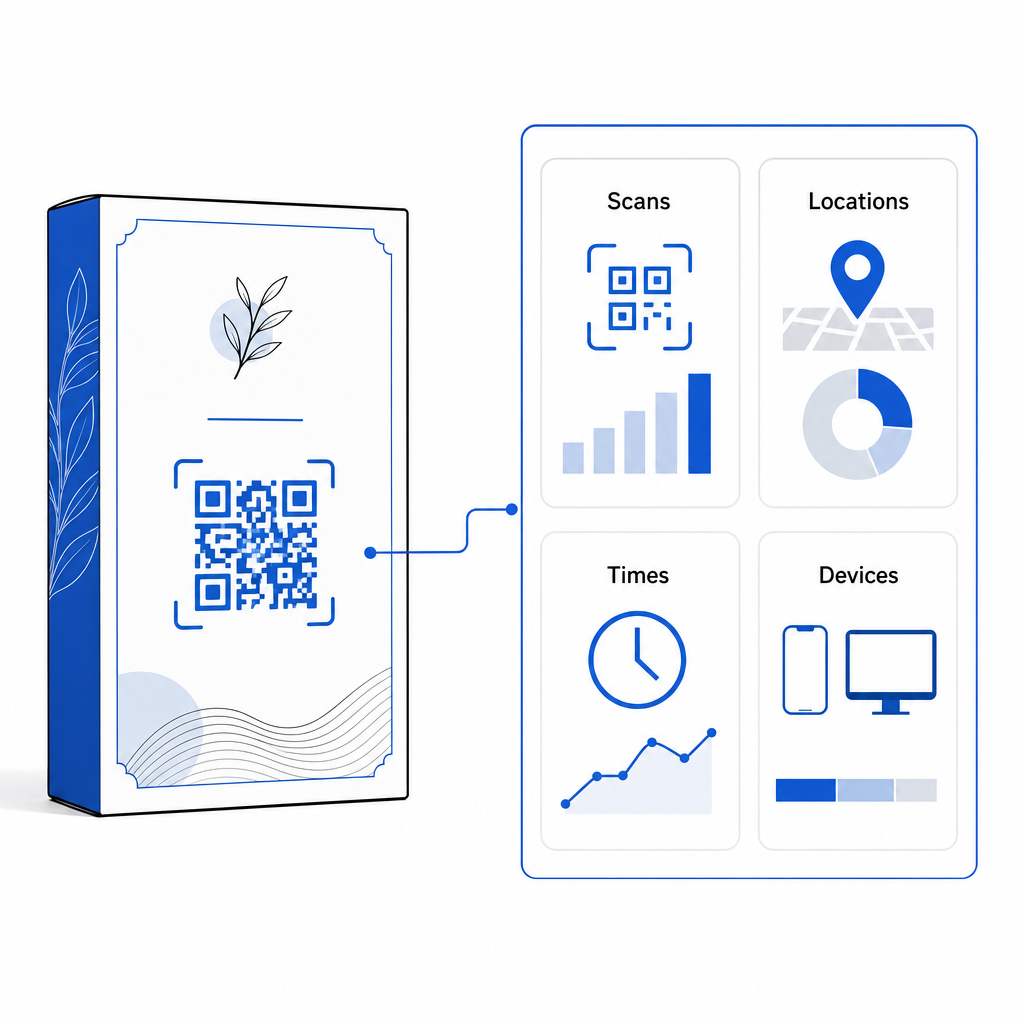
| Scananalyses | Er zijn geen trackinggegevens of prestatiestatistieken beschikbaar. | Registreert het totale aantal scans, unieke bezoekers, scantijden, locaties en apparaattypen. |
| Codepatroondichtheid | Bij het coderen van lange bestemmings-URL's wordt het patroon onoverzichtelijk en moeilijk te scannen. | Maakt gebruik van een korte redirect-URL, waardoor het modulepatroon overzichtelijk en gemakkelijk te scannen blijft. |
| Kostenefficiëntie | Gratis te genereren, maar brengt het risico met zich mee van kostbare herdrukken van de verpakking als de bestemmings-URL's wijzigen. | Vereist een betaald abonnement, maar elimineert de kosten voor het herdrukken van verpakkingen. |
Het in grote aantallen printen van statische codes brengt aanzienlijke operationele risico's met zich mee voor merken. Als de URL van een promotiepagina wordt bijgewerkt, een seizoenscampagne eindigt of een link niet meer werkt, worden statische verpakkingscodes onbruikbaar. Dit dwingt uw bedrijf tot de keuze tussen kostbare herdrukken van de verpakking of verloren klantvertrouwen.
Een Dynamische QR code generator Dit scheidt het fysieke, afgedrukte codepatroon van de online bestemming. Als uw bestemmingslink of aanbieding verandert, hoeft u alleen de bestemmings-URL in uw beheerdashboard bij te werken zonder uw fysieke ontwerp aan te passen.
Dynamische codes bieden ook uitgebreide campagneanalyses. U kunt het scanvolume, de piekuren, geografische locaties en typen gebruikersapparaten monitoren om te evalueren hoe klanten met uw fysieke verpakking omgaan. Om optimale prestaties te behouden, voert u elke 1 tot 3 maanden audits uit van uw actieve dynamische codes om te controleren of alle doelpagina's snel laden en de juiste content weergeven.
Beheer uw verpakkingscampagnes vanuit één dashboard. Vermijd kostbare herdrukrisico's door bewerkbare dynamische codes te creëren met realtime analyses. Begin met het bouwen van traceerbare verpakkingen met de Pageloot dynamische QR-code tool vandaag.
Hoe implementeer je interactieve QR-codes op verpakkingen?
- Definieer de doelstelling van de campagne: Bepaal welke specifieke klantinteractie je wilt stimuleren, zoals het tonen van een videotutorial, het verzamelen van beoordelingen na aankoop of het aanbieden van een loyaliteitskorting.
- Selecteer een dynamische QR-codegenerator: Stel bewerkbare redirect-URL's in om volledige controle over de bestemmingsinhoud te behouden en tegelijkertijd realtime scanstatistieken vast te leggen.
- Aanpassen binnen de merkrichtlijnen: Gebruik merkkleuren met een hoog contrast en integreer uw bedrijfslogo erin. 25% van het codegebied, waarbij ervoor gezorgd wordt dat cruciale positioneringsmarkeringen vrij blijven.
- Voeg een overtuigende oproep tot actie toe: Plaats duidelijke, expliciete tekst naast het codepatroon, zoals 'Scan om de tutorial te bekijken' of 'Scan voor 20% korting op uw volgende bestelling'.“
- Testen op verschillende fysieke substraten en apparaten: Print fysieke testmonsters op de uiteindelijke verpakkingsmaterialen en test de scanbaarheid op iOS- en Android-apparaten onder verschillende lichtomstandigheden.
- Campagneanalyses monitoren en optimaliseren: Bekijk de scanlocatie, het apparaat en de timinggegevens in uw beheerdashboard om uw marketingstrategieën na de aankoop te optimaliseren.
Door QR-codes op productverpakkingen te integreren, transformeert u traditionele verpakkingen in dynamische digitale contactpunten die de klantbetrokkenheid stimuleren. Door een sterk kleurcontrast en duidelijke, rustige zones te combineren met bewerkbare, dynamische links, beschermt u uw investering in drukwerk en verzamelt u tegelijkertijd waardevolle realtime inzichten in uw doelgroep.
Klaar om uw verpakkingen te transformeren in een interactieve digitale ervaring? Maak vandaag nog traceerbare, volledig aanpasbare QR-codes voor uw productverpakkingen met de Pageloot dynamische QR-codegenerator.
Veelgestelde vragen
De aanbevolen minimale afmeting voor QR-codes op verpakkingen is 3 x 3 cm (1,2 x 1,2 inch). Voor gebogen oppervlakken of codes die van verderaf worden gescand, dient u een afstand-formaatverhouding van 10:1 aan te houden om een betrouwbare scan te garanderen.
Ja, als u dynamische QR-codes gebruikt. Dynamische codes leiden verkeer via een bewerkbare korte URL, waardoor u de bestemmingswebpagina's, video's of digitale bestanden op elk gewenst moment kunt bijwerken zonder de fysieke verpakking opnieuw te hoeven printen.
Plaats de QR-code op een vlak, glad oppervlak, uit de buurt van naden, vouwen en reflecterende oppervlakken van de verpakking. Plaats de code altijd naast een duidelijke oproep tot actie, zodat klanten weten welke inhoud ze kunnen verwachten na het scannen.